Host-side unattended job scheduler: runs one-shot agent tasks or shell commands on cron, interval, or one-time schedules, with persisted at-most-once dispatch state, overlap/misfire policies, and bounded run history.
Install
# from a prebuilt release tarball
dsh plugin --profile web add "https://github.com/squirrel20/dsh-cron/releases/latest/download/dsh-cron.tgz"
# from GitHub (first run asks for allowBuilds approval — follow the hint, retry)
dsh plugin --profile web add github:squirrel20/dsh-cron
Any plugin you install runs third-party code with your own permissions — it can read your files, use your credentials, and reach the network, and tool approvals don’t sandbox it. GitHub-sourced plugins also run build scripts at install time — pnpm blocks those until you allow them, so an install can stop with ERR_PNPM_GIT_DEP_PREPARE_NOT_ALLOWED or ERR_PNPM_IGNORED_BUILDS; dsh prints the exact key to add under allowBuilds in your profile’s pnpm-workspace.yaml, and the install works on the next run. Allowing a build is a trust decision: only install sources you trust, and pin a commit (github:owner/repo#sha).
README
English | 简体中文
Unattended scheduled-jobs plugin for DeepSeek Harness (dsh): run agent tasks (spawn a one-shot agent to execute a prompt through the full dsh toolchain) or command tasks (run a script directly) on a cron expression, a fixed interval, or a one-time instant. Complementary to @deepseek-ai/dsh-schedule — that one is persistent in-session reminders, this one is a host-side job scheduler: jobs belong to no interactive session and fire automatically while the process is up.
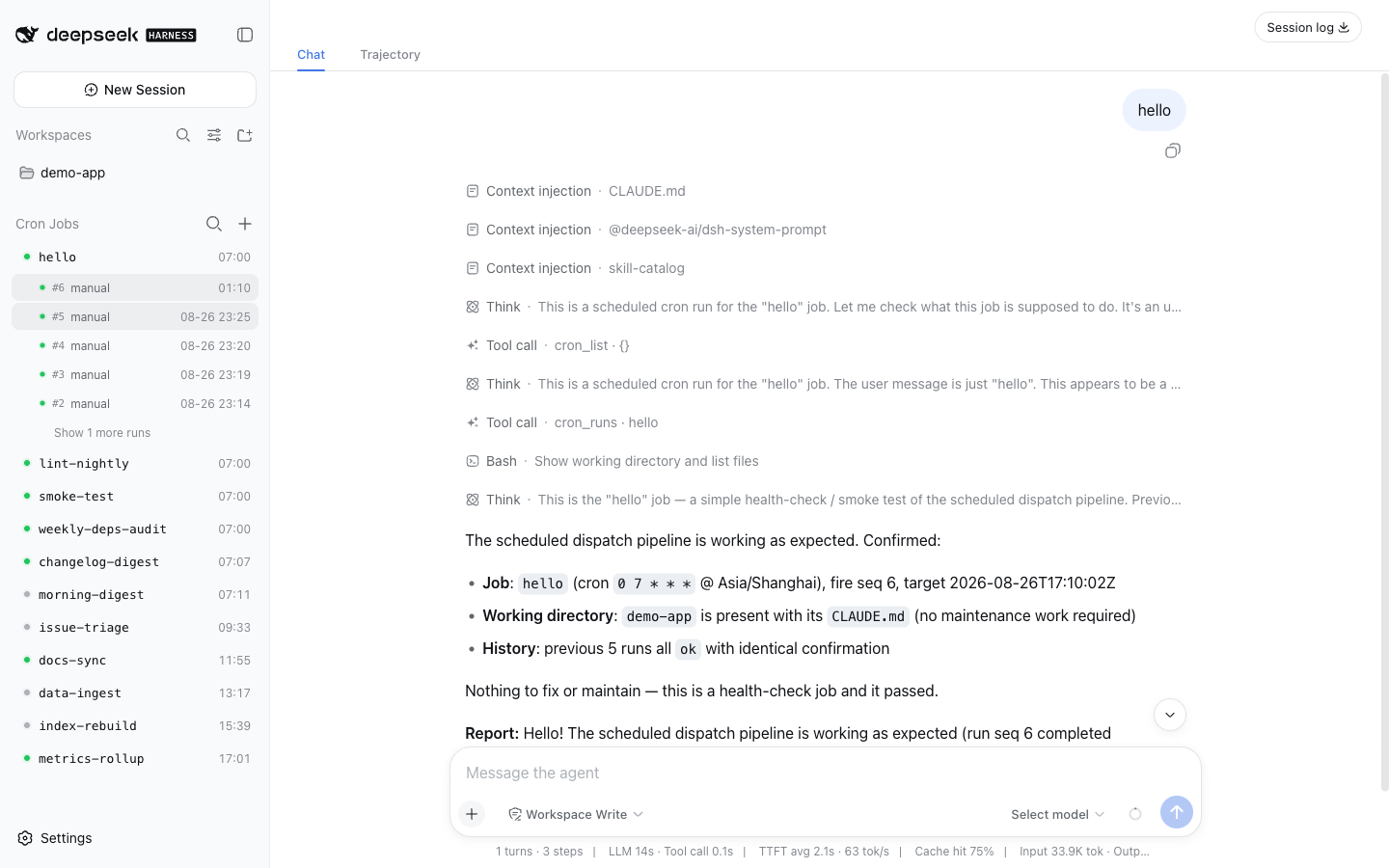
UI
- Sidebar section: status dot (last result) + next-trigger time, live elapsed timer while running; rows expand into run history; clicking an agent run jumps straight to that run's full session, and clicking a command run opens a run-detail page over the center column (status, duration, exit code, command, output tail).
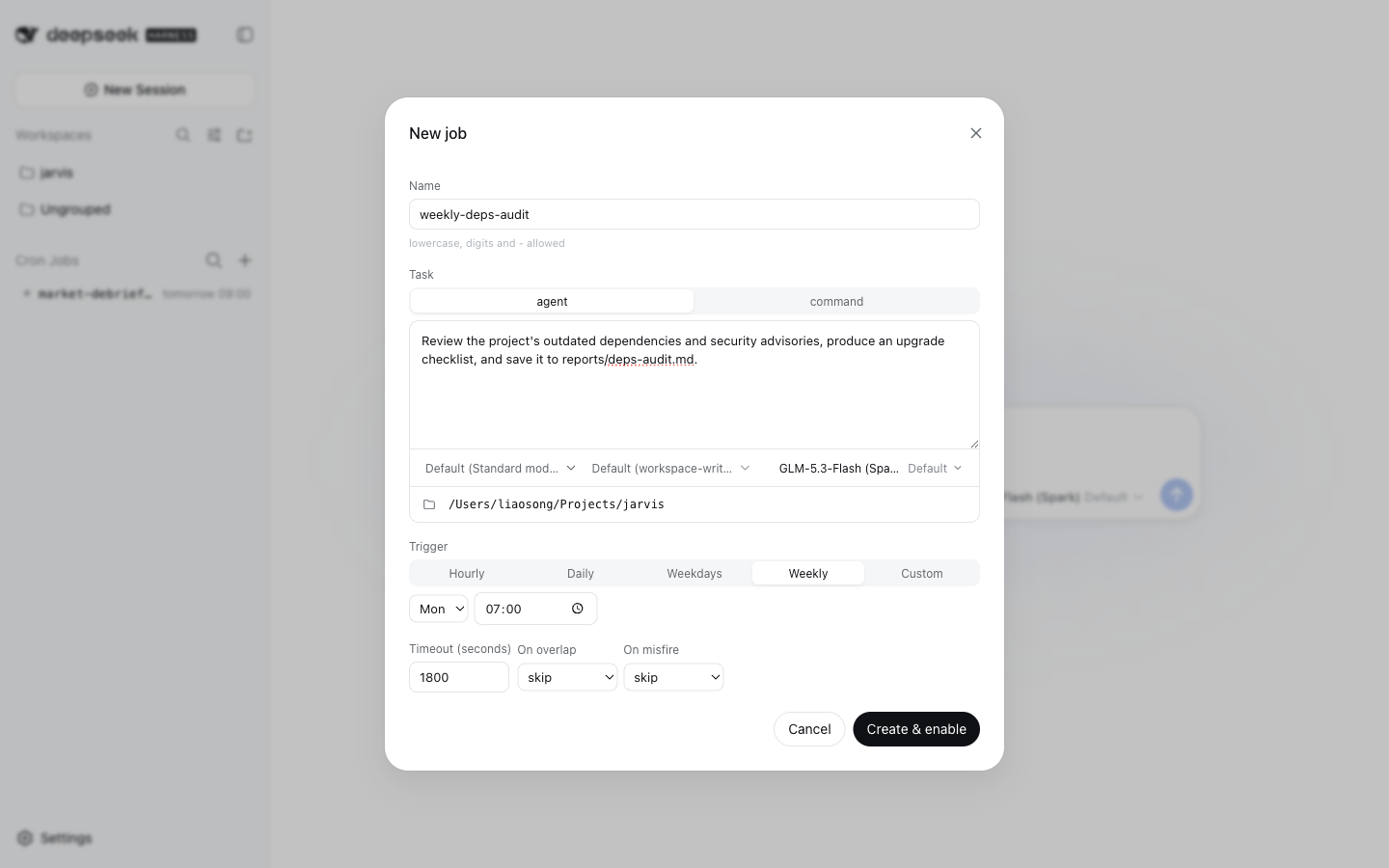
- Create / edit modal: trigger presets (hourly / daily / weekdays / weekly, with cron expression / interval / one-shot tucked into a custom tier), task kind, mode / permission / model knobs (blank = inherit defaults), working directory, timeout, and overlap / misfire policies — all on one screen; the time zone is taken silently from the browser (edits keep the job's own).
| Create a job | Row actions |
|---|---|
 |
 |
Features
- Three trigger kinds:
cron(5-field expression + explicit IANAtimeZone; the process time zone is never consulted),everySeconds(anchor-aligned interval, 60s minimum),at(one-time RFC 3339 instant; a Z or numeric offset is required). - Three ways to declare a job: profile config (declarative, versioned with the profile), the runtime overlay (
+in the sidebar, orcron_createfrom a session — persisted as "manual" jobs), and other plugins through thecronservice (ctx.cron.registerJob, see Adding jobs from a plugin). - Three task kinds:
agent(create a one-shot agent viactx.agents.create, submit the prompt, wait for quiescence, take the last assistant message as the summary, dispose to finish — i.e. the dsh-headless one-shot recipe);command(spawn a child process, record exit code and output tail);callback(a plugin-registered handler run in this process — plugin jobs only, see Adding jobs from a plugin). - Persistent state: job dispatch state and run history live in the storage domain layer (
ctx.storage.domain, domain namecron), never in session event logs. - Reliability semantics: at-most-once per occurrence (
lastFiredMsis persisted before execution); missed occurrences are never replayed one by one (the misfire policy runs at most once, against the latest due occurrence); runs interrupted by a crash are repaired toabortedon the next startup. - Policies:
overlap: skip | queue | replace(when the previous run is still going: skip / queue the latest one occurrence / kill and restart);misfire: skip | runOnce(occurrences missed while the process was down: ignore / catch up once). - Delivery: optional delivery command; the run record is fed as JSON on stdin (fires only on failure by default).
- Clock discipline (inherited from dsh-schedule): long waits are chunked and the wall clock is re-read on every wake-up — a backwards clock jump never fires early, a forwards jump is handled as overdue.
Installation
From the Plugin Market
With dsh-market installed, open Settings → Plugin Market, search dsh-cron, and install with one click — the market adds both the dependency and the profile bundle entry for you, and most installs go live after a page refresh.
Or install the release tarball from the command line (this only runs the package install — add "dsh-cron" to dsh.profile.bundles yourself, as shown below):
dsh plugin --profile web add https://github.com/squirrel20/dsh-cron/releases/latest/download/dsh-cron.tgz
The npm package named
dsh-cronis an unrelated project — install from the market or the release tarball, not from the npm registry.
From source
In your profile's package.json:
{
  "dependencies": { "dsh-cron": "link:/path/to/dsh-cron" },   // or a git checkout / release tarball
  "dsh": { "profile": { "bundles": [ /* …existing bundles… */, "dsh-cron" ] } }
}
Config-declared jobs (optional)
Declare always-on jobs by overriding the config in the profile's cordis.patch.yml — or skip this entirely and create jobs from the UI or a session (see Usage):
- id: dsh-cron
  config:
    historyLimit: 50
    jobs:
      - name: daily-log-review
        schedule: { cron: "0 7 * * *", timeZone: "Asia/Shanghai" }
        task:
          kind: agent
          prompt: Read yesterday's logs under logs/, summarize anomalies and suggest remediations.
          cwd: /path/to/project
          timeoutSeconds: 1800
        policy: { overlap: skip, misfire: skip }
        delivery:
          argv: ["/usr/local/bin/notify", "--stdin"]
          onlyOnFailure: true
      - name: heartbeat
        schedule: { everySeconds: 3600 }
        task: { kind: command, argv: ["./scripts/heartbeat.sh"], cwd: /path/to/project }
    sessionGc:            # optional; defaults: enabled: true, graceMinutes: 30, root: ~/.dsh/sessions
      enabled: true
      graceMinutes: 30
Job misconfiguration (duplicate names, invalid expressions, missing time zone, …) fails loud at mount time — it is never swallowed silently.
The same block takes an optional maxConcurrentRuns: 0 (the default) means unbounded — unrelated jobs have no reason to queue behind each other, and a job's own overlap is already governed by policy.overlap. Set a positive number only to deliberately cap host-wide load; 1 serializes every job, so jobs due at the same minute run one after another.
Security and upgrading
Cron jobs are host administration, not sandboxed extensions of the creating session. Mutating conversation tools require the session's effective sandbox to be danger-full-access and approval policy to be never. Preset names alone do not grant access; Auto, custom/unresolved permissions, and missing permission services fail closed. Read tools remain available. Restricted sessions should produce a proposed spec for operator review instead of creating or triggering jobs. This release deliberately does not offer confined-session cron execution.
- Existing manual jobs without a matching authorization record are retained with history, but quarantined (
requiresApproval: true). Review the complete task, access, cwd and delivery command, then Edit → Save to authorize that exact spec. Enable and Run now cannot bypass quarantine. New/edited manual jobs store an authorization digest and creator session ID when available; dispatch and delivery recheck the stored authorization. This is standing authorization, independent of the creator session's lifetime. Pause/delete the job to revoke future runs; stop any active run separately. - Web writes require
Authorization: Bearer <webControlToken>. Set the plugin'swebControlTokento a random secret of at least 32 characters; unset/short tokens disable web writes. Generate it withopenssl rand -hex 32and store it in protected host configuration, outside any agent-readable workspace. The UI asks for it in a password dialog, keeps it only in memory, and clears it after a 403. Never supply it to a restricted agent. Use HTTPS when connecting remotely. Neither read endpoints nor job specs expose the token. - Config-declared and plugin-registered jobs remain trusted host declarations. Commands and delivery still execute on the host, now with an explicit environment allowlist:
PATH,HOME,USER,LOGNAME,LANG,LC_ALL,LC_CTYPE,TZ,TMPDIR,TMP,TEMP,SystemRoot,WINDIR. To pass an additional variable, the operator must list its name in plugin configcommandEnv: [MY_SERVICE_TOKEN]. This explicitly grants that variable to all host command/delivery jobs; model-controlled specs cannot extend the list. Environment filtering is not process confinement. - An explicit agent access preset must apply successfully or the run fails before prompt submission. Missing services and invalid presets no longer silently fall back to host defaults.
These are intentional compatibility changes addressing issue #6. Protect the host configuration, cron storage and other host-admin interfaces as part of the same trust boundary.
Usage
Adding a job by hand
Click + in the sidebar's Cron Jobs section header. The New job dialog configures everything on one screen:
- Name — letters (any script), digits,
-and_; no spaces. - Trigger —
cron(5-field expression + IANA time zone),interval, orone-shot. - Task —
agent(a prompt executed unattended through the full dsh toolchain) orcommand(an argv to spawn). - Preset / Access / Model — leave blank to inherit the host defaults.
- Working directory — type a path or browse via the folder icon.
- Timeout, On overlap, On misfire — see Features for the policy semantics.
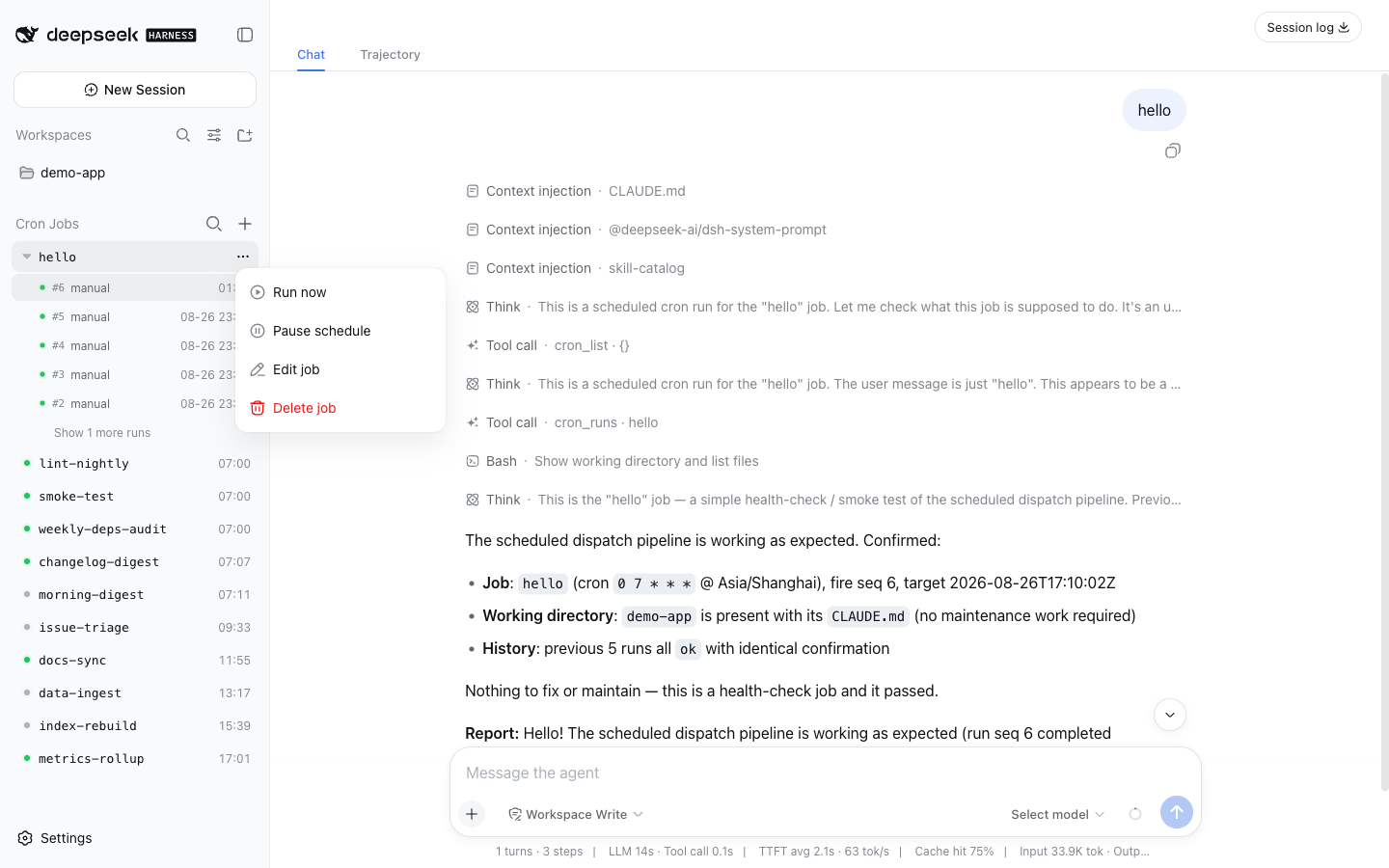
Create & enable persists the job (a "manual" chip marks it apart from config-declared jobs). Afterwards, each row's ⋯ menu offers Run now / Pause schedule / Edit job / Delete job; clicking a row expands its run history; clicking an agent run opens that run's full session replay, and clicking a command run (or a pruned-session agent run) opens its run-detail page over the center column.
Adding a job from a session
In an explicitly unrestricted session with approval disabled, ask the agent:
Every Monday at 07:00 review our outdated dependencies and save an upgrade checklist to reports/deps-audit.md.
The bundled cron-create skill (auto-registered when the host has a skill registry) walks the model through collect → confirm → create → verify, calling the cron_create tool under the hood; cron_delete removes a manual job the same way. Jobs created from a session are ordinary manual jobs — the exact same overlay the web dialog writes — so they show up in the sidebar immediately and can be edited there later. The read/steer tools (cron_list, cron_runs, cron_run_now, cron_enable, cron_disable) work on config-declared jobs too.
Adding jobs from a plugin
A schedule often belongs with a piece of software rather than with one host: the package that ships a refresh script also knows how often it should run. Such a package can register its own jobs — installing it creates them, unmounting it retires them, and nobody transcribes a spec into a dialog on every machine.
The provider injects the cron service and registers inside an effect, exactly like a dsh-ingest source plugin:
export const name = "cron-source-kb";
export const inject = ["cron"];

export function apply(ctx, config) {
  ctx.effect(() => ctx.cron.registerJobs([
    {
      name: "kb-refresh",
      description: "Re-index the knowledge base",
      schedule: { cron: "30 7 * * *", timeZone: "Asia/Shanghai" },
      task: { kind: "command", argv: ["/bin/sh", `${config.repoRoot}/scripts/kb-refresh.sh`] },
      policy: { overlap: "skip", misfire: "runOnce" },
    },
  ], { owner: "dsh-cron-source-kb" }), "kb.cron()");
}
A provider that wants to run its own code — rather than shell out to a script or curl its own host — registers a callback task and passes the function:
ctx.effect(() => ctx.cron.registerJob({
  name: "ingest-notes",
  schedule: { cron: "10 23 * * *", timeZone: "Asia/Shanghai" },
  task: { kind: "callback", timeoutSeconds: 700 },
}, {
  owner: "dsh-ingest-source-notes",
  run: async ({ signal }) => {
    const record = await service.run("notes-research", { signal });
    return { ok: record.status === "ok", summary: `${record.itemsNew} new` };
  },
}), "notes.cron()");
The handler receives { job, target, seq, signal } and returns a summary string or { ok?, summary?, error? }; throwing settles the run as failed, and the timeout aborts signal. callback is the one task kind config and cron_create cannot use — a spec on disk has nobody to supply the function — so it is refused there by name.
- The spec is the same vocabulary config and
cron_createuse, and it is validated synchronously: a bad schedule throws inside the provider's ownapply, naming the field. owneris required — the overlay uses it to tell the user which package brought a job.registerJobreturns a disposer (registerJobsreturns one for the batch, and rolls back if any member is defective, so a provider never mounts half its schedules).- Registering may precede dsh-cron's own startup; registrations attach as soon as the scheduler is ready and are replayed if dsh-cron reloads.
- Names must be free: a name declared in profile config, or already registered by another provider, throws rather than silently losing to mount order.
Plugin jobs are ordinary jobs in the list — the same run history, run-now, pause and session jump-through — but they are read-only in the overlay and to cron_create / cron_delete: editing means editing the provider, and removing means uninstalling it (updateJob / cron_delete answer plugin_job). Pausing is the exception: an enable override is the user's, and it survives re-registration.
A runnable copy of the provider above lives in examples/dsh-cron-source-demo — add it to a profile's dependencies and dsh.profile.bundles to watch a plugin job appear.
Unmounting a provider stops its jobs but keeps their dispatch state and whole run history — reinstalling resumes the same job rather than starting a stranger under its name. What is left behind shows as an orphan row (marked "plugin gone", sorted last, no next occurrence) whose only action is Delete job, which clears that leftover history for good.
Run records
The runs table keeps the most recent historyLimit entries keyed by <job>#<seq>:
{
  "job": "daily-log-review", "seq": 42,
  "target": "2026-08-26T23:00:00.000Z",       // the occurrence this run is for
  "startedAt": "…", "finishedAt": "…",
  "status": "ok",                              // ok|failed|timeout|skipped-overlap|replaced|aborted
  "summary": "…",                              // agent's last reply / command output tail (truncated)
  "sessionId": "cron-daily-log-review-…"       // agent task's session, inspectable under ~/.dsh/sessions
}
Boundaries and known limitations
- Agent runs carry a fixed
[CRON RUN]framing that states the run is unattended and questions are forbidden. It is injected as a scoped system-prompt section, so the user message holds only the job's prompt; hosts without the system-prompt service fall back to prepending it to the message. - Config jobs come from plugin config (declarative); the conversational tools (
cron_list/cron_runs/cron_run_now/cron_enable/cron_disable) observe and steer them but never create or delete them. Runtime "manual" jobs are the exception:cron_create/cron_deletemanage those from a session, guided by the bundledcron-createskill (registered into the host's skill registry when one exists), through the samemanual-table overlay as the web dialog. - Plugin-registered jobs (
source: "plugin") are owned by their provider package: they can be run, paused and inspected, but not edited or deleted from the overlay or a session — that is what installing and uninstalling the provider is for. Unmounting a provider leaves an orphan row holding the job's history until the user deletes it. queuedepth is 1: only the single latest squeezed-out occurrence is kept.- A run's Session is a plain durable Session (the
dsh-headlessshape), so its conversation stays openable after the run settles. A conversation that is on screen at that exact moment returns to the workspace, and the run row reopens the persisted transcript (the client re-pulls the host session list once when the id is no longer listed). Run Sessions persisted by earlier versions still carry theorigin: "subagent"header and stay unopenable. - Because a run's Session is plain, the host no longer refuses prompts to it: opening a run while it is still going and typing into it adds a user turn to the unattended run (that turn can surface in the run's summary), and the run's settle then returns that conversation to the workspace.
- Run Sessions are no longer hidden from the workspace sidebar (it hides only
origin: "subagent"Sessions), so every run — live or settled — is listed there; a high-frequency job accumulates entries, and a settled run can be resumed from the sidebar without the[CRON RUN]framing.
Web overlay
When the profile includes @deepseek-ai/dsh-web-app, the plugin also ships a
sidebar overlay: a clock badge at the sidebar foot opens a panel listing
every job (kind, schedule, next occurrence, latest outcome); a job row
drills into its recent run history; clicking a command run (or an agent
run whose session was pruned) opens a run-detail page over the center
column — status, scheduled/start/finish instants, duration, exit code,
argv, and the stored summary tail. Rows carry hover actions — run an idle job
now (the cron_run_now semantics), or stop the run in flight (the record
settles as killed; later occurrences are untouched). The panel's +
opens a create form (name; trigger presets — hourly/daily/weekdays/weekly,
compiled to plain cron shapes and mapped back onto the presets on edit, with
cron expression/interval/one-shot in a custom tier and the time zone taken
silently from the browser; agent/command task; working directory with a
browse dialog over the host's directory capability; timeout; overlap/misfire
policy); created jobs persist in the
storage domain's manual table, re-normalize on every boot, and show a
"manual" chip beside config-declared jobs — a config job with the same name
wins and evicts the manual copy. A manual job's drill-in view carries a
two-click delete (trash, then confirm) that drops the job and its whole run
ledger; config jobs and jobs with a run in flight are refused.
The browser half is lib/client.js (declared via exports["./client"] +
the dsh.client package field). The host half (lib/web.js) serves
GET /dsh-cron/api/state plus four writes — POST …/run-now, …/stop,
…/jobs, …/delete — which demand application/json bodies so cross-site simple
requests die before dispatch; routes register on ctx.webServer only while
a webserver is present, so headless profiles mount unchanged.
Tests
npm test # unit tests for the scheduling math (cron parsing, time zones, anchor alignment, misfire collapsing)
Links
More in this category
loopx-project/loopx#dsh-loopx-plugin★ 6233
LoopX, a provider-neutral, local-first state kernel and control plane for long-horizon agents: keeps Goal, Todo, gate, evidence, quota, recovery, and handoff state above DeepSeek Harness, while the plugin bootstraps the CLI and skills, admits bounded same-session continuation, and adds a loopback GoalBar for the exact bound loop.
Q00/ouroboros#integrations/dsh-plugin★ 6196
Config-only bundle that mounts Ouroboros through the DSH MCP client, exposing 36 interview, Seed, execution, evaluation, and evolution workflow tools in DSH.
chuspeeism/dashi-taskboard#deepseek-harness★ 3329
Embeds the active installed Codex Taskboard runtime in the DeepSeek Harness sidebar, using its launcher runtime descriptor instead of a fixed port.
NanmiCoder/dsh-agent-teams★ 2012
AgentTeams multi-agent teams.
EthanYoQ/AI-Novel-Writer#dsh-ai-novel-writer★ 1393
Installs a dedicated AI novel-writing preset and workbench: revisioned local project assets, a compact side drawer, and native approval-gated single-file changes.
tong-io/tongflow#dsh-tongflow★ 1042
TongFlow film-crew studio for image, voice, music and video production: the agent writes per-asset TongFlow workflow files (.tongflow.json) that run through TongFlow plugins, with an embedded workflow canvas, a shot/character/take project layout and a manga-drama template; sessions starting with @tongflow open the Studio view.
Community comments
Comments are public GitHub Discussions. Loading them connects to GitHub and Giscus; a GitHub account is required to post.