Browse the directories/files of the workspace in DeepSeek Harness Web GUI and display file changes in conjunction with Git.
Install
# from GitHub (first run asks for allowBuilds approval — follow the hint, retry)
dsh plugin --profile web add github:sqfcyily/dsh-workspace-files
Any plugin you install runs third-party code with your own permissions — it can read your files, use your credentials, and reach the network, and tool approvals don’t sandbox it. GitHub-sourced plugins also run build scripts at install time — pnpm blocks those until you allow them, so an install can stop with ERR_PNPM_GIT_DEP_PREPARE_NOT_ALLOWED or ERR_PNPM_IGNORED_BUILDS; dsh prints the exact key to add under allowBuilds in your profile’s pnpm-workspace.yaml, and the install works on the next run. Allowing a build is a trust decision: only install sources you trust, and pin a commit (github:owner/repo#sha).
README
简体中文 | English
dsh-workspace-files
A DeepSeek Harness (dsh) Web GUI plugin — browse the session workspace directory tree, view file contents, and manage Git the VS Code way (stage / commit / pull / push / switch branches / discard changes / line-level diff), right inside the conversation view.
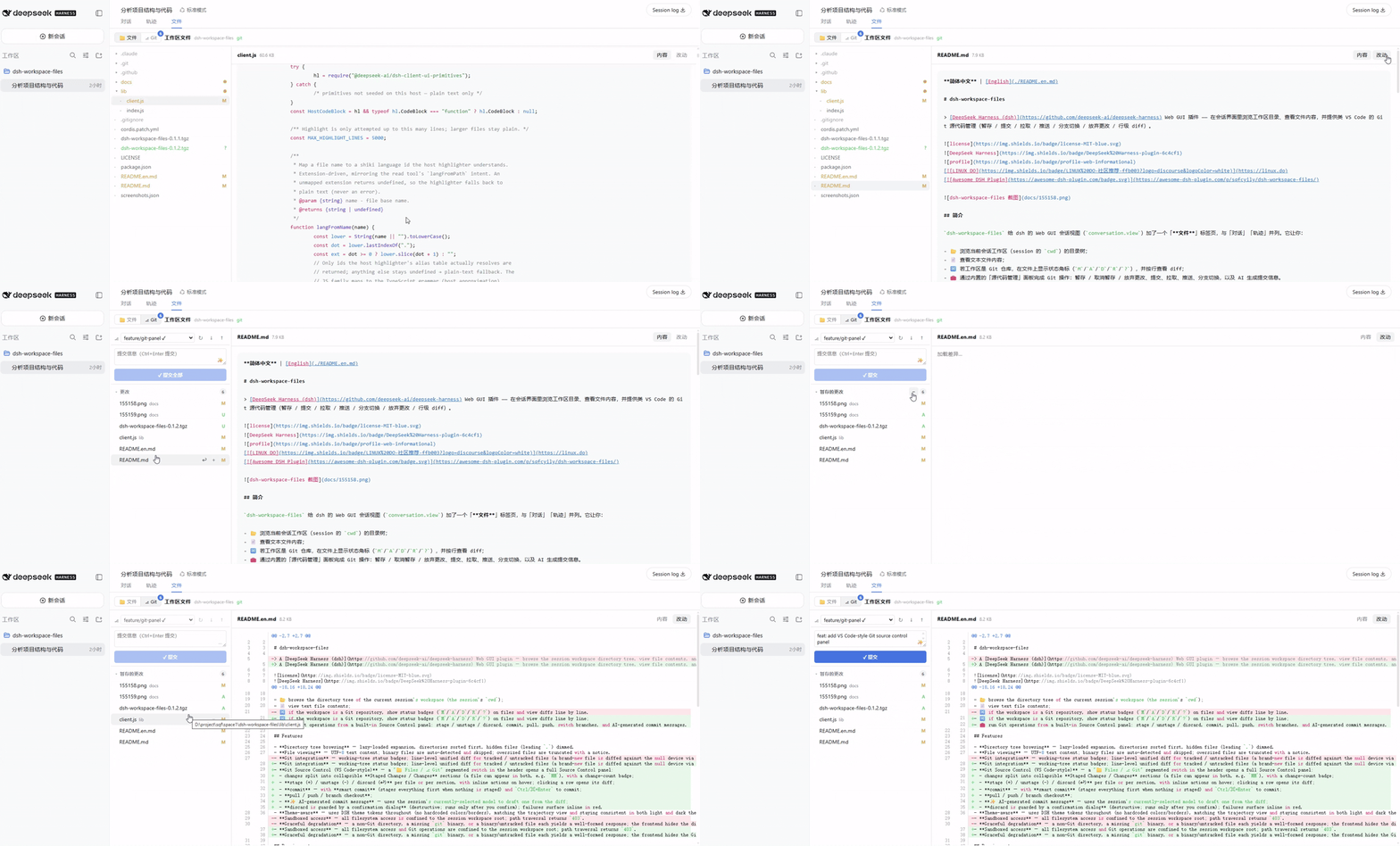
Overview
dsh-workspace-files adds a "Files" tab to the dsh Web GUI conversation view (conversation.view), alongside "Chat" and "Trajectory". It lets you:
- 📂 browse the directory tree of the current session's workspace (the session's
cwd); - 📄 view text file contents;
- 🔀 if the workspace is a Git repository, show status badges (
M/A/D/R/?) on files and view diffs line by line; - 🧰 run Git operations from a built-in Source Control panel: stage / unstage / discard, commit, pull, push, switch branches, and AI-generated commit messages.
Features
- Directory tree browsing — lazy-loaded expansion, directories sorted first, hidden files (leading
.) dimmed. - File viewing — UTF-8 text content; binary files are auto-detected and skipped; oversized files are truncated with a notice.
- Git integration — working-tree status badges; line-level unified diff for tracked / untracked files (a brand-new file is diffed against the null device via
git diff --no-index, so its added lines still show), with a line-number gutter that stays pinned during horizontal scroll. - Git Source Control (VS Code-style) — a "📁 Files / ⎇ Git" segmented switch in the header opens a full Source Control panel:
- changes split into collapsible Staged Changes / Changes sections (a file can appear in both, e.g.
MM), with a change-count badge; - stage (+) / unstage (−) / discard (↩) per file or per section, with inline actions on hover; clicking a row opens its diff;
- commit — with smart commit (stages everything first when nothing is staged) and
Ctrl/⌘+Enterto commit; - pull / push / branch checkout;
- ✨ AI-generated commit message — uses the session's currently-selected model to draft one from the diff;
- discard is guarded by a confirmation dialog (destructive; runs only after you confirm); failures surface inline in red.
- changes split into collapsible Staged Changes / Changes sections (a file can appear in both, e.g.
- Theme-aware — uses DSH theme tokens throughout (no hardcoded colors/borders), matching the trajectory view and staying consistent in both light and dark themes.
- Sandboxed access — all filesystem access and Git operations are confined to the session workspace root; path traversal returns
403. - Graceful degradation — a non-Git directory, a missing
gitbinary, or a binary/untracked file each yields a well-formed response; the frontend hides the Git entry and falls back to plain browsing.
Requirements
- DeepSeek Harness (
dshCLI) installed and runnable, with the web profile enabled. - Node.js — the exact version requirement follows dsh.
- Git (optional) — enables the diff feature when on
PATH; when absent, the plugin degrades to file browsing only.
Installation
Download the tarball for the version you want from the GitHub Release, then install (web profile):
dsh plugin --profile web add ./dsh-workspace-files-0.1.2.tgz
Or install straight from GitHub:
dsh plugin --profile web add github:sqfcyily/dsh-workspace-files
After installing, reopen the dsh Web GUI and a "Files" tab appears at the top of the conversation view.
Uninstall
dsh plugin --profile web remove dsh-workspace-files
Usage
- Open the dsh Web GUI (default
http://127.0.0.1:3080). - Enter any session and select the "Files" tab at the top of the conversation view.
- In the left directory tree: click a directory to expand it, click a file to view its contents.
- If the workspace is a Git repository: a status badge shows to the right of each file name; after opening a file, use the top-right "Content / Changes" toggle to view the diff.
- Use the top-left "📁 Files / ⎇ Git" segmented switch to open the Source Control panel:
- stage (+) files from the "Changes" section into "Staged Changes", or act on a whole section at once;
- type a message in the commit box (or hit ✨ to let the AI draft one from the diff), then click ✓ Commit (it auto-stages everything when nothing is staged;
Ctrl/⌘+Enteralso works); - use the toolbar's ↓ Pull / ↑ Push and the branch dropdown for pull / push / checkout;
- to drop changes, click ↩ Discard on a file or section and confirm in the dialog (this cannot be undone).
The workspace root is taken from the current session's cwd (the session header dsh records). The plugin resolves it from the host by sessionId — no need to specify a path manually.
Security
- All filesystem access goes through
confine(root, target), ensuring the target stays within the session workspace root; otherwise403is returned. Every path argument in a Git operation is likewise bounded viaconfinedRelPaths. - Symlinks are reported by their own kind but not followed (kept simple and safe for v1).
- Binary files (a NUL byte within the first 8000 bytes) return no content, only a
binary: trueflag. - Route split: read-only browsing (list / read / diff / is-repo / status / branches) uses
GET; Git write operations (stage / unstage / discard / commit / pull / push / checkout / commit-message) usePOST. There is no filesystem write / delete interface — writes are Git-only. - Git is always invoked via
execFilecallinggitdirectly (no shell, no string concatenation), with the working directory pinned to the session workspace root, to avoid command injection. - Discard is destructive: it restores tracked files with
git checkout --and removes untracked files withgit clean -fd; the frontend always shows a confirmation dialog first. Be aware it cannot be undone.
Verified behavior
- host
/api/workspace-files/session-root: resolves the session workspace root bysessionId(reads thecwdheader fromsessionPersistence). - host
/api/workspace-files/list|read: directory listing, file read, path traversal returns403. - host
/api/workspace-git/is-repo|status|diff: repo probe, status parsing (including the index/working-tree columnsx/y), line-level diff for tracked/untracked files. - host
/api/workspace-git/branches|checkout|stage|unstage|discard|commit|pull|push|commit-message: branch listing/checkout, stage/unstage/discard, commit, pull, push, AI commit-message generation. - non-Git directory / git missing:
is-reporeturnsfalse, and the frontend hides the Git entry. - the client bundle is correctly served via
/plugins/workspace-files/client.jsand appears in the startup manifest.
Roadmap
- Syntax highlighting.
- Git Source Control (stage / commit / pull / push / branch checkout / discard).
- Diff line-number gutter.
- Side-by-side (split) diff view.
- Pagination / incremental lazy loading for very large directories.
Local development
lib/ is the source:
lib/index.js       host (Node) half — HTTP routes
lib/client.js      browser (React) half — file-browser UI
cordis.patch.yml   web profile patch (inserts the dual-face row)
package.json       package manifest + dsh.bundle / dsh.client declarations
Pack an installable tarball:
npm pack
This produces dsh-workspace-files-<version>.tgz, the artifact consumed by dsh plugin add.
Related links
- DeepSeek Harness official repo: https://github.com/deepseek-ai/deepseek-harness
- Common community plugin topic:
dsh-plugin
License
MIT © 2026 sqfcy
Links
More in this category
zhu1090093659/dsh-web#packages/dsh-task-board★ 8597
Task board for the dsh web GUI: a sidebar multi-column kanban whose cards run in real DSH agent sessions and can also be scheduled with cron expressions, executed host-side even with the browser closed.
zhu1090093659/dsh-web#packages/dsh-web-all★ 8597
Plugin and skin collection for the DSH Web UI: task board, Git graph, right-side panel, remote mobile UI, pet, live token stats, and a skin center.
MeteorNOX/DeepSeek-Balance-Whale-Widget★ 4424
A fixed-corner whale widget for the DSH web GUI — balance, today's usage and per-turn cost with peak/off-peak pricing, editable balance-alert and daily-budget bubbles, a module-based custom bubble queue with A/B weighted choices and random lines or images, 30+ vendor templates (OpenAI, OpenRouter, Kimi, SiliconFlow, Ark, Zhipu, MiniMax and more) with per-model balance and subscription quota, plus task-end sound, imported audio, custom roles and a resource manager. Local-only, no telemetry.
ccch1mneyyy/dsh-TUI★ 4268
Claude Code-style full-screen terminal UI: pixel-whale header, live status line, and streaming thought expansion.
omdsh-dev/DSH-better-sidebar★ 4098
Full sidebar workbench with file rendering and editing, terminal, Git, and subagents; third-party plugins can register new tabs.
Devin-AXIS/deepseek-design#deepseek-idesign★ 1445
Visual design studio for websites, app prototypes, posters, cards, reports, and magazines, with templates, direct element editing, selection-aware AI draft handoff, and export.
Community comments
Comments are public GitHub Discussions. Loading them connects to GitHub and Giscus; a GitHub account is required to post.