Plugin marketplace in Settings that targets any local profile, not just the running one: install, update and remove across web, headless and other profiles, with install-script warnings, an installed view that also covers non-catalog profile dependencies, and an automatic DSH restart when the current profile changes.
Install
# from npm (prebuilt)
dsh plugin --profile web add @springbrand/dsh-plugin-marketplace
# from GitHub (first run asks for allowBuilds approval — follow the hint, retry)
dsh plugin --profile web add github:springbrand-lab/dsh-plugin-market
Any plugin you install runs third-party code with your own permissions — it can read your files, use your credentials, and reach the network, and tool approvals don’t sandbox it. GitHub-sourced plugins also run build scripts at install time — pnpm blocks those until you allow them, so an install can stop with ERR_PNPM_GIT_DEP_PREPARE_NOT_ALLOWED or ERR_PNPM_IGNORED_BUILDS; dsh prints the exact key to add under allowBuilds in your profile’s pnpm-workspace.yaml, and the install works on the next run. Allowing a build is a trust decision: only install sources you trust, and pin a commit (github:owner/repo#sha).
README
@springbrand/dsh-plugin-marketplace
English | 中文

The visual plugin marketplace built into DeepSeek Harness Web settings and bundled with SpringBrand Desktop. Open Settings → Plugin Marketplace to browse and search the catalog, then install, update, or remove plugins.
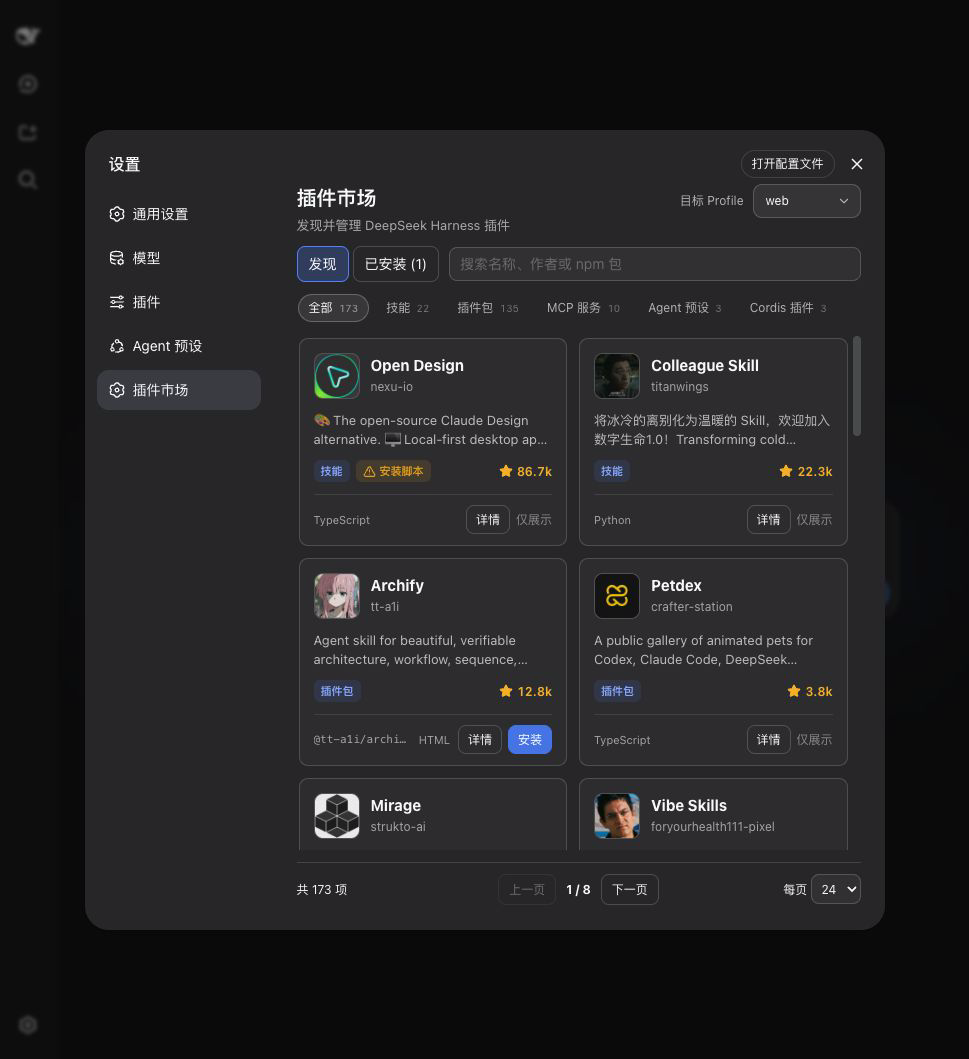
Install from scratch
You do not need DSH preinstalled.
Install the LTS version of Node.js, then close and reopen your terminal.
Install DSH and pnpm:
npm install --global pnpm @deepseek-ai/dshConfirm that DSH is available:
dsh --versionInstall the marketplace:
dsh plugin --profile web add @springbrand/dsh-plugin-marketplaceStart DSH Web:
dsh web
Keep the terminal open. Your browser normally opens automatically; otherwise, open the http://127.0.0.1:... address printed in the terminal. Then go to Settings → Plugin Marketplace.
If dsh is still not found after reopening the terminal, use:
npx @deepseek-ai/dsh plugin --profile web add @springbrand/dsh-plugin-marketplace
npx @deepseek-ai/dsh web
Already have DSH?
dsh plugin --profile web add @springbrand/dsh-plugin-marketplace
dsh web
What you get
- Browse and search by name, author, description, or npm package, with visible plugin categories, repository avatars, and compact GitHub Star counts.
- Profile management across
web,headless, and other local profiles under ordinary DSH; SpringBrand Desktop limits operations to its active profile. - Install, update, and remove in one place, with exact installed versions, visible update badges and counts, and one-click updates to the latest published version.
- Installed view covering both catalog entries and profile dependencies that are not listed in the catalog.
- Marketplace self-updates in SpringBrand Desktop by installing the latest release into the active profile; removing that profile override falls back to the version bundled with the app.
- Clear activation timing: changes to the current profile restart DSH automatically; changes to other profiles apply on their next launch.
Security
- Installation is limited to catalog entries marked
bundle,installable, andnpm. - The server resolves the npm package name from the catalog again instead of accepting an arbitrary source from the browser.
- Updates and removals accept only valid npm package names already installed in the selected profile.
- Mutation endpoints accept same-origin JSON POST requests only, with an 8 KiB body limit.
- Ordinary DSH commands are launched with argument arrays, never through a shell. SpringBrand Desktop delegates to its managed package-operation service. Only one plugin operation runs at a time.
Plugins are third-party code. Catalog inclusion is not a security endorsement; install only sources you trust.
How it works
[Web settings]
      |
      v
[Local HTTP API from this plugin]
      |
      +--> [dshplugin.market/api/catalog]
      |
      +--> ordinary DSH: dsh plugin --profile <profile> add|update|remove <package>
      |
      +--> SpringBrand Desktop plugins: desktopPnpm.runPlugin()
      |
      +--> SpringBrand Desktop marketplace override: desktopPnpm.run()
Under ordinary DSH, the marketplace targets the running profile by default and can select another profile in the UI. SpringBrand Desktop exposes only its active profile, runs package operations through desktopPnpm, and requests an orderly application restart through desktopProfiles. Third-party plugins use runPlugin() so DSH reconciles their bundle layers. The marketplace's own profile override uses direct run() because its row already belongs to Desktop; reconciling it as another bundle would duplicate that row. The plugin does not provide arbitrary hot-mounting or seamless port handoff.
Which profiles appear as targets
Under ordinary DSH the profile list is web, headless, the profile this process was launched with, and every directory under <DSH home>/profiles, sorted by name. The DSH home is DSH_HOME when set, otherwise ~/.dsh. profiles/node_modules is never offered as a target.
A profile appears in the list before it has been initialized, so a plugin can be installed into headless from a web session without creating the profile first. What the Installed view reports for each profile is that profile's own package.json dependency map — which is why it also lists packages that were installed outside this marketplace and are absent from the catalog. SpringBrand Desktop also reports the marketplace version bundled with the app; its first self-update creates a profile dependency that takes precedence after restart.
Configuration
Override these fields in the profile's Cordis configuration:
config:
  profile: web
  catalogUrl: https://dshplugin.market/api/catalog
  restartDelayMs: 1500
profile: the profile used by an ordinary DSH process; read from the launch arguments by default. SpringBrand Desktop always uses its active profile.catalogUrl: the plugin catalog JSON URL; HTTP and HTTPS are supported.restartDelayMs: delay before restarting an ordinary DSH process, from 500 to 30000 milliseconds. SpringBrand Desktop owns its restart timing.
Uninstall
Remove the package from the marketplace's Installed tab, or run:
dsh plugin --profile web remove @springbrand/dsh-plugin-marketplace
Development
npm install
npm run check
License
MIT
Links
More in this category
zhu1090093659/dsh-web#packages/dsh-plugin-manager★ 8229
Plugin manager tab in DSH Settings → Plugins: install from npm or git with progress, enable/disable switches effective at next startup, conflict reconciliation with undo, and one-click hand-off to a fix session.
dsh-market/dsh-market★ 5159
Browse, search and install community plugins from inside DeepSeek Harness settings, with category filters, one-click updates, enable/disable, theme switching and configuration backup.
kingOfSoySauce/dsh-skin-market★ 173
Native skin marketplace and lifecycle manager that discovers community skins, displays previews and compatibility status, and provides verified one-click or manual installation paths.
bradeGithub/DSH-Plugins-Marketplace★ 170
GitHub-topic-driven plugin & skill marketplace: a Settings page that browses the auto-collected registry (the whole dsh-plugin topic plus the skills index, CI-refreshed every 2 hours) with one-click install, type detection, install-script and host-shadow-dependency safety confirmations, env-key management, and the STANDARD.md recognition spec.
awesome-dsh-plugin/dsh-find-plugin★ 162
Find plugins without leaving the agent: search this curated registry by keyword or category, with ready-to-run install commands.
Sanqi-normal/dsh-webui-market-plugin★ 105
In-harness plugin market for the dsh web GUI: browse the awesome-dsh-plugin.com catalog and install/uninstall plugins into a profile from Settings → Plugins → Plugin Market.
Community comments
Comments are public GitHub Discussions. Loading them connects to GitHub and Giscus; a GitHub account is required to post.