Diagnoses and repairs DeepSeek Harness on native Windows around the official persistent PowerShell and Workspace Write stack, creates the desktop shortcut, and keeps earlier Git Bash and BusyBox presets behind an explicit legacy setup. No WSL.
Install
# from npm (prebuilt)
dsh plugin --profile web add dsh-win32
# from GitHub (first run asks for allowBuilds approval — follow the hint, retry)
dsh plugin --profile web add github:sjh9714/dsh-win32
Any plugin you install runs third-party code with your own permissions — it can read your files, use your credentials, and reach the network, and tool approvals don’t sandbox it. GitHub-sourced plugins also run build scripts at install time — pnpm blocks those until you allow them, so an install can stop with ERR_PNPM_GIT_DEP_PREPARE_NOT_ALLOWED or ERR_PNPM_IGNORED_BUILDS; dsh prints the exact key to add under allowBuilds in your profile’s pnpm-workspace.yaml, and the install works on the next run. Allowing a build is a trust decision: only install sources you trust, and pin a commit (github:owner/repo#sha).
README
Fix DSH on Windows. No WSL.
Official PowerShell. Workspace Write. One command.
npx dsh-win32 setup
Current DeepSeek Harness already includes persistent PowerShell and a Windows ACL sandbox. dsh-win32 checks that official stack, finds known Windows failures, applies the repairs it can prove safe, and creates a desktop shortcut.
It does not install Git, PowerShell, busybox, WSL, or another DSH bundle on the current path.
Use the standalone CLI above on current DSH. Do not run dsh plugin --profile web add dsh-win32 for this workflow: that installs the legacy bundle, not the current Windows setup path.
中文 · Windows evidence and legacy details
Using a coding agent? Copy the setup and verification request. For a guided walkthrough, see Windows troubleshooting in Chinese.
Start with the Windows first-run walkthrough if DSH will not launch or a check fails. It follows one problem from diagnosis through the next verification step. Share your first-run result, including attempts that are still blocked.
Need to disable or uninstall the old plugin, even when DSH cannot start? See disable / uninstall / remove. From 0.17.14, npx dsh-win32@0.17.14 disable --profile web previews offline deactivation; after stopping DSH, add --apply to back up the manifest and disconnect only the old bundle.
See the current setup
Reproduced setup flow. This is not a screen recording.
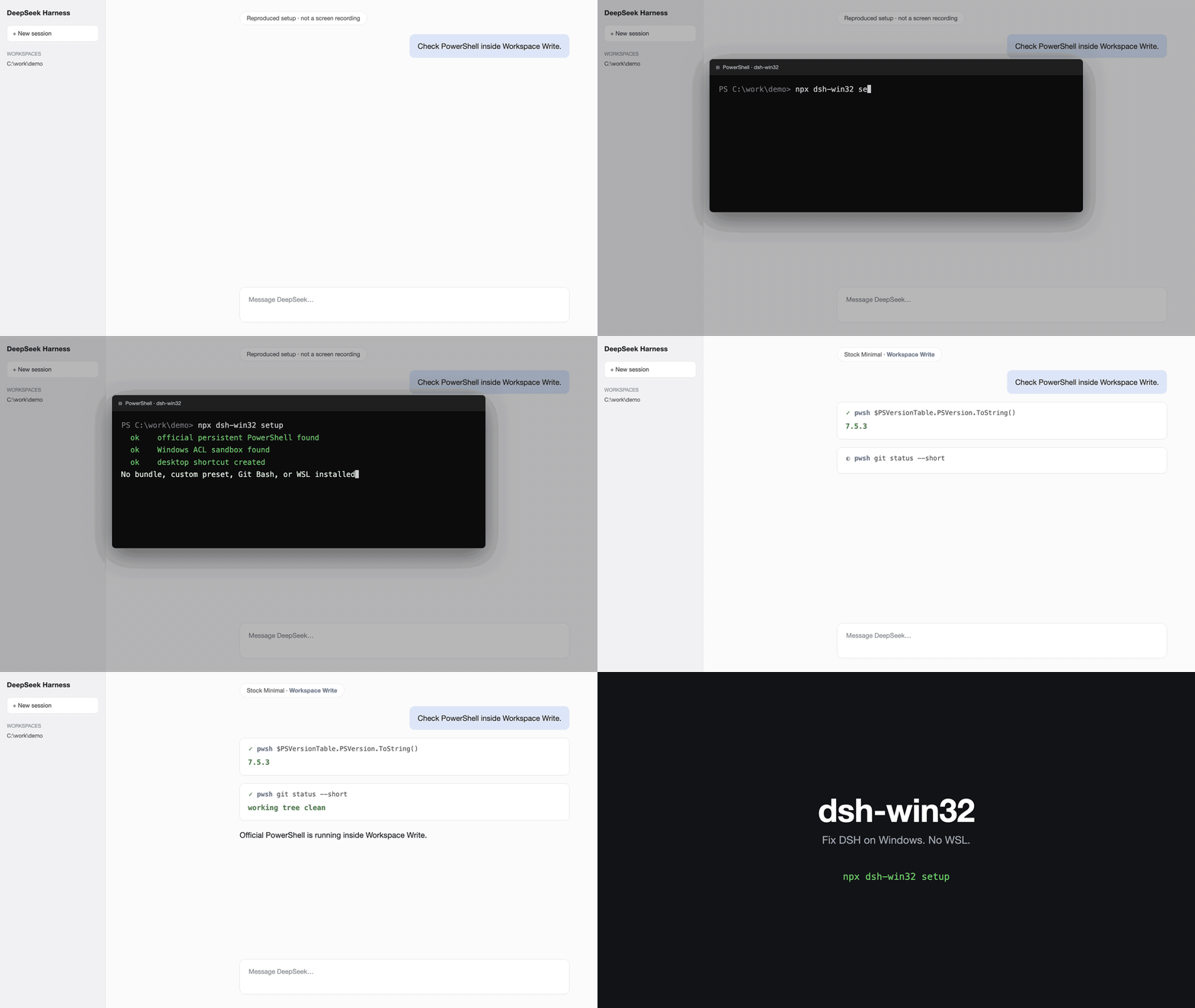
The command checks the official persistent PowerShell and Workspace Write packages, creates the shortcut, and leaves the profile on the stock Minimal preset.
What setup does
- Checks the latest published DSH Windows package contract
- Checks PowerShell 7 and known broken koffi runtimes
- Creates a
DeepSeek Harnessdesktop shortcut for the Web profile - Leaves the official profile and preset unchanged
- Shows the exact next steps for a first session
After setup, open DSH, add a workspace, choose the stock Minimal preset, and keep Workspace Write enabled.
Use another profile without creating a shortcut.
npx dsh-win32 setup --profile desktop --no-shortcut
--sandboxed remains accepted for old notes and scripts. Current DSH already provides the sandbox, so the flag makes no extra change.
Live verification of an installed stack
From 0.17.12, opt in to setup followed by one installed-stack check:
npx dsh-win32 setup --verify
Use --profile NAME --no-shortcut when appropriate. Ordinary setup is unchanged; --legacy --verify is rejected. Setup and component acceptance are reported separately, and a failed or unsupported verification makes the command exit nonzero. This does not install DSH or prove a complete Desktop/Minimal session. For a check without setup or JSON output, use the standalone command:
npx dsh-win32 verify
npx dsh-win32 verify --json
verify is a model- and API-key-free acceptance run against an already installed @deepseek-ai/dsh dependency tree. It does not use registry metadata as proof. In an isolated temporary home and workspace it invokes the installed model-facing persistent pwsh tool through the official terminal, subprocess, Workspace Write policy, and Windows ACL sandbox components.
A pass requires all of these live observations:
- 64-bit PowerShell 7 launches and reports a real executable
- two
pwshcalls retain the same PTY, current directory, and environment state - exact content is written and read inside the temporary workspace
- a normal-process control can write the isolated outside target, while confined PowerShell is denied and creates no file
- the shell recovers after denial; cancellation tears down its PTY; a replacement call works; and a second cancellation tears down cleanly
- every runtime resource, temporary home, and temporary workspace is removed
No user DSH profile, config, workspace, or PowerShell profile is loaded or changed. Secret-bearing environment variables are not passed to the worker, and reports contain no tested paths or terminal output. Native Windows and a DSH-supported Node release are required; Node 23 is explicitly unsupported.
If a timeout or output limit leaves worker or descendant containment unconfirmed, verification fails and preserves the isolated snapshot instead of deleting files under a potentially live process.
verify creates its own Workspace Write policy and Windows ACL-confined PowerShell child. If you run it from an agent that is already inside another Workspace Write or Windows ACL sandbox, approve one unsandboxed/full-access execution for this verify command only; otherwise the nested restricted-token/ConPTY layers can stall before PowerShell launches. This does not bypass the acceptance boundary: the inner child under test remains confined, and the outside-write denial is still required to pass. Worker timeouts report only a fixed, path-free progress checkpoint so nested-launch stalls can be distinguished without exposing terminal output or environment values.
The boundary is deliberate: this composes the installed official components and invokes the real persistent tool, but it does not start the complete stock Minimal host/preset, run the plugin installer, execute hook bridges, or make a model request. A pass must therefore be read as component-chain acceptance, not as an end-to-end stock-session or hook-enforcement claim.
Tools run under a non-driving synthetic agent with a real temporary DSH session. The verifier does not instantiate DSH's private agent-loop inbox; any attempt to use that inbox fails the check instead of returning fabricated state.
The repository CI installs @deepseek-ai/dsh@latest from scratch and runs this acceptance on real Windows. Pushes, pull requests, and manual runs cover npm and strict pnpm layouts on Node 22.19 and 24. A weekly upstream watch retains both installers on Node 22.19, so a new DSH publication is checked even when dsh-win32 itself has not changed.
The pnpm lane preserves a strict 24-hour publication cooldown and an explicit build-script allowlist. It can select an older eligible release than npm. Read the installed DSH version in each result; a pass is not evidence for a release that the package manager has not installed.
Doctor and safe repair
npx dsh-win32 doctor
npx dsh-win32 doctor --json
npx dsh-win32 fix
doctor verifies the published DSH Windows package contract and checks local Windows failures. Its JSON output follows the dsh-doctor/v1 envelope. Use verify when you need live evidence from the installed stack rather than registry metadata.
fix only repairs installed koffi versions that are known broken or fail a real runtime load. It verifies the load again after repair.
Upstream plugin and hook boundaries
Two current DSH control paths sit outside repairs that dsh-win32 can safely apply:
- On Windows,
dsh plugin addcan split a local package path containing spaces, and relative package paths can resolve from an unexpected working directory (upstream #2485). Prefer a published package specifier. If a local package is unavoidable, stage it at a space-free absolute path and read back the installed package identity rather than trusting a successful command alone. - Hook logs are not proof that enforcement happened. An interpreter-backed Claude Code hook can lose its blocking exit code through PowerShell on Windows (upstream #2485), while a
{"continue": false}result can be recorded asdecision: stopwithout halting the run (upstream #1514). After changing hooks or upgrading DSH, run a harmless unconditional deny canary and confirm the target action is actually blocked.
doctor cannot prove either behavior from package metadata, and verify deliberately avoids user profiles, hook configuration, model requests, and plugin installation. They therefore do not report these upstream paths as passing. The canary remains a user-controlled end-to-end check until DSH exposes a safe, isolated hook acceptance interface.
Bring an existing setup
Once the Windows checks pass, dsh-movein can preview importing an existing Claude Code, Codex, or OpenCode setup. It is optional and separate from Windows setup: dsh-win32 does not install it for you.
Start with a preview in the project you want to move. Do not add --apply until you have reviewed the destinations, conflicts, and unsupported settings.
npx dsh-movein
Moving configuration does not prove hook enforcement or a complete stock Minimal session. Keep the verification boundaries above.
Legacy DSH
DSH rc.6 and older did not ship the current official PowerShell stack. The previous Git Bash and busybox presets remain available behind an explicit flag.
The package's @deepseek-ai/dsh-subprocess-local peer range, >=0.1.0-rc.5 <0.1.0-rc.7, intentionally bounds that legacy bundle. It is not the host version range for the standalone setup, doctor, or verify commands, which do not wire the bundle into current DSH. A successful dsh plugin add is not compatibility evidence; the missing host-peer warning is tracked in upstream #6680.
If a newer host reports skipping profile bundle "dsh-win32" or an incompatible subprocess peer, do not widen the range or grant an allow-version exemption as a repair. DSH 0.1.7-rc.1 requires a different process-inspector snapshot contract from this legacy bundle; the bundle is not compatible merely because it loads or --dump-config succeeds. Follow the compatibility-warning migration guide. Current DSH already has its own Windows process inspector.
If a current DSH profile already lists dsh-win32 as a plugin, run npx dsh-win32 doctor --profile NAME with that profile's actual name. Doctor warns about the legacy bundle and suggests a removal command; it does not remove anything. Review and back up the affected profile before deciding whether to remove it.
npx dsh-win32 setup --legacy
npx dsh-win32 setup --legacy --sandboxed
npx dsh-win32 doctor --legacy
Legacy setup requests the exact invoked dsh-win32 version without lowering the profile's pnpm release-age or build policy. If a new release is held, wait for the configured cooldown and retry; do not add a release-age bypass.
Legacy setup reinstalls default presets. From 0.17.10, an existing preset is first moved intact to a unique backup under $DSH_HOME/dsh-win32/preset-backups (or ~/.dsh/dsh-win32/preset-backups). Custom edits remain in that backup, not in the new active preset. Plugin activation still leaves existing presets untouched. To fix only a missing persona text/prefix field without resetting your custom tools or shell settings, use the in-place recovery instructions.
On Windows, doctor --legacy checks installed persona keys without rewriting rosters or printing their prompt text. A passing key check is not proof of full host/session compatibility. Add --profile NAME when inspecting a non-web profile; recovery commands retain that selection and legacy mode.
The legacy Git Bash preset needs danger-full-access. The legacy busybox preset can run in Workspace Write. Neither path installs Git automatically.
Read the implementation evidence, compatibility history, and complete legacy limitations.
Honest limits
doctorchecks published package metadata;verifyseparately reports and loads the selected installed DSH identity.verifydoes not boot the complete stock Minimal host/preset, so host wiring and UI session ownership remain outside its pass claim.- Neither command validates
dsh plugin addpath handling or hook enforcement; see the upstream boundaries above. - PowerShell 7 is recommended. dsh-win32 does not install it.
- A legacy busybox session uses ash rather than Bash.
- Editing a legacy encoded file writes UTF-8.
- Treat
C:\tmpas outside the expected legacy write fence until the upstream Windows path issue is fixed.
License
MIT.
Links
More in this category
yjh051108/dsh-routing-suite★ 7003
One repository, three parts: a runtime injector for DSH plugin packages (inject, hot-reload, unload, promote a dev staging tool to the front, route self-heal, plus a settings-page plugin manager that lists, unloads and drags folders in to internalize), a task-aware reasoning-mode router agent preset (router-standard / router-spec / router-react), and a graded two-level task protocol whose six tools (commit_star, lock_stage, revise_do, edit_plan, mark_task, redteam_verdict) pin task state to disk. The injector implementation ships in-tree, so the install carries its own behaviour rather than a dependency list.
strukto-ai/mirage#dsh★ 3666
Swaps the filesystem and bash providers for a mirage virtual workspace: file tools and shell commands run over mounted resources (RAM, S3, Redis, Slack, Gmail, Notion, Postgres) instead of the host disk, with per-mount read/write/exec modes, per-command sandbox routing (monty, pyodide, quickjs in process; docker, e2b, daytona remote), and installed CLIs (git, gh, slack, linear, ntn, gws, or one you register) as head words in the virtual terminal.
hust-open-atom-club/oh-dsh★ 325
Community distribution: TUI, desktop, and Web UI as one bundle with layered installation.
weijiafu14/pi2dsh★ 206
Pi Host ABI compatibility engine: after one install, unmodified Pi extensions from npm mount as native DSH plugins with `dsh plugin add <pi-package>`. Verified end to end on stock DSH with pi-mcp-adapter (full MCP manager: OAuth, resources, prompts, MCP Apps, elicitation, sampling), @tintinweb/pi-subagents, pi-code, pi-hermes-memory and pi-background-tasks; `pi2dsh inspect` reports a package's compatibility before installing.
lire1131/dsh-undo-savepoint★ 166
Undo/redo & rollback system for DSH: every config change is auto-snapshotted; undo/redo/restore to any version from the WebUI or the offline CLI/GUI tools (works even when DSH fails to boot).
Fishquito7/dsh-skill-mcp-panel★ 155
Manages DSH skills and MCP servers from the web settings: skill cards with hot enable/disable, workspace scopes, groups, batch migration and drag-and-drop import, plus stdio/HTTP MCP CRUD with connection tests, secret redaction and the unified dsh-panel CLI.
Community comments
Comments are public GitHub Discussions. Loading them connects to GitHub and Giscus; a GitHub account is required to post.