A vision-language gateway provider route: pasted images are described by a configurable VL model (Qwen-VL by default) before the DeepSeek wire.
Install
# from npm (prebuilt)
dsh plugin --profile web add dsh-deepseek-vision
# from GitHub (first run asks for allowBuilds approval — follow the hint, retry)
dsh plugin --profile web add github:siegfly/dsh-deepseek-vision
Any plugin you install runs third-party code with your own permissions — it can read your files, use your credentials, and reach the network, and tool approvals don’t sandbox it. GitHub-sourced plugins also run build scripts at install time — pnpm blocks those until you allow them, so an install can stop with ERR_PNPM_GIT_DEP_PREPARE_NOT_ALLOWED or ERR_PNPM_IGNORED_BUILDS; dsh prints the exact key to add under allowBuilds in your profile’s pnpm-workspace.yaml, and the install works on the next run. Allowing a build is a trust decision: only install sources you trust, and pin a commit (github:owner/repo#sha).
README
Install: dsh plugin --profile web add dsh-deepseek-vision
A vision-language gateway plugin for DeepSeek Harness. A text-only DeepSeek coding
model gains image support through a "gateway" provider route: models the catalog
declares image-capable (official deepseek-v4-flash-vision-exp) stream images natively
to DeepSeek's vision endpoint; every other model gets pasted images described verbatim
by a configurable VL model (Qwen-VL by default) before the text-only wire. Zero changes
to the official repo, no version lock on cross-machine installs. Among the dsh vision
plugins it is the thinnest bridge: no injected agent tools, no third-party relay, no
local model requirement.
Table of Contents
- Highlights
- Why This One
- Quick Start
- What It Does
- How It Works
- Configuration
- Usage
- Install
- Version Alignment
- Development
- Boundaries & Notes
- FAQ
- License
Highlights
- Paste an image, keep your model: registers the
deepseek-visionroute (display name DeepSeek + Vision) with a realinputModalities: ['text','image']declaration — chat pastes,tool-fs read_image, browser screenshot tools, MCP tool-returned images, and ACP inline images all get through. - Describe once per configuration generation: the in-process LRU key covers the full
VL configuration generation plus
attachmentId; retries, compaction, and later turns reuse the same description — no double billing. - Session invariants hold: original images stay persisted in the session log; history / replay / reconstruction are unaffected.
- Official install mechanism: bundle declaration +
dsh plugin add, four spec forms (npm / git / directory / tarball), web and headless profiles — the exact same path as official plugins. - Swap the VL model with zero code: endpoint / model / prompt / key all live in a
settings card; any OpenAI-style
/chat/completionsgateway works (DashScope, vLLM, OpenRouter, LM Studio…). - Explicit failure semantics: fail-closed by default with stable error codes
(
AUTH/TIMEOUT/TRANSPORT/IMAGE_TOO_LARGE…), orplaceholderto degrade. - No cross-version lock-in: releases do not pin an official dsh version. The no-CLI
replica path (
pnpm install-profile) rebuilds on the target machine against its own dsh — a successful build is the proof of compatibility, and pre-install checks grade differences instead of failing silently; the officialdsh plugin addpath installs published artifacts as-is with no target rebuild — runtime imports resolve through the healed fallback, but compatibility is not verified on the target (see Version Alignment).
Why This One
Dozens of dsh vision plugins appeared within hours of the official harness launch, with different mechanisms and trade-offs. This plugin's position is one sentence: the thinnest bridge — one provider route, and nothing else.
- No injected agent tools: no
vision_describe/analyze_image-style tools; the agent's behavior surface is unchanged, and pasting an image stays the plain "paste" path. - No third-party relay: no anonymous fallback endpoints, no proxy servers, no on-disk answer cache — images only ever pass through the VL endpoint you configured (your key, your endpoint, your data).
- No local model dependency: no Python / MLX / llama.cpp / Ollama requirements; install and go.
- Official-grade release quality: official bundle install mechanism, pre-install compatibility gates, build-anchor stamp, 121 tests / 97% coverage, bilingual docs.
| Dimension | This plugin | Tool-style (e.g. dsh-vision-any, dsh-vision) | Router-style (e.g. dsh-vision-router) | Proxy-style (e.g. dsh-vision-proxy) | Local-pipeline (e.g. DeepSeek-Harness-Vision-Tools) |
|---|---|---|---|---|---|
| Mechanism | provider gateway route | injected agent tools | tools + multi-provider routing | transparent proxy route | Python local VLM pipeline |
| Image data flow | your VL endpoint only | your own API | includes a third-party anonymous fallback | own endpoint + fallback chains | local model, never leaves the machine |
| Swap VL model | settings card, zero code | config files | config files | config + Ollama auto-detect | swap local model |
| Answer/description cache | in-process LRU (descriptions only) | — | content-hash answer cache | SHA-256 cache | — |
| Failure semantics | fail-closed + stable error codes | — | — | timeout protection | — |
| Release path | official bundle mechanism + compat gates + anchor stamp | — | — | — | non-bundle |
The table lists directional differences only; every project is iterating fast — check each project's latest README before choosing.
Quick Start
Prerequisites: the dsh CLI available and booted at least once, pnpm on PATH
(dsh plugin installs plugins through pnpm).
Step 1 — install dsh on a new machine (one-time, pick one). dsh is the
official CLI (npm package @deepseek-ai/dsh):
npm install -g @deepseek-ai/dsh        # recommended: dsh permanently on PATH
# or (the official one-line launch):
npx @deepseek-ai/dsh web               # no global install: CLI lives only in npx cache
⚠️ With the
npxform,dshdoes not enter PATH — a fresh terminal typing baredshfails with "command not found". Either install globally, or prefix every command withnpx @deepseek-ai/dsh.
Step 2 — install (git form, pinned commit — recommended):
dsh plugin --profile web add github:siegfly/dsh-deepseek-vision#<sha>
# without a global install, use the npx prefix:
npx @deepseek-ai/dsh plugin --profile web add github:siegfly/dsh-deepseek-vision#<sha>
The published npm version (0.1.7) works too — swap the spec for
dsh-deepseek-vision@0.1.7 (explicit pin; pnpm 11 gates releases younger
than 24h by default, so a bare spec would still resolve to 0.1.5 within
the first day of a publish).
Deploy & use: restart dsh web once → pick DeepSeek + Vision on the Models
page → fill the VL key in Settings → Plugins → Plugin settings → paste an image
and send.
Uninstall:
dsh plugin --profile web remove dsh-deepseek-vision
Headless profiles, the other spec forms (git / directory / tarball), and machines without the CLI — see Install.
What It Does
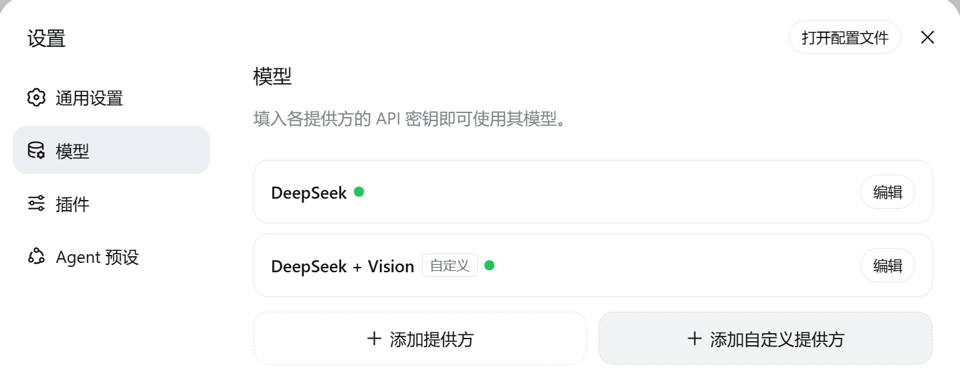
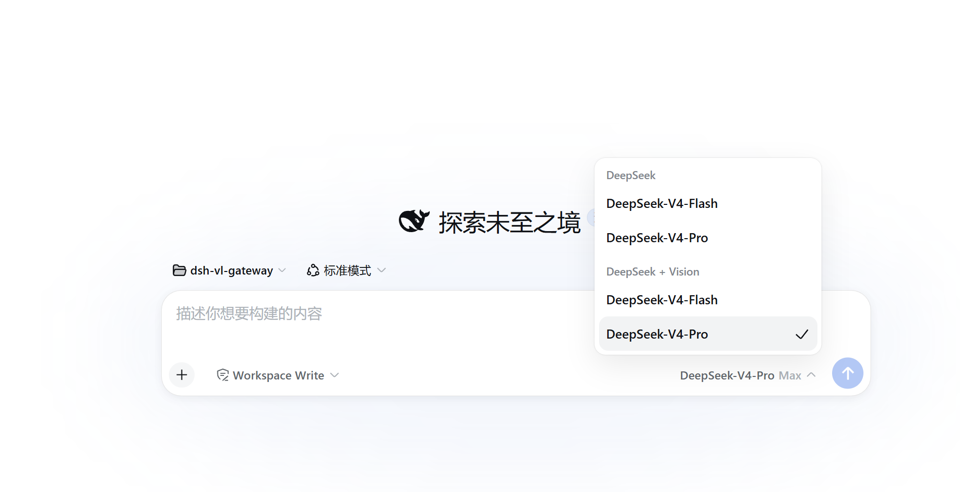
Select the DeepSeek + Vision provider in the chat:
 |
 |
|---|
- paste / drop an image → routed by the selected model: models the DeepSeek catalog
declares image-capable (the official default advertises
deepseek-v4-flash-vision-exp) keep the image and stream natively to DeepSeek's vision endpoint; text-only and uncatalogued models get the configured VL description first (verbatim code, errors, logs, UI text, plus layout); - the description replaces the image for DeepSeek → you keep coding with DeepSeek while gaining image understanding;
- each image/configuration generation is described once and reused across retries and turns;
- the session log still persists the original images.
How It Works
flowchart LR
    User["chat paste / read_image / screenshot / MCP / ACP"] --> Gate["deepseek-vision route: inputModalities = text + image"]
    Gate --> Persist["apiproxy prompt RPC -> ImageBlock persisted to session log"]
    Persist --> Decide{"DeepSeek catalog declares image input for this model?"}
    Decide -- "yes (official vision model)" --> Native["yield* super.stream(): parent serializes images natively to DeepSeek's vision endpoint"]
    Decide -- "no (text-only / uncatalogued)" --> Bridge["ImageBridge rewrites image blocks (incl. nested tool results)"]
    VL["configured VL model (default qwen3-vl-flash, OpenAI-compatible endpoint)"] --> Bridge
    Cache["attachmentId -> description LRU cache"] --> Bridge
    Bridge --> Stream["yield* super.stream(): native DeepSeek wire keeps streaming"]
Why a gateway adapter instead of middleware: DSH has two hard gates — the prompt /
selectModel RPC rejects models whose inputModalities lacks image, and the
llm-deepseek serializer throws UNSUPPORTED_CONTENT on image blocks for text-only
models. This plugin registers a new provider route that extends the officially exported
DeepSeekAdapter: inside stream() it first consults the parent catalog for the
selected model — catalog-declared image models (official rc.2 publishes
deepseek-v4-flash-vision-exp by default) pass through untouched and the parent
serializes images natively; text-only and uncatalogued models get their image blocks
rewritten to text before the pristine DeepSeek wire. Reasoning efforts, context window,
default maxTokens, and retry policy are inherited from the parent.
Configuration
Everything is optional (defaults apply). Both keys support credential-refs (environment
variable names). When dsh's credentials service is mounted, its result is authoritative,
including an unconfigured result; the route reads the launch environment directly only when
that service is absent. Official credentials-local precedence is: process environment
(highest, read-only) → GUI-managed .credentials.yaml → .env fallback. Credentials
written on the Web Models page therefore work, while a key explicitly exported for this
process always wins and cannot be changed in the GUI:
| Path | Default | Notes |
|---|---|---|
provider |
deepseek-vision |
registered route id (avoids deepseek-official) |
displayName |
DeepSeek + Vision |
name in the model picker |
mode |
native-first |
native-first prefers native vision and falls back for text models; always-describe forces projection; disabled restores stock DSH behavior |
deepseek.* |
— | identical shape to the official llm-deepseek section (apiKeyEnv / baseURL / thinking / reasoningEffort / maxTokens / models / retryPolicy…) |
deepseek.apiKeyEnv |
DEEPSEEK_API_KEY |
DeepSeek key |
vl.apiKeyEnv |
QWEN_VL_API_KEY |
VL model key |
vl.baseURL |
https://dashscope.aliyuncs.com/compatible-mode/v1 |
any OpenAI-compatible /chat/completions gateway |
vl.model |
qwen3-vl-flash |
VL model id (best price for OCR-style descriptions; use qwen-vl-max for hard visual reasoning) |
vl.describePrompt |
detailed English prompt with verbatim extraction | the description instruction |
vl.timeoutMs |
120000 |
hard timeout per description request |
vl.maxTokens |
2048 |
maximum description output tokens per image |
vl.maxPixels |
4194304 |
deterministic DSH request-image pixel cap before VL upload |
vl.maxBytes |
5000000 |
deterministic DSH request-image encoding target before VL upload |
vl.maxCacheEntries |
64 |
in-process description cache capacity (LRU) |
vl.onFailure |
fail |
fail = failed description fails the request; placeholder = degrade to a text placeholder |
llm-vl-gateway is also a settings namespace with three edit entry points: the
Settings → Plugins → Plugin settings card ("DeepSeek + Vision", all vl.* fields +
VL key), the Web Models page (the deepseek.* subsection is rendered by the configurable
provider directory), and settings.yaml (both subsections).
The card is collapsed by default like native DSH plugin cards; collapsing retains drafts,
and a successful save collapses it automatically.
provider / displayName are registration-time facts: edits apply immediately (the
adapter route and the configurable provider directory are re-registered atomically, no
restart); a conflicting route id keeps both registries on their old values and logs why.
Inline patch config example (all optional):
- insert:
    - id: llm-vl-gateway
      name: dsh-deepseek-vision
      config:
        deepseek:
          reasoningEffort: high
        mode: native-first
        vl:
          apiKeyEnv: DASHSCOPE_API_KEY
          model: qwen3-vl-flash
Usage
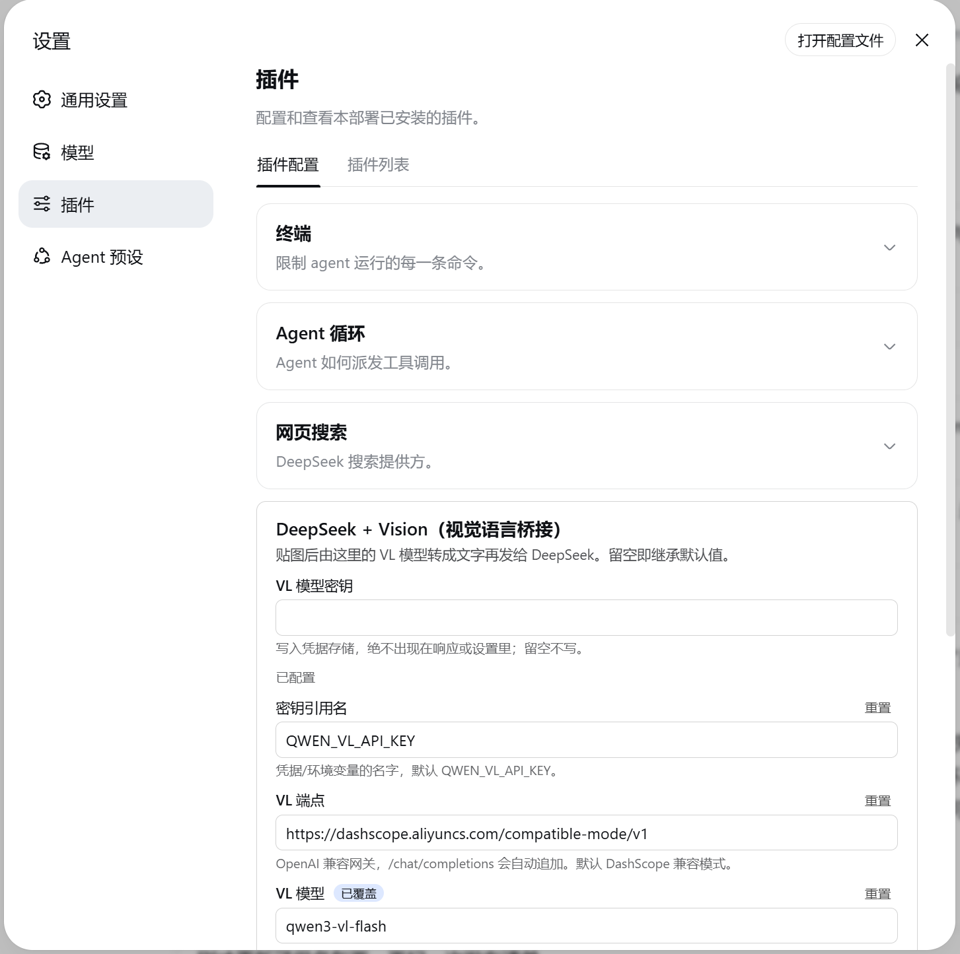
- Set two keys: fill the VL key in the Settings → Plugins → Plugin settings card (stored in the credential store, never echoed); reuse the existing DeepSeek credential;
- pick the DeepSeek + Vision provider on the Models page (per-session selection persists as the default);
- paste an image and send — it is described automatically; DeepSeek sees text.
The settings card is this plugin's client face (dsh.client): it registers into the
settings.plugin.item slot the same way official decoupled plugins do, and edits the
llm-vl-gateway.vl section with the same interaction model as built-in cards (drafts,
override state, save-as-a-whole).
Install
Installation uses the official bundle mechanism: the package declares
dsh.bundle.patch (pointing at the bundled cordis.patch.yml); dsh plugin add links
the package into the profile and reconciles the package name into the profile manifest's
dsh.profile.bundles layer stack. No manual cordis.patch.yml edits (managed blocks
from older versions are migrated away automatically on the next install/uninstall).
Any of the official spec forms works — the git form (pinned commit) is the everyday recommendation:
dsh plugin --profile web add github:siegfly/dsh-deepseek-vision#<sha>       # git (recommended), pinned commit
dsh plugin --profile web add dsh-deepseek-vision@0.1.7             # npm (published 0.1.7, explicit pin)
dsh plugin --profile web add file:<repo path>                        # local directory (dev)
dsh plugin --profile web add ./dsh-deepseek-vision-0.1.7.tgz              # tarball (npm pack artifact)
Headless profiles work the same: dsh plugin --profile headless add dsh-deepseek-vision
(the client card is web-only). Verify the bundle layer mounted:
dsh --profile web --dump-config | grep llm-vl-gateway. Uninstall mirrors install for
every form: dsh plugin --profile <name> remove dsh-deepseek-vision.
Without the CLI, use the equivalent replica (needs Node 22.19+ or 24+ and pnpm on PATH;
init layout → target rebuild → compat gate → pnpm add → bundles reconcile):
pnpm install        # devDeps only (typescript/vitest), never @deepseek-ai/*
pnpm install-profile          # or node scripts/install-profile.mjs [profile] [dshHome]
This is the only install path that rebuilds on the target machine: install-profile
recompiles the plugin against the target's own dsh types and runs the check-compat.mjs
gate before installing into the profile (see Version Alignment).
Both paths do the following: link dsh-deepseek-vision into the profile's node_modules
(runtime @deepseek-ai/* imports resolve through the official healed fallback to the
same dsh install — one shared cordis instance, no dual-instance issues); reconcile the
package into dsh.profile.bundles; and, when the profile layout is missing, create it with
official initProfile semantics (manifest + empty user patch layer +
pnpm-workspace.yaml) — existing files are never touched.
This repository is an independent git repository with no git relationship to the official deepseek-harness repo (no fork / submodule / remote); the official checkout is never modified.
Version Alignment
The two install paths differ in compatibility strategy:
- Official CLI path (
dsh plugin add, npm / git / tarball): installs published artifacts as-is — the npm package was built at publish time, the git form uses the committedlib/, the tarball is an author-packed artifact. No target-machine rebuild and no compatibility gate. Runtime@deepseek-ai/*imports resolve from the target machine's own dsh install (healed fallback); if the target official dsh's API does not match this plugin's compiled artifacts, install does not fail early — the problem shows up at startup or first use. Check the target dsh is roughly on the generation thatdshCompat.anchorVersiondeclares before installing. - No-CLI replica path (
pnpm install-profile): rebuilds the plugin on the target machine with the target machine's own dsh types before checking. Only this path offers "a successful build is the compatibility proof":
On the replica path, releases pin no official version — installs proceed on newer (or older) official dsh; a successful build is itself the compatibility proof. A future official release that changes an API this plugin uses fails the build with a clear tsc error — only then is a new release needed.
dshCompat.anchorVersionrecords the build provenance of the committedlib/— a provenance note, not an install gate;lib/build-anchor.json(written bypnpm build) keeps that provenance honest.node scripts/check-compat.mjs [dshHome]grades the target machine before install: exact match = exit 0; any difference = exit 1, advisory, proceed; unbuilt release or preset drift = refuse (env overrides available). The check runs only insideinstall-profile; the official CLI path never calls it.
Full policy, exit-code grades, and release triggers: docs/VERSIONING.md.
Development
pnpm test      # vitest
pnpm build     # tsc (host + client) + tsdown browser bundle
scripts/harness-paths.mjsis the repo's only resolution seam:$DSH_CHECKOUT→ repo-rootharness-paths.json(gitignored) → the installed dsh's healed fallback.- On npm-only machines the 2 client test suites self-skip (npm ships the client runtime browser-only); machines with the official checkout run the full suite.
- Built artifacts keep bare
@deepseek-ai/*specifiers resolved through the profile fallback at runtime.
Details: docs/DEVELOPMENT.md. Contributing: CONTRIBUTING.md; security reporting: SECURITY.md.
Boundaries & Notes
- compaction: inherits the session provider (the gateway route) by default and
follows the session model — catalog-declared image models stream images natively,
text-only models get images rewritten and hit the cache; explicitly pinning compaction
to
deepseek-officialwith images in history fails withUNSUPPORTED_CONTENTas before. - image-history sessions after uninstall: after the plugin is removed, a session whose
history contains images cannot switch back to a text-only model (the official
selectModelgate rejects byinputModalities— expected behavior, not data loss); new sessions are unaffected, and reinstalling restores the gateway route. - VL failure semantics: fail-closed by default — a failed description (e.g. dead key)
aborts the request with a stable code (
AUTH/TIMEOUT/TRANSPORT…) instead of silently dropping the image;onFailure: placeholderdegrades. - request projection and limits: deployment limits fail fast first; the new DSH
readImageRequestseam then deterministically scales and encodes tovl.maxPixels/vl.maxBytes, whilevl.maxTokenscaps description output. Providers may impose lower limits. - role on new DSH: this is no longer required for all image support; it is an optional
compatibility layer for text models. Set
mode: disabledor uninstall when native vision is sufficient. It remains useful for DeepSeek text/reasoning models, forced uniform OCR, or a separately controlled VL provider. - the cache is not durable storage: after restart, durable attachments can be described again, but descriptions from the previous process are not reused.
- Descriptions consume DeepSeek context (a few hundred tokens per image, billed once).
- DSH's
imageRequestPricingis synchronous, so it cannot know a first-time dynamic description's exact token count; context preflight currently underestimates that portion, whilevl.maxTokensstill hard-caps the actual description response.
FAQ
dsh is missing / "command not found" on a new machine? Install the official CLI
first: npm install -g @deepseek-ai/dsh (one-time; dsh stays on PATH afterwards). If
you launch via npx @deepseek-ai/dsh web (the official one-line way), the CLI runs only
from the npx cache and is not on PATH — use the npx prefix for plugin commands:
npx @deepseek-ai/dsh plugin --profile web add dsh-deepseek-vision. The plugin itself
lives in the profile, independent of where the CLI comes from; one install is permanent.
Do I need to care about Node versions to install it? Not for the official path
(dsh plugin add); only the no-CLI replica needs Node 22.19+ / 24+ and pnpm on PATH.
What does #<sha> mean? A placeholder in the git spec form — replace it with a
commit hash to pin an exact snapshot; without #<sha> the install takes the latest
commit of the default branch.
Does it support the CLI (headless)? Yes. The gateway route behaves identically in
both profiles; the settings card is web-only, and headless configures via settings.yaml.
After uninstalling, a session with image history cannot pick a model? Expected: the
official selectModel gate rejects text-only models for image-bearing sessions. New
sessions are unaffected; reinstalling restores the gateway route.
Why not send the image to DeepSeek directly? There are now two paths: models the
DeepSeek catalog declares image-capable (official deepseek-v4-flash-vision-exp) already
stream images natively and never touch this plugin. DeepSeek's text-only models reject
image_url, so a VL model describes the image first — no model swap, no
information loss.
License
Links
More in this category
liustack/modlens★ 4063
Vision bridge for text-only models: paste an image, get structured JSON evidence (OCR, layout, semantics).
ysr666/dsh-vision-router★ 1125
Free vision for text-only agents: built-in keyless vision chain plus pixel tools (Q&A, grounding, crop, pixel diff, colors, OCR, SVG trace, cutout, screenshots); paste an image to use it.
Anionex/dsh-vision-toolkit★ 884
Vision for text-only models: paste an image and the model switches to a Vision Toolkit variant for image Q&A, multi-image comparison, long-screenshot OCR, screenshot-to-UI reproduction, element grounding, and pixel diff. No API key by default — images are processed by the author-hosted free service, 100 per machine per day; configurable to your own provider.
dickpy/dsh-imagegen★ 93
AI image generation for the DSH Web GUI: text-to-image and image-to-image through a configurable OpenAI-compatible endpoint (gpt-image-2 / gpt-image-1 / dall-e-3), with an api_url/api_key settings card and a sidebar split-pane generation studio.
fandc520/dsh-comfyui★ 89
Drive a local or remote ComfyUI server from DeepSeek Harness: comfyui_run / comfyui_object_info / comfyui_workflow tools generate and edit images and videos, with a workflow library (graph extraction: per component / main flow / all), a load area with resolution auto-match, a live queue, SDXL and Wan 2.1 templates, a companion skill, and a same-origin media proxy.
sunxin-ai/dsh-design-qa★ 44
Design-fidelity QA for text-only models: a `deepseek_vision` tool borrows an eye from any OpenAI-compatible vision route, so the model can judge whether an implementation matches its mock — shipped with the benchmark behind that judgement (four fixtures, 23 injected defects, raw transcripts) and the questioning discipline it depends on.
Community comments
Comments are public GitHub Discussions. Loading them connects to GitHub and Giscus; a GitHub account is required to post.