Remote access gateway for the DSH Web GUI: login auth plus an HTTP/WebSocket reverse proxy to the loopback server, no --trusted-host needed.
Install
# from GitHub (first run asks for allowBuilds approval — follow the hint, retry)
dsh plugin --profile web add github:siberiah2o/dsh-plugin-remote
Any plugin you install runs third-party code with your own permissions — it can read your files, use your credentials, and reach the network, and tool approvals don’t sandbox it. GitHub-sourced plugins also run build scripts at install time — pnpm blocks those until you allow them, so an install can stop with ERR_PNPM_GIT_DEP_PREPARE_NOT_ALLOWED or ERR_PNPM_IGNORED_BUILDS; dsh prints the exact key to add under allowBuilds in your profile’s pnpm-workspace.yaml, and the install works on the next run. Allowing a build is a trust decision: only install sources you trust, and pin a commit (github:owner/repo#sha).
README
Remote access gateway for the DeepSeek Harness (DSH) Web GUI — login auth + HTTP/WebSocket reverse proxy to the loopback DSH server.
中文 · MIT
Install
dsh plugin --profile web add dsh-plugin-remote && dsh web
Note: this is a DSH (DeepSeek Harness) plugin — install it into a profile through
dsh plugin(or the profile's dependencies) so the gateway activates; a plainnpm ialone does not wire it in.
Screenshots
| Login | Main view (对话 / 轨迹 / 远程访问 tabs) |
|---|---|
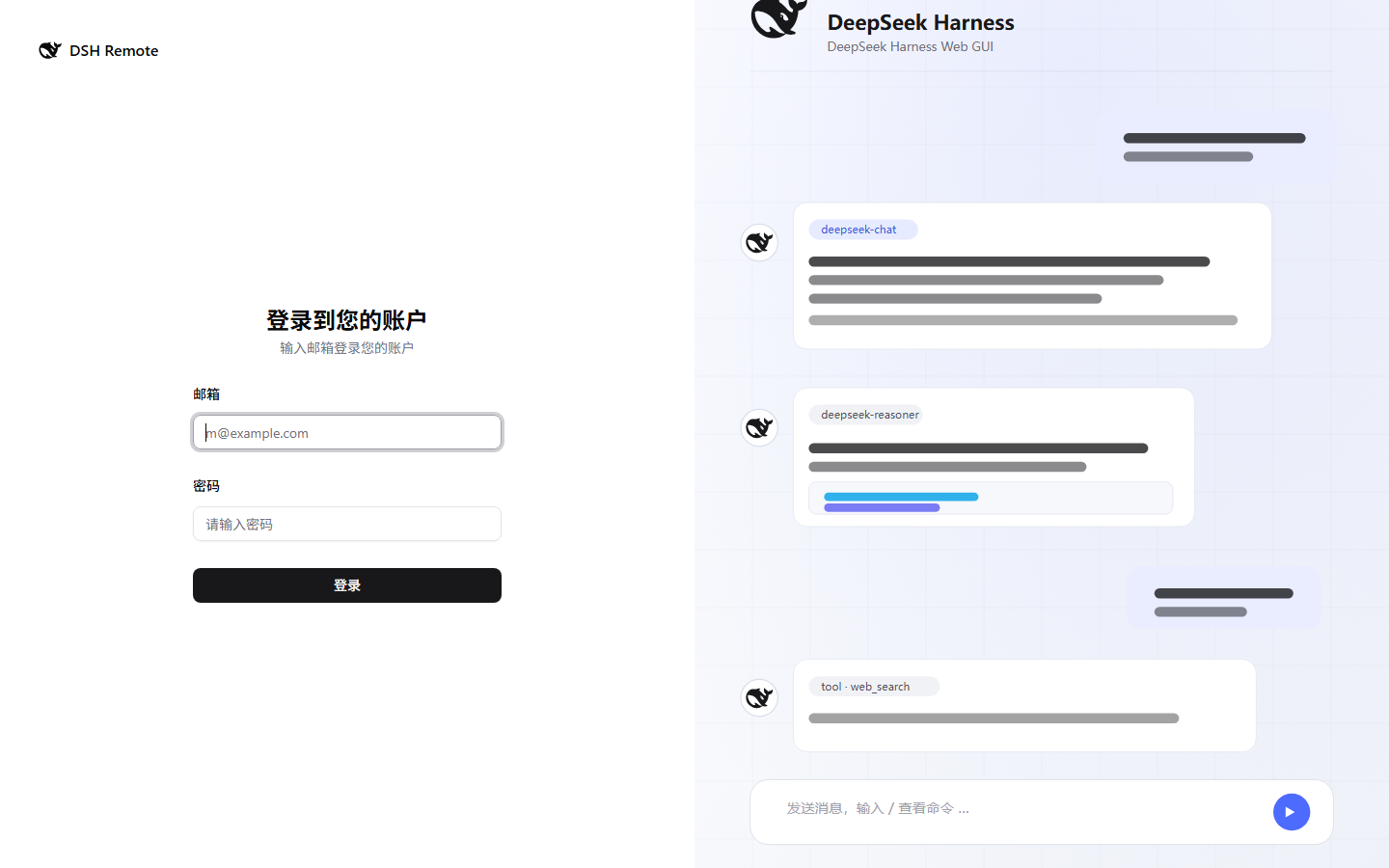 |
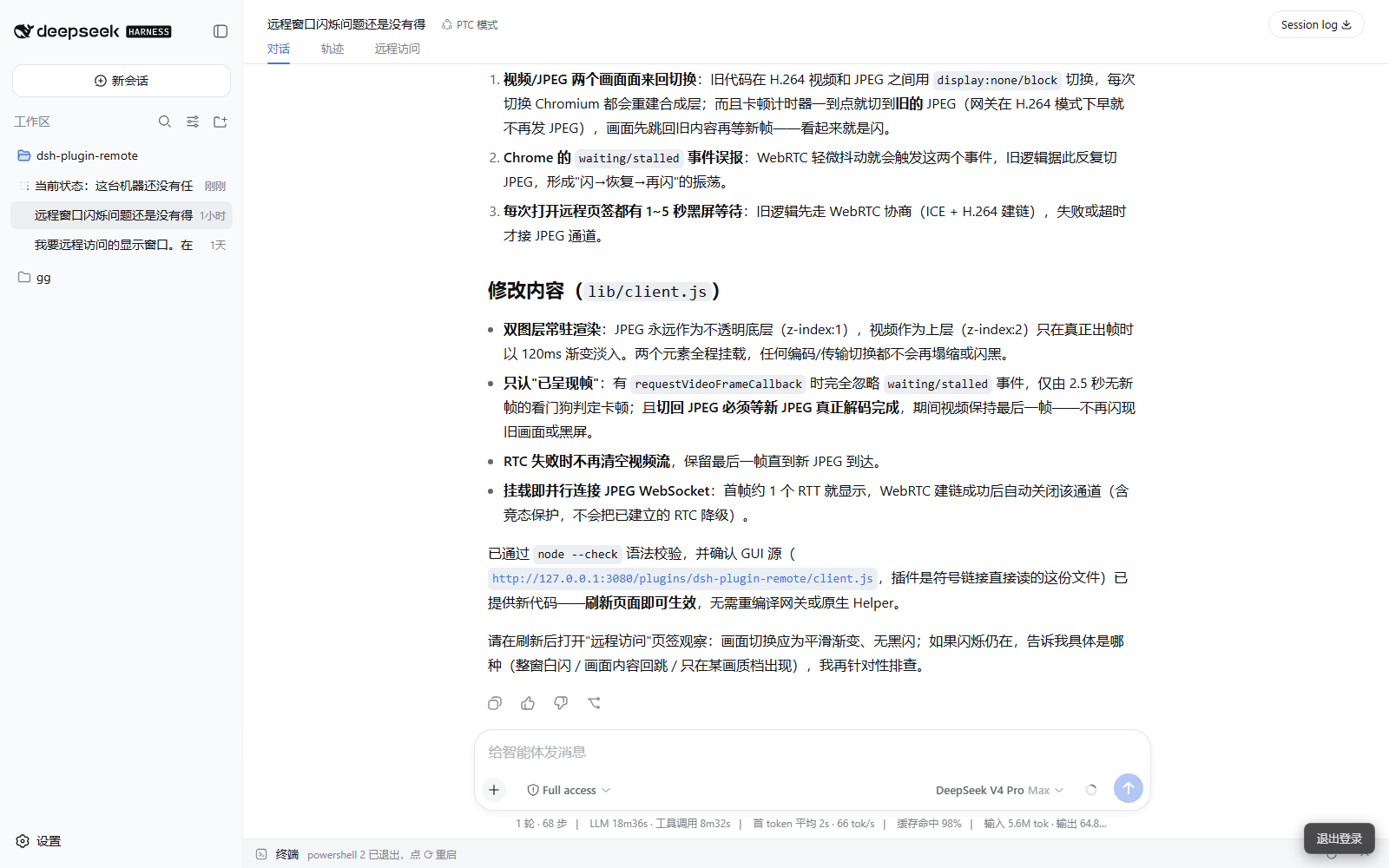 |
| Remote desktop tab | Settings → Remote Access |
|---|---|
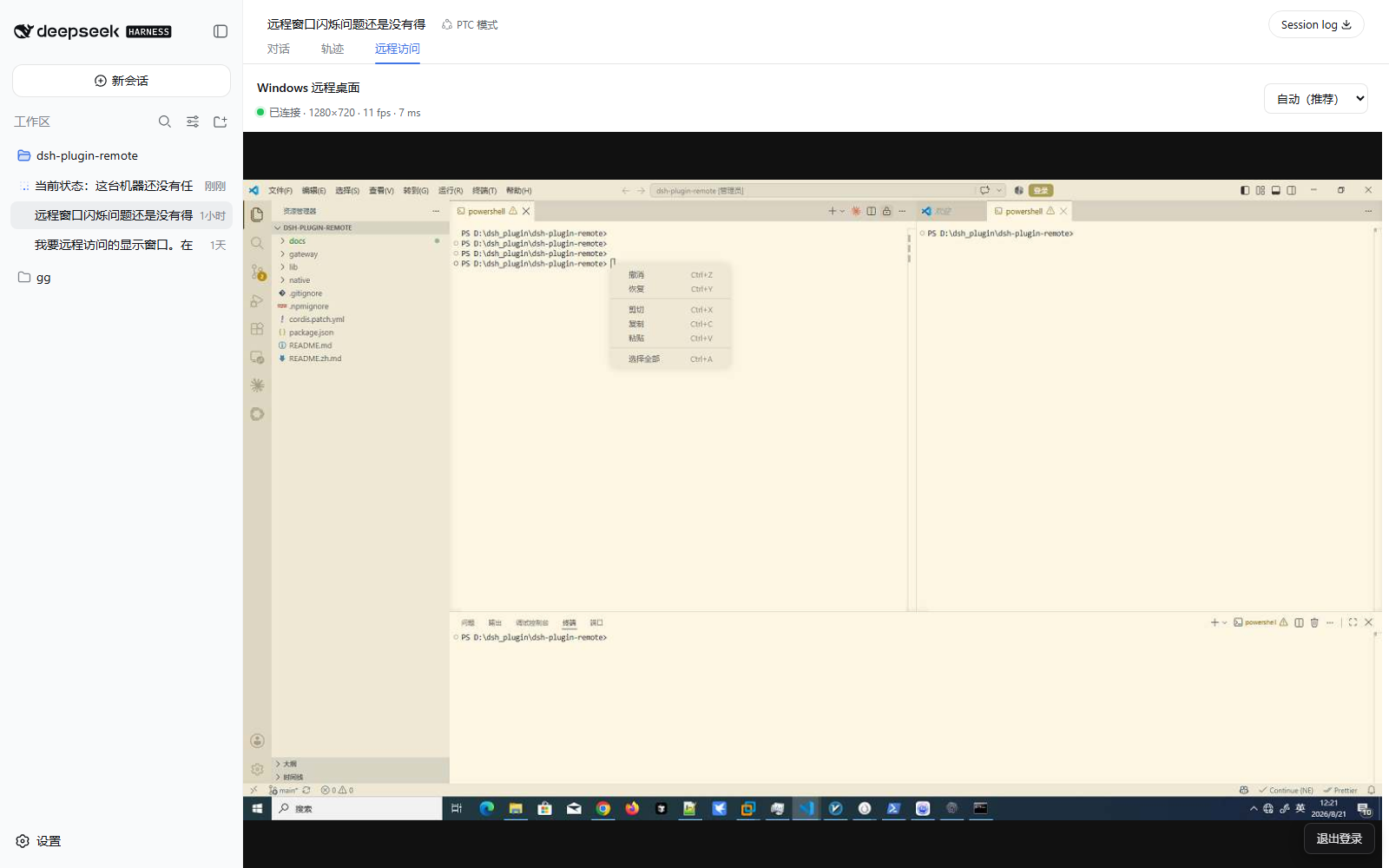 |
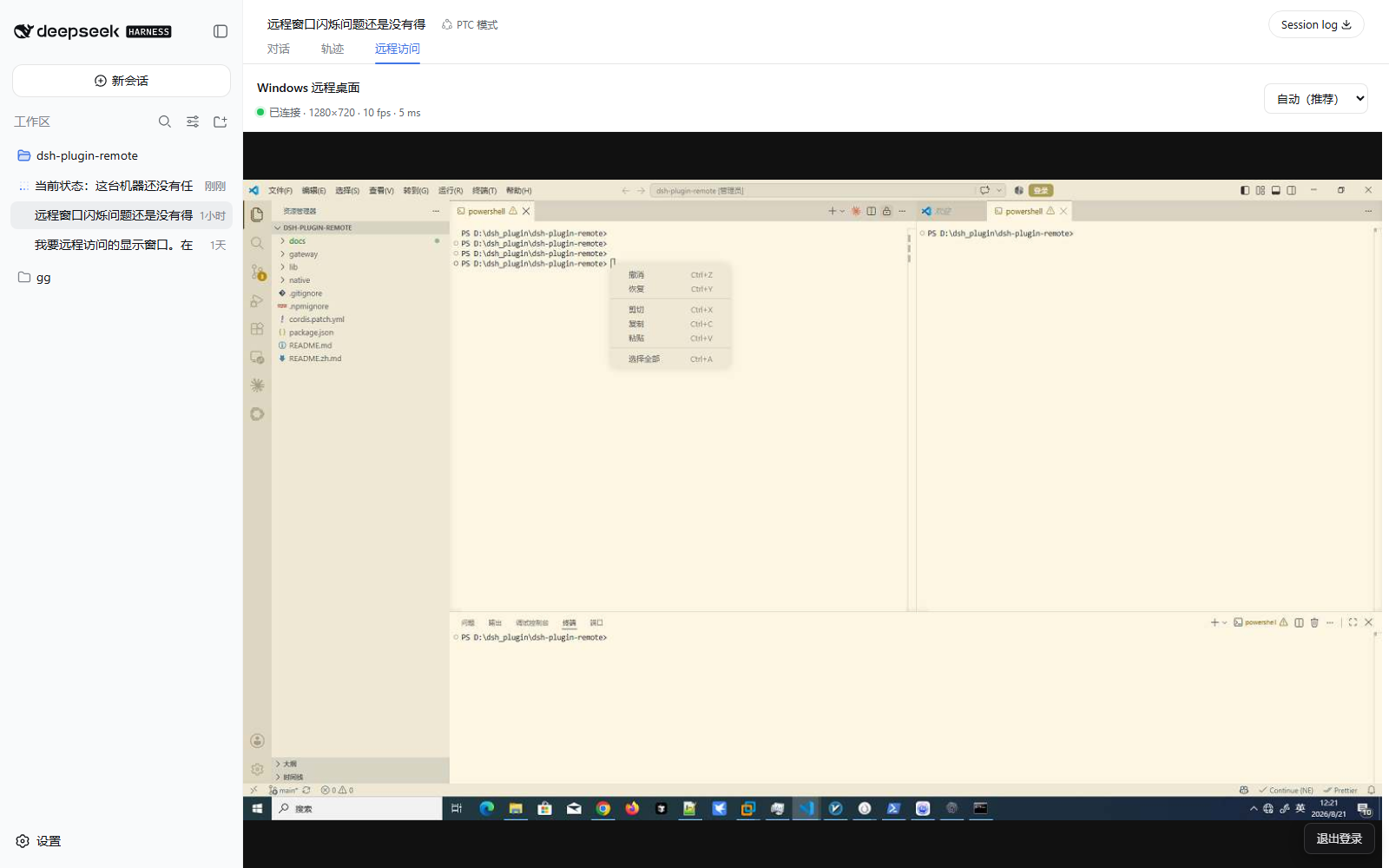 |
Features
- Login-gated remote access: scrypt credentials + HttpOnly session cookie; HTTP/WebSocket reverse proxy with Host/Origin rewriting — no
--trusted-hostneeded - White-themed login page (shadcn/ui, mobile-friendly) with the DeepSeek Harness brand
- Gateway admin API (
/admin/*, session-required), managed in the Settings → 远程访问 section:- Remote-access whitelist (IP / CIDR; loopback always allowed; hot-reloaded)
- Account password changes (old sessions revoked immediately)
- Request log: every request persisted to per-day JSONL shards, download + 1/3/7-day retention rules
- Localized zh/en, follows the GUI language
- Zero-install Windows desktop projection: the plugin starts its bundled x64 native helper automatically; no .NET, FFmpeg, driver, or separate agent installation is required
- Interactive remote desktop as a dedicated 远程访问 tab in the conversation view ring (next to 对话/轨迹), projecting the Windows desktop full-width with pointer input, keyboard input, and weak-network/balanced/sharp quality profiles. The primary WAN transport is WebRTC with independent lossy frame/pointer channels and a reliable control channel; the original WebSocket viewer remains an automatic fallback
- The gateway keeps its custom HTTP/WebSocket plumbing on Node built-ins; the
optional native
node-datachannelpackage provides the WebRTC fast path and the Next.js login app lives insidegateway/
Usage
- Open
http://<server-ip>:4080— the first visit creates the only account - Manage accounts:
node lib/remote-passwd.mjs add|set-password|list|del <username> - Data lives under
$DSH_HOME/plugin-data/dsh-plugin-remote/(users.json,whitelist.json,logs/)
Windows desktop
On Windows 10/11 x64, the plugin launches native/windows-x64/dsh-remote-host.exe
after the gateway becomes ready. It connects back with a random process-local
authentication token that is never written to disk. Only logged-in gateway
users can open the viewer/control channel.
The current Windows helper source has two video paths. After native:build,
the primary path captures BGRA frames, encodes H.264 through Media Foundation,
and sends one access unit into a real WebRTC H.264/RTP track. The browser and
libdatachannel then use the media transport's pacing, congestion feedback,
NACKs, and keyframe requests instead of putting every full frame into a TCP
queue. During startup or when H.264 cannot be decoded, the gateway keeps the
JPEG DataChannel path alive and switches to it automatically; the authenticated
WebSocket viewer is the final compatibility fallback. The package prefers the
dsh-remote-host-h264.exe binary when present and keeps the old exe as a legacy
fallback; npm run native:build refreshes both copies.
Pointer motion and wheel events use a disposable low-latency channel, while keyboard, button transitions, ACKs, and input-reset messages remain ordered and reliable. This prevents stale video from blocking new input on a weak link.
For clients behind symmetric NAT or UDP-restricted networks, configure a TURN
server in the plugin row. The values use the browser RTCConfiguration shape:
{
  rtcIceServers: [
    'stun:stun.example.net:3478',
    { urls: 'turns:turn.example.net:5349', username: 'user', credential: 'secret' },
  ],
}
STUN is useful for direct paths; TURN is the reliable relay fallback. Keep the WebSocket fallback enabled when deploying in environments where UDP policy is unknown.
Windows secure desktops (UAC prompts, sign-in, and locked sessions) cannot be
captured or controlled. Set config.desktop: false to disable projection.
Development verification
npm run native:build
npm run gateway:build
npm run test:desktop
License
MIT
Links
More in this category
zhu1090093659/dsh-web#packages/dsh-remote-web-ui★ 8262
Remote control of a dsh web workspace from phone or PC: QR-code pairing through a token-gated channel, SSE real-time sync, and separate mobile and full desktop GUI modes.
zhu1090093659/dsh-web#packages/dsh-ssh★ 8262
SSH ops panel for DSH: web terminal, SFTP transfer with progress, local port forwarding, and one-command cluster execution across hosts; agents share the same host config.
saya-ch/dsh-mobile★ 350
Access DeepSeek Harness from the Android app or a mobile browser with secure LAN and remote connections, persistent device pairing, and a customizable mobile interface.
ZSeven-W/dsh-ios★ 310
A live iOS Simulator or USB-connected iPhone inside the conversation: 22 agent tools for booting, building, driving the UI by accessibility identity or OCR text, list-row actions and SwiftUI preview hot reload, plus a streaming sidebar panel you can tap and drag on.
liguobao/ds-harness-remote★ 248
Multi-device remote access for DeepSeek Harness: continue an active session from your phone, tablet, browser, or another computer over an end-to-end encrypted channel (Noise IK + adaptive relay/WebRTC transport), with device authorization, ApiProxy-only remote capabilities, and read-only file preview via dsh-file-viewer — no shell, remote desktop, or write access.
wenbin-wb/dsh-bridge★ 179
Remote and mobile access for DeepSeek Harness: provides LAN QR code connection, Cloudflare/custom tunnels, WeChat, QQ, Feishu, Telegram bot integration, and security authentication.
Community comments
Comments are public GitHub Discussions. Loading them connects to GitHub and Giscus; a GitHub account is required to post.