Collapses each settled turn's process rows into one expandable disclosure in the DeepSeek Harness Web conversation while keeping the final answer visible.
Install
# from npm (prebuilt)
dsh plugin --profile web add dsh-conversation-process-collapse
# from GitHub (first run asks for allowBuilds approval — follow the hint, retry)
dsh plugin --profile web add github:shimingming520/dsh-conversation-process-collapse
Any plugin you install runs third-party code with your own permissions — it can read your files, use your credentials, and reach the network, and tool approvals don’t sandbox it. GitHub-sourced plugins also run build scripts at install time — pnpm blocks those until you allow them, so an install can stop with ERR_PNPM_GIT_DEP_PREPARE_NOT_ALLOWED or ERR_PNPM_IGNORED_BUILDS; dsh prints the exact key to add under allowBuilds in your profile’s pnpm-workspace.yaml, and the install works on the next run. Allowing a build is a trust decision: only install sources you trust, and pin a commit (github:owner/repo#sha).
README
English | 中文
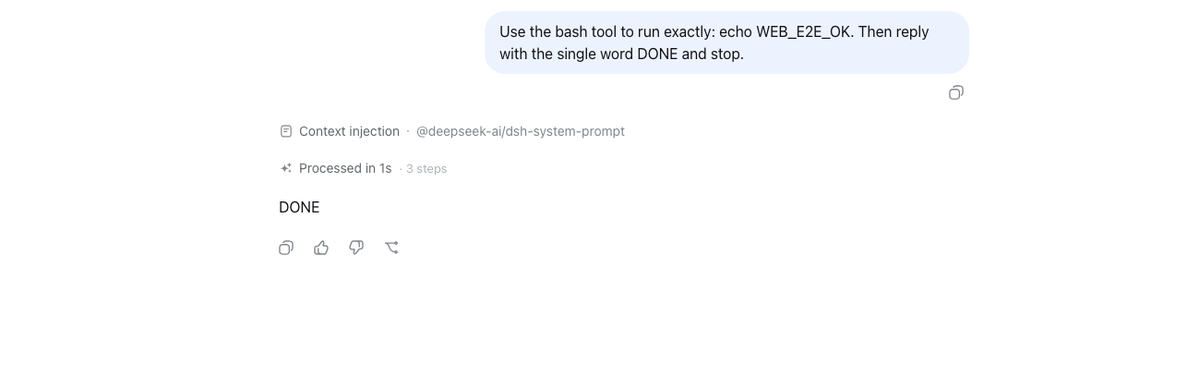
Settled-turn process folding for the Web conversation: once a turn closes, every process row — intermediate narration, Think rows, tool cards, retry status, workflow runs — collapses at the DOM layer into one expandable disclosure (Processed in {duration} · {n} steps, duration omitted when a boundary is out of the window) at the turn's first process position, while the closing content message and the turn-tail stay visible. Reasoning inside the final answer is also hidden with the group; its visible text remains. A turn folds only when it is closed AND has a content-bearing assistant step — tool-only turns and live streaming keep the plain flow, so an answer or the running progress is never hidden.
The DOM version currently focuses on process-row folding while keeping the final answer visible. The earlier React-slot feature that promotes generated images beside the final answer has not yet been ported to the DOM implementation and can be added later as an enhancement.
The implementation is a pure frontend DOM plugin: it watches [data-chat-flow], recognizes closed turns, and collapses process rows into an expandable disclosure while keeping the final answer visible. It does not require the unmerged conversation.chat.processGroup extension point, a profile override, or a fork of the official conversation package.
Install / Update as a standalone plugin
The package ships an installable bundle declaration (dsh.bundle.patch +
cordis.patch.yml), so it installs from any
DeepSeek Harness installation exactly like any profile plugin:
dsh plugin --profile web add dsh-conversation-process-collapse
# update
dsh plugin --profile web update 'dsh-conversation-process-collapse@latest'
The npm package name is dsh-conversation-process-collapse; it is both the
profile bundle row and the browser client package.
The command is a pnpm forwarder over the profile directory; it then reconciles
the profile's bundle layer stack, so the plugin joins dsh web without a
build step.
No override is needed. After installing, restart dsh web and hard-refresh
the browser (Cmd / Ctrl + Shift + R) to load the new client bundle.
After install
After adding the package and restarting dsh web, settled turns in the Web conversation collapse their process rows into one disclosure header while the final answer stays visible:
If the plugin manager marks an unrelated npm package as “installed, not active” (inert), that is normal: only packages declaring dsh.bundle metadata enter the profile bundle layer and become profile plugins. This package declares dsh.bundle; after installing it, restart the DSH process and hard-refresh the browser (Cmd / Ctrl + Shift + R) so the new bundle layer is loaded.
Model Experience
None, as this package folds already-rendered conversation rows in the browser without altering model requests, Tool execution, or session events.
KV Cache effect
None; this package neither assembles nor sends a provider request.
Known Limitations and Deferred Work
- Expansion state is not persisted — the open/closed state lives in memory, so switching conversation tabs or reloading the page returns each group to its collapsed default.
- The DOM pass runs on the rendered flow only — the plugin can only see messages already mounted in the page; unloaded history boundaries are not folded until paging brings them in.
Links
More in this category
zhu1090093659/dsh-web#packages/dsh-task-board★ 8670
Task board for the dsh web GUI: a sidebar multi-column kanban whose cards run in real DSH agent sessions and can also be scheduled with cron expressions, executed host-side even with the browser closed.
zhu1090093659/dsh-web#packages/dsh-web-all★ 8670
Plugin and skin collection for the DSH Web UI: task board, Git graph, right-side panel, remote mobile UI, pet, live token stats, and a skin center.
MeteorNOX/DeepSeek-Balance-Whale-Widget★ 4631
A fixed-corner whale widget for the DSH web GUI — balance, today's usage and per-turn cost with peak/off-peak pricing, editable balance-alert and daily-budget bubbles, a module-based custom bubble queue with A/B weighted choices and random lines or images, 30+ vendor templates (OpenAI, OpenRouter, Kimi, SiliconFlow, Ark, Zhipu, MiniMax and more) with per-model balance and subscription quota, plus task-end sound, imported audio, custom roles and a resource manager. Local-only, no telemetry.
ccch1mneyyy/dsh-TUI★ 4484
Claude Code-style full-screen terminal UI: pixel-whale header, live status line, and streaming thought expansion.
omdsh-dev/DSH-better-sidebar★ 4133
Full sidebar workbench with file rendering and editing, terminal, Git, and subagents; third-party plugins can register new tabs.
Devin-AXIS/deepseek-design#deepseek-idesign★ 1453
Visual design studio for websites, app prototypes, posters, cards, reports, and magazines, with templates, direct element editing, selection-aware AI draft handoff, and export.
Community comments
Comments are public GitHub Discussions. Loading them connects to GitHub and Giscus; a GitHub account is required to post.