Agent2Agent protocol v1.0 for DSH: run a standard A2A server to let other agents call this instance, connect to remote A2A agents as clients, and manage both from a visual settings page.
Install
# from npm (prebuilt)
dsh plugin --profile web add @ryubyte/dsh-a2a
# from GitHub (first run asks for allowBuilds approval — follow the hint, retry)
dsh plugin --profile web add github:ryubyte/dsh-a2a
Any plugin you install runs third-party code with your own permissions — it can read your files, use your credentials, and reach the network, and tool approvals don’t sandbox it. GitHub-sourced plugins also run build scripts at install time — pnpm blocks those until you allow them, so an install can stop with ERR_PNPM_GIT_DEP_PREPARE_NOT_ALLOWED or ERR_PNPM_IGNORED_BUILDS; dsh prints the exact key to add under allowBuilds in your profile’s pnpm-workspace.yaml, and the install works on the next run. Allowing a build is a trust decision: only install sources you trust, and pin a commit (github:owner/repo#sha).
README
中文文档 | English
A DeepSeek Harness (DSH) plugin that implements the Agent2Agent (A2A) Protocol v1.0 (Linux Foundation, a2aproject/A2A, Apache-2.0).
It turns a DSH instance into a full A2A peer in both directions:
- Client mode (outbound) — discover a remote agent via its AgentCard, map each skill to a DSH model tool (
a2a__<name>__<skill>), and execute remote tasks through A2A JSON-RPC. - Server mode (inbound) — expose this DSH to other agents:
/.well-known/agent-card.jsonplus a JSON-RPC endpoint (SendMessage,GetTask,ListTasks,CancelTask,SendStreamingMessageover SSE) on the DSH webserver.
Installation
Install into a profile with one command and restart:
dsh plugin --profile web add @ryubyte/dsh-a2a
dsh --profile web
dsh plugin installs the package into the profile and auto-registers the
plugin layer (this package declares dsh.bundle.patch in package.json) — no
manual configuration is needed.
Screenshots
| Connected agents (this DSH as a client) | Public service (this DSH as an agent) |
|---|---|
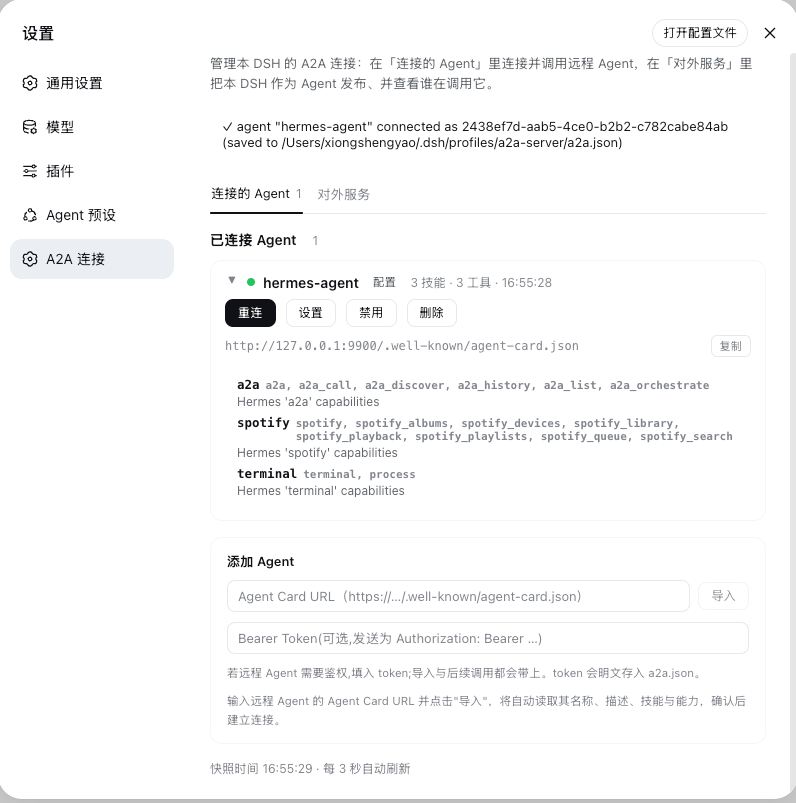 |
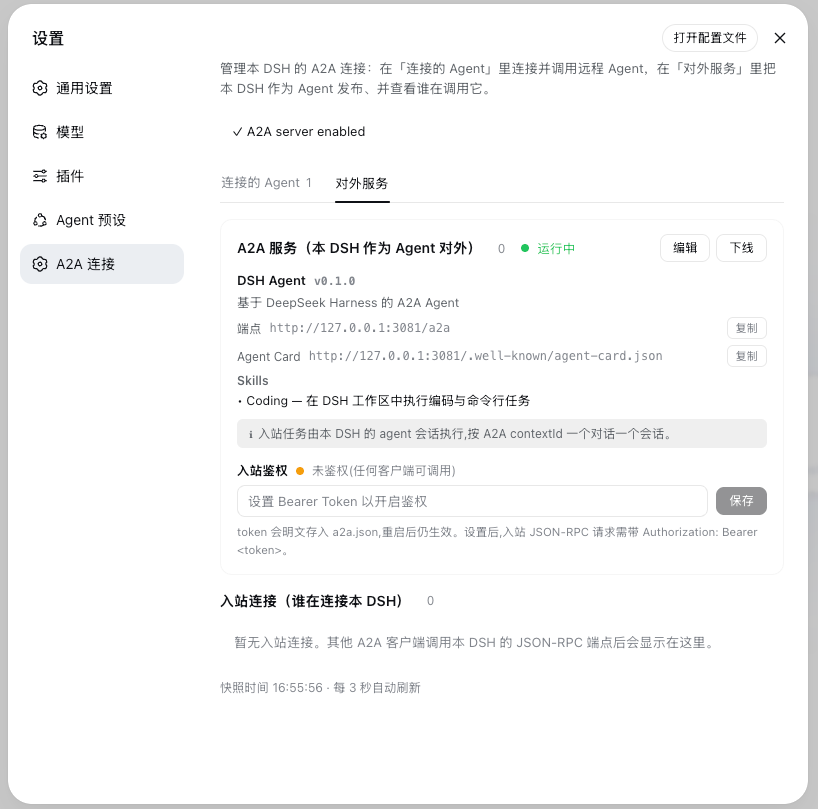 |
Features
Protocol surface (A2A v1.0)
- Discovery:
GET /.well-known/agent-card.json(well-known first, configured URL fallback) - Unary:
SendMessage,GetTask,ListTasks,CancelTask,GetExtendedAgentCard - Streaming:
SendStreamingMessage(SSE) /SubscribeToTask, withTaskStatusUpdateEvent+TaskArtifactUpdateEvent - Task lifecycle:
SUBMITTED → WORKING → COMPLETED / FAILED / CANCELED / REJECTED / INPUT_REQUIRED / AUTH_REQUIRED - Auth: outbound sends a per-agent Bearer token (
Authorization: Bearer …); inbound can protect the endpoint with a shared Bearer token — when set, the AgentCard declares abearerAuthscheme and requests without/with a wrong token get 401 (both unary calls and the SSE stream) - Types:
Task,Message,Part(text/raw/url/data),Artifact,AgentCard, security schemes, extensions
Connection dashboard (设置 → A2A 连接)
The panel is split into two tabs by role, and everything is configurable in the UI — no need to hand-edit a2a.json:
"Connected agents" (this DSH as a client, outbound)
- Lists connected remote agents (name, connection state, AgentCard URL, skill/tool counts, last activity); expand to see each skill's name/tags/description. Each agent has Reconnect / Settings / Disable / Delete controls (a disabled agent shows as a greyed-out placeholder card whose control becomes Enable).
- Settings — edit that agent's timeout (timeoutMs), skill mapping (mapSkills), and Bearer token in place; saving reconnects with the new config to apply it.
- Add agent — enter an AgentCard URL (optional Bearer token) → "Import" to preview the remote name/description/skills → "Connect". Config is written back to
a2a.json.
"Public service" (this DSH as an agent, inbound)
- Visual identity editing — read-only view of the service name/description/version, endpoint, Agent Card URL (one-click copy) and Skills; click "Edit" to change these fields in place and fully add/edit/remove Skills, saving rebuilds the AgentCard immediately (no restart).
- Guided setup — on a fresh install (no
a2a.json), this tab shows a form pre-filled with sensible defaults; tweak as needed and click "Create & go online" to publish the service — one step generatesa2a.jsonand starts serving. - Online / offline toggle; shows who executes inbound tasks (custom executor / this DSH's agent session / none).
- Inbound auth — set or clear the shared Bearer token that gates the endpoint (persisted to
a2a.json, effective immediately). - Inbound peers — who is calling this DSH (label, source address, first/last seen, task count, streaming flag), with a close control.
- The panel refreshes every 3 s;
/a2a/apiserves a JSON snapshot and control endpoints, fenced to loopback/same-origin (the token value is never returned in the snapshot — only whether one is configured).
Runtime configuration (a2a.json)
Configuration is driven by a2a.json (per profile, fully manageable from the
UI) — manage agents and the public service without touching the composition. The
file is resolved from the active profile, not the launch directory: the plugin
parses --profile <name> from the process command line (the dsh web alias is
recognized as the web profile too) and reads/writes
~/.dsh/profiles/<name>/a2a.json — configs the UI generates on first use also
land in that profile directory, so they are read no matter which working
directory you launch from. Hand-writing a2a.json is still supported (below),
but a new user can do everything through the UI.
Usage
1. Configure a remote agent (outbound)
Declare agents to connect to in the profile's a2a.json:
{
  "agents": [
    {
      "name": "research",
      "agentCardUrl": "https://research.example.com/.well-known/agent-card.json",
      // "bearerToken": "...",
      // "timeoutMs": 8000,
      // "mapSkills": true,
      // "enabled": false        // keep the entry, but don't auto-connect
    }
  ]
}
Alternatively, in the Web GUI go to 设置 → A2A 连接 → "Connected agents" → Add
agent, paste an AgentCard URL to import and connect — the config is written back
to a2a.json. After connecting, the agent's "Settings" lets you adjust its
timeout, skill mapping, and token.
Once connected, the remote agent's skills appear as model tools:
a2a__<name>__<skill>.
A local agent session's repeated tool calls to a given remote agent reuse one
A2A contextId, so they land in the same remote session with cross-turn memory;
different local sessions are isolated into separate conversations.
2. Expose this DSH as an A2A agent (inbound)
Recommended: use the UI. Open 设置 → A2A 连接 → "Public service"; a fresh install shows a pre-filled form — tweak a few fields and click "Create & go online". No hand-written JSON required. The config below is the equivalent for reference or scripted deployment.
Or enable server mode manually in a2a.json:
{
  "mode": "server",
  "server": {
    "enabled": true,             // explicitly turn the inbound server on
    // "baseUrl": omit to auto-infer (see below); set only behind a proxy / public domain
    "agentName": "My DSH Agent",
    "agentDescription": "A DSH agent over A2A v1.0",
    "agentVersion": "0.1.0",
    "skills": [
      { "id": "coding", "name": "Coding", "description": "Execute coding and shell tasks.", "tags": ["coding", "shell"] }
    ]
  }
}
When baseUrl is left empty (or cleared in the UI), the AgentCard auto-infers the webServer's real listen address, so it never advertises a stale port; set it explicitly only when this DSH sits behind a reverse proxy or public domain whose external address differs from the local listener.
About
mode:mode(client/server/both) selects which half mounts at startup, defaulting toclient. It is optional —server.enabled: trueor the presence ofagentsturns on the respective half, so ana2a.jsongenerated through the UI usually omitsmodeand relies on those fields. Writingmodeby hand is clearer but equivalent.
Other A2A clients discover this DSH via the auto-inferred
http://<host>:<port>/.well-known/agent-card.json and call the /a2a endpoint.
Who executes an inbound task (executor precedence)
On each inbound task the server picks an executor in this order:
- Explicit
execute(injected via composition config) — yours wins. - This DSH's own agent session (the default, when an agent loop is
present) — one session per A2A
contextId: the first task for a contextctx.agents.create()s a session (later tasks for the same context reuse it, so history accumulates; a restarted processresumes it on demand), sends the message as anext-turnwaking item, awaitswhenIdle(), and takes the latest assistant reply as the A2A artifact. Concurrent tasks for one context are serialized; distinct contexts run in parallel. Sessions are not disposed per task (that would defeat context accumulation) — all are disposed on plugin unload/disable. Turning on server mode is enough — no code. notConfiguredExecutor(fallback) — when nothing is injected and no usable agent loop is composed (e.g. a bare dsh-base profile), it returns "no executor configured — inject one" and runs nothing.
On "present":
ctx.agents(the registry) existing ≠ being able to create an agent.create()needs a factory registered by an agent-loop plugin; without itcreate()rejects and the DSH agent executor surfaces that as a readable error rather than throwing. So a minimal profile still needs an explicit executor.Session ↔ cwd: a DSH session validates
cwdas an absolute path and freezes it into the session header at creation. Inbound sessions use a dedicated cwd<profile>/.a2a-sessions(kept separate from the profile root so they don't crowd your interactive sessions). They appear in the session list's "Ungrouped" bucket, each namedA2A: <first-prompt summary>(inbound messages carry a plugin source, which DSH's automatic titling ignores, so we name it explicitly). Naming is cosmetic — failures are logged, never failing the task.Cancellation:
CancelTaskaborts the running task's executor signal, actually stopping the agent turn (not just flipping task status).For local testing you may still pass
shellExecutor, which runs the prompt as a/bin/sh -ccommand — trusted clients only. For production put a TLS reverse proxy in front and setauthTokenas needed.
Directory structure
src/
  protocol.ts        # A2A v1.0 types & constants
  card.ts            # AgentCard discovery / validation
  jsonrpc.ts         # JSON-RPC 2.0 + SSE transport
  client.ts          # outbound client (A2AClient)
  server.ts          # inbound server + TaskStore (A2AServer)
  outbound.ts        # skill → model-tool bridge (registerAgentTools)
  dashboard.ts       # connection registry + control
  a2a-config.ts      # runtime a2a.json parsing / persistence
  index.ts           # Cordis plugin entry (client / server modes)
  client/
    index.ts         # browser half: settings "A2A 连接" panel
lib/                 # build output (index.js + client.js + types/)
scripts/
  build-client.mjs   # wrap client bundle (__ModuleLoader__)
  capture-shots.mjs  # README screenshot capture (headless Chrome + CDP)
cordis.patch.yml     # plugin registration row (self-mounted bundle)
package.json         # dsh.bundle.patch + dsh.client manifest
How it works
- The plugin reads
ctx.webServerandctx.toolsas context properties insidectx.inject(...)/ctx.effect(...)— the native Cordis pattern used by DSH bundles (dsh-client-hmr, …). A composition missing either half simply idles that half; nothing crashes. baseUrlis optional in server mode: when omitted the AgentCard advertises the webserver's real listen address, so ephemeral ports never publish a stale URL. When bound to127.0.0.1that loopback address is advertised; when bound to0.0.0.0the plugin derives the machine's LAN address (reachable by remote Agents), falling back to127.0.0.1only when none exists. Set it explicitly only when a reverse proxy fronts the instance.- Client-mode connection lifecycle hooks (
onReady/onDispose) feed a process-wide shared registry; multiple instances (client + server) share it, and/a2a/apiis registered once per process. - All registrations are fiber-scoped: Cordis disposes them on plugin stop/update.
- Disabled agents (
enabled: false) show as grayed-out placeholder cards and are not reconnected on restart until re-enabled.
Known limitations
- The dashboard API (
/a2a/api) listens on loopback / same-origin only; it carries no secrets and exists for operator visibility. - Inbound execution follows the executor precedence:
with an agent loop present it defaults to this DSH's own cwd-bound
session; otherwise (and with nothing injected) it refuses and returns
"no executor configured".
shellExecutoris local-testing only. Whatever the executor, never expose server mode to untrusted networks (no auth by default unless you setauthToken). - The A2A spec requires HTTPS for production
AgentInterface.url; DSH's webserver binds loopback by default, so put a TLS reverse proxy in front before exposing beyond localhost. - Bearer tokens — both the outbound per-agent token and the inbound endpoint
authToken— are stored in plaintext ina2a.json; secure the file yourself.
Links
More in this category
yjh051108/dsh-routing-suite★ 7000
One repository, three parts: a runtime injector for DSH plugin packages (inject, hot-reload, unload, promote a dev staging tool to the front, route self-heal, plus a settings-page plugin manager that lists, unloads and drags folders in to internalize), a task-aware reasoning-mode router agent preset (router-standard / router-spec / router-react), and a graded two-level task protocol whose six tools (commit_star, lock_stage, revise_do, edit_plan, mark_task, redteam_verdict) pin task state to disk. The injector implementation ships in-tree, so the install carries its own behaviour rather than a dependency list.
strukto-ai/mirage#dsh★ 3678
Swaps the filesystem and bash providers for a mirage virtual workspace: file tools and shell commands run over mounted resources (RAM, S3, Redis, Slack, Gmail, Notion, Postgres) instead of the host disk, with per-mount read/write/exec modes, per-command sandbox routing (monty, pyodide, quickjs in process; docker, e2b, daytona remote), and installed CLIs (git, gh, slack, linear, ntn, gws, or one you register) as head words in the virtual terminal.
hust-open-atom-club/oh-dsh★ 324
Community distribution: TUI, desktop, and Web UI as one bundle with layered installation.
weijiafu14/pi2dsh★ 212
Pi Host ABI compatibility engine: after one install, unmodified Pi extensions from npm mount as native DSH plugins with `dsh plugin add <pi-package>`. Verified end to end on stock DSH with pi-mcp-adapter (full MCP manager: OAuth, resources, prompts, MCP Apps, elicitation, sampling), @tintinweb/pi-subagents, pi-code, pi-hermes-memory and pi-background-tasks; `pi2dsh inspect` reports a package's compatibility before installing.
Fishquito7/dsh-skill-mcp-panel★ 175
Manages DSH skills and MCP servers from the web settings: skill cards with hot enable/disable, workspace scopes, groups, batch migration and drag-and-drop import, plus stdio/HTTP MCP CRUD with connection tests, secret redaction and the unified dsh-panel CLI.
lire1131/dsh-undo-savepoint★ 172
Undo/redo & rollback system for DSH: every config change is auto-snapshotted; undo/redo/restore to any version from the WebUI or the offline CLI/GUI tools (works even when DSH fails to boot).
Community comments
Comments are public GitHub Discussions. Loading them connects to GitHub and Giscus; a GitHub account is required to post.