View tab manager for the DeepSeek Harness Web GUI session header: enable, hide, reorder and rename the conversation view tabs (Chat / Trajectory), with locale-aware zh/en copy and npm update reminders.
Install
# from npm (prebuilt)
dsh plugin --profile web add dsh-view-manager
# from GitHub (first run asks for allowBuilds approval — follow the hint, retry)
dsh plugin --profile web add github:runcat-tommy/dsh-view-manager
Any plugin you install runs third-party code with your own permissions — it can read your files, use your credentials, and reach the network, and tool approvals don’t sandbox it. GitHub-sourced plugins also run build scripts at install time — pnpm blocks those until you allow them, so an install can stop with ERR_PNPM_GIT_DEP_PREPARE_NOT_ALLOWED or ERR_PNPM_IGNORED_BUILDS; dsh prints the exact key to add under allowBuilds in your profile’s pnpm-workspace.yaml, and the install works on the next run. Allowing a build is a trust decision: only install sources you trust, and pin a commit (github:owner/repo#sha).
README
Manage the view tabs in the DeepSeek Harness Web GUI session header — the
tabs contributed through the conversation.view slot (e.g. Chat / 对话,
Trajectory / 轨迹, and any future view plugins).
| English | 简体中文 |
|---|
Features
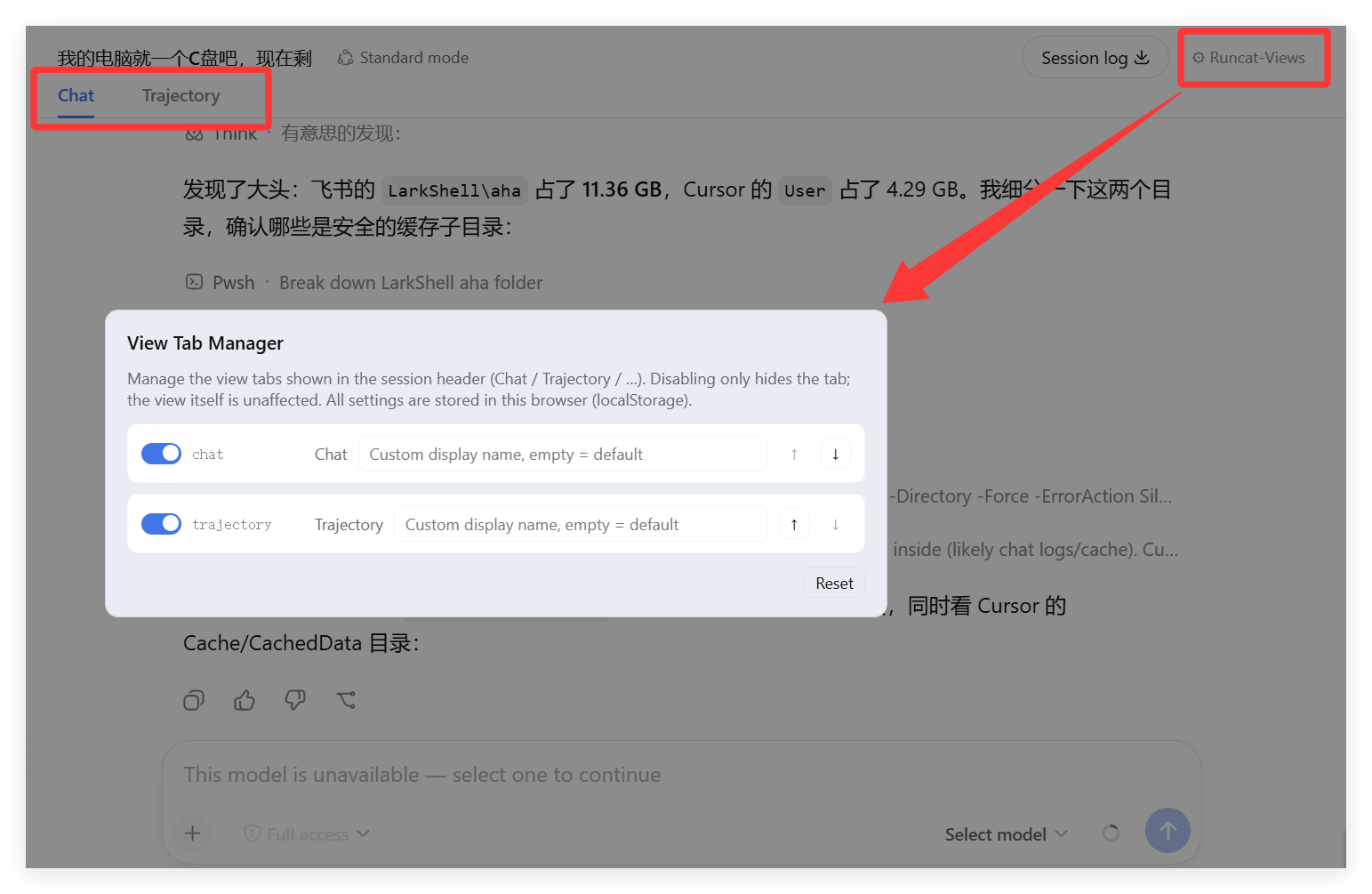
- Enable / disable: disabling a view tab hides its label in the session header (the view itself keeps working)
- Reorder: move tabs up/down to change their display order
- Rename: set a custom display label (empty restores the default)
- Locale-aware: plugin copy follows the DSH UI language (zh / en)
- Local storage: configuration lives in browser localStorage and applies immediately — no restart needed
- Update reminders: automatically detects newer versions on npm; a red badge on the button plus an update card in the panel — with "Update now / Ignore this version / Later"
Preview
Install
Option 1: install from npm (recommended):
dsh plugin --profile web add dsh-view-manager
Option 2: install from GitHub:
dsh plugin --profile web add github:runcat-tommy/dsh-view-manager
Option 3: local development — clone this repo, then run from inside the project folder:
cd dsh-view-manager
dsh plugin --profile web add .
Restart the Web UI after installing, then open any session — a ⚙ Runcat-Views button appears at the far right of the session header.
Usage
- Open a session (Chat or Trajectory)
- Click ⚙ Runcat-Views at the far right of the session header
- Each view gets one row:
- Toggle: enable / disable (disabled = tab hidden)
Original: the default label (follows the UI language)- Input: custom display name (empty restores default)
- ↑ / ↓: reorder
- Reset: clear all custom configuration
Update reminders
- When a new version is found, a red badge appears on the button; hover to see the version number
- An update card shows at the top of the panel:
- Update now → confirm the command → run the update → verify the version → prompt to restart the Web UI
- Ignore this version → stop reminding for that version (restore via "Restore reminder" in the card)
- Later → collapse the card
- In local development mode (link/file source) the update button is disabled automatically
How it works
- Data source matches the host:
slots.entries("conversation.view")(same asviewTabs()), so every current view registration is visible - The host renders tabs with no hide/reorder/rename extension point, so this
plugin applies its configuration at the DOM layer: buttons inside
[role="tablist"]are aligned to the entries order; hiding usesdisplay:none, reordering uses flexorder, renaming rewritestextContent; a MutationObserver re-applies after React re-renders - The management entry mounts on
conversation.session.header.utilities(list/session) - Copy is registered through the
localeservice (namespaceviewManager) and follows the DSH language - Update detection: the node half exposes
/view-manager-api/version | check-update | update(loopback-trusted), comparing the npm registry against the local version; after updating, the local version is re-read and verified instead of trusting the exit code
Development
dsh-view-manager/
├── package.json          # dsh.bundle.patch + dsh.client declarations
├── cordis.patch.yml      # profile-layer bundle patch
├── lib/
│   ├── index.js          # node half: update check/run API routes
│   └── client.js         # browser half: manager panel + DOM apply + update card
Local debugging (hot reload needs the dev:web build; otherwise restart the Web UI after changes):
dsh plugin --profile web add file:./dsh-view-manager
License
MIT
Links
More in this category
zhu1090093659/dsh-web#packages/dsh-task-board★ 9796
Task board for the dsh web GUI: a sidebar multi-column kanban whose cards run in real DSH agent sessions and can also be scheduled with cron expressions, executed host-side even with the browser closed.
zhu1090093659/dsh-web#packages/dsh-web-all★ 9796
Plugin and skin collection for the DSH Web UI: task board, Git graph, right-side panel, remote mobile UI, pet, live token stats, and a skin center.
MeteorNOX/DeepSeek-Balance-Whale-Widget★ 6532
A fixed-corner whale widget for the DSH web GUI — balance, today's usage and per-turn cost with peak/off-peak pricing, editable balance-alert and daily-budget bubbles, a module-based custom bubble queue with A/B weighted choices and random lines or images, 30+ vendor templates (OpenAI, OpenRouter, Kimi, SiliconFlow, Ark, Zhipu, MiniMax and more) with per-model balance and subscription quota, plus task-end sound, imported audio, custom roles and a resource manager. Local-only, no telemetry.
ccch1mneyyy/dsh-TUI★ 6206
Claude Code-style full-screen terminal UI: pixel-whale header, live status line, and streaming thought expansion.
omdsh-dev/DSH-better-sidebar★ 4738
Full sidebar workbench with file rendering and editing, terminal, Git, and subagents; third-party plugins can register new tabs.
Devin-AXIS/deepseek-design#deepseek-idesign★ 1632
Visual design studio for websites, app prototypes, posters, cards, reports, and magazines, with templates, direct element editing, selection-aware AI draft handoff, and export.
Community comments
Comments are public GitHub Discussions. Loading them connects to GitHub and Giscus; a GitHub account is required to post.