Plugin inventory manager for DeepSeek Harness Web: table view of installed plugins with status filters, enable/disable switches applied via HMR, config viewer/copy, uninstall and npm update reminders.
Install
# from npm (prebuilt)
dsh plugin --profile web add dsh-plugin-runcat-inventory
# from GitHub (first run asks for allowBuilds approval — follow the hint, retry)
dsh plugin --profile web add github:runcat-tommy/dsh-plugin-runcat-inventory
Any plugin you install runs third-party code with your own permissions — it can read your files, use your credentials, and reach the network, and tool approvals don’t sandbox it. GitHub-sourced plugins also run build scripts at install time — pnpm blocks those until you allow them, so an install can stop with ERR_PNPM_GIT_DEP_PREPARE_NOT_ALLOWED or ERR_PNPM_IGNORED_BUILDS; dsh prints the exact key to add under allowBuilds in your profile’s pnpm-workspace.yaml, and the install works on the next run. Allowing a build is a trust decision: only install sources you trust, and pin a commit (github:owner/repo#sha).
README
中文 | English
Version: v1.3.2 · Changelog: CHANGELOG.en.md (中文)
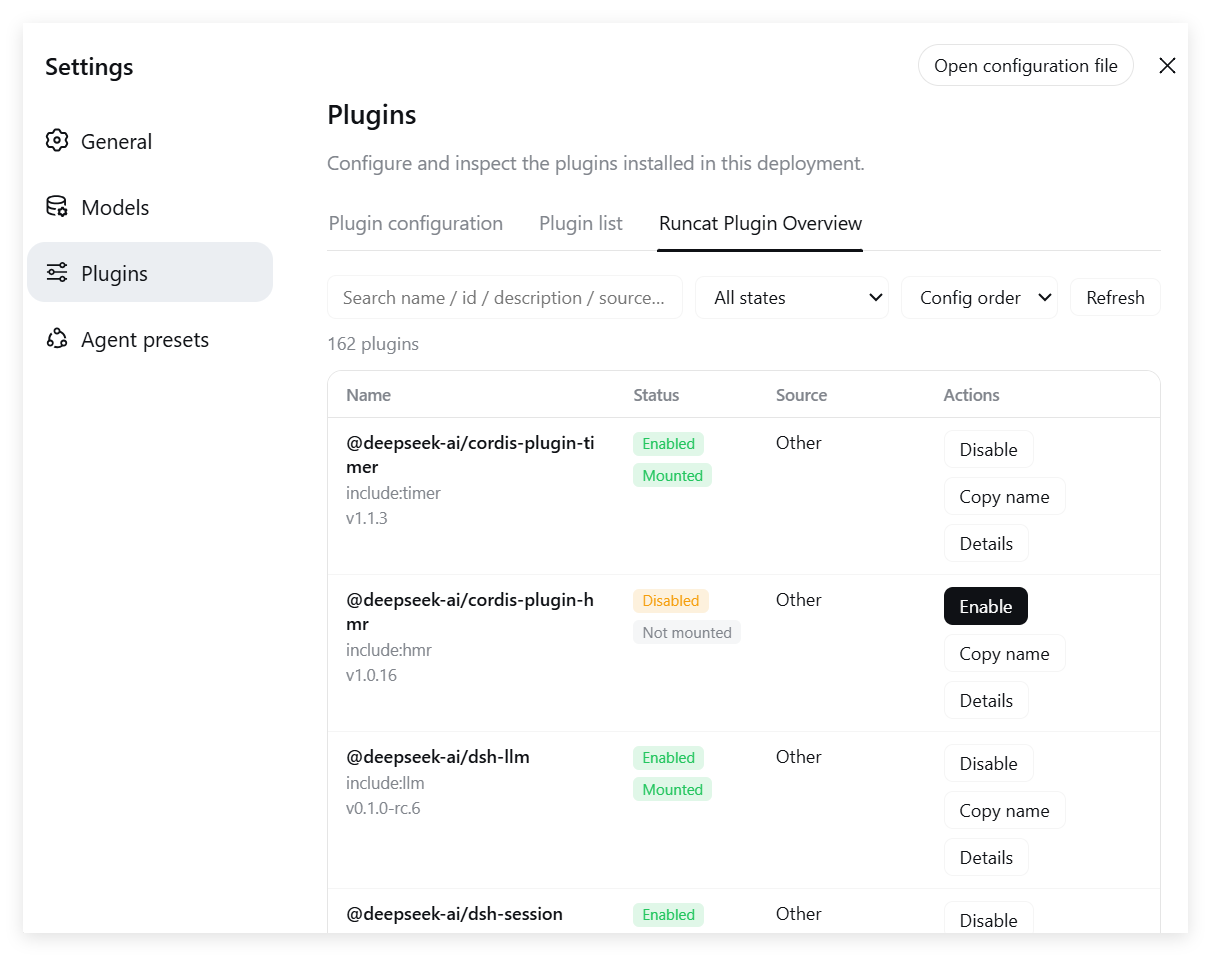
A better DSH plugin list: table view, status filters, enable/disable switches (hot-applied), uninstall, update reminders, config viewer and copy, automatic zh/en UI switching. Entry point: Settings → Runcat Plugin Overview (in the Settings left navigation; shown as 逃咪-插件总览 in Chinese).
Screenshot
Features
| Capability | Description |
|---|---|
| Table view | 4 columns with fixed ratios: Name 36% / Status 15% / Source 21% / Actions 28% (name takes the largest share) |
| Entry point | Registered directly in Settings → Runcat Plugin Overview (left navigation, right after "Plugins") |
| Languages | Built-in Simplified Chinese / English; the UI follows the DSH environment (Settings → General → Language, or the browser language); the plugin's own description switches too |
| Runtime status | Enabled/Disabled + Cordis status (Mounted / Waiting for deps / Loading / Mount failed / Not mounted / Unloading) |
| Description / Version | Read from each package's package.json; the full description is shown in the expanded row (click "Details") |
| Source | Only this plugin shows its repository home page (https://github.com/runcat-tommy/dsh-plugin-runcat-inventory); others show the install method (local link / local path / GitHub / npm / built-in) |
| Details expansion | The "Details" button appears when a plugin has a description or a config; the expanded row shows the full description + config JSON, with one-click copy |
| Enable / Disable | Edits the profile's cordis.patch.yml (user override layer), hot-applied via HMR — no restart needed |
| Uninstall | "Uninstall" button in the Actions column with a confirm dialog; removes the dependency and bundle layer from the profile, effective after restarting the Web UI; cannot uninstall itself or built-in packages; uninstalled rows are marked "Uninstalled" in the list (dimmed, actions disabled) to avoid repeat operations |
| Update reminders | Checks the npm registry for the latest version (batched scan: 4 per batch, 200ms gap, 1h cache); when the plugin itself has a new version, a prominent card appears at the top of the panel; other plugins show vX → vY highlighting in the version column + an inline "Update" button + a top banner; the update pins the target version into the command (add <name>@<latest>) and re-checks the installed version afterwards |
| Update results | Progress and results render inside the row (the confirm dialog closes on confirm and never blocks the UI): success → "applied" or "restart DSH to use it"; failure → "Update failed" plus Reason (error code / command / exit code / stderr); after a successful update the plugin asks DSH's own HMR to hot-apply, so no restart is needed when it can be applied |
| Batch & restart | Two buttons in the top banner: Update all (sequential, per-row progress, summary) and Restart DSH (CLI hosts restart directly and the page waits for it; on Desktop the shell owns the host, so it explains that a manual reopen is required) |
| Update boundaries | Local link dependencies (link: / file: / workspace:) are not updatable (clicking Update refuses explicitly: installing the npm release would drop the development link); a local version already ≥ npm latest reports "already up to date" instead of failing; VERSION_MISMATCH now means only "genuinely older than the target" (npm source not synced yet — retry later) |
| Search & filter | Keyword (combined search over name / id / description / source / version) + status filter |
| Sorting | Config order (default) / Name ↑ / Name ↓ |
| Width | No sticky columns; ←/→ arrow keys scroll horizontally; the Source column hides on narrow screens |
Structure
dsh-plugin-runcat-inventory/   # local folder name after git clone (same as the repo)
├── package.json      # dsh.bundle.patch + dsh.client declarations
├── cordis.patch.yml  # patch layer: inserts this plugin entry into the root entry list
├── lib/
│   ├── index.js      # Host half: loader inventory + /runcat-api routes + patch file editing
│   └── client.js     # Browser half: hand-written ModuleLoader bundle, table UI
├── test/
│   └── mock-test.mjs # host-half unit tests (node test/mock-test.mjs, 5 cases)
├── assets/
│   ├── preview-zh.png # Chinese-UI screenshot
│   └── preview-en.png # English-UI screenshot
├── CHANGELOG.md      # changelog (Chinese)
├── CHANGELOG.en.md   # changelog (English)
├── README.md         # Chinese docs
└── README.en.md      # English docs (this file)
Prerequisites
| Dependency | Required? | Notes |
|---|---|---|
| Node.js | ✅ Required | DSH itself is a Node program; install Node.js (suggest 20+ or the latest LTS; no strict minimum) |
| DSH CLI | ✅ Required | npm i -g @deepseek-ai/dsh |
| pnpm | ✅ Required | dsh plugin forwards to pnpm; without it you get pnpm not found on PATH; install with npm i -g pnpm |
| Git | ⚠️ Depends on method | Needed for Method B (GitHub source) or Method C (local development); not needed for Method A (npm) |
| Network | ⚠️ Depends on environment | Method A needs access to the npm registry; Methods B/C need access to GitHub — if direct connections fail, configure a git proxy, e.g. git config --global http.https://github.com.proxy http://127.0.0.1:7897 |
This plugin itself has zero dependencies: the host half only uses Node built-ins (plus lazily resolving js-yaml from the profile), and the browser half is a hand-written ModuleLoader bundle. Nothing extra to install.
Installation
Installs into the web profile (replace web with your profile name if different).
Method A: npm install (simplest, recommended)
dsh plugin --profile web add dsh-plugin-runcat-inventory
Pulls directly from the npm registry; the package is published at https://www.npmjs.com/package/dsh-plugin-runcat-inventory (if your npm/pnpm is configured with a mirror, wait for the mirror to sync).
Method B: install directly from GitHub
dsh plugin --profile web add github:runcat-tommy/dsh-plugin-runcat-inventory
pnpm pulls the repo directly from GitHub; this plugin has no build scripts, so no
allowBuildsis needed.
Method C: local folder (for development/debugging)
git clone https://github.com/runcat-tommy/dsh-plugin-runcat-inventory.git
cd dsh-plugin-runcat-inventory
dsh plugin --profile web add .
dsh plugin add .links this folder into the profile vialink:— dev-friendly: code changes take effect after restarting the Web UI, no reinstall needed.
Verify
dsh --profile web --dump-config should end with an entry whose id is runcat-inventory and name is dsh-plugin-runcat-inventory.
Then restart the Web UI and open Settings → Runcat Plugin Overview (in the left navigation; 逃咪-插件总览 in Chinese).
How it works
- Data: the host half iterates
ctx.loader.entries()(same as the official inventory); fiber status maps from FiberState; description/version are read from each package'spackage.json; source is derived from the profile'spackage.jsondependency declarations. - Enable/Disable: writes
{id, name, disabled: true}patches into~/.dsh/profiles/web/cordis.patch.yml(to disable) or removes them (to enable). DSH watches this file via HMR (watchUserPatches) and hot-applies changes to the loader — plugins toggle instantly without a restart. - Communication: the browser half fetches same-origin
/runcat-apiroutes; routes carry a loopback trust check (CSRF protection). - Lazy js-yaml resolution: when installed via
link:, the plugin's real path is the workspace (no node_modules there), so at runtime js-yaml is resolved anchored at the profile directory.
Uninstall
dsh plugin --profile web remove dsh-plugin-runcat-inventory
Known limitations
- If
cordis.patch.ymlcontains!!jsexpressions, the enable/disable switch reports a failure (the file is never corrupted; it just cannot be auto-edited). - The disable patch is matched and removed exactly as
{id, name, disabled: true}(three keys); conflicts with hand-written content are resolved by the "exactly three keys" rule.
Changelog
Full history in CHANGELOG.en.md (中文).
- v1.3.2 (2026-10-19): the enable/disable result moved from the bottom of the panel to directly under that plugin's row (full width, room for long text), worded "Enabled: X (applying live — click Refresh at the top right to confirm)"; the notice stays readable for at least 5 seconds and is retired only once the state really flips.
- v1.3.1 (2026-10-19): fixed "clicking Enable/Disable does nothing" — the host could not resolve js-yaml (
YAML_UNAVAILABLE), so the patch file was never written. Enable/disable is now plain text editing (append/remove a marked- id/name/disabled: trueitem, everything else preserved byte for byte), with no YAML parser dependency at all. - v1.3.0 (2026-10-19): UX rework — the confirm dialog for update/uninstall closes as soon as you confirm, and progress/results move into the row ("restart DSH to use it" or "applied" on success; "Update failed" plus an expandable Reason with error code, command, exit code and stderr tail on failure); the top banner gains "Update all" and "Restart DSH"; successful updates are hot-applied through DSH's own HMR, so no restart is needed when it can be applied (on Desktop the Electron shell owns the host, so the plugin explains that a manual reopen is required instead of pretending).
- v1.2.3 (2026-10-19): fixed three measured defects on Desktop 0.2.1-rc.2 (unrelated to version compatibility) — ① update/uninstall always failed because
dshis not on the host process's PATH: added CLI resolution (RUNCAT_DSH_CLI/ host exe + asarcli.js/ PATH / known install locations) and aDSH_CLI_NOT_FOUNDcode; ② enable/disable failed wholesale when the patch layer contains!!js: a!!jstype plus placeholder round-trip now writes the original code back unchanged; ③ writes no longer drop the user's comments. - v1.2.2 (2026-10-16): fixed two measured defects — ① the update command now pins the target version (
add <name>@<latest>), so "pnpm no-op exits 0 → the self-check calls it a failure" is gone; local link dependencies (link/file/workspace) are explicitly refused; "already up to date" and "update failed" are separate messages, and the response carriesfrom_version → to_version. ② host peer declarations completed (locale + runtime + ui-settings), so the market readscompatibleinstead ofunknown. - v1.2.1 (2026-10-16): declared the host peer range — but the declared
@deepseek-ai/dsh-client-runtimeis not in the Desktop host inventory, so the market still readunknown(fixed in v1.2.2). - v1.2.0 (2026-09-01): added update reminders — the plugin's own update is shown in a prominent card at the top of the panel (Update now / Not now); other plugins show
vX → vYhighlighting in the version column + an inline "Update" button + a top banner; batched scanning (4/batch, 200ms gap, 1h cache); updated plugins are marked "Restart to apply"; updating the plugin itself is supported. - v1.1.0 (2026-09-01): milestone — the version line moved to 1.x and the release was published to npm (https://www.npmjs.com/package/dsh-plugin-runcat-inventory), aggregating everything since 0.4.x (uninstall + "Uninstalled" markers, left-navigation entry, zh/en UI, npm install).
- v0.4.0 (2026-09-01): added uninstall (button in the Actions column + confirm dialog + cannot uninstall itself or built-ins); the entry point moved from the "Settings → Plugins" tab to the Settings left navigation (Settings → Runcat Plugin Overview).
- v0.3.8 (2026-09-01): installation gained "Method A: npm install" (simplest, recommended); the previous methods became B/C;
package.jsongained adsh.marketplacedeclaration (for the dsh-plugin-marketplace scanner). - v0.3.7 (2026-08-28): added preview screenshots — the Chinese README shows the Chinese-UI screenshot, the English README shows the English-UI screenshot (
assets/folder). - v0.3.6 (2026-08-28): docs — added
CHANGELOG.en.md(English changelog) with language switcher links on both changelogs. - v0.3.5 (2026-08-28): docs — added Method B (install from GitHub source); added
README.en.md(English docs) with language switcher links on both READMEs. - v0.3.4 (2026-08-27): docs — folder name unified to
dsh-plugin-runcat-inventory; added the "Prerequisites" section. - v0.3.3 (2026-08-27): the plugin's own description now follows the UI language (zh/en, in the Details row).
- v0.3.2 (2026-08-27): fix — only this plugin shows the repo URL; others show install methods again; Source column content wraps (long URLs no longer overflow into Actions).
- v0.3.1 (2026-08-27): fixed column ratios (Name 36% / Status 15% / Source 21% / Actions 28%); Source shows the repo URL for this plugin.
- v0.3.0 (2026-08-27): i18n — zh/en dictionaries via the DSH locale service; host errors become error codes; source becomes kind+spec.
- v0.2.1 (2026-08-27): Chinese name changed from 逃猫-插件总览 to 逃咪-插件总览.
- v0.2.0 (2026-08-27): 4-column layout, details expansion, name sorting, keyboard scrolling, narrow-screen adaptation; two cross-platform bug fixes; mock unit tests.
- v0.1.0 (2026-08-27): initial release — 7-column table, enable/disable (HMR hot-applied), config viewer/copy, search filters.
Links
More in this category
yjh051108/dsh-routing-suite★ 6991
One repository, three parts: a runtime injector for DSH plugin packages (inject, hot-reload, unload, promote a dev staging tool to the front, route self-heal, plus a settings-page plugin manager that lists, unloads and drags folders in to internalize), a task-aware reasoning-mode router agent preset (router-standard / router-spec / router-react), and a graded two-level task protocol whose six tools (commit_star, lock_stage, revise_do, edit_plan, mark_task, redteam_verdict) pin task state to disk. The injector implementation ships in-tree, so the install carries its own behaviour rather than a dependency list.
strukto-ai/mirage#dsh★ 3715
Swaps the filesystem and bash providers for a mirage virtual workspace: file tools and shell commands run over mounted resources (RAM, S3, Redis, Slack, Gmail, Notion, Postgres) instead of the host disk, with per-mount read/write/exec modes, per-command sandbox routing (monty, pyodide, quickjs in process; docker, e2b, daytona remote), and installed CLIs (git, gh, slack, linear, ntn, gws, or one you register) as head words in the virtual terminal.
first-fluke/oh-my-agent#dsh★ 1352
Runs project OMA checks before and after tool execution and when a turn tries to finish. Installs its OMA CLI dependency and initializes unconfigured projects on first use. Requires Node.js 22+; initial setup needs network access and project write access.
hust-open-atom-club/oh-dsh★ 323
Community distribution: TUI, desktop, and Web UI as one bundle with layered installation.
MichengAI/dsh-skills-manager★ 294
Manages local DeepSeek Harness skills in Settings and shows shared Agent skills as read-only.
Fishquito7/dsh-skill-mcp-panel★ 223
Manages DSH skills and MCP servers from the web settings: skill cards with hot enable/disable, workspace scopes, groups, batch migration and drag-and-drop import, plus stdio/HTTP MCP CRUD with connection tests, secret redaction and the unified dsh-panel CLI.
Community comments
Comments are public GitHub Discussions. Loading them connects to GitHub and Giscus; a GitHub account is required to post.