A super-simplified LLM-wiki memory plugin: one index document (auto-loaded) + one markdown file per topic (read only when needed) — no dumping everything into the context and burning tokens. Simple and lightweight, painless to install/uninstall, and freely editable however you like.
Install
# from npm (prebuilt)
dsh plugin --profile web add dsh-simple-wiki-memory
# from GitHub (first run asks for allowBuilds approval — follow the hint, retry)
dsh plugin --profile web add github:rainow/dsh-simple-wiki-memory
Any plugin you install runs third-party code with your own permissions — it can read your files, use your credentials, and reach the network, and tool approvals don’t sandbox it. GitHub-sourced plugins also run build scripts at install time — pnpm blocks those until you allow them, so an install can stop with ERR_PNPM_GIT_DEP_PREPARE_NOT_ALLOWED or ERR_PNPM_IGNORED_BUILDS; dsh prints the exact key to add under allowBuilds in your profile’s pnpm-workspace.yaml, and the install works on the next run. Allowing a build is a trust decision: only install sources you trust, and pin a commit (github:owner/repo#sha).
README
A super-simplified LLM-wiki memory plugin: one index document (auto-loaded) + one markdown file per topic (read only when needed) — no dumping everything into the context and burning tokens. Simple and lightweight, painless to install/uninstall, and freely editable however you like.
A self-maintaining persistent memory system for DeepSeek Harness (DSH). Built on the native dsh-agent-instructions (AGENTS.md) mechanism — no RAG, no vector DB, no LLM calls at runtime. Just Markdown + git.
简体中文(默认)见 README.md · English: this file.
Changelog
v0.1.3 (2026-09-10) — DSH 0.1.5-rc compatibility (incl. 0.1.3)
- Compatible with DSH 0.1.5-rc.2 / 0.1.5-rc.1 / 0.1.5-alpha.x / 0.1.3-alpha.x: peerDependencies extended to
^0.1.0-rc.7 || ^0.1.1-rc.2 || ^0.1.2-alpha.1 || ^0.1.3-alpha.1 || ^0.1.5-alpha.1, covering five release lines (older installs keep working); - Verified item by item against the
dsh-v0.1.5-rc.2source:session/event+turn/end,agent/pre-step(agent injection and decision shape unchanged),createUserMessage, cordis 4.0.2prepend, patchinsert,dsh.bundle.patch— all compatible; - DSWM is unaffected by the 0.1.3/0.1.5 breaking changes: the 0.1.3 session-persistence
SessionHandlerefactor, the 0.1.5 removal ofctx.agent, and the Web plugin panel slot migration are all unused by DSWM (it only hookssession/eventandagent/pre-step); - Install/upgrade:
dsh plugin --profile web add dsh-simple-wiki-memory.
v0.1.2 (2026-08-28) — DSH 0.1.2-alpha compatibility
- Compatible with DSH 0.1.2-alpha.1 / 0.1.2-alpha.2: peerDependencies extended to
^0.1.0-rc.7 || ^0.1.1-rc.2 || ^0.1.2-alpha.1, covering the0.1.0-rc.7+,0.1.1-rc.2+and0.1.2-alpha.1+release lines; - Runtime APIs (
session/event,agent/pre-step, message construction, cordis patch, …) verified against thedsh-v0.1.2-alpha.2source — no breaking changes; - Install/upgrade:
dsh plugin --profile web add dsh-simple-wiki-memory(npm source always resolves the latest).
v0.1.1 (2026-08-25) — first npm release
- Published to npm (
dsh-simple-wiki-memory) — dsh-market now shows the version and detects updates automatically; added a GitHub Actions auto-publish workflow (push av*tag to release); - DSH 0.1.1-rc.2 support: peerDependencies cover the
0.1.0-rc.7+and0.1.1-rc.2+lines; - Documented the known conflict with the liangshen / Anchored Standard anchored modes.
v0.1.0 (2026-08-18) — initial release
- Six-rule memory system: auto-injected index + one markdown file per topic read on demand; pending → reference → archive zones + memory-log audit + git auto-backup;
- Runtime hooks: auto-commit after each turn, pending report at session start;
- AGENTS.md is merge-only (never overwrites); uninstall keeps all your data.
Overview — what problem does this solve?
Long-term memory without the token tax. If you dump all your memory into the prompt, a large memory costs a fortune in tokens every session. DSWM loads only the index (small, auto-injected every session); the actual topic files are read on demand when a task needs them.
Lightweight, no heavy machinery. LLM-Wiki-style systems are powerful but heavy and hard to maintain — overkill for most users. DSWM's entire memory is plain Markdown files: edit them by hand, or let the agent edit them. What you see is what you get.
Shared across harnesses. Long-term memory should belong to you, not to one harness. DSWM's memory is plain .md files that any harness can consume — to reuse the same memory in another tool, just point that tool's AGENTS.md (or equivalent) at it.
What it does
Every session, DSH auto-injects ~/.dsh/AGENTS.md (the memory index + rules) before the first request. DSWM maintains that file plus a small wiki vault:
~/.dsh/
├── AGENTS.md              # index + six-rule maintenance convention (auto-injected)
└── workspace/             # the vault (a git repo)
    ├── reference/         # confirmed memory topics (indexed, searchable)
    ├── pending/           # unconfirmed drafts (NOT indexed; waiting for you to confirm)
    ├── archive/           # outdated topics (kept, not searched)
    └── memory-log.md      # append-only operation log (audit + freshness)
reference/ holds one Markdown file per topic, named by topic — like this:
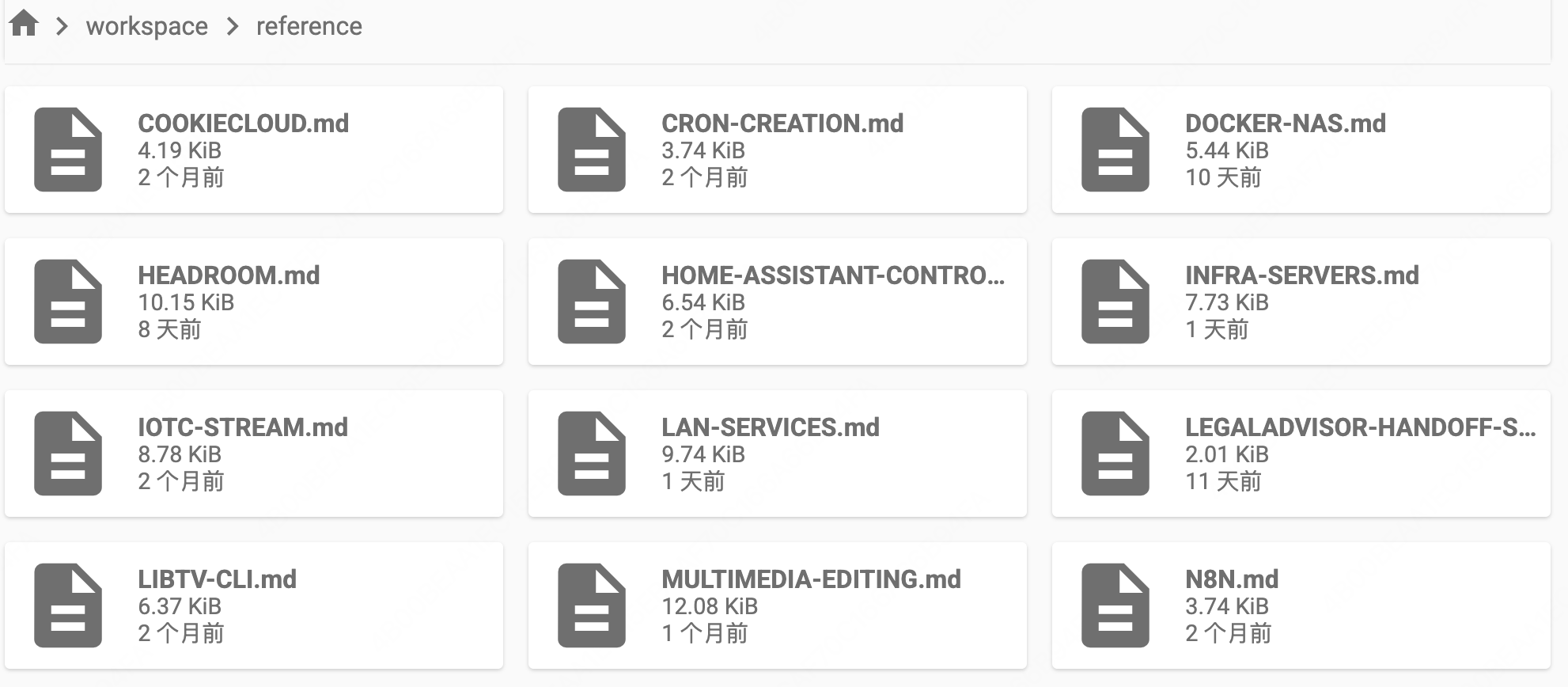
Each file is the full detail of one topic (e.g. DOCKER-NAS.md, INFRA-SERVERS.md, HOME-ASSISTANT-CONTROL.md), pointed to by an index entry in AGENTS.md; the file is read only when the task needs it — otherwise only the small index occupies context.
The six rules (all in AGENTS.md, injected into every session)
- Write trigger (realtime) — capture memorable info as it appears during the session; write immediately (don't wait for session end, don't silently drop it). Writing is realtime (straight into
pending/), confirming is deferred (reported at the start of your next session) — so/newor closing the page never loses anything. - Admission — unconfirmed →
pending/; say "save" / "confirm" / "promote" to promote toreference/+ update index + log. TTL: 7d (interactive) / 30d (unattended). - Unattended sessions (task-board timers, background subagents) — write
pending/only, never promote themselves. - Periodic cleanup — say "organize memory" → agent proposes reorganization (split/merge/rename/archive), you approve, outdated content goes to
archive/. - Backup —
workspace/is a git repo; auto-commit after memory changes. - Retrieval — check the index first; if no match, scan
reference/(fallback), never assume "no memory".
Compatibility
- Verified against DSH 0.1.5-rc.2 (source-level review) and 0.1.1-rc.2 (live web profile); peerDependencies cover the
0.1.0-rc.7+,0.1.1-rc.2+,0.1.2-alpha.1+,0.1.3-alpha.1+and0.1.5-alpha.1+release lines. - Last verified: 2026-09-10.
- Requires the native
dsh-agent-instructionsmechanism (enabled by default in thedsh-basebundle); if your deployment disables it, memory injection will not work.
Known conflict with anchored modes (liangshen / Anchored Standard)
liangshen mode and Anchored Standard mode clear the runtime context on the first turn and keep only your direct message, which suppresses the automatic ~/.dsh/AGENTS.md injection performed by dsh-agent-instructions. DSWM's memory index and six-rule convention rely on that injection, so in these modes memory is not auto-loaded at the start of a session.
This is not a bug — it is the deliberate design of anchored modes (anchoring the reasoning trajectory to a minimal context). The fix is simple:
- When you need to read/maintain memory, ask the agent to read
AGENTS.mdmanually, e.g.:Read ~/.dsh/AGENTS.md first, then continue- or simply
Follow the memory rules in AGENTS.md
- In liangshen mode, after the first-block anchoring promotes (entering "we can" mode), you can also ask the agent to read
AGENTS.mdmanually, and the memory rules then work normally with DSWM. - Other (non-anchored) sessions are unaffected — memory is auto-injected as usual.
Install
Option 1: npm (recommended — auto-updates)
dsh plugin --profile web add dsh-simple-wiki-memory
Published to npm. The dsh-market plugin market shows the version and detects updates automatically (new releases prompt after a one-day safety window); you can also pull the latest manually with the same command at any time.
Option 2: GitHub (source install)
dsh plugin --profile web add github:rainow/dsh-simple-wiki-memory
Option 3: let an agent install it
Just paste the link below into a DSH session and ask the agent to install it for you:
https://github.com/rainow/dsh-simple-wiki-memory
The agent will run
dsh plugin --profile web add dsh-simple-wiki-memoryand complete the first-time sync.
First startup syncs the skeleton, scaffolds the vault, and git-inits workspace/ — idempotent, merge-only, never clobbers your existing ~/.dsh/AGENTS.md index entries.
Uninstall
dsh plugin --profile web remove dsh-simple-wiki-memory
Removing the plugin stops the runtime hooks (auto-commit, pending report) but keeps your data: ~/.dsh/AGENTS.md and ~/.dsh/workspace/ are not deleted. The six-rule convention stays in AGENTS.md (it is plain text the agent follows); delete that section manually if you want it gone.
Quick start
- Install (above); the vault is scaffolded automatically on first startup.
- In any session, ask the agent to remember something — it writes to
pending/. - Say "save" / "confirm" / "promote" to promote pending drafts into confirmed memory.
- Say "organize memory" to trigger the reorganization workflow (you approve before it executes).
- The bundled
memory-queryskill handles retrieval with the directory-scan fallback.
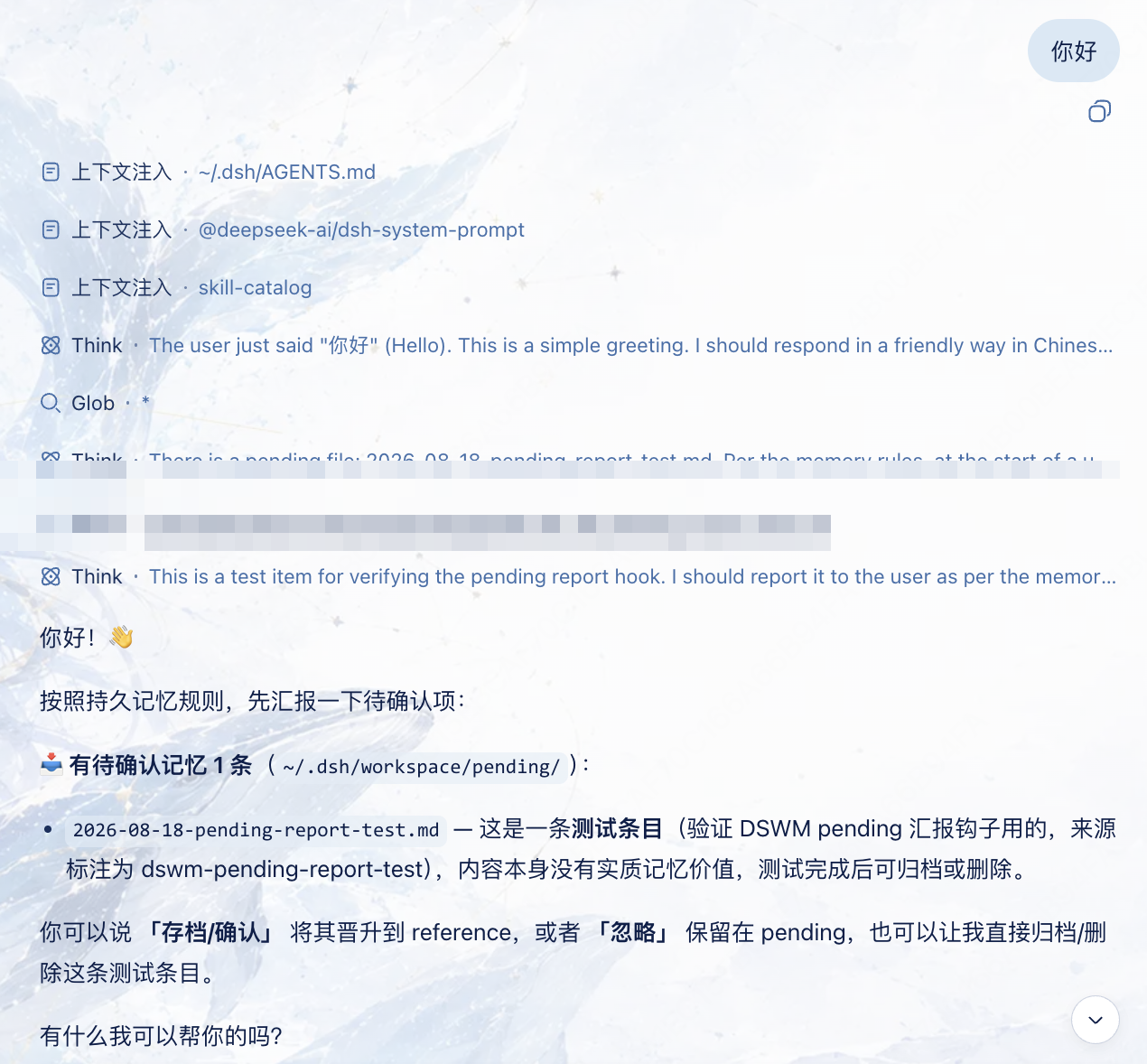
At the start of your next session, the agent automatically reminds you of unconfirmed memory (writing is realtime, so /new or closing the page never loses anything):
Configuration
v0.1 has no user-facing configuration; defaults are safe. Planned (v0.2): settings section for TTL days, auto-commit on/off, memory directory path.
Permissions & data
- Files: reads/writes
~/.dsh/AGENTS.mdand~/.dsh/workspace/(createsreference/,pending/,archive/,memory-log.md; merges the rules section into AGENTS.md — never overwrites your index entries). - Commands: runs
git init / add / commitinside~/.dsh/workspace/(auto-backup). - No network, no credentials, no telemetry.
- Reading memory works in any sandbox mode (reads are never sandboxed in DSH). Writing to
~/.dsh/workspace/requiresdanger-full-access, orworkspace-writewith per-call approval escalation.
Troubleshooting
- Auto-commit does nothing: check
~/.dsh/workspace/.gitexists; if git is unavailable, the plugin degrades gracefully (memory still works, just without backup). - Memory not injected: confirm
dsh-agent-instructionsis enabled in your profile/preset (it is the mechanism that auto-loads AGENTS.md). - Rollback: the vault is a git repo —
git -C ~/.dsh/workspace log/git -C ~/.dsh/workspace reset --hard <commit>.
Development
node --check lib/index.js # syntax check
Package layout: lib/index.js (sync + hooks), assets/ (AGENTS.md / memory-log templates), skills/memory-query/. The plugin uses the DSH bundle distribution model (dsh.bundle.patch → cordis.patch.yml).
License
MIT
Links
More in this category
vectorize-io/hindsight#coding-agents★ 44741
Hindsight, agent memory that learns: long-term project memory with auto recall and retain, knowledge pages, deep reflection, and per-repo memory banks.
volcengine/OpenViking#examples/dsh-memory-plugin★ 39138
OpenViking memory and context bundle for DeepSeek Harness: pre-step auto-recall and profile injection, session capture, `viking://` URI guarding, and recall/write memory tools backed by an OpenViking server.
agentscope-ai/ReMe#dsh★ 3547
Connects DeepSeek Harness to ReMe's local-first, self-evolving personal knowledge base: automatically captures completed main-agent conversations as user-owned Markdown memory, searches conversations and source material through reme_search with BM25, optional embeddings, and wikilink expansion, and schedules daily memory consolidation.
zilliztech/memsearch#MemSearch★ 2706
Shared Markdown memory for DSH and other coding agents, with automatic capture, pre-step context injection, searchable recall, and memory-to-skill self-evolution through a review panel.
vshulcz/deja-vu#extensions/dsh★ 1120
Reads the session files thirty-three other coding agents on this machine already wrote — Claude Code, Codex, Cursor, VS Code Copilot Chat, opencode, OpenClaw, Hermes, Kimi, Cline, Zed and more — including sessions from before it was installed: six tools (deja_recall, deja_session, deja_blame, deja_fix, deja_how, deja_remember), a /deja command, and optional automatic recall added to the runtime context. Local BM25 index, no LLM, no embeddings, no network (dsh plugin --profile web add dsh-deja).
adoresever/graph-memory★ 635
Traceable, searchable cross-session memory for DeepSeek Harness — conversation knowledge as typed graph nodes (TASK/SKILL/EVENT) and typed edges.
Community comments
Comments are public GitHub Discussions. Loading them connects to GitHub and Giscus; a GitHub account is required to post.