Phone-first web client for DeepSeek Harness whose /m/ page serves a compact mobile UI instead of proxying the full desktop UI, with approvals staying on the phone when the phone started the turn and Mermaid rendered on the device.
Install
# from npm (prebuilt)
dsh plugin --profile web add dsh-mobi-web
# from GitHub (first run asks for allowBuilds approval — follow the hint, retry)
dsh plugin --profile web add github:rainfish-home/dsh-mobi-web
Any plugin you install runs third-party code with your own permissions — it can read your files, use your credentials, and reach the network, and tool approvals don’t sandbox it. GitHub-sourced plugins also run build scripts at install time — pnpm blocks those until you allow them, so an install can stop with ERR_PNPM_GIT_DEP_PREPARE_NOT_ALLOWED or ERR_PNPM_IGNORED_BUILDS; dsh prints the exact key to add under allowBuilds in your profile’s pnpm-workspace.yaml, and the install works on the next run. Allowing a build is a trust decision: only install sources you trust, and pin a commit (github:owner/repo#sha).
README

A phone-first web client for DeepSeek Harness, served by a sidecar gateway that runs inside the harness process.
Not
dsh-mobile-gateway. There is an unrelated npm package by that name ("scan a QR code + settings page + live sync"). This one is different: a 32 KB page instead of a proxied UI, approvals that stay on the phone when the phone started the turn, and Mermaid rendered on the device. Package and repo are bothdsh-mobi-web; the local checkout directory is still nameddsh-mobi-web-plugin.
phone browser ──HTTPS──▶ Cloudflare tunnel / Tailscale ──▶ 127.0.0.1:3083 (this plugin) ──▶ harness host services
Read this first: what you are exposing
Holding the login token means operating this machine through the harness. The gateway proxies the whole harness, not just chat:
- send prompts, and read every session on the machine (history included)
- approve tool calls — including shell commands — and answer "yes" on your behalf
- with approvals, run anything the harness itself could run
So: put it behind Tailscale (a private tailnet) rather than a public tunnel unless you know what you are doing, use a token you generated for this and nothing else, and never reuse a password from another service. The token is stored in $DSH_HOME/dsh-mobi-web-token (mode 0600) and the log prints only its path.
What it looks like
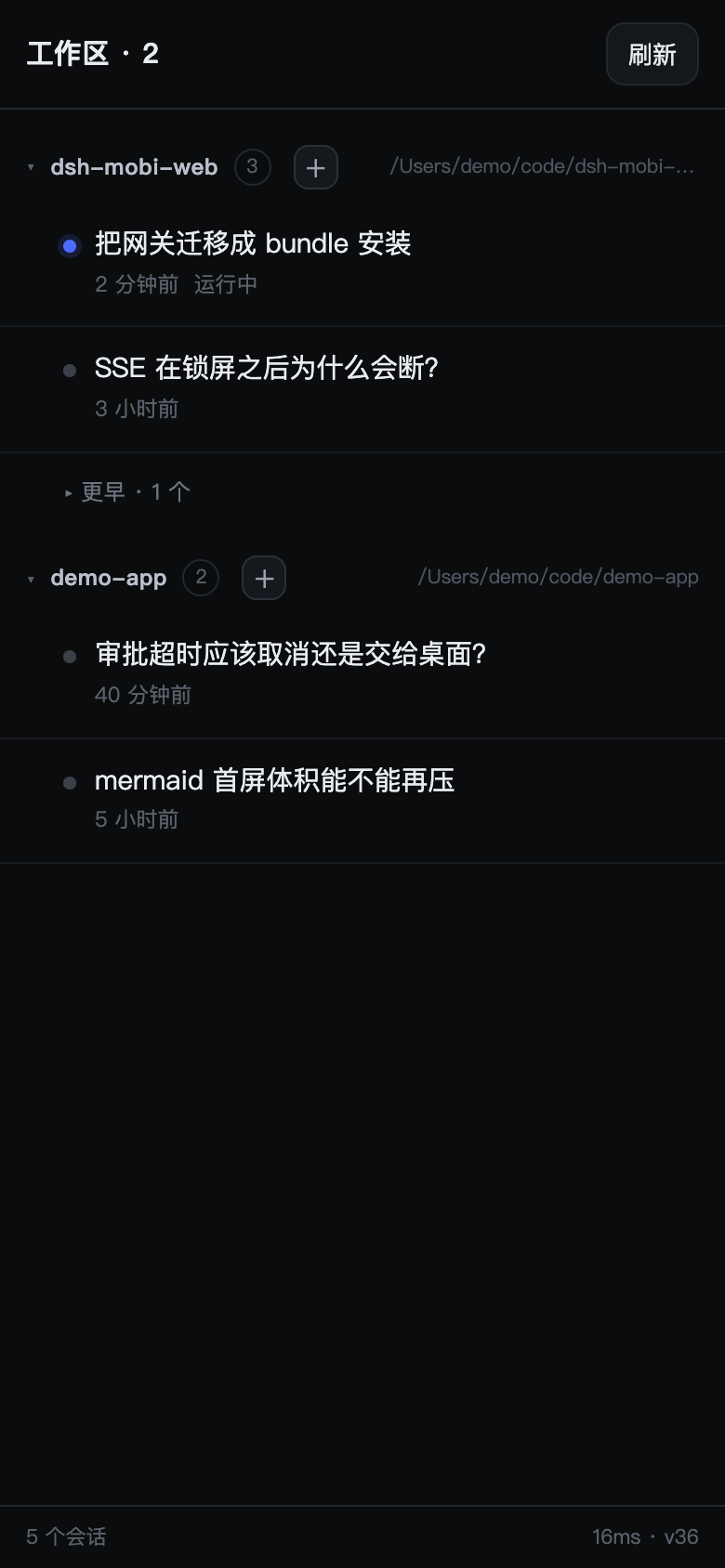
Sessions grouped by workspace, the running one marked, anything older than 24 h folded away, archived ones hidden.
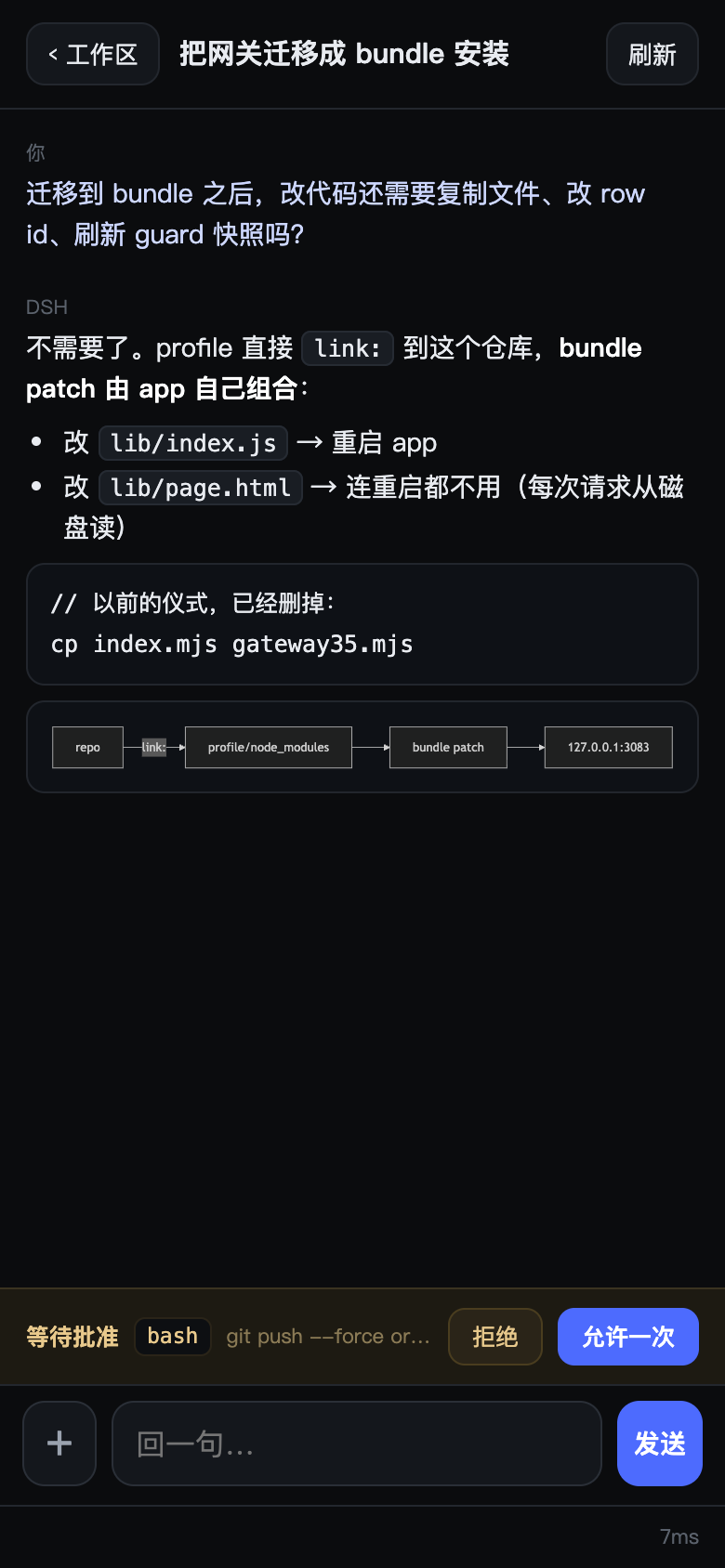
A conversation: Markdown, a Mermaid diagram rendered on the device, and an approval card waiting at the bottom — the one the desktop never sees, because the phone started this turn.
Why this exists
The official web UI ships ~4.6 MB of JavaScript. Over a relayed mobile link (0.4 MB/s in practice) that is ten-plus seconds of white screen, and the layout assumes a trackpad. This gateway serves a ~32 KB page instead and talks to the same host services in-process, so it can do things a proxied UI cannot — like holding an approval the desktop never sees.
What you get
Browse
- Sessions grouped by workspace, newest activity first (same
SessionSummary.updatedAtthe desktop orders by) - Split into active (running, or touched within 24 h) and older (collapsed, remembered per workspace)
- Archived sessions are filtered out; workspace collapse state persists
Read
- Markdown: headings, lists, tables, blockquotes, links, inline code, fenced code
- Mermaid fenced blocks render as SVG; tap one to open it full-screen (pan + pinch), tap again to close
- Long messages fold to ~460 px with "展开全文"
- Live token streaming: the reply grows word by word
Do
- Send multi-line text (Enter inserts a newline; the send button is the only way to send)
- Send images (up to 4, inline base64, 4 MB each)
- Stop a running turn
- Create a session in any workspace (
+on the workspace header) - Jump back to the newest message
Approve
- Approval requests arrive as cards over SSE
- Origin affinity: if the phone started the turn, the approval stays on the phone. It waits up to 15 minutes, then cancels — it never falls back to a desktop nobody is sitting at. Desktop-origin turns keep the old behaviour (20 s grace, then hand back).
Stay up
- SSE with exponential-backoff reconnect (2 s → 30 s) and a 6 s poll as fallback
- The gateway lives inside the harness process, so it starts and stops with it — no separate daemon to supervise
Install
The plugin is a DSH bundle: it ships its own cordis.patch.yml, so no profile file is edited by hand. There are two install paths, because the desktop profile is special.
Web / other profiles — the npm CLI:
dsh plugin --profile web add dsh-mobi-web     # from npm
dsh plugin --profile web add link:/path/to/dsh-mobi-web-plugin   # from a checkout
The desktop profile — desktop is reserved for the Electron-owned profile, and the npm CLI refuses to manage it. Install through the app's plugin manager, or with the Desktop-installed command (dsh inside the app bundle):
dsh plugin --profile desktop add dsh-mobi-web
Either way, after add the package is in package.json → dsh.profile.bundles (the CLI reconciles that list by inspecting each dependency's dsh.bundle declaration). A new bundle only mounts on restart — adding it changes nothing until the app or dsh starts again.
Then expose the port:
tailscale serve --bg 3083          # phone on the same tailnet
# or a Cloudflare tunnel ingress: host → http://127.0.0.1:3083
Open https://<your-host>/m/.
The password. If you do not set token in the patch config, one is minted on first start and written to $DSH_HOME/dsh-mobi-web-token (mode 0600). The startup log prints where it is, not the token itself — cat that file to read it. (The token is echoed only when the file could not be written, i.e. when that process holds the only copy.) Set token: '…' to choose your own, or token: false to disable the gate — only on a network you fully trust.
To override anything, add a row to your profile's cordis.patch.yml. A patch replaces the row's whole config object, so restate every non-default value:
- id: dsh-mobi-web
  config:
    listenHost: '127.0.0.1'
    listenPort: 3083
    blockPaths: ['/dsh-whale/']
Configuration
| key | default | meaning |
|---|---|---|
listenHost |
127.0.0.1 |
never bind wider; a tunnel does the rest |
listenPort |
3083 (bundle patch; the code default is 3080) |
|
token |
auto-minted file | password for the cookie gate; false disables it |
allowTokenUrl |
false |
accept ?t=… links (leaks via history, off by default) |
blockPaths |
[] |
path prefixes answered 204 to keep the page light |
approvalPriority |
'phone-first' |
'desktop' disables interception entirely |
pwa |
true |
inject manifest + icon into the proxied UI |
brotli |
true |
recompress JS for the proxied UI |
Routes
| route | what |
|---|---|
GET /m/ |
the mobile page (cookie-gated) |
GET /m/api/sessions |
workspace-grouped list (10 s cache) |
GET /m/api/session?id= |
messages (newest 40 / 120 k chars) + pending approvals |
GET /m/api/events?session= |
SSE: state, message, astart, adelta, aend, tool, approval, approval-done |
POST /m/api/prompt |
{id, text, images[]} — verifies the message actually landed |
POST /m/api/cancel |
interrupt the running turn |
POST /m/api/create |
{cwd} → new session |
POST /m/api/approve |
{id, decision} |
GET /__gw/health |
unauthenticated liveness |
GET /__gw/stats |
counters + approval diagnostics (cookie-gated) |
Design notes
- No
0.0.0.0.dshrefuses to start on a non-loopback host, so a sidecar proxy is the only option; the tunnel terminates TLS outside. - Cookie minting happens server-side. Letting the launch-token flow redirect through
303dropped theSameSite=Strictcookie on iOS, producingERR_TOO_MANY_REDIRECTS. - Every request handler is wrapped in try/catch. dsh treats an uncaught exception as fatal; a sidecar must never crash the host.
- The profile links the checkout. Editing
lib/index.jsand restarting is the deploy;lib/page.htmlis read per request, so it needs no restart at all.
Limits worth knowing
- Single user, single host. No account model beyond one shared token.
- No push notifications: if the phone is asleep, an approval waits for you (up to 15 min) rather than pinging you.
- Images inside historical messages render as
[图片]— only the fact they existed is kept. - Mermaid is vendored (857 KB brotli), lazy-loaded on the first diagram.
- Sessions cannot be moved between workspaces — DSH derives membership from the session's
cwdat creation. - Compatibility: verified on DSH
0.2.2-rc.1. The gateway reads host services throughctx.get('sessionQuery')and friends — private API, not a stable contract. A dsh upgrade may break it; the page and the HTTP layer would keep working.
Repo layout
lib/index.js      the gateway plugin (single file on purpose)
lib/page.html     the mobile page, served from disk on every request
assets/           vendored mermaid (js + gz + br) and the app icon
cordis.patch.yml  bundle patch — the install declaration
test/             27 tests, fake host services, no network
Tests
node --test test/*.test.mjs # 27 tests, no network, fake host services
Links
More in this category
zhu1090093659/dsh-web#packages/dsh-remote-web-ui★ 9959
Remote control of a dsh web workspace from phone or PC: QR-code pairing through a token-gated channel, SSE real-time sync, and separate mobile and full desktop GUI modes.
zhu1090093659/dsh-web#packages/dsh-ssh★ 9959
SSH ops panel for DSH: web terminal, SFTP transfer with progress, local port forwarding, and one-command cluster execution across hosts; agents share the same host config.
liguobao/ds-harness-remote★ 1319
Multi-device remote access for DeepSeek Harness and supported coding workspaces through an end-to-end encrypted channel, with adaptive Relay/WebRTC transport, device authorization, workspace files, read-only previews, terminals, and optional Codex Remote.
saya-ch/dsh-mobile★ 728
Access DeepSeek Harness from the Android app or a mobile browser with secure LAN and remote connections, persistent device pairing, and a customizable mobile interface.
uumit-ai/dsh-uumit-remote★ 381
Open dsh web from your phone or another computer through a UUMit account, without running your own server or installing another program: a built-in tunnel client connects to UUMit's hosted tunnel, and a panel in the sidebar handles pairing and who can use it (only you, people you invite by link or phone number, or everyone), with revocation. Requires dsh web on DSH >=0.2.1-rc.2.
ZSeven-W/dsh-ios★ 355
A live iOS Simulator or USB-connected iPhone inside the conversation: 22 agent tools for booting, building, driving the UI by accessibility identity or OCR text, list-row actions and SwiftUI preview hot reload, plus a streaming sidebar panel you can tap and drag on.
Community comments
Comments are public GitHub Discussions. Loading them connects to GitHub and Giscus; a GitHub account is required to post.