Real-time hot topics panel for the DSH web GUI: AI news and engineering news, each item with a distilled summary and the source link, shown from a sidebar entry with three views, keyword/source filters, read-state marking and hotkeys.
Install
# from npm (prebuilt)
dsh plugin --profile web add dsh-hotspots
# from a prebuilt release tarball
dsh plugin --profile web add "https://github.com/qys0012/dsh-hotspots/releases/latest/download/dsh-hotspots.tgz"
# from GitHub (first run asks for allowBuilds approval — follow the hint, retry)
dsh plugin --profile web add github:qys0012/dsh-hotspots
Any plugin you install runs third-party code with your own permissions — it can read your files, use your credentials, and reach the network, and tool approvals don’t sandbox it. GitHub-sourced plugins also run build scripts at install time — pnpm blocks those until you allow them, so an install can stop with ERR_PNPM_GIT_DEP_PREPARE_NOT_ALLOWED or ERR_PNPM_IGNORED_BUILDS; dsh prints the exact key to add under allowBuilds in your profile’s pnpm-workspace.yaml, and the install works on the next run. Allowing a build is a trust decision: only install sources you trust, and pin a commit (github:owner/repo#sha).
README
This plugin publishes its README in Chinese only.

DeepSeek Harness(DSH)Web 时事热点插件:侧边栏一键查看实时热点,内容分两大部分——
- 🤖 AI 大事:大模型 / Agent / skill 插件 / 工作流 / 送 tokens / 免费模型
- 🔧 工科热点:智能制造 / 机器人 / 政策 / MCU×AI / 企业动态
每条热点包含关键信息提炼与信息来源链接(抖音 / 小红书 / B站 / 知乎 / 微博 / 微信公众号 / 36氪 / 机器之心 / 量子位 / IT之家 / 政府网站等,自动识别平台并标注)。
✨ 功能
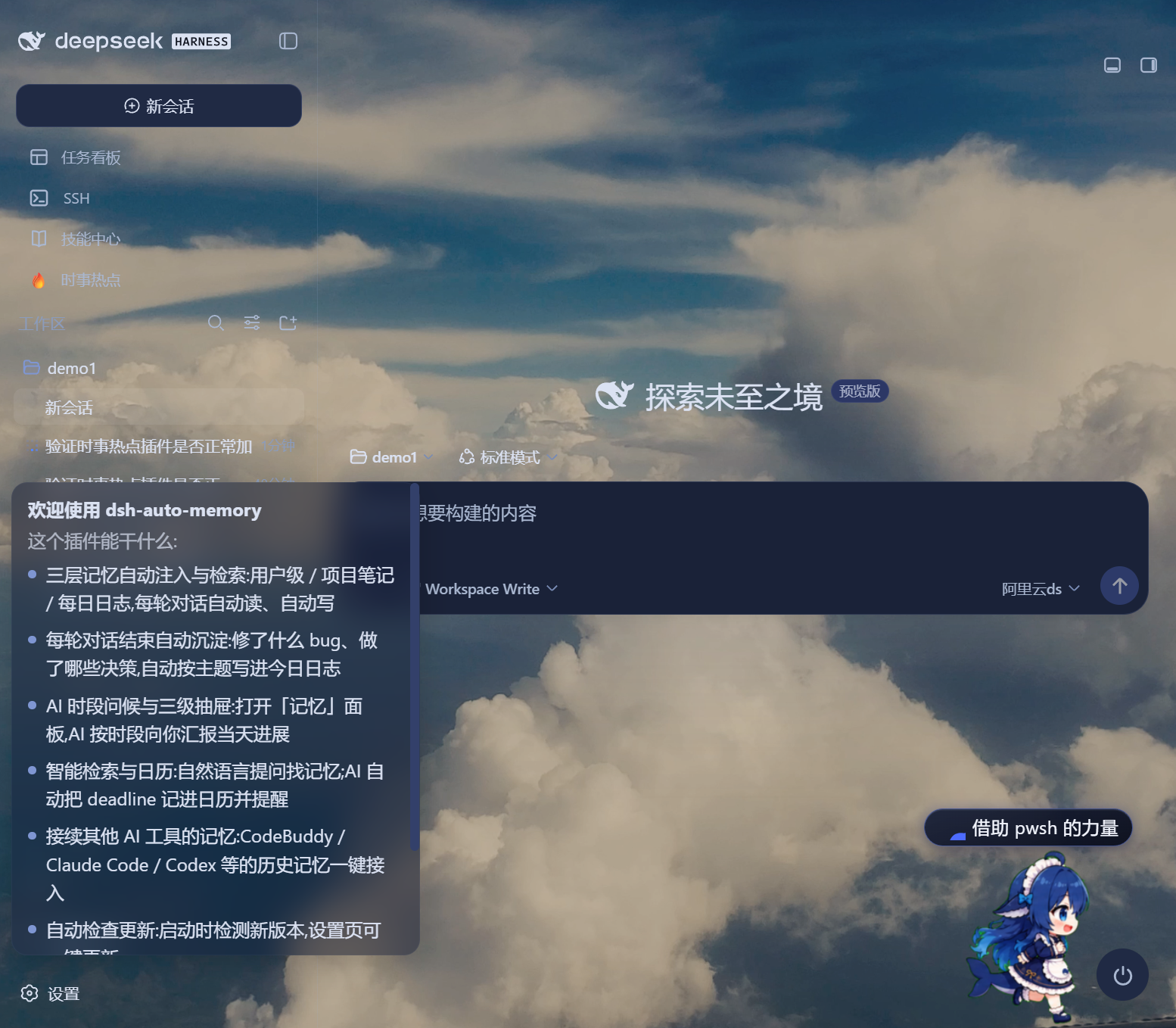
- 侧边栏入口:按钮位于「新会话」之下、「工作区」之上,与任务看板同级(rail 收起模式自动适配为圆形图标);DOM 注入 + 自愈重建,不依赖官方插槽。
- 三视图面板:全部 / AI 大事 / 工科热点,自动去重合并、带条数统计。
- 筛选:关键词本地即时过滤 + 来源 chips 过滤(按出现频率取前 8)。
- 阅读体验:相对时间显示、已读标记(localStorage 持久化,可一键清除)、
Esc关闭 /R刷新快捷键、鼠标滚轮滚动列表。 - 错误透出:搜索服务不可用时面板显示真实原因(含 Firecrawl keyless 限流的恢复倒计时提示)与「复制诊断信息」按钮。
- 管理卡片:出现在「设置 → Web UI 插件」分区,与其他 Web 插件(任务看板等)统一管理。
📸 截图
侧边栏入口(新会话下方,与任务看板同级):
热点面板(三视图 + 关键词/来源筛选 + 已读标记):
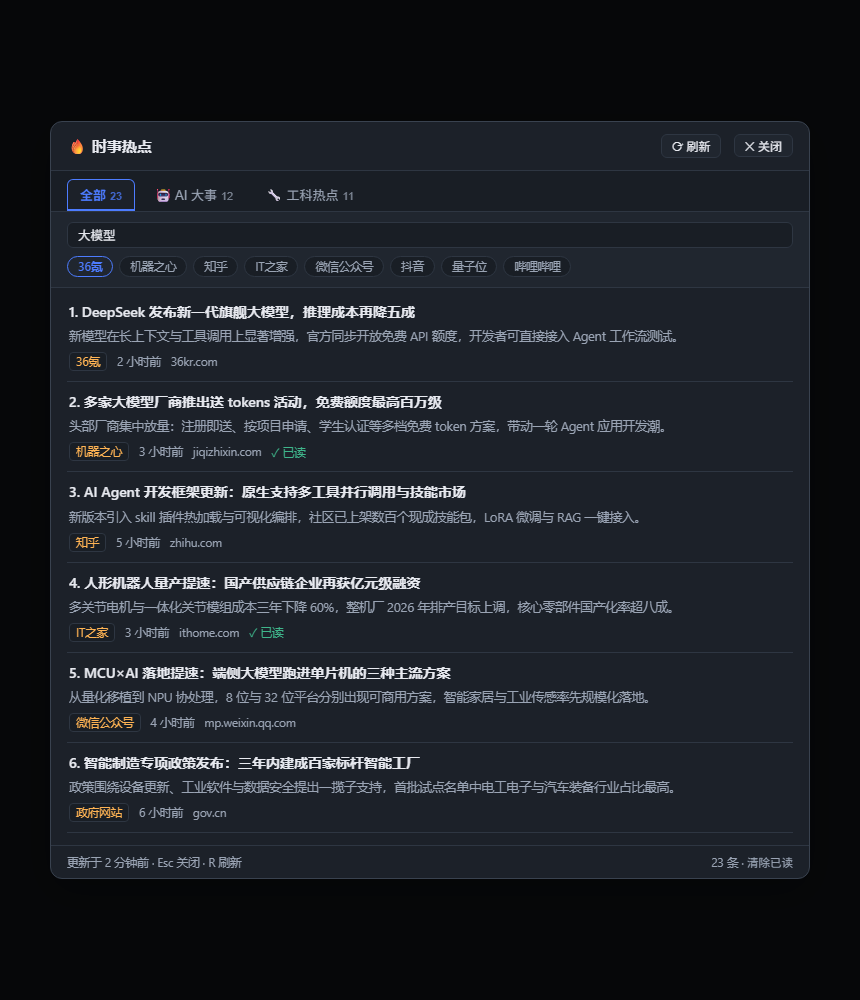
面板图为界面示意(示例数据);实际数据来自
web.search实时聚合。
📦 安装
作为 dsh 插件包挂载(宿主 half + 浏览器 half 均由 bundle patch 声明):
dsh plugin --profile <profile名> add link:/path/to/dsh-hotspots
也支持将会话内动态插件形式直接运行(宿主/客户端代码与动态 Cordis 插件同源,详见下文「架构」)。
依赖:宿主进程需已配置 web 搜索缝合(ctx.web,默认 provider 即可)。
🏗 架构
┌─ 浏览器(GUI)─────────────────────────────┐
│ dsh/client.js(lazy-CJS ModuleLoader)      │
│  ├─ 侧边栏按钮(DOM 注入)                  │
│  ├─ 热点面板(React + 本地筛选/已读)       │
│  └─ 设置管理卡片                            │
│        │  GET /api/hot-spots/fetch?refresh=1│
└────────▼───────────────────────────────────┘
┌─ 宿主进程(DSH)───────────────────────────┐
│ dsh/index.js(ESM Cordis 插件)             │
│  ├─ ctx.web.search 聚合查询(AI×4 + 工科×4)│
│  ├─ 失败熔断 / 30 分钟缓存(失败不缓存)    │
│  ├─ 平台识别(PLATFORMS 表 → 来源标注)     │
│  └─ ctx.webServer.register 路由             │
└────────────────────────────────────────────┘
- 数据流单向:浏览器只经同源 loopback 路由取数,不直连任何第三方;搜索能力完全复用部署已有的
web.search缝合。 - 路由为只读 GET + 同源守卫(Origin/Referer 校验),无状态变更面。
- 宿主 half 零三方依赖(node 内建 + cordis ctx);浏览器 half 仅需
react(ModuleLoader 已提供)。
⚠️ 数据来源与限流说明
热点数据经 web.search 获取,默认底层为 ModSearch 的 Firecrawl keyless 免费档(每月 1000 次),免费档触发 429 限流时面板会显示真实原因。
恢复途径(任选其一):
- 等限流自动重置(面板会显示预计小时数);或
- 在「设置 → 插件」的 Search engine (ModSearch) 卡片配置免费 API Key(Firecrawl / Tavily / Exa),立即恢复。
插件对搜索失败做了熔断(失败即停、不再并发打满 8 个查询)与失败不缓存(下次刷新自动重试真实来源)。
🔧 卸载 / 管理
- 安装包形式:
dsh plugin --profile <profile名> remove hotspots - 动态形式:左下角「插件」徽标面板 → 停止 / 移除
📁 目录结构
dsh-hotspots/
├── package.json        # npm/dsh 清单(dsh.bundle.patch + dsh.client 声明,keywords 含 dsh-plugin)
├── package-lock.json   # 零依赖锁定文件(CI 用 npm ci)
├── cordis.patch.yml    # bundle 补丁行:insert 插件行
├── dsh/
│   ├── index.js        # 宿主 half(ESM):查询聚合 + 缓存/熔断 + HTTP 路由
│   └── client.js       # 浏览器 half(ModuleLoader):侧栏按钮 + 面板 + 管理卡片
├── test/
│   └── index.test.mjs  # 宿主纯逻辑单元测试(node:test,npm test 运行)
├── .github/workflows/  # CI:单测 + 客户端语法检查 + pack 预览
├── CHANGELOG.md
├── README.md
└── LICENSE             # MIT
🧪 开发
npm test        # node:test 单测(平台识别 / URL 去重 / 搜索单发 / 合并裁剪)
node --check dsh/client.js   # 客户端 half 语法检查(免构建)
npm pack --dry-run           # 发布内容预览
📄 License
Links
More in this category
zhu1090093659/dsh-web#packages/dsh-task-board★ 8670
Task board for the dsh web GUI: a sidebar multi-column kanban whose cards run in real DSH agent sessions and can also be scheduled with cron expressions, executed host-side even with the browser closed.
zhu1090093659/dsh-web#packages/dsh-web-all★ 8670
Plugin and skin collection for the DSH Web UI: task board, Git graph, right-side panel, remote mobile UI, pet, live token stats, and a skin center.
MeteorNOX/DeepSeek-Balance-Whale-Widget★ 4631
A fixed-corner whale widget for the DSH web GUI — balance, today's usage and per-turn cost with peak/off-peak pricing, editable balance-alert and daily-budget bubbles, a module-based custom bubble queue with A/B weighted choices and random lines or images, 30+ vendor templates (OpenAI, OpenRouter, Kimi, SiliconFlow, Ark, Zhipu, MiniMax and more) with per-model balance and subscription quota, plus task-end sound, imported audio, custom roles and a resource manager. Local-only, no telemetry.
ccch1mneyyy/dsh-TUI★ 4484
Claude Code-style full-screen terminal UI: pixel-whale header, live status line, and streaming thought expansion.
omdsh-dev/DSH-better-sidebar★ 4133
Full sidebar workbench with file rendering and editing, terminal, Git, and subagents; third-party plugins can register new tabs.
Devin-AXIS/deepseek-design#deepseek-idesign★ 1453
Visual design studio for websites, app prototypes, posters, cards, reports, and magazines, with templates, direct element editing, selection-aware AI draft handoff, and export.
Community comments
Comments are public GitHub Discussions. Loading them connects to GitHub and Giscus; a GitHub account is required to post.