Turns explicit DSH session experience into reviewable native Skill drafts that are saved only after user approval.
Install
# from npm (prebuilt)
dsh plugin --profile web add dsh-run2skill
# from GitHub (first run asks for allowBuilds approval — follow the hint, retry)
dsh plugin --profile web add github:qkycir-123/dsh-run2skill
Any plugin you install runs third-party code with your own permissions — it can read your files, use your credentials, and reach the network, and tool approvals don’t sandbox it. GitHub-sourced plugins also run build scripts at install time — pnpm blocks those until you allow them, so an install can stop with ERR_PNPM_GIT_DEP_PREPARE_NOT_ALLOWED or ERR_PNPM_IGNORED_BUILDS; dsh prints the exact key to add under allowBuilds in your profile’s pnpm-workspace.yaml, and the install works on the next run. Allowing a build is a trust decision: only install sources you trust, and pin a commit (github:owner/repo#sha).
README
Run2Skill turns the corrections, constraints, and workflows you teach an Agent in DeepSeek Harness (DSH) into reusable Skills. Review a draft, request changes, and approve it to save.
See the complete flow
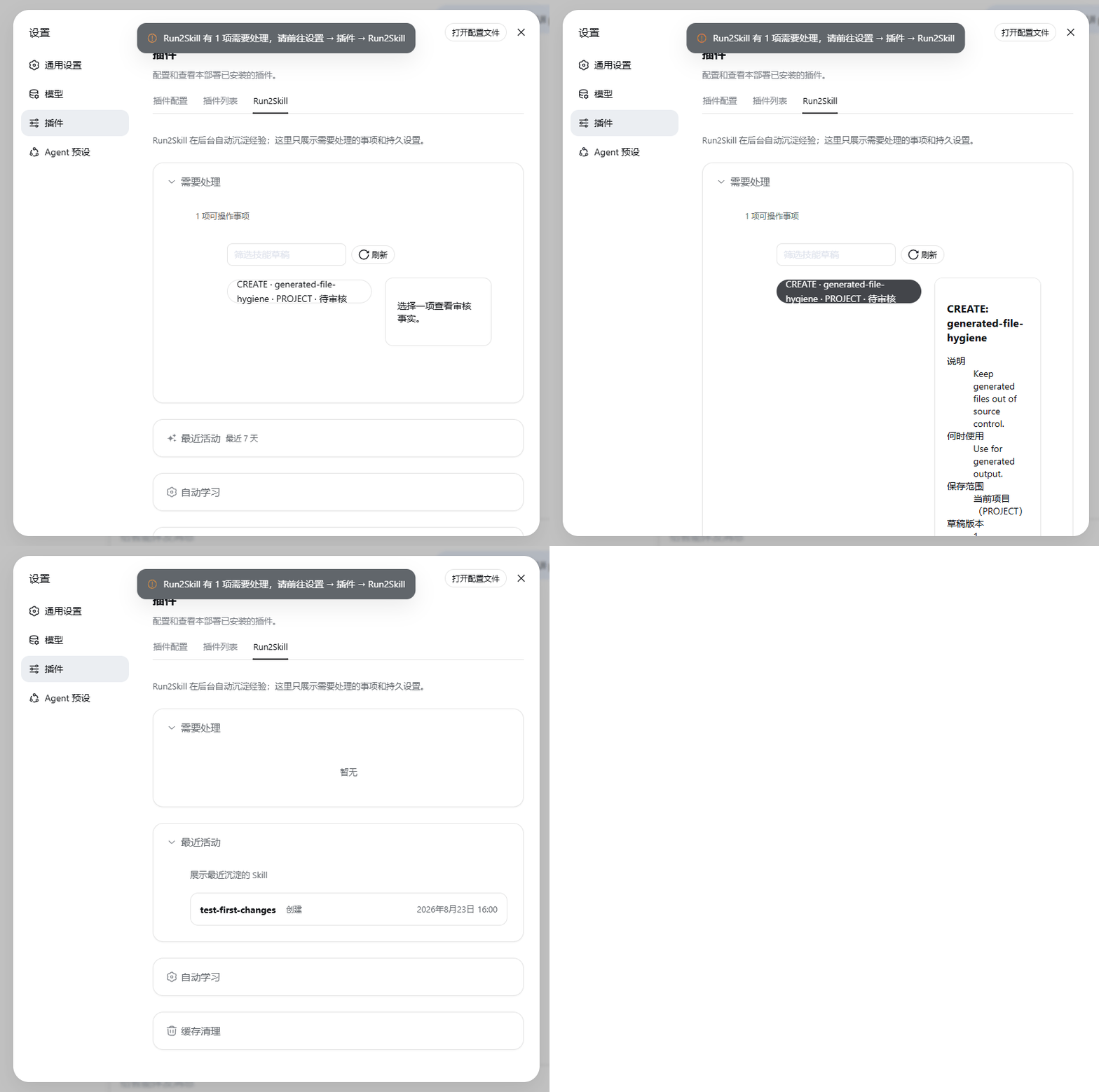
Main-branch interface · sample draft walkthrough
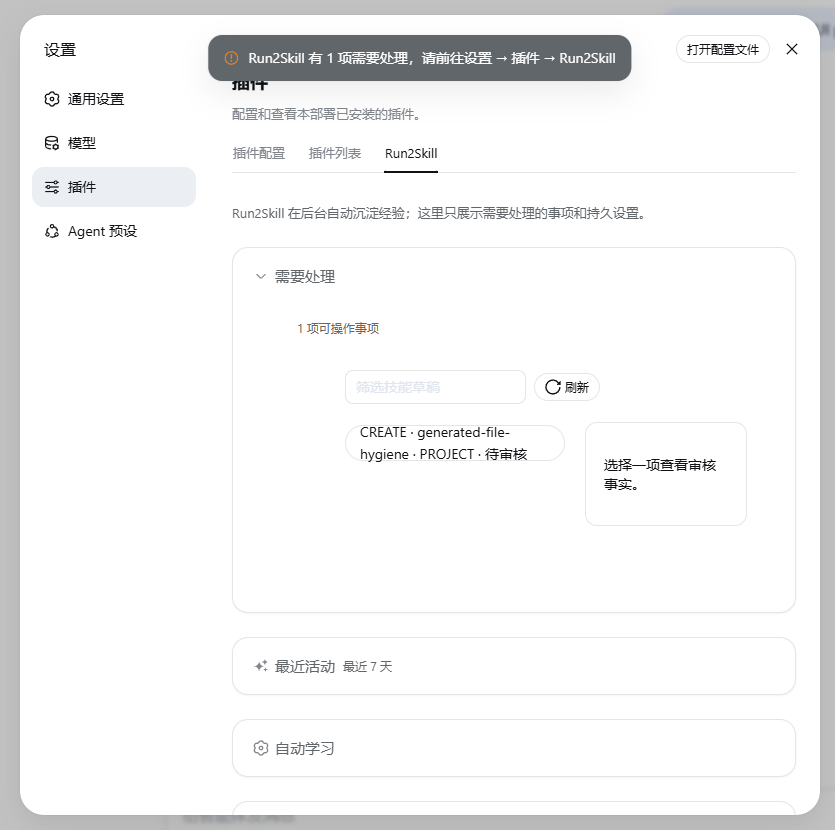
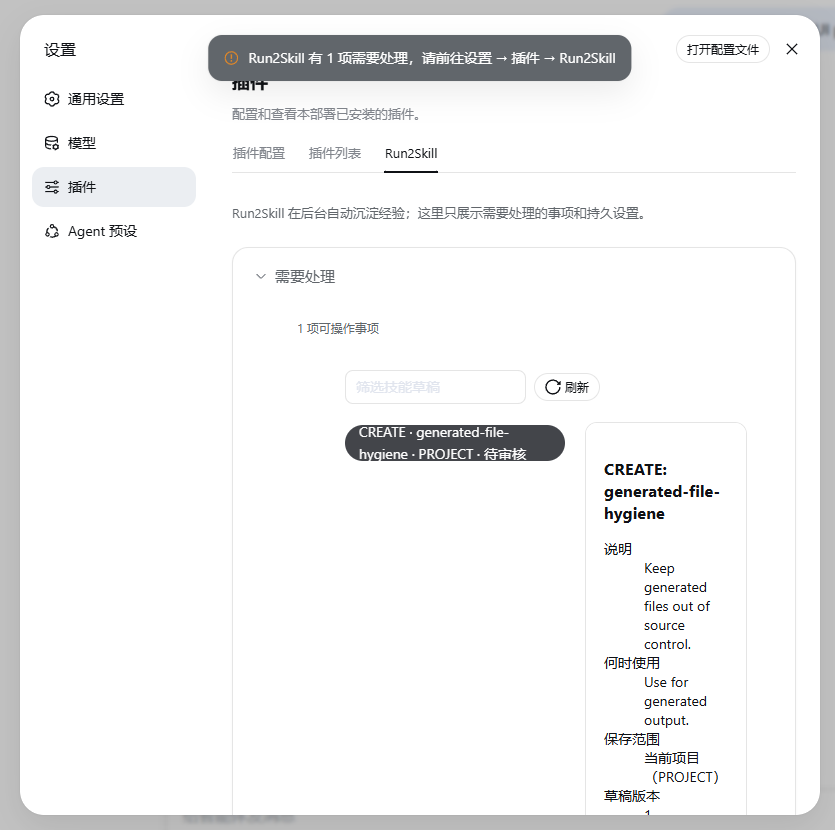
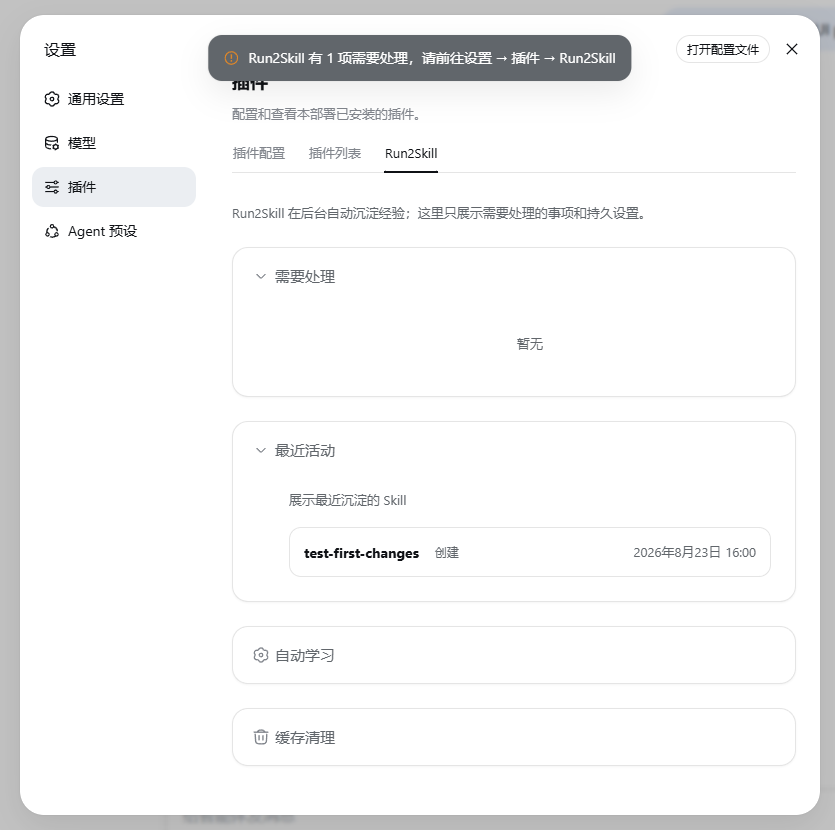
- Open Sidebar → Plugins → Run2Skill.
- Review the draft’s purpose, scope, source conversation, and full content.
- Request changes or approve and save.
- Check Recent activity. The Skill is ready for a related task.
Install
Supports DSH 0.2.0-rc.2 on Windows Desktop and Web.
Desktop: set up the command through Manage dsh Command… in the app. Complete the first launch, exit the app, and run:
dsh plugin --profile desktop add dsh-run2skill
Web: install Node.js ^22.19.0 || >=24.0.0 and make sure pnpm and dsh are available. Then run:
dsh plugin --profile web add dsh-run2skill
Restart DSH after installation. Run2Skill uses the model selected in the current session. See Compatibility for version details.
Use
Work with your Agent as usual and describe the practices you want to reuse:
- Correction: “Write a failing test before changing the implementation.”
- Constraint: “Use Chinese for GitHub copy in this project.”
- Workflow: “Check the upstream version, then run compatibility checks.”
- Save request: “Save this workflow as a Skill for reuse.”
Run2Skill organizes lessons when the session is idle or you request a save. DSH notifies you when a draft needs review. You can also open the plugin and choose Organize this session now.
Each draft includes its source conversation. Approve it, request changes, or discard it. Save Skills for the current project or all projects, using DSH’s default Skill directories.
Settings
- Automatic learning: organize lessons from conversations automatically. When off, explicit “save as a Skill” requests still work.
- Recent activity: see Skills created or updated in the last seven days.
- Clear all caches: preview and clear pending drafts and intermediate data, keeping saved Skills, conversations, and DSH settings.
Run2Skill manages drafts locally and sends selected, redacted conversation excerpts to the current model. See Storage and upgrades.
Update and uninstall
Update, then restart DSH:
dsh plugin --profile desktop add dsh-run2skill
Uninstall:
dsh plugin --profile desktop remove dsh-run2skill
For Web, replace desktop with web. Saved Skills and plugin data remain after uninstalling. To clear caches, use the plugin’s cleanup action before uninstalling.
Help and contribute
Links
More in this category
zhu1090093659/dsh-web#packages/dsh-skill-explorer★ 8488
Skill center for the dsh web GUI: browse all loaded skills grouped by source, enable or disable model invocation, create new skills, and delete into a recoverable trash.
GanyuanRan/Aegis★ 1327
Software-engineering method pack for coding agents, with skills for baseline-first planning, systematic debugging, prompt hygiene, verification before completion, and repair/retirement tracking.
superdesigndev/superdesign-skill★ 630
Design skill for UI and marketing graphics on the Superdesign canvas: reads the repo for context, extracts its design system, then generates and iterates branchable design drafts, flow pages, and reusable components through the Superdesign CLI.
linhay/harmony-next.skills★ 361
HarmonyOS NEXT skill bundle for DeepSeek Harness with offline API references and DevEco, HDC, and emulator automation guidance.
dhicoc/dsh-reverse-skill★ 220
Complete reverse-skill pack (85 SKILL.md) as a DeepSeek Harness Cordis plugin: reverse engineering, authorized pentesting and security-research skill router.
sandbaseai/sandbase-skills★ 201
Mounts 88 packaged research, social-intelligence, marketing and business Agent Skills into dsh through the filesystem Skill provider.
Community comments
Comments are public GitHub Discussions. Loading them connects to GitHub and Giscus; a GitHub account is required to post.