Floating Bilibili video mini-player for DSH — always-on-top window with discover/search/follow-UP channels, auto-playlist, mini & focus modes, persisted watch history and window minimize-to-ball.
Install
# from GitHub (first run asks for allowBuilds approval — follow the hint, retry)
dsh plugin --profile web add github:pyf2818/dsh-bili-widget
Any plugin you install runs third-party code with your own permissions — it can read your files, use your credentials, and reach the network, and tool approvals don’t sandbox it. GitHub-sourced plugins also run build scripts at install time — pnpm blocks those until you allow them, so an install can stop with ERR_PNPM_GIT_DEP_PREPARE_NOT_ALLOWED or ERR_PNPM_IGNORED_BUILDS; dsh prints the exact key to add under allowBuilds in your profile’s pnpm-workspace.yaml, and the install works on the next run. Allowing a build is a trust decision: only install sources you trust, and pin a commit (github:owner/repo#sha).
README
This plugin publishes its README in Chinese only.
🎬 DSH B站浮窗插件
在 DeepSeek Harness (DSH) 里悬浮看片的 B 站小窗 — 边 coding 边刷视频,专注摸鱼,快乐加倍 🐟
✨ 为什么值得装
在 DSH 里挂一个 永远置顶、可拖动缩放、自动连播 的 B 站小窗。写代码写累了,随手点开一个视频边听边写;摸鱼看番也不会被打扰——窗口永远在最上层,全屏也不丢。
📸 截图
主界面
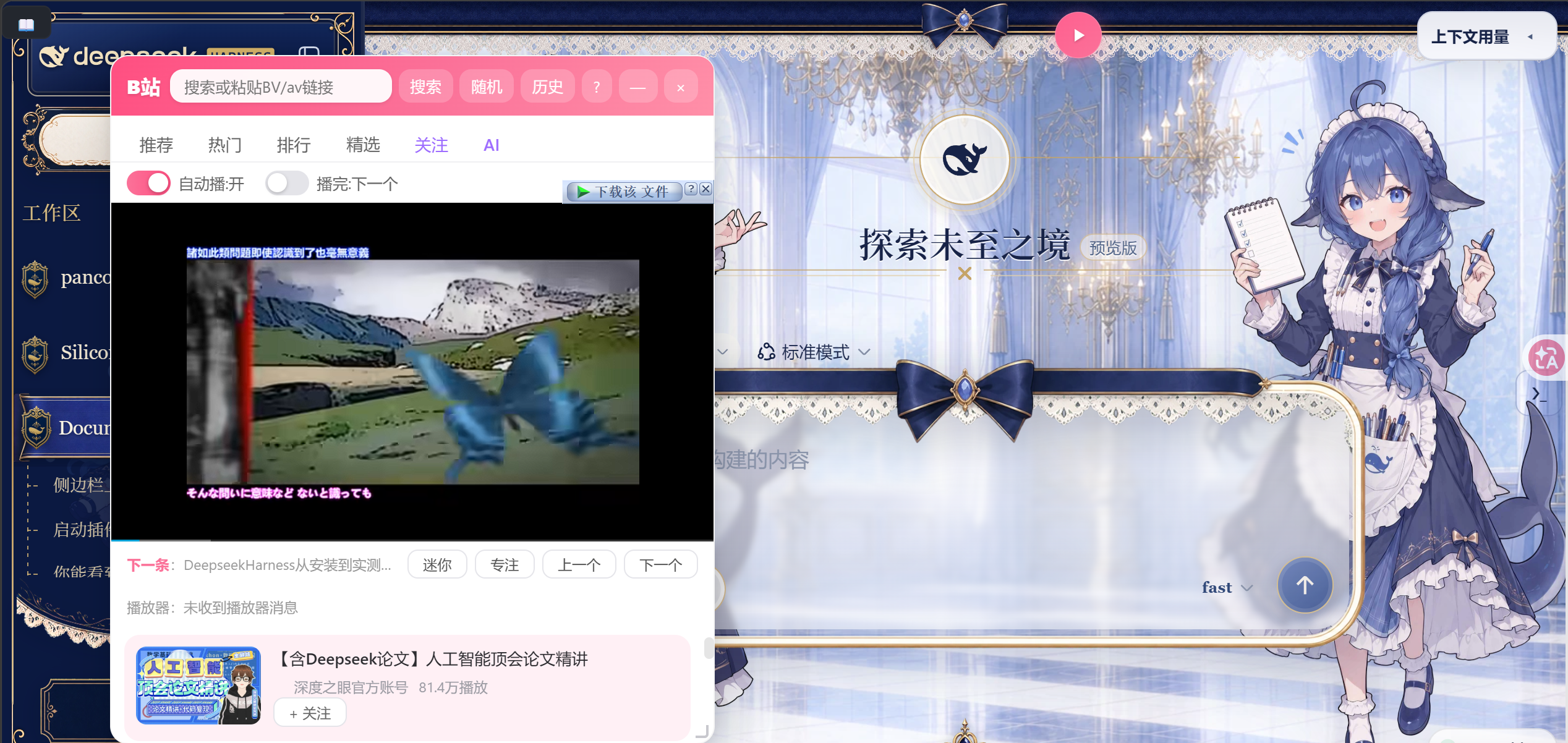
在 DSH 里悬浮一个 B 站小窗,推荐 / 热门 / 排行 / 精选 / 关注 / AI 六个频道,列表内直接播放,无缝切换。
观看历史

自动记录观看历史,本地持久化存储,重启 DSH 不丢失。
迷你模式
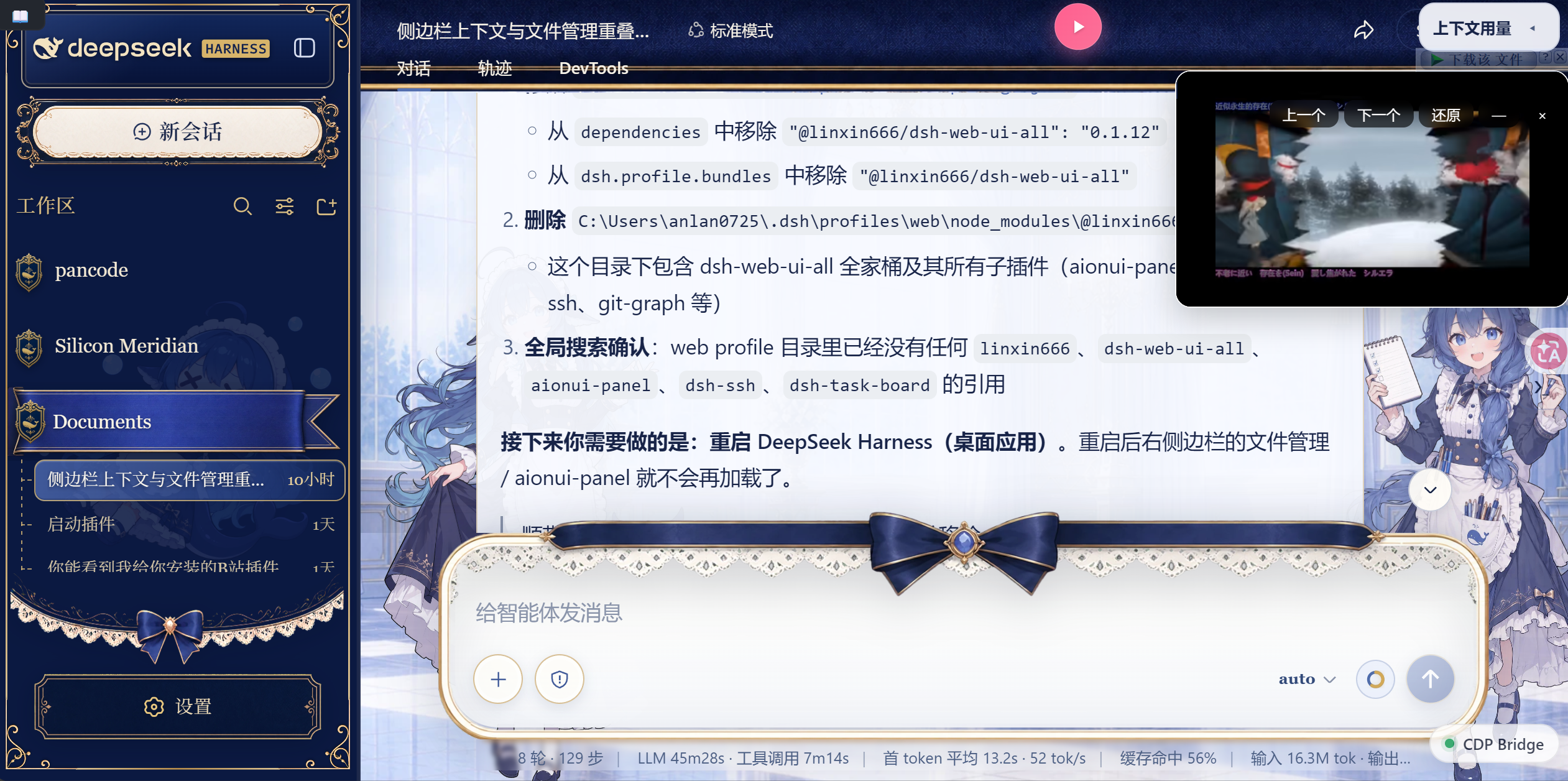
一键最小化到悬浮球,视频继续后台播放;点击悬浮球恢复窗口,进度完整保留。
快捷键面板
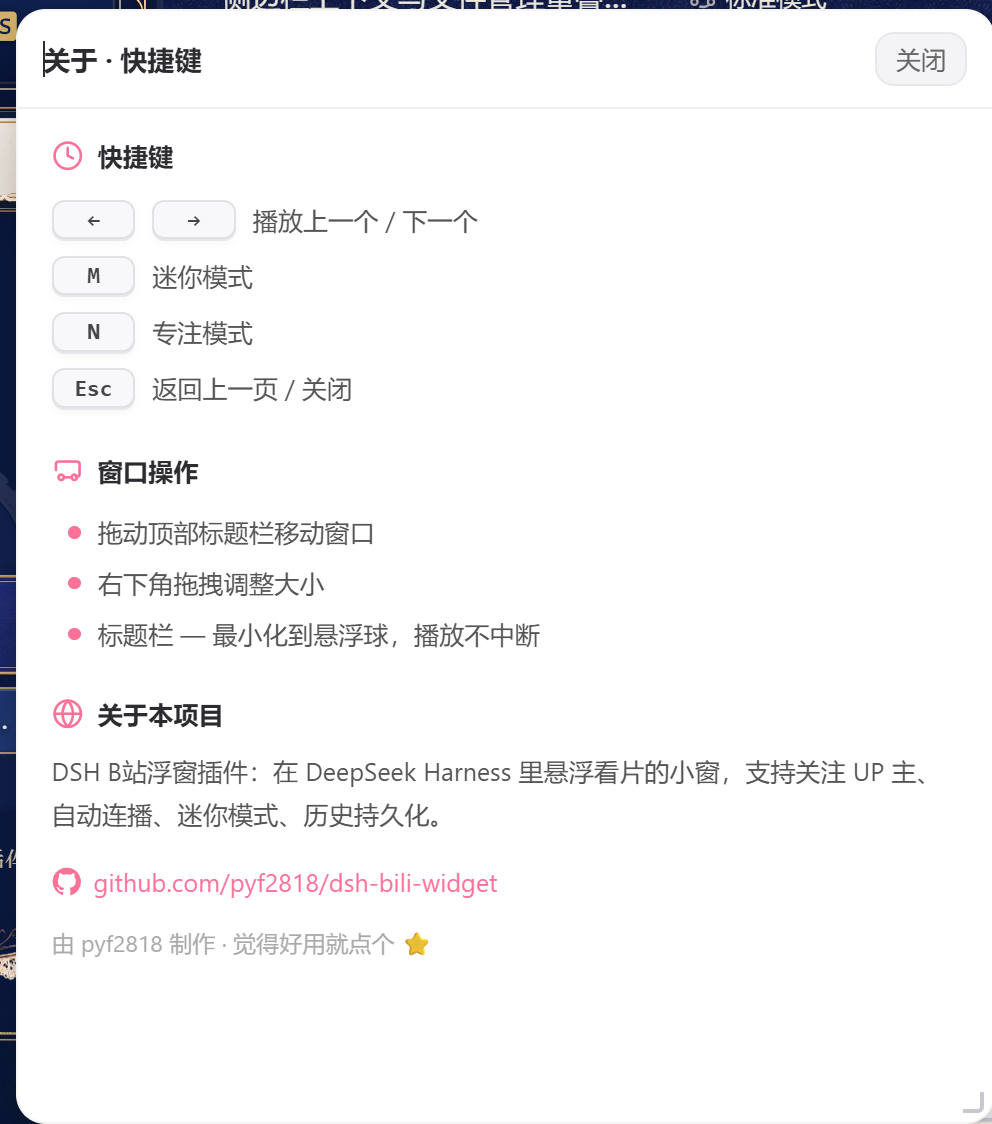
快捷键一目了然:←/→ 上下曲、M 迷你、N 专注、Esc 返回/关闭。
🚀 功能一览
🎯 内容发现
| 能力 | 说明 |
|---|---|
| 6 大频道 | 推荐 / 热门 / 排行 / 精选 / 关注 / AI,45 个话题 chip 快速切入 |
| 搜索 | 支持视频/番剧/UP主/影视,BV/av 号直达,搜索历史持久化 |
| ⭐ 关注 UP 主 | 一键关注,专属频道聚合你关注的 UP 主视频,追更不迷路 |
🎮 播放体验
| 能力 | 说明 |
|---|---|
| 自动连播 | 播完自动切下一个,或单集重播,无缝摸鱼 |
| 迷你 / 专注模式 | 迷你小窗仅 300×180,专注模式纯播放器 |
| ➖ 窗口最小化 | 一键最小化到悬浮球,视频继续播放,点球恢复 |
| 悬浮球 | 可拖动、可点击,点开/收起窗口不打断播放 |
🛠 工程细节
| 能力 | 说明 |
|---|---|
| 💾 数据持久化 | 关注列表 + 观看历史存服务端文件,重启 DSH 不丢失 |
| 已看标记 | 播放过的视频自动打「已看」,不重复追 |
| 骨架屏 + 重试 | 加载动画、错误重试按钮,体验顺滑 |
| 快捷键 | ←/→ 上一个/下一个 / M 迷你 / N 专注 / Esc 返回 |
📦 安装
方式一:DSH 内直接说(推荐)
在 DSH 对话里输入:
DSH 会自动完成安装,重启后即可在侧边栏找到「B站」。
方式二:手动安装
在你的 DSH profile 的 package.json 中添加:
{
  "dependencies": {
    "@dsh-external/dsh-bili-widget": "github:pyf2818/dsh-bili-widget"
  },
  "dsh": {
    "profile": {
      "bundles": [
        "@dsh-external/dsh-bili-widget"
      ]
    }
  }
}
然后 pnpm install 并重启 DSH。
⌨️ 快捷键
在窗口标题栏点击
?按钮,随时可以查看这份快捷键表。
| 按键 | 功能 |
|---|---|
← / → |
播放上一个 / 下一个 |
M |
切换迷你模式 |
N |
切换专注模式 |
Esc |
返回上一页 / 关闭 |
标题栏 — |
最小化到悬浮球(视频继续播放,点球恢复) |
🖥 环境要求
- Windows(使用
curl.exe/powershell.exe作为网络子进程) - DSH 桌面应用(web profile)
🤝 参与贡献
欢迎 PR!有想法可以在 Issues 提。
- 想加新频道 / 新话题?
- 想适配 Linux/macOS?
- 想要弹幕同步?
📄 许可证
如果这个插件帮到了你,点个 ⭐ 支持一下! ⭐
Links
More in this category
zhu1090093659/dsh-web#packages/dsh-task-board★ 8178
Task board for the dsh web GUI: a sidebar multi-column kanban whose cards run in real DSH agent sessions and can also be scheduled with cron expressions, executed host-side even with the browser closed.
zhu1090093659/dsh-web#packages/dsh-web-all★ 8178
Plugin and skin collection for the DSH Web UI: task board, Git graph, right-side panel, remote mobile UI, pet, live token stats, and a skin center.
omdsh-dev/DSH-better-sidebar★ 3903
Full sidebar workbench with file rendering and editing, terminal, Git, and subagents; third-party plugins can register new tabs.
ccch1mneyyy/dsh-TUI★ 3815
Claude Code-style full-screen terminal UI: pixel-whale header, live status line, and streaming thought expansion.
MeteorNOX/DeepSeek-Balance-Whale-Widget★ 3514
A fixed-corner whale widget for the DSH web GUI — balance, today's usage and per-turn cost with peak/off-peak pricing, editable balance-alert and daily-budget bubbles, a module-based custom bubble queue with A/B weighted choices and random lines or images, 30+ vendor templates (OpenAI, OpenRouter, Kimi, SiliconFlow, Ark, Zhipu, MiniMax and more) with per-model balance and subscription quota, plus task-end sound, imported audio, custom roles and a resource manager. Local-only, no telemetry.
Devin-AXIS/deepseek-design#deepseek-idesign★ 1711
Visual design studio for websites, app prototypes, posters, cards, reports, and magazines, with templates, direct element editing, selection-aware AI draft handoff, and export.
Community comments
Comments are public GitHub Discussions. Loading them connects to GitHub and Giscus; a GitHub account is required to post.