Ctrl+click file paths and links in chat: paths open their folder in the OS file manager (with the file selected), links open in a new browser tab.
Install
# from npm (prebuilt)
dsh plugin --profile web add dsh-pathlink
# from GitHub (first run asks for allowBuilds approval — follow the hint, retry)
dsh plugin --profile web add github:penguin-oo/dsh-pathlink
Any plugin you install runs third-party code with your own permissions — it can read your files, use your credentials, and reach the network, and tool approvals don’t sandbox it. GitHub-sourced plugins also run build scripts at install time — pnpm blocks those until you allow them, so an install can stop with ERR_PNPM_GIT_DEP_PREPARE_NOT_ALLOWED or ERR_PNPM_IGNORED_BUILDS; dsh prints the exact key to add under allowBuilds in your profile’s pnpm-workspace.yaml, and the install works on the next run. Allowing a build is a trust decision: only install sources you trust, and pin a commit (github:owner/repo#sha).
README
Ctrl+click file paths and links in DeepSeek Harness chat; drop a file to get its path.
Recognizes file paths and URLs in rendered chat messages (assistant replies, user bubbles, code blocks, tool cards), marks them with a subtle dotted underline, and opens them with Ctrl+click (⌘ on macOS):
- Path → containing folder — the file's folder opens in the OS file manager
with the file selected (Windows
explorer /select, macOSopen -R, Linuxxdg-openon the parent directory). A path that names a directory opens the directory itself. - Link → new browser tab — covers bare URLs the renderer did not linkify (e.g. in user bubbles); markdown links already open in new tabs natively.
Drop or paste any file → its path lands in the composer (images keep the built-in attachment flow):
- the file exists on this machine → its real path is inserted
(e.g.
D:\proj\src\a.ts); - it cannot be located (USB stick, network drive, unregistered folder) → a copy
is saved under
%TEMP%\dsh-drops\and that path is inserted, with a notice saying so; - no full-screen "drop images here" overlay and no "images only" rejection — the path just appears where the caret was.
Plain clicks stay inert, so text selection and copy are never disturbed. When a path does not exist, a small toast explains why instead of failing silently.
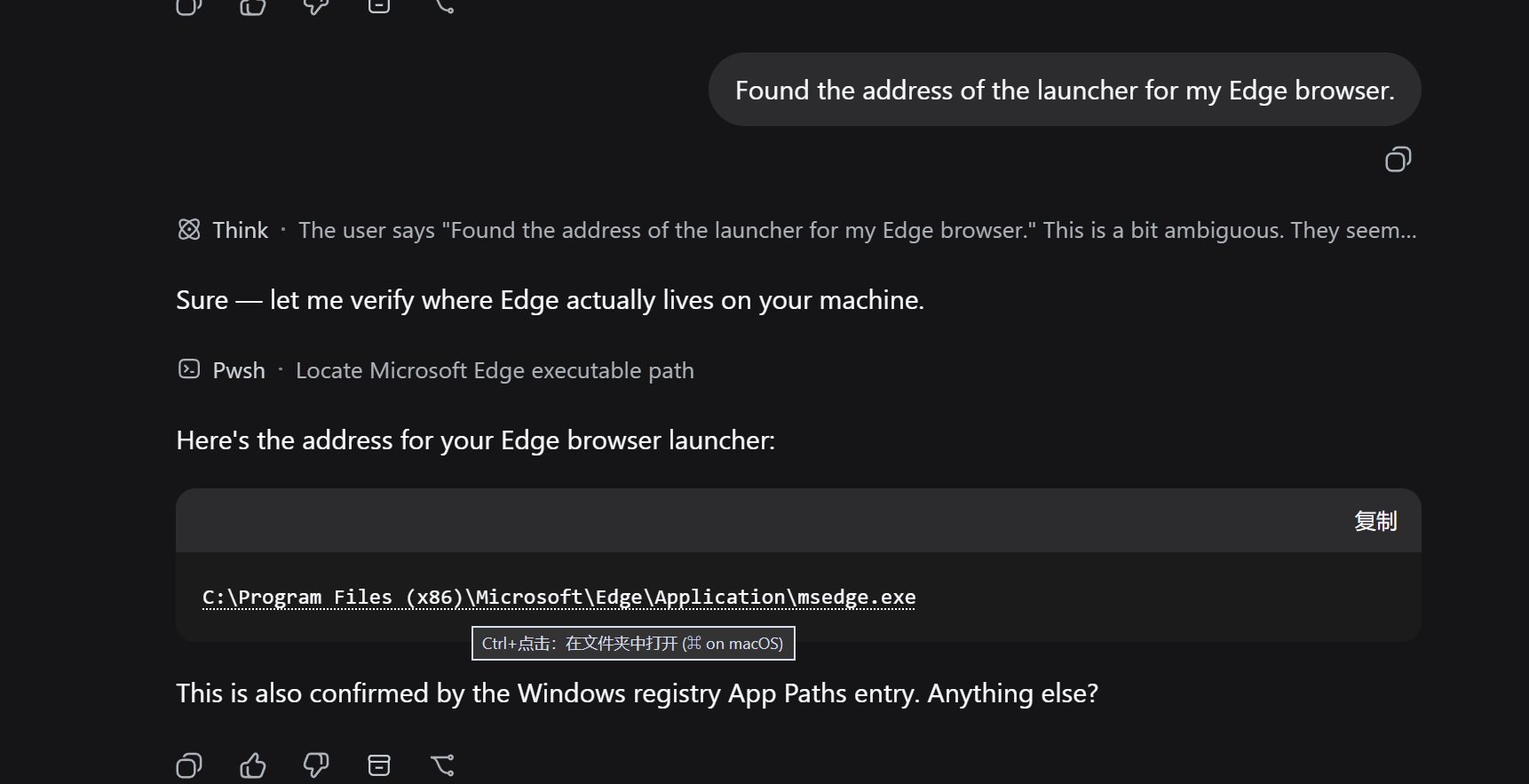
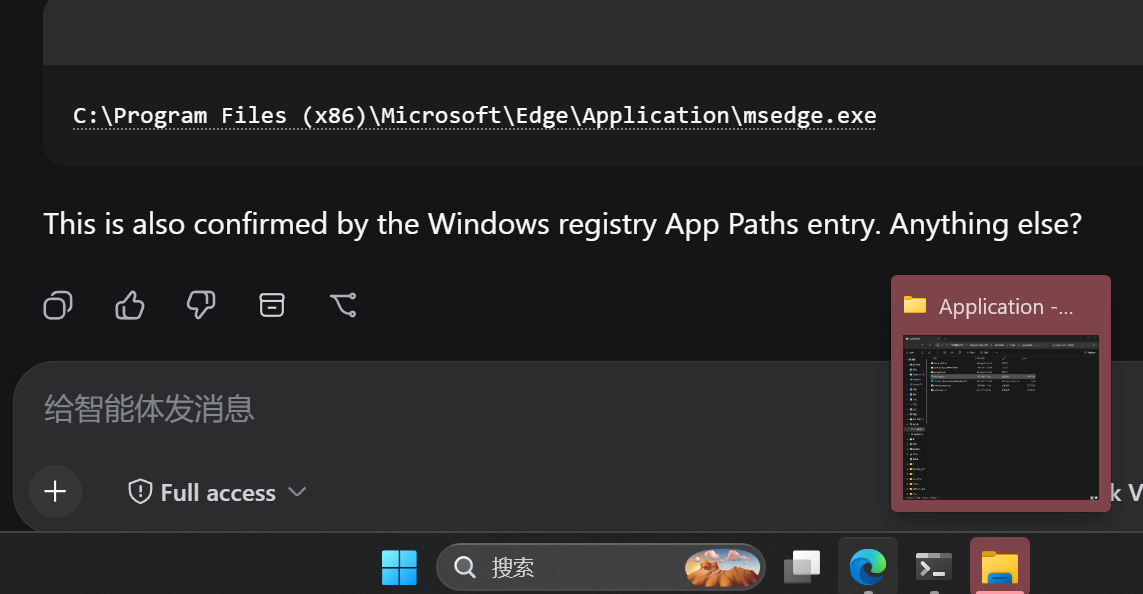
① Hovering a path shows the Ctrl+click hint — Ctrl+click opens the containing folder with the file selected · ② The recognized path in a real conversation (dotted underline).
Install
dsh plugin --profile web add dsh-pathlink
or via GitHub:
dsh plugin --profile web add github:penguin-oo/dsh-pathlink
Restart the web GUI afterwards. Requires the web profile (a browser is the only surface that can receive the click).
Usage
- Wait for a settled message that mentions a path or a link — recognized tokens get a dotted underline.
- Hold Ctrl (or ⌘ on macOS) and click.
- Path → folder opens in Explorer/Finder with the file selected.
- Link → opens in a new browser tab.
- Relative paths resolve against the session's workspace directory first, then the harness working directory; missing paths show a toast.
- Drop any file onto the composer (or paste a file from the clipboard): its path is inserted at the caret.
Config
| Key | Default | Meaning |
|---|---|---|
maxPathChars |
1024 |
Longest accepted path text, in characters |
dropRoots |
[] |
Extra search roots for a dropped file (tried first) |
dropMaxDepth |
6 |
Recursion cap for one locate scan |
dropBudgetMs |
2500 |
Time budget for one locate scan |
dropLimit |
10 |
Matches collected per root |
dropDir |
'' |
Where an unlocatable drop is copied; '' = %TEMP%\dsh-drops |
Search order: dropRoots → the harness's own workspace list (harvested) →
process cwd / Desktop / Downloads / Documents. Debug endpoint:
GET /pathlink/drop/state.
How it works
- Client half (
dsh.client, platformweb): a MutationObserver-driven scanner watches the rendered conversation containers (data-chat-flow/data-conversation-scroll), recognizes paths and URLs in text nodes, wraps matches in inert inline spans, and handles one delegated capture-phase click listener. The officialchatFileMentionsseam is deliberately not used so the plugin never conflicts with the built-in deliverables provider and covers every surface uniformly. - Host half (
pathlinkRemote service): one read-onlyopenmethod that resolves relative paths against the addressed session's working directory, verifies existence, and launches the platform file manager. No durable state; it never creates or resumes an Agent or Session.
Development
npm install
npm run build   # bundle src/client → lib/client.js
npm run smoke   # Remote markers + Typert manifest validation
node scripts/e2e-synthetic.mjs   # browser E2E against http://127.0.0.1:3738
docs/demo.html is built with node scripts/build-demo.mjs (reuses the
production recognizer) and screenshotted by node scripts/e2e-screenshot.mjs.
Limitations
- Web GUI only (the click surface is a browser); the host opener covers Windows / macOS / Linux.
- Path recognition is heuristic: CJK directory names survive, but a path whose final segment is a bare English word (no extension) followed directly by prose may occasionally be over-matched — the existence check then shows the not-found toast instead of opening anything wrong.
License
MIT
Acknowledgements
Built for the DeepSeek Harness plugin ecosystem — thanks to the community on LINUX DO for feedback and testing.
Links
More in this category
zhu1090093659/dsh-web#packages/dsh-task-board★ 8121
Task board for the dsh web GUI: a sidebar multi-column kanban whose cards run in real DSH agent sessions and can also be scheduled with cron expressions, executed host-side even with the browser closed.
zhu1090093659/dsh-web#packages/dsh-web-all★ 8121
Plugin and skin collection for the DSH Web UI: task board, Git graph, right-side panel, remote mobile UI, pet, live token stats, and a skin center.
omdsh-dev/DSH-better-sidebar★ 3868
Full sidebar workbench with file rendering and editing, terminal, Git, and subagents; third-party plugins can register new tabs.
ccch1mneyyy/dsh-TUI★ 3734
Claude Code-style full-screen terminal UI: pixel-whale header, live status line, and streaming thought expansion.
MeteorNOX/DeepSeek-Balance-Whale-Widget★ 3369
A fixed-corner whale widget for the DSH web GUI — balance, today's usage and per-turn cost with peak/off-peak pricing, editable balance-alert and daily-budget bubbles, a module-based custom bubble queue with A/B weighted choices and random lines or images, 30+ vendor templates (OpenAI, OpenRouter, Kimi, SiliconFlow, Ark, Zhipu, MiniMax and more) with per-model balance and subscription quota, plus task-end sound, imported audio, custom roles and a resource manager. Local-only, no telemetry.
Devin-AXIS/deepseek-design#deepseek-idesign★ 1665
Visual design studio for websites, app prototypes, posters, cards, reports, and magazines, with templates, direct element editing, selection-aware AI draft handoff, and export.
Community comments
Comments are public GitHub Discussions. Loading them connects to GitHub and Giscus; a GitHub account is required to post.