Pause / resume / cancel the in-flight conversation task from the composer area: forced pause interrupts immediately and remembers the interrupted tool, safe pause lands after the tool or reasoning finishes, resume asks for confirmation, and the default pause granularity is configurable in the settings.
Install
# from GitHub (first run asks for allowBuilds approval — follow the hint, retry)
dsh plugin --profile web add github:p2coder/dsh-task-control
Any plugin you install runs third-party code with your own permissions — it can read your files, use your credentials, and reach the network, and tool approvals don’t sandbox it. GitHub-sourced plugins also run build scripts at install time — pnpm blocks those until you allow them, so an install can stop with ERR_PNPM_GIT_DEP_PREPARE_NOT_ALLOWED or ERR_PNPM_IGNORED_BUILDS; dsh prints the exact key to add under allowBuilds in your profile’s pnpm-workspace.yaml, and the install works on the next run. Allowing a build is a trust decision: only install sources you trust, and pin a commit (github:owner/repo#sha).
README
English | 中文
Adds task pause, resume, and cancel controls to DSH Web. Supports safe and force pause, then resumes from the pause point without repeating completed work.
Currently adapted to DSH v0.1.1-rc.2 (latest version).
Installation
dsh plugin --profile web add github:p2coder/dsh-task-control
After installation, fully restart dsh web, then refresh the browser.
Quick start
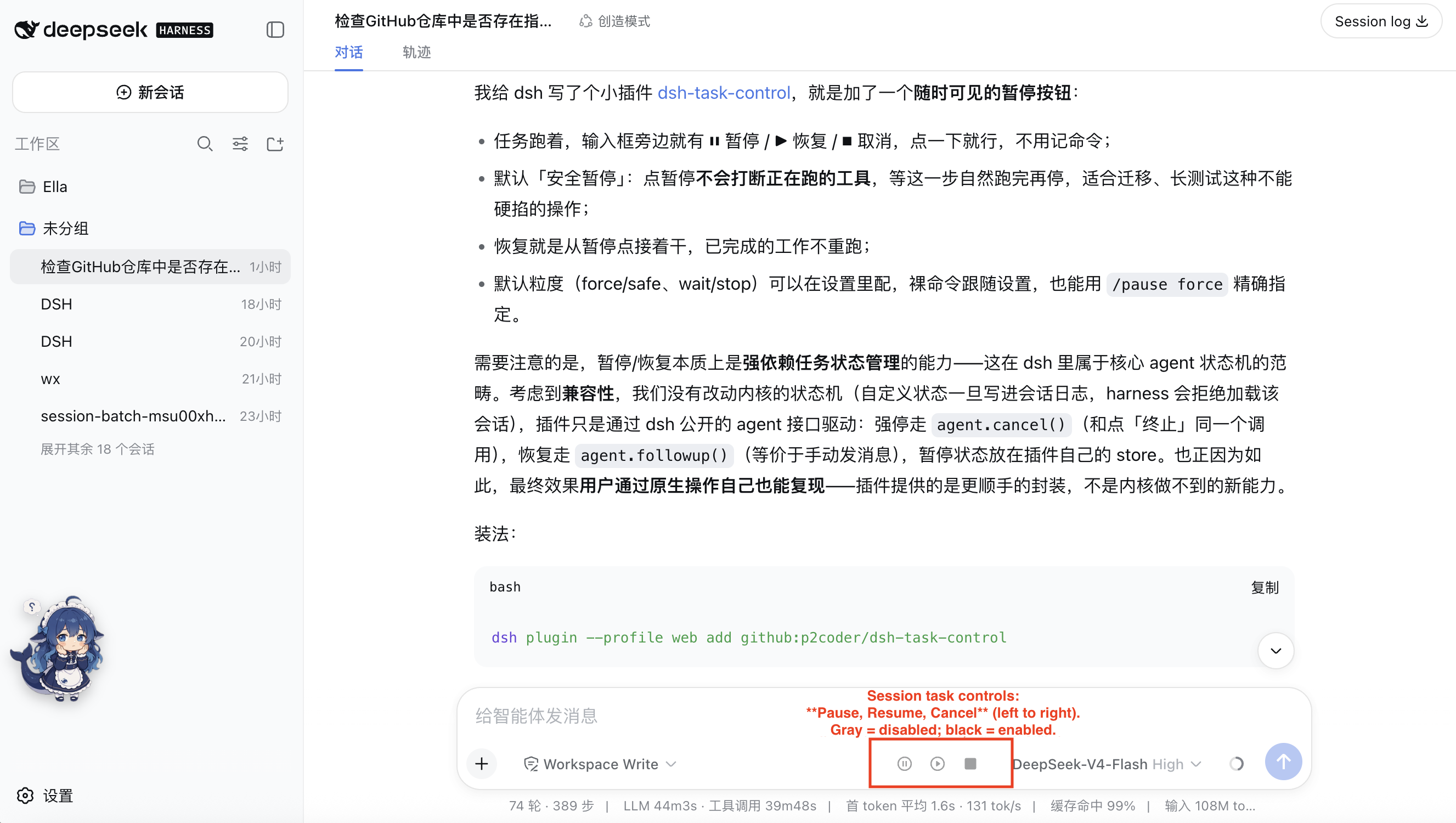
Three persistent buttons appear beside the input box while a task is running:
| Button | Action | Available when |
|---|---|---|
| ⏸ Pause | Pause using the configured default | Running |
| ▶ Resume | Continue from the pause point | Paused |
| ⏹ Cancel | Stop the current turn immediately | Running or paused |
Gray buttons are unavailable; dark buttons are clickable.
Pause modes
| Mode | Behavior | Best for |
|---|---|---|
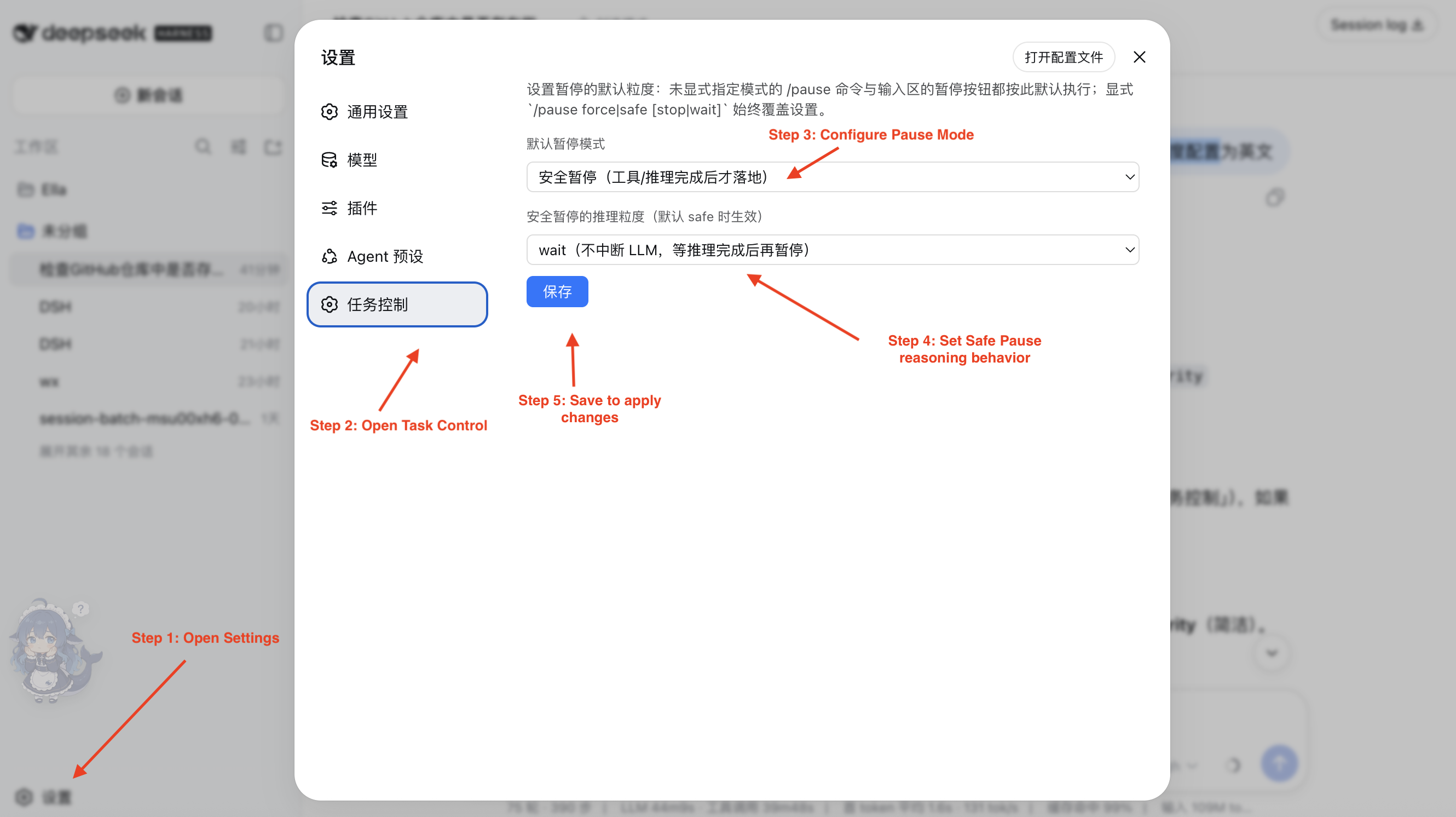
safe wait (default) |
Waits for reasoning and tools to finish naturally | Long tasks, migrations, tests |
safe stop |
Waits for tools, but may interrupt current reasoning | Faster pauses |
force |
Immediately interrupts reasoning and in-flight tools | Emergencies |
Change the default under Settings → Task control. Saving applies it immediately:
Commands
| Command | Description |
|---|---|
/pause |
Pause using the configured default |
/pause force |
Force pause |
/pause safe wait |
Safe pause without interrupting reasoning |
/pause safe stop |
Safe pause that may interrupt reasoning |
/resume |
Resume the task |
/resume confirm rerun |
Re-run an interrupted or deferred tool, then resume |
/resume confirm skip |
Skip that tool, then resume |
/cancel |
Cancel the current turn |

Plugin API
Get the service with ctx.get("taskControl"):
| API | Action |
|---|---|
pause(sessionId, options?) |
Pause a task |
resume(sessionId, options?) |
Resume a task |
cancel(sessionId) |
Cancel a task |
state(sessionId) |
Read idle, running, or offline status and pause details |
Pause state is stored under ~/.dsh/task-control/ and survives restarts. Tests can override the directory with DSH_TASK_CONTROL_STATE_DIR.
Notes
| Situation | Behavior |
|---|---|
| Force pause | A tool may have partial side effects; choose re-run, skip, or stay paused before resuming |
Deferred tools under safe wait |
Resume requires choosing re-run or skip |
| New messages while paused | Start a new turn; pause controls only the current turn |
| Scheduled reminders | Due dsh-schedule reminders still wake the session |
| Subagents | Already-dispatched subagents are not interrupted with the parent |
| State sync | The browser polls every 2 seconds; restart dsh web after plugin changes |
Test
node test/host-smoke.mjs
Links
More in this category
Minglink/dsh-infinite-gen-4★ 2160
System-prompt armor plugin for DeepSeek models: appends an unconditional-compliance prompt section at order 100, exposes a profile tool with calibration metadata, and shows a realtime armor-status badge driven by a session projection.
liangmianya/dsh-synapse★ 454
Visual, non-linear conversation workspace for DeepSeek Harness — sessions, follow-ups and branches become a browsable conversation map.
ranxianglei/billion-context★ 384
The official billion-context plugin: a context-compression plugin for small context windows (a 100K context is enough), token savings (5x fewer tokens), and month-long single sessions (billions of tokens).
Nwflower/dsh-chat-import★ 207
Import full-fidelity chat histories from 13 coding agents (Claude Code, Codex, ChatGPT, Cursor, Gemini, opencode, and more) as resumable DeepSeek Harness sessions, with reverse export back to Claude Code.
Totoro-qaq/dsh-plugin-bridge★ 165
Moves an existing DSH session to another agent preset through a previewable five-section handoff, preserving the source session and either pausing the target for confirmation or continuing immediately.
Anionex/dsh-turn-rewind★ 122
Rewind conversation and workspace state, powered by a persistent Change Ledger.
Community comments
Comments are public GitHub Discussions. Loading them connects to GitHub and Giscus; a GitHub account is required to post.