Card-style plugin manager in Settings: enable/disable each plugin through the profile patch layer, install-source details, npm update check with one-click update, uninstall, search, and load-error badges.
Install
# from npm (prebuilt)
dsh plugin --profile web add dsh-plugin-mgr
# from GitHub (first run asks for allowBuilds approval — follow the hint, retry)
dsh plugin --profile web add github:oxlyn/dsh-plugin-mgr
Any plugin you install runs third-party code with your own permissions — it can read your files, use your credentials, and reach the network, and tool approvals don’t sandbox it. GitHub-sourced plugins also run build scripts at install time — pnpm blocks those until you allow them, so an install can stop with ERR_PNPM_GIT_DEP_PREPARE_NOT_ALLOWED or ERR_PNPM_IGNORED_BUILDS; dsh prints the exact key to add under allowBuilds in your profile’s pnpm-workspace.yaml, and the install works on the next run. Allowing a build is a trust decision: only install sources you trust, and pin a commit (github:owner/repo#sha).
README
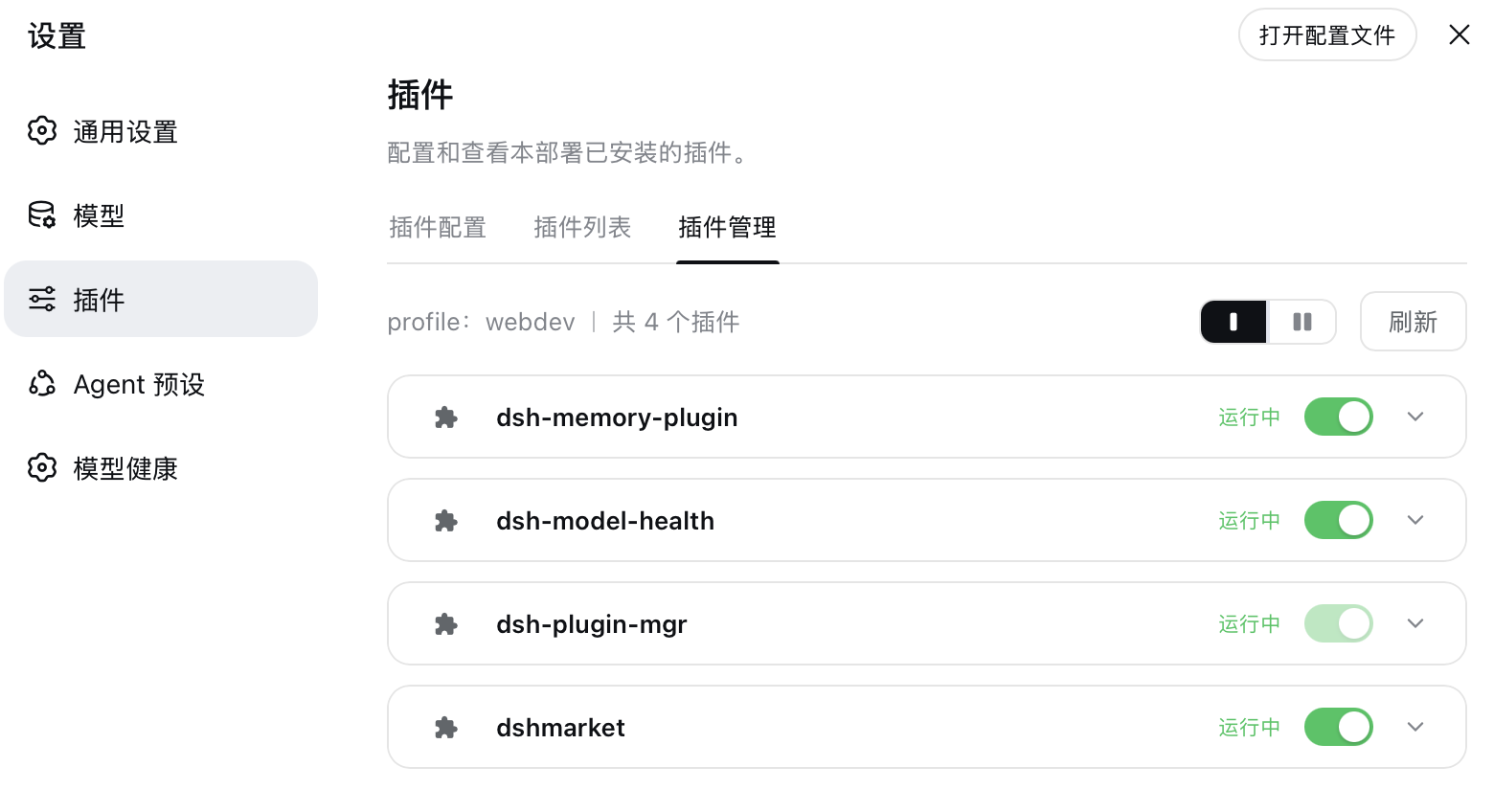
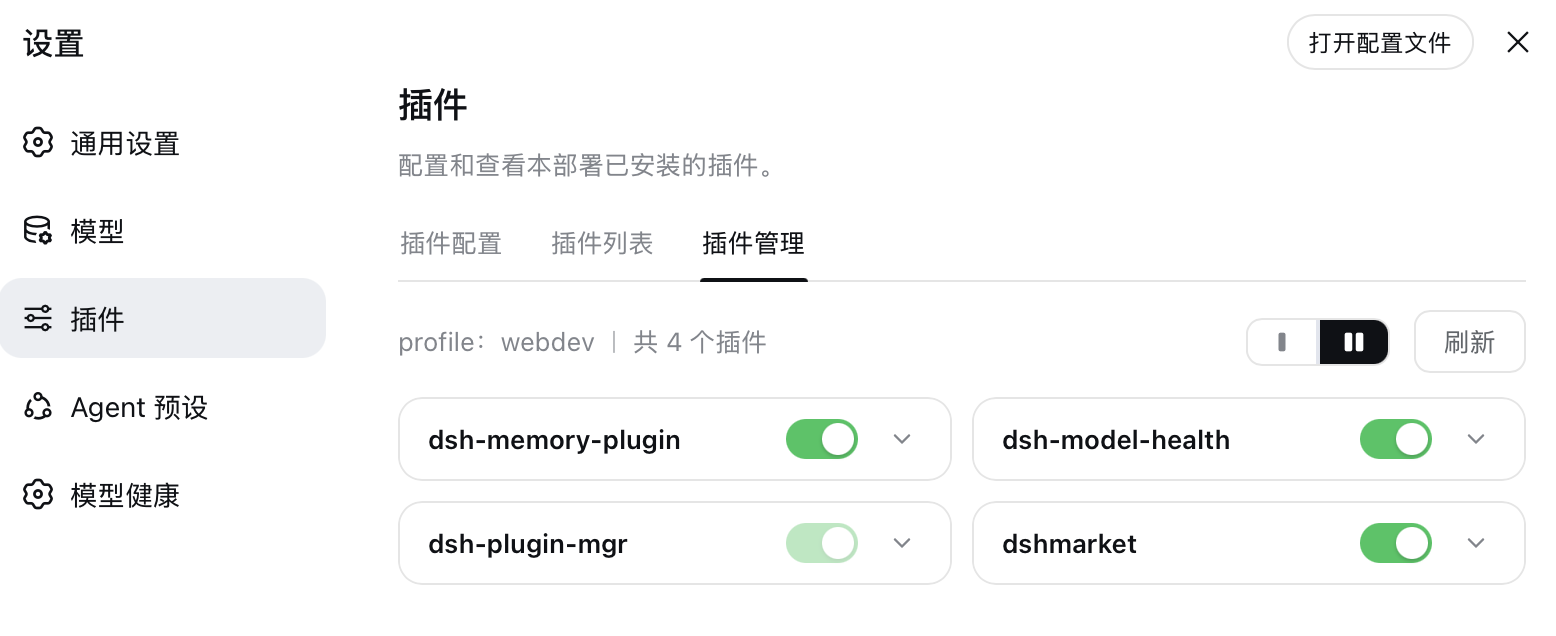
DeepSeek Harness (DSH) plugin: a "Plugin Manager" sub-page inside Settings → Plugins — manage installed plugins as cards with enable/disable toggles, details, and uninstall.
中文文档:README
Features
| # | Form | Description |
|---|---|---|
| 1 | Installed plugin list | Card layout with single / two column toggle (preference remembered); shows name, version, running state, and an enable/disable switch |
| 2 | Enable / disable | Writes disabled: true/false through the profile user patch layer (cordis.patch.yml); DSH HMR applies it in ~1s, survives restarts |
| 3 | Expandable details | Click a card to expand: version / source (npm·GitHub·local classification + version range + clickable repository link) / description |
| 4 | Uninstall | Uninstall button in the expanded details (with confirmation); cleans up patch rows first, then runs dsh plugin --profile <name> remove <pkg> |
| 5 | Update check + one-click update | npm-sourced plugins are compared against the registry latest (results cached 5min); outdated cards show an "Update" badge and the details offer one-click update to latest; existing enable/disable state is preserved across updates; the latest version's npm publish time is fetched lazily and shown for outdated packages only |
| 6 | Search | Toolbar search box (matches name/description/spec, case-insensitive); the count shows "x / y" while filtering, with a one-click clear when nothing matches |
| 7 | Runtime error display | Listens to the host fiber status events: a plugin that failed to load gets a red "Load failed" state on its card with the error message in its details; recovery (HMR fix / rollback restart) clears it automatically |
Highlights:
- Modern card UI aligned with the official DSH settings card design language (bg-layer-3 surface, 12px radius, hover highlight)
- Light/dark theme support (all colors from theme CSS variables); bilingual zh/en (follows the harness language setting, switches instantly)
- Refresh gives clear feedback: button state change + a "Refreshed · time" banner
- Safety guards: host infrastructure modules refuse toggling/uninstalling; the manager's own switch and uninstall are grayed out (hover shows "This plugin"), double-checked host-side
- Patch-layer writes are serialized (no interleaved read-modify-write), restore the empty
[]placeholder (never brick the profile), and refuse malformed YAML - Update checks hit the npm registry, resolved as:
DSH_PLUGIN_MGR_REGISTRYenv >npm_config_registry> profile/.npmrc > ~/.npmrc > npmjs.org (mirror-aware, e.g. npmmirror); npm-sourced plugins only, host modules and self-guarding follow the same policy as uninstall - Runtime error capture rides the cordis
internal/statusevent (global: truebypasses the context filter): FAILED fibers are attributed to their package viafiber.entry.options.name, the error message comes fromfiber.await()rethrowing it, and returning to ACTIVE clears the record — no polling, failures and recoveries are both noticed instantly - POST endpoints require
Content-Type: application/json(CSRF guard) with a 64KB body cap
How it works
The plugin consists of a host side and a client side (declared via the dsh.client field in package.json):
┌─ host side   src/index.ts → dist/index.js ──────────────────────┐
│  ctx.webServer.register:                                          │
│    GET  /api/plugin-manager/list     reads profile deps + patch   │
│    GET  /api/plugin-manager/updates  compares npm registry latest │
│    POST /api/plugin-manager/toggle   enable/disable (patch layer) │
│    POST /api/plugin-manager/uninstall spawns dsh plugin remove    │
│    POST /api/plugin-manager/update   spawns dsh plugin add @latest│
│  profile location: the loader's cordis:include entry path         │
└──────────────────────────────────────────────────────────────────┘
                          │ fetch (JSON)
┌─ client side src/client.js (browser module) ─────────────────────┐
│  injects the "Plugin Manager" tab via the settings.plugins.tab    │
│  React card list + switches + accordion details; zh/en dicts      │
│  registered through the locale service                            │
└──────────────────────────────────────────────────────────────────┘
The toggle mechanism (same lineage as dshmarket / dsh-plugin-hub's plugin console): the profile user patch layer applies per-row override semantics — - id: X + disabled: true disables, disabled: false force-enables — and DSH's config hot-reload (HMR) recomposes the plugin tree within ~1s.
Install
From npm (recommended)
dsh plugin --profile web add dsh-plugin-mgr
From source / GitHub
git clone https://github.com/oxlyn/dsh-plugin-mgr.git
cd dsh-plugin-mgr && pnpm install && pnpm run build

# Run from the PARENT directory (dsh plugin add anchors relative
# paths to the invoking directory):
cd ..
dsh plugin --profile web add ./dsh-plugin-mgr
dsh web
# Startup log should show: [dsh-plugin-mgr] ready — routes GET /api/plugin-manager/list ...
Install straight from GitHub (prepare builds dist automatically):
dsh plugin --profile web add github:oxlyn/dsh-plugin-mgr
Verify
Open dsh web → Settings → Plugins → the "Plugin Manager" tab; you should see cards for installed plugins.
Requirements
- Node
^22.19.0 || >=24.0.0(required by the DSH host) - pnpm (for building from source)
Development
pnpm install
pnpm run typecheck   # type checking
pnpm run build       # build dist/
Project layout:
dsh-plugin-mgr/
├── src/index.ts              # host entry: metadata + route registration + test exports
├── src/server/               # host-side modules by responsibility
│   ├── types.ts              #   shared types + cordis Context augmentation
│   ├── paths.ts              #   profile / user patch-layer location
│   ├── patch-layer.ts        #   patch-layer line-level read/write (enable/disable)
│   ├── rows.ts               #   patch row ids owned by each package
│   ├── lifecycle.ts          #   dsh CLI subprocess (uninstall/update)
│   ├── fiber-watch.ts        #   runtime failure capture (fiber FAILED attribution)
│   ├── registry.ts           #   npm update check (semver/.npmrc/packument)
│   ├── inspect.ts            #   installed-list assembly
│   └── http.ts               #   JSON I/O + input validation
├── src/shared/api-paths.ts   # API path constants (shared by host & client)
├── src/client/               # client side (bundled into dist/client.js via esbuild)
│   ├── main.js               #   boot() factory entry + apply()
│   ├── context.js            #   platform require bridge (React/hooks/primitives)
│   ├── i18n.js               #   zh/en dictionaries + fmt
│   ├── styles.js             #   CSS injection
│   ├── api.js                #   HTTP wrapper
│   ├── toast.js              #   toast queue hook + renderer
│   ├── PluginManagerTab.js   #   tab root component (state orchestration)
│   └── components/           #   Toolbar / PluginCard / ConfirmModal
├── scripts/build-client.mjs  # esbuild bundling script
├── cordis.patch.yml          # bundle layer declaration (id/name resolve as package names)
└── dist/                     # build output (included in the published files field)
Client artifact constraint: dist/client.js must be a single-file IIFE with the
__ModuleLoader__.load(...) call appended at the end. Platform dependencies
(react, UI primitives) are resolved at runtime through the context.js bridge,
so bundling needs no externals config. Business modules must not touch platform
modules at module top level (bundle evaluation runs before the factory).
Links
License
Links
More in this category
zhu1090093659/dsh-web#packages/dsh-plugin-manager★ 8835
Plugin manager tab in DSH Settings → Plugins: install from npm or git with progress, enable/disable switches effective at next startup, conflict reconciliation with undo, and one-click hand-off to a fix session.
dsh-market/dsh-market★ 6775
Browse, search and install community plugins from inside DeepSeek Harness settings, with category filters, one-click updates, enable/disable, theme switching and configuration backup.
kingOfSoySauce/dsh-skin-market★ 202
Native skin marketplace and lifecycle manager that discovers community skins, displays previews and compatibility status, and provides verified one-click or manual installation paths.
awesome-dsh-plugin/dsh-find-plugin★ 188
Find plugins without leaving the agent: search this curated registry by keyword or category, with ready-to-run install commands.
bradeGithub/DSH-Plugins-Marketplace★ 176
GitHub-topic-driven plugin & skill marketplace: a Settings page that browses the auto-collected registry (the whole dsh-plugin topic plus the skills index, CI-refreshed every 2 hours) with one-click install, type detection, install-script and host-shadow-dependency safety confirmations, env-key management, and the STANDARD.md recognition spec.
Sanqi-normal/dsh-webui-market-plugin★ 104
In-harness plugin market for the dsh web GUI: browse the awesome-dsh-plugin.com catalog and install/uninstall plugins into a profile from Settings → Plugins → Plugin Market.
Community comments
Comments are public GitHub Discussions. Loading them connects to GitHub and Giscus; a GitHub account is required to post.