Flyout sidebar with a file tree, uncommitted-changes list and multi-tab file/diff previews; pops out into a standalone browser tab.
Install
# from npm (prebuilt)
dsh plugin --profile web add dsh-flyout-sidebar
# from GitHub (first run asks for allowBuilds approval — follow the hint, retry)
dsh plugin --profile web add github:oxlyn/dsh-flyout-sidebar
Any plugin you install runs third-party code with your own permissions — it can read your files, use your credentials, and reach the network, and tool approvals don’t sandbox it. GitHub-sourced plugins also run build scripts at install time — pnpm blocks those until you allow them, so an install can stop with ERR_PNPM_GIT_DEP_PREPARE_NOT_ALLOWED or ERR_PNPM_IGNORED_BUILDS; dsh prints the exact key to add under allowBuilds in your profile’s pnpm-workspace.yaml, and the install works on the next run. Allowing a build is a trust decision: only install sources you trust, and pin a commit (github:owner/repo#sha).
README
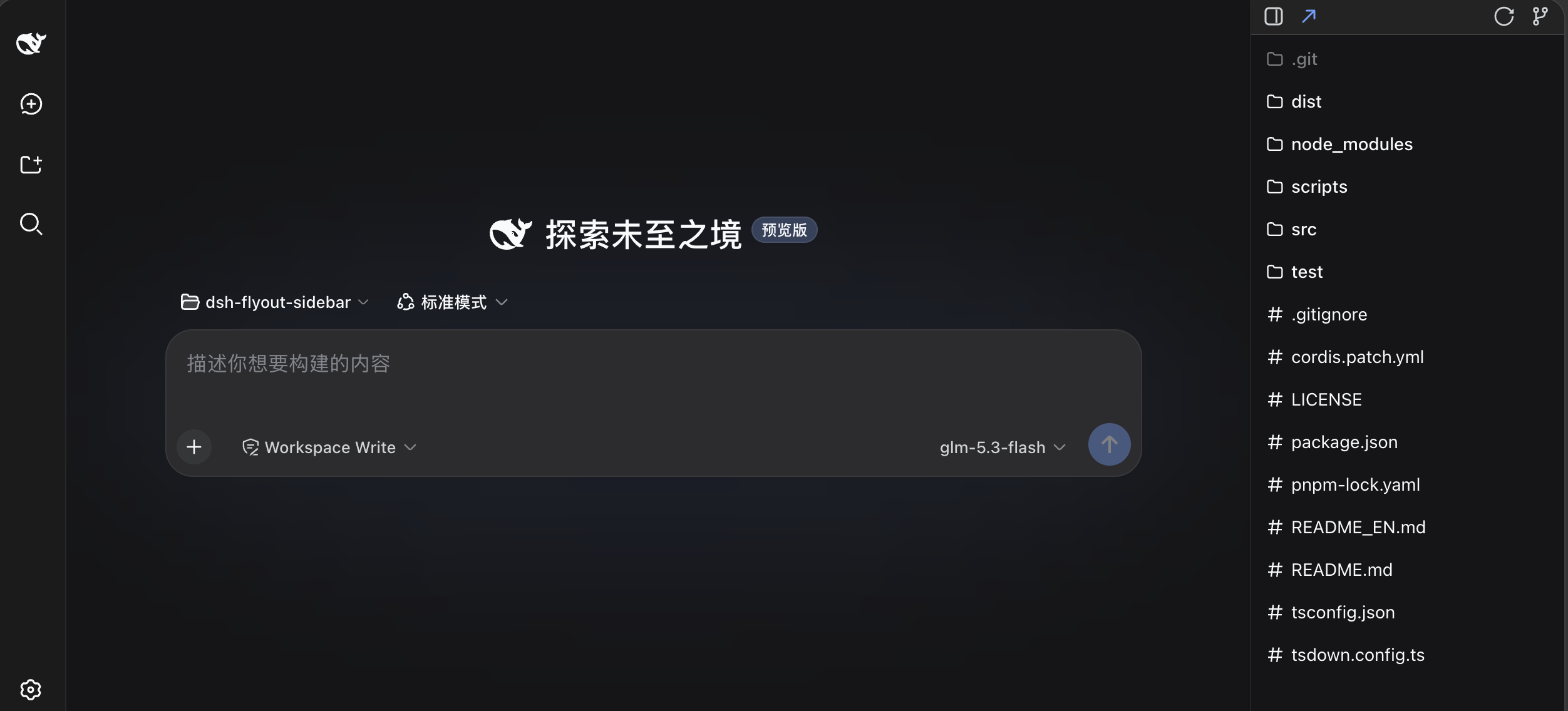
DeepSeek Harness (DSH) plugin: a flyout sidebar — file tree + Git changed-but-uncommitted files, multi-tab preview of files and diffs, a preview area that covers the whole conversation region, and one-click pop-out to a standalone browser tab you can drag to another monitor.
中文 | EN
Install
From npm (recommended)
dsh plugin --profile web add dsh-flyout-sidebar
From GitHub sources
dsh plugin --profile web add github:oxlyn/dsh-flyout-sidebar
Local install (development)
git clone https://github.com/oxlyn/dsh-flyout-sidebar.git
cd dsh-flyout-sidebar
npm install
npm run build          # tsdown → dist/index.js + dist/client.js

# run from the parent directory (dsh plugin add resolves relative paths against the cwd):
cd ..
dsh plugin --profile web add ./dsh-flyout-sidebar   # symlink install; after editing src/ run npm run build and restart dsh web
dsh web
Verify
After installing, restart dsh web and hard-refresh the browser (Cmd/Ctrl+Shift+R). A persistent sidebar icon button appears in the top-right corner (visible even with no session). You can also verify the config layer:
dsh --profile web --dump-config | grep dsh-flyout-sidebar # this line should appear
Highlights
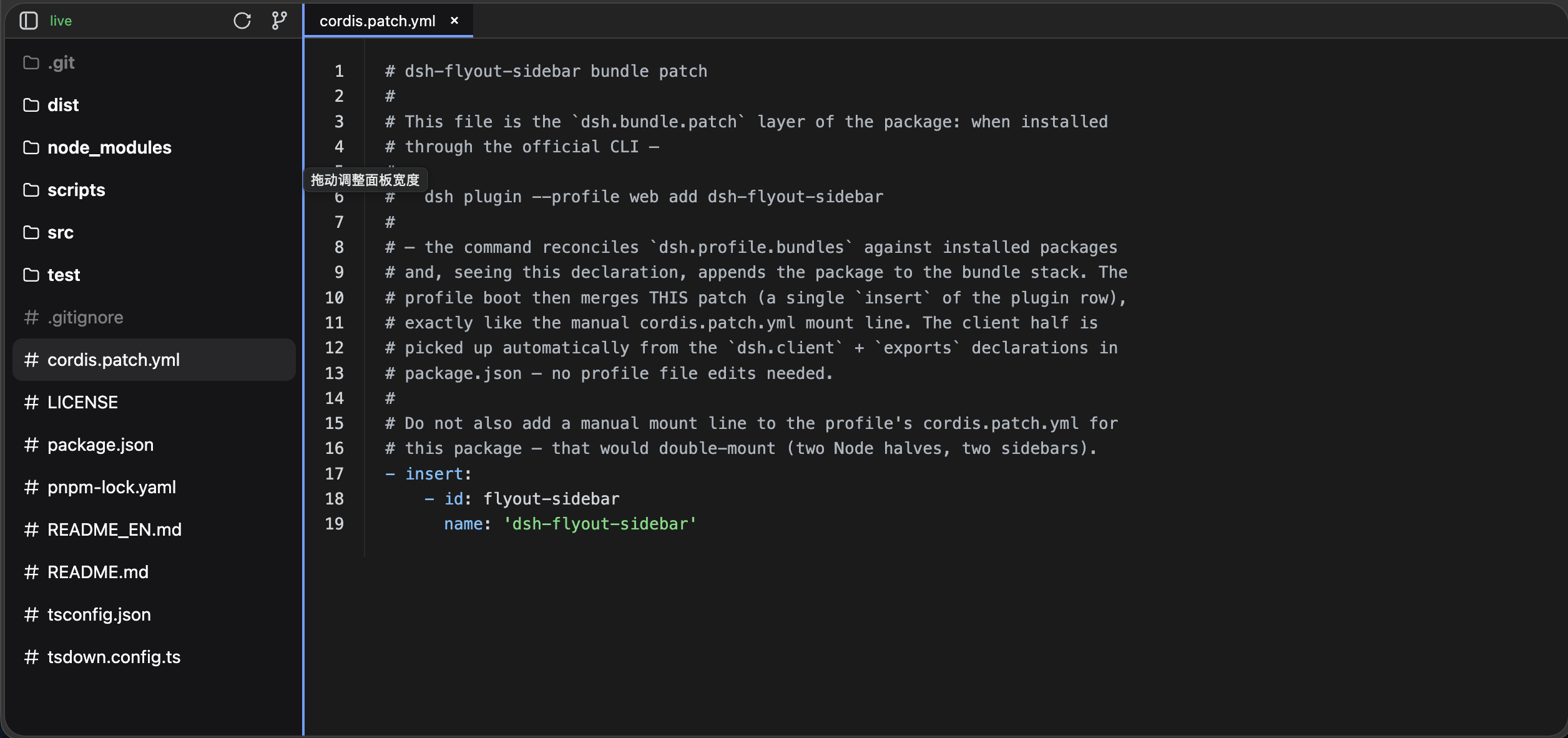
- Pop it out: the ↗ button in the panel header pops the sidebar out to a standalone
/flyout-sidebarbrowser tab — drag it to another monitor and use it as a dedicated file panel while the main screen keeps the conversation unobstructed; the panel and the flyout sync session and theme in real time vialocalStorage, and the flyout has no title bar so all vertical space goes to content - Large preview area: the preview overlay covers the entire conversation region to the left of the sidebar (not a narrow strip) — code with line numbers + syntax highlighting, long files, large images and PDFs all get plenty of reading width
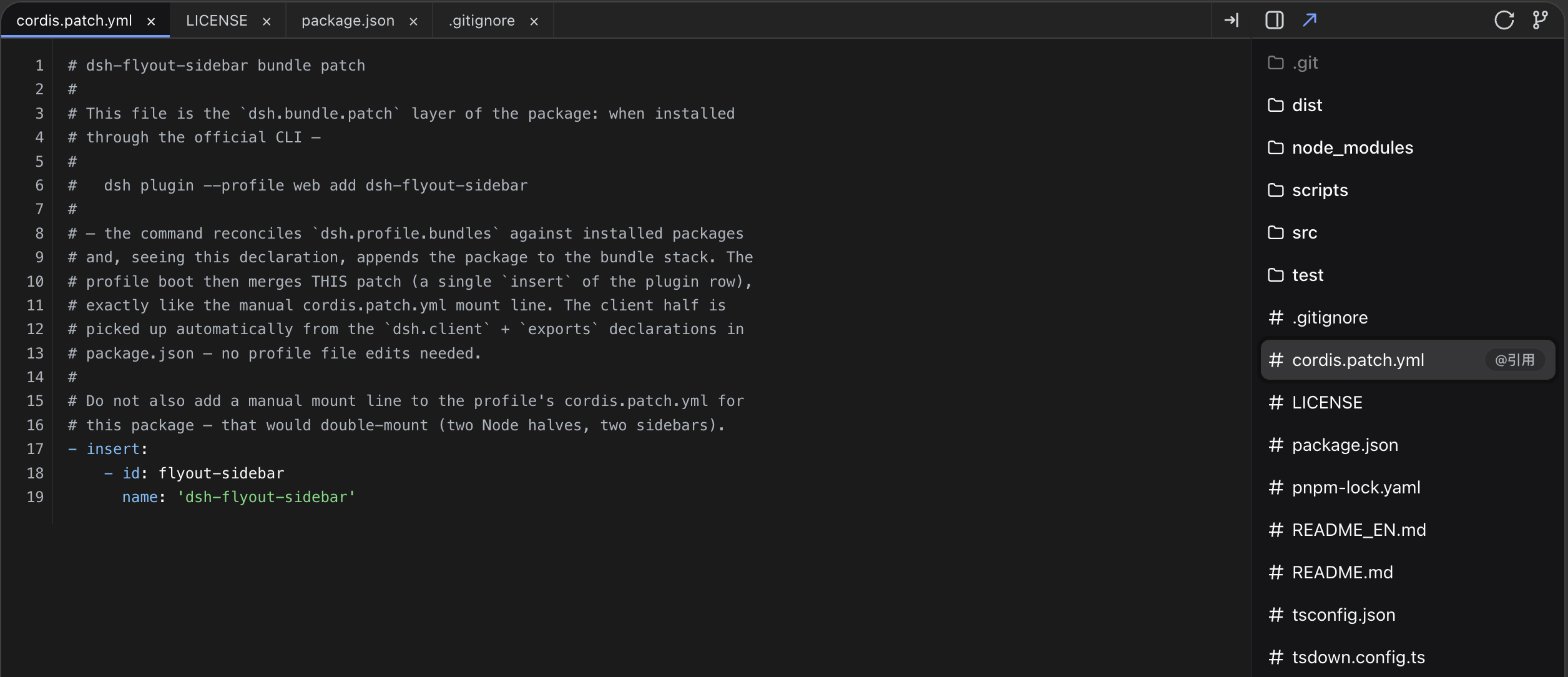
- Multi-tab preview of files / diffs: open many file tabs at once, or click a Git change to open a colored unified diff; supports code highlighting, Markdown rendering, images, PDF (embedded pdf.js, offline-safe) and sandboxed HTML iframes; ⇥ collapses/restores all tabs at once
- Auto refresh: the Git changes list follows automatically — a 700ms debounce after every agent tool run, 2s polling, and a 15s fallback covering out-of-band IDE edits; the refresh button forces a real fetch with a row-by-row reveal animation
Features
| # | Form | Entry | Description |
|---|---|---|---|
| 1 | File tree view (default) | visible when the panel opens | Browse the current workspace; lazy-expanded directories, directories first; re-roots automatically when the workspace/session switches; a search box at the top filters files by name (instant full-repo search via git ls-files, gitignore-aware) |
| 2 | Git changes view | git-branch icon in the panel header | Lists changed-but-uncommitted files (M/A/D/R/U badges, hover for staged/unstaged, renames show the original path, per-file +n −n line stats); clicking a file shows a colored unified diff against HEAD — untracked files get a synthesized new-file diff |
| 3 | Multi-tab preview | click a file | The preview overlay covers the entire area left of the sidebar; open many files at once; syntax highlighting by extension, plus Markdown, images, PDF and sandboxed HTML iframes; ⇥ collapses the whole preview (tabs kept, opening a file restores them) |
| 4 | Flyout tab | ↗ in the panel header | Pops out to /flyout-sidebar, draggable to another monitor; content left / file panel right, one-click side swap, draggable width (defaults to minimum, preference remembered) |
More:
- Switching projects/sessions clears all preview tabs automatically, so content never leaks across workspaces
- One-click path copy, or write an
@pathquote into the session composer, from git change rows and file tree rows - Both the panel and the flyout tab follow DSH's light/dark theme in real time (the flyout syncs via
localStorage, correct on first paint) - Coexists with other sidebar plugins: it shifts left of other side cards automatically, both stay visible
- The panel opens/closes with a push-pull slide animation; the trigger button slides along with it
- Bilingual UI (Chinese / English): follows the browser language by default, pinnable in settings; the flyout syncs the choice via
localStorage - Code previews support soft wrap (⇋ icon in the preview bar or the setting), horizontal scrolling by default
Escexits stepwise: closes the active preview tab first, then collapses the panel; open preview tabs are restored per session after a browser reload (sessionStorage)- Code previews use the browser's native find (⌘/Ctrl+F); per-line rendering keeps line numbers aligned even with soft wrap
- Image previews support wheel zoom, drag panning and double-click reset
- The external-link icon in the preview bar opens the current file in the system editor/IDE (host side via
open/xdg-open/Windowsrundll32, path anchored to the workspace) - Resilient file tree loading: when the workspace is not yet resolvable on the host, it retries with exponential backoff (~9s window), then shows an error with a Retry button; clicking refresh replays the top-down staggered row animation
Settings
A "Flyout Sidebar" tab appears in the DSH settings panel (⚙️ in the bottom-left):
| Setting | Default | Description |
|---|---|---|
| Default expanded | on | Expand the sidebar on page load; when off it starts collapsed |
| Auto refresh | on | Poll the latest git status every 2s while the changes view is open |
| File tree | on | Show the file tree view and the view-toggle icon; when off the panel always shows the Git changes view |
| Min panel width | 20% | Minimum panel width (percent of window width, 20–60%); drag the panel's left edge to widen it |
| Interface language | auto (browser) | Display language for the sidebar and the flyout page (Chinese / English); the flyout applies it after a reload |
| Code wrap | off | Soft-wrap long lines in code previews; horizontal scrolling when off (the preview-bar icon toggles it temporarily) |
Settings are stored in the browser's localStorage (key dsh-flyout-sidebar:settings); the flyout's panel width / side preferences live in dsh-flyout-sidebar:panelw / panelLeft.
How it works
The plugin splits into a host side and a client side, written in TypeScript + JSX and bundled by tsdown into two single-file bundles:
┌─ host side src/index.ts → dist/index.js (Node process, ESM) ────┐
│  - host/artifacts.ts   artifact tracking (write/edit + shell    │
│                        snapshot diff)                           │
│  - host/git.ts         git status/diff (per-workspace cache)    │
│      git status --porcelain=v1 -z   change list                 │
│      git diff HEAD -M -- <path>     colored unified diff text   │
│  - host/workspace.ts   session → workspace cwd resolution       │
│  - host/files.ts       directory listing / text reading         │
│  - host/page.ts        standalone flyout page HTML (inlines the │
│                        shared modules)                          │
│  - host/routes.ts      ctx.webServer.register:                  │
│      GET /flyout-sidebar/gitstatus  change list JSON (?force)   │
│      GET /flyout-sidebar/gitdiff    per-file diff JSON          │
│      GET /flyout-sidebar/listdir    directory listing           │
│      GET /flyout-sidebar/content    text content (code preview) │
│      GET /flyout-sidebar/search     filename search             │
│      GET /flyout-sidebar/media      images / PDF binary         │
│      (media responses carry CSP sandbox / nosniff to block inline  │
│       SVG XSS; every read path is anchored to the workspace and   │
│       there are no state-mutating routes like /remove)            │
│  - tools/result event → 700ms debounced cache refresh           │
└──────────────────────────────────────────────────────────────────┘
                          │ fetch
┌─ client side src/client/index.tsx → dist/client.js (IIFE) ───────┐
│  - React components (classic JSX via an `h` factory; React is   │
│    provided at runtime by DSH's __ModuleLoader__ factory, the   │
│    bundle does not embed it)                                    │
│  - shell.overlay: persistent top-right icon button + panel      │
│  - file tree ⇄ Git changes views; multi-tab preview overlay     │
│  - settings.section: Flyout Sidebar settings                    │
│  - cross-tab localStorage sync: session id, theme, panel prefs  │
└──────────────────────────────────────────────────────────────────┘
Technical notes: a single tsdown.config.ts bundles both sides (host ESM / client IIFE); a custom ?raw plugin inlines the shared module sources into the flyout page's classic <script> and embeds the vendored pdf.js into the host bundle (fully offline); shared modules shared/ext.js (preview types), shared/highlight.js (zero-dependency syntax highlighter) and shared/markdown.js (Markdown rendering) are portable JS with JSDoc types, reused on both sides and inlined into the flyout page; host dependencies are declared via inject: ['webServer', 'sessionQuery', 'timer'].
Requirements
- Node
>=20(DSH host requirement) giton the PATH and a git repository as the workspace (otherwise the Git changes view shows an error; the file tree is unaffected)- Local builds need the devDependencies (
tsdown,typescript, ...; zero runtime dependencies)
Development
npm run build         # tsdown: regenerate dist/index.js and dist/client.js
npm run check         # tsc --noEmit strict type checking
npm test              # node:test smoke tests (host routes/events + client rendering + flyout page + markdown/highlight regression)
Recommended one-time setup of the pre-commit guard:
ln -sf ../../scripts/precommit.sh .git/hooks/pre-commit. Everygit commitrebuilds the bundles and runs the type check and tests, blocking the commit if the bundles are out of sync or any test fails.
Project structure:
dsh-flyout-sidebar/
├── tsdown.config.ts      # tsdown build: host/client bundles + ?raw inline plugin
├── src/index.ts          # host entry (exports name/inject/apply, ESM)
├── dist/                 # ⚙️ generated: index.js (host) / client.js (browser), do not edit
├── snapshots/            # README screenshots
├── src/shared/           # shared portable modules (JSDoc types, inlined into the flyout page): ext / markdown / highlight
├── src/host/             # host modules: types / artifacts / workspace / files / git / page (flyout HTML) / routes (HTTP)
├── src/client/           # client modules (TSX): jsx (React bridge) / runtime / store / styles / icons / preview / components
├── src/vendor/pdfjs/     # vendored pdf.js (embedded at build time, offline-safe)
├── test/                 # node:test smoke tests (black-box checks against dist)
└── cordis.patch.yml      # bundle mount patch
Updates
dsh plugin --profile web update dsh-flyout-sidebar # or `add` again
Then restart dsh web and hard-refresh the browser.
If you still get the old version after publishing: the DSH profile's pnpm supply-chain policy
minimumReleaseAge(24h by default) holds back freshly published versions. Add this package's name (without a version) tominimumReleaseAgeExcludein the profile'spnpm-workspace.yamlto unlock it immediately.
Links
License
Links
More in this category
zhu1090093659/dsh-web#packages/dsh-task-board★ 8978
Task board for the dsh web GUI: a sidebar multi-column kanban whose cards run in real DSH agent sessions and can also be scheduled with cron expressions, executed host-side even with the browser closed.
zhu1090093659/dsh-web#packages/dsh-web-all★ 8978
Plugin and skin collection for the DSH Web UI: task board, Git graph, right-side panel, remote mobile UI, pet, live token stats, and a skin center.
MeteorNOX/DeepSeek-Balance-Whale-Widget★ 5292
A fixed-corner whale widget for the DSH web GUI — balance, today's usage and per-turn cost with peak/off-peak pricing, editable balance-alert and daily-budget bubbles, a module-based custom bubble queue with A/B weighted choices and random lines or images, 30+ vendor templates (OpenAI, OpenRouter, Kimi, SiliconFlow, Ark, Zhipu, MiniMax and more) with per-model balance and subscription quota, plus task-end sound, imported audio, custom roles and a resource manager. Local-only, no telemetry.
ccch1mneyyy/dsh-TUI★ 4819
Claude Code-style full-screen terminal UI: pixel-whale header, live status line, and streaming thought expansion.
omdsh-dev/DSH-better-sidebar★ 4290
Full sidebar workbench with file rendering and editing, terminal, Git, and subagents; third-party plugins can register new tabs.
Devin-AXIS/deepseek-design#deepseek-idesign★ 1478
Visual design studio for websites, app prototypes, posters, cards, reports, and magazines, with templates, direct element editing, selection-aware AI draft handoff, and export.
Community comments
Comments are public GitHub Discussions. Loading them connects to GitHub and Giscus; a GitHub account is required to post.