Digital Employee,Integrates three catalogs — Experts, Skills, and Connectors — supporting browsing, favoriting, invoking, and publishing without modifying the host.
Install
# from GitHub (first run asks for allowBuilds approval — follow the hint, retry)
dsh plugin --profile web add github:open-dshai/dsh-employee
Any plugin you install runs third-party code with your own permissions — it can read your files, use your credentials, and reach the network, and tool approvals don’t sandbox it. GitHub-sourced plugins also run build scripts at install time — pnpm blocks those until you allow them, so an install can stop with ERR_PNPM_GIT_DEP_PREPARE_NOT_ALLOWED or ERR_PNPM_IGNORED_BUILDS; dsh prints the exact key to add under allowBuilds in your profile’s pnpm-workspace.yaml, and the install works on the next run. Allowing a build is a trust decision: only install sources you trust, and pin a commit (github:owner/repo#sha).
README
A Marketplace panel for the DeepSeek Harness web client. It surfaces three catalogs — Experts (专家), Skills (技能), and Connectors (连接器) — sourced from the skill.dualpaw.com registry, and lets you browse, favorite, summon (invoke), and publish directly from the chat UI.
The plugin is a self-contained Cordis plugin: it registers only the locale
capability and DOM-injects its own sidebar entry and center-column panel. No
host gateway or slot changes are required.
Overview
The Marketplace plugin adds a new sidebar entry below 技能中心 (Skill Center). Toggling it takes over the center column with a three-tab panel:
| Tab | What it shows |
|---|---|
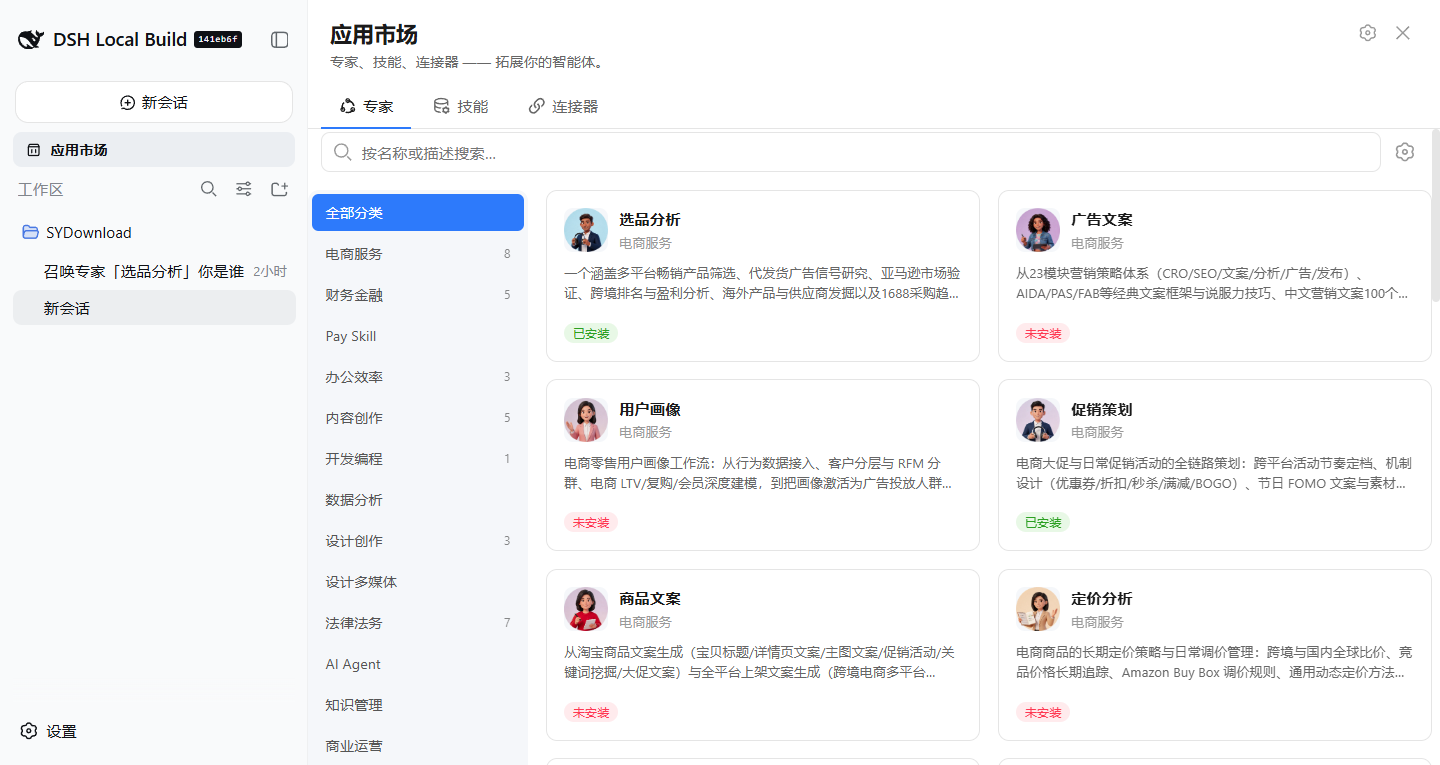
| Experts (专家) | Category rail on the left, expert cards on the right. Hover a card to reveal the 召唤 (Invoke) button. |
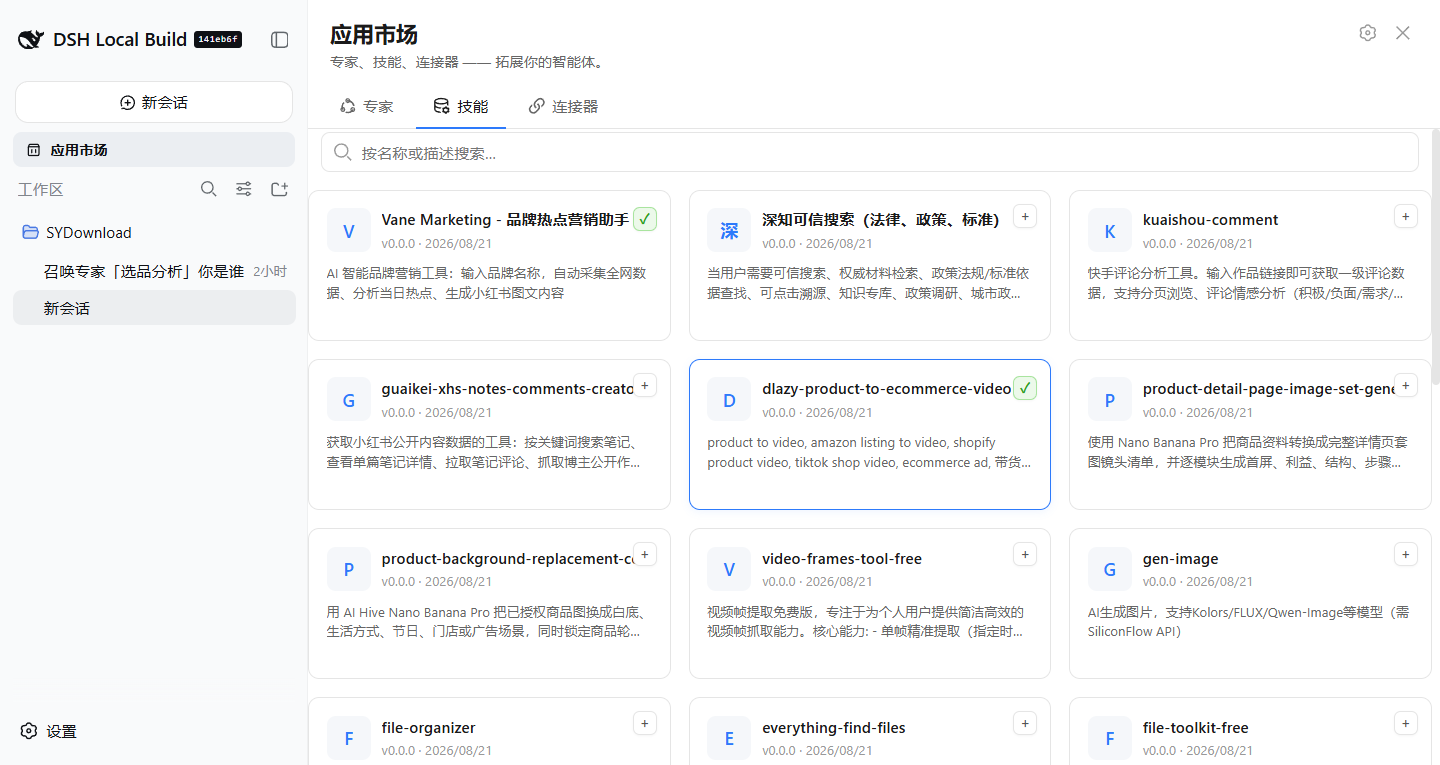
| Skills (技能) | Searchable list of publishable skills, with a 发布技能 (Publish skill) toolbar action. |
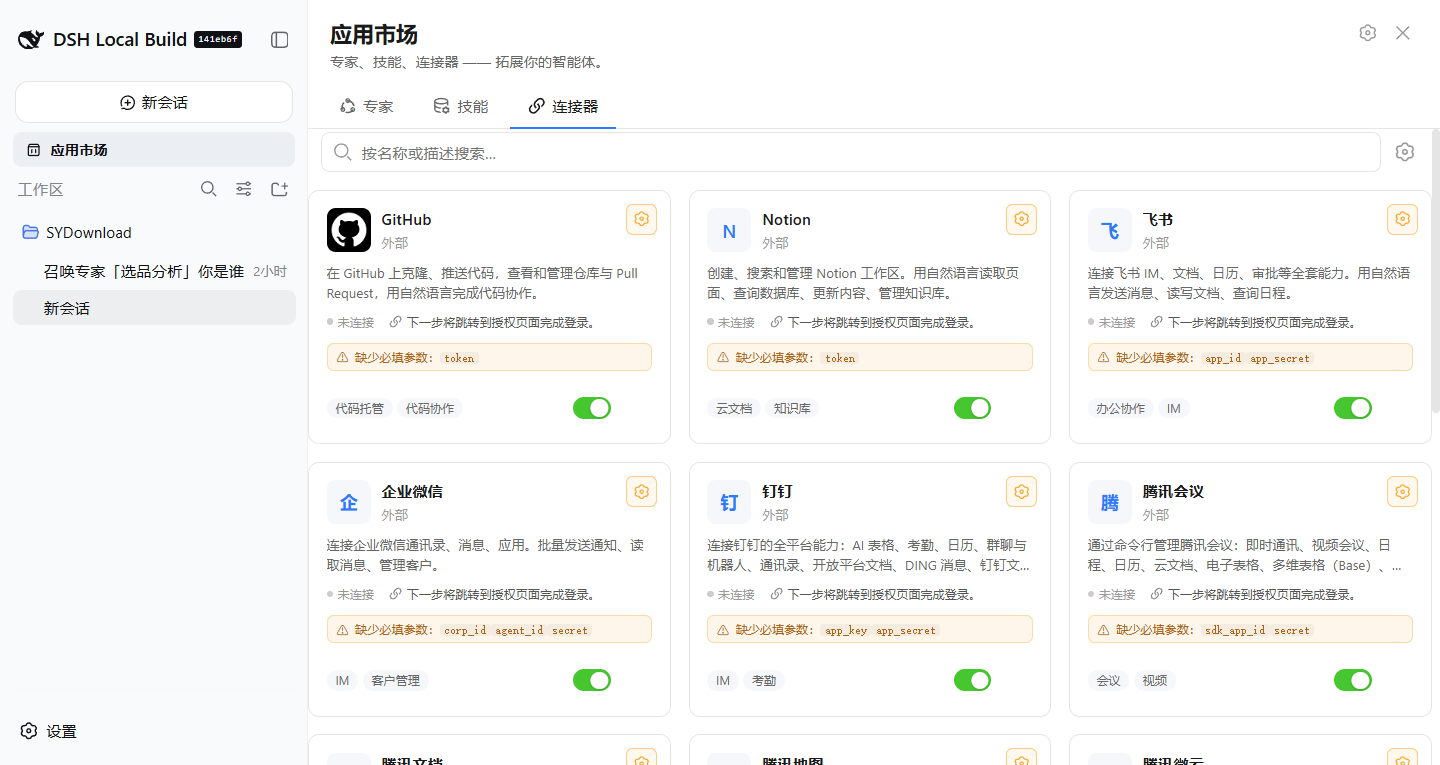
| Connectors (连接器) | Connector catalog; each connector can pre-fill the composer and expose a per-connector toggle chip. |
An invocation bridge listens for dsh:invoke-expert / dsh:invoke-skill /
dsh:connector-fill window events emitted by the list/detail components. It
pre-fills the composer, shows a "current expert / current skill" badge, and
injects a 🔌 chip next to the composer that pops up a per-connector toggle
popover.
Features
1. Auto-load on tab open
Clicking the Experts or Skills tab lazily loads its catalog from the upstream
registry the first time the tab is shown (loadExperts() / loadSkills()),
so the panel opens instantly and fetches data on demand.
2. ⚙ Parameters — token + registration
A ⚙ icon in the panel header opens the shared Parameters dialog
(MarketplaceSettingsDialog). There you can:
- Paste your API token (stored locally on this device only).
- Jump straight to the sign-up / token page: https://skill.dualpaw.com/register
The token is the single credential that gates every upstream mutation — favoriting an expert, publishing a skill, and connectors that require real auth. Local-only actions (download / summon) are unaffected.
3. Favorites (gated on token)
Once a token is present, expert and skill cards show a ♥ favorite corner button. Favoriting is a no-op until a token is saved, so the UI stays honest about which actions will actually persist.
4. Publish a skill (gated on token)
With a token saved, the Skills tab toolbar reveals a 发布技能 (Publish skill)
button that opens PublishSkillDialog. Enter a name, description, and
instructions, then submit — the plugin POSTs to /skills on the registry and
refreshes the skill list. Publishing without a token is blocked up front with a
clear hint.
5. Hover → 召唤 (Invoke) with auto-install + "已安装" tag
Hovering an expert card reveals the 召唤 (Invoke) button:
- The button prefix icon shows install state — ✓ Installed / ⊘ Not installed — and flips the moment you click.
- Clicking 召唤 on a not-yet-installed expert first calls
installExpert, showing 下载中 (Downloading) / 召唤中 (Summoning) inside the same button, then auto-downloads the expert's bundled skills atomically and dispatches thedsh:invoke-expertevent so the composer takes over as usual. - Installed experts keep an 已安装 (Installed) tag on the card.
Screenshots
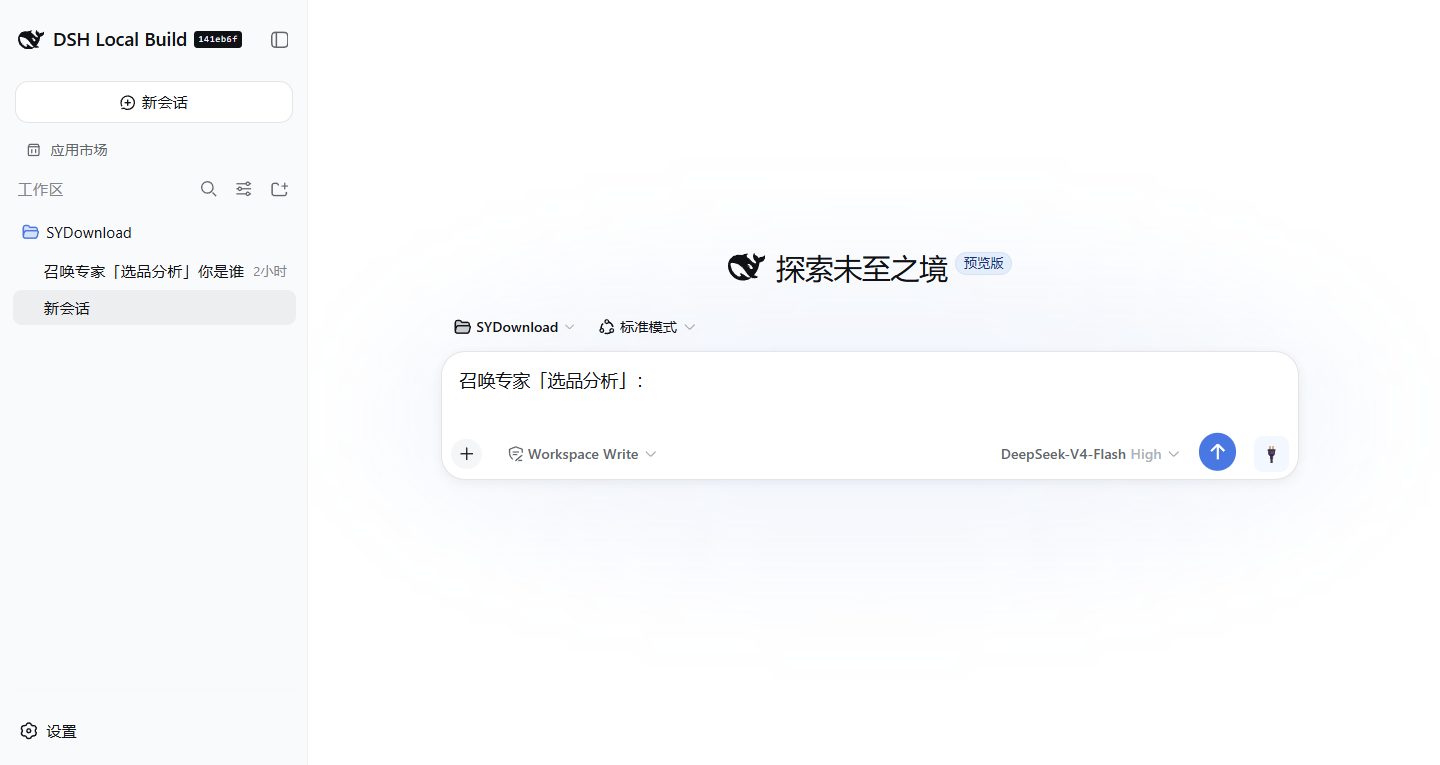
Screenshots to be added. Suggested captures:
— Experts.
— expert card hover with 召唤 button.
— ⚙ skills
— connectors.
--  -->
-->
Environment & Prerequisites
| Requirement | Version |
|---|---|
| Node.js | ^22.19 || >=24 |
| Package manager | pnpm (workspace repo) |
| React | ^18.2.0 (peer) |
| DeepSeek API key | Optional — only for running the host harness with live agents |
The plugin itself is pure front-end; it talks to skill.dualpaw.com through
its own CORS relay in src/client/api.ts, which falls back to mock data when
the registry is unreachable. No build-time secrets are required.
This package lives inside the DeepSeek Harness monorepo
(packages/client/ui-marketplace) and is built with the repo's shared
tsdown pipeline.
Installation
As a workspace package (development)
From the repository root:
pnpm install
pnpm --filter @deepseek-ai/dsh-client-ui-marketplace bundle
bundle (via tsdown) compiles src/ into the runtime bundles:
lib/index.js— ESM entry (used by the host).lib/client.js— the browser half loaded bydsh web.
⚠️ The running web client loads the compiled
lib/client.js, notsrc/. After editingsrc/, you must re-run thebundlescript above (and restartdsh web) for changes to appear.
Run the host web client
pnpm dsh web --port 8080
# open http://127.0.0.1:8080
Toggle the Marketplace entry in the sidebar to open the panel.
Usage
- Open the Marketplace sidebar entry.
- Pick a tab — Experts / Skills / Connectors.
- Click ⚙ in the panel header to open Parameters:
- Paste your API token, or
- Follow the link to https://skill.dualpaw.com/register to get one.
- With a token saved:
- ♥ favorite experts / skills.
- On the Skills tab, click 发布技能 to publish a new skill.
- Hover an expert card and click 召唤 to install (if needed) and invoke it. Installed experts show an 已安装 tag.
Project layout
packages/client/ui-marketplace/
├── src/client/
│   ├── index.ts                    # plugin entry (apply + locale registration)
│   ├── store.ts                    # MarketplaceStore (catalogs, install, favorite, publish)
│   ├── api.ts                      # CORS relay to skill.dualpaw.com + mock fallback
│   ├── MarketplaceController.ts    # panel open/close + single-occupant coordination
│   ├── MarketplacePanel.tsx        # the three-tab center panel
│   ├── ExpertsTab.tsx              # experts grid + hover 召唤 + favorite
│   ├── SkillsTab.tsx               # skills list + publish toolbar action
│   ├── ConnectorsTab.tsx           # connector catalog + composer chip
│   ├── MarketplaceSettingsDialog.tsx  # ⚙ Parameters (token + register link)
│   ├── PublishSkillDialog.tsx      # publish-skill dialog (token-gated)
│   ├── invoke.ts                   # invocation bridge (dsh:invoke-* events)
│   ├── locales.ts                  # en / zh i18n dictionaries
│   └── styles.module.css           # CSS modules
├── lib/                            # build output (tsdown) — do not edit by hand
├── tsdown.config.ts
└── package.json
Disclaimer
This plugin is an independent community contribution and is not an official
product of DeepSeek AI. The upstream registry at skill.dualpaw.com is operated
by a third party; your API token is stored only in your local browser. Use at
your own risk and review the source before running it against any production
environment.
MIT License. See LICENSE.
Links
More in this category
zhu1090093659/dsh-web#packages/dsh-plugin-manager★ 9321
Plugin manager tab in DSH Settings → Plugins: install from npm or git with progress, enable/disable switches effective at next startup, conflict reconciliation with undo, and one-click hand-off to a fix session.
dsh-market/dsh-market★ 8235
Browse, search and install community plugins from inside DeepSeek Harness settings, with category filters, one-click updates, enable/disable, theme switching and configuration backup.
kingOfSoySauce/dsh-skin-market★ 246
Native skin marketplace and lifecycle manager that discovers community skins, displays previews and compatibility status, and provides verified one-click or manual installation paths.
awesome-dsh-plugin/dsh-find-plugin★ 204
Find plugins without leaving the agent: search this curated registry by keyword or category, with ready-to-run install commands.
bradeGithub/DSH-Plugins-Marketplace★ 188
GitHub-topic-driven plugin & skill marketplace: a Settings page that browses the auto-collected registry (the whole dsh-plugin topic plus the skills index, CI-refreshed every 2 hours) with one-click install, type detection, install-script and host-shadow-dependency safety confirmations, env-key management, and the STANDARD.md recognition spec.
Sanqi-normal/dsh-webui-market-plugin★ 104
In-harness plugin market for the dsh web GUI: browse the awesome-dsh-plugin.com catalog and install/uninstall plugins into a profile from Settings → Plugins → Plugin Market.
Community comments
Comments are public GitHub Discussions. Loading them connects to GitHub and Giscus; a GitHub account is required to post.