Mobile adaptation for the DSH Web UI: compact typography, full-width composer with caret fix, drawer sidebar with overlay-close, two-page settings flow, responsive tables and stats, safe touch targets.
Install
# from GitHub (first run asks for allowBuilds approval — follow the hint, retry)
dsh plugin --profile web add github:ook826092-cloud/dsh-mobile-css
Any plugin you install runs third-party code with your own permissions — it can read your files, use your credentials, and reach the network, and tool approvals don’t sandbox it. GitHub-sourced plugins also run build scripts at install time — pnpm blocks those until you allow them, so an install can stop with ERR_PNPM_GIT_DEP_PREPARE_NOT_ALLOWED or ERR_PNPM_IGNORED_BUILDS; dsh prints the exact key to add under allowBuilds in your profile’s pnpm-workspace.yaml, and the install works on the next run. Allowing a build is a trust decision: only install sources you trust, and pin a commit (github:owner/repo#sha).
README
This plugin publishes its README in Chinese only.
DeepSeek Harness(DSH)Web UI 移动端适配插件 —— 让你的 DSH 在手机上真正好用起来!
纯 CSS 注入 + 两个轻量辅助脚本,零依赖、零源码修改、随时可卸载。 通过官方
WebServer.tapIndex()钩子注入,桌面端完全不受影响。
✨ 特色功能
📱 界面整体优化
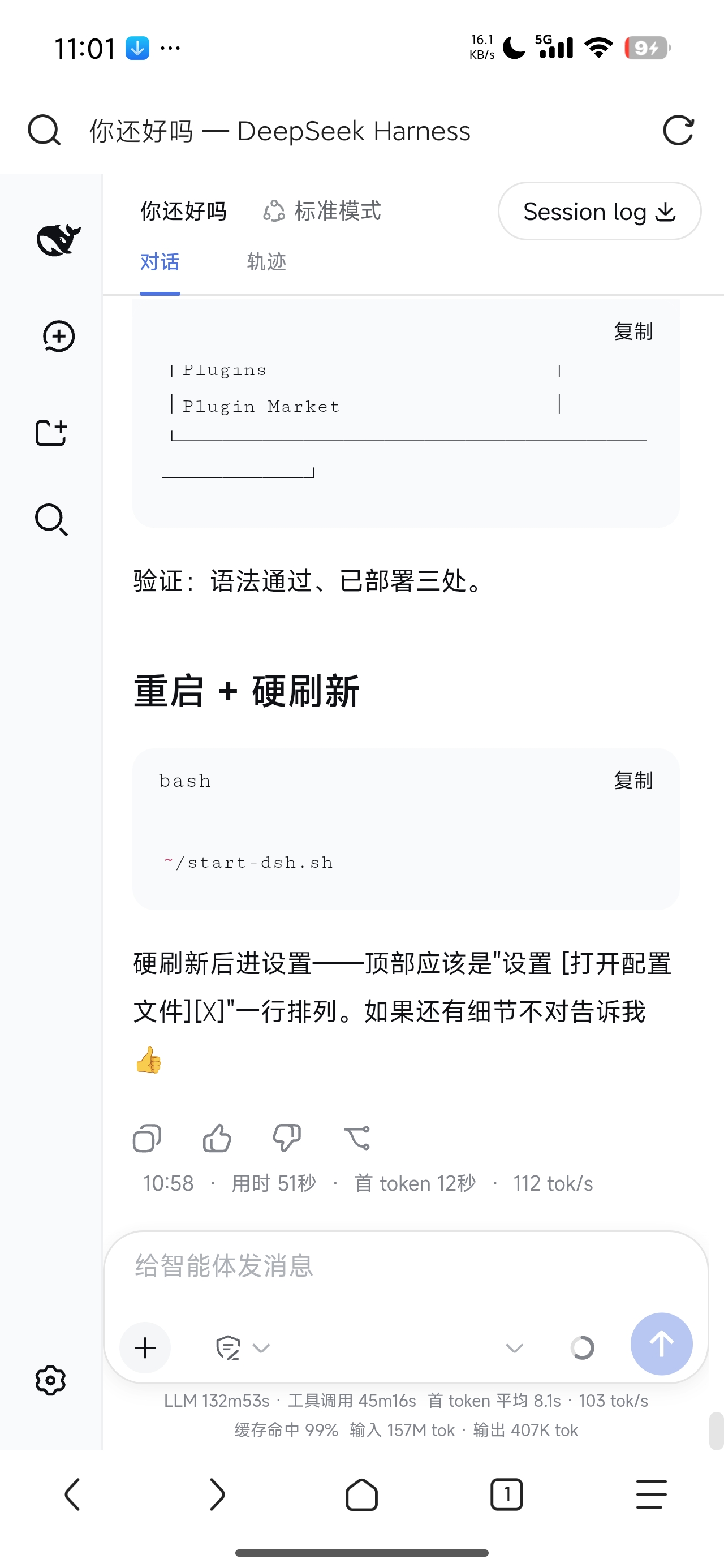
- 紧凑字号体系:针对手机屏幕调整字体大小层级,信息密度更高、一屏装更多内容,同时保证可读性
- 移动端字体栈:优先使用手机系统的优质字体(小米 MiSans / 鸿蒙 HarmonyOS Sans / Roboto 等),观感更自然
- 安全触控目标:独立控件 ≥44px,不再误触;输入框防安卓聚焦自动缩放
🖥️ 输入区(Composer)
- 输入卡全宽贴边:充分利用屏幕宽度
- 光标对齐修复:透明输入层与镜像文字层字号严格一致,光标不再错位
- 模型名智能隐藏:只显示 v 形箭头,点击仍可切换模型,不再挤占权限开关
- 发送按钮贴右:按钮永远停在右下角
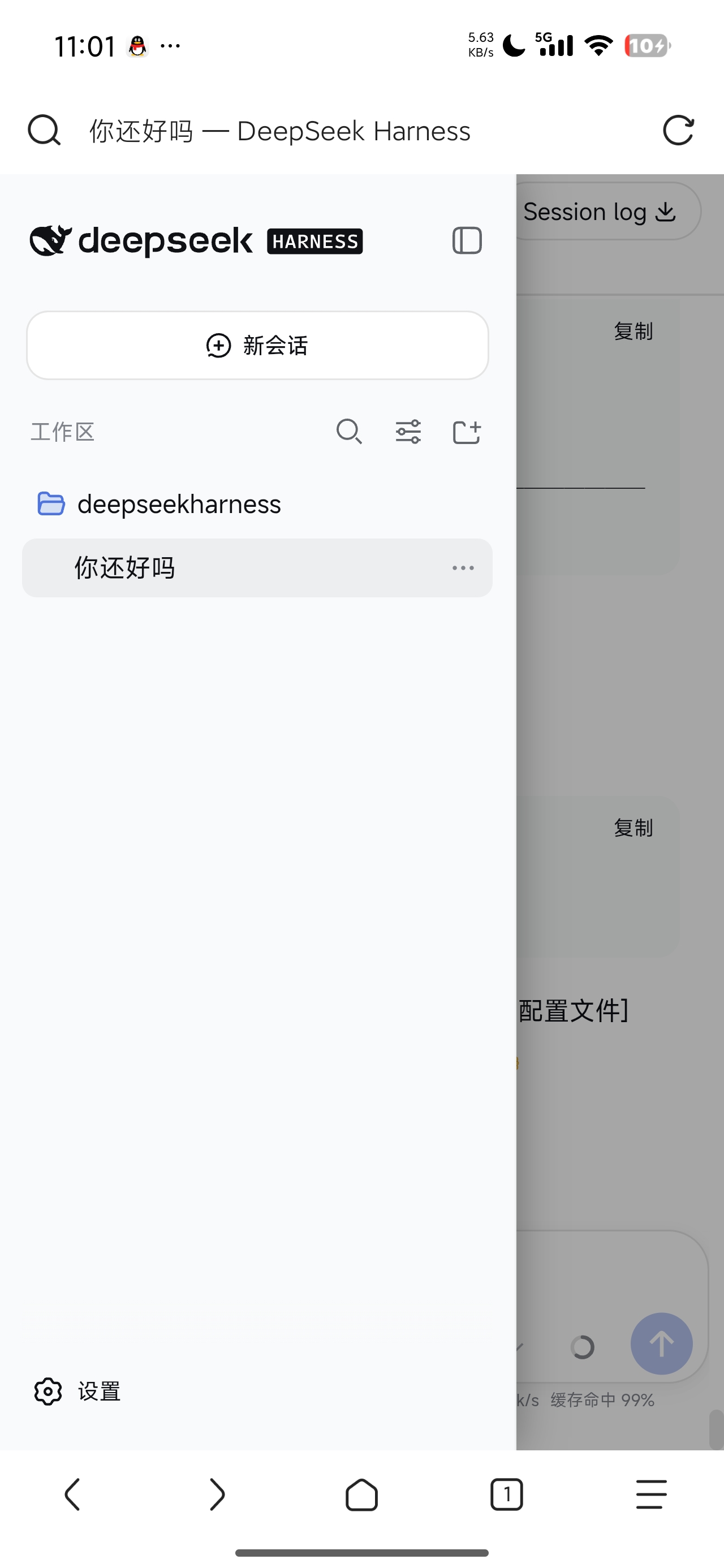
🗂️ 侧边栏抽屉式
- 展开时覆盖主界面(带遮罩 + 阴影),主界面不再被挤压变形
- 点击遮罩即可关闭,交互跟手机 App 一致
- 收起时保留小图标条(rail)
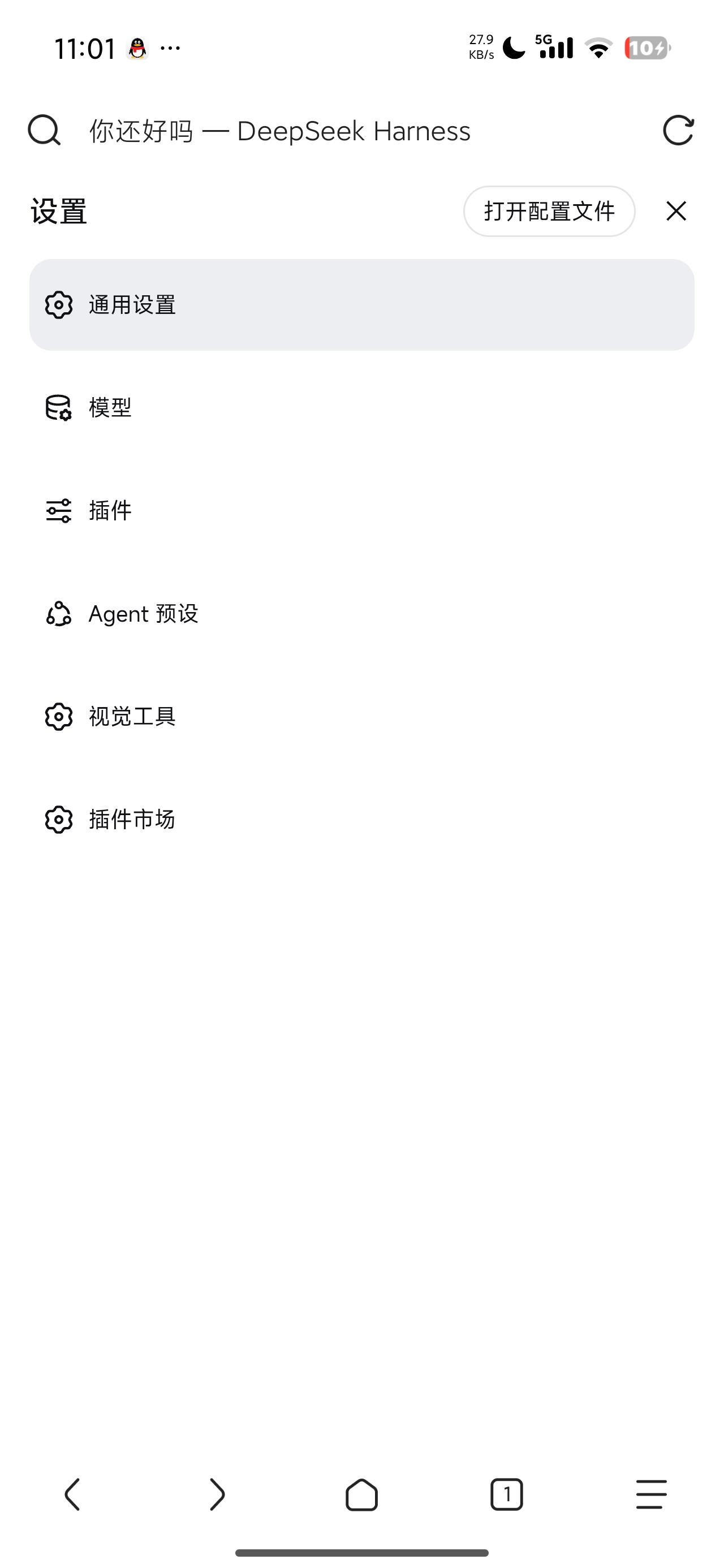
⚙️ 设置页两页式
- 手机标准交互:全屏菜单页 → 点击选项跳转全屏内容页 → ☰ 返回
- 标题与按钮同级布局、顶部留白紧凑
- 长标签自动换行、表单/表格/图片防溢出
💬 消息区
- 用户消息气泡占满整行,不再又高又窄
- 消息底部操作条(复制/点赞/分支/统计)换行完整显示,统计单行紧凑
- 工具调用摘要允许换行,不再被省略号截断
📊 统计行
- 只保留有用信息,固定两行(耗时+速度 / 缓存+Token),行数不随内容跳变
📋 Markdown 表格
- 长单元格内容(如工具名)自动换行,不再盖住相邻列
📦 安装教程
方式一:从 GitHub 一键安装(推荐)
dsh plugin --profile web add github:ook826092-cloud/dsh-mobile-css
方式二:从 npm 安装
dsh plugin --profile web add dsh-mobile-css
方式三:手动 patch(不经过包管理器)
将以下内容加入你的 profile patch(~/.dsh/profiles/web/cordis.patch.yml):
- insert:
    - id: dsh-mobile-css
      name: "dsh-mobile-css"
然后安装依赖并启动:
cd ~/.dsh/profiles/web
pnpm add dsh-mobile-css
dsh web
安装后
- 重启
dsh web - 浏览器硬刷新(清除缓存或隐私窗口)
- 打开 DSH Web UI,在手机上感受移动端适配效果
卸载
删除 patch 中的 dsh-mobile-css 条目,重启 dsh web 即可完全移除。插件只注入 CSS 和两个事件监听脚本,不留任何残留。
📸 实机效果
 |
 |
 |
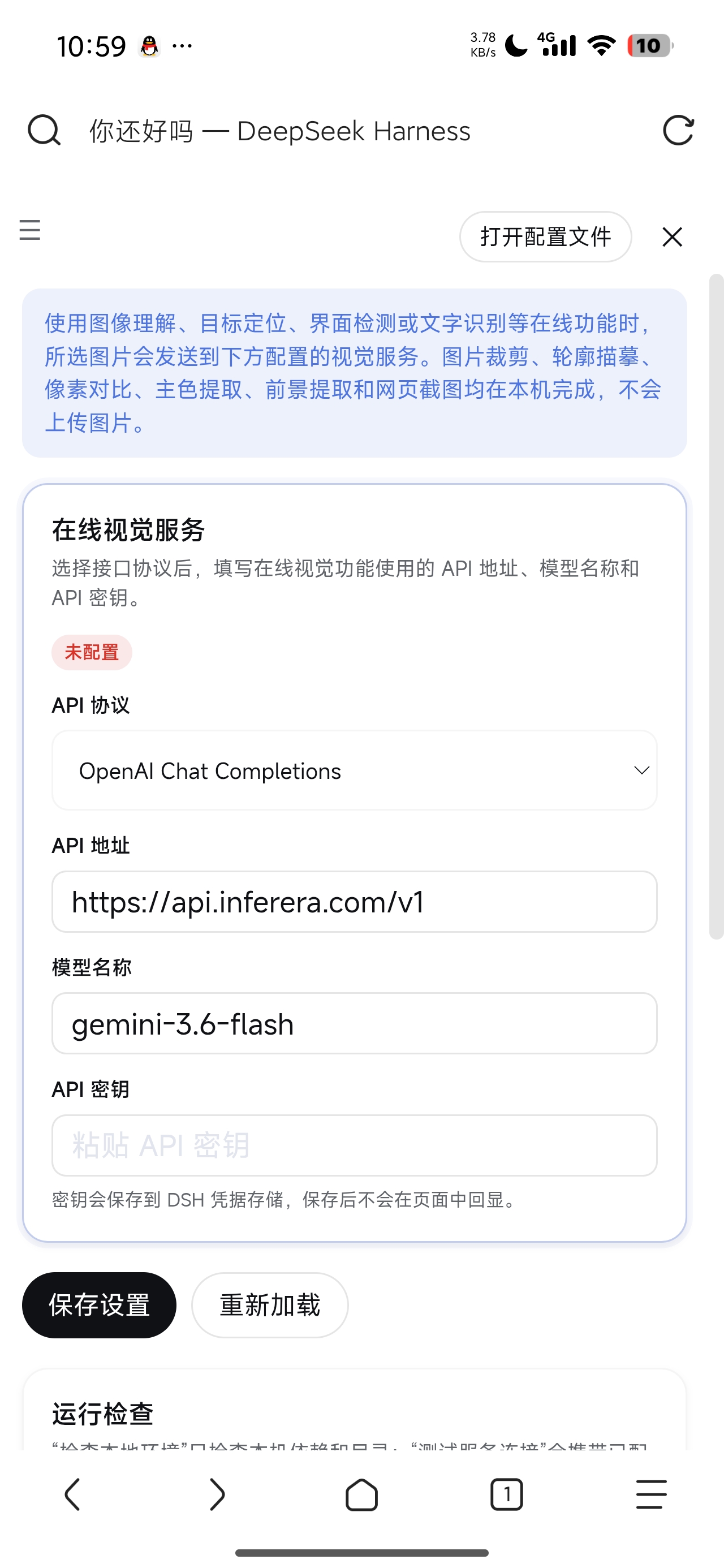 |
截图来自 Android 真机实拍。
🛡️ 兼容性与通用性
- 触发条件:
pointer: coarse(触屏)或视口 ≤1024px —— 适用于几乎所有现代 Android / iOS 手机,桌面端(鼠标 + 宽屏)完全不受影响 - 不依赖具体机型:不写死任何设备型号、分辨率、像素密度;所有尺寸通过媒体查询和相对单位自适应
- 浏览器要求:现代 Chrome / 系统浏览器(基于 Chromium 的安卓浏览器均支持;
:has()选择器需要 Chrome 105+,安卓手机浏览器均为 Chromium 内核,均满足) - 前端版本:插件按 DSH Web 前端的 CSS Modules 类名选择器编写;DSH 升级后如个别选择器失效,复查对应类名即可(这是所有 CSS 类插件共有的特性,非插件缺陷)
- 安全:纯 CSS + 两个事件监听脚本(遮罩关闭抽屉、设置导航收起),无网络请求、无凭证访问、无文件系统操作
📜 协议
Links
More in this category
zhu1090093659/dsh-web#packages/dsh-remote-web-ui★ 8121
Remote control of a dsh web workspace from phone or PC: QR-code pairing through a token-gated channel, SSE real-time sync, and separate mobile and full desktop GUI modes.
zhu1090093659/dsh-web#packages/dsh-ssh★ 8121
SSH ops panel for DSH: web terminal, SFTP transfer with progress, local port forwarding, and one-command cluster execution across hosts; agents share the same host config.
saya-ch/dsh-mobile★ 333
Access DeepSeek Harness from the Android app or a mobile browser with secure LAN and remote connections, persistent device pairing, and a customizable mobile interface.
ZSeven-W/dsh-ios★ 308
A live iOS Simulator or USB-connected iPhone inside the conversation: 22 agent tools for booting, building, driving the UI by accessibility identity or OCR text, list-row actions and SwiftUI preview hot reload, plus a streaming sidebar panel you can tap and drag on.
liguobao/ds-harness-remote★ 234
Multi-device remote access for DeepSeek Harness: continue an active session from your phone, tablet, browser, or another computer over an end-to-end encrypted channel (Noise IK + adaptive relay/WebRTC transport), with device authorization, ApiProxy-only remote capabilities, and read-only file preview via dsh-file-viewer — no shell, remote desktop, or write access.
wenbin-wb/dsh-bridge★ 177
Remote and mobile access for DeepSeek Harness: provides LAN QR code connection, Cloudflare/custom tunnels, WeChat, QQ, Feishu, Telegram bot integration, and security authentication.
Community comments
Comments are public GitHub Discussions. Loading them connects to GitHub and Giscus; a GitHub account is required to post.