Cross-agent, local-first persistent memory plugin for DeepSeek Harness (DSH), powered by Mnemon. It shares long-term memory across Mnemon-enabled agents and adds runtime memory, searchable project documents, semantic recall, knowledge graph, and a Sidebar UI.
Install
# from npm (prebuilt)
dsh plugin --profile web add dsh-mnemon
# from GitHub (first run asks for allowBuilds approval — follow the hint, retry)
dsh plugin --profile web add github:omdsh-dev/dsh-mnemon
Any plugin you install runs third-party code with your own permissions — it can read your files, use your credentials, and reach the network, and tool approvals don’t sandbox it. GitHub-sourced plugins also run build scripts at install time — pnpm blocks those until you allow them, so an install can stop with ERR_PNPM_GIT_DEP_PREPARE_NOT_ALLOWED or ERR_PNPM_IGNORED_BUILDS; dsh prints the exact key to add under allowBuilds in your profile’s pnpm-workspace.yaml, and the install works on the next run. Allowing a build is a trust decision: only install sources you trust, and pin a commit (github:owner/repo#sha).
README
Runtime context, searchable documents and long-term evidence share a familiar Sidebar. The default Starter installs a tested plugin combination; contributors can replace or extend its parts without rebuilding the memory system.
Automatic idle review now uses bounded spawn checkpoints, a five-minute minimum interval and a 20-attempt limit per loaded session. It can be disabled independently. Published Agent Teams tool conflicts pause review before any child starts; failed runs retain committed receipt metadata and are never replayed automatically. See review configuration and compatibility.
Use three tiers, not three copies
| Memory | Keep here | How it reaches the Agent |
|---|---|---|
| Runtime | Preferences, working agreements, facts needed on the next turn | Compact USER / MEMORY projection |
| Documents | Designs, investigations, procedures and handoffs | Search, then read the relevant narrative |
| Memory Spaces | Durable facts, decisions, entities and relationships | On-demand evidence from enabled backends |
A memory space is one named, Provider-backed scope for long-term evidence. It contains individual memories and can be activated independently. The Chinese product term is 记忆空间.
Use the same data from Sidebar, conversation tools or Headless. Global, workspace, centralized workspace and custom storage scopes are explicit. Direct retrieval does not spawn a Mnemon task Agent; Agent Query, semantic writes and maintenance may use the configured model. Workflows and costs.
Start with the default installation
You need a compatible DSH Host. Runtime memory and Documents work right away. Memory Spaces use whichever Provider you set up: Mnemon Native uses a separately installed mnemon CLI, and the other Providers connect to their own services. The npm Starter installs neither. Follow the platform installation guide and verified compatibility baselines.
dsh plugin --profile web add dsh-mnemon
dsh web
To use Mnemon Native, install its CLI with npm install --global @mnemon-dev/mnemon and check it with mnemon --version.
dsh-mnemon supports DSH 0.1.7-rc.2, its pinned development baseline; keep v0.5.16 on older hosts. See the compatibility matrix. Existing Sessions with source summary requires notice form need the explicit dsh-mnemon-repair-session --input FILE --output NEW_FILE copy repair; see legacy Session recovery before replacing any artifact.
For Headless, add the same package to that profile with dsh plugin --profile headless add dsh-mnemon.
Open Memory System → Status, then add a Runtime memory. Select a DSH workspace before creating Documents, even with global storage. To retain long-term facts, create a Memory Space with an explicitly selected Provider. Sidebar is the default; optional Builtin placement uses the same pages.
Upgrading from v0.4 retains the familiar configuration, data and workflow. Configuration lives on the dsh-mnemon page under Plugins, where DSH 0.1.7 keeps plugin settings; the main Strategy and three optional enhancements are chosen there too, and no View tab or generic memory-plugin manager is added. Upgrade checklist.
Source + Strategy → View
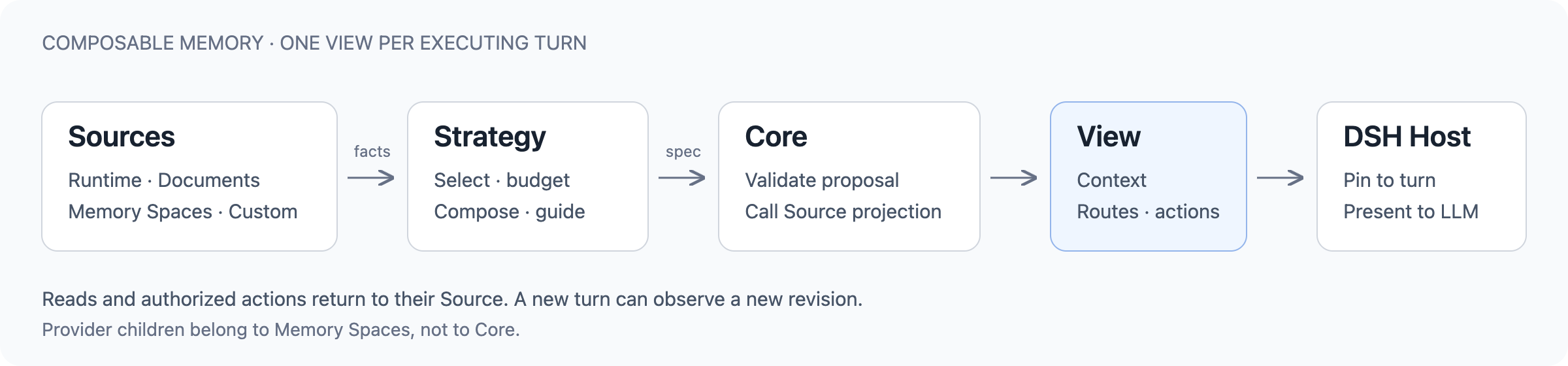
- Source owns memory, its projection, read/write operations and optional DSH pages.
- Strategy chooses how available Sources participate: selection, resident context, retrieval and guidance. Pure composition does not write memory.
- Core validates the proposal, asks Sources for bounded projections and compiles an immutable View. The DSH Host pins it to the executing turn and controls tool access.
A View includes context and the scoped routes/actions the LLM can use next. It is not another database or a frontend page. Memory Spaces owns its Provider child Fibers; Core exposes only the small ctx.mnemonMemory contribution service.
The same public contracts serve the default plugins and external repositories. Source authors keep their data and backend choices; Strategy authors reuse those capabilities, the turn lifecycle, budgets and test fixtures. Architecture and sequence diagrams.
Official plugins
The Starter ships 3 Sources, 2 main Strategies (one selected at a time), 3 optional enhancements and 9 Providers. Packages are independently versioned and published; the Starter pins an exact tested combination.
| Package | Responsibility | Default |
|---|---|---|
| dsh-mnemon-source-runtime | USER / MEMORY, revisions and local hot storage | Enabled |
| dsh-mnemon-source-documents | Markdown, search, revisions and archiving | Enabled |
| dsh-mnemon-source-memory-spaces | Durable evidence and Source-owned Provider children | Enabled |
| dsh-mnemon-strategy-default-three-tier | The familiar three-tier View and turn retrieval policy | Selected |
| dsh-mnemon-strategy-general | Every available Source in one budget; the model decides how to use each | Off |
| dsh-mnemon-strategy-auto-capture | In-turn guidance to retain useful facts | Off |
| dsh-mnemon-strategy-light-context | A shared resident-projection ceiling | Off |
| dsh-mnemon-strategy-scoped | Ordered Source selection and a writable subset | Off |
Choose one main Strategy and any enhancements on the dsh-mnemon page under Plugins. The enhancements use Core's standard selection, projection and capture slots, so they work with either main Strategy and can coexist. They still produce one View. Capture is guidance, not an autonomous recorder; a projection ceiling is not token accounting or delta injection; scoped selection does not create storage.
Memory Spaces can use these Provider plugins:
Mnemon Native · OpenViking · Honcho · Mem0 · Hindsight · Holographic · RetainDB · ByteRover · Supermemory.
Native is the default backend; third-party services are disabled until explicitly configured. Graph, deletion, exact-write and enumeration capabilities remain backend-specific. Provider capabilities and setup.
Build your own composition
Use dsh-mnemon/extension-sdk to define and install a Source or Strategy on its Cordis Fiber. Use the owning Strategy's SDK for an additive contribution, or dsh-mnemon-source-memory-spaces/provider-sdk for a Memory Spaces driver.
Your repository owns its manifest, public dependencies, implementation, tests and build. DSH's Profile/Loader installs and mounts it; Mnemon does not scan arbitrary installed plugins. Installing code, activating a contribution and choosing the complete Strategy are distinct decisions.
Start with the plugin author guide and external consumer examples. They cover isolated package consumption, multiple instances, disposal, scoped reads and authorized writes. A Git or Notion integration can be a new Source; it is not implied support for every existing DSH memory plugin.
Independent plugin repositories are welcome. Contributions to this repository follow CONTRIBUTING; discuss new capabilities and Providers in an Issue first.
Data and trust
- Runtime and Documents are local; Native is local by default. External Providers use their configured services and scopes.
- Disabling participation does not erase memory. Switching storage scope does not migrate it. Provider disabling may clear local catalog metadata, not remote data.
- Saved Provider credentials stay on the Host and are excluded from Mnemon Packs. Packs still contain private memory and need protection.
- Source and Strategy plugins are trusted in-process JavaScript, not sandboxed code. Historical memory never outranks current instructions. Model-generated plugins are not automatically installed.
Backup and recovery · Security policy · Release history · Roadmap
Develop and verify
pnpm install --frozen-lockfile
pnpm verify
pnpm verify:plugins
Use Node.js ^22.19.0 || >=24.0.0 and pnpm 10.13.1. Package-level checks run independently; WebUI captures use disposable data and a real DSH Host. Tests of mechanics are not claims of LLM accuracy or live cloud-Provider conformance. Development · Media provenance.
Links
More in this category
volcengine/OpenViking#examples/dsh-memory-plugin★ 38815
OpenViking memory and context bundle for DeepSeek Harness: pre-step auto-recall and profile injection, session capture, `viking://` URI guarding, and recall/write memory tools backed by an OpenViking server.
vectorize-io/hindsight#coding-agents★ 37670
Hindsight, agent memory that learns: long-term project memory with auto recall and retain, knowledge pages, deep reflection, and per-repo memory banks.
agentscope-ai/ReMe#dsh★ 3526
Connects DeepSeek Harness to ReMe's local-first, self-evolving personal knowledge base: automatically captures completed main-agent conversations as user-owned Markdown memory, searches conversations and source material through reme_search with BM25, optional embeddings, and wikilink expansion, and schedules daily memory consolidation.
zilliztech/memsearch#MemSearch★ 2670
Shared Markdown memory for DSH and other coding agents, with automatic capture, pre-step context injection, searchable recall, and memory-to-skill self-evolution through a review panel.
vshulcz/deja-vu#extensions/dsh★ 1074
Reads the session files thirty-three other coding agents on this machine already wrote — Claude Code, Codex, Cursor, VS Code Copilot Chat, opencode, OpenClaw, Hermes, Kimi, Cline, Zed and more — including sessions from before it was installed: six tools (deja_recall, deja_session, deja_blame, deja_fix, deja_how, deja_remember), a /deja command, and optional automatic recall added to the runtime context. Local BM25 index, no LLM, no embeddings, no network (dsh plugin --profile web add dsh-deja).
adoresever/graph-memory★ 630
Traceable, searchable cross-session memory for DeepSeek Harness — conversation knowledge as typed graph nodes (TASK/SKILL/EVENT) and typed edges.
Community comments
Comments are public GitHub Discussions. Loading them connects to GitHub and Giscus; a GitHub account is required to post.