Qwen multi-modal plugin support.
Install
# from GitHub (first run asks for allowBuilds approval — follow the hint, retry)
dsh plugin --profile web add github:omdsh-dev/Qwen-MM-Plugins
Any plugin you install runs third-party code with your own permissions — it can read your files, use your credentials, and reach the network, and tool approvals don’t sandbox it. GitHub-sourced plugins also run build scripts at install time — pnpm blocks those until you allow them, so an install can stop with ERR_PNPM_GIT_DEP_PREPARE_NOT_ALLOWED or ERR_PNPM_IGNORED_BUILDS; dsh prints the exact key to add under allowBuilds in your profile’s pnpm-workspace.yaml, and the install works on the next run. Allowing a build is a trust decision: only install sources you trust, and pin a commit (github:owner/repo#sha).
README
English · 中文
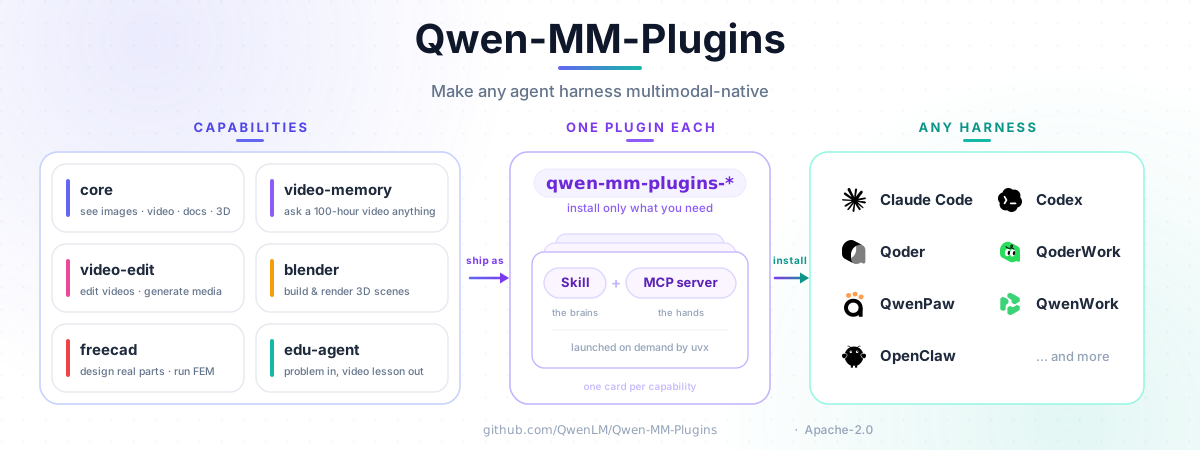
Native multimodal plugins for Qwen models. Make any agent harness multimodal-native.
Architecture
Install
The guided installer supports Claude Code, CodeBuddy, Codex, Qoder, OpenClaw, Qwen Code, and Gemini
CLI. Shared configuration lives in ~/.qwen-mm-plugins/config.
In-app setup for WorkBuddy, QoderWork, and QwenWork, plus manual setup for DeepSeek Harness, Hermes Agent, opencode, pi, and QwenPaw, is documented in the other harness guide.
curl -fsSL https://raw.githubusercontent.com/QwenLM/Qwen-MM-Plugins/main/install.sh | bash
Update the capabilities already installed in one harness:
curl -fsSL https://raw.githubusercontent.com/QwenLM/Qwen-MM-Plugins/main/install.sh | bash -s -- update
Released capabilities use independent, immutable tags. For local checkout installs, rollback, manual skill + MCP setup, dependencies, and Windows/WSL2, see the installation guide.
DeepSeek Harness (DSH)
The source repository includes a DSH carrier at packages/dsh. It mounts selected
Qwen capabilities through the official @deepseek-ai/dsh-mcp-client; the Python MCP servers still
come from this repository's uvx package source. Install the carrier in the target profile:
dsh plugin --profile web add @omdsh-dev/qwen-mm-plugins-dsh
The carrier requires the native-media DSH client line and relies on its built-in attachment admission
and finalizeContent support; it does not carry a compatibility layer for older MCP clients. See
the DSH setup guide for profile configuration and
source-checkout mode.
Capabilities
Each capability is installed independently as a Skill plus an optional MCP server. Its
install name is qwen-mm-plugins-<capability>.
| Capability | Use case | Main requirements | Cookbook |
|---|---|---|---|
core |
Read images and video; visualize documents, code, data, 3D files, and more | No API key; ffmpeg for audio/video; format-specific apps as needed | Cookbook |
api |
Qwen VL/Omni vision, OCR, grounding, ASR, segmentation, and audio-video understanding | DashScope; ffmpeg for local audio/video | Cookbook |
search |
Web search, page extraction, and reverse-image search | Serper, Exa, or Tavily key; image search requires Serper | Cookbook |
video-memory |
Build hierarchical memory for long-video QA | DashScope; ffmpeg/ffprobe for builds | Cookbook |
video-edit |
Image, video, and audio generation with editing workflows | DashScope; ffmpeg + Node/Chromium for full edits | Cookbook |
blender |
Model, texture, light, and render in Blender | Blender; Xvfb on headless Linux | Cookbook |
freecad |
Parametric CAD, STEP/STL, and FEM workflows | FreeCAD; CalculiX for FEM; Xvfb on headless Linux | Cookbook |
edu-agent |
Create Chinese math/science explainer videos and interactive pages | Skill-only; Node/Chromium + ffmpeg; DashScope for narrated video | Cookbook |
Try it
After installing a capability, reference a file and ask naturally; the Skill selects the relevant MCP tool.
@report.pdf          Summarize page 3 and extract its table.
@meeting.mp4         Transcribe this with speaker labels and timestamps.
@place.jpg           Identify where this photo was taken and verify it on the web.
@lecture-2h.mp4      List the main points with timestamps.
core reads media at dynamic resolution, so manual resizing is normally unnecessary.
Requirements and configuration
uvprovidesuvx, which installs Python dependencies on demand.- Local
coretools need no API key in the default native-image mode. Text-only caption fallback, cloud, and search capabilities need their provider credentials. - Video, document, browser, Blender, and FreeCAD workflows may need system applications.
Run the installer's Configure and Verify actions to set credentials and check dependencies. See Installation for prerequisites and the configuration reference for every setting.
Documentation
License
Apache-2.0 — see LICENSE. Third-party attribution for the Blender and FreeCAD integrations is recorded in their respective Blender and FreeCAD notices.
Links
More in this category
V1ki/dsh-plugin-subscriptions★ 394
Use ChatGPT (Codex), Claude, and Grok subscriptions as DeepSeek Harness LLM providers, with Settings login, model catalogs, usage, plus image_generate, video_generate, and x_search tools.
Mars-Sea/dsh-commandcode-provider★ 337
Unofficial Command Code LLM provider: registers a `commandcode` route with a live model catalog and reasoning-effort support.
corrinehu/dsh-workbuddy-connect★ 216
Brings the models in the WorkBuddy desktop app straight into DeepSeek Harness — zero configuration in the DSH chat.
cv-superding/dsh-deepseek-web-login★ 170
Adds a deepseek-web provider that uses chat.deepseek.com web models in DSH, with browser login capture, PoW request signing, SSE streaming, and prompting-based tool calls.
volcengine/ark-cli#ark-plan-api★ 139
Registers Ark Agent Plan, Coding Plan and postpaid model routes in the native DSH model picker.
franksong2702/dsh-codex-connect★ 120
Connect ChatGPT OAuth and OpenAI Codex models to DeepSeek Harness, with opt-in search and image tools.
Community comments
Comments are public GitHub Discussions. Loading them connects to GitHub and Giscus; a GitHub account is required to post.