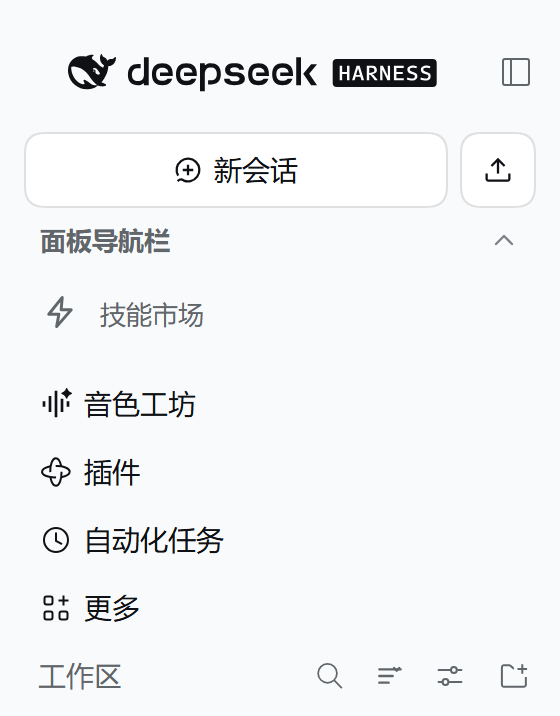
Adds a collapsible "Panel Navigation" header row to the DSH sidebar: it folds the global panel rows and plugin sidebar entries, and expands them in place on click.
Install
# from GitHub (first run asks for allowBuilds approval — follow the hint, retry)
dsh plugin --profile web add github:naofu233/dsh-panel-nav-fold
Any plugin you install runs third-party code with your own permissions — it can read your files, use your credentials, and reach the network, and tool approvals don’t sandbox it. GitHub-sourced plugins also run build scripts at install time — pnpm blocks those until you allow them, so an install can stop with ERR_PNPM_GIT_DEP_PREPARE_NOT_ALLOWED or ERR_PNPM_IGNORED_BUILDS; dsh prints the exact key to add under allowBuilds in your profile’s pnpm-workspace.yaml, and the install works on the next run. Allowing a build is a trust decision: only install sources you trust, and pin a commit (github:owner/repo#sha).
README
A collapsible Panel Navigation header for the DeepSeek Harness sidebar. It folds the global panel rows (Plugins, Scheduled tasks, More, and any registered panels) together with every plugin sidebar entry into one row, and expands them in place on click.
Unlike popover or “More menu” variants, expanding restores the native panel rows exactly where they were. It does not change panel pinning, does not open a menu, and does not touch host files.
Screenshots
Folded (default):

Expanded:
What it does
- Adds a full-width Panel Navigation row below New Session and above the first plugin sidebar entry.
- Folded by default: hides the native
nav[aria-label="全局面板"]/nav[aria-label="Global panels"]panel list and every sidebar entry that follows thedata-dsh-part="sidebar-entry"convention. - Click the row to expand; click again to fold. The state is stored in
localStorageunderdsh.panel-nav-fold.folded. - When the whole sidebar is collapsed to its 56px rail, the row becomes a 36×36 icon-only control.
- Removes the empty band the shell reserves above and below the panel list, so the Workspaces section follows the group with normal spacing.
- Self-heals after React re-renders through a
MutationObserver.
Install
From the DSH plugin market (dshmarket), or directly from GitHub:
dsh plugin --profile <profile> add github:naofu233/dsh-panel-nav-fold
Replace <profile> with the profile in use (for the desktop app this is usually tauri or desktop). Then restart or reload as the plugin manager asks.
For local development, use Plugins → Add plugin and choose this directory.
Compatibility
- Tested with DeepSeek Harness
0.2.2-rc.2and0.2.2-rc.3(2026-11 shell update) on Windows, in both the Tauri desktop app and the web UI. package.jsondeclaresengines.dsh: ^0.2.2-rc.2.- This is a DOM/CSS-level enhancement, not an official shell extension point. It reads the current sidebar structure (
nav[aria-label="全局面板"],[data-dsh-part="sidebar-entry"], and the shell's_panelList/_scrollAreamodule classes). A future shell change can break placement or folding; the row itself stays visible and the plugin can be disabled safely. - It does not modify host files or other plugins.
Privacy
- No network requests, no telemetry, no credentials, and no workspace or session data is read or transmitted.
- The only persisted state is the fold flag in
localStorage(dsh.panel-nav-fold.folded). - All rendering happens locally in the page.
Uninstall
Disable or remove the plugin in Plugins. The localStorage key can be cleared manually; leaving it is harmless.
Files
client.js— client half: the row, state, self-healing, and styles.index.js— host half (no host behavior).cordis.patch.yml— bundle patch.locale/— plugin-manager title and description.screenshots.json— market screenshots.icon.svg— plugin icon.
License
MIT
Links
More in this category
zhu1090093659/dsh-web#packages/dsh-task-board★ 10458
Task board for the dsh web GUI: a sidebar multi-column kanban whose cards run in real DSH agent sessions and can also be scheduled with cron expressions, executed host-side even with the browser closed.
zhu1090093659/dsh-web#packages/dsh-web-all★ 10458
Plugin and skin collection for the DSH Web UI: task board, Git graph, right-side panel, remote mobile UI, pet, live token stats, and a skin center.
ccch1mneyyy/dsh-TUI★ 7797
Claude Code-style full-screen terminal UI: pixel-whale header, live status line, and streaming thought expansion.
MeteorNOX/DeepSeek-Balance-Whale-Widget★ 7271
A fixed-corner whale widget for the DSH web GUI — balance, today's usage and per-turn cost with peak/off-peak pricing, editable balance-alert and daily-budget bubbles, a module-based custom bubble queue with A/B weighted choices and random lines or images, 30+ vendor templates (OpenAI, OpenRouter, Kimi, SiliconFlow, Ark, Zhipu, MiniMax and more) with per-model balance and subscription quota, plus task-end sound, imported audio, custom roles and a resource manager. Local-only, no telemetry.
omdsh-dev/DSH-better-sidebar★ 5191
Full sidebar workbench with file rendering and editing, terminal, Git, and subagents; third-party plugins can register new tabs.
omdsh-dev/dsh-genui★ 1007
Interactive UI components rendered inline in replies: layout, charts, forms, quizzes, mermaid, 3D scenes, and an action event loop back to the model.
Community comments
Comments are public GitHub Discussions. Loading them connects to GitHub and Giscus; a GitHub account is required to post.