QA project workbench for dsh: manage test projects, requirements, test cases, defects, milestones, reports and approval gates through a browser UI and 18 QA-domain tools.
Install
# from npm (prebuilt)
dsh plugin --profile web add dsh-qa
# from GitHub (first run asks for allowBuilds approval — follow the hint, retry)
dsh plugin --profile web add github:naodeng/dsh-qa
Any plugin you install runs third-party code with your own permissions — it can read your files, use your credentials, and reach the network, and tool approvals don’t sandbox it. GitHub-sourced plugins also run build scripts at install time — pnpm blocks those until you allow them, so an install can stop with ERR_PNPM_GIT_DEP_PREPARE_NOT_ALLOWED or ERR_PNPM_IGNORED_BUILDS; dsh prints the exact key to add under allowBuilds in your profile’s pnpm-workspace.yaml, and the install works on the next run. Allowing a build is a trust decision: only install sources you trust, and pin a commit (github:owner/repo#sha).
README
dsh-qa · QA Workbench
dsh-qa is a local QA workbench for DeepSeek Harness. It keeps requirements, test cases, risks, execution, evidence, and delivery decisions in one project space. Project and iteration conversations reuse native DSH sessions with Test Mode (preset id: qa); business data stays local and the runtime has no production dependencies.
The published version is v0.7.2; this patch release builds on 0.7.1 by restoring historical DSH conversation rendering within the same project workspace, documenting Harness 0.2.0-rc.2 host validation, and adding the official macOS client installation path. Installing the dsh-qa main bundle provides both the qa and quality-control presets, so no separate preset-install command is needed. Real execution through any external provider still requires provider-specific acceptance.
Compatibility acceptance: plugin loading, Test Mode (qa), and existing-project DSH history rendering were verified in the official macOS client running DeepSeek Harness v0.2.0-rc.2; the authenticated qa Host Smoke on the same version completed with 6 passed. This covers the qa bundle and does not replace separate validation of the quality-control bundle.
Test Dashboard → DSH Test Chat → Project Kanban → Calendar Schedule
Table of Contents
- Features
- Installation (DSH plugin)
- Install and update with npm (standalone)
- Quick Start (try without installing)
- QA Control Workbench
- Standalone Mode
- Architecture
- AI Toolset
- Companion QA Skills
- Development & Contributing
- Roadmap Documentation
- License
- FAQ
Features
Test Project Management
- Project & iteration duality: The top-level object can be a test project or an iteration (iterations can hang off a parent project); both bind their own DSH session, and the filter bar separates them
- Test dashboard & calendar: Active projects, due-soon/overdue milestones, pending gates, open defects, and recent activity on one screen; calendar supports year/month/day jumps, click-a-date creation, project-scoped milestones or events, and direct deletion
- Real-time kanban: Six-column pipeline (Requirements → Test Design → Case Review → In Execution → Defect Regression → Released), drag-and-drop columns, SSE real-time push, multi-window sync
- Project archive workspace: Wide project detail for editing name, key, product, owner, summary, and stage; ten sections — Overview / Quality Tasks / Requirements / Test Cases / Defects / Milestones / Reports / Knowledge / Minutes / Gates — plus progress, AI strategy, members, file directory, and stage timeline
- Local project directory: Creating a project can auto-generate an 8-level workspace:
01_需求与范围 / 02_测试计划 / 03_测试用例 / 04_测试数据与脚本 / 05_测试执行 / 06_缺陷 / 07_测试报告 / 08_发布与归档; deleting a project record never deletes the folder - Gate governance: Requirements review / strategy review / case review / report review / release / closure are requested by the AI and approved manually by the test owner (aligned with the 8-stage AI quality-analysis workflow)
QA Control Workbench (0.2–0.5 quality domain, included in the v0.4.0 baseline)
- Quality tasks and source snapshots: Create a quality task for each test objective. The server captures and validates requirements, workspace files, or allowed Git revisions, then records summaries, digests, acceptance criteria, risks, test scope, and analysis decisions instead of trusting client-supplied paths or content.
- Test plans and controlled execution: Maintain reviewed test plans and immutable execution-profile versions per quality task. A run preview token is issued only for the current reviewed plan, current profile version, and source digest before a controlled local run starts in a minimal environment.
- Native QA Execution & Action Desk: Host execution goes through preview, confirmation, start, cancel, retry, and evidence archiving; the Action Desk summarizes actionable execution states from the canonical Action Queue without treating running items as completed results.
- Evidence, analysis, and regression: Archive terminal runs as integrity-checked evidence bundles; analyze failures, promote confirmed defects with human confirmation, compare runs from the same plan, and manage traceable deterministic regression sets with exclusions.
- Computed quality gates: Calculate
PASS / WARN / BLOCKfrom execution provenance, verified evidence, critical test results, and risk state. Delivery reports and trends remain available after refresh; controlled exceptions require an owner, reason, and expiry and apply only to eligible warnings. - Direct project details: The active-project list and kanban card body open the full project detail directly. The dashboard shows up to five active projects, while the kanban retains the complete project list.
Quality delivery workflow
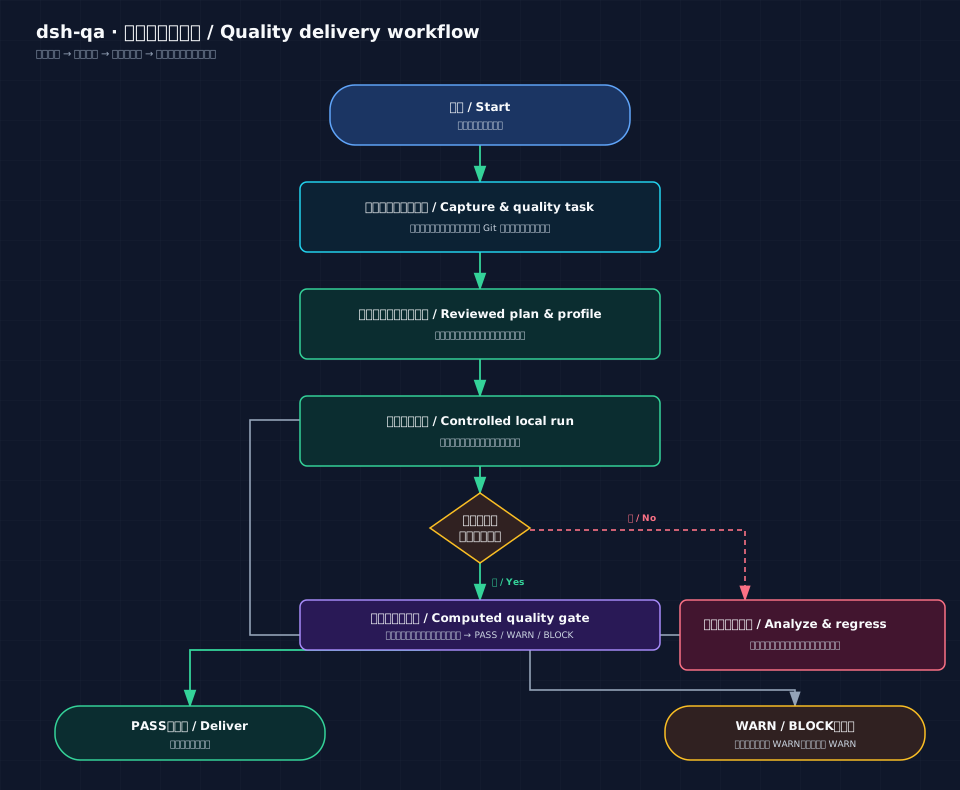
The diagram makes the control boundary explicit: a run that is not terminal or lacks verified evidence enters failure analysis and regression before it runs again. Only a PASS gate reaches delivery; WARN / BLOCK requires review. An exception applies only to an eligible WARN check and can never turn BLOCK into a pass.
AI Collaboration
- Controllable AI modes: Per project — full assistance, on-demand collaboration, or fully off; auto-extraction and dashboard reminders can be toggled independently
- AI material boards: The AI registers requirements (linkable to test cases with verification purposes), test cases (priority, requirement-trace
trace, risk tags, three states), defects (business-impact-based severity plus reproduction frequency and impact scope), milestones (auto-computed due dates with overdue/due-soon badges), events, test knowledge, meeting minutes, and test reports (versioned), and can ingest Playwright/Pytest automation results; every registration appears live on kanban cards and the material feed - DSH skills & commands: Each project binds an independent DSH session; the "Skills & Commands" panel supports categories, search, and click-to-insert, with
/instant suggestions and results echoed back into the workbench - QA Skill installer: The
QA Skill Installertab groups skills into Testing Types, Testing Workflows, and Enhanced; Testing Types uses the site-aligned groups Requirements & Strategy, Case Design & Review, Functional & Compatibility, API & Automation, Quality Specialties, and Defects, Reports & Review, with bilingual switching, search, detail links, and one-click DSH installation - Single DSH chat & model switching: Uses only this project's DSH Test Mode session; the model switcher reads DSH's native model catalog — no second model set inside the plugin
UI & Connectivity
- Language switching (zh / en): switch the UI language from the settings dialog — Chinese by default and persisted in your local browser; navigation, dashboard, kanban, lists, calendar, radar and drawer/modal titles are all bilingual
- Settings and release information: the settings dialog shows installed/latest versions, compatible DSH version, GitHub repository, and project website; the brand version button opens bilingual, paginated release history; Appearance supports Light, Dark, and System, while Presets shows the
qaandquality-controlbundles included by the main plugin - Adjustable workspace: Main nav, project rail, and project radar widths are draggable and collapsible; double-click edges to reset; layout presets are no longer exposed in the settings dialog
- Overdue milestones in red, due-within-7-days in yellow, pending gates in purple — live counts in the top bar
Installation (DSH plugin)
Manage the plugin with the same method used to start DSH. dsh web is an alias for dsh --profile web; both command sets below manage the web profile.
Option 1: Start DSH with npx
# Install the dsh-qa plugin
npx --yes @deepseek-ai/dsh plugin --profile web add dsh-qa

# Update the dsh-qa plugin
npx --yes @deepseek-ai/dsh plugin --profile web update dsh-qa

# Start or restart the Web UI after installation or update
npx --yes @deepseek-ai/dsh web
Option 2: Start from a DeepSeek Harness source checkout
Run these commands from the Harness repository root after pnpm install and pnpm run build:
# Install the dsh-qa plugin
pnpm dsh plugin --profile web add dsh-qa

# Update to npm's latest version
pnpm dsh plugin --profile web update dsh-qa

# Start or restart the Web UI after installation or update
pnpm dsh web
To pin GitHub or a local development checkout, replace add dsh-qa in either option with add github:naodeng/dsh-qa or add link:/path/to/dsh-qa. Restart the Web UI after installation or update because plugins load when the host starts. A 「质量工作台 / QA Workbench」 entry appears in the GUI sidebar; click to open the workbench in the conversation area or use the toolbar to open it in a tab.
Official macOS client
The official macOS DSH client exclusively owns the desktop profile, so it must not be managed with dsh plugin --profile desktop from the CLI. Install dsh-qa as follows:
- Open the client's Plugins page and choose the add-plugin or Git-repository entry point.
- Enter
https://github.com/naodeng/dsh-qaand confirm the installation; for local development, select the local Git repository or path. - After installing or updating, fully quit DSH with
⌘Qand reopen it so the plugin code is loaded again. - Open QA Workbench / 质量工作台 from the sidebar.
If the plugin manager reports Already up to date for an unchanged Git URL but does not load new code, remove the old dsh-qa entry from the Plugins page and add it again. This does not delete project data or conversation bindings under ~/.dsh/dsh-qa/. The v0.2.0-rc.2 acceptance above was performed through this client path.
Models & API: The workbench does not maintain a second set of API keys or model configs. Each test project binds a native DSH session whose working directory is the project folder, and automatically uses Test Mode (preset id:
qa). Model list, model switching, skills, commands, tools, and permission policies all come from DSH; to add providers or models, configure them in DSH settings.If an old project is bound to a blank standard-mode session, the workbench switches it to Test Mode automatically; if the old session already has conversation history, the workbench keeps that history, creates a new Test Mode session, and rebinds.
Install and update with npm (standalone)
# Requires Node.js 18+
npm install -g dsh-qa
qabench           # → http://127.0.0.1:8899

# Update to npm's latest version, then restart the workbench
npm update -g dsh-qa
qabench
This starts the local QA workbench only. To use sessions, models, skills, and commands inside DeepSeek Harness, install the plugin using the Installation (DSH plugin) steps above.
Quick Start (try without installing)
# Requires Node.js 18+
git clone https://github.com/naodeng/dsh-qa.git
cd dsh-qa
npm start        # → http://127.0.0.1:8899
On first launch, one sample project and one sample iteration are created with requirements, test cases, defects, milestones, reports, and a pending approval gate. Explore them from the dashboard, kanban, and calendar. Standalone mode manages local project data; DSH chat, models, skills, and commands require opening the plugin from the DSH sidebar.
Standalone Mode
npm start          # or double-click start.command
# → http://127.0.0.1:8899 (data directory: <project>/data)
The standalone address lets you view and manage test projects, the kanban, and the calendar; DSH chat, models, skills, and commands must be used from the plugin opened in the DSH sidebar.
Architecture
lib/index.js      Host half (cordis plugin): starts the workbench in-process + /api/dsh-qa routes + system-prompt announcement
lib/client.js     Browser half (0.7.1): official Panel/Slot sidebar + main keyed slot + Workbench iframe
lib/panel-contract.js  Panel/Slot semantic contract (runtime adapter stays in client.js)
cordis.patch.yml  Profile bundle patch (inserts the plugin line)
preset/qa/cordis.patch.yml  Declarative QA preset bundle
preset/quality-control/cordis.patch.yml  Declarative quality-control preset bundle
server/           Workbench service (native http + SSE; projects, quality tasks, execution, evidence, and gates)
public/           Four-view frontend (vanilla JS, no build step; relative paths, mountable under any prefix)
Routes: /api/dsh-qa/info (status), /api/dsh-qa/workbench/ (same-origin mirror proxy, SSE pass-through). The same-origin iframe also connects native sessions through DSH's current session/*, agentPresets/*, skills/*, and commands/* APIs — all behind a loopback guard.
Data directory: plugin mode ~/.dsh/dsh-qa/ (projects & local materials); standalone mode <project>/data/. DSH chat is persisted by DSH itself. Both the workbench and DSH listen on 127.0.0.1.
AI Toolset
The workbench ships 23 QA-domain tools that DSH sessions call through function calling to update projects and quality tasks:
| Group | Tools |
|---|---|
| Project management | project_get project_update member_add project_transition |
| Requirements & cases | requirement_add testcase_add testcase_status testcase_link |
| Defects & milestones | defect_add defect_status milestone_add event_add |
| Notes & reports | knowledge_save minutes_save report_draft report_draft_save |
| Gates & imports | gate_request testrun_import |
| Quality tasks | qa_quality_task_get qa_quality_analysis_request qa_quality_analysis_save qa_quality_risk_decide qa_quality_test_scope_suggest |
Test Mode Preset (plugin mode)
In plugin mode, workbench chat automatically uses DSH's Test Mode (preset id: qa). Installing the dsh-qa main bundle declares both qa and quality-control; standalone local-project management does not require either preset.
# Install the dsh-qa bundle from the current checkout into the web profile
scripts/install-qa-preset.sh
# Choose a profile or preview the command
scripts/install-qa-preset.sh --profile web --dry-run
The preset is based on DSH's official standard (full coding capabilities) with a QA-testing persona and built-in QA quality principles (executable, judgeable test cases covering positive/exception/boundary; defects separating facts from guesses; no fabricated data). Harness 0.1.7+ discovers ids=qa and quality-control from the active profile's bundle declarations.
quality-control preset (included in the main bundle)
The dsh-qa main bundle now declares both qa and quality-control. Install or update dsh-qa, restart DSH, and both Test Mode and R&D Quality Control Mode are available; no separate preset-install command is needed.
For independently managed quality-control bundles (advanced use), see preset/quality-control/README.md. The official Electron desktop client still exclusively owns the desktop profile, so it must not be changed through the CLI or npx --profile desktop.
If dsh-qa-quality-control was installed separately before, remove or disable it from the DSH profile before updating dsh-qa so the same preset is not declared twice.
preset/quality-control remains available as an independently installable bundle and does not copy or mutate user preset directories.
Companion QA Skills
The workbench chat reuses DSH-native skills and commands (type / to search). You can install awesome-qa-skills as companion testing skills and reference the multi-role workflows of awesome-qa-prompt.
Open the workbench from the DSH sidebar and select QA Skill Installer to browse and install skills. The page shows skills/zh or skills/en according to the active UI language. Card names, descriptions, use cases, and detail links are synchronized from the QA Skills Library; the local awesome-qa-skills checkout remains the installation source.
The installer keeps the website's category order: Testing Types (Requirements & Strategy, Case Design & Review, Functional & Compatibility, API & Automation, Quality Specialties, Defects, Reports & Review), Testing Workflows, and Enhanced. Skills are installed into DeepSeek Harness at ~/.dsh/skills/; restart dsh web after installation before using them in a new DSH session.
# Install the current repository's testing-type and testing-workflow skills into the DSH skills directory
scripts/install-qa-skills.sh                     # default: all Chinese skills
scripts/install-qa-skills.sh --lang en           # English skills
scripts/install-qa-skills.sh --skill test-case-writing   # install a single skill
scripts/install-qa-skills.sh --src /path/to/awesome-qa-skills   # custom repo path
scripts/install-qa-skills.sh --dry-run           # preview without writing
After installing, restart dsh web and type / in the workbench chat to see the skills (e.g. /test-case-writing, /bug-reporting, /requirements-analysis, /test-strategy, /test-reporting). The built-in QA system prompt already adopts these libraries' quality principles: test cases organized by requirement-trace trace and risk tags covering positive/exception/boundary scenarios; defects separating "observed facts" from "cause guesses" with business-impact-based severity plus reproduction frequency and impact scope; reports distinguishing executed facts, unexecuted scope, and evidence gaps.
License note: This plugin, awesome-qa-skills, and awesome-qa-prompt all use the PolyForm Noncommercial 1.0.0 license (non-commercial use only). This plugin only provides installation guidance and quality-principle references — it does not copy their content.
Development & Contributing
- Environment: Node.js 18+; run
npm cibefore development or tests - Run:
npm startfor standalone;npm run devfor watch mode - Test:
npm testruns unit/API tests (node:test) plus Chromium end-to-end tests (Playwright);npm run test:unit/npm run test:e2erun each separately - If the default test port is occupied:
QA_E2E_PORT=8900 npm test; the default remains8899 - Harness host smoke:
DSH_WEB_URL='<full URL printed by dsh web, including ?token=...>' DSH_HOST_VERSION=dsh-v0.2.0-rc.2 npm run test:host-smoke; the configuration also keepsdsh-v0.1.7-rc.2,dsh-v0.1.7-rc.1, anddsh-v0.1.7-alpha.1as supported compatibility entries; the version variable must exactly match the running Harness; Playwright exchanges the launch token for its browser-session cookie before testing. Run only the Panel lifecycle withnpm run test:host-smoke -- test/e2e/dsh-panel-lifecycle.spec.js; these commands are not part of standardnpm test - Publish: after
npm publish, install withdsh plugin --profile web add dsh-qa; models and keys are managed by the user's DSH configuration - Issues and PRs welcome (Conventional Commits)
Roadmap Documentation
- Version semantics and route boundaries: explains the v0.4.1 baseline, the current 0.5.0→1.0 route, and formal release versions
- Quality Workbench documentation index: requirements, solution design, technical design, and per-version implementation plans
- 0.5.1 Harness 0.1.7 impact assessment: preset-bundle migration, lifecycle fixes, and the
qabundle's real-host6 passedresult;quality-controlruntime verification remains unassessed - 0.5.0 Harness compatibility matrix: historical 0.5.0 Panel/Slot evidence; the historical 0.4.1 host evidence remains recorded
- Post-1.0 Capability Roadmap: after Quality Intelligence moves earlier, the post-1.0 Obligation, Graph, Adapter, Policy, Multi-Agent, and Autonomous QE direction
License
PolyForm Noncommercial License 1.0.0 — non-commercial use only; see LICENSE for details.
FAQ
- No sidebar entry: restart
dsh web(plugins load when the host starts) - Model unavailable or auth failure: check the provider, model, and credentials in DSH settings; the workbench does not store keys separately
- Can't see skills or commands: make sure you opened the plugin from the DSH sidebar, not the standalone 8899 address; a DSH session is auto-created and bound on first entry into a project
- Port conflict: automatically bumps 8899→8909; the plugin line can configure
port - Quality gate shows BLOCK: a run, evidence item, or risk does not yet meet the delivery rules. Check the delivery-report checks first; fix the issue or create a time-bound exception only for an eligible warning.
- Relation to DSH Test Mode: testing business data is stored by this plugin; each project session automatically uses the
qapreset and can invoke the testing tools and skills installed there
Links
More in this category
loopx-project/loopx#dsh-loopx-plugin★ 6242
LoopX, a provider-neutral, local-first state kernel and control plane for long-horizon agents: keeps Goal, Todo, gate, evidence, quota, recovery, and handoff state above DeepSeek Harness, while the plugin bootstraps the CLI and skills, admits bounded same-session continuation, and adds a loopback GoalBar for the exact bound loop.
Q00/ouroboros#integrations/dsh-plugin★ 6203
Config-only bundle that mounts Ouroboros through the DSH MCP client, exposing 36 interview, Seed, execution, evaluation, and evolution workflow tools in DSH.
chuspeeism/dashi-taskboard#deepseek-harness★ 3333
Embeds the active installed Codex Taskboard runtime in the DeepSeek Harness sidebar, using its launcher runtime descriptor instead of a fixed port.
NanmiCoder/dsh-agent-teams★ 2035
AgentTeams multi-agent teams.
EthanYoQ/AI-Novel-Writer#dsh-ai-novel-writer★ 1411
Installs a dedicated AI novel-writing preset and workbench: revisioned local project assets, a compact side drawer, and native approval-gated single-file changes.
tong-io/tongflow#dsh-tongflow★ 1045
TongFlow film-crew studio for image, voice, music and video production: the agent writes per-asset TongFlow workflow files (.tongflow.json) that run through TongFlow plugins, with an embedded workflow canvas, a shot/character/take project layout and a manga-drama template; sessions starting with @tongflow open the Studio view.
Community comments
Comments are public GitHub Discussions. Loading them connects to GitHub and Giscus; a GitHub account is required to post.