Session-bound persistent TypeScript REPL for DSH PTC mode: bindings and imports stay live across run_code calls, edit_run_code replaces one line without resending the block, module import/export syntax is adapted via AST rewriting, and durable bindings are restored from the session journal after a cold restart.
Install
# from npm (prebuilt)
dsh plugin --profile web add dsh-ptc-plus
# from GitHub (first run asks for allowBuilds approval — follow the hint, retry)
dsh plugin --profile web add github:muyuanjin/dsh-ptc-plus
Any plugin you install runs third-party code with your own permissions — it can read your files, use your credentials, and reach the network, and tool approvals don’t sandbox it. GitHub-sourced plugins also run build scripts at install time — pnpm blocks those until you allow them, so an install can stop with ERR_PNPM_GIT_DEP_PREPARE_NOT_ALLOWED or ERR_PNPM_IGNORED_BUILDS; dsh prints the exact key to add under allowBuilds in your profile’s pnpm-workspace.yaml, and the install works on the next run. Allowing a build is a trust decision: only install sources you trust, and pin a commit (github:owner/repo#sha).
README
Let the model keep computing and revise its work within a session, with less repeated setup and fewer avoidable tool-call errors.
PTC Plus provides a stateful TypeScript computation environment for DSH's PTC mode. Built on a REPL, it keeps variables, functions, imports, and intermediate results available across tool calls. It extends declaration update rules and adapts module syntax, with call tolerance and code editing designed for models that repeatedly write and revise code.
- Keep computing: reuse data already loaded and processed in the session.
- Revise directly: update a variable or function under the same name; existing closures read the updated binding. Small changes can be sent as code deltas.
- Avoid routine call failures: use familiar module syntax, recover from identifiable call omissions, and receive correction suggestions for verifiable syntax errors.
- Reuse common capabilities: save functions as global bindings, provide their interfaces and usage notes to the model, and use them across sessions.
Quick start · Feature overview · Continuous computation · Editing and call tolerance · Global bindings · Interface and settings · Values and recovery
Quick start
Requires Node.js ^22.19.0 || >=24.0.0 and the latest available official DSH release. Install into the profile you actually use:
dsh plugin --profile <profile> add dsh-ptc-plus
Replace <profile> with your profile name. Restart DSH and select PTC mode in the session. Continuous computation, call tolerance, and global bindings default to on. Explicitly disabled options in an existing configuration stay disabled.
Session history uses DSH's public reader, and the Host incrementally projects prompt facts. Missing read surfaces or malformed historical event arrays produce explicit diagnostics, not a claim that unavailable history was successfully recovered as an empty session.
With the default interface settings, the session has a REPL tab; wide screens also show a green PTC Plus header indicator. The sparkle button beside the composer opens the global binding menu and PTC Plus settings. You can also open Plugins → Installed → dsh-ptc-plus → Configure in the sidebar to check the main switch and all plugin settings.
Once installed, describe your task to the model as usual. The run_code and edit_run_code examples below show how the model uses these features. See the installation guide for other installation methods, Desktop, the local development launcher, upgrades, and troubleshooting.
For Windows source testing, double-click scripts\run-upstream-dsh.cmd to fetch the official DSH default branch, reuse an isolated build cache, and load this plugin checkout. The first run installs dependencies and builds DSH; see upstream source testing.
Feature overview
Default PTC mode starts every execution in a fresh environment: variables from the previous call are gone, and a change that depends on earlier results means resending the setup code. PTC Plus turns run_code into a session-bound TypeScript REPL and closes the gaps below.
| Scenario | Default PTC mode | With PTC Plus |
|---|---|---|
| Continue processing data | Each call starts fresh, so setup code must be sent again | Variables, functions, imports, and intermediate results stay in the session for the next call |
| Revise an existing name | No established binding can be updated, so the whole cell has to be resent | Revise variables, functions, classes, and import bindings under the same names; existing closures read updated bindings |
| Change a small part of the code | A one-line change means resending the complete source | Submit a delta through edit_run_code, then execute the complete revised cell |
| Use module syntax | Static import and export are invalid inside the function body |
Write them directly in a cell; the plugin adapts the module syntax |
| Omit a call summary | Missing run_code.description fails validation |
Supply a display summary automatically so otherwise valid code proceeds |
| Provider rejects malformed tool JSON | The whole turn ends with a provider error | Repair or preserve a buffered tool-call tail containing only tool framing and at most one usage event; route every other buffered tail through schema rejection so the model continues |
| Recover a misplaced top-level tool call | Undeclared top-level calls are rejected in PTC mode | Convert the call to run_code when the live tool definitions uniquely identify the target and validate its arguments |
| Locate a code error | Return the native error and stack | Map the error to the cell source; suggest an edit when a missing trailing delimiter has one verified correction |
| Work with the current project | Relative Node paths depend on the host process directory | Resolve file paths, session module imports, and default child-process directories from the session project directory |
| Find tools and parameters | Read through the tool interfaces already supplied to the model | List and search current capabilities in code, then inspect relevant interfaces on demand |
| Transfer data beyond plain JSON | JSON cannot fully represent undefined, BigInt, cycles, and similar values |
Preserve supported special values and reference relationships for further computation and recovery |
| Inspect computation state | No reusable session variables remain after a call | View retained names, source definitions, reuse counts, and bounded value previews in the REPL tab |
| Reuse functions across sessions | Save the code yourself and reload it in later calls | Save TypeScript global bindings and supply their interfaces and usage notes to the model |
| Author and test global bindings | No dedicated workbench for global bindings | Ask the model for a draft to review, or run unsaved source in the workbench |
| Continue after a restart | No computation state spans calls, so there is nothing to recover | Recover verifiable state from session records and report what cannot be recovered |
The following sections explain usage and limits. See the runtime reference for complete language rules, configuration fields, and diagnostics.
Continuous computation and language extensions
The model executes the following code through run_code. Each call's code is a cell.
First, define the data and a calculation:
const amounts: number[] = [12, 8, 5]
function total() {
  return amounts.reduce((sum, value) => sum + value, 0)
}
return total() // 25
In the next call, revise the data and reuse the function:
const amounts = amounts.filter(value => value >= 8)
return total() // 20
There is no need to redefine total or invent another variable name to avoid a redeclaration error. total() reads the updated amounts.
The default stateful semantics (bindingUpdates: 'stateful') extend JavaScript/TypeScript binding rules for continued revision:
- Variables, functions, classes, and import bindings in the same scope can be updated, including bindings declared with
const. Same-name revisions also work within a single cell. - Existing closures read updated bindings; a previously saved function value remains the original function.
- Blocks, functions, and loop iterations retain their separate scopes.
- Failed initialization does not permanently reserve a name that was never successfully established. Other changes made before the failure are not rolled back.
Cells support TypeScript, top-level await / return, and static import / export. To detect name overwrites instead, disable Allow redeclarations and overrides to select the protected policy. Protected runtime names such as tools remain unavailable for overwriting.
Static imports take effect before the entire cell body executes. Assignments and ordinary declarations in the body can then override them. A static import in a later cell restores the binding's live module source. Writing an import below an ordinary declaration in the same cell does not restore it at that textual position. To retrieve the current exported value at a particular step, assign it explicitly:
join = (await import('node:path')).join
This captures the function value at that moment; a static import follows its module source. See the runtime reference for more language rules.
run_code, edited code, and the global binding workbench follow the same language policy; the workbench's temporary state is separate from the model's session. Explicit eval, Function, node:vm, and independent runtimes retain their corresponding native boundaries. See the language reference for scope, module interoperability, and historical session rules.
Code editing and call tolerance
Send only the change
The model can use edit_run_code to change the most recent editable cell in the current model turn without resending its complete source. If the second cell above has just completed and the same turn is still running, its filter can be changed to value >= 10:
edit_run_code({
  edits: [{ old_string: 'value >= 8', new_string: 'value >= 10' }]
})
An edit reruns the entire cell; this example returns 12. Earlier state changes are not rolled back. If the code writes files or calls external services, rerunning still requires considering duplicate effects. Edits can repair failed code or refine a successful computation.
Republishing a historical result as a compacted display entry is not another execution and does not make the older cell the new edit target. A newer failed cell remains available for correction.
Recover from identifiable call problems
| Situation | PTC Plus behavior |
|---|---|
run_code omits its outer description |
Supply a display summary so code with otherwise valid arguments can execute |
| The model calls a native tool outside the PTC direct-tool list | Convert it to the corresponding run_code when current tool definitions uniquely identify the target and validate the arguments |
Argument validation reports a missing description |
Distinguish outer and nested tool arguments and provide correction guidance, saved as a complete message so session history remains loadable |
| Code fails to parse | Identify the source position; at EOF, suggest a target-bound edit if appending one or two closing delimiters has exactly one validated correction |
The first two behaviors default to on and can be disabled in settings. Syntax suggestions do not execute automatically or establish that the code matches the task's intent.
Project files and tool capabilities
Start from the session project directory
The model can use Node.js directly to read files, process data, and run programs. Relative file paths and imports in session code resolve from the recorded session project directory. Child processes use that directory when cwd is omitted; an explicit directory still takes precedence.
For example, in a project containing package.json, the first call reads its dependencies:
import { readFile } from 'node:fs/promises'
const manifest = JSON.parse(await readFile('package.json', 'utf8'))
const deps = Object.keys(manifest.dependencies ?? {})
return deps.length
The next call works directly with the loaded data:
return deps.map(dep => dep + '@' + manifest.dependencies[dep])
This does not reread the file: it uses manifest already in the session. Direct file, network, and other external inputs can remain usable in the live environment without being guaranteed recoverable after a restart.
Discover tools as needed
The model can still use DSH's current native tools through tools.*. To discover available capabilities, capabilities.tree() lists the catalog, find() searches names and descriptions, and inspect() provides parameter information for selected interfaces:
const matches = await capabilities.find('read')
return capabilities.inspect({
  symbols: matches.slice(0, 4).map(item => item.symbol),
  budget: 4,
})
Search uses lexical matching, so short keywords such as read or session work best. A miss does not prove that a tool is unavailable. Discovery grants no additional authority; DSH still validates and schedules calls. See capability discovery.
Global bindings: reuse functions across sessions
Session variables serve the current task. Global bindings save common TypeScript functions for multiple sessions to load. For example, after saving a binding named textTools, the model can call textTools.clean(text).
Global bindings and the sparkle shortcut default to on. Create entries manually, import .ts files, or ask the model to write and revise them:
/binding new Create textTools to trim outer whitespace while preserving interior spaces
/binding edit <id> Add line-by-line trimming
<id> is the entry's identifier in the workbench. You can also select the binding to revise from the sparkle menu.
Author, review, and enable
The model can test with in-memory examples before submitting a draft. The draft floats above the composer; expanding or collapsing it leaves the conversation in place. Opening a draft from the composer menu or original request goes directly to the large dialog. Choose Enlarge binding draft to review the complete source in a large dialog with independent scrolling and save/discard actions at the bottom. The header separates resize and close controls; Shrink binding draft returns to preview. Review its source, interface, and model instructions, then choose Save and enable, Save disabled, or Discard draft. Submission alone neither saves nor enables a binding. If you close the panel, the sparkle button's draft badge lets you reopen it.
The sparkle menu lists and toggles entries even before the first message; these choices apply across sessions. Enabled entries appear first; the disabled group shows its count and starts collapsed. Only the binding list scrolls, keeping authoring, revision, management, and settings actions visible at the bottom. Enabled entries' interfaces and usage notes are provided to the model in new sessions. Changes during a session are delivered on its next allowed request.
Interface guidance and independent trial runs
Each entry can derive its public interface from source and include purpose, input constraints, or examples. Editing only its instructions does not reset its loaded runtime state. Assignment or redeclaration in a session overrides only the corresponding name and does not rewrite the saved global entry.
The workbench can run unsaved source and retain temporary variables across executions. Its computation state is separate from the model's session, making it useful for manual function checks; file and network operations still have real effects. Entries can be managed without an active PTC session. See the global binding guide for source format, interface generation, storage, and the full workflow.
Interface and settings
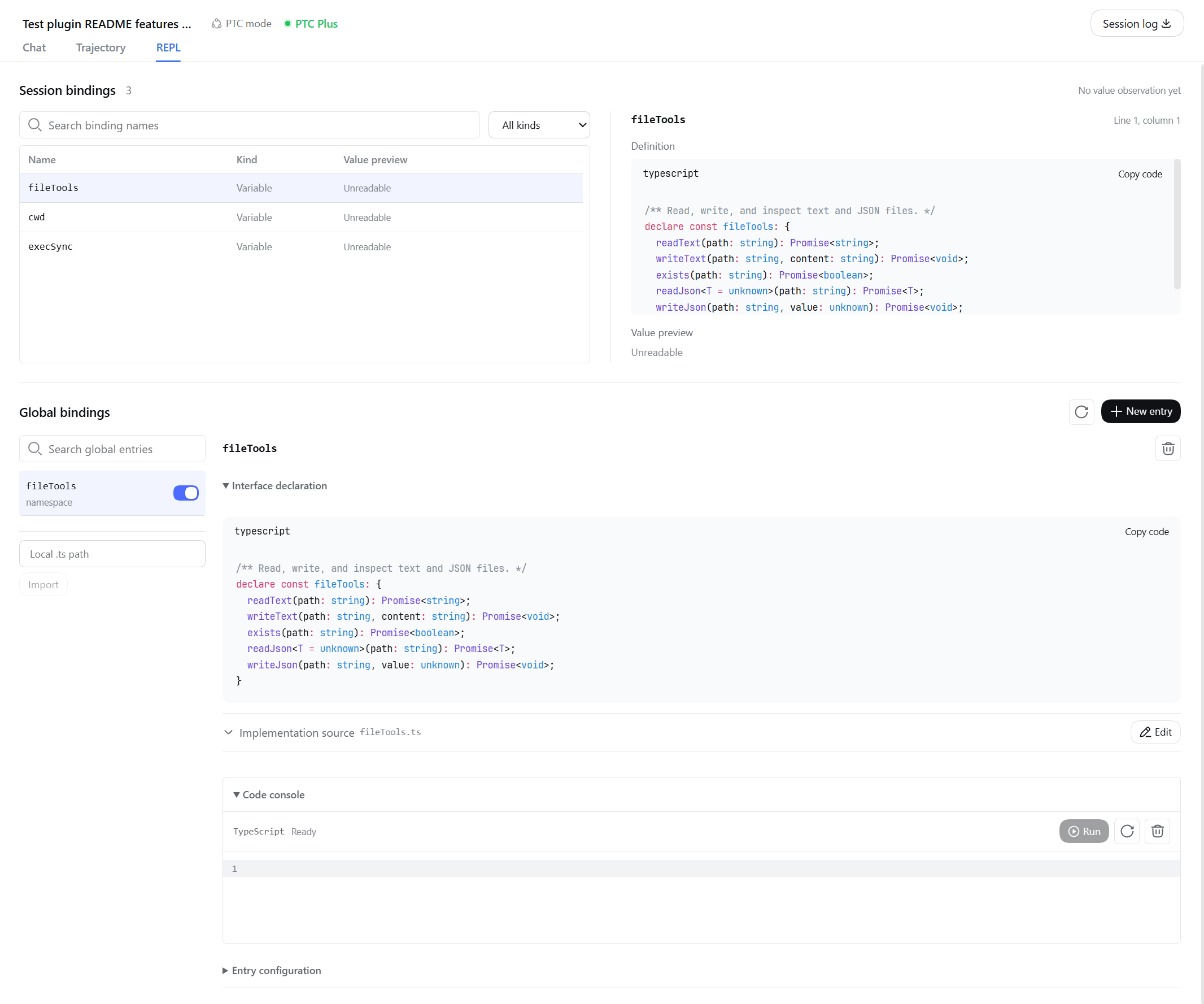
The REPL tab lets you search retained names, inspect definitions, see reuse counts and bounded value previews, and open the global binding workbench. Previews have type and size limits; missing, incomplete, or unreadable previews are identified explicitly, and display does not invoke user getters. The green PTC Plus header indicator offers a quick binding list on wide screens; use the REPL tab on narrow screens.
Workbench controls provide visible keyboard focus and disabled feedback, and REPL names remain readable in light and dark themes. See the visual contract for browser regression checks and their coverage limits.
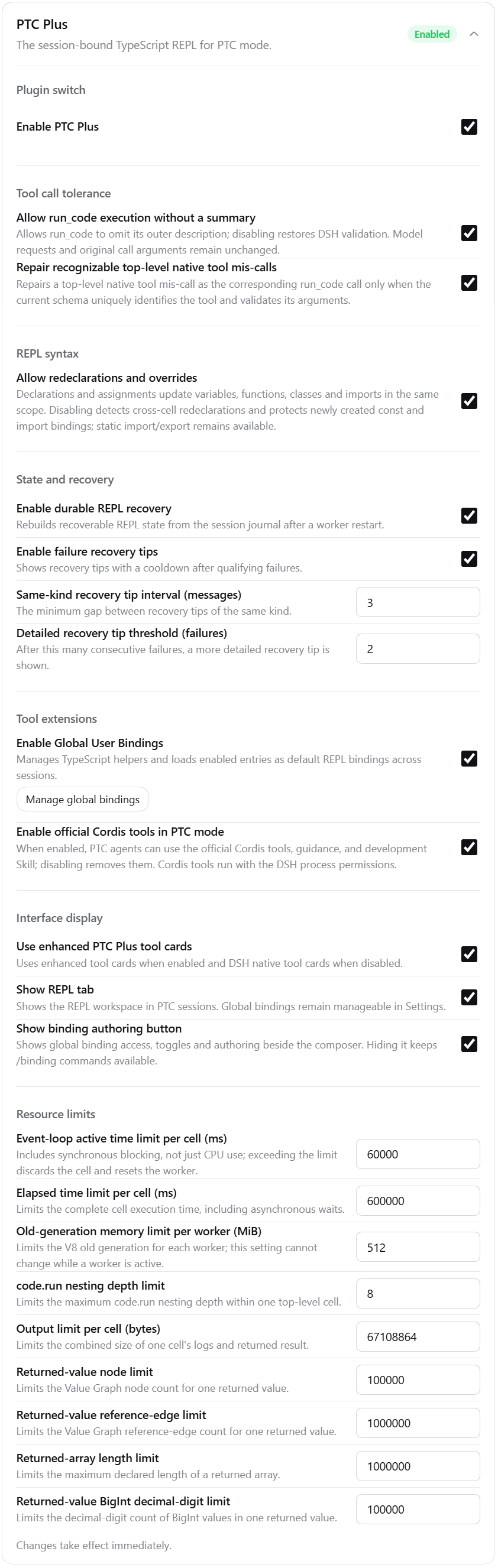
The sparkle menu beside the composer groups binding authoring, entry management, and PTC Plus settings. Its settings dialog and the sidebar plugin configuration page share the same configuration:
| Group | What you can adjust |
|---|---|
| Plugin switch | Enable or disable PTC Plus |
| Tool call tolerance | Missing call summaries and identifiable misplaced native-tool calls |
| REPL syntax | Allow same-name revisions or choose name protection |
| State and recovery | Restart recovery, contextual tips, and their frequency |
| Tool extensions | Global bindings and their management entry, official Cordis tool integration |
| Interface display | Enhanced tool cards, the REPL tab, and the sparkle shortcut |
| Resource limits | Execution time, memory, and output budgets |
Everyday computation features default to on. Cordis development tools default to off and can be enabled when inspecting or developing DSH plugins; see the integration notes. Explicitly disabled options stay disabled, and each saved binding keeps its own enabled state.
Settings usually apply immediately. A worker's memory limit cannot be changed while that worker is active or a submitted cell is preparing to execute. See the configuration reference for fields, defaults, and full limits.
The host execution provider must use TypeScript. Changing it to another language during reload withdraws the active PTC runtime and reports a diagnostic; returning to TypeScript reactivates it without changing the plugin setting.
Value transfer and state recovery
Preserve values beyond plain JSON
Within the supported value domain, tool arguments, results, and recovery records preserve undefined, BigInt, NaN, infinities, sparse arrays, cycles, and shared references. Ordinary JSON results remain structured values; special values are displayed as readable text to the model, separately from their program values.
This does not make every JavaScript object transferable or persistent: functions, Promises, class instances, Date, Map, and Set are outside the value-transfer domain. Keeping a function in the REPL for later calls is different from returning that function as a tool result. Reuse session variables for continued computation; see the value-transfer specification for the complete supported domain.
Recover state with verifiable history
Session state is not permanent memory. After a restart, runtime reset, or context compaction, only state verifiable from session records whose provenance remains in the model's context can be retained. Direct file or network inputs, damaged history, and compacted source provenance can reduce what remains available.
Unverifiable state is discarded with a diagnostic; if necessary, the current computation continues in an empty environment. Recovery neither redispatches recorded native-tool calls nor reverses historical external effects. See the runtime reference for recovery evidence and limits.
Boundaries
- Execution permissions: primarily designed for
danger-full-access. Code can access Node.js and the operating system directly; the plugin adds no security sandbox. DSH continues to own native-tool permissions, approvals, cancellation, and sandbox policy. - Failures and reruns: a failed execution does not mean earlier statements had no effect. Process isolation, editing, and recovery do not guarantee that external operations are safe to repeat. Timeouts or output overflow can also release the computation environment.
- Errors and cost: language adaptation and call tolerance do not guarantee that every program succeeds. Actual call counts and token usage depend on the task and model; see the evaluation notes for a recorded comparison and its limitations.
PTC Plus is a community plugin, with no affiliation with or endorsement from DeepSeek or DSH.
Further reading
Installation and upgrades · Global bindings · Runtime reference · Architecture and development · Verification · All documentation
Links
More in this category
yjh051108/dsh-routing-suite★ 7015
One repository, three parts: a runtime injector for DSH plugin packages (inject, hot-reload, unload, promote a dev staging tool to the front, route self-heal, plus a settings-page plugin manager that lists, unloads and drags folders in to internalize), a task-aware reasoning-mode router agent preset (router-standard / router-spec / router-react), and a graded two-level task protocol whose six tools (commit_star, lock_stage, revise_do, edit_plan, mark_task, redteam_verdict) pin task state to disk. The injector implementation ships in-tree, so the install carries its own behaviour rather than a dependency list.
strukto-ai/mirage#dsh★ 3682
Swaps the filesystem and bash providers for a mirage virtual workspace: file tools and shell commands run over mounted resources (RAM, S3, Redis, Slack, Gmail, Notion, Postgres) instead of the host disk, with per-mount read/write/exec modes, per-command sandbox routing (monty, pyodide, quickjs in process; docker, e2b, daytona remote), and installed CLIs (git, gh, slack, linear, ntn, gws, or one you register) as head words in the virtual terminal.
hust-open-atom-club/oh-dsh★ 322
Community distribution: TUI, desktop, and Web UI as one bundle with layered installation.
weijiafu14/pi2dsh★ 212
Pi Host ABI compatibility engine: after one install, unmodified Pi extensions from npm mount as native DSH plugins with `dsh plugin add <pi-package>`. Verified end to end on stock DSH with pi-mcp-adapter (full MCP manager: OAuth, resources, prompts, MCP Apps, elicitation, sampling), @tintinweb/pi-subagents, pi-code, pi-hermes-memory and pi-background-tasks; `pi2dsh inspect` reports a package's compatibility before installing.
Fishquito7/dsh-skill-mcp-panel★ 184
Manages DSH skills and MCP servers from the web settings: skill cards with hot enable/disable, workspace scopes, groups, batch migration and drag-and-drop import, plus stdio/HTTP MCP CRUD with connection tests, secret redaction and the unified dsh-panel CLI.
lire1131/dsh-undo-savepoint★ 178
Undo/redo & rollback system for DSH: every config change is auto-snapshotted; undo/redo/restore to any version from the WebUI or the offline CLI/GUI tools (works even when DSH fails to boot).
Community comments
Comments are public GitHub Discussions. Loading them connects to GitHub and Giscus; a GitHub account is required to post.