Migrates skills from other agents (Cursor, Claude Code, Codex, OpenCode, and more) into DSH: scans 14 agent platforms plus the shared ~/.agents skills layer, detects duplicate names across sources, lets you pick the best source per skill, copies them into the DSH skills directory, and rolls back previously migrated skills.
Install
# from a prebuilt release tarball
dsh plugin --profile web add "https://github.com/mjylfz/dsh-skill-mover/releases/download/v1.1.0/dsh-skill-mover-1.1.0.tgz"
# from GitHub (first run asks for allowBuilds approval — follow the hint, retry)
dsh plugin --profile web add github:mjylfz/dsh-skill-mover
Any plugin you install runs third-party code with your own permissions — it can read your files, use your credentials, and reach the network, and tool approvals don’t sandbox it. GitHub-sourced plugins also run build scripts at install time — pnpm blocks those until you allow them, so an install can stop with ERR_PNPM_GIT_DEP_PREPARE_NOT_ALLOWED or ERR_PNPM_IGNORED_BUILDS; dsh prints the exact key to add under allowBuilds in your profile’s pnpm-workspace.yaml, and the install works on the next run. Allowing a build is a trust decision: only install sources you trust, and pin a commit (github:owner/repo#sha).
README
DSH Skill Mover
Move skills already installed in other agents into DeepSeek Harness in one click.
Scans and migrates skills from 14 agent platforms (Cursor / Claude Code / Codex / OpenCode / Hermes / OpenClaw / Kimi / Trae / Trae CN / CodeBuddy / Qwen Code / Qoder / Qoder CN / QoderWork): recognizes the shared layer (~/.agents/skills) automatically, merges same-name skills, never copies the same skill twice, and skills are usable in DSH right after migration.
Preview
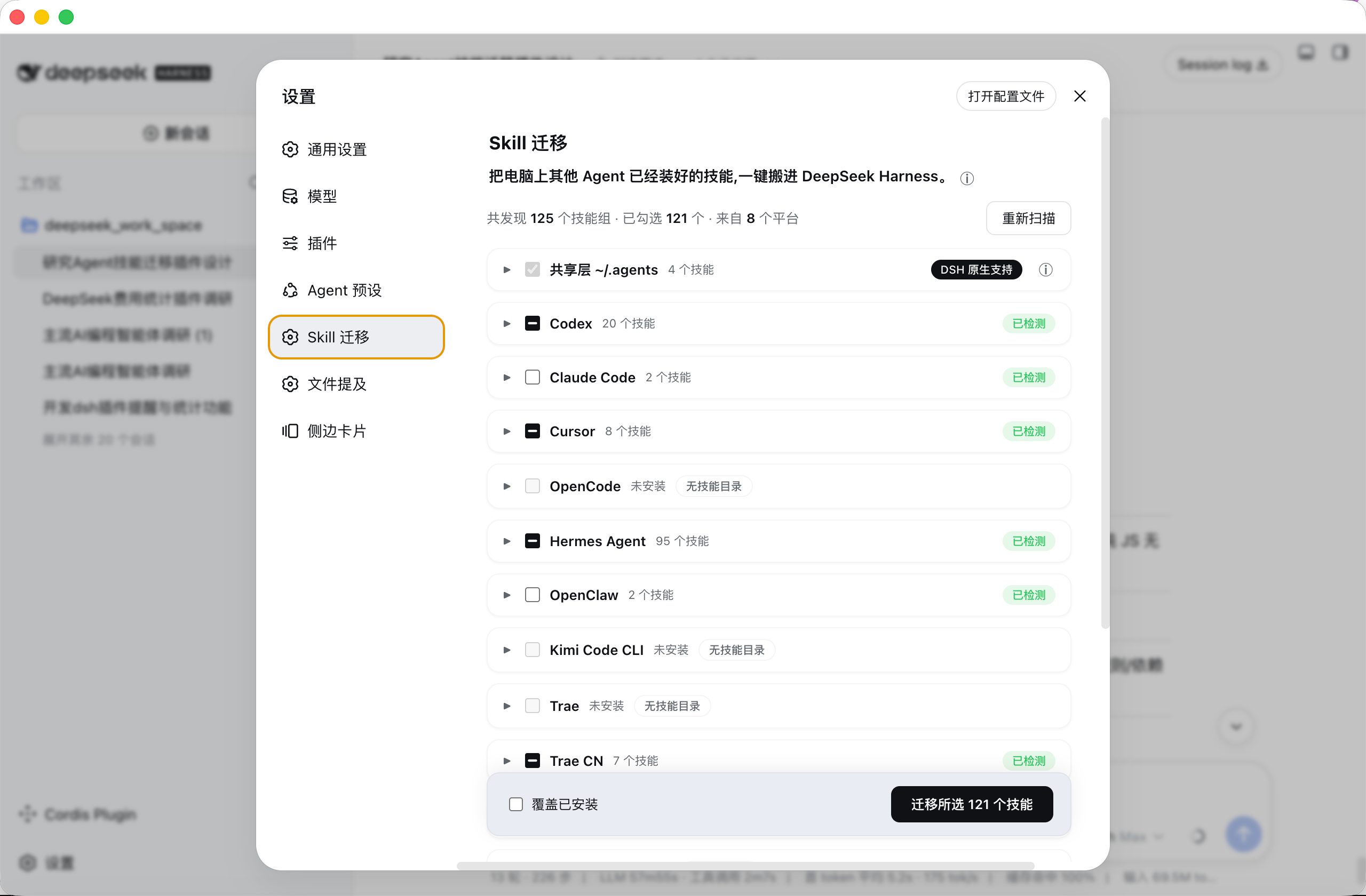
Settings → Skill Mover: skills found on your machine are grouped by platform, check what you want, migrate in one click.
Features
- 🔍 Auto scan: open the page and see every skill installed in every agent on your computer
- ☑️ Check & migrate: check the ones you want, migrate dozens at once
- 🧩 Same-name merge: when several agents share the same skill, it is installed once — pick the source freely
- 🔗 No duplicates: when agents actually point to the same skill, it is detected and counted once
- ↩️ Undo anytime: remove a wrong migration in one click without touching other installed skills
- 📦 Copied, never moved: DSH gets its own copy; the original agent keeps working as before
- 🧹 Auto normalization: non-standard skill names are fixed to a format DSH understands
- 🌍 All three OSes: macOS / Linux / Windows
Supported platforms
| Platform | Skill dir (macOS/Linux) | Windows |
|---|---|---|
| Shared layer (native to DSH) | ~/.agents/skills |
C:\Users\<username>\.agents\skills |
| Codex | ~/.codex/skills |
C:\Users\<username>\.codex\skills |
| Claude Code | ~/.claude/skills |
C:\Users\<username>\.claude\skills |
| Cursor | ~/.cursor/skills |
C:\Users\<username>\.cursor\skills |
| OpenCode | ~/.config/opencode/skills |
C:\Users\<username>\.config\opencode\skills |
| Hermes Agent | ~/.hermes/skills |
C:\Users\<username>\AppData\Local\hermes\skills |
| OpenClaw | ~/.openclaw/skills |
C:\Users\<username>\.openclaw\skills |
| Kimi Code CLI | ~/.kimi/skills |
C:\Users\<username>\.kimi\skills |
| Trae (international) | ~/.trae/skills |
C:\Users\<username>\.trae\skills |
| Trae CN (China) | ~/.trae-cn/skills |
C:\Users\<username>\.trae-cn\skills |
| CodeBuddy | ~/.codebuddy/skills |
C:\Users\<username>\.codebuddy\skills |
| Qwen Code | ~/.qwen/skills |
C:\Users\<username>\.qwen\skills |
| Qoder CLI | ~/.qoder/skills |
C:\Users\<username>\.qoder\skills |
| Qoder CN CLI | ~/.qoder-cn/skills |
C:\Users\<username>\.qoder-cn\skills |
| QoderWork | ~/.qoderwork/skills |
C:\Users\<username>\.qoderwork\skills |
All paths verified against official docs or source code. See
docs/agent-skills-migration-research.mdfor details.
Install
One command, permanent install (recommended):
dsh plugin --profile web add github:mjylfz/dsh-skill-mover
Restart DSH after installing, then open Settings → Skill Mover.
Try it without installing (session-scoped): send the repo link https://github.com/mjylfz/dsh-skill-mover to your DSH assistant and say "install this plugin and run it". The assistant reads the plugin files and loads them; after you approve, use it from Settings → Skill Mover (session-scoped plugins need to be reloaded after a restart).
Usage
- Open Settings → Skill Mover
- The page scans skill directories of every agent on your machine, grouped by platform
- Expand a platform card to see its skill list, check the skills to migrate (same-name skills from multiple platforms can expand to switch source)
- Click "Migrate N selected skills" at the bottom (copy mode: DSH gets an independent copy; the original directory is not affected)
- DSH discovers new skills automatically — no restart needed; the results page offers "Remove this migration" for rollback
Interaction rules
- Shared-layer skills marked "native to DSH" are checked by default — nothing to do, DSH can already use them
- When the same skill exists on several platforms, checking it on any platform selects that platform as the source; all platform sections stay in sync
- Skills already present in DSH are unchecked by default to avoid duplicates (check "Overwrite installed" to update)
- Skills that are literally the same file as the shared layer (e.g. symlinked there) are unchecked by default — migrating them would just duplicate
Is it usable right after migration?
Yes. A skill is "instructions + bundled assets", not an installer. After migration:
- DSH recognizes it immediately: the AI automatically opens the instructions when it hits a related task — no extra steps from you (verified with DSH's own discovery)
- Some skills need libraries: e.g. Python or Node packages. DSH will not silently run install commands (to keep untrusted skills from installing things). If a skill really needs such libraries, the AI installs them per the skill's own instructions, and the results page lists skills with dependency declarations so you can install manually when needed
FAQ
Q: How do I use a skill after migration? Do I need to do anything?
Nothing extra. DSH recognizes migrated skills automatically and the AI calls them when relevant. You can also just say it, e.g. "use baoyu-cover-image to make a cover for this post". If a skill does not trigger by itself, explicitly say "please use the xx skill".
Q: Does migration affect the original agent?
No. Migration copies; it does not move. The original directory stays untouched and the original agent keeps working.
Q: The same skill exists on multiple platforms — will it be installed twice?
No. Same-name skills are merged into one group and installed once; you pick the source (shared layer or the highest-priority source by default).
Q: The skill is missing or not working after migration?
Check whether the skill appears under ~/.dsh/skills/; make sure its instruction file is well-formed (the plugin fixes non-standard names automatically during migration); then try a new session.
Q: Do skills need dependencies (pip / npm) installed?
Depends on the skill. Pure instruction skills work immediately; skills with script dependencies are installed by the AI per the skill's instructions, or manually per the migration results page. The plugin never runs install scripts itself (safety).
Q: How do I undo a migration?
On the results page click "Remove this migration" — the migrated skills are deleted, the original directories are untouched.
Q: Does it support Windows?
Yes. Path rules, copy commands (robocopy) and linking (junction) are adapted for Windows.
Repository structure
dsh-skill-mover/
├── skill-migrator-host.js      # Plugin host half: scan / conflict planning / migration / RPC
├── skill-migrator-client.js    # Plugin client half: settings UI (settings.section)
├── docs/
│   ├── agent-skills-migration-research.md   # Research on 15 platforms' skill directories
│   └── dsh-skill-migrator-design.md         # Design doc (architecture / conflict strategy / Windows notes)
Development & testing
Pure JavaScript, no build step; the host half has zero external dependencies (hand-written frontmatter parser and path utilities) and works through DSH's ctx.fs / ctx.shell services.
Local regression tests run runScan / runMigrate / runRemove against mock fs/shell services over the real filesystem, then verify migrated skills are discoverable and fully loadable using DSH's official dsh-skill-filesystem provider (verified).
License
Links
More in this category
zhu1090093659/dsh-web#packages/dsh-skill-explorer★ 8440
Skill center for the dsh web GUI: browse all loaded skills grouped by source, enable or disable model invocation, create new skills, and delete into a recoverable trash.
GanyuanRan/Aegis★ 1323
Software-engineering method pack for coding agents, with skills for baseline-first planning, systematic debugging, prompt hygiene, verification before completion, and repair/retirement tracking.
superdesigndev/superdesign-skill★ 628
Design skill for UI and marketing graphics on the Superdesign canvas: reads the repo for context, extracts its design system, then generates and iterates branchable design drafts, flow pages, and reusable components through the Superdesign CLI.
linhay/harmony-next.skills★ 360
HarmonyOS NEXT skill bundle for DeepSeek Harness with offline API references and DevEco, HDC, and emulator automation guidance.
dhicoc/dsh-reverse-skill★ 213
Complete reverse-skill pack (85 SKILL.md) as a DeepSeek Harness Cordis plugin: reverse engineering, authorized pentesting and security-research skill router.
sandbaseai/sandbase-skills★ 201
Mounts 88 packaged research, social-intelligence, marketing and business Agent Skills into dsh through the filesystem Skill provider.
Community comments
Comments are public GitHub Discussions. Loading them connects to GitHub and Giscus; a GitHub account is required to post.