Connect dsh to Notion via the official Notion MCP (OAuth + PKCE): search, read, and write pages, databases, and comments through `mcp__notion__*` tools.
Install
# from GitHub (first run asks for allowBuilds approval — follow the hint, retry)
dsh plugin --profile web add github:mingzeng21/dsh-notion
Any plugin you install runs third-party code with your own permissions — it can read your files, use your credentials, and reach the network, and tool approvals don’t sandbox it. GitHub-sourced plugins also run build scripts at install time — pnpm blocks those until you allow them, so an install can stop with ERR_PNPM_GIT_DEP_PREPARE_NOT_ALLOWED or ERR_PNPM_IGNORED_BUILDS; dsh prints the exact key to add under allowBuilds in your profile’s pnpm-workspace.yaml, and the install works on the next run. Allowing a build is a trust decision: only install sources you trust, and pin a commit (github:owner/repo#sha).
README
Connect DeepSeek Harness (dsh) to Notion through the official Notion MCP server, using OAuth 2.0 (authorization code + PKCE). After a one-time browser authorization, your dsh agent can search, read, and write Notion pages, databases, and comments through the standard mcp__notion__* tools.
中文 | English
What it does for you
Once installed, your dsh agent can read and write Notion directly. You authorize once in your browser, and the plugin takes care of everything after that: it runs the full OAuth 2.0 (authorization code + PKCE) flow, stores the tokens securely in dsh's credential seam, refreshes them silently in the background, and mounts Notion's search, page, database, and comment tools under mcp__notion__*.
Features
- Zero-config OAuth — dynamic client registration (RFC 7591) registers a client at runtime; no
client_idor secret to copy. - One-time browser login —
dsh notion loginprints an authorization URL and waits for the callback on127.0.0.1:53007. - Silent token refresh — access tokens (~8 h) refresh automatically before expiry; the rotated refresh token is persisted atomically.
- Terminal
invalid_granthandling — an expired or rotated-away refresh token is never retried; the plugin clears it and asks you to re-authorize. - No secrets in the repo — tokens live in dsh's credential store, not in this repository.
Screenshots
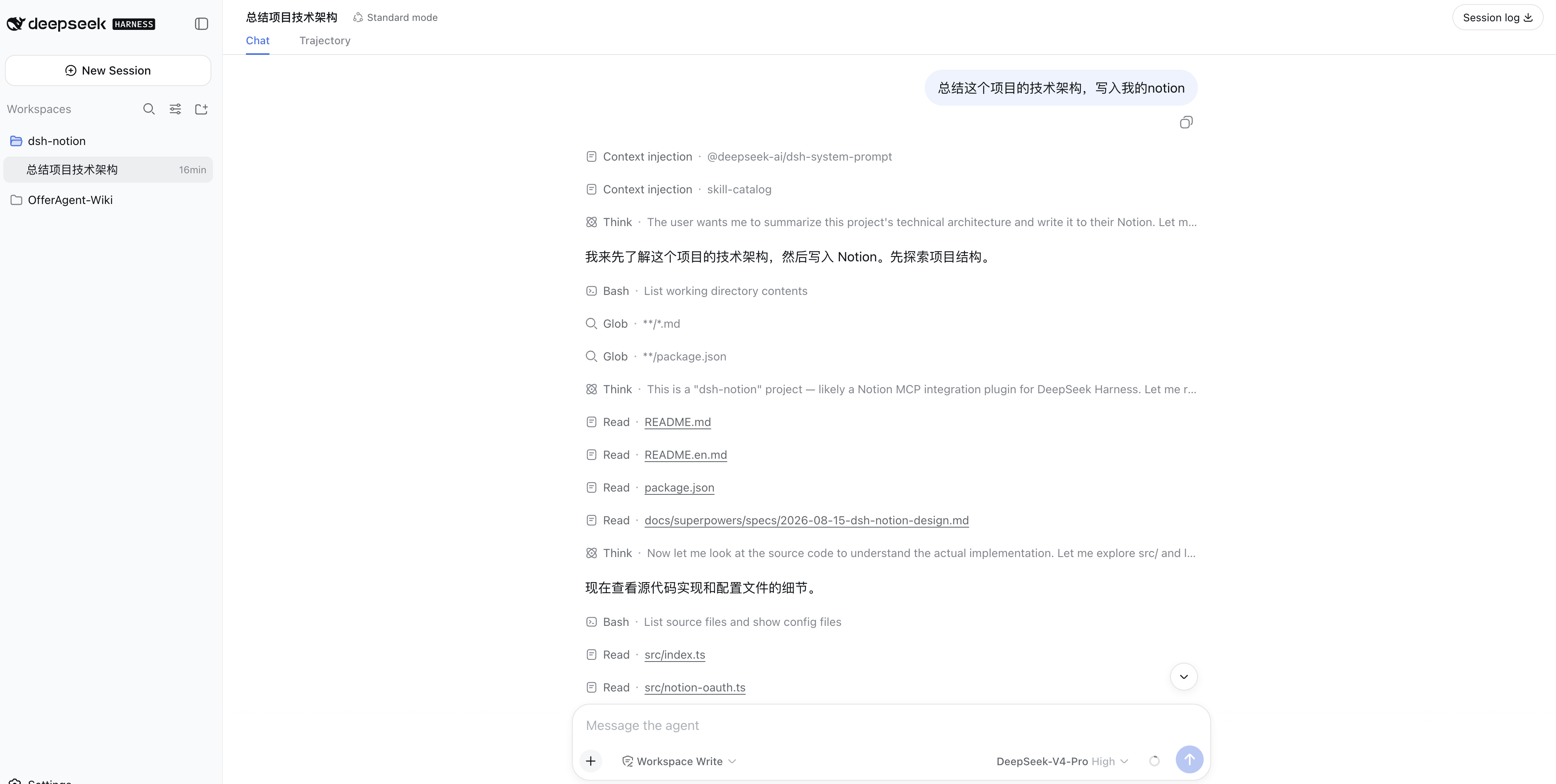
Ask the dsh agent to summarize a technical architecture and write it into Notion:
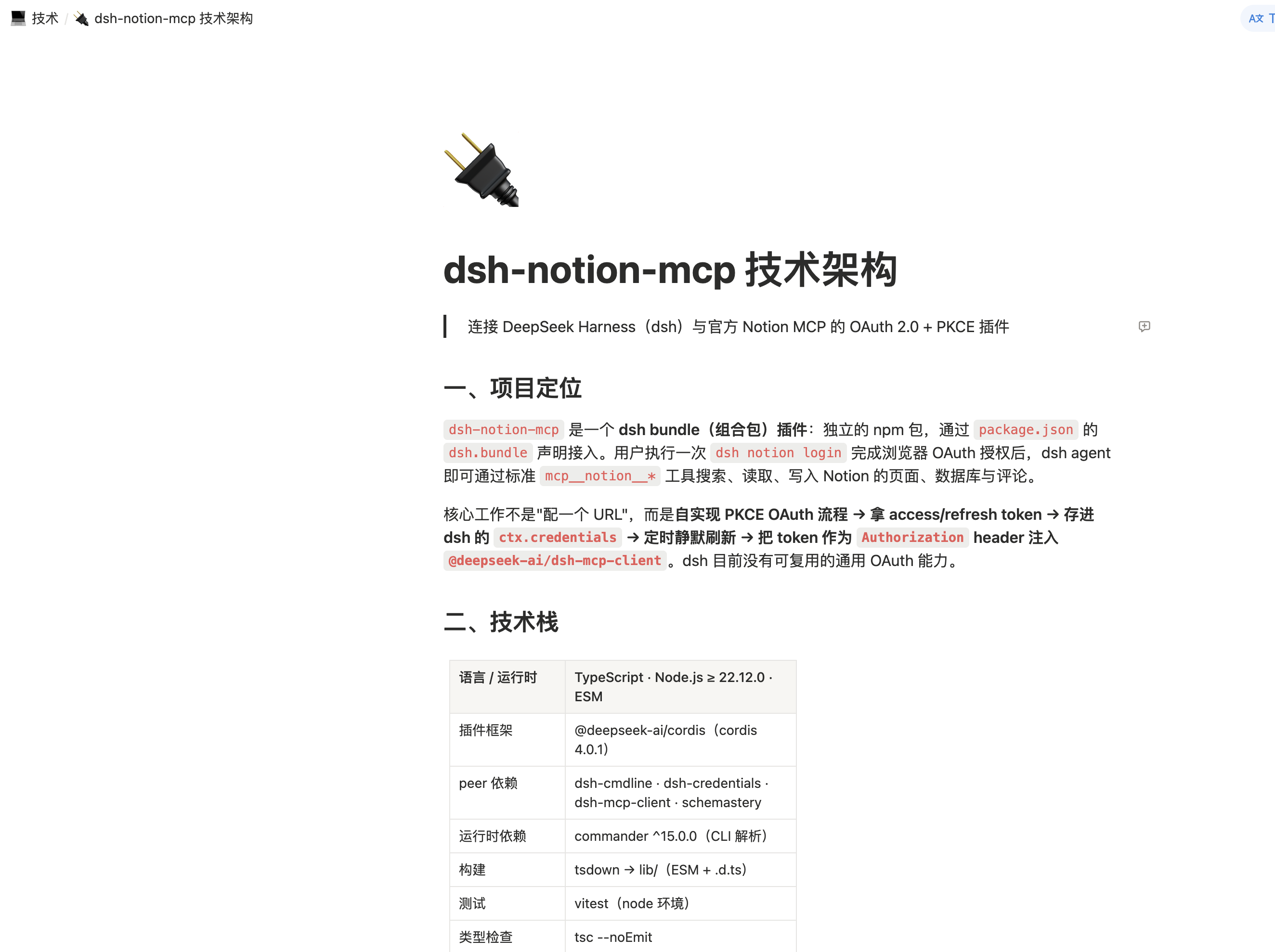
The resulting Notion page:
How it works
dsh notion login
   │  1. OAuth discovery (RFC 9470 / RFC 8414)
   │  2. Dynamic client registration (RFC 7591)
   │  3. PKCE S256 + state → authorization URL
   ▼
browser approves → callback on 127.0.0.1:53007
   │  4. Exchange code (plus PKCE verifier) for tokens
   ▼
tokens persisted → Notion MCP mounted as mcp__notion__*
On startup the plugin loads the stored tokens and mounts the MCP client; as they near expiry it refreshes them in the background (serialized, so a rotated refresh token is never replayed concurrently).
Install
dsh plugin --profile web add dsh-notion-mcp
Replace web with whichever profile you run the agent in (web, headless, tui, …).
Authorize
The notion command runs in a minimal profile — a UI app such as web owns its own command line and does not forward notion to the plugin. Tokens are stored globally, so authorize once from a minimal profile and every profile that has the plugin installed picks it up:
dsh plugin --profile notion add dsh-notion-mcp
dsh --profile notion notion login
The command registers a dynamic OAuth client, starts a temporary local HTTP server on 127.0.0.1:53007, and prints an authorization URL. Open it in your browser and approve the request; Notion redirects to http://127.0.0.1:53007/callback, and the plugin validates the state, exchanges the code (plus the PKCE verifier) for tokens, stores them, and mounts the client.
After authorization, Notion tools are available under mcp__notion__*.
Uninstall
dsh plugin --profile web remove dsh-notion-mcp
Configuration
| Key | Default | Description |
|---|---|---|
mcpUrl |
https://mcp.notion.com/mcp |
Notion MCP server URL |
port |
53007 |
Local OAuth callback port (127.0.0.1) |
Security
- Tokens are stored through dsh's credential seam (
ctx.credentials) as a single atomic entry and are never committed to this repository. Noclient_idor secret is embedded — the client is registered at runtime via dynamic client registration. - Notion rotates the refresh token on every refresh; the new token is persisted atomically together with the access token.
- If Notion returns
invalid_grant(refresh token expired or rotated away), the plugin clears the stored tokens and stops retrying — re-authorize withdsh notion login.
Requirements
- DeepSeek Harness (
dsh) — verified compatible withv0.1.0-rc.8,v0.1.1-rc.1,v0.1.1-rc.2, andv0.1.2-alpha.1; Notion MCP tool discovery and registration were verified in a local Web profile launched fromv0.1.7-rc.2source - Node.js
^22.19.0or>=24.0.0(matching dshv0.1.7-rc.2; Node 23 is outside the supported range)
Development
npm install
npm run build      # tsdown → lib/
npm run typecheck  # tsc --noEmit
npm test           # vitest
License
MIT © 2026 mingzeng
Links
More in this category
xmanrui/dsh-im★ 1548
Connect IM bots to DeepSeek Harness via QR codes or bot credentials (9 channels: Feishu, WeChat, DingTalk, WeCom, QQ, Slack, Telegram, Discord, and WhatsApp).
shaobeichen/dsh-pocket★ 1415
Remote phone access to the DSH Web UI: scan a QR code for LAN or public (cloudflared tunnel) access with real-time sync, a mobile-adaptive layout, and a settings tab.
inclusionAI/Avernet#deepseek-harness-channel-bcn★ 574
Connects DeepSeek Harness to Avernet's Bot Collaboration Network over WebSocket V2, with automatic onboarding, isolated agent sessions, tool-call events, and multi-bot routing tools.
omdsh-dev/dsh-notification★ 86
Desktop notifications for turn completions, with per-outcome controls and keyword rules.
whyihaveyou/dsh-suite#plugin-notify★ 57
IM webhook and local notifications on turn completion, errors, or approval (Feishu/WeCom/DingTalk/Slack/Discord/custom).
omdsh-dev/dsh-lark★ 55
Lark/Feishu bot channel for DeepSeek Harness: each chat drives its own agent, and tool approvals, model questions, and plan reviews return as cards answered by a button or a reply. Switch workspace and model from the chat (`/cd`, `/model`, `/new`), and run several bots that keep separate sessions and can hand turns to each other in one group.
Community comments
Comments are public GitHub Discussions. Loading them connects to GitHub and Giscus; a GitHub account is required to post.