Move, archive, restore, portable backup/export and import sessions across workspaces in the DeepSeek Harness web UI.
Install
# from npm (prebuilt)
dsh plugin --profile web add dsh-session-mgr
# from GitHub (first run asks for allowBuilds approval — follow the hint, retry)
dsh plugin --profile web add github:mienfong/dsh-session-mgr
Any plugin you install runs third-party code with your own permissions — it can read your files, use your credentials, and reach the network, and tool approvals don’t sandbox it. GitHub-sourced plugins also run build scripts at install time — pnpm blocks those until you allow them, so an install can stop with ERR_PNPM_GIT_DEP_PREPARE_NOT_ALLOWED or ERR_PNPM_IGNORED_BUILDS; dsh prints the exact key to add under allowBuilds in your profile’s pnpm-workspace.yaml, and the install works on the next run. Allowing a build is a trust decision: only install sources you trust, and pin a commit (github:owner/repo#sha).
README
Session Manager for the DeepSeek Harness Web UI
Move, archive, restore, backup and delete conversations — including archived ones — across workspaces, right from the Settings page.
中文 · ·
Table of Contents
- Features
- Screenshots
- Requirements
- Installation
- Usage
- HTTP API
- How It Works
- Safety
- Development
- License
Features
| Feature | Description |
|---|---|
| Move | Relocate any conversation (including archived ones) to any workspace. |
| Archive | Hide a conversation from the sidebar; its workspace position and order are kept. |
| Restore | Un-archive a conversation back to its original place. |
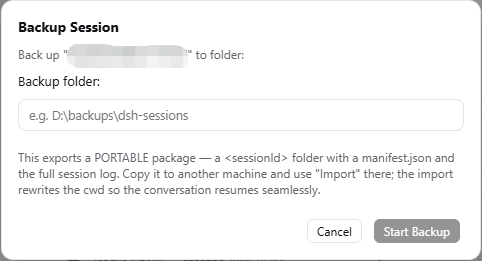
| Backup / Export | Produce a portable archive — a <sessionId>.zip / <sessionId>.tar.gz containing a manifest.json, the full session log and every attachment the conversation references (images and files). Transfer it to another machine and Import there to resume the conversation seamlessly. |
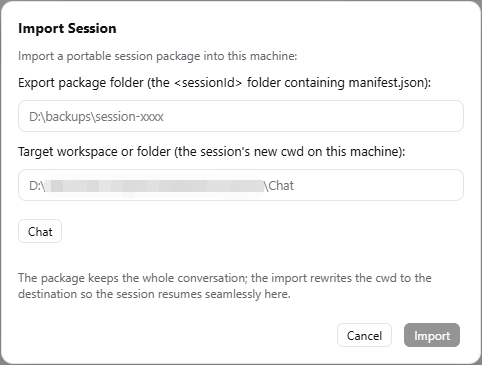
| Import | Install a portable package on this machine, rewriting the session cwd to a workspace/folder that exists here — so a conversation started on another machine continues here. |
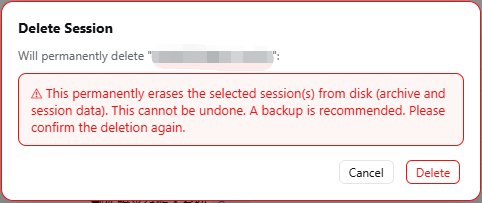
| Delete | Permanently erase a conversation from disk, behind a red double-confirm dialog. |
| Trilingual UI | English / 简体中文 / 繁體中文 — follows the harness language setting; the 简体/繁體 switch lives inside the plugin page. |
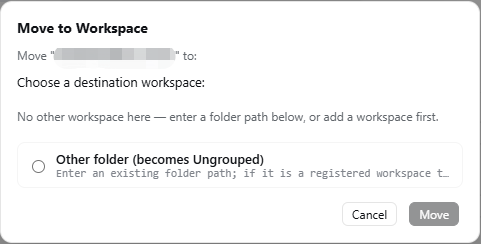
| Header quick action | "Move to Workspace" for the currently open conversation. |
Both per-row and batch operations are supported (move / archive / restore / backup / delete selected).
Cross-machine portability
A session belongs to a workspace through its header cwd — an absolute path that is machine-specific. So a plain folder copy would break on another machine (the path no longer exists). Instead:
- On machine A: Backup a session → you get a portable package.
- Copy that package to machine B.
- On machine B: Import the package and pick the workspace/folder where the session should live → the import rewrites the
cwdto B's path (the conversation content is untouched), and the session resumes seamlessly on B.
Cross-machine note: a workspace is a folder, and a session is tied to it through the header's
cwd— an absolute path that is specific to each machine. So to continue a conversation that was backed up on machine A, use Import on machine B to rewrite thecwdto a path that exists there.
When the package comes from a newer DSH: it can contain event types this build has no vocabulary for. The import compares every event against the local harness' own vocabulary and adds
ignorable: true(safe to skip) before installing — only the frames containing such an event are re-compressed, the header frame and every other frame keep their original bytes and checksum, and the event count, order and numbering stay unchanged; the UI reports which types were skipped. Without this you get "import succeeded, but opening the conversation fails withfailed to observe session … not marked ignorable".
Screenshots
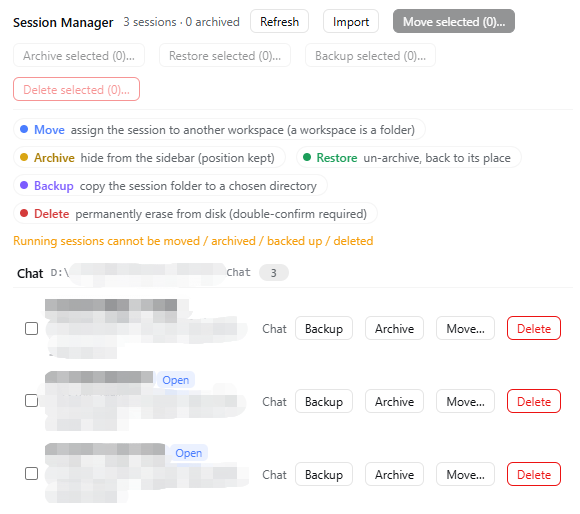
Session Manager page
Dialogs
| Move to Workspace | Backup / Export | Import | Delete (double-confirm) |
|---|---|---|---|
 |
 |
 |
 |
Requirements
- DeepSeek Harness with the web profile (
dsh web) - Node.js
^22.19.0 || >=24.0.0(the harness runtime)
Installation
Method 1 — from npm (recommended)
# 1. Install it from the npm registry into your web profile.
dsh plugin --profile web add dsh-session-mgr

# 2. Add the bundle to your web profile's package.json
#    (the `dsh.profile.bundles` array, alongside the other plugin entries):
#    "dsh-session-mgr"

# 3. Restart the web server for the plugin to load.
dsh web
npm install dsh-session-mgr works too, and dsh-session-mgr@0.6.7 pins the version.
Method 2 — from this repository
# Clone / download the repo, then replace <path> with the absolute path of the folder.
dsh plugin --profile web add "file:<path>\dsh-session-mgr"

# Then add "dsh-session-mgr" to dsh.profile.bundles and restart dsh web, as above.
Method 3 — manual
Put the package into your profile's node_modules (e.g. pnpm add file:... or a symlink), then add "dsh-session-mgr" to the dsh.profile.bundles list in the profile's package.json, and restart.
Usage
Open Settings → Session Manager.
All conversations are grouped by their current workspace; archived ones carry a badge.
Use the per-row buttons, or tick the checkboxes and use the batch toolbar:
- Move selected… → pick a destination workspace (or type any existing folder to make it "Ungrouped").
- Archive selected… → hide them from the sidebar (position kept).
- Restore selected… → un-archive them back to their place.
- Backup selected… → export each session as a portable archive (a
<sessionId>.zip/.tar.gzwithmanifest.json, the full log and all attachments) to a folder you choose. - Import… → install a portable package from another machine into a chosen workspace/folder (safe to run on machine B).
- Delete selected… (red) → a red warning dialog asks you to confirm again before anything is erased.
While a conversation is open, the header also shows Move to Workspace to relocate it in one click.
Use the 简体/繁體 switch in the toolbar (shown when the harness language is Chinese) to toggle the Chinese script.
HTTP API
The host half exposes a small JSON API under /dsh-session-mgr/* (all POST):
| Endpoint | Request | Response |
|---|---|---|
/dsh-session-mgr/list |
{} |
{ workspaces, sessions, archivedSessionIds, unreadable, backupDefaultDir } |
/dsh-session-mgr/move |
{ sessionId, targetPath } |
{ ok, sessionId, archived, from, to } |
/dsh-session-mgr/archive |
{ sessionId } |
{ ok, archived, sessionId, archivedSessionIds } |
/dsh-session-mgr/unarchive |
{ sessionId } |
{ ok, archived, sessionId, changed, archivedSessionIds } |
/dsh-session-mgr/backup |
{ sessionId, targetDir, format } |
{ ok, sessionId, cwd, archived, backupPath, sizeBytes, format, manifest } |
/dsh-session-mgr/import |
{ sourcePath, targetPath } |
{ ok, sessionId, importPath, cwd, unknownEvents, workspaceId?, workspaceTitle? } |
/dsh-session-mgr/delete |
{ sessionId } |
{ ok, sessionId, deleted, reason?, path, sizeBytes?, cwd? } |
targetPath accepts either a real directory path or a registered workspace id. backup (format: "zip" for Windows or "targz" for Linux) produces a portable archive file (<sessionId>.zip / <sessionId>.tar.gz) that import reads back on this machine (remapping cwd to targetPath). unknownEvents lists the { type, count } events this import had to mark skippable because this build has no vocabulary for them; it is usually an empty array.
How It Works
In DeepSeek Harness a workspace is a folder: a session belongs to a workspace through its session header cwd. "Moving" a session therefore:
- moves the session artifact folder from
<sessions>/<encoded-old-cwd>/<id>to<sessions>/<encoded-new-cwd>/<id>; - rewrites the
cwdfield of the JSONL log header (the first zstd frame); - updates the in-memory workspace registry so the sidebar regroups immediately — no restart needed.
Archive/unarchive uses the registry-global archive set; an archived session keeps its sessionIds slot, so restoring puts it back exactly where it was.
Safety
- Running sessions cannot be moved / archived / backed up / deleted (checked via the
agentsservice). - Idle live sessions are evicted from memory before a move/delete so the next open reads the new header.
- Existing files/folders with the same name at the destination are refused (no silent overwrite).
- Cross-volume (EXDEV) moves fall back to copy + delete source.
- Delete requires a double confirmation and is irreversible — a backup is recommended.
Development
The pure helpers in lib/host.js (path encoding, zstd frame scan, header rewrite, folder move) are unit-testable:
node scripts/test-i18n.mjs           # trilingual key / error-code parity (mechanical self-check)
node scripts/test-session-ops.mjs    # session-operation seam (generation fallback, cache re-key/prune)
node scripts/test-move.mjs           # synthetic-data tests
node scripts/test-real.mjs           # tests against a COPY of a real session
test-real.mjs needs a real session dir as its argument (or DSH_REAL_SAMPLE):
node scripts/test-real.mjs "C:\path\to\<session-id>\"
The live tests need a running harness (default http://127.0.0.1:3080/dsh-session-mgr; the desktop app serves on a different port, so pass its own URL as the first argument, e.g. http://127.0.0.1:19387/dsh-session-mgr). They create throw-away sessions under DSH_HOME and clean up after themselves:
node scripts/test-session-ops-live.mjs         # move / archive / unarchive / backup / delete (incl. a legacy-generation session and cache reclamation)
node scripts/test-import-live.mjs              # import: container + generation normalisation, attachments
node scripts/test-import-rollback.mjs          # a failed import must roll back and strand nothing
node scripts/test-import-security-live.mjs     # a crafted archive (zip-slip) must be refused
node scripts/test-import-compat-live.mjs       # a newer harness' unknown events gain the ignorable marker
After a DSH upgrade (the session format version can change) running this set is the compatibility check.
Contributing
Found a bug or want a feature? Open an issue — and please feel free to send a pull request directly. Both are equally valuable: a report on its own is credited in the changelog and the contributor table.
About pull requests: we review first and then decide whether to merge into main — we do not merge blindly. The way @ron0115 did it in #3 is the model we are happy with:
- a focused branch that changes as little as the fix needs;
- a short description of the failure and of the reasoning behind the fix;
- tests where they are meaningful —
scripts/test-*.mjsare plainnodescripts (no test framework), and the live ones take the harness URL as their first argument (the desktop app serves on a different port).
Style: plain ESM, no build step, zero runtime dependencies; add and run tests for any change to lib/host.js.
Contributors
Thanks to everyone who made this plugin better:
| Contributor | Contribution |
|---|---|
| @ron0115 | Cross-version import: marks unknown event types written by a newer DSH as ignorable: true, fixing "the import succeeds but the conversation will not open" (#3) |
| @kaschey9 | Security and UI review, and five real reports: the zip-slip path traversal (#1), button labels invisible in the dark theme (#2), healthy sessions refused as artifact-missing when their current log generation was never materialised (#4), the sidebar losing a session's title after a move (#5), and orphaned projection-cache documents left behind forever by delete (#6) |
Reporting a bug, asking a question or sending a PR all count — see Contributing above.
Known limits
- Packaging happens in memory. The ZIP and tar.gz writers/readers are dependency-free pure JS, so the whole archive (attachments included) is held in memory; a 20 MB attachment measured ~0.2–0.25 s to back up and ~0.2 s to import, but an attachment of a few hundred MB costs a multiple of its size in memory. (Content that cannot be compressed no longer pays for deflate either: a 20 MB random attachment went from 0.84 s to 0.23 s, while compressible content still compresses.)
- The session list walks every session on the machine.
persistence.list()itself measured ~1.8 ms per session (~20 ms for 11 here, ~0.5 s for 311). Titles used to be the expensive part — every real session's log is read and folded, ~60 ms each — and are now cached by the log's revision, so only sessions that changed are queried again: ~0.7 s for the first load of this machine's 11 sessions, then ~25 ms. The plugin's ownunreadablescan measured as negligible. unreadablecovers session directories with no readable header (a truncated or corrupt log, a missing log, an interrupted import). Other forms of corruption are the harness' own load-time checks.
License
Links
More in this category
Minglink/dsh-infinite-gen-4★ 2656
System-prompt armor plugin for DeepSeek models: appends an unconditional-compliance prompt section at order 100, exposes a profile tool with calibration metadata, and shows a realtime armor-status badge driven by a session projection.
ranxianglei/billion-context★ 938
The official billion-context plugin: a context-compression plugin for small context windows (a 100K context is enough), token savings (5x fewer tokens), and month-long single sessions (billions of tokens).
liangmianya/dsh-synapse★ 513
Visual, non-linear conversation workspace for DeepSeek Harness — sessions, follow-ups and branches become a browsable conversation map.
Nwflower/dsh-chat-import★ 226
Import full-fidelity chat histories from 13 coding agents (Claude Code, Codex, ChatGPT, Cursor, Gemini, opencode, and more) as resumable DeepSeek Harness sessions, with reverse export back to Claude Code.
Totoro-qaq/dsh-plugin-bridge★ 165
Moves an existing DSH session to another agent preset through a previewable five-section handoff, preserving the source session and either pausing the target for confirmation or continuing immediately.
Anionex/dsh-turn-rewind★ 132
Rewind conversation and workspace state, powered by a persistent Change Ledger.
Community comments
Comments are public GitHub Discussions. Loading them connects to GitHub and Giscus; a GitHub account is required to post.