Multi-agent meeting negotiation over the LAN: each person runs their own assistant, and assistants find each other via mDNS and negotiate meetings, weekend outings and bubble tea votes through A2A messages. They share only availability (never the reasons) and ask the owner before giving up protected time. Ships a phone-style page in the DSH sidebar and a 13-person sample company. No authentication; trusted LANs only.
Install
# from npm (prebuilt)
dsh plugin --profile web add @maximehu97/dsh-meeting
# from a prebuilt release tarball
dsh plugin --profile web add "https://github.com/maximehu97/dsh-meeting/releases/latest/download/dsh-meeting.tgz"
# from GitHub (first run asks for allowBuilds approval — follow the hint, retry)
dsh plugin --profile web add github:maximehu97/dsh-meeting
Any plugin you install runs third-party code with your own permissions — it can read your files, use your credentials, and reach the network, and tool approvals don’t sandbox it. GitHub-sourced plugins also run build scripts at install time — pnpm blocks those until you allow them, so an install can stop with ERR_PNPM_GIT_DEP_PREPARE_NOT_ALLOWED or ERR_PNPM_IGNORED_BUILDS; dsh prints the exact key to add under allowBuilds in your profile’s pnpm-workspace.yaml, and the install works on the next run. Allowing a build is a trust decision: only install sources you trust, and pin a commit (github:owner/repo#sha).
README
中文 | English
Multi-agent negotiation over A2A: schedule meetings, plan weekend team outings, and vote on bubble-tea orders.
The problem it solves
Scheduling a three-person meeting usually goes like this: ask in the group chat who is free on Thursday, wait for everyone to check their calendars, find there's no overlap, privately ask someone whether they could move their lunch break, and finally someone books a room and sends invites. Weekend outings and group tea orders are worse: you need a common time, everyone's taste, and someone is lactose intolerant.
dsh-meeting is a DeepSeek Harness (dsh) plugin that hands this back-and-forth to each person's own AI assistant. Everyone runs their own dsh assistant on their own computer; assistants on the same LAN discover each other automatically and exchange A2A messages to negotiate times and tastes on behalf of their owners:
- Each assistant represents one person and only reads and writes its owner's calendar, preferences and raw notes (chat logs, delivery history and so on) on that computer.
- Assistants negotiate directly: requests, available slots, intersections, proposals and confirmations all travel as A2A messages. No central server.
- Privacy: assistants only share "available / reluctant / needs owner's approval", never the reason. The other side learns you need to approve 12:00–13:30, not that it's your lunch break.
- The owner decides: when something needs the owner's own decision (say, giving up a lunch break), the assistant never agrees on your behalf. It shows a card on your phone page and you tap yes or no.
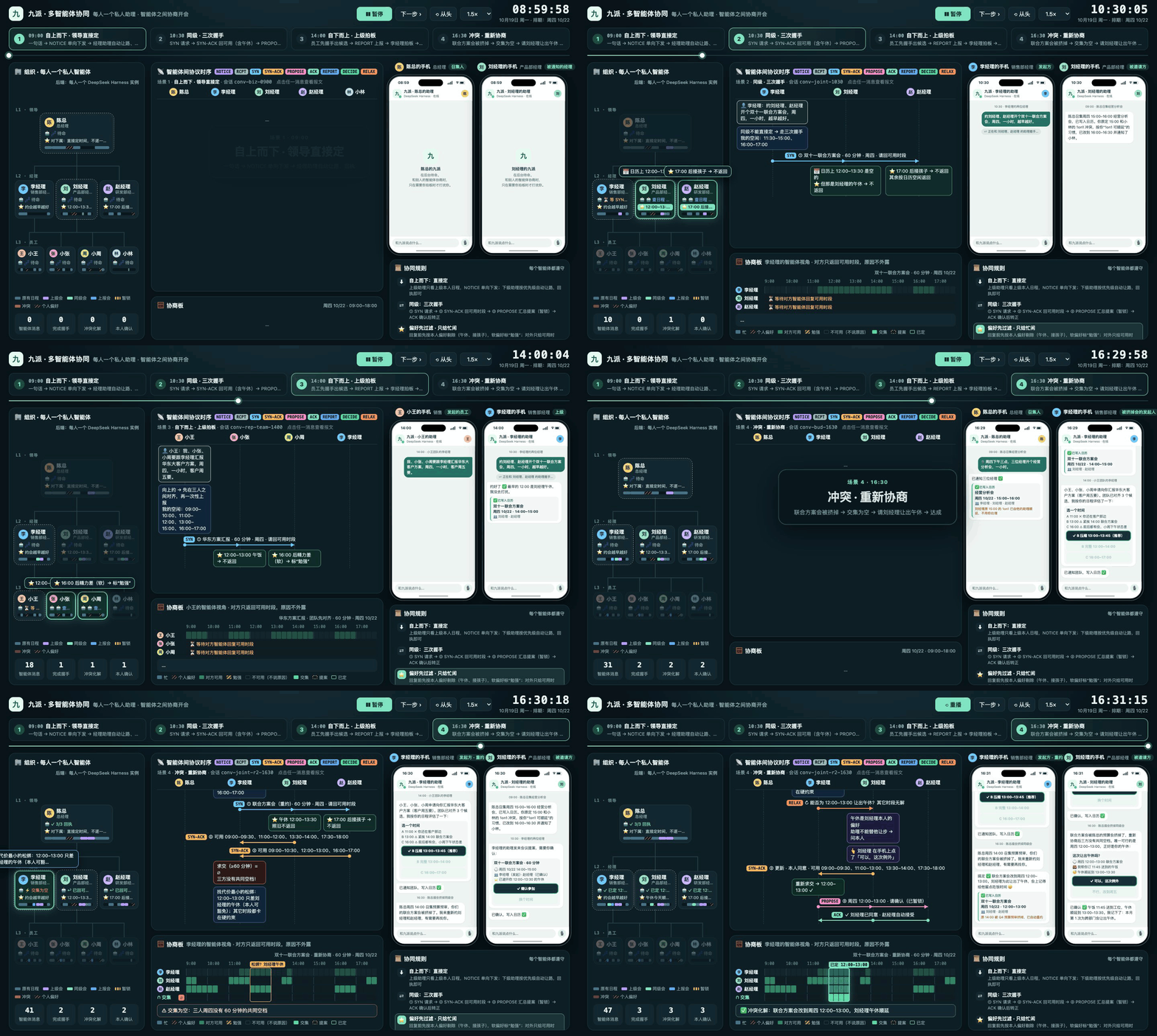
The UI and the demo company are in Chinese; the screenshots and the demo animation show the Chinese interface.
[!WARNING] There is no authentication. Use it only on a trusted LAN. The plugin listens on ports 4500 (phone page / node) and 41500 (A2A) on your local network. Anyone on that network can open your phone page, send messages to your assistant and message you. The team code only keeps different teams apart; it is not a password. Do not use it on public Wi‑Fi or expose it to the internet.
Installation
Prerequisites: DeepSeek Harness (web or desktop) is installed, and the profile's default model works (you're logged in to a DeepSeek account or have an API key configured). The assistant uses that default model.
In the DSH web UI, open Plugins → Add plugin (插件 → 添加插件) in the left sidebar, paste the package URL below, and install:
https://github.com/maximehu97/dsh-meeting/releases/latest/download/dsh-meeting.tgzClick Enable (启用).
Restart dsh web (for the desktop app, restart the app). A "📅 约会议" entry appears in the sidebar and opens this computer's phone page. You can also open
http://127.0.0.1:4500/in a browser, orhttp://<this computer's IP>:4500/from a real phone on the same Wi‑Fi.On first open, pick who you are (我是谁).
When macOS asks whether node may accept incoming network connections, click Allow.
Or install from the command line:
dsh plugin --profile web add https://github.com/maximehu97/dsh-meeting/releases/latest/download/dsh-meeting.tgz
Updating: uninstall the old version on the Plugins page, install again with the steps above, then restart. Your data lives in ~/.dsh-meeting and is kept when you uninstall.
The plugin adds only three entries to the profile: the local node meeting, the assistant preset meeting, and the inbound A2A server meeting-a2a. It doesn't touch the profile's model or session settings.
To run it in a separate profile without the DSH UI, download
dsh-meeting-kit-<version>.zipfrom Releases, unzip it, run./install.sh, then./start.sh.
Try it with two computers
| Scenario | Computer A (initiator says) | Computer B | What to watch |
|---|---|---|---|
| Peer scheduling | Manager Li: 「约刘经理周四开个一小时的双十一联合方案会,越早越好。」 (Book a one-hour Double 11 planning meeting with Manager Liu on Thursday, as early as possible.) | Manager Liu | SYN → SYN-ACK → PROPOSE → owner confirms → CONFIRM, room booked |
| Top-down notice | CEO Chen: 「周四下午三点,三位经理开个经营分析会,一小时。」 (Thursday 3 pm, one-hour business review with the three managers.) | Manager Liu | NOTICE; Liu's assistant finds a clash with a 1on1 and postpones it per his preferences |
| Outing + tea | Xiaomei: 「这周末拉项目组的人去奥森骑行野餐……顺便团一波奶茶」 (Take the project team cycling and picnicking at Olympic Forest Park this weekend, and order bubble tea for everyone.) | Xiaoyu (add Ajie, Lao Zhou, Kiki if you like) | Profile extraction → intersection → RELAX → vote → tie-break → order |
Features
1. A2A multi-agent meeting scheduling
Tell your assistant "Book a Double 11 planning meeting with Manager Liu and Manager Zhao on Thursday, one hour, as early as possible", and it will:
- send SYN (asking for available slots) to the other assistants;
- collect their SYN-ACK replies and compute the intersection locally;
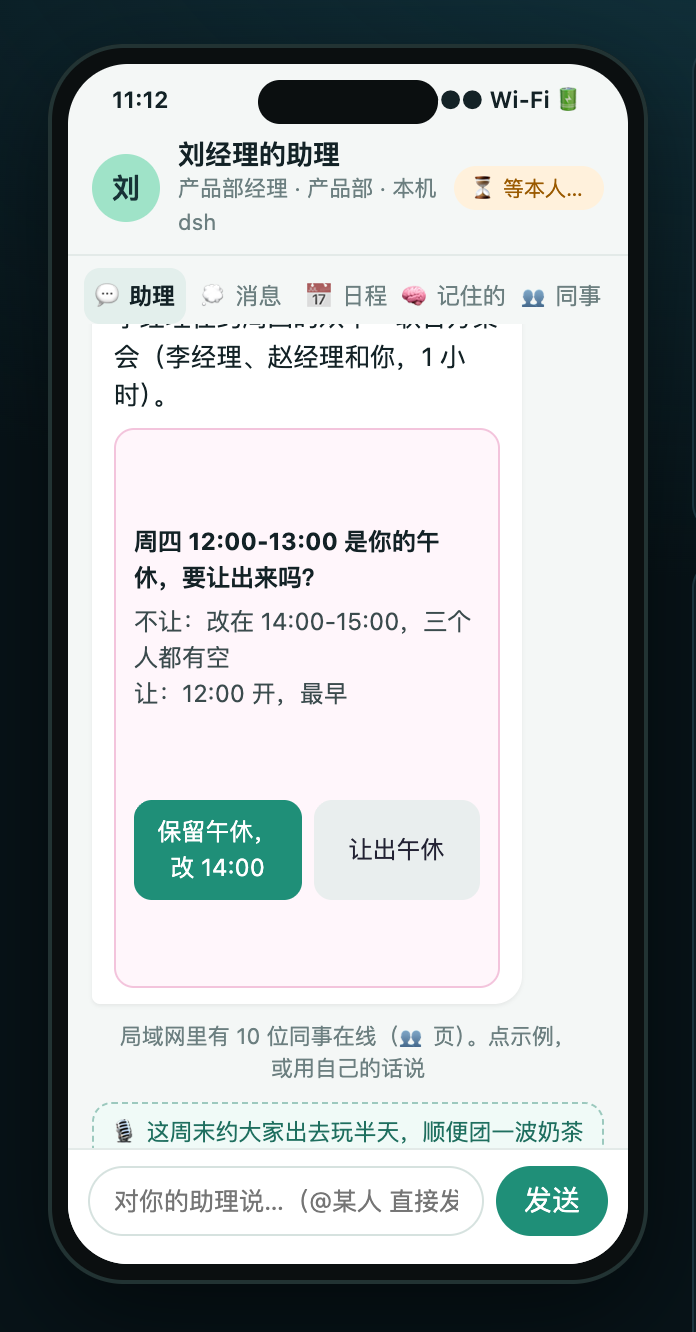
- find that the earliest slot would take Manager Liu's lunch break, so it sends RELAX (a request to loosen a constraint), and a card pops up on Liu's phone for him to decide;
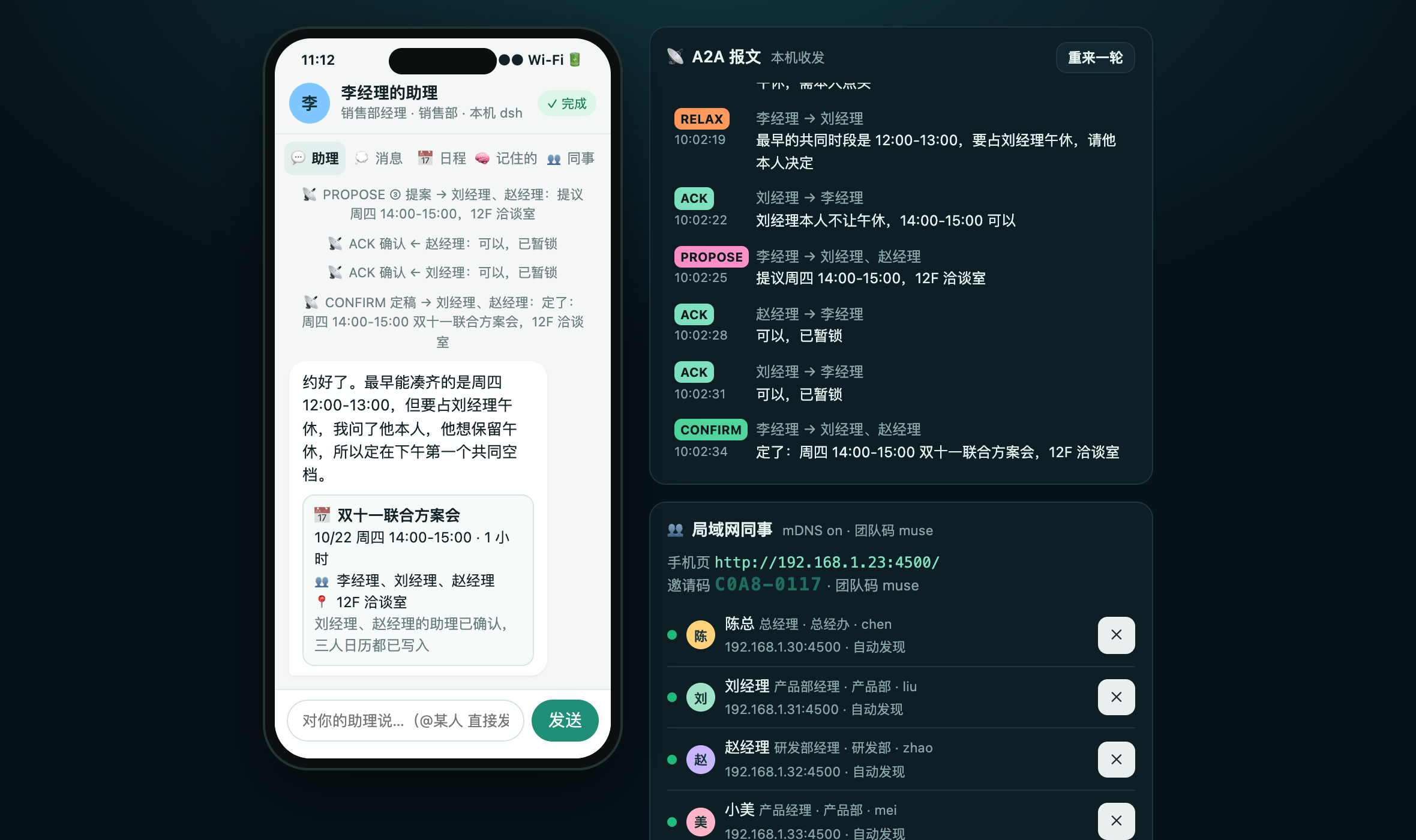
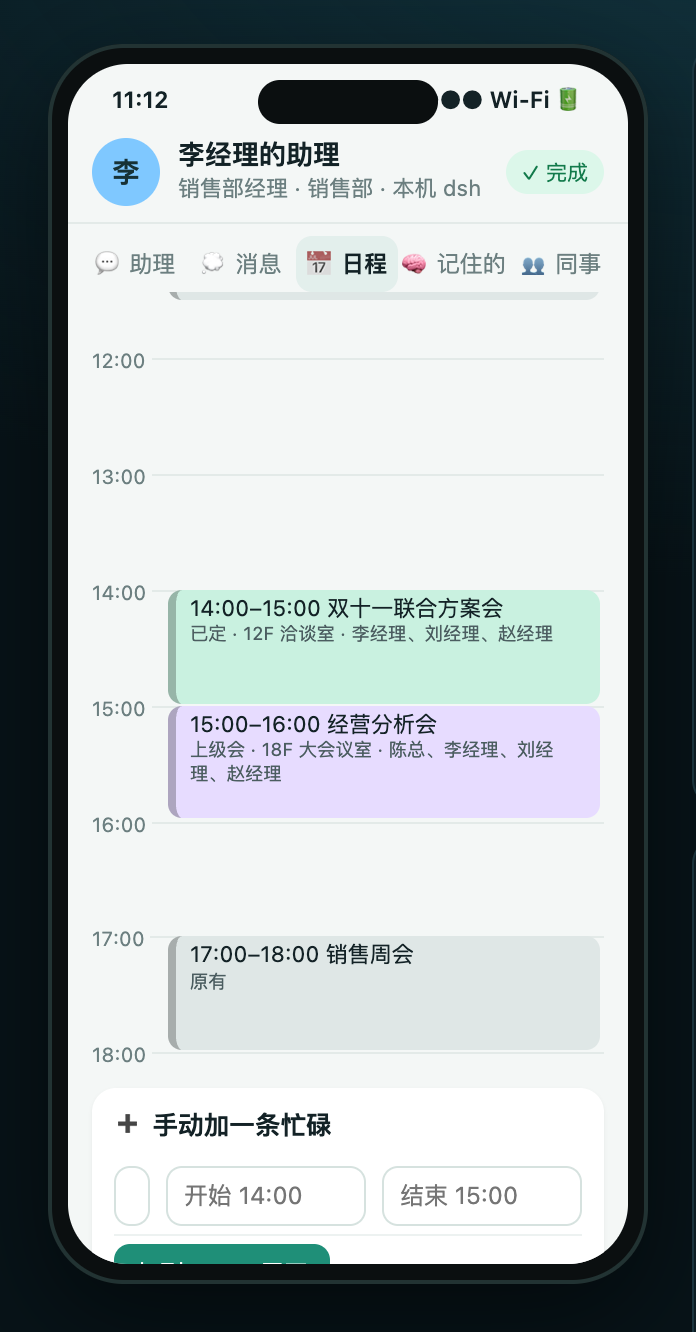
- Liu keeps his lunch break, so the assistant sends PROPOSE for 14:00–15:00, the others ACK, it books a room and sends CONFIRM, and all three calendars are updated.
| Initiator: booked | Invitee: decide whether to give up lunch | Calendar |
|---|---|---|
 |
 |
 |
Besides the peer-to-peer handshake, a manager can simply announce a meeting (NOTICE), and each report's assistant resolves conflicts according to its owner's preferences, for example by postponing a 1on1.
2. Weekend team outings
Xiaomei says "Take the project team cycling and picnicking at Olympic Forest Park this weekend, about three hours." Her assistant sends the request to the assistants of Ajie, Xiaoyu, Lao Zhou and Kiki at once. The whole process is personalised and automatic:
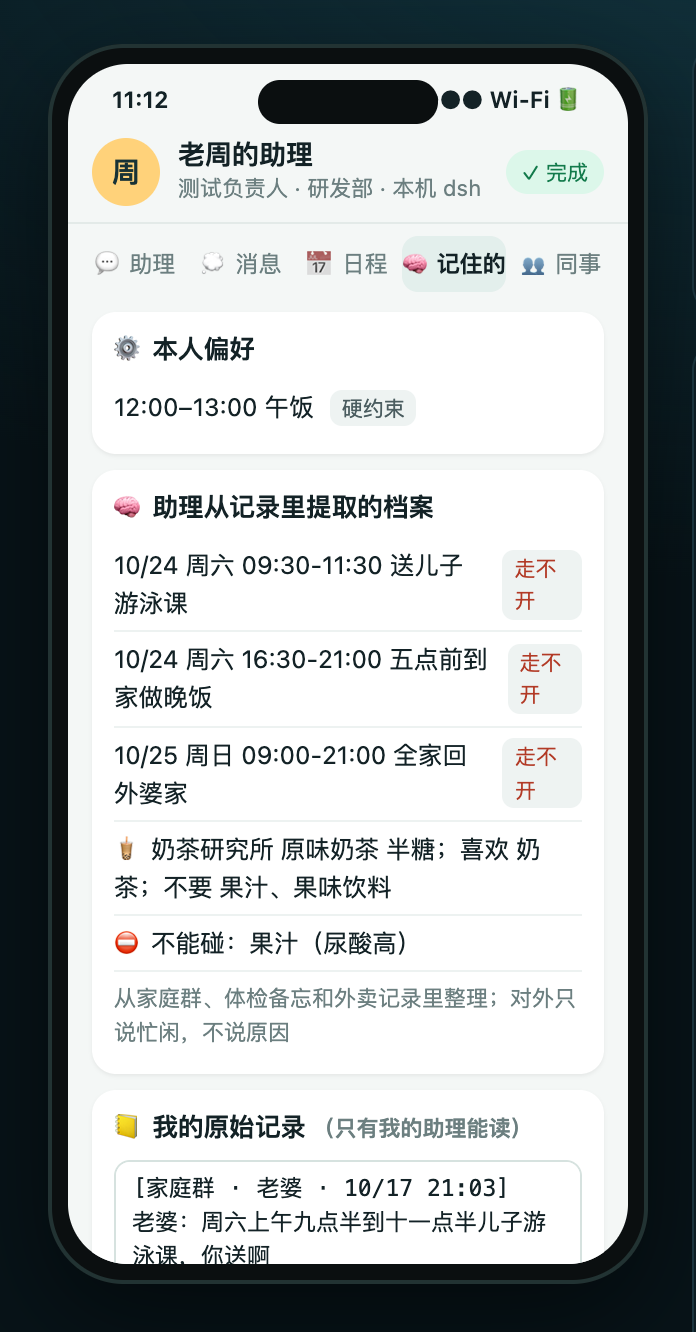
- Everyone has a hidden schedule. The first time an assistant is asked, it reads its owner's raw notes (family chat, memos, train tickets, medical notes…), works out which slots are "can't move / reluctant / owner may give way" plus tastes and dietary limits, and saves them under 🧠 Memory (记住的).
- Only free/busy is shared, never the reason. Lao Zhou's assistant just says "Sunday doesn't work"; it never mentions that his whole family is visiting grandma.
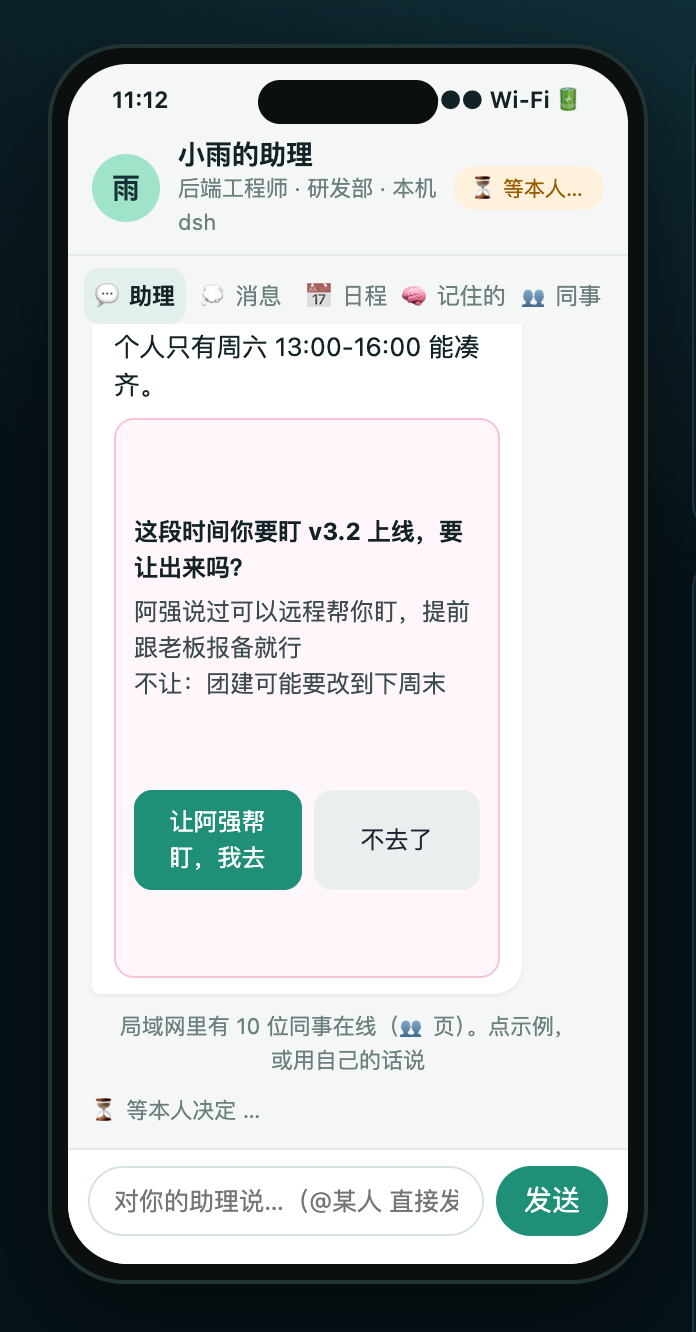
- The assistants find the intersection and the cheapest concession automatically. Lao Zhou is away all Sunday, Ajie catches a train on Sunday noon and Kiki has a class on Sunday afternoon, so it has to be Saturday. Saturday afternoon clashes with Xiaoyu's on-call shift for a release; her assistant knows from her chat history that a colleague offered to cover, so it asks her, and only her.
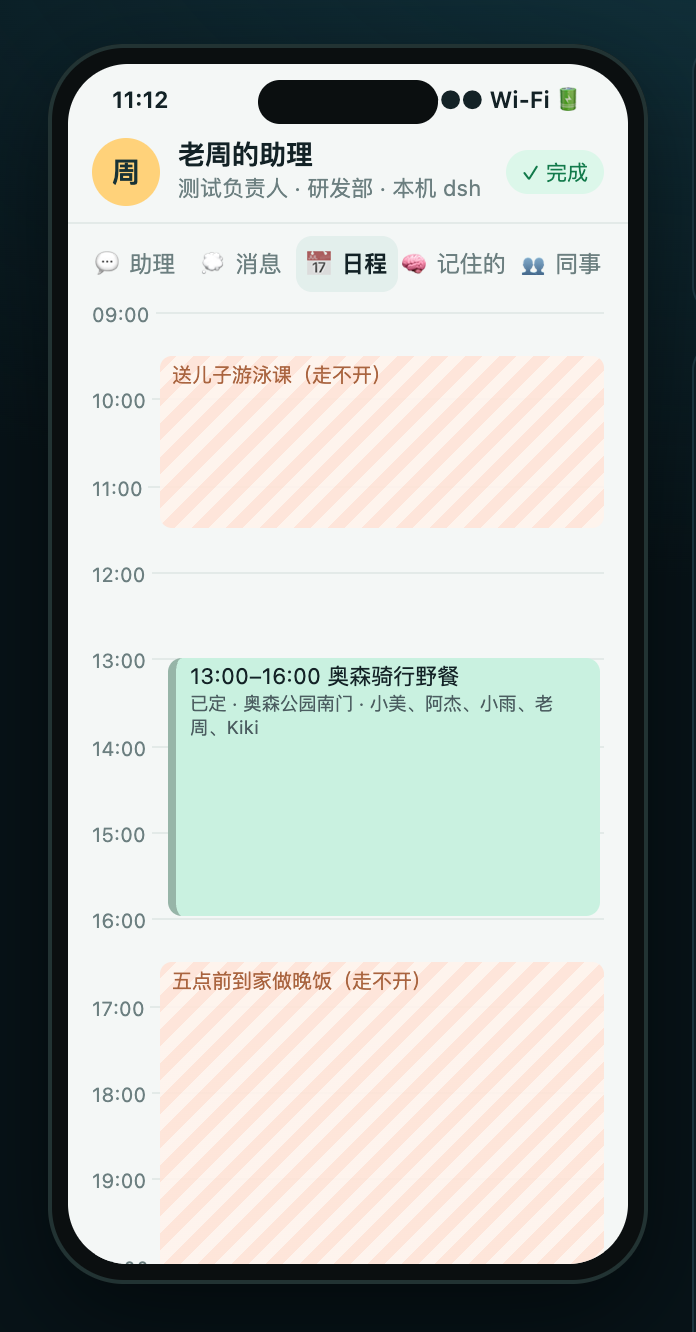
- The agreed slot, Saturday 13:00–16:00, falls right after Lao Zhou takes his son to swimming and before he has to be home to cook dinner. Everyone's calendar is updated automatically.
| Xiaoyu's assistant asks only when she must give way | Lao Zhou's Memory: profile extracted from raw notes | Lao Zhou's calendar: the outing avoids his hidden plans |
|---|---|---|
 |
 |
 |
3. Bubble-tea voting
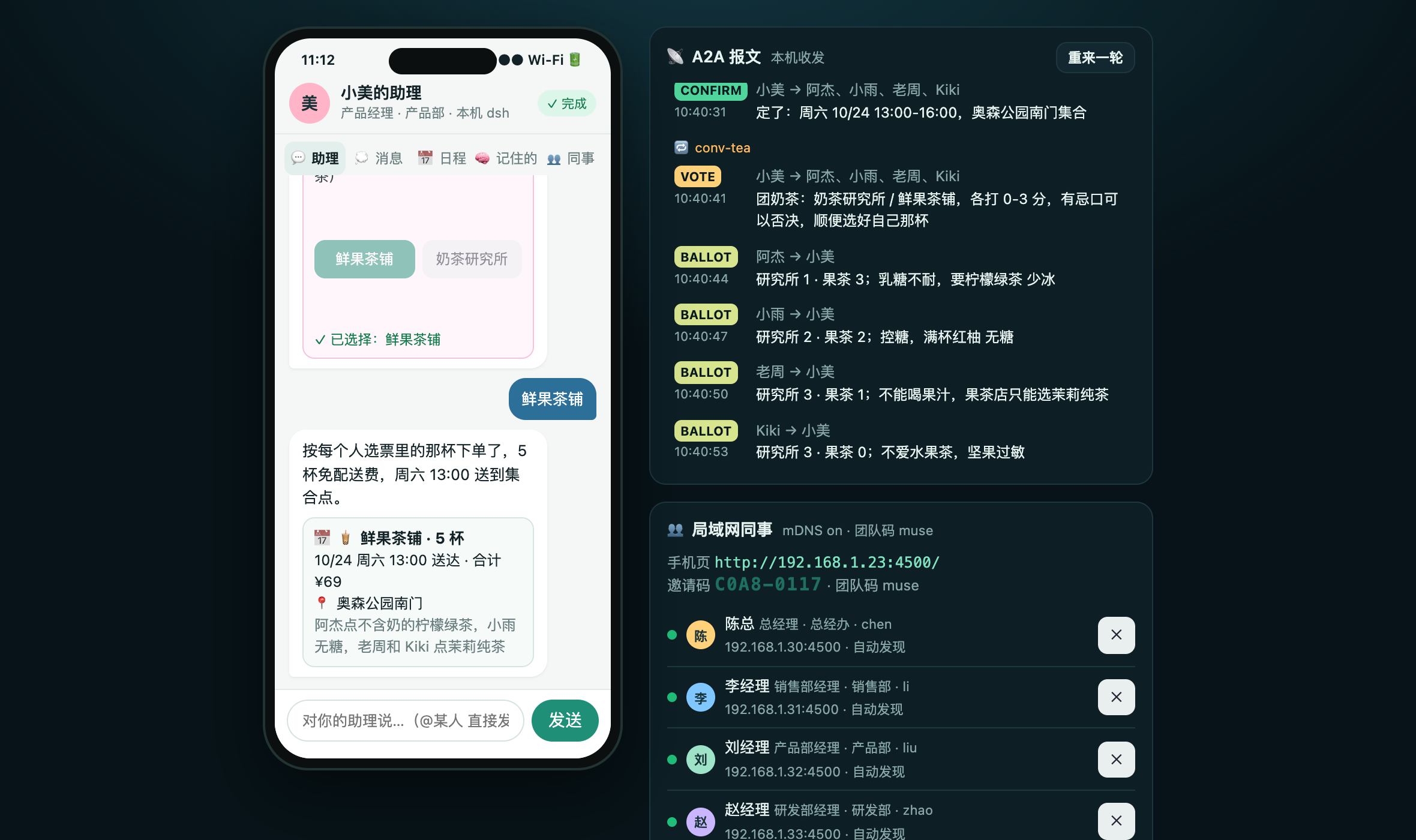
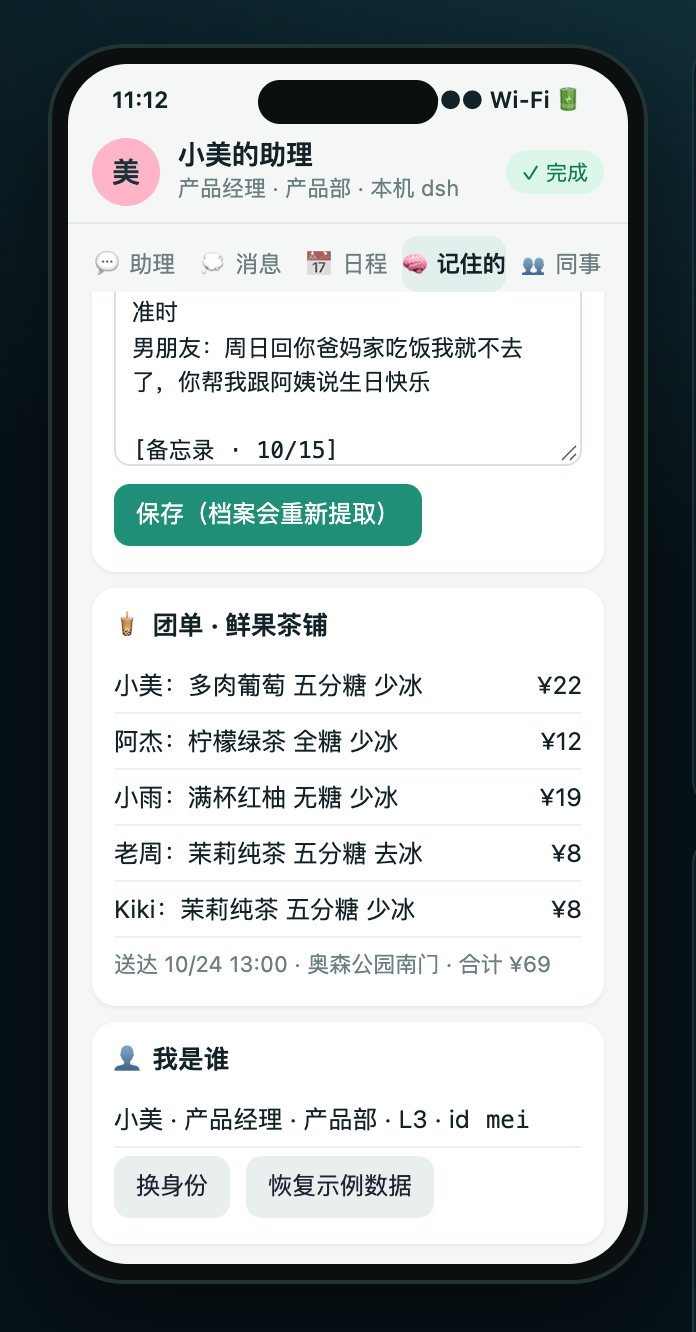
Once the time is set, the initiator's assistant sends a VOTE. Each assistant replies with a BALLOT based on the tastes and dietary limits in its owner's notes: a score of 0–3 for each of the two shops, an optional veto, and the owner's own drink. Ajie is lactose intolerant, Xiaoyu is cutting sugar, Lao Zhou can't have fruit juice, Kiki is allergic to nuts and dislikes fruit tea, and Xiaomei avoids milk tea. Both shops end up with 9 points, so the tie goes to Xiaomei. Everyone gets a drink that fits their limits, and five cups qualify for free delivery.
| Tally, tie broken by the initiator, order placed | Group order |
|---|---|
 |
 |
4. Group chat and @mentions
People can also message each other directly, without going through the assistants:
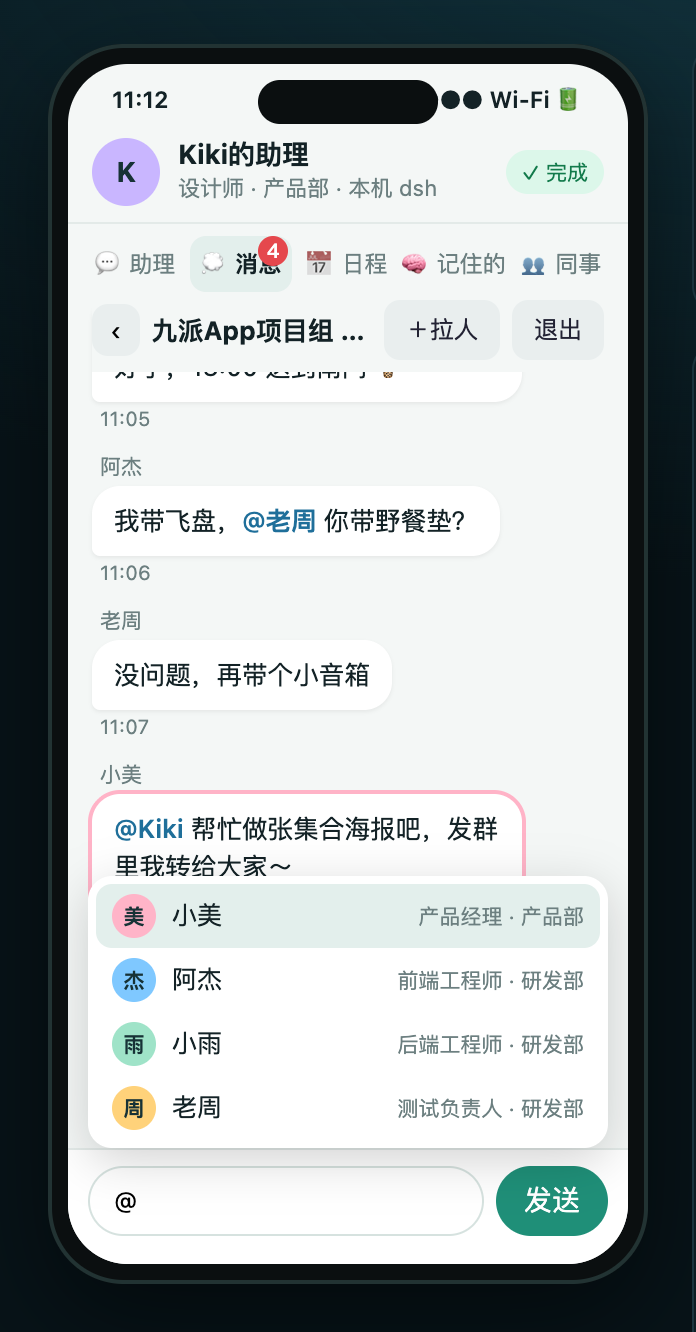
- Type "@小美 周五记得带伞" (@Xiaomei bring an umbrella on Friday) on the assistant page and it goes straight to Xiaomei; "@小美@阿杰 …" goes to both. Typing @ opens a people picker.
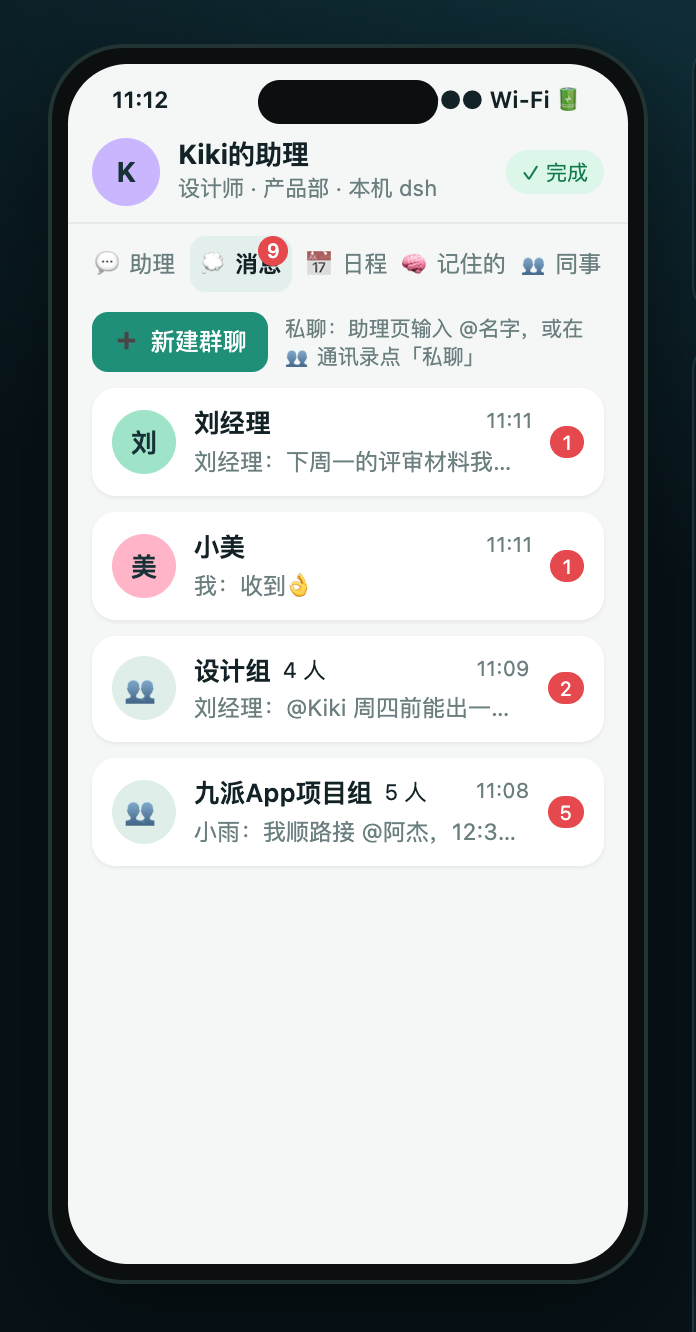
- The 💭 Messages tab has direct messages and group chats with unread counts: create a group, invite people, leave. Whoever you @ in a group gets notified.
- If the recipient is offline, the message waits in your local outbox and is delivered when they come back online.
- You can also ask the assistant, e.g. "Tell Manager Liu I'll be ten minutes late" or "What's the group talking about?"
| Message list: DMs, groups and unread counts | @mentioning someone in a group |
|---|---|
 |
 |
5. A 13-person company directory
The plugin ships with a fictional 13-person company, so you can demo it right after installing:
| Department | Members |
|---|---|
| General Office (总经办) | 陈总 (CEO Chen) |
| Sales (销售部) | 李经理 (Manager Li), 小王, 小张, 小周 |
| Product (产品部) | 刘经理 (Manager Liu), 小林, 小美, Kiki |
| R&D (研发部) | 赵经理 (Manager Zhao), 阿杰, 小雨, 老周 |
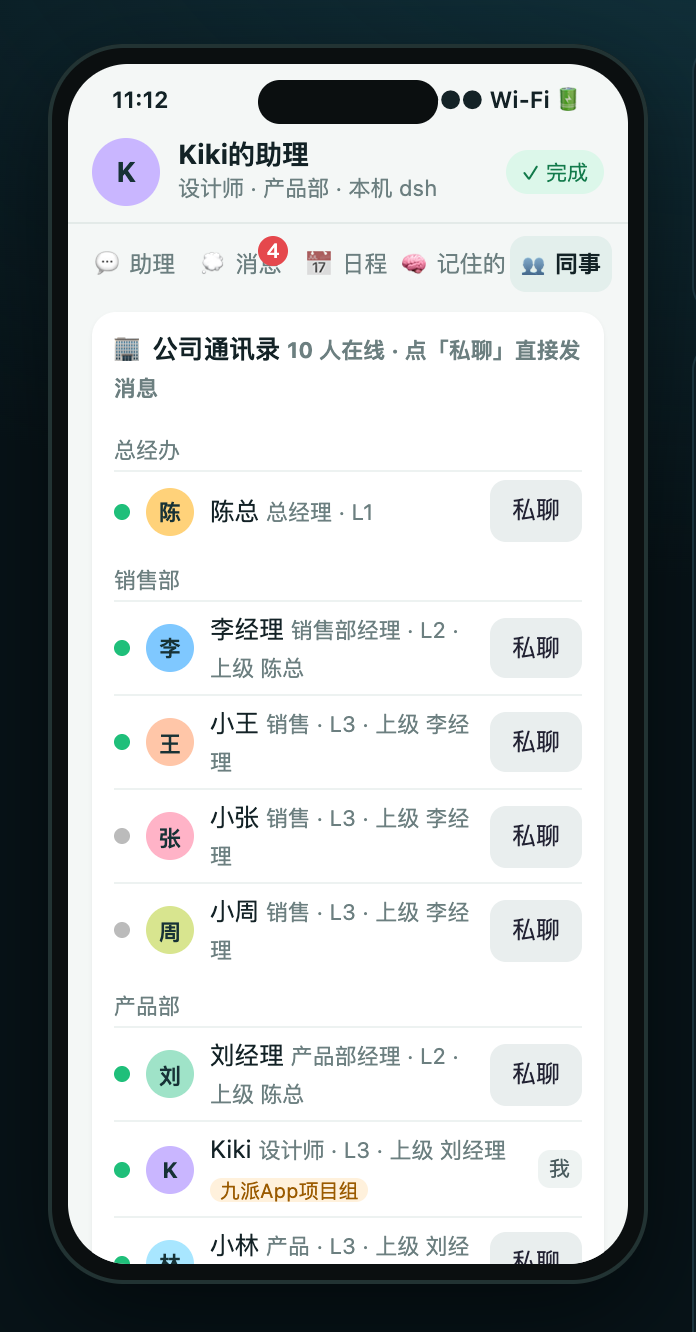
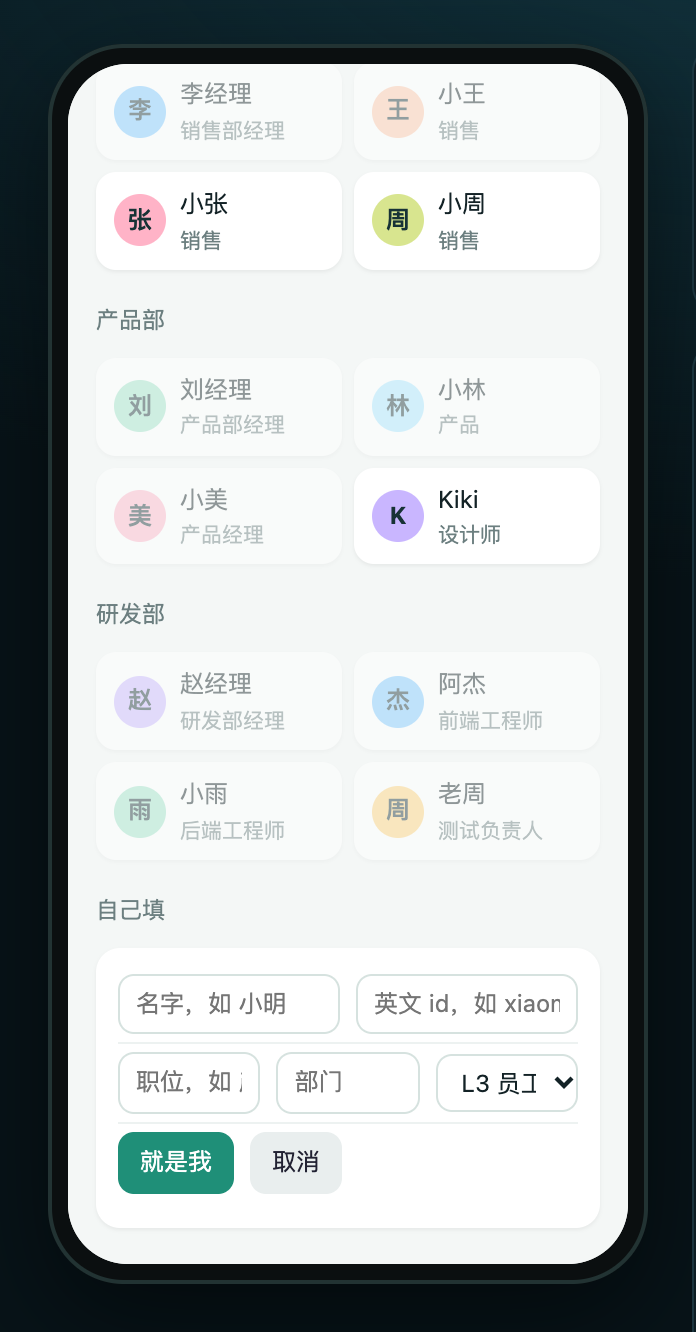
Xiaomei, Kiki, Ajie, Xiaoyu and Lao Zhou also belong to the cross-department "九派App项目组" project team. Everyone has their own weekday calendar, preferences and raw notes (tea tastes, dietary limits, weekend plans). On first open, choose who you are: pick a role from the company (greyed-out ones are already taken by another computer on the LAN), or fill in your own name, title and department. You can switch later with "换身份" on the 🧠 Memory tab.
| Company directory by department, showing who is online | Pick a role, or fill in your own |
|---|---|
 |
 |
6. LAN discovery via mDNS
Colleagues on the same Wi‑Fi show up on the 👥 tab within seconds (Bonjour service type _dshmeet._tcp; only nodes with the same team code recognise each other; heartbeat every 15 seconds). If the router blocks multicast (common on corporate or hotel Wi‑Fi and phone hotspots), add the other person manually on the 👥 tab by IP, IP:port or invite code. Adding from one side is enough; both sides remember each other.
Architecture
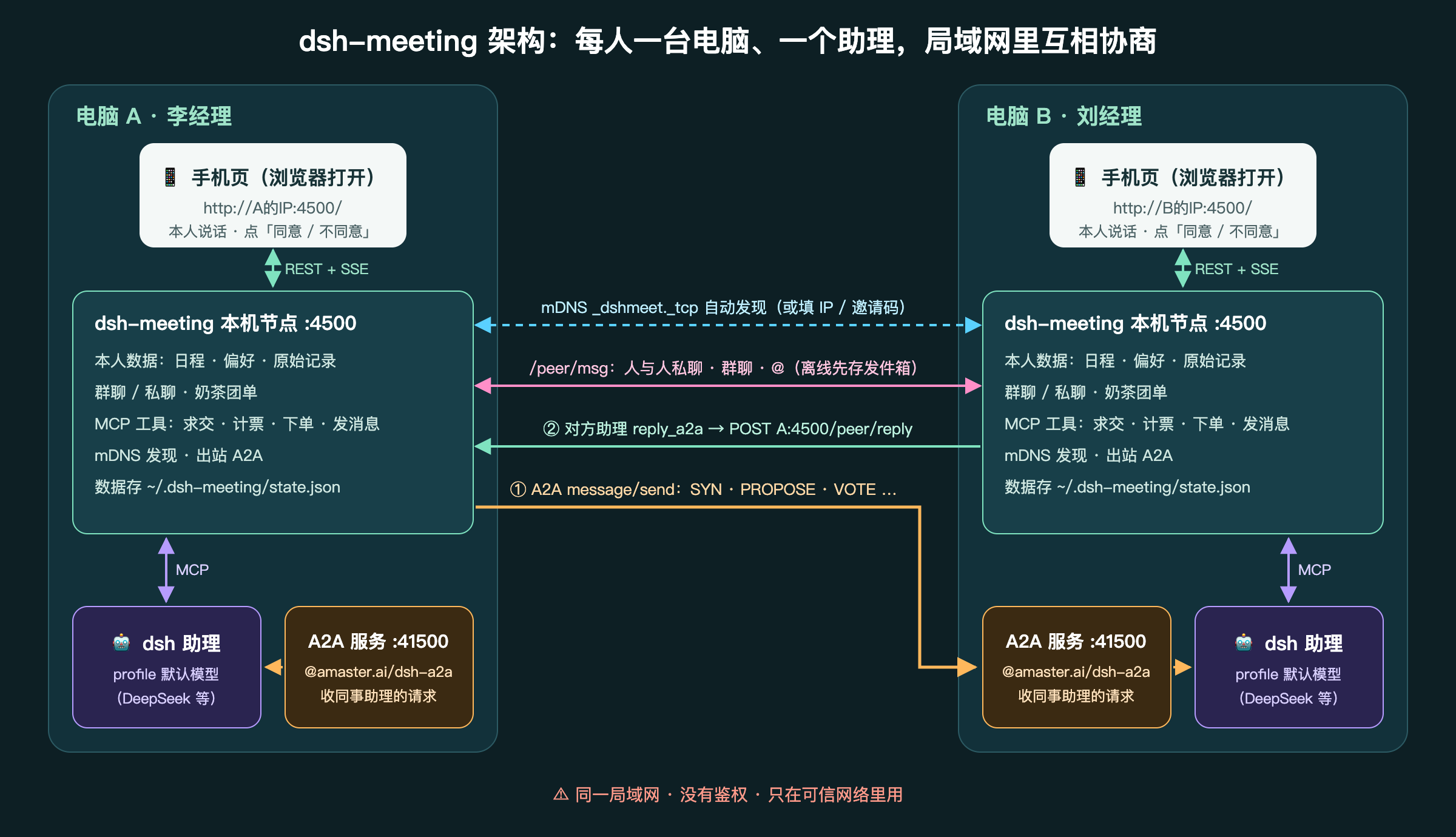
Each computer's dsh process contains three parts, all inserted by this plugin's bundle patch:
| Component | Role |
|---|---|
Local node dsh-meeting :4500 |
Stores the owner's data (calendar, preferences, raw notes, messages, tea orders); serves the phone page (REST + SSE); provides MCP tools for the assistant (intersection, tallying, ordering, messaging); handles mDNS discovery and outbound A2A |
Assistant preset meeting |
Uses the profile's default model. Its only tools are the local node's MCP tools; no bash or file tools |
Inbound A2A @amaster.ai/dsh-a2a :41500 |
Receives A2A requests from colleagues' assistants and hands them to the local assistant |
Message flow for one negotiation:
- The assistant calls
send_a2a; the local node sends A2A JSON-RPC to port 41500 on the other computer (non-blockingmessage/send, then polling withtasks/get). - When the other assistant is done, it calls
reply_a2a, and its node POSTs a structured reply to the initiator node's/peer/reply. - Person-to-person messages and group chats go between nodes via
/peer/msg, bypassing the assistants.
Owner confirmation has two safeguards: ask_owner shows a card on the owner's phone page and waits; grant_exemption (agreeing to use a protected slot) only takes effect if the owner tapped "agree" within the last 30 minutes.
Ports and firewall
| Port | Used for | Must be open to the LAN |
|---|---|---|
| 4500/TCP | Local node: phone page, node-to-node /peer/*; /mcp accepts 127.0.0.1 only |
Yes |
| 41500/TCP | Inbound A2A (@amaster.ai/dsh-a2a) | Yes |
| 5353/UDP | mDNS multicast (auto-discovery) | Yes (optional; add IPs manually if blocked) |
- macOS: on first start, allow node to accept incoming network connections. If "Block all incoming connections" or a third-party firewall is on, allow node.
- Linux (ufw):
sudo ufw allow 4500,41500/tcp && sudo ufw allow 5353/udp - To change ports: dsh patches replace an entry's config as a whole, so the node port, the MCP URL in the preset and the A2A port must change together.
lib/patch.mjsgenerates the overlay; with the standalone kit, just runDSH_MEETING_PORT=4600 ./start.sh.
Security
[!CAUTION]
- No authentication, no encryption: the phone page,
/peer/*and the A2A port are open to the whole LAN. Anyone who can reach your computer can see your calendar, send messages as you, and send requests to your assistant.- Use it only on a trusted LAN, such as an office network or home Wi‑Fi. Don't use it on public Wi‑Fi, and don't port-forward it or expose it to the internet.
- The team code only separates teams; it is not a password.
- The demo data is fictional. Keep the points above in mind if you replace it with your real calendar and chat logs.
- Disable the plugin on the Plugins page when you're not using it.
Data and reset
- Data is stored in
~/.dsh-meeting/state.json: calendar, profile, conversations and messages. - "重来一轮" (start over) at the top right of the page clears conversations and A2A messages; the calendar is kept.
- On the 🧠 tab, "恢复示例数据" restores the demo data, and "换身份" lets you pick a different person.
Development
node scripts/build.mjs # generates lib/seeds.json and cordis.patch.yml, builds the tgz and the standalone kit zip in dist/
| Path | Purpose |
|---|---|
lib/index.js |
cordis plugin entry (config schema, starts/stops the local node) |
lib/client.js |
Browser side: the "约会议" sidebar entry and main-panel page in DSH |
lib/node.mjs |
Local node: state, tool implementations, outbound A2A, mDNS and manual discovery, HTTP |
lib/mcp.mjs |
MCP tool list and Streamable HTTP handling |
lib/engine.mjs |
Date-aware free/busy, intersection, relaxation and tallying |
lib/prompt.mjs |
Assistant prompt |
web/ |
Phone page |
kit/ |
install / start / stop scripts for the standalone kit |
docs/images/ |
README screenshots (the phone page rendered locally with demo data) and the demo animation |
dsh.bundle in package.json declares the patch the plugin inserts (cordis.patch.yml).
License
MIT
Links
More in this category
loopx-project/loopx#dsh-loopx-plugin★ 6388
LoopX, a provider-neutral, local-first state kernel and control plane for long-horizon agents: keeps Goal, Todo, gate, evidence, quota, recovery, and handoff state above DeepSeek Harness, while the plugin bootstraps the CLI and skills, admits bounded same-session continuation, and adds a loopback GoalBar for the exact bound loop.
Q00/ouroboros#integrations/dsh-plugin★ 6255
Config-only bundle that mounts Ouroboros through the DSH MCP client, exposing 36 interview, Seed, execution, evaluation, and evolution workflow tools in DSH.
chuspeeism/dashi-taskboard#deepseek-harness★ 3376
Embeds the active installed Codex Taskboard runtime in the DeepSeek Harness sidebar, using its launcher runtime descriptor instead of a fixed port.
NanmiCoder/dsh-agent-teams★ 2336
AgentTeams multi-agent teams.
EthanYoQ/AI-Novel-Writer#dsh-ai-novel-writer★ 1705
Installs a dedicated AI novel-writing preset and workbench: revisioned local project assets, a compact side drawer, and native approval-gated single-file changes.
Miaotofu01/Study-Mate★ 1124
Your AI learning companion: helping you plan your studies, understand concepts, and build projects to master a subject.
Community comments
Comments are public GitHub Discussions. Loading them connects to GitHub and Giscus; a GitHub account is required to post.