Turns the current session into a team lead: splits a goal into a dependency graph of tasks, assembles a team from 11 built-in roles (each optionally bound to its own provider, model and reasoning effort), and dispatches ready tasks concurrently into their own sub-sessions. A task is done only after its acceptance command runs through a receipt that records the exit code and output tail; a live panel reports duration and token totals per run, task and member. Its HTTP routes have no DSH access check, so a web page open in your browser could call them.
Install
# from GitHub (first run asks for allowBuilds approval — follow the hint, retry)
dsh plugin --profile web add github:maliang/dsh-auto-team
Any plugin you install runs third-party code with your own permissions — it can read your files, use your credentials, and reach the network, and tool approvals don’t sandbox it. GitHub-sourced plugins also run build scripts at install time — pnpm blocks those until you allow them, so an install can stop with ERR_PNPM_GIT_DEP_PREPARE_NOT_ALLOWED or ERR_PNPM_IGNORED_BUILDS; dsh prints the exact key to add under allowBuilds in your profile’s pnpm-workspace.yaml, and the install works on the next run. Allowing a build is a trust decision: only install sources you trust, and pin a commit (github:owner/repo#sha).
README
Turn the current DeepSeek Harness session into a team lead: the goal becomes a dependency-aware task graph, roles dispatch in parallel to resumable sub-agents, every completion must pass a quality gate, and the whole run stays visible and editable from the composer switch and the right-side panel.
Current version dsh-auto-team@0.2.4 (package.json), compatible with Node >=22.18 and DSH >=0.2.1-alpha.2 <0.3.0, verified on host 0.2.2-rc.2.
Features
- Multiple tasks + dependency graph: one goal becomes a task graph with
dependsOn;maxConcurrent(default 3, configurable 1..8, clamped by the host limit) caps how many run at once; a downstream task only leavesblockedafter its upstream passed the gate and becamedone; a flow node jumps straight into the member session that runs it (onJumpinsrc/client/views/FlowCanvas.tsx→uiWorkspace.openSession, and when there is no member or the session is unreachable the reason is stated, never swallowed). - Automatic team assembly: the lead reads the goal and picks a
roleIdper task from 11 built-in roles (product / architecture / full-stack / frontend / backend / design / QA / docs / review / DevOps / security audit); a missing role is never guessed — dispatch is skipped withROLE_UNAVAILABLE; write scopes (writeScopes) are mutually exclusive, so a conflicting task moves towaitingwith "who it waits for and on which path" spelled out and holds no concurrency slot; role cards show role / task / duration. - Per-sub-agent models: a role can bind
model{provider,model,reasoningEffort}; when undeclared it follows the session default; an unresolvable model blocks dispatch (MODEL_UNRESOLVABLE) instead of silently falling back to the lead model; before reusing an idle member the host compares the role's target route with that member's real session route, and creates a new member (plus a message) when they differ (the reuse gate insrc/host/team/dispatch.ts). - Gate = evidence: the only path from
runningtodoneisauto_team_receipt— it really runs the acceptance command and records the exit code plus the last 4000 characters of output (the full log lands in<workspace>/.auto-team/artifacts/<taskId>.log); a failure turns intoreworkwith the evidence sent back to the same member and downstream tasks stayblocked. - Observable panel: run / task / member all carry duration and tokens (cache hits, output, call count, hit rate =
cacheRead / (input + cacheRead)); when the source reports nothing the cell reads "not available" — no zeros, no estimates; stalls have three statesnone/quiet/unreported, onlyquiet(progress signals exist but stopped) is flagged,unreportedsays "insufficient evidence"; a member that ends its turn without a receipt is recorded assilentFinish, the task row shows "awaiting receipt", and the lead is notified exactly once. - Team memory + member self-service: memory is two tracks of md (public + project); entries carry P0/P1/P2,
supersedereplaces older entries, and injection respects a character budget (default 4000 — what does not fit stays out of the context and remains reachable by itsmem://id); a member can read its own task and submit its own receipt from its own sub-session, while passing someone else'staskIdreturnsFORBIDDEN.
30-second tour
All commands run at the repo root; copy this line first (it lands on the repo root from any subdirectory):
export REPO="$(git rev-parse --show-toplevel)" && cd "$REPO"
- Install (this machine uses profile
desktop;dshis not on PATH):
cd "$REPO" && pnpm install
cd "$REPO" && pnpm build
cd ~/.dsh/profiles/desktop
pnpm add "file:$REPO"
grep -n '"dsh-auto-team"' package.json
If grep shows only 1 line (no dsh.profile.bundles entry), add "dsh-auto-team" to that array by hand, then restart.
Turn it on: restart the host and refresh the GUI. The "auto team" capsule on the left of the composer is the per-session master switch, off by default; it is live only when all four are present — capsule, session-header button, right-side tab, settings section. Miss one and the install is incomplete.
Dispatch the first task and accept it: tell the lead the goal (e.g. "split this requirement into tasks and dispatch the team"). The lead calls
auto_team_plan, every task needs aroleIdand an executableacceptance(a blank one rejects the whole batch), and a saved plan auto-dispatches; after a member reports back, the lead session with the switch on (or that member) submits a receipt,auto_team_receiptactually runs the gate, and onlyexit 0becomes done.
Rollback is three commands (the last line should print 0):
cd ~/.dsh/profiles/desktop
pnpm remove dsh-auto-team
grep -c '"dsh-auto-team"' package.json
How one requirement runs
| Step | What happens | What you can see / change |
|---|---|---|
| Split | The lead calls auto_team_plan to build tasks with dependsOn, each with a roleId + acceptance; blank acceptances, missing dependencies or cycles reject the whole batch |
The panel "plan" page lets you change roles and cancel tasks; cancelling drops the member count to 0 |
| Dispatch | Ready tasks are taken in dependency order, at most maxConcurrent; write-scope conflicts queue as waiting; auto_team_dispatch only confirms idempotently (no runId is rejected outright) |
Task status: pending / waiting / running / gate / rework / done, plus paused (frozen), interrupted (member died, resumable), failed, cancelled and skipped |
| Work | Members are resumable sub-agents reached directly with auto_team_message; idle members may be reused, and a different route creates a new member |
Click a member card or a flow node to open that member's session |
| Receipt | A member or the lead calls auto_team_receipt, which really runs acceptance and records the exit code and output tail; a failure turns into rework, the evidence goes back to the same member, downstream stays blocked, and the per-task rework cap defaults to 3 (configurable 1..10) |
Gate conclusion and command on the task row, full log in artifacts, "rework" badge with evidence, no auto-retry past the cap |
| Requirement changed | Pass revise: true to stay in the same run (without it a new run is created); auto_team_add_tasks appends, and cancelled tasks keep their downstream blocked |
The "requirement updated" capsule at the top of the panel |
Capabilities
| Capability | Entry point | Notes |
|---|---|---|
| Enable / disable (per session, default off) | Capsule on the left of the composer | conversation.input.left; when off every tool answers "not enabled" |
| Right-side panel (tasks / history / memory) | "Auto team" tab in the right sidebar | keyed slot: sidebar.right.pane.tab + .title, and it must also register into sidebarRightTabs |
| Project library / memory | Left sidebar section + full-page main area; panel "Memory" (project track), "Global" (public track) | Falls back to an inline library if the main-area registration fails; two-track md, also via auto_team_memory |
| Settings / roles / skills | "Auto team" settings section | 6 parameters; 11 built-in roles + 12 skills, editable but not deletable (skills can be restored) |
| Lead tools (8) | Callable in any session with the switch on | plan → dispatch form the backbone; add_tasks / status / message / receipt (the only completion path) / memory / role complete the set; when disabled all of them return the same "auto team is not enabled…" message |
Screenshots
Four screenshots from a real host (macOS desktop, 1728×1084; the tasks page and dependency graph come from a 5-task / 5-member run on 2026-11-10):
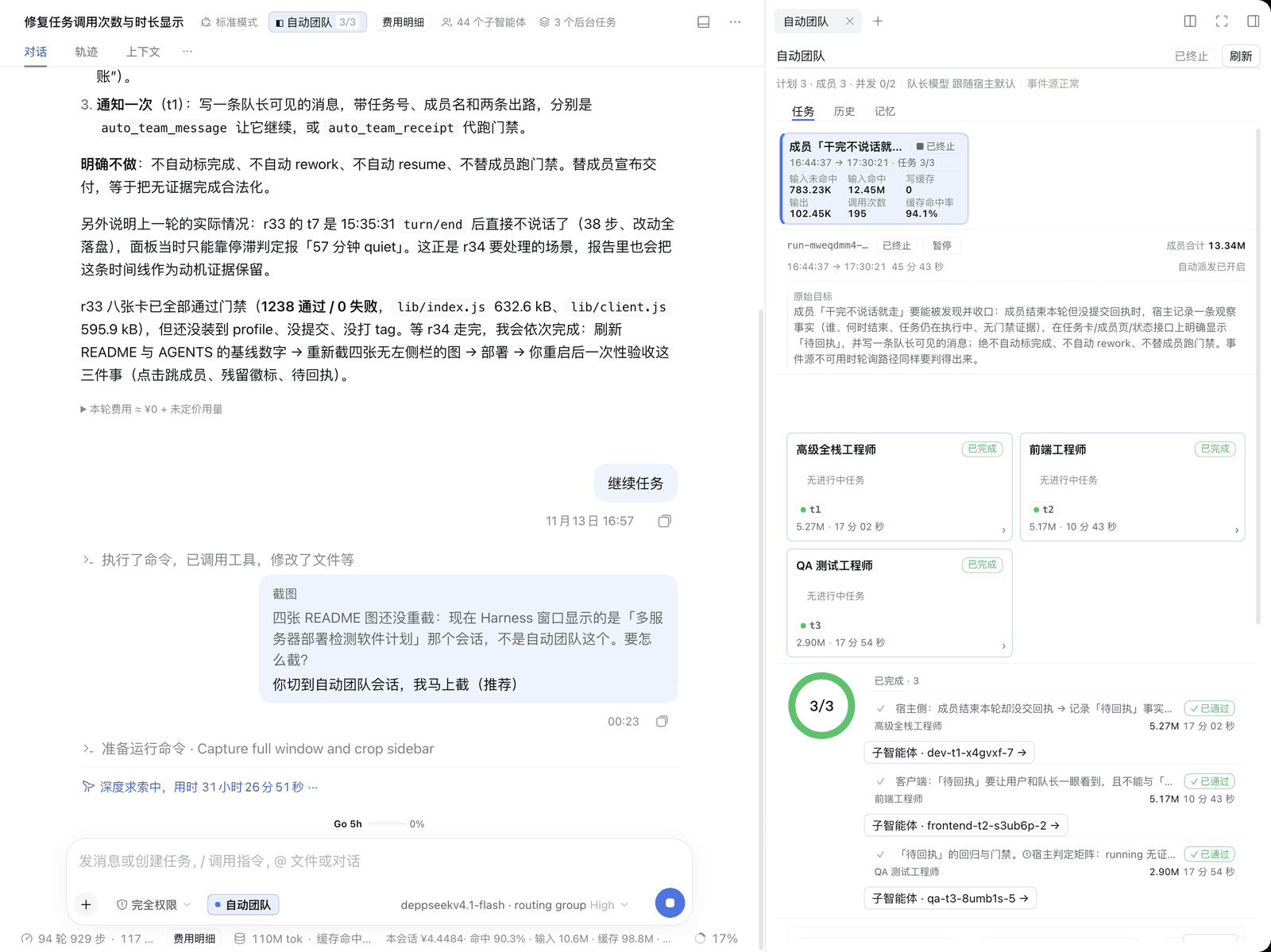 Panel overview: the conversation area plus the right-side "auto team" panel, left navigation cropped.
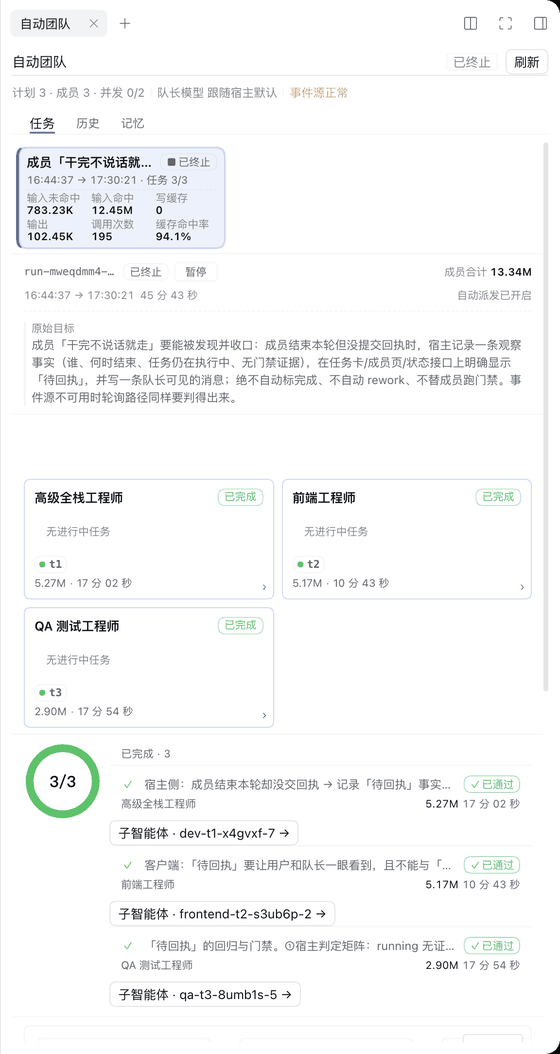 Tasks page: run header (
plan 5 · members 5 · concurrency 0/3), usage block, member cards grouped by role (role / task / duration), completion ring and per-task gate conclusions.
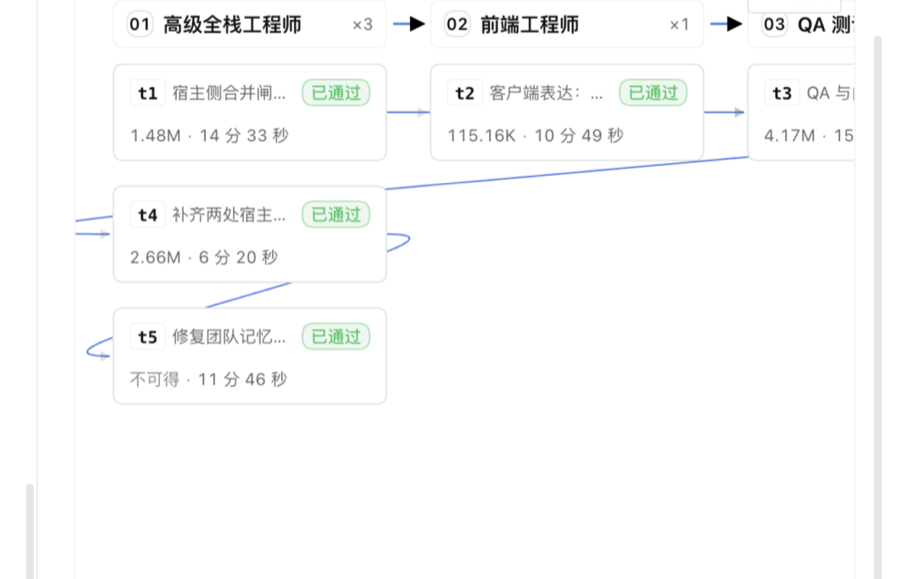 Dependency graph: every node carries its tokens and duration (unavailable reads "not available", never 0), and clicking a node opens the member session that runs it.
 Entry point: the capsule at the bottom-left of the composer, enabled per session; while off no member is ever created.
Source files of all four images: panel overview, tasks page, dependency graph, composer switch.


Compatibility and version support
| Component | Required / verified | Evidence |
|---|---|---|
| Node.js | >=22.18 (declared); measured v26.11.1 here |
package.json engines.node; node -v |
| DSH host | >=0.2.1-alpha.2 <0.3.0 (declared); verified on 0.2.2-rc.2 (macOS desktop) |
package.json engines.dsh; CFBundleShortVersionString |
| Member API boundary | since 0.2.2-rc.2 member capabilities live in subagents; the old agentTeams only keeps task-book methods |
HostSubagents in src/host/adapters.ts |
Honest boundary: only 0.2.2-rc.2 is installed here, so the old 0.2.1-alpha.2 ~ 0.2.2-rc.1 path has unit-test stubs but no real-host regression; engines.dsh is a declared range, not a per-version verification.
node -v
node -e "const p=require('./package.json');console.log(p.version,p.engines.node,p.engines.dsh)"
License: MIT (see LICENSE)
Where data lands
| Path | Contents |
|---|---|
~/.dsh/auto-team/runs/ |
Run state: plan, tasks, member bindings, gate evidence, termination |
~/.dsh/auto-team/sessions.json, settings.json |
Per-session switch; 6 parameters (concurrency, memory budget, stall threshold, rework cap, gate timeout, lead model) |
~/.dsh/auto-team/roles/<id>.json, skills/<id>.md |
Roles and skills (seeded on first start; editable, not deletable) |
~/.dsh/auto-team/memory/public/, <workspace>/.auto-team/memory/ |
Public (cross-project) and project memory; the project workspace is resolved from the real run project and reports degraded/degradeReason when it cannot be resolved |
<session workspace>/.auto-team/artifacts/<taskId>.log |
Full gate log (relative paths inside acceptance commands are usable) |
Inspect what landed, and clean up historical data (backfill is idempotent; curation starts as a dry run):
ls ~/.dsh/auto-team/
ls ~/.dsh/auto-team/runs/ | tail -5
ls .auto-team/memory/
node src/host/memory/backfill-cli.ts --dry-run
node src/host/memory/curate-cli.ts --track project --dir "$(pwd)/.auto-team/memory" --dry-run
Troubleshooting
The three most common cases only; the rest are in ARCHITECTURE.md §9 and memory.md.
| Symptom | Real cause | Fix |
|---|---|---|
| Every tool answers "not enabled" | Tools identify the session via exec.agent.id, the panel records the switch on the real session |
Flip the switch in the same session; never fall back to 'current' |
| Build is green but the right-side tab never appears | A keyed slot without key, or the tab was not registered into sidebarRightTabs |
Both keys and register({id}) must match; rerun pnpm test after the fix |
Every panel request is HTTP 404 |
webServer is not active yet at apply time |
This repo registers in two stages (try once + ctx.inject(['webServer'])); in DevTools GET /api/auto-team/snapshot?sessionId=… should be 200 and include roles |
grep -rn 'sidebarRightTabs' src/client/slots.ts
grep -rn 'ctx.get' src/host/adapters.ts | wc -l
node --test test/r29-packaging.test.ts
Known limitations
- A member session can only see / submit its own task, and member self-service is also gated by the switch: when the lead session that owns the run is off,
statusandreceiptboth answer "not enabled". - Configured concurrency may be clamped by the host: setting 6 may still run 3; the setting is a request, and the snapshot carries requested / clamped markers.
- The left sidebar section and full-page project library are not verified on a real host (U2): a failed registration falls back to the inline panel library, so the right panel is unaffected; the four screenshots only cover the right panel and the composer entry.
- Pause only stops dispatch, receipts, and stall detection: running members keep writing files; interrupt that member in the panel to stop it immediately; a saved plan auto-dispatches with no "review first" switch, so pause before confirming if you want to review.
- Usage on old runs may stay "not available" forever: those runs ended on older builds and their sessions are gone; the memory page token count carries
≈because it is estimated from characters (about "chars / 2"), not provider-reported.
Development and verification (must be green before committing)
cd "$REPO" && pnpm typecheck
cd "$REPO" && pnpm test
cd "$REPO" && pnpm build
node --input-type=module -e "await import('./lib/index.js')"
node --input-type=module -e "await import('./lib/client.js')"
npm pack --dry-run --cache /tmp/npm-pack-cache
Reproduce the whole chain in one line:
export REPO="$(git rev-parse --show-toplevel)" && cd "$REPO" && pnpm typecheck && pnpm test && pnpm build && node --input-type=module -e "await import('./lib/index.js')" && node --input-type=module -e "await import('./lib/client.js')" && npm pack --dry-run --cache /tmp/npm-pack-cache
- Baseline (measured 2026-11-16):
pnpm test1287 pass / 0 fail / 0 skipped;npm pack --dry-runlists 9 files (package.json,LICENSE, both READMEs,cordis.patch.yml, bothlib/bundles,locale/en.json,locale/zh.json), withLICENSEincluded automatically by npm. - Do not bypass:
lib/must be committed (it is thepnpm add file:install source); local imports carry the.tsextension; host and client never import each other and only talk overGET/POST /api/auto-team; host service access is concentrated insrc/host/adapters.ts.
Documentation
| What you need | Where |
|---|---|
| Architecture, module contracts, data flow, build / test / CI, unfinished list | ARCHITECTURE.md |
| Host events, UI slots, real-host verification | HOST-EVENTS.md, UI-SLOTS.md, REAL-HOST-VERIFY.md |
| Revising one requirement: merge, cancel, stopping states | r21 merge & replan |
| Team conventions and pitfalls | memory.md |
| Per-requirement task folders (newest first = iteration history) | docs/teamflow/ |
| Collaboration rules and doc index | AGENTS.md |
Links
More in this category
loopx-project/loopx#dsh-loopx-plugin★ 6694
LoopX, a provider-neutral, local-first state kernel and control plane for long-horizon agents: keeps Goal, Todo, gate, evidence, quota, recovery, and handoff state above DeepSeek Harness, while the plugin bootstraps the CLI and skills, admits bounded same-session continuation, and adds a loopback GoalBar for the exact bound loop.
Q00/ouroboros#integrations/dsh-plugin★ 6373
Config-only bundle that mounts Ouroboros through the DSH MCP client, exposing 36 interview, Seed, execution, evaluation, and evolution workflow tools in DSH.
chuspeeism/dashi-taskboard#deepseek-harness★ 3495
Embeds the active installed Codex Taskboard runtime in the DeepSeek Harness sidebar, using its launcher runtime descriptor instead of a fixed port.
NanmiCoder/dsh-agent-teams★ 2978
AgentTeams multi-agent teams.
EthanYoQ/AI-Novel-Writer#dsh-ai-novel-writer★ 2670
Installs a dedicated AI novel-writing preset and workbench: revisioned local project assets, a compact side drawer, and native approval-gated single-file changes.
shanliuling/dsh-image-gen★ 1576
Native conversational image generation for DeepSeek Harness: ask the agent to create an image, and it handles generation and keeps the result directly in the conversation.
Community comments
Comments are public GitHub Discussions. Loading them connects to GitHub and Giscus; a GitHub account is required to post.