Working memory that survives compaction and session switches - it keeps where each piece of work stands and its next step, the user's hard requirements, dead ends already tried, reusable step-by-step guides, environment facts and evidence-backed conclusions, and re-injects them as system-prompt sections every turn (handoff, rules, guide index, project profile, dead ends). An end-of-turn pass distils new records from the turn and a compactor merges the pool; waystone_write, waystone_recall and waystone_status let the model or the user read, correct and audit exactly what was injected. Append-only JSONL, global plus per-workspace scopes, configurable data root and a settings page; no third-party endpoints (the passes use the host's own session model) and no runtime dependencies. Its HTTP routes have no DSH access check, so a web page open in your browser could call them.
Install
# from npm (prebuilt)
dsh plugin --profile web add dsh-waystone
# from GitHub (first run asks for allowBuilds approval — follow the hint, retry)
dsh plugin --profile web add github:lujfsd/dsh-waystone
Any plugin you install runs third-party code with your own permissions — it can read your files, use your credentials, and reach the network, and tool approvals don’t sandbox it. GitHub-sourced plugins also run build scripts at install time — pnpm blocks those until you allow them, so an install can stop with ERR_PNPM_GIT_DEP_PREPARE_NOT_ALLOWED or ERR_PNPM_IGNORED_BUILDS; dsh prints the exact key to add under allowBuilds in your profile’s pnpm-workspace.yaml, and the install works on the next run. Allowing a build is a trust decision: only install sources you trust, and pin a commit (github:owner/repo#sha).
README
This plugin publishes its README in Chinese only.
DSH 的工作记忆插件。上下文一压缩、一换窗口,前面聊过的东西就没了;这个插件负责把「丢了就再也找不回来」的那部分留在盘上,并在下一轮重新摆到模型眼前。
它解决四类具体的丢失:
- 做到哪了:每个正在做的事是一条「线」,带当前状态和下一步,换窗口后模型接着做,不用你复述。
- 你说过的硬约束:出现「以后都 / 禁止 / 必须」这类要求时记成规约,每轮注入,防止改着改着又犯。
- 试过的死路:错的方向记下来,防止下次又走一遍。
- 环境事实:构建/测试/运行命令、平台限制这些「一换窗口就要重新摸索」的东西,汇总成
[项目档案]常驻注入。
安装
包本体是一个标准 npm 包(16 个文件,无运行时依赖),已发布到 npm registry:
npm i dsh-waystone
装进 DSH:把包名交给插槽管理即可(pnpm add dsh-waystone 实测会把 dsh-waystone 自动登记进 profile 的 bundles):
plugin_manager(install_bundle, target=dsh-waystone)
不走 registry 的来源(离线 / 钉版本 / 改代码):
# GitHub Release 的 tarball
npm i https://github.com/lujfsd/dsh-waystone/releases/download/v0.1.2/dsh-waystone-0.1.2.tgz

# 已下载到本地的同一个 tarball
npm i /path/to/dsh-waystone-0.1.1.tgz

# 从源码
git clone https://github.com/lujfsd/dsh-waystone.git
后两种来源装进 DSH 时,target 换成包目录或 .tgz 的绝对路径。
然后重启 DSH:服务端模块与客户端 bundle 都在宿主启动时加载,不重启不会生效。重启后会话顶部出现「路标」标签页,说明装配成功。
模型每轮看到什么
| 段落 | 内容 | 什么时候出现 |
|---|---|---|
[waystone · 工作记忆契约] |
插件使用说明(怎么记、怎么查、什么该记),固定文本 | 总是 |
[规约 · 全局] / [规约 · 本工作区] |
你的硬要求,按强度排序,超预算截断 | 有规则时 |
[指南索引] |
与本轮话题相关的可复用步骤,只给标题+id | 命中时 |
[项目档案] |
构建/测试/运行/平台限制的摘要 | 工作区里事实够多时 |
[交接] |
每个进行中的一条线:名称 (tp_xxxxxx):做到哪;下一步:… |
有未完成的线时 |
[死路 · 别重试] |
踩过的坑,按轮次轮转展示 3 条 | 有时 |
交接段的取舍:前 3 条线给全(正文 + 下一步),第 4 条起只给「名称 + topic_id + 下一步」(最多再 6 条),再多就只报总数 —— 被挤掉的线不会静默消失,至少能看到它还开着。
三个工具
| 工具 | 干什么 |
|---|---|
waystone_write |
写记录。模型自查、你手动补记都走它 |
waystone_recall |
按键词 / 记录 id(as_xxxxxx)/ topic id(tp_xxxxxx)取回原文;默认不返回已被取代的旧记录,加 include_expired:true 取全 |
waystone_status |
doctor:数据根、条数、陈旧锚点、判官是否降级;injected:true 回显本轮真实注入原文,可逐字节核对 |
记录分 6 类:state(做到哪,按线一条)、rule(你的硬要求)、conclusion(带依据的判断)、guide(下次能照着跑的步骤)、fact(环境事实,只留指针)、deadend(死路)。
配置项
改法只有一处:设置页「插件 → waystone → 配置」(写进当前 profile 的 cordis.patch.yml 里 waystone 那一行),或直接编辑该行。改动下一轮生效。没有插件的私有配置文件——只有一个来源,就不会出现「改了没生效」。
| 键 | 默认 | 范围 | 管什么 |
|---|---|---|---|
rulesMax |
30 | 1–200 | 只管「规约」(你的硬要求)条数;全局库与各工作区库各自计数,结论/事实/指南/死路都不计入。超了淘汰「最久没被召回 + 强度最低」那条,新写的照样能进 |
injectBudgetTokens |
1500 | 200–8000 | 每轮注入的总预算(词元,按 2 字符 ≈ 1 词元估算)。规约段用全额,交接段只用 55%(最少 300) |
compactPoolMax |
60 | 20–500 | 「结论与事实」里还「有效」的记录总数(结论 + 事实,被否决的结论也算结论;自动生成的 [项目档案] 不算)达到多少条,触发一次自动合并整理 |
compactBatch |
60 | 10–200 | 单次整理最多把最新多少条送进模型;调小省输入但收敛慢 |
dataDir |
空 | 路径 | 存储根。填什么就是什么,不会在你填的目录下再补 waystone/data 层;根下只有 global/(全局规则)与 ws/(各工作区)。只有留空才用默认根 <宿主数据目录>/waystone/data。环境变量 WAYSTONE_DATA_DIR 优先级更高 |
非法值不会静默吞掉:会在注入面上带字段名提示(如 [记忆不可用:E_CONFIG config.rulesMax]),完整原因在 waystone_status 与 errors.log。
换存储根不会自动搬数据:改 dataDir 后新根是空库,旧数据原样留在原处。运行期刻意不做自动迁移 —— 静默搬盘比空库更危险,所以只在两个地方提供显式迁移:
- 查看页一键迁移(推荐):打开「路标 → 诊断 → 旧数据根」,会列出旧根路径和条数;点「迁移到当前根」→ 再点一次「确认迁移 N 条?」才真正复制。只有当前根是空库时按钮才出现(已有数据就拒绝,不合并),且只复制、不删源。服务端只接受
POST /api/waystone/migrate、只认它自己列出的旧根,传别的路径一律拒绝。 - 命令行(要合并或删源时用):
node scripts/migrate-data-root.mjs --to <新根> --dry-run   # 先看计划
node scripts/migrate-data-root.mjs --to <新根>             # 复制 + 逐行校验,源保留
node scripts/migrate-data-root.mjs --to <新根> --prune     # 校验通过后删源
node scripts/migrate-data-root.mjs --to <新根> --merge     # 新根已有数据时按 id 并集
迁移后旧目录仍在原处:确认新根数据齐全,再自己删旧目录(脚本 --prune 或手动)。
「路标」查看页
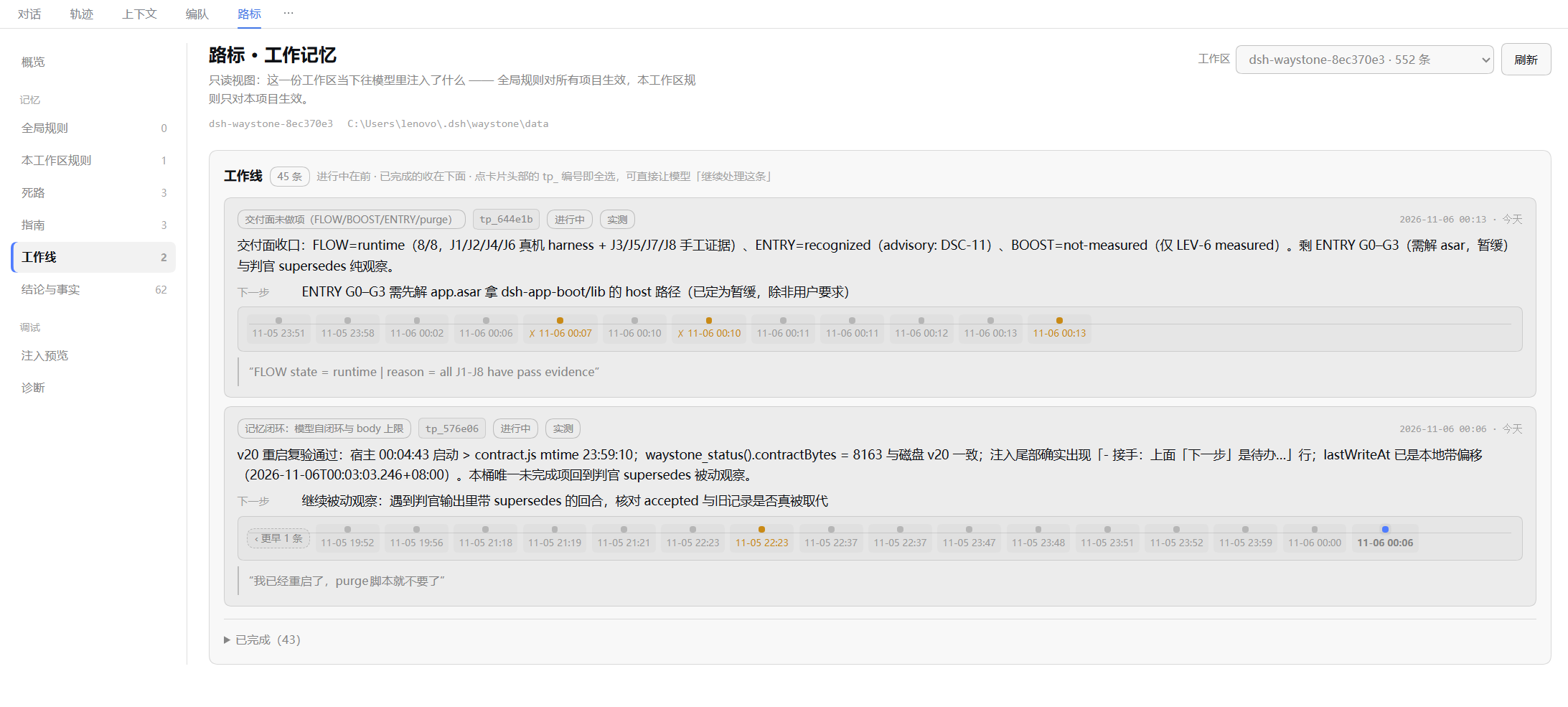
会话顶部标签页:只读(唯一例外是「诊断 → 旧数据根」里的显式迁移,要连点两次确认才发请求)。左侧导航分区:概览 / 全局规则 / 本工作区规则 / 死路 / 指南 / 工作线 / 结论与事实 / 注入预览 / 诊断。
- 概览:条数指标 + 「当前状态」(就是模型这一轮看到的交接段原文)+ 注入记录。
- 工作线:每条线一张卡,头部带
tp_xxxxxx—— 点一下即全选,复制后可以直接跟模型说「继续处理 tp_xxxxxx」。卡里有该线的正文/下一步,以及同 topic 的时间线(左旧右新,点节点看那一条的内容)和挂在它下面的结论/事实/指南/死路。 - 注入预览:本轮注入逐字节原文,怀疑模型没看到什么时先看这里。
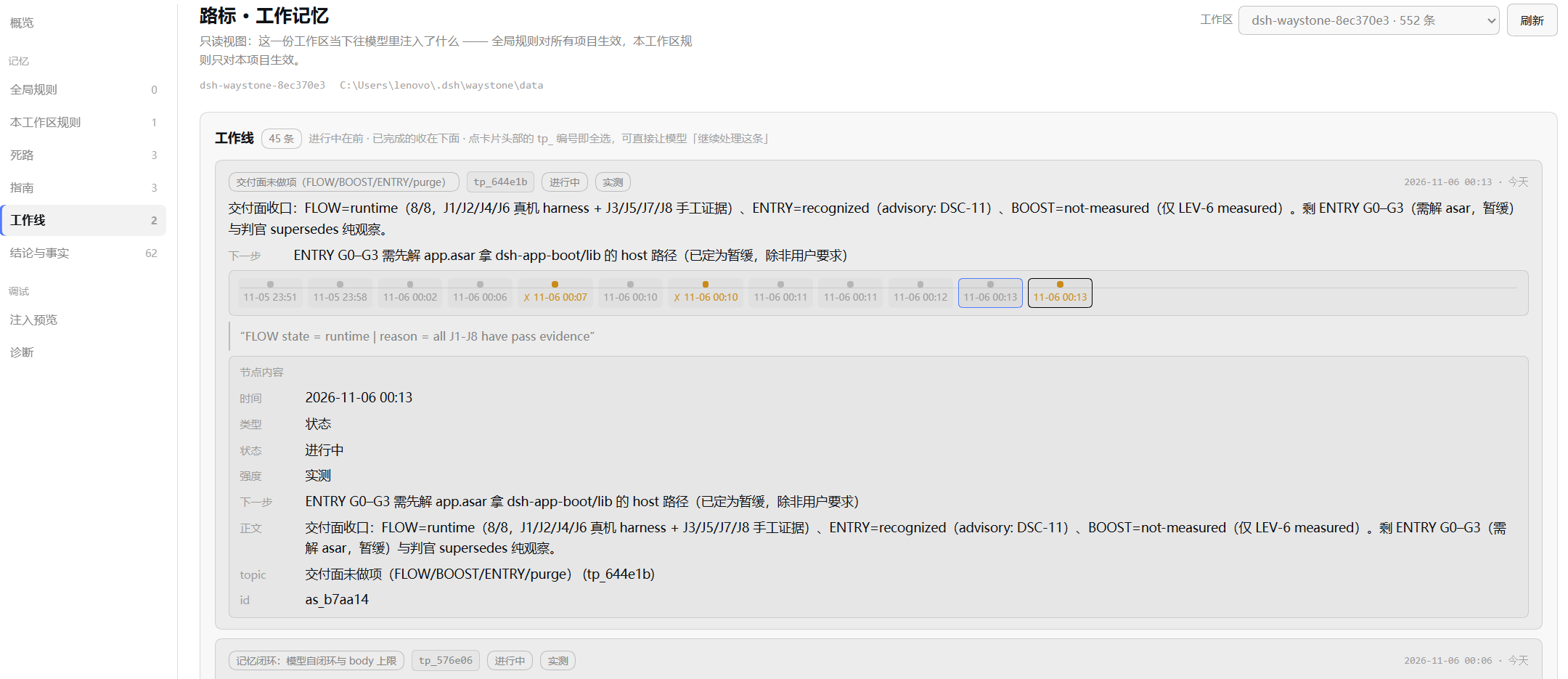
点时间线上的任一节点,会在卡片下方展开那条记录的全貌(时间 / 类型 / 状态 / 强度 / 下一步 / 正文 / topic / id):
数据与隐私
- 数据只在自己数据根内,追加写(append-only),没有修改和删除;状态(进行中/已完成/已取代/已过期)是读的时候算出来的。
- 卸载默认保留数据;想清干净就删
<dataDir>与~/.dsh/waystone/errors.log(没有隐式清理命令)。 - 不上传会话、不做第三方代理、不读宿主的私有文件,也不改你已有的提示内容 —— 只在它自己的位置追加段落。
- 只有带
source.quote的判断/规约才会被接受,且rule的引文必须是本会话你原话的子串 —— 防止模型把自己的推测写成「用户要求」。
许可
MIT © 2026 dsh-waystone contributors
Links
More in this category
vectorize-io/hindsight#coding-agents★ 63454
Hindsight, agent memory that learns: long-term project memory with auto recall and retain, knowledge pages, deep reflection, and per-repo memory banks.
volcengine/OpenViking#examples/dsh-memory-plugin★ 42807
OpenViking memory and context bundle for DeepSeek Harness: pre-step auto-recall and profile injection, session capture, `viking://` URI guarding, and recall/write memory tools backed by an OpenViking server.
MemTensor/MemOS#memos-local-plugin★ 12510
Local-first memory plugin for DeepSeek Harness: layered L1/L2/L3 memory with automatic capture, manual memos_* retrieval tools, and a built-in memory viewer.
agentscope-ai/ReMe#dsh★ 3843
Connects DeepSeek Harness to ReMe's local-first, self-evolving personal knowledge base: automatically captures completed main-agent conversations as user-owned Markdown memory, searches conversations and source material through reme_search with BM25, optional embeddings, and wikilink expansion, and schedules daily memory consolidation.
zilliztech/memsearch#MemSearch★ 2942
Shared Markdown memory for DSH and other coding agents, with automatic capture, pre-step context injection, searchable recall, and memory-to-skill self-evolution through a review panel.
vshulcz/deja-vu#extensions/dsh★ 1677
Cross-session memory and context recovery across forty-five other coding agents (45+) on this machine, reading session files they already wrote before install (Claude Code, Codex, Cursor, Windsurf, Trae, Antigravity, VS Code Copilot Chat, opencode, OpenClaw, Hermes, Kimi, Qoder, Cline, Zed, Magpie and more): six tools (deja_recall, deja_session, deja_blame, deja_fix, deja_how, deja_remember), a /deja command, and optional automatic recall injected into runtime context. Local BM25 CLI/MCP index, no LLM, no embeddings, no network (dsh plugin --profile web add dsh-deja).
Community comments
Comments are public GitHub Discussions. Loading them connects to GitHub and Giscus; a GitHub account is required to post.