Groups the DSH model picker by provider: the menu lists sources with their model counts, and hovering a source slides that provider's models out in a side panel (default); in panel mode a click opens the same panel, and double-clicking a source title cycles hover -> panel -> inline (expand below the title). The active model stays visible at a glance. Pure DOM enhancement with zero intrusion - the panel is plugin-owned DOM mounted on body and selection happens by programmatically clicking the real menu buttons, so no React-managed node is moved or removed, keeping the host rendering intact and coexisting with other UI plugins. Styling follows the host by reusing the official --dsw-* theme tokens, with an enforced opaque background, sufficient contrast, and one shared set of sizing and colour tokens for both menu levels. No network access and no telemetry. Built for DSH kernel 2.0.15-next.
Install
# from npm (prebuilt)
dsh plugin --profile web add dsh-model-fold
# from GitHub (first run asks for allowBuilds approval — follow the hint, retry)
dsh plugin --profile web add github:loyalchiiina/dsh-model-fold
Any plugin you install runs third-party code with your own permissions — it can read your files, use your credentials, and reach the network, and tool approvals don’t sandbox it. GitHub-sourced plugins also run build scripts at install time — pnpm blocks those until you allow them, so an install can stop with ERR_PNPM_GIT_DEP_PREPARE_NOT_ALLOWED or ERR_PNPM_IGNORED_BUILDS; dsh prints the exact key to add under allowBuilds in your profile’s pnpm-workspace.yaml, and the install works on the next run. Allowing a build is a trust decision: only install sources you trust, and pin a commit (github:owner/repo#sha).
README
This plugin publishes its README in Chinese only.
模型菜单别再一条道排到底。 给 DeepSeek Harness(DSH)的模型选择菜单加按来源(provider)分组的导航能力。
Stop scrolling one endless model list. Group the DSH model picker by provider — the menu lists sources first, and each source's models open in a slide-in side panel (hover / click) or inline below the title.
三种模式 / Three modes
| 悬浮模式(默认) | 列表模式 |
|---|---|
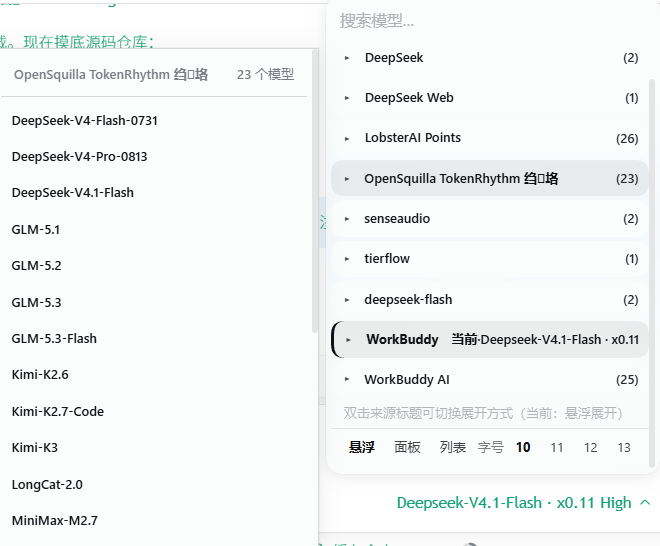 |
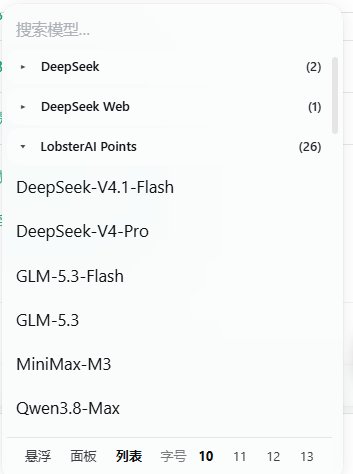 |
| 鼠标划过来源 → 右侧滑出该来源的模型;移开自动收起 | 点来源 → 在下方就地展开该来源的模型 |
第三种是面板模式(
panel):样子与悬浮模式相同,但需要单击来源才滑出面板(不做悬停触发)。
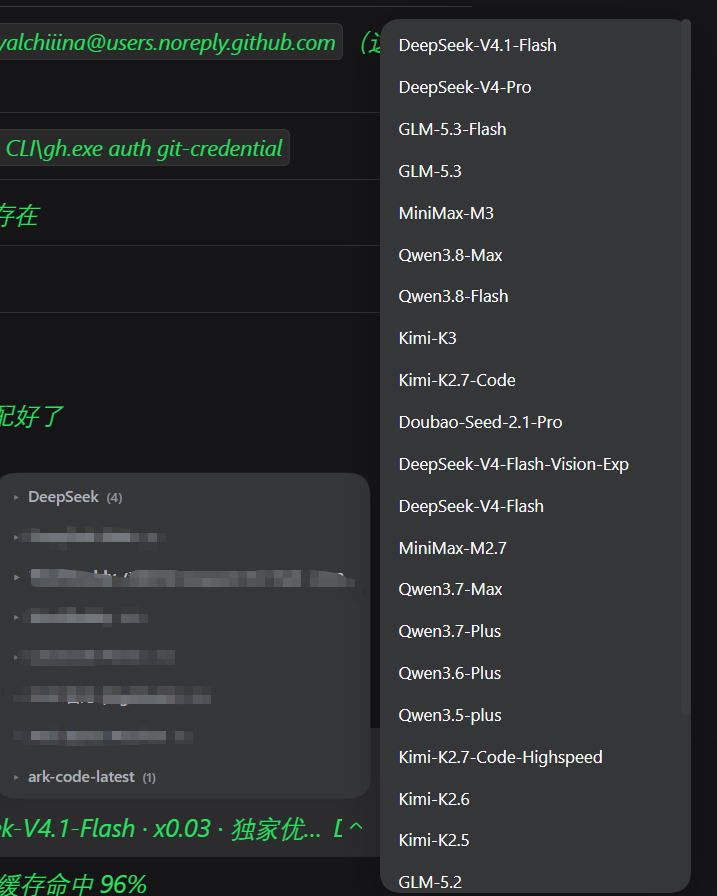
左下:折叠后的来源列表(
DeepSeek (4)、OpenSquilla TokenRhythm 网关 (23)…) 右侧:悬停/点击来源后从右滑出的模型子面板(DeepSeek-V4.1-Flash、GLM-5.3、MiniMax-M3、Kimi-K3…) 底部:设置条 —— 一键切换模式与字号 Left: the folded source list · Right: the slide-in model panel · Bottom: mode + font-size switcher
解决什么问题 / The problem
接了三五个来源之后,模型菜单能拉出一屏还滚不完——DeepSeek、GLM、MiniMax、Qwen、Kimi 二十几个模型挤在一起,每次选模型都要眯着眼找。
Add three or five providers and the model menu runs off the screen — two dozen models jumbled together, every switch a squint-and-hunt exercise.
功能亮点(v0.5.0,三模式)
- 🖱 悬浮展开(默认):鼠标划过来源标题,该来源的模型就从右侧滑出;移开自动收起。不用点击,选模型更快。
- 📋 来源优先:菜单只列来源(▾ 箭头 + 来源名 + 模型数),一屏看清有几个来源。
- 👁 当前来源与模型一眼可见:正在使用的来源标注
当前·模型名(加粗 + 品牌色),子面板内选中项保留 ✓。 - 🔄 三模式自由切换:双击任意来源标题循环切换
悬浮 → 列表 → 面板(即hover → inline → panel);菜单底部设置条也可直接点选,选择即时生效并记住。 - 🔤 面板内调字号:设置条提供
10 / 11 / 12 / 13四档字号,点一下即刻生效,全菜单与子面板同步。 - 💡 自带用法提示:菜单**底部(设置条上方)**有一行小字
双击来源标题可切换展开方式(当前:悬浮展开),新用户不必猜。 - 🎨 配色与排版跟随官方:背景、文字、悬停、圆角全部复用官方
--dsw-*主题变量,底色不透明、对比度充足;来源清单与子集清单尺寸与配色完全统一。 - 🧩 纯 DOM 增强,零侵入:面板与设置条都是插件自建 DOM,选择通过程序化点击原菜单真实按钮完成,不移动、不删除任何 React 管理的节点,与其他插件兼容。
- 🔒 不联网:插件没有任何网络请求,逻辑全在本地 DOM。
Features (v0.5.0, three modes)
- 🖱 Hover to open (default) — glide over a source heading and its models slide out from the right; they retract when you leave. No click needed.
- 📋 Sources first — the menu lists providers only (▾ arrow + name + model count).
- 👁 Active source & model at a glance — the current source is tagged
当前·model-name(bold + brand colour), with ✓ on the selection inside the panel. - 🔄 Three modes, switchable — double-click any source heading to cycle
hover → inline → panel, or use the in-menu switcher. Applied instantly and remembered. - 🔤 Font size right in the menu — pick
10 / 11 / 12 / 13; both the menu and the side panel follow. - 💡 Built-in hint — a one-line tip at the bottom of the menu (above the settings bar) tells new users about mode switching.
- 🎨 Colours and type follow the host — background, text, hover and radius all come from the SAME
--dsw-*tokens the official menu uses, with an enforced opaque background. - 🧩 Pure DOM enhancement, zero intrusion — the panel and the settings bar are plugin-owned DOM; selection happens by programmatically clicking the real menu buttons; no React-managed node is moved or removed.
- 🔒 No network access — zero requests, all logic runs locally in the DOM.
适配内核 / Compatibility
| 项目 | 版本 |
|---|---|
| DSH 桌面端(内核,实测) | 2.0.18-next(dsh-desktop-next) |
| 官方模型选择组件(实测) | @deepseek-ai/dsh-client-ui-model-selection 0.2.1-alpha.2 |
| 客户端运行环境 | DSH Web GUI(Electron renderer,dsh-app://app/) |
engines.dsh(本包声明) |
>=0.1.7-rc.1 |
上表「实测」两行是本机 2026-10-19 从
app.asar读出的真实版本,只作参考;本包自身只声明engines.dsh: ">=0.1.7-rc.1"与peerDependencies["@deepseek-ai/dsh"]: ">=0.1.7-rc.1", 不硬绑某个具体内核版本。
本插件增强的是 两级下钻菜单(root → model / effort):
div[role="menu"]                      ← 官方 portal 到 body 的浮层
├─ pane="root"   button[role="menuitem"]      (「模型」「推理等级」两个 cell)
├─ pane="model"  div.groups > section[role="group"][aria-labelledby]
│                 ├─ div(分组标题 = 来源名)
│                 └─ button[role="menuitemradio"](模型项)
└─ pane="effort" 扁平的 button[role="menuitemradio"](无 section[role="group"])
插件只增强 pane="model";root 与 effort 因不含 section[role="group"] 而完全不介入——这也是「思考等级」面板一直稳定的原因。
若你的 DSH 内核版本不同:官方若改动 section[role="group"] / aria-labelledby / menuitemradio 这套语义结构,插件会因选择器失配而静默不生效(不会报错、不会破坏原菜单)。可在 DSH 里按 Ctrl+Shift+I 打开 DevTools,确认上述结构后再提 issue。
三种模式的交互细节见 docs/modes.md,版本历史见 CHANGELOG.md。
安装 / Install
在 DSH profile 中安装(依赖 dsh.bundle 自声明,无需手动改 cordis.patch.yml):
dsh plugin --profile desktop add dsh-model-fold
或安装本地 tgz:
dsh plugin --profile desktop add ./dsh-model-fold-<version>.tgz
或把目录复制到 profile 的 node_modules 并在 profile package.json 的 dsh.profile.bundles 中加入 dsh-model-fold。
Install from npm:
dsh plugin --profile desktop add dsh-model-fold
回滚 / 模式说明 · Rollback
自 v0.5.0 起为三模式:默认 hover(划过来源标题就地滑出该来源的模型),双击任意来源标题按 悬浮 → 列表 → 面板 循环切换,也可用菜单底部设置条直接点选;选择写入 localStorage 并跨菜单记忆。panel(右侧子面板)是 v0.3.0~v0.4.x 的旧默认值,老用户首次升级会自动迁移到 hover,之后若再次显式选 panel 则尊重你的选择。若要回到 v0.2.0(单 inline 模式)版本,可从 GitHub Releases 获取历史版本。
Since v0.5.0 the plugin ships three modes: hover (default — glide over a source heading and its models slide out), with double-click cycling hover → inline → panel; the in-menu settings bar at the bottom lets you pick one directly. The choice is persisted across menu opens. panel was the default in v0.3.0–v0.4.x; users upgrading from that era are migrated to hover once, and any later explicit panel choice is respected. To return to the v0.2.0 single-mode behaviour, grab a historical release from GitHub Releases.
更新日志 / Changelog
v0.5.0
- 🖱 新增悬浮模式并设为默认:鼠标划过来源标题就地滑出该来源的模型,移开自动收起(延迟 260ms 防闪烁)。三模式循环变为
悬浮 → 列表 → 面板。 - 🎛 菜单底部新增设置条:可直接切模式、调字号(
10 / 11 / 12 / 13),position: sticky; bottom: 0常驻;按钮的mousedown/click都stopPropagation,不会触发宿主「点外部关闭」。 - 💡 新增用法提示行:菜单底部显示
双击来源标题可切换展开方式(当前:悬浮展开)。 - 🔁 默认值迁移:老用户 localStorage 里的旧默认
panel一次性迁移到hover,之后显式选panel则尊重。 - 🐛 修复来源标题样式长期完全失效:内核
section[role="group"]首个子元素是span[data-menu-group-start],而旧 CSS 用> div:first-child定位标题 → 永不匹配,导致折叠箭头、悬停高亮、「当前·模型名」徽标等 10 条规则全失效。改用内核显式属性钩子[data-menu-group-heading]。 - 🐛 修复字号切换「时好时坏」:
paneSignature()把插件自建节点算进签名 → 被误判为 pane 切换 →resetView()清掉自建 DOM。改为签名排除自建节点 + 设置条幂等更新 + 字号点击只刷data-on。 - 🔤 字号整体调小:正文 15px → 11px、行高 22px → 16px、条目高 38px → 28px、箭头 12px → 10px,并接入
--mf-fs。 - 📸 README 补
docs/images/mode-hover.png与docs/images/mode-list.png两张效果图。
v0.4.8
- 📦 声明官方 DSH 兼容要求:
engines.dsh与peerDependencies["@deepseek-ai/dsh"]均为>=0.1.7-rc.1;不再硬绑具体内核版本号。
v0.4.7
- 🐛 修复「子面板一闪而过」:折叠隐藏按钮导致官方
onBlur关闭整个菜单;改为隐藏前先把焦点移回 trigger。 - 🐛 修复「点击来源没反应」:点击事件改为
document级委托,不再依赖会被 React 换掉的节点。 - 🐛 修复「面板透明 / 文字看不清」:支持 8 位 hex,把官方的半透明菜单表面色合成成不透明等价色,文字色按底色亮度确定对比度。
- 🎨 来源清单与子集清单统一:字号 / 字重 / 行高 / 条目高 / 内距与悬停共用同一套令牌。
- 🎨 勾选更醒目:✓ 加大到 16px 加粗并用品牌色,选中项加品牌色左条。
- 🛡 单例守卫:
dispose()摘净所有监听器与定时器,启动新实例前先拆旧实例,杜绝热重载堆叠。 - 🧹 移除全部临时诊断代码(不再有任何日志上报或额外监听器)。
v0.4.2
- 子面板自适应主题;双模式切换。
(更早版本见 CHANGELOG.md 与 GitHub Releases。)
原理 / How it works
目标 DOM 是 @deepseek-ai/dsh-client-ui-model-selection 渲染、portal 到 body 的 div[role="menu"]:其中每个来源是一个 section[role="group"],首子 div 为分组标题。插件用 MutationObserver 捕获菜单出现,在标题元素上追加自定义 data 属性(React 不管理这些内容),用 CSS :has() 依据 data 属性隐藏组内模型项——不移动、不删除任何 React 管理的节点,因此不破坏原组件的渲染与状态。
The target DOM is the div[role="menu"] rendered by @deepseek-ai/dsh-client-ui-model-selection and portalled to body; each provider is a section[role="group"] whose first child div is the group heading. The plugin uses a MutationObserver to catch the menu appearing and attaches custom data attributes to the heading (content React does not manage), then hides the in-group model items via CSS :has() — moving and removing nothing React owns.
v0.4.7 修复的三个硬骨头 / Three fixes worth documenting
这几个坑都是与官方组件行为耦合才出现的,改官方 UI 的插件都可能撞上:
1. 事件必须用 document 级委托,不能挂在 React 管理的节点上
早期版本把 click/mousedown 挂在来源标题 div 上。但标题是 React 管理的节点,pane 切换或任何重渲染都可能换掉它——监听器留在旧节点上,用户点的是新节点,于是点击永不触发(实测日志 onTitleClick 触发 0 次),表现为「点了没反应 / 一闪而过」。
现在统一由 document 上的捕获期委托处理,并按落点反查所属分组,不再持有任何节点引用。
2. 折叠前必须先把焦点从将被隐藏的按钮上移走
折叠靠 CSS display:none 隐藏真实模型按钮,而官方在进入模型列表后会主动把焦点放到「当前选中」的那个按钮上。两者相撞:官方聚焦 → 插件隐藏 → 浏览器强制失焦 → 官方根节点 onBlur 收到 relatedTarget = null → close() → 整个菜单连同刚打开的面板一起消失。
修复:隐藏前若发现焦点落在该分组内,先 focus() 回菜单 trigger(trigger 在官方 rootRef 内,onBlur 会因此放行)。
3. 背景要取官方的「菜单表面色」并合成成不透明色
官方菜单的 background-color 是 transparent,真正的颜色来自 CSS 变量 --dsw-specific-menu,而它的值形如 #43454a73——8 位 hex,结尾 73 是 alpha ≈ 45%。
- 若只认
rgb()/rgba(),会解析失败 → 面板退到祖先底色 → 比菜单暗(颜色不一致); - 若直接照抄,又可能抄到
transparent→ 面板全透明(文字看不清)。
正确做法:解析 8 位 hex,把半透明色按 alpha 合成到祖先底色上,得到「看起来与菜单一致、但完全不透明」的等价色;再把同一套变量写到菜单节点上,让来源清单与子集清单共用同一底色。
与 React 共存的其余纪律
- 单例守卫:热重载会反复执行
apply,dispose()必须摘净所有监听器与定时器;启动新实例前还要显式拆掉上一个实例,否则多个实例同时处理同一次点击、互相 open/close 面板。 - 焦点不转移:面板项不设
tabindex、不主动focus()——面板挂在body,不在官方rootRef/menuRef内,焦点一旦进入面板就等于「离开菜单」,会触发官方close()。 - 面板挂
body:官方菜单是 React portal 子树,任何重渲染都会回收其非 React 子节点;面板必须挂在body并用fixed定位。
FAQ
- 装完没效果? 需要重启 DSH:客户端 bundle 在宿主启动时加载进浏览器,改动/新装后必须重启才生效。 No effect after install? Restart DSH — the client bundle is loaded into the browser at host startup.
/model命令弹窗里有分组折叠吗? 没有。本插件增强的是 composer 的模型菜单(div[role="menu"]结构);/model弹窗是另一套 UI 表面,暂不涉及。- 双击切换模式会丢折叠状态吗? 不会。inline 模式的展开/折叠记忆独立保存;panel 模式下所有来源保持收起、由子面板展示。
- 会上传任何数据吗? 不会。插件没有任何网络请求,全部逻辑在本地 DOM 完成。 Does it upload anything? No — zero network requests, everything stays in the local DOM.
License
MIT
Links
More in this category
Ebony-Vinyl/dsh-our-free-model★ 51127
Adds free model lanes to DeepSeek Harness — DeepSeek V4.1 Flash, Kimi K3 and others — with no login, sign-up or API key, plus a local OpenAI-compatible gateway, fallback routing and a usage dashboard.
dingminhua/dsh-connect-workbuddy★ 870
Connects locally signed-in WorkBuddy models, CN and international alike, to DSH, reading each model's credit multiplier from the upstream catalog on every refresh, with per-model image input toggles, account switching backed by an auto-failing-over pool, manual daily check-in, and read-only credit overviews shown as compact pills on the card and in the composer.
V1ki/dsh-plugin-subscriptions★ 532
Use ChatGPT (Codex), Claude, and Grok subscriptions as DeepSeek Harness LLM providers, with Settings login, model catalogs, usage, plus image_generate, video_generate, and x_search tools.
Alice-Marx/dsh-model-router★ 471
Routes DeepSeek Harness work across configured model APIs and supported vendor CLIs with dependency-aware packages and cost previews.
Mars-Sea/dsh-commandcode-provider★ 443
Unofficial Command Code LLM provider: registers a `commandcode` route with a live model catalog and reasoning-effort support.
FishBottle7/opencode2dsh★ 379
Exposes OpenCode Zen free models to DeepSeek Harness, with no API key.
Community comments
Comments are public GitHub Discussions. Loading them connects to GitHub and Giscus; a GitHub account is required to post.