Global font DIY: change size, weight, colour and family at any place in the DSH interface, per element or for the whole window, then hide the floating ball when you are done. No CSS writing and no restart. Adapts DSH kernel 0.2.2-rc.1.
Install
# from npm (prebuilt)
dsh plugin --profile web add dsh-font-enhancer
# from GitHub (first run asks for allowBuilds approval — follow the hint, retry)
dsh plugin --profile web add github:loyalchiiina/dsh-font-enhancer
Any plugin you install runs third-party code with your own permissions — it can read your files, use your credentials, and reach the network, and tool approvals don’t sandbox it. GitHub-sourced plugins also run build scripts at install time — pnpm blocks those until you allow them, so an install can stop with ERR_PNPM_GIT_DEP_PREPARE_NOT_ALLOWED or ERR_PNPM_IGNORED_BUILDS; dsh prints the exact key to add under allowBuilds in your profile’s pnpm-workspace.yaml, and the install works on the next run. Allowing a build is a trust decision: only install sources you trust, and pin a commit (github:owner/repo#sha).
README
This plugin publishes its README in Chinese only.
dsh-font-enhancer · 字体DIY悬浮球
功能描述:全局字体 DIY 神器:界面任意位置的字体大小、字重、颜色与字体族都能改,可逐个元素也可整体生效,调完把悬浮球隐藏即可。不用写 CSS、不用重启。适配 DSH 内核 0.2.2-rc.1。
English: Global font DIY: change size, weight, colour and family at any place in the DSH interface, per element or for the whole window, then hide the floating ball when you are done. No CSS writing and no restart. Adapts DSH kernel 0.2.2-rc.1.
DeepSeek Harness(DSH)插件:右下角一颗「字」悬浮球,点开字体 DIY 面板,整站字体 / 颜色 / 字号随你调。
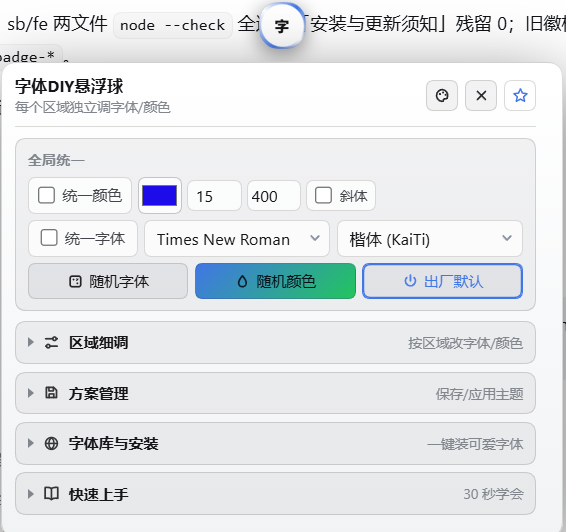
功能
「字」悬浮球 + 字体DIY面板
- 右下角常驻一颗 34px 的「字」悬浮球,点击打开「字体DIY悬浮球」设置面板(副标题:每个区域独立调字体/颜色)。
- 面板按区域管理界面文字:每个区域可独立调整字体(中英文分选)、颜色、字号、字重(粗细)、斜体、行距。
- 内置 10 个常用区域(均按
data-slot定位),还支持框选页面上的任意文字来新增/替换区域。 - 中文字体 18 款、英文字体 18 款可选;面板自身固定楷体,不被自己的设置影响。
全局统一区
- 统一颜色:一键给所有已启用区域上色,默认
#1E0BEA。 - 统一字体:英文字体与中文字体分开选择(例如英文 Times New Roman + 中文楷体)。
- 统一字号(最小 8,最大 22)、统一字重(100–900)、统一斜体。
- 随机字体 / 随机颜色:一键把字体或颜色随机铺满所有区域。
- 出厂默认:一键回到「未装插件」的状态——所有区域停用、两个全局统一关闭,插件不再改动任何页面字体(各区域已调过的设置仍保留);再点一次退出出厂默认,全部区域重新勾选并自动勾上「统一颜色 + 统一字体」。出厂默认态下点随机按钮或勾选任意区域/统一项,会自动解除出厂默认(各区域勾选自动联动)。
四折叠栏
面板下半部分是四个可折叠区块:
- 区域细调(按区域改字体/颜色):框选区域、框选取代默认、恢复内置区域、刷新;每个区域一张设置卡片。
- 方案管理(保存/应用主题):把当前所有区域设置保存成方案,随时切换/重命名/删除/清空;另含 🎨 皮肤菜单入口。
- 字体库与安装(一键装可爱字体):8 款一键安装字体——霞鹜文楷(LXGW WenKai)、得意黑(Smiley Sans)、站酷快乐体(ZCOOL KuaiLe)、Comic Neue(已内置)、Baloo 2、Fredoka、Nunito、Caveat;其中1 款已随包内置(
lib/fonts/ComicNeue.ttf),其余 7 款在你点「一键安装」时运行时联网下载(中文字体几 MB,请等下载完成);还支持上传自己的.ttf/.otf安装包。 - 快速上手(30 秒学会):9 步图文指南,每步配黑白线性图标。
130 款皮肤 · 三球同步
- 🎨 皮肤菜单提供 130 款悬浮球皮肤,与技能浏览器球、Todo 进度球同步换肤(菜单首行可开关「三球皮肤同步」,也可仅本球单独换肤)。
- 内置
0 · 随系统 · 深/浅自动:跟随系统深浅色模式在官方深色 / 官方浅色之间自动切换。 129 · 官方深色、130 · 官方浅色两款官方皮肤强制锁定字色,保证与宿主界面一致。- 皮肤按「官方主题 / 浓郁深底 / 尘埃灰调 / 招牌特效 / 浅色纸面 / 柔光深底 / 中性点缀 / 克制精选」八组分类,菜单三列排布方便浏览。
- 皮肤底色亮度自动判定(支持 hex / rgb / hsl),自动决定球面文字用深字还是白字。
面板外文字强制黑/白/自动
- 对插件面板之外被改色的文字,提供 A(自动)/ ●(强制黑)/ ○(强制白) 三档按钮,一键解决彩色底上看不清字的问题。
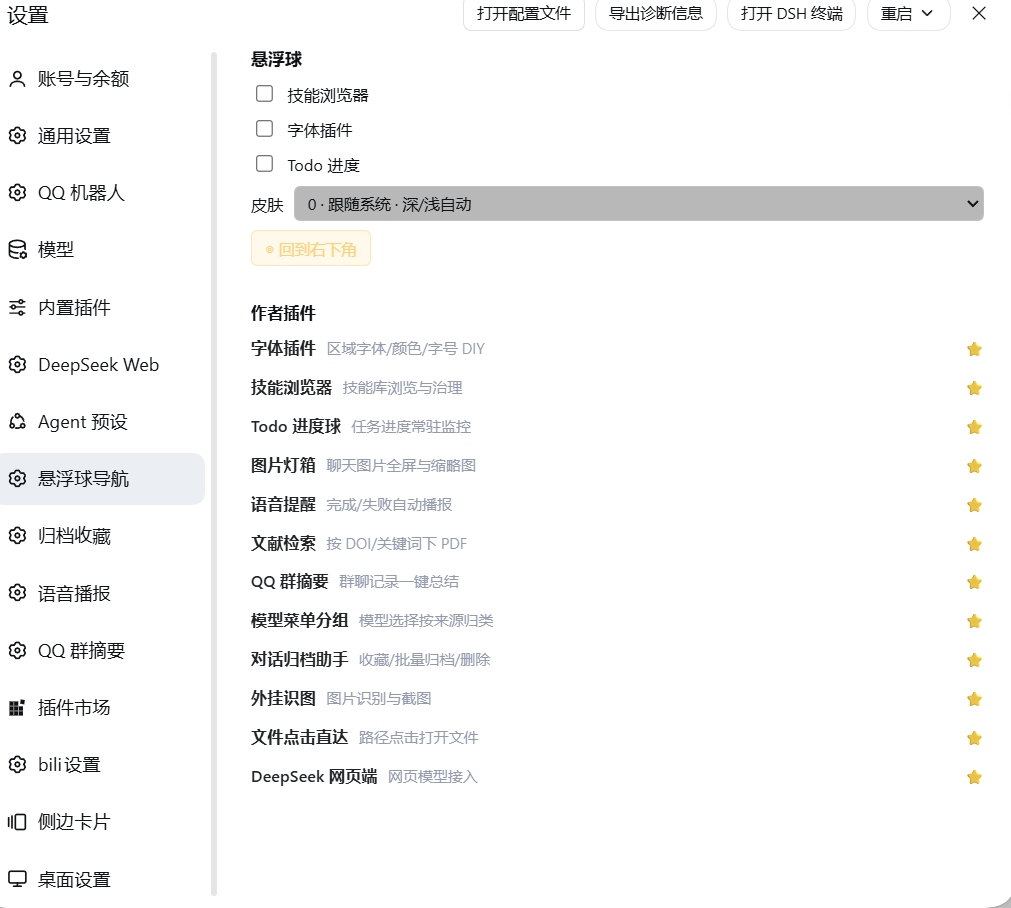
设置页「悬浮球导航」分区
- DSH 设置页新增「悬浮球导航」分区(本插件独立安装时):字体球显隐开关、「◎ 回到右下角」复位按钮,以及作者插件推荐清单(含已装/未装标记)。
- 若已安装技能浏览器插件,该分区自动让位,避免重复。
版本提醒
面板标题栏的 ↑ 按钮就是更新入口(v1.5.9 起),状态就地变化、不弹系统对话框:
| 状态 | 界面表现 |
|---|---|
| 有新版 | 按钮变红色(#ff4d4f),点一下即安装进 desktop profile(v1.5.11) |
| 检查中 | 文案变「检查中…」,期间不可重复点 |
| 已是最新 | 短暂显示「已是最新 vX.Y.Z」,随后回到 ↑ |
| 失败 | 就地标红提示(常见原因:宿主未重启),不会静默失败 |
更新提示自 v1.5.10 起改为行内浮标(浮在按钮旁,不再弹系统对话框)。点「更新」装完必须彻底退出 DSH 客户端再启动,宿主才加载新代码。
设置页导航图标:v1.5.12 改为字体语义 A+a,v1.5.13 起与技能浏览器统一为同一颗**「悬浮球」**(圆环 + 中心点 + 轨道弧),三件插件共用同一个「悬浮球导航」界面。
效果图
设置页 · 悬浮球导航分区
安装
方式一:dsh 插件市场
在 DSH 内打开插件市场,搜索 dsh-font-enhancer(字体插件)即可一键安装。
方式二:npm
npm install dsh-font-enhancer
适配版本
- DSH 内核(@deepseek-ai/dsh):0.2.1-rc.3(package.json engines.dsh 已声明 >=0.1.7-rc.1)
- DSH 桌面端:2.0.20-next(DSH NEXT)
- Node.js:^22.19.0 || >=24.0.0
- 已在上述版本实测通过;低版本 0.1.7-rc.1 及以上兼容。
多语言 README
简体中文(本文件)· हिन्दी · Español · Português
License
Links
More in this category
zhu1090093659/dsh-web#packages/dsh-task-board★ 10406
Task board for the dsh web GUI: a sidebar multi-column kanban whose cards run in real DSH agent sessions and can also be scheduled with cron expressions, executed host-side even with the browser closed.
zhu1090093659/dsh-web#packages/dsh-web-all★ 10406
Plugin and skin collection for the DSH Web UI: task board, Git graph, right-side panel, remote mobile UI, pet, live token stats, and a skin center.
ccch1mneyyy/dsh-TUI★ 7675
Claude Code-style full-screen terminal UI: pixel-whale header, live status line, and streaming thought expansion.
MeteorNOX/DeepSeek-Balance-Whale-Widget★ 7201
A fixed-corner whale widget for the DSH web GUI — balance, today's usage and per-turn cost with peak/off-peak pricing, editable balance-alert and daily-budget bubbles, a module-based custom bubble queue with A/B weighted choices and random lines or images, 30+ vendor templates (OpenAI, OpenRouter, Kimi, SiliconFlow, Ark, Zhipu, MiniMax and more) with per-model balance and subscription quota, plus task-end sound, imported audio, custom roles and a resource manager. Local-only, no telemetry.
omdsh-dev/DSH-better-sidebar★ 5142
Full sidebar workbench with file rendering and editing, terminal, Git, and subagents; third-party plugins can register new tabs.
Devin-AXIS/deepseek-design#deepseek-idesign★ 1816
Visual design studio for websites, app prototypes, posters, cards, reports, and magazines, with templates, direct element editing, selection-aware AI draft handoff, and export.
Community comments
Comments are public GitHub Discussions. Loading them connects to GitHub and Giscus; a GitHub account is required to post.