Fills in the Web UI's missing IDE workbench: resizable chat / editor / files-and-Git columns in Conversation, multi-tab file editing with save and new-file, workspace Terminal, a file tree with name filter and open-in-external-editor, SCM (stage/commit/push/pull, branch switch, Git graph, inline diffs), a status bar, and git_* model tools.
Install
# from GitHub (first run asks for allowBuilds approval — follow the hint, retry)
dsh plugin --profile web add github:loadingvx/deepseek-harness-workbench-plugin
Any plugin you install runs third-party code with your own permissions — it can read your files, use your credentials, and reach the network, and tool approvals don’t sandbox it. GitHub-sourced plugins also run build scripts at install time — pnpm blocks those until you allow them, so an install can stop with ERR_PNPM_GIT_DEP_PREPARE_NOT_ALLOWED or ERR_PNPM_IGNORED_BUILDS; dsh prints the exact key to add under allowBuilds in your profile’s pnpm-workspace.yaml, and the install works on the next run. Allowing a build is a trust decision: only install sources you trust, and pin a commit (github:owner/repo#sha).
README
Requires DeepSeek Harness ≥ 0.1.5 (compatibility update)
This plugin line is adapted for DeepSeek Harness 0.1.5+, which ships the official right sidebar (
ui-sidebar-right). Workbench panels (Git, Usage, terminal, browser, control plane, and more) dock into that host sidebar instead of only using the plugin’s own chrome.On older harness versions you may still see an update available notice, but install is refused so your environment is not broken. Upgrade DeepSeek Harness to 0.1.5 or newer first, then install or upgrade this plugin.
A workbench plugin for the DeepSeek Harness Web UI. After Workbench is opened in Conversation, chat stays on the left. Two columns appear on the right: the editor (Agent Control Plane, syntax highlighting, and smart terminal) and the side dock for files, Git, the Usage panel, and the Ultra Slash panel.
Look for these first:
Usage — official API balance, this-machine observed spend, this-session tokens and context. Pin it above the left Settings button so you can see spend while chatting.
Agent Control Plane — the editor’s first tab by default. Two pages: Execution trajectory (timeline fishbone of user → LLM → tools → agent reply, with expandable I/O) and Capabilities (current-session agent model, tools, prompt sections, and session knobs). Toggle visibility in Settings.
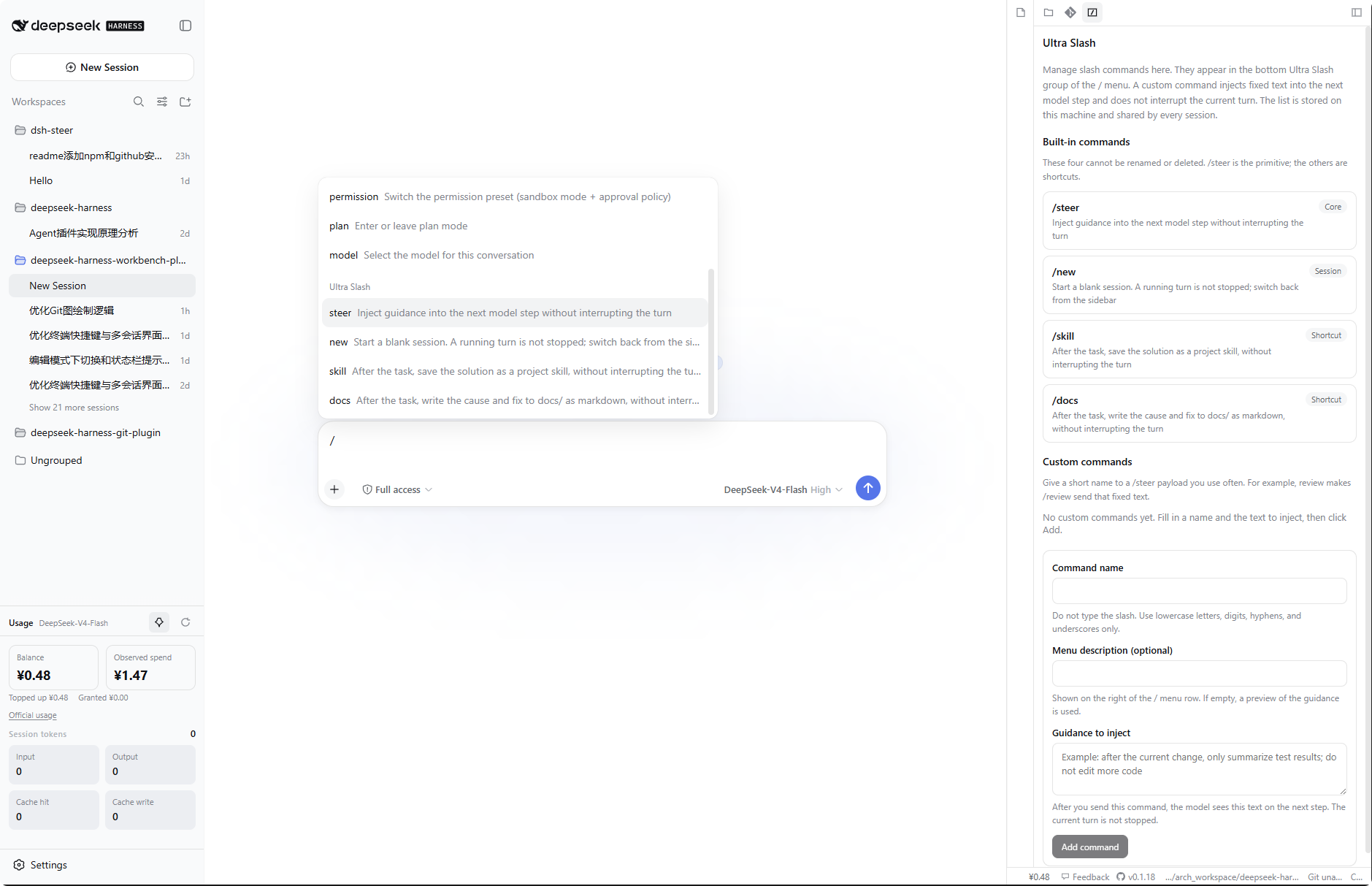
Ultra Slash — slash commands that inject guidance without stopping the current turn. Manage them in the right dock; send them from the bottom group of the chat
/menu.Canvas — live React previews for product prototypes, dashboards, and custom visuals. Agent-written files live under
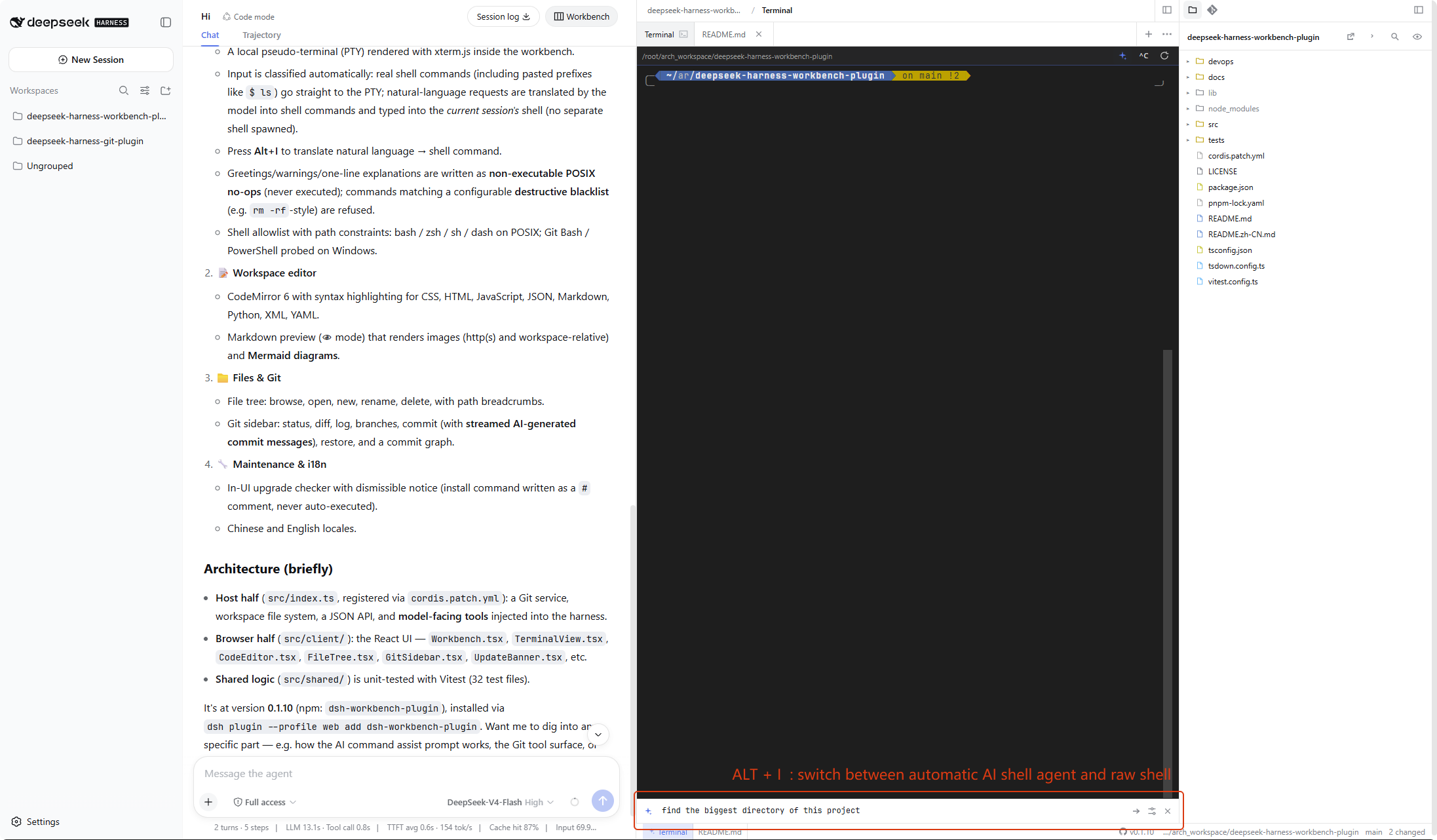
.canvas/*.canvas.tsxin the workspace (not in IDE config folders). After a write, the workbench auto-opens the file in preview; switch to edit or split like Markdown. Send/canvas <topic>to steer the model without interrupting the turn.Smart terminal — a local PTY in the editor. Real shell lines (including pasted
$ ls) run as-is. Natural language is translated by AI command assist (Alt+I or the ✨ button) and typed into the current terminal. Notes are never executed. A blacklist blocks destructive commands the assistant would otherwise type. Alt+J opens another terminal tab.Add to chat — hand the model anything without copying and pasting. Drag a file from the tree (or a DevTools network request) into the chat box; right-click terminal output to add the selection or recent output (with its pwd/shell context); or tap the point-and-pick button in the embedded browser and click a page element. Each lands as a reference chip in the input and rides along with your next message.
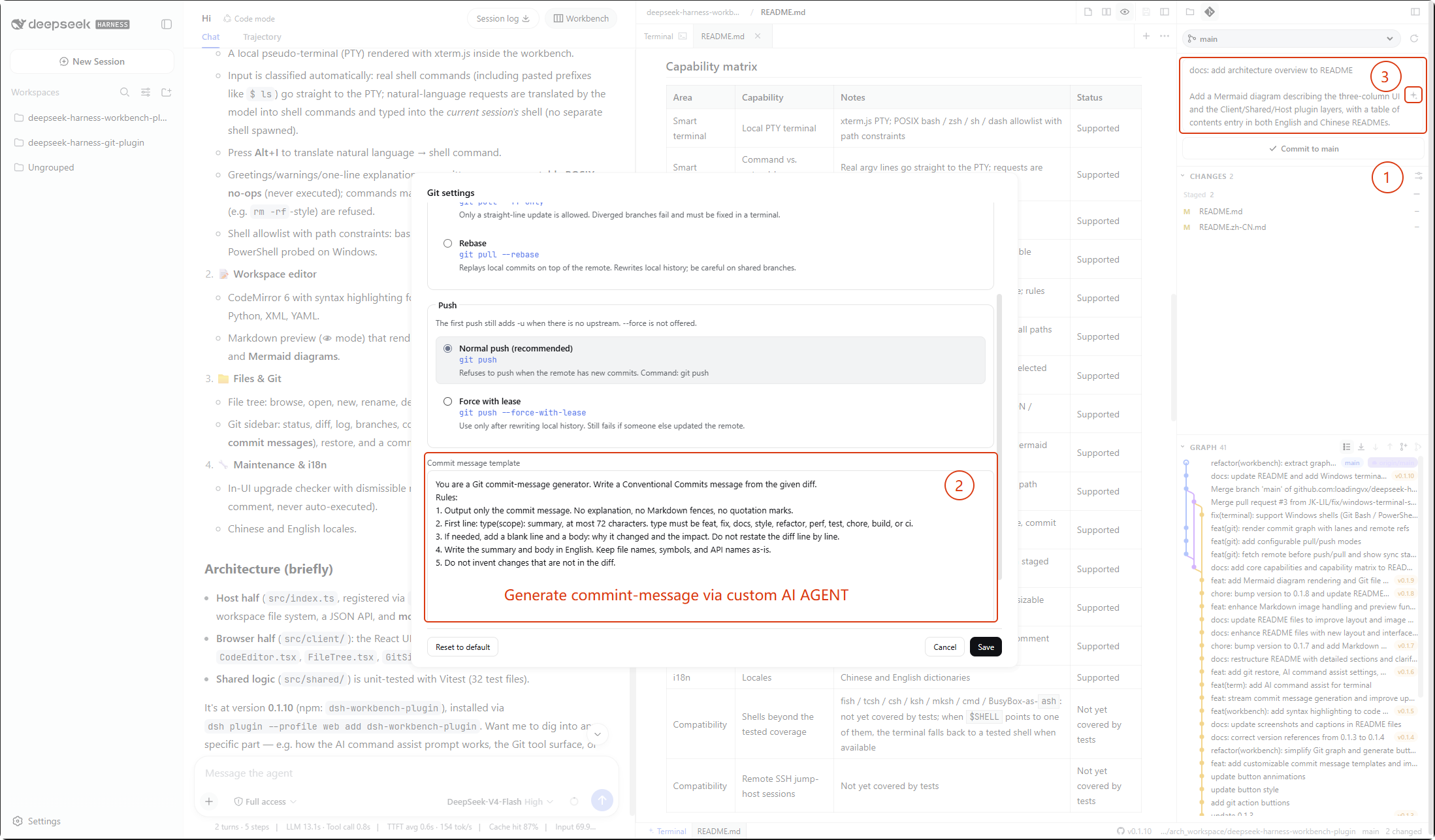
AI commit messages — in the right-dock Source Control tab, generate a message from staged changes; the text streams into the commit box. The template is editable.
Notification sounds — when a session finishes while you are away or is waiting on you (approval, plan confirmation, question), the workbench plays a chime. Pick one of 5 built-in Web Audio sounds or upload your own audio (mp3, ogg, wav, webm, m4a, flac, up to 50 MB); a loop reminder keeps replaying it every N seconds (default 10) until the item is handled. The master switch, sound picker, and loop interval live in the workbench Settings panel.
Contents
- Interface
- Core capabilities
- Feature list
- Agent Control Plane
- Usage panel
- Ultra Slash
- Canvas
- Smart terminal
- Workspace terminal
- AI command assist
- Capability matrix
- Release
- Installation
- Upgrade
- License
Interface
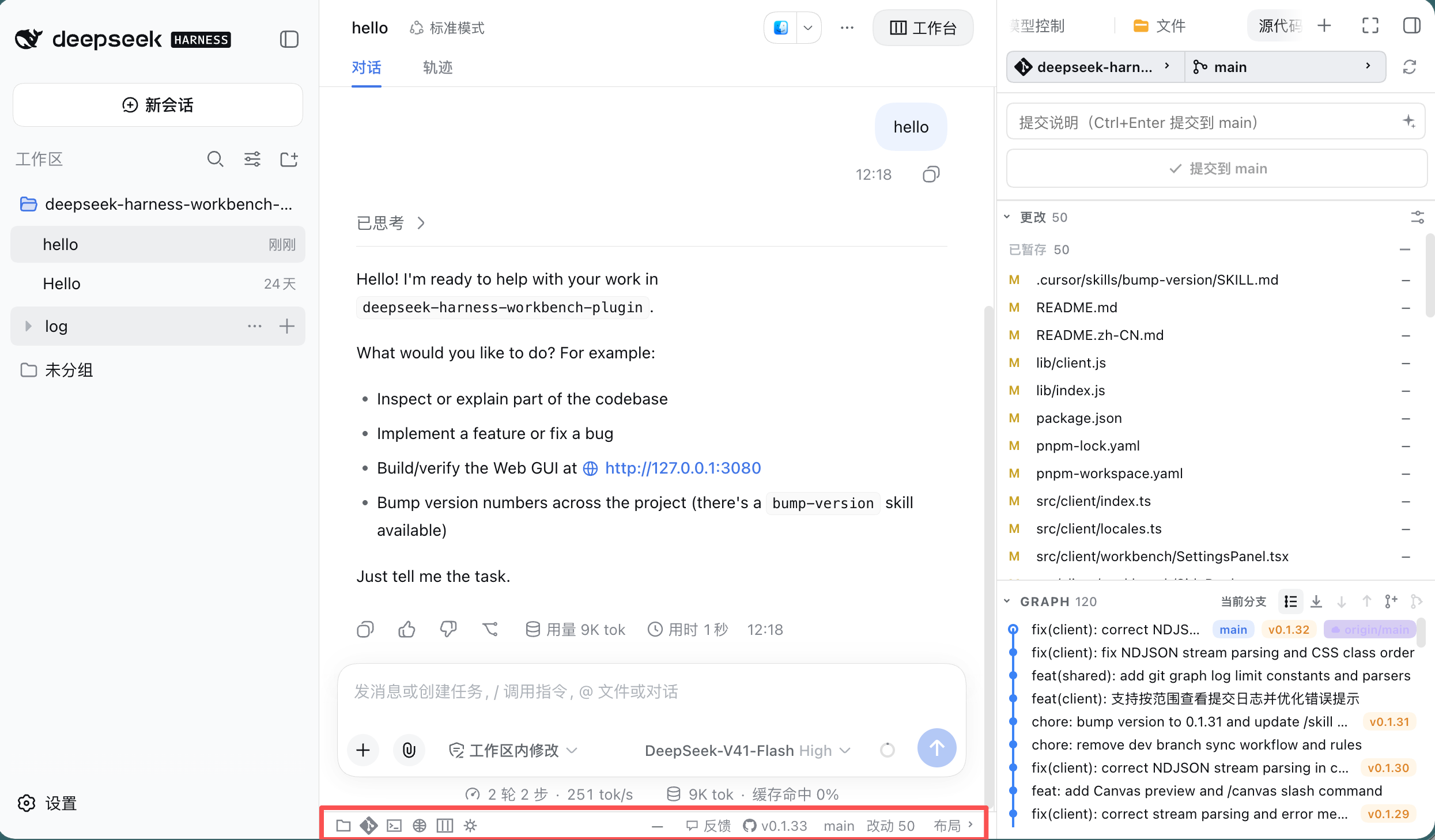
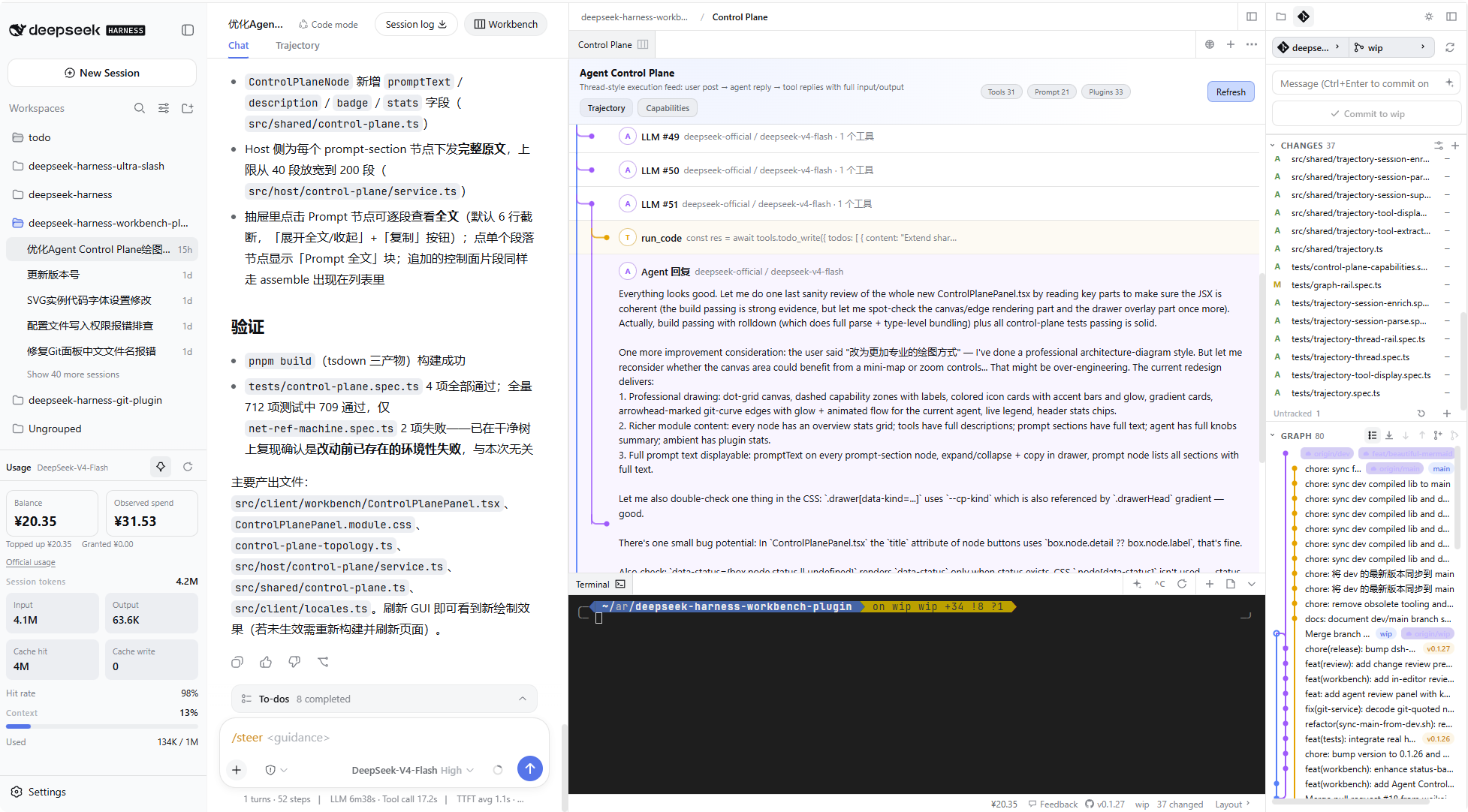
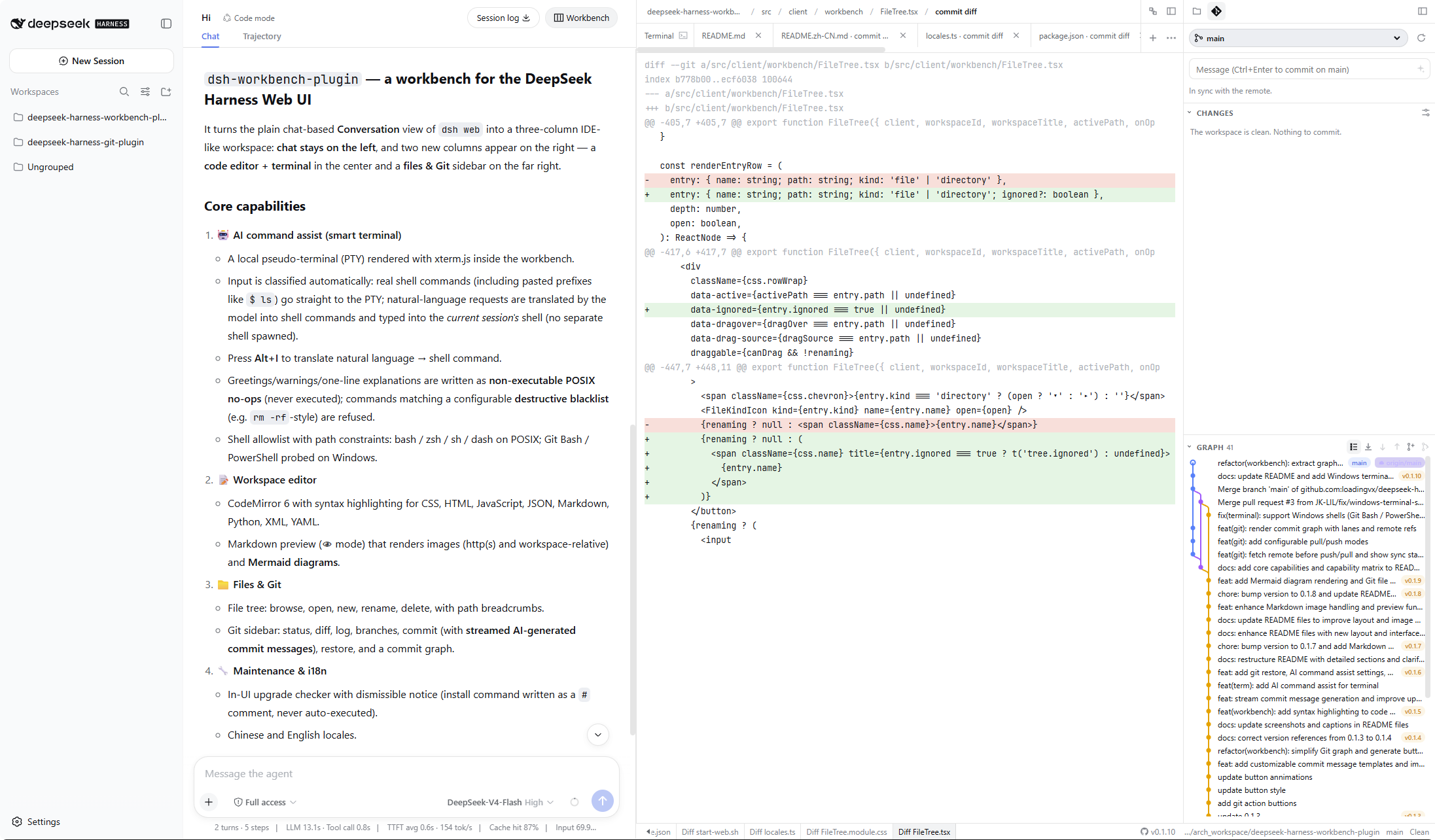
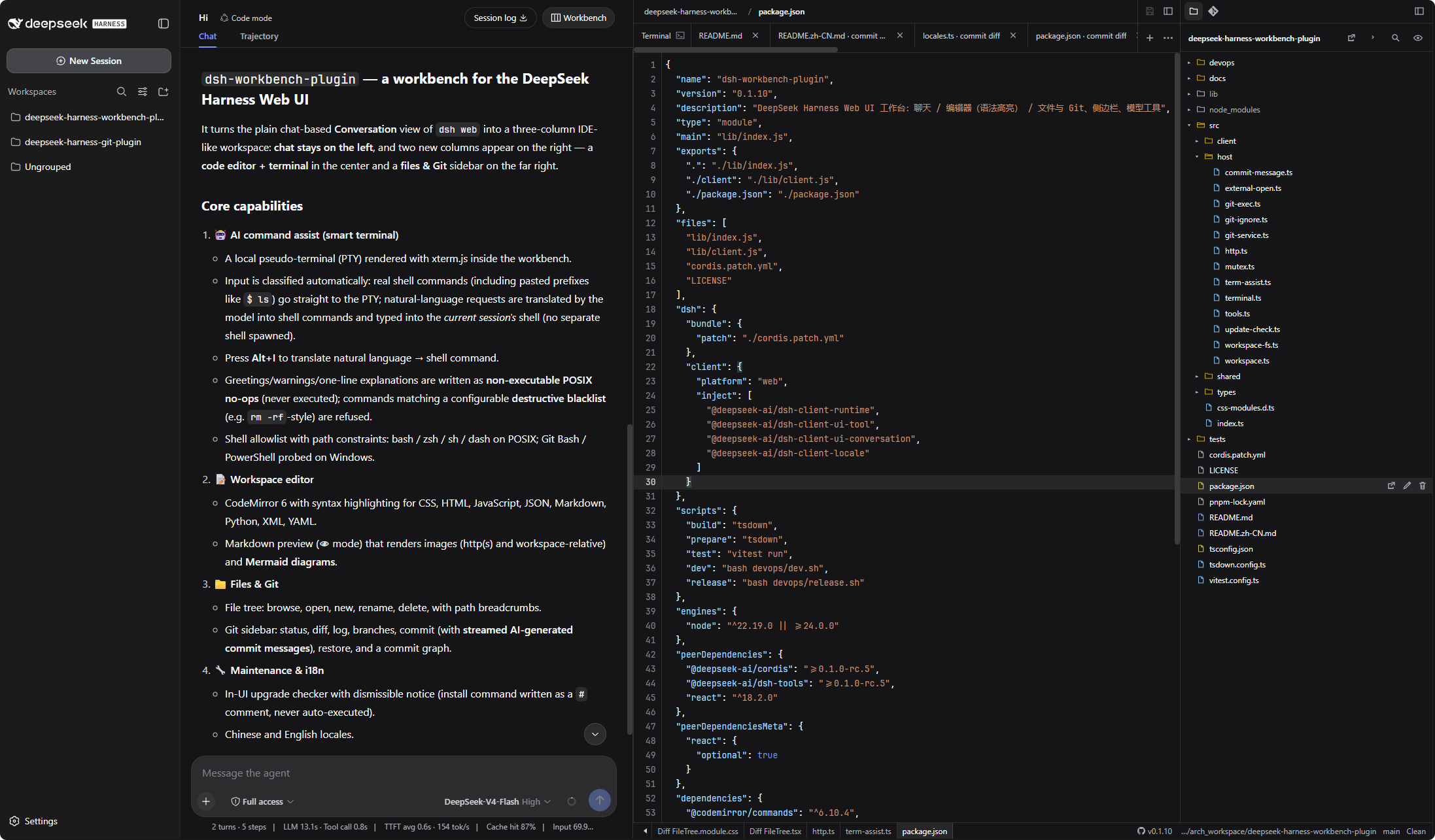
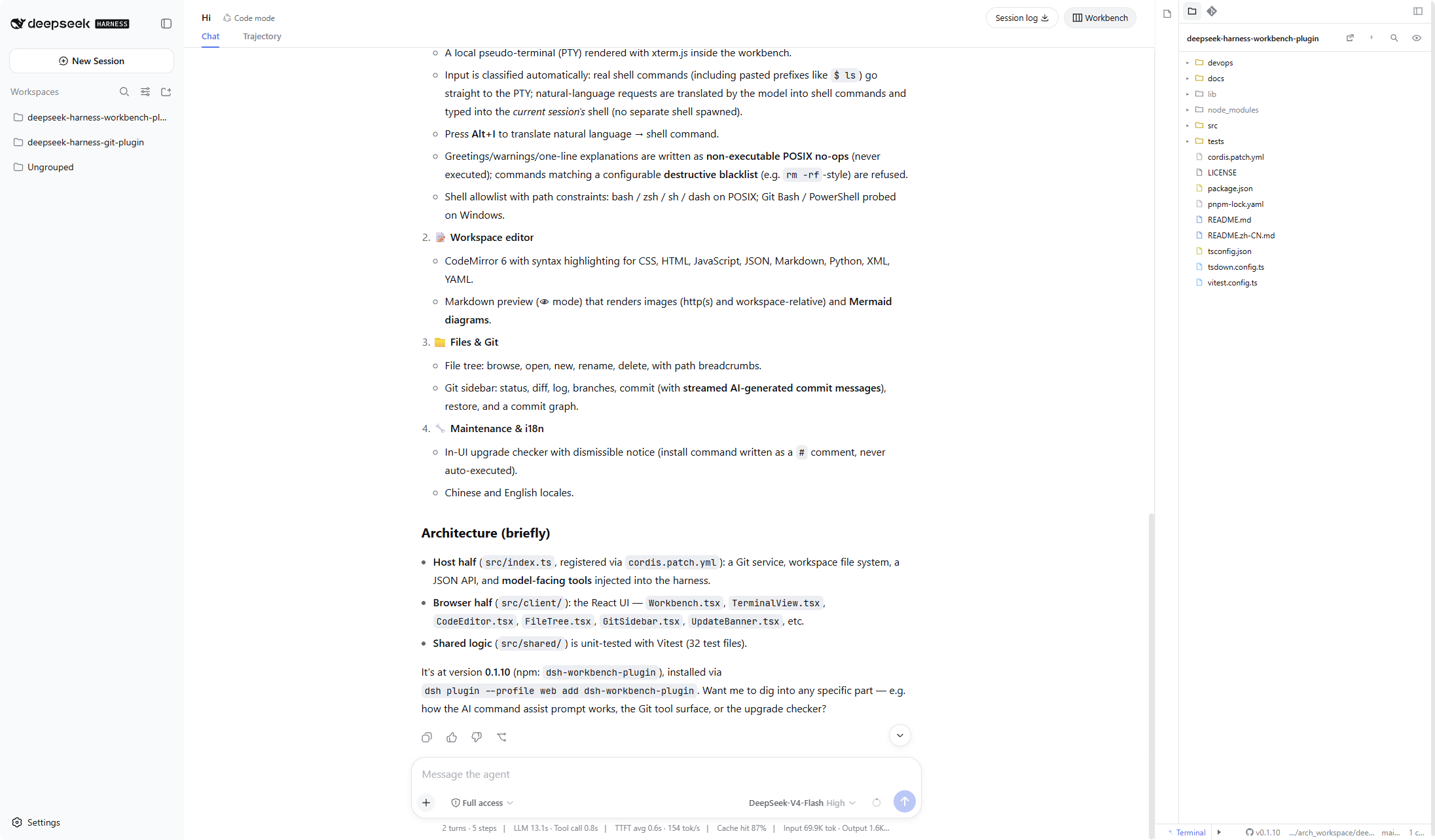
The workbench uses a three-column layout. Conversation stays on the left. The two columns on the right are the capability area: editor (Agent Control Plane, syntax highlighting, smart terminal) in the center; file tree, Git, Usage, and Ultra Slash on the far right. The right dock tabs are Files, Source Control, Usage, and Ultra Slash. The editor’s first tab is Control Plane by default.
DeepSeek-Harness >= V0.1.5
Previous Version
Core capabilities
- Workbench layout. Three columns: Conversation on the left, editor and terminal in the center, files / Git / Usage / Ultra Slash on the right. A new session opens the workbench immediately. By default the editor is collapsed, the files sidebar is open, and usage is pinned above Settings. Columns can be resized, collapsed to icon rails, and restored. Collapse, the side-dock tab, and the usage pin are remembered globally across reload and new sessions.
- Smart terminal. A local PTY. Real shell lines (including pasted
$ ls) go straight to the terminal; natural language is translated and typed into the current shell. Notes are non-executable. A configurable blacklist blocks destructive commands the assistant would otherwise type. - Agent Control Plane. First editor tab (on by default; toggle in Settings). Execution trajectory shows a threaded feed with a left rail for each LLM round, tool call, and agent reply (expand for full I/O). Capabilities lists the current session agent’s model, tools, prompt sections, sub-agents, and session knobs you can adjust online.
- Workspace editor. CodeMirror 6 with syntax highlighting, Plain / Emacs / Vim keymaps, Markdown edit / preview / split, Canvas edit / preview / split (React render of
.canvas/*.canvas.tsx), image and spreadsheet previews, Git diffs, tabs, breadcrumbs, save and dirty-close guards. - Files. Tree browse, filter, hidden files,
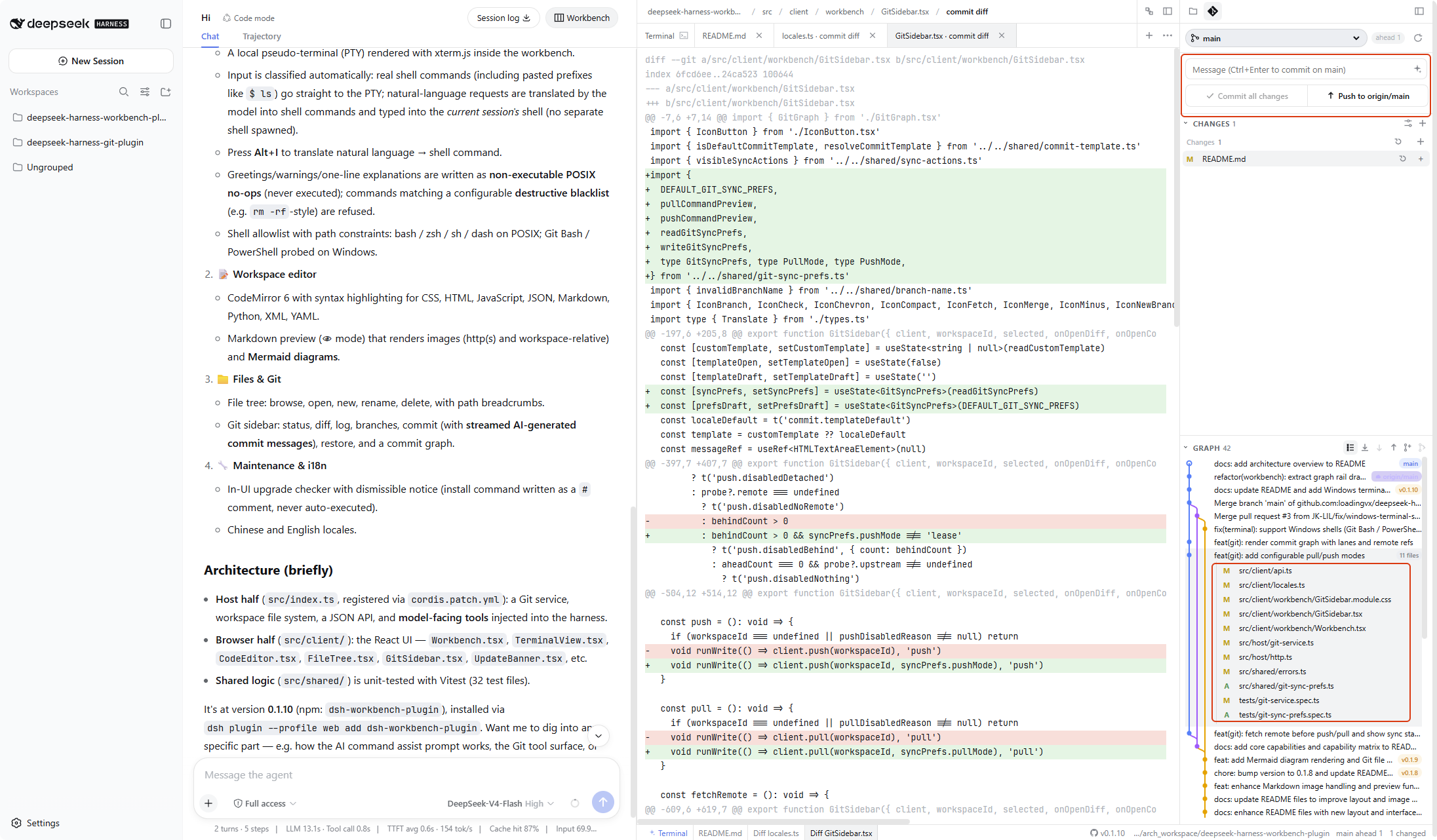
.gitignoremarks, new / rename / delete, and open in a local editor (Cursor, VS Code, and others). - Git. Status, stage, commit (including streamed AI messages), fetch / pull / push with safety checks, branches, merge, restore, commit graph,
git init, and model-facinggit_*tools. - Usage panel. Official API balance, this-machine observed spend, this-session tokens and context. Open the right-dock Usage tab, or pin the panel above the left Settings button (including the collapsed icon rail). The status bar always shows the balance next to Feedback.
- Ultra Slash panel. Slash commands that inject guidance into the next model step without interrupting the current turn. Open the right-dock Ultra Slash tab to manage them; type
/in chat and pick from the bottom Ultra Slash group. Built-in:/steer,/new,/skill,/docs,/canvas. Custom/nameshortcuts are stored on this machine and shared by every session. - Status bar. Open-file tabs, balance, Feedback, version / upgrade, workspace path, branch, dirty count, editor mode.
- Maintenance & privacy. In-UI upgrade checker, Chinese / English UI, and redaction of tokens in paths and errors.
Feature list
Workbench
- Three-column layout: Conversation | editor + terminal | files / Git / Usage / Ultra Slash
- Right-dock tabs: Files, Source Control, Usage, Ultra Slash
- Opens as soon as you create a session; no first message required
- Header Workbench button shows or hides the whole workbench
- Drag column widths; double-click a sash to reset; widths are remembered
- Collapse Conversation, editor, or the right dock into a narrow icon rail
Editor
- Multi-file tabs; save; unsaved indicator; confirm before closing dirty files
- Close all / others / left / right
- Path breadcrumbs
- Syntax highlighting: JavaScript, TypeScript, JSX, TSX, JSON, HTML, CSS, Markdown, Python, XML, YAML; other files stay plain text
- Keymaps: Plain / Emacs / Vim from the status bar; the choice persists; Emacs is the default so typing is insertion, not Vim normal mode
- Vim mode: visual selections render properly (
v/V/<C-v>);:wsaves,:qcloses the tab,:qacloses all,:x/:wqsave and close,:vs/:spsplit left-right / top-bottom,:onlyunsplits; append!to force (skip unsaved-change confirmation) - Editor split:
:vs/:spsplits only the editor body into two file views — the toolbar and tab bar stay single, nothing is duplicated; the split pane's tab is underlined, clicking a tab switches the focused pane's file; drag the sash to resize,:onlyor the "Unsplit" toolbar button merges back - Editor → chat: a floating "Add to chat" button appears on selection; the toolbar and the tab right-click menu can add the whole file — the same official composer chip as terminal / network refs, with the file path as context
- Markdown: edit, preview, or split; GFM; http(s) and workspace-relative images; Mermaid fenced blocks (flowchart, sequence, state, class, ER, XY chart via beautiful-mermaid); workspace file links open in the editor; unsafe links are blocked
- Canvas:
.canvas/<name>.canvas.tsxunder the workspace root; edit / preview / split like Markdown; host transpiles TSX, browser mounts a self-contained React component; auto-open in preview after Agent write/edit; manual open from the file tree defaults to preview too - Git working-tree diffs and commit diffs open as editor tabs
- Image preview: png, jpg, jpeg, gif, webp, avif, bmp, ico
- Table preview: csv, tsv, xlsx (UTF-8, then GB18030 if the file looks garbled).
.xlsis recognized but opens in an external app - New empty file; new terminal tab (Alt+J)
Agent Control Plane
- First editor tab (Control Plane / Agent Control Plane). Toggle under Settings → Agent control plane; on by default
- Execution trajectory (default): chronological user messages, each LLM round (expand for tools and agent reply), context injections, and more; left rail with blue / purple / orange fishbone lines; foldable rows with full tool I/O
- Capabilities: current-session agent inventory — model, tools, prompt sections, sub-agents, environment plugins; overview stats on top, trajectory-style list below with adjustable knobs
- Auto-refresh (~every 4s); manual Refresh; Clear all knobs resets session overrides
- Requires an open session on the left. See Agent Control Plane
File tree
- Browse, expand, open, new, rename, delete (with confirmation)
- Toggle hidden files;
.gitignoreignored files are marked - Filter by file name
- Open a file or the whole workspace in Cursor, VS Code, VS Code Insiders, VSCodium, Windsurf, Zed, or the system default (only apps that are actually installed)
- Truncation notice when a folder is too large to list in full
Git
git initplususer.name/user.emailwhen the folder is not a repo- Staged / unstaged / untracked lists
- Stage, unstage, and whole-section actions
- Discard unstaged edits or delete untracked files (with confirmation)
- Open a file diff in the editor
- Commit, commit all, Ctrl+Enter
- Streamed AI commit messages; customizable template
- Fetch / pull / push. Dirty tree, behind remote, detached HEAD, and missing upstream block the unsafe click. No
--force - Pull mode: merge / fast-forward only / rebase. Push mode: normal / force-with-lease
- Switch branch, create and switch, merge (conflicts abort cleanly)
- Ahead / behind counts and remote probe
- GRAPH: commit graph, compact by default (message-only; can switch to full), copy hash, expand files, open a commit diff, drag height; compact/open and Git settings are remembered
- Conversation tools:
git_status,git_diff,git_log,git_branch,git_commit(commit needs user approval; no delete /reset --hard/clean)
Usage
- Right-dock Usage tab (gauge icon). Pin it above left Settings so you can watch spend while chatting
- Official API balance; currency mark follows the API (
¥for CNY,$for USD) - Observed spend on this machine (top-ups do not erase it). The official key API does not return lifetime spend — this is a local running total, not the website figure
- Session tokens: input / output / cache hit / cache write / hit rate (this conversation only)
- Context occupancy
- Official usage opens the DeepSeek usage page
- Unpin to send the panel back to the right dock. Pin still works when the left rail is collapsed (compact strip: balance / spend / tokens)
- Drag height without covering the session list; double-click the handle to reset
- Status-bar balance to the left of Feedback;
—(or¥—/$—) when the balance cannot be read - See Usage panel for where to click and what the numbers mean
Ultra Slash panel
- Right-dock Ultra Slash tab (
/icon). Chinese UI label: 插件命令 - Type
/in the chat box: plugin commands sit in the bottom group, below a divider - Built-in, cannot be renamed or deleted:
/steer(inject guidance),/new(blank session;/new <text>starts the new session with that first message),/skill(save under.dsh/skills/after the task),/docs(write cause and fix underdocs/after the task),/canvas(create or update a Canvas under.canvas/after the task) - Custom
/nameshortcuts send a fixed/steerpayload. Fillreviewin the panel — do not type the slash — and/reviewappears in the menu - Does not interrupt the current turn. If the model is running, the text is queued for the next model access; you do not need Stop
- Stored on this machine at
~/.dsh/ultra-slash/commands.json; every session shares the same list (at most 40 custom commands) - See Ultra Slash for the command table and how to add your own
Status bar
- Scrollable open-file tabs
- Balance, Feedback (GitHub Issues), version (GitHub repo), upgrade entry (npm)
- Workspace path (tokens redacted), current branch, dirty file count
- Editor-mode menu
Smart terminal
- Local xterm.js PTY in the workspace directory
- Command vs. natural-language classification; pasted prompt prefixes such as
$ lsstill count as commands - Multiple tabs (Alt+J); each tab has its own PTY and AI-assist state; the first terminal tab stays pinned
- AI command assist (Alt+I or the sparkle button)
- Notes / greetings / warnings written as non-executable statements
- Configurable destructive blacklist (assistant-typed only; what you type in the PTY is not blocked)
- Assist settings: separator line, one-line explanation, direct-run of real commands, custom translation prompt
- Interrupt (Ctrl+C), reconnect, copy output
- POSIX shells: bash / zsh / sh / dash. Windows: Git Bash, then Windows PowerShell. See Workspace terminal
Maintenance
- Chinese and English UI
- Dismissible upgrade notice; install command pasted into the terminal as a
#comment - Tokens, passwords, and Bearer keys are redacted in UI text and errors; URLs keep host and path
Usage panel
Open the right-dock Usage tab (gauge icon). To keep spend in view while you chat, click the pin: the panel moves above the left Settings button. Click pin again to send it back to the right dock. Pin still works when the left rail is collapsed — you get a compact strip with balance, spend, and tokens.
| What you see | Meaning |
|---|---|
| Balance | Official API balance. Currency follows the API (¥ for CNY, $ for USD) |
| Observed spend | Sum of balance drops recorded on this machine after you started watching. Top-ups do not erase it. This is not the lifetime total on the official website — the key API does not return that figure |
| Session tokens | Input / output / cache hit / cache write / hit rate for this conversation only, not the whole account |
| Context | How much of the current context window is used |
| Official usage | Opens platform.deepseek.com/usage |
Drag the top handle to change height; double-click resets. The session list above stays visible. The status bar (left of Feedback) always shows the same balance; — means it could not be read.
If the panel cannot load a balance:
- No API key — fill the key environment variable in Settings
- Key rejected — check for typos or extra spaces
- Endpoint failed — click Refresh; this also happens when the network or provider is down
- Unsupported — this provider has no usable balance API
Reset observed spend only clears the local running total on this machine. It does not change the official account.
Agent Control Plane
Open the editor’s first tab Control Plane (Chinese UI: 控制面). If you do not see it, enable Show control plane in editor under Settings → Agent control plane (on by default).
Switch between two sub-pages at the top; your choice is remembered:
| Sub-page | What it does |
|---|---|
| Execution trajectory | Threaded view of the current session: user messages → each LLM round (expand for tool calls and agent reply) → context injections, and more. A left rail marks the timeline and branches. Expand LLM rows for in-episode detail; tools and replies show full input/output. Streaming turns are highlighted. |
| Capabilities | Inspect and tune the current session agent: overview and stats on top, then a trajectory-style list of LLM, tools, prompt sections, sub-agents, and so on; environment plugins are listed at the bottom. Items marked Adjustable expose session knobs (model, tool switches, prompt section text, and more). |
Common actions:
- Refresh — reload the control-plane snapshot and trajectory
- Clear all knobs — drop session knob overrides and return to defaults
- Click a capability row — open details and adjust knobs in the drawer
Notes:
- Open a session on the left first; an empty state means no trajectory yet or the agent is not ready
- Hiding the tab does not undo knobs already applied — it only hides the panel
- If loading fails, update the workbench host and restart
dsh web
Ultra Slash
Open the right-dock Ultra Slash tab (/ icon; Chinese UI: 插件命令). These commands also appear when you type / in the chat box: they sit in the bottom group, below a divider, titled Ultra Slash.
They inject text into the next model step. The current turn is not stopped. You do not need Stop. If the model is running, the text is queued until the next model access; if it is idle, the next step starts immediately.
Built-in commands
These five cannot be renamed or deleted.
| Command | What it does |
|---|---|
/steer <guidance> |
Inject the guidance into the next model step without interrupting the turn. Example: /steer list the files you would change, do not edit yet |
/new [text] |
Switch to a blank session; text after the command is sent as the first message of the new session. A running turn is not stopped; switch back from the left session list |
/skill |
After the current task, write the solution to .dsh/skills/<name>/SKILL.md so DeepSeek Harness can load it. Same “do not interrupt” rule as /steer |
/docs |
After the current task, write the cause and the fix as markdown under docs/. Same rule as /steer |
/canvas [topic] |
After the current task, create or update a Canvas file under .canvas/ in the workspace (product prototype, dashboard, analysis, or custom interactive UI). Append a topic after the command to steer filename and layout. Same rule as /steer |
If /steer is sent with empty text, the UI tells you to write the guidance first and shows a usage example. Nothing is injected.
Default prompts
The Default prompts section of the panel lets you set a default text for /new, /skill, /docs, and /canvas each (/steer stays manual and cannot be configured). Leaving a field empty uses the built-in text:
- The
/newdefault is sent as the first message of the new session;/new <text>still uses what you type. - The
/skill,/docs, and/canvasdefaults are injected into the next model step; text you append after the command is added after the default (e.g./canvas order admin prototype).
Defaults are saved on this machine in the same commands.json as the custom commands and shared by every session; they survive a page refresh.
Typing /new, /skill, /docs, /canvas, or a custom command name highlights the name in the composer with the reference style (the same as DSH built-in commands and skill names), whether or not the session is running.
Custom commands
Give a short name to a /steer payload you use often. For example, fill review and a fixed paragraph; afterwards /review in chat sends that paragraph.
- Open the right-dock Ultra Slash tab.
- Under Custom commands, fill Command name (no slash:
reviewbecomes/review), optional Menu description, and Guidance to inject. - Click Add command. A success line confirms the name; you can type it in chat immediately.
- Edit or delete a row from the same list. Delete asks for confirmation.
Rules the panel enforces (you will see a Chinese or English reason under the field if something is wrong):
- Name: start with a lowercase letter; then only letters, digits, hyphens, or underscores. Put Chinese or other languages in the guidance text, not the name.
- Do not reuse
/steer,/new,/skill,/docs,/canvas, or DeepSeek Harness names such as/helpand/plan. - At most 40 custom commands. Description at most 80 characters; guidance at most 8000.
- The list is stored on this machine at
~/.dsh/ultra-slash/commands.json(or$DSH_HOME/ultra-slash/commands.json) and is shared by every session. A damaged file is not overwritten — fix or delete it, then try again.
Canvas
Canvas is the workbench’s way to ship standalone visual deliverables — product prototypes, dashboards, architecture reviews, timelines, and other React layouts — beside chat, without dumping everything into markdown.
Where files live
Unlike Cursor’s user-config canvases/ folder, this plugin keeps Canvas in the current workspace:
| Item | Rule |
|---|---|
| Directory | .canvas/ at the workspace root |
| Filename | <descriptive-kebab-name>.canvas.tsx (e.g. .canvas/order-dashboard.canvas.tsx) |
| Format | One self-contained file per canvas: default-export a React component, inline style only, data embedded in the file (no fetch, no extra modules) |
Only paths under .canvas/ ending in .canvas.tsx use the Canvas preview pipeline. Other .tsx files stay plain text.
How to create one
- Slash command —
/canvasor/canvas <topic>injects built-in guidance into the next model step without stopping the current turn. The model writes the file under.canvas/. - Manual — create
.canvas/my-prototype.canvas.tsxyourself and open it from the file tree.
The Default prompts section in the Ultra Slash panel can override the shipped /canvas guidance.
Preview and auto-open
When the Agent writes or edits a .canvas/*.canvas.tsx file, the workbench:
- Auto-opens the file in the editor
- Lands in preview mode and renders the React component (toolbar: edit / split / preview, same pattern as Markdown)
Opening a Canvas file yourself also defaults to preview. Switch to edit to change TSX source, or split for side-by-side source and preview.
Compilation runs on the workbench host (TSX → JS); the browser mounts the result with React hooks injected. Compile errors show in the preview pane with a short Chinese message.
Capability matrix
| Area | Capability | Notes | Status |
|---|---|---|---|
| Workbench | Three-column layout | Chat | editor + terminal | files / Git / Usage / Ultra Slash | Supported |
| Workbench | Auto-open | New session opens the workbench without a first message | Supported |
| Workbench | Resize / collapse | Drag sashes (double-click resets); collapse to icon rails; widths remembered | Supported |
| Editor | Syntax highlighting | JS / TS / JSX / TSX / JSON / HTML / CSS / Markdown / Python / XML / YAML | Supported |
| Editor | Keymaps | Plain / Emacs / Vim; persists; Emacs default | Supported |
| Editor | Tabs and save | Multi-tab, dirty close confirm, close all / others / left / right | Supported |
| Editor | Markdown | Edit / preview / split; images; Mermaid; safe file links | Supported |
| Editor | Canvas | .canvas/*.canvas.tsx; edit / preview / split; React render; auto-open after Agent write |
Supported |
| Editor | Image preview | png / jpg / jpeg / gif / webp / avif / bmp / ico | Supported |
| Editor | Table preview | csv / tsv / xlsx; .xls external only |
Supported |
| Editor | Diffs | Working-tree and commit diffs as tabs | Supported |
| Files | File tree | Browse / filter / hidden / ignore marks / new / rename / delete | Supported |
| Files | Open externally | Cursor / VS Code / Insiders / VSCodium / Windsurf / Zed / system default | Supported |
| Git | Status and commit | Stage / restore / commit / AI message / template | Supported |
| Git | Sync | Fetch / pull / push with dirty / behind / detached guards; no --force |
Supported |
| Git | Branches | Switch / create / merge; git init + identity |
Supported |
| Git | GRAPH | Commit graph, compact mode, copy hash, commit file diffs | Supported |
| Git | Model tools | git_status / git_diff / git_log / git_branch / git_commit |
Supported |
| Usage | Balance and tokens | Official balance; local observed spend; this-session tokens; context | Supported |
| Usage | Pin | Above left Settings, including collapsed rail; status-bar ¥ / $ | Supported |
| Ultra Slash | Built-in commands | /steer / /new / /skill / /docs / /canvas; do not interrupt the current turn |
Supported |
| Ultra Slash | / menu group |
Bottom Ultra Slash group (Chinese: 插件命令), below a divider | Supported |
| Ultra Slash | Custom commands | Named /steer shortcuts; local commands.json; at most 40 |
Supported |
| Status bar | Chrome | File tabs, Feedback, version, cwd, branch, dirty, editor mode | Supported |
| Smart terminal | Local PTY | xterm.js; POSIX bash / zsh / sh / dash with path constraints | Supported |
| Smart terminal | Command vs. natural language | Real argv lines go to the PTY; requests are translated | Supported |
| Smart terminal | Multiple terminal tabs | Alt+J; isolated PTY per tab | Supported |
| Smart terminal | AI translation | Alt+I; current session shell only | Supported |
| Smart terminal | Note isolation | Greetings / warnings never executed | Supported |
| Smart terminal | Destructive blacklist | Assistant-typed only; rules configurable | Supported |
| Smart terminal | Windows — Git Bash | Standard Git for Windows paths | Supported |
| Smart terminal | Windows — PowerShell | System PowerShell when Git Bash is absent | Supported |
| Maintenance | Upgrade checker | Notice + # install command in the terminal |
Supported |
| Maintenance | Locales | Chinese and English | Supported |
| Privacy | Secret redaction | Tokens in UI / errors / paths | Supported |
| Compatibility | Shells beyond tested coverage | fish / tcsh / csh / ksh / mksh / cmd / BusyBox-as-ash; $SHELL is ignored and a tested shell is used when available |
Not yet covered by tests |
| Compatibility | Remote SSH jump-host sessions | Not yet covered by tests | Not yet covered by tests |
Release
| Item | Description |
|---|---|
| Package | dsh-workbench-plugin |
| Version | 0.1.37 (npm tag latest) |
| Registry | https://registry.npmjs.org |
+ dsh-workbench-plugin@0.1.37
Maintainers publish npm with bash devops/release.sh. The script uses the existing npm login session on this machine. Credentials must not be stored in the repository.
The app market installs from GitHub (github:loadingvx/deepseek-harness-workbench-plugin). That path does not compile on the user's machine. Before every GitHub push: bash devops/build.sh, then commit lib/index.js and lib/client.js together with the source.
Installation
Prerequisites
DeepSeek Harness 0.1.5 or newer is installed (official right sidebar / ui-sidebar-right), and dsh web can be started. Older hosts are not supported for this plugin line; see the notice at the top of this page.
Procedure
- Install the plugin (pin the version; do not omit
@0.1.37):
dsh plugin --profile web add dsh-workbench-plugin@0.1.37
dsh plugin add is implemented with pnpm. pnpm 11 waits 24 hours after a version is published before it will pick it as latest. A bare dsh-workbench-plugin (no @version) can therefore install 0.1.0 and still exit 0. Pinning @0.1.37 requests that release explicitly.
If a pinned install is still refused as too new, add this to ~/.dsh/profiles/web/pnpm-workspace.yaml and run the command again:
minimumReleaseAgeExclude:
  - dsh-workbench-plugin
- Restart
dsh web. - Open http://127.0.0.1:3080, enter Conversation, and create a new session. Workbench opens on the right immediately — you do not need to send a first message. After the first turn, the header Workbench button can hide or show it.
App market / GitHub
The market command installs the GitHub tree, not the npm tarball:
dsh plugin --profile web add github:loadingvx/deepseek-harness-workbench-plugin
This only works when the default branch already contains built lib/index.js and lib/client.js. A source-only commit will fail: pnpm blocks the git-hosted prepare script unless the user adds allowBuilds. After install, restart dsh web and open Workbench as above.
Upgrade
Automatic notice
When a lower version is already installed, a dismissible notice appears (and StatusBar shows the newer version). If the host is DeepSeek Harness ≥ 0.1.5, the upgrade description and install command are written to the workspace terminal as # comments and are not executed. Remove the leading #, press Enter, then restart dsh web.
# dsh plugin --profile web add dsh-workbench-plugin@<latest>
If the host is below 0.1.5, the same “update available” notice may still appear, but install is refused (no install command is written; StatusBar “Run update” stays disabled) so the environment is not broken. Upgrade harness first.
If the registry lookup fails, no notice is shown. Dismissing the notice skips only that latest version; a subsequent newer release will prompt again.
Upgrading from 0.1.1
Version 0.1.1 does not include the upgrade checker and will not display the notice. Install 0.1.37 manually using the command above. Later releases will prompt in the UI.
Workspace terminal
The workspace terminal is a local pseudo-terminal (PTY). AI command assist converts natural language into shell commands and writes them into the current session shell; greetings and notes are written as non-executable statements and are never executed. Shell coverage — tested and not yet tested — is summarized in the capability matrix.
Allowed shells — POSIX
| Name | Selection criteria | Assist verification |
|---|---|---|
| bash | $SHELL is bash; otherwise the default when $SHELL is not one of the remaining rows |
Verified (including failglob and interactive history expansion) |
| zsh | $SHELL is zsh |
Verified (including default nomatch). Interactive zsh does not treat # as a comment by default, so notes are not written as a bare # line |
| sh | $SHELL is sh; otherwise the fallback when bash and zsh are unavailable |
Verified. /bin/sh may be a symlink to bash or dash; the symlink target is used as-is |
| dash | Only when $SHELL is explicitly dash (/bin/dash, /usr/bin/dash, or /usr/local/bin/dash) |
Same POSIX : no-op as sh. Dash is not included in the default candidate list |
Allowed shells — Windows
| Name | Selection criteria | Assist verification |
|---|---|---|
| Git Bash | Probed at C:/Program Files/Git/bin/bash.exe and C:/Program Files/Git/usr/bin/bash.exe; selected when present |
Not yet covered by tests |
| Windows PowerShell | Probed at %SystemRoot%/System32/WindowsPowerShell/v1.0/powershell.exe; selected when Git Bash is absent |
Not yet covered by tests |
Path constraints
Absolute paths are accepted only under /bin, /usr/bin, or /usr/local/bin, and only for the four POSIX names in the table above (for example /bin/bash, /usr/bin/zsh). On Windows, absolute paths to the Git Bash and PowerShell executables are accepted. All other paths, including custom installs under a home directory, are ignored so that unknown programs are not executed.
Selection order
On Windows, Git Bash is probed first, followed by the system PowerShell, then the POSIX candidates below. The POSIX order is:
$SHELL(must be on the allowlist)/bin/bash/usr/bin/bash/bin/zsh/usr/bin/zsh/bin/sh/usr/bin/sh
If none of these paths are available, the terminal cannot start. Shells not yet covered by tests (fish, tcsh, csh, ksh, mksh, cmd, and BusyBox invoked as ash) are listed in the capability matrix: when $SHELL points to one of them, the value is ignored and the terminal falls back to a tested shell when available. BusyBox is treated as sh only when the operating system exposes it as /bin/sh; the name ash is not yet covered by tests.
AI command assist
Alt+J opens a new terminal tab; each tab keeps its own isolated PTY session and AI-assist state.
Alt+I (or the sparkle button in the terminal toolbar) opens the AI command assist bar of the active terminal. It translates natural-language requests into shell commands and writes them into the shell of that terminal; no separate shell is started. Greetings, warnings, and the one-line explanation preceding a command are written as non-executable statements and are never executed.
License
MIT
Links
More in this category
zhu1090093659/dsh-web#packages/dsh-task-board★ 8121
Task board for the dsh web GUI: a sidebar multi-column kanban whose cards run in real DSH agent sessions and can also be scheduled with cron expressions, executed host-side even with the browser closed.
zhu1090093659/dsh-web#packages/dsh-web-all★ 8121
Plugin and skin collection for the DSH Web UI: task board, Git graph, right-side panel, remote mobile UI, pet, live token stats, and a skin center.
omdsh-dev/DSH-better-sidebar★ 3868
Full sidebar workbench with file rendering and editing, terminal, Git, and subagents; third-party plugins can register new tabs.
ccch1mneyyy/dsh-TUI★ 3734
Claude Code-style full-screen terminal UI: pixel-whale header, live status line, and streaming thought expansion.
MeteorNOX/DeepSeek-Balance-Whale-Widget★ 3369
A fixed-corner whale widget for the DSH web GUI — balance, today's usage and per-turn cost with peak/off-peak pricing, editable balance-alert and daily-budget bubbles, a module-based custom bubble queue with A/B weighted choices and random lines or images, 30+ vendor templates (OpenAI, OpenRouter, Kimi, SiliconFlow, Ark, Zhipu, MiniMax and more) with per-model balance and subscription quota, plus task-end sound, imported audio, custom roles and a resource manager. Local-only, no telemetry.
Devin-AXIS/deepseek-design#deepseek-idesign★ 1665
Visual design studio for websites, app prototypes, posters, cards, reports, and magazines, with templates, direct element editing, selection-aware AI draft handoff, and export.
Community comments
Comments are public GitHub Discussions. Loading them connects to GitHub and Giscus; a GitHub account is required to post.