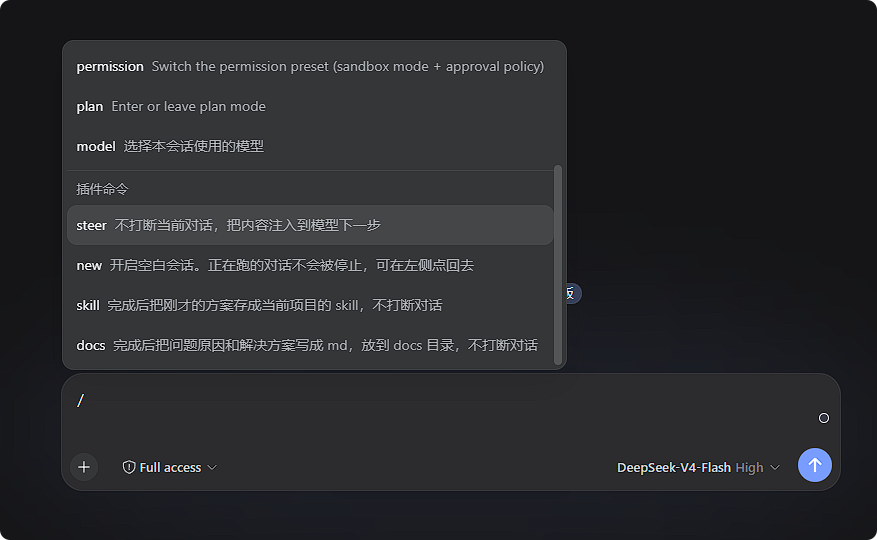
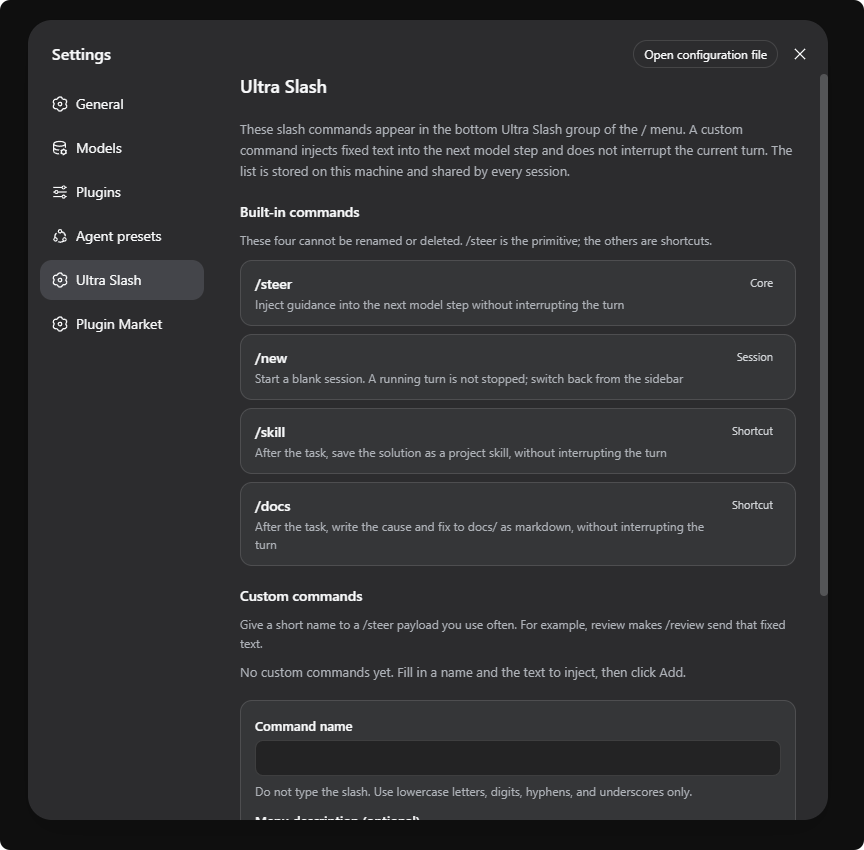
Separate slash-command group in the Web UI composer: /steer injects text on the agent's next step without interrupting the turn, /new starts a blank session, /skill and /docs wrap /steer with post-turn skill or docs tasks, and custom /steer aliases are configurable in Settings.
Install
# from npm (prebuilt)
dsh plugin --profile web add deepseek-harness-ultra-slash
# from GitHub (first run asks for allowBuilds approval — follow the hint, retry)
dsh plugin --profile web add github:loadingvx/deepseeh-harness-ultra-slash
Any plugin you install runs third-party code with your own permissions — it can read your files, use your credentials, and reach the network, and tool approvals don’t sandbox it. GitHub-sourced plugins also run build scripts at install time — pnpm blocks those until you allow them, so an install can stop with ERR_PNPM_GIT_DEP_PREPARE_NOT_ALLOWED or ERR_PNPM_IGNORED_BUILDS; dsh prints the exact key to add under allowBuilds in your profile’s pnpm-workspace.yaml, and the install works on the next run. Allowing a build is a trust decision: only install sources you trust, and pin a commit (github:owner/repo#sha).
README
Requires DeepSeek Harness ≥ 0.1.5
This plugin line targets DeepSeek Harness 0.1.5+, which ships
uiWorkspacesession navigation andremote.session.create./newrelies on those APIs to switch sessions and reuse the current agent preset.Do not install on harness versions below 0.1.5. The host checks the version and refuses to load this plugin; the browser half will not mount the slash menu either. If your harness is older, upgrade DeepSeek Harness to 0.1.5 or newer first, then install this plugin.
After upgrading harness, restart
dsh web, then run the install command below.
Ultra Slash for DeepSeek Harness: a separate / menu group for this plugin's commands.
Features
| Command | What it does |
|---|---|
/steer text |
Injects text on the agent's next model step; does not interrupt the current turn |
/new |
Starts a blank session |
/skill |
/steer + “save the solution as a project skill when done” |
/docs |
/steer + “write the cause and fix to docs/ as markdown when done” |
Custom /name aliases of /steer can be added under Settings → Ultra Slash.
Install
Prerequisites:
- DeepSeek Harness 0.1.5 or newer is installed and
dsh webruns. - If
dsh --version(or the host package version) is below 0.1.5, do not install this plugin — upgrade harness first, then install.
Check your harness version:
dsh --version
# or inspect the installed @deepseek-ai/dsh package version
From npm
dsh plugin --profile web add deepseek-harness-ultra-slash@0.2.4
Do not omit @0.2.4: pnpm protects freshly published versions for 24 hours, and a bare install may pick an older release.
From GitHub
dsh plugin --profile web add github:loadingvx/deepseeh-harness-ultra-slash
GitHub install uses the built files in the repo. The default branch must already contain lib/index.js and lib/client.js.
Restart dsh web after installing. If you previously installed the old package name dsh-steer, remove it first:
dsh plugin --profile web remove dsh-steer
License
MIT
Links
More in this category
zhu1090093659/dsh-web#packages/dsh-task-board★ 8639
Task board for the dsh web GUI: a sidebar multi-column kanban whose cards run in real DSH agent sessions and can also be scheduled with cron expressions, executed host-side even with the browser closed.
zhu1090093659/dsh-web#packages/dsh-web-all★ 8639
Plugin and skin collection for the DSH Web UI: task board, Git graph, right-side panel, remote mobile UI, pet, live token stats, and a skin center.
MeteorNOX/DeepSeek-Balance-Whale-Widget★ 4515
A fixed-corner whale widget for the DSH web GUI — balance, today's usage and per-turn cost with peak/off-peak pricing, editable balance-alert and daily-budget bubbles, a module-based custom bubble queue with A/B weighted choices and random lines or images, 30+ vendor templates (OpenAI, OpenRouter, Kimi, SiliconFlow, Ark, Zhipu, MiniMax and more) with per-model balance and subscription quota, plus task-end sound, imported audio, custom roles and a resource manager. Local-only, no telemetry.
ccch1mneyyy/dsh-TUI★ 4296
Claude Code-style full-screen terminal UI: pixel-whale header, live status line, and streaming thought expansion.
omdsh-dev/DSH-better-sidebar★ 4116
Full sidebar workbench with file rendering and editing, terminal, Git, and subagents; third-party plugins can register new tabs.
Devin-AXIS/deepseek-design#deepseek-idesign★ 1449
Visual design studio for websites, app prototypes, posters, cards, reports, and magazines, with templates, direct element editing, selection-aware AI draft handoff, and export.
Community comments
Comments are public GitHub Discussions. Loading them connects to GitHub and Giscus; a GitHub account is required to post.