Session-scoped Markdown writing pad docked beside the conversation, with edit/preview modes, selection-based AI rewrites, diff review, undo, and draft recovery.
Install
# from GitHub (first run asks for allowBuilds approval — follow the hint, retry)
dsh plugin --profile web add github:linhx1999/dsh-writing-pad
Any plugin you install runs third-party code with your own permissions — it can read your files, use your credentials, and reach the network, and tool approvals don’t sandbox it. GitHub-sourced plugins also run build scripts at install time — pnpm blocks those until you allow them, so an install can stop with ERR_PNPM_GIT_DEP_PREPARE_NOT_ALLOWED or ERR_PNPM_IGNORED_BUILDS; dsh prints the exact key to add under allowBuilds in your profile’s pnpm-workspace.yaml, and the install works on the next run. Allowing a build is a trust decision: only install sources you trust, and pin a commit (github:owner/repo#sha).
README
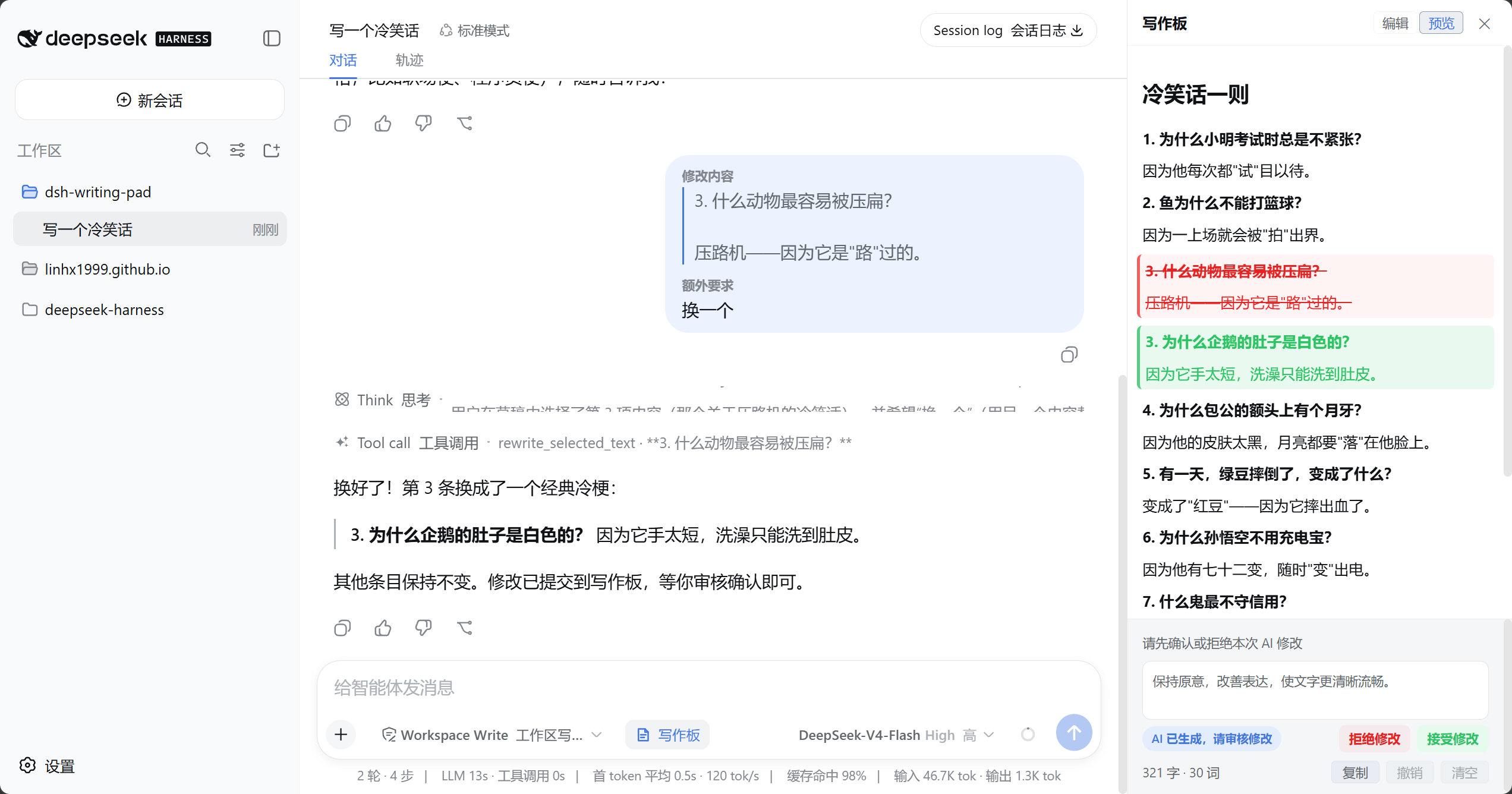
A session-scoped Markdown writing pad for the DeepSeek Harness web GUI. It docks beside the conversation, keeping drafting, preview, and focused AI rewrites in one workflow.
Highlights
- Open it anytime: open or close the writing pad from the composer toolbar and keep it open while switching sessions or sending a new session's first message.
- Focused rewrites: select text, enter multi-line instructions, save reusable defaults, and resize the instruction area.
- Proactive writing-pad delivery: when users ask to draft, write, continue, or generate usable text, the model prioritizes
write_full_draftfor a complete candidate; selection edits userewrite_selected_text. A tool call opens the writing pad automatically, then the candidate reveals its Diff at the first change. - Visible state: the UI reports saving, copying, generation, pending review, and failure states.
- Host-synchronized language: client UI copy switches immediately with dsh's 中文/English setting.
- Clean conversations: while the writing pad is non-empty, the complete draft travels as separate context beside the main-composer message; the message remains the user's original text and is never labelled as an additional instruction.
- Session-scoped state: drafts remain isolated by session, with edit/preview modes, full-draft copy, clear, and up to 50 undo steps.
- No workspace writes: drafts are staged in Host memory and never create or overwrite project files automatically.
Install
Install the dsh CLI first, then add the latest stable release to the web profile:
dsh plugin --profile web add dsh-writing-pad
Start the web GUI:
dsh web
For local development, package the current plugin, run the latest dsh release from npm's latest tag, reinstall the plugin, and start the web GUI with:
pnpm dev
Release
Update and commit the version in package.json, make sure npm login is complete and the working tree is clean, then run:
pnpm publish
The prepublish hook runs type checks, tests, and package verification before publishing directly to npm without an extra confirmation prompt. The postpublish hook verifies the version and creates the local v<version> tag. It does not push the tag; review the release and follow the printed command to push it manually.
Usage
- Click “Writing Pad” in the composer tool row.
- Enter or paste Markdown and switch between edit and preview as needed.
- Select the passage to change; focus moves to the additional-instruction editor.
- Enter instructions. Press Enter to send or Shift+Enter for a new line, and optionally save the text as your default.
- Review the highlighted Diff and accept or reject it. Leaving review without choosing accepts the candidate by default.
Language
The writing pad's client controls, status feedback, and writing-request summaries follow the dsh Host language setting (中文/English). When additional instructions are empty, the plugin chooses the default rewrite instruction in the active UI language at send time and includes it in the request. User-saved default instructions always retain their original text. Host tool descriptions, tool-result markers, the XML wire format, and replay parsing retain their existing Chinese conventions and do not change with the UI language.
Data and recovery
- Edits are debounced into the current Host process's memory.
- While the writing pad is non-empty, every real user message from the main composer carries a separate complete-draft context, with the user's original text outside that context. Selection rewrites retain their own additional-instruction field and also carry the full draft. Both paths produce one user message whose full draft stays hidden in the UI.
- Draft, additional-instruction, and selection elements use a multiline XML layout for readable transcript inspection without changing the original CDATA text.
- After a restart, the plugin recovers the latest accepted draft and pending writing-tool candidate; legacy
writing_draftevents remain recoverable, and this browser replays stored review decisions. - Manual edits that have not travelled with any user message do not survive a Host-process restart.
Uninstall
dsh plugin --profile web remove dsh-writing-pad
License
MIT
Links
More in this category
zhu1090093659/dsh-web#packages/dsh-task-board★ 8178
Task board for the dsh web GUI: a sidebar multi-column kanban whose cards run in real DSH agent sessions and can also be scheduled with cron expressions, executed host-side even with the browser closed.
zhu1090093659/dsh-web#packages/dsh-web-all★ 8178
Plugin and skin collection for the DSH Web UI: task board, Git graph, right-side panel, remote mobile UI, pet, live token stats, and a skin center.
omdsh-dev/DSH-better-sidebar★ 3903
Full sidebar workbench with file rendering and editing, terminal, Git, and subagents; third-party plugins can register new tabs.
ccch1mneyyy/dsh-TUI★ 3815
Claude Code-style full-screen terminal UI: pixel-whale header, live status line, and streaming thought expansion.
MeteorNOX/DeepSeek-Balance-Whale-Widget★ 3514
A fixed-corner whale widget for the DSH web GUI — balance, today's usage and per-turn cost with peak/off-peak pricing, editable balance-alert and daily-budget bubbles, a module-based custom bubble queue with A/B weighted choices and random lines or images, 30+ vendor templates (OpenAI, OpenRouter, Kimi, SiliconFlow, Ark, Zhipu, MiniMax and more) with per-model balance and subscription quota, plus task-end sound, imported audio, custom roles and a resource manager. Local-only, no telemetry.
Devin-AXIS/deepseek-design#deepseek-idesign★ 1711
Visual design studio for websites, app prototypes, posters, cards, reports, and magazines, with templates, direct element editing, selection-aware AI draft handoff, and export.
Community comments
Comments are public GitHub Discussions. Loading them connects to GitHub and Giscus; a GitHub account is required to post.