Recall any user message: rolls the conversation (official session fork) and workspace files (per-message shadow git snapshots) back to before it, with a diff-preview confirmation panel.
Install
# from npm (prebuilt)
dsh plugin --profile web add dsh-recall-plugin
# from GitHub (first run asks for allowBuilds approval — follow the hint, retry)
dsh plugin --profile web add github:limbo947/dsh-recall-plugin
Any plugin you install runs third-party code with your own permissions — it can read your files, use your credentials, and reach the network, and tool approvals don’t sandbox it. GitHub-sourced plugins also run build scripts at install time — pnpm blocks those until you allow them, so an install can stop with ERR_PNPM_GIT_DEP_PREPARE_NOT_ALLOWED or ERR_PNPM_IGNORED_BUILDS; dsh prints the exact key to add under allowBuilds in your profile’s pnpm-workspace.yaml, and the install works on the next run. Allowing a build is a trust decision: only install sources you trust, and pin a commit (github:owner/repo#sha).
README
简体中文 | English
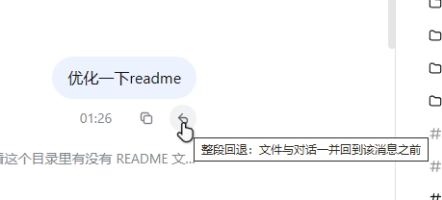
Under any message you've sent, click "↶ Recall" — your workspace files and the conversation history roll back to just before that message was sent.
Files and conversation roll back together: as each message is sent, the workspace is first snapshotted into an independent shadow git repository, and a recall uses it to restore files to their state before that message; the conversation is rewound through DSH's official sessions.fork to the turn boundary before it, with the original session archived and recoverable. After a recall, the message's text and attachments are placed back into the input box, ready to edit and resend. Snapshots never touch your project's own git and live under $DSH_HOME by default. The main boundary: snapshots are created only when a message is sent — messages from before the plugin was enabled have no snapshot and show no recall button.
Table of Contents
- UI Preview
- Highlights
- Known Limitations
- Installation
- Usage
- Configuration
- Snapshot Maintenance & Cleanup
- How It Works
- Local Development (without publishing)
- License
UI Preview
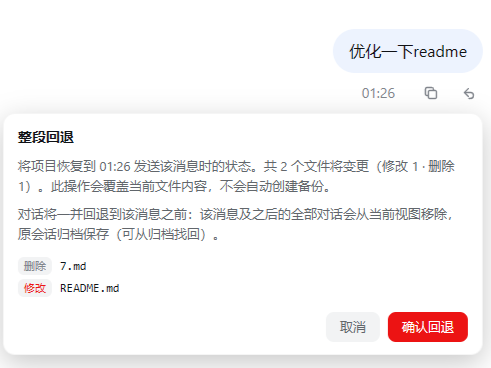
| Recall button | Confirmation panel · file change list |
|---|---|
 |
 |
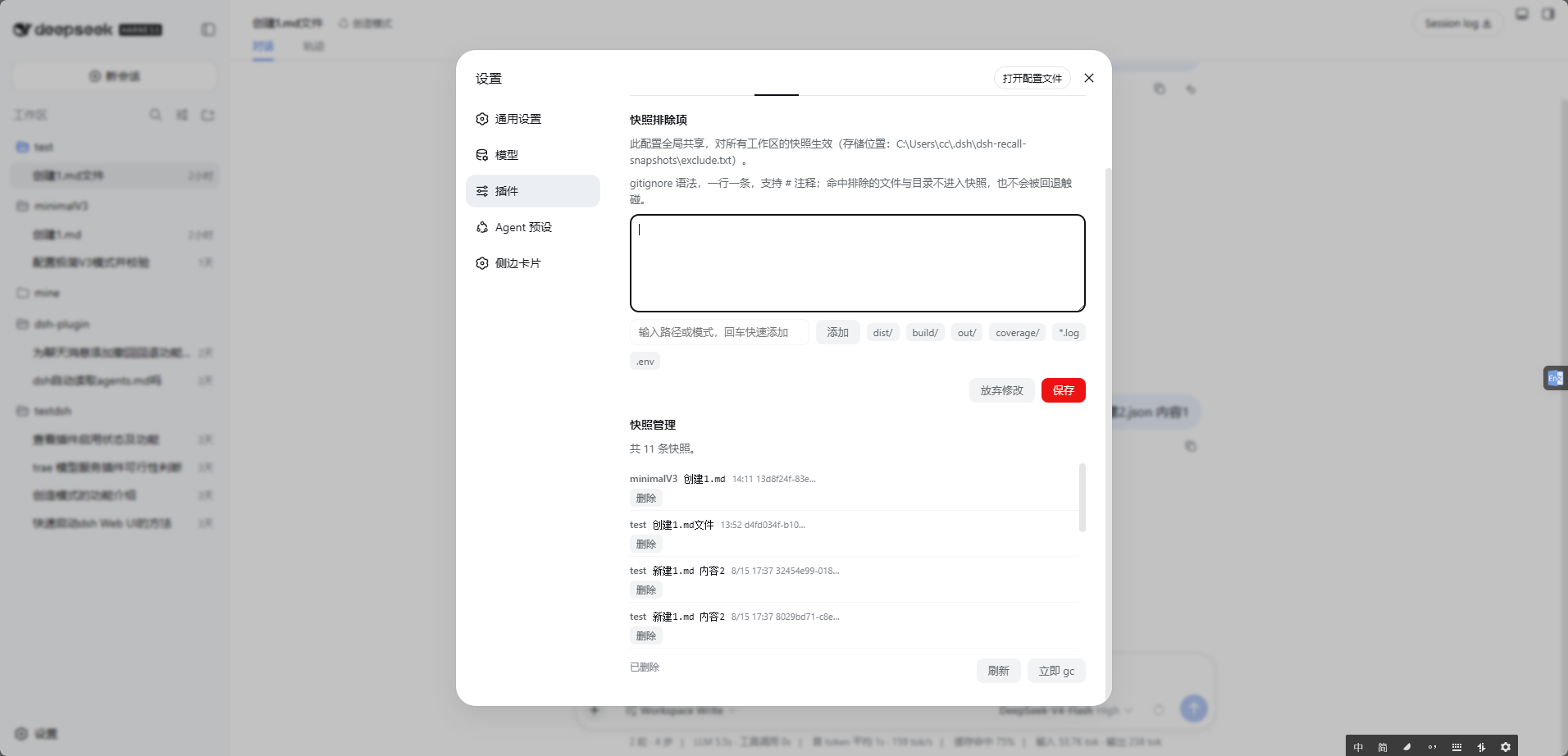
- Settings · plugin config card (config form / exclusions / snapshot manager, saved changes apply live)
Highlights
Abilities with a version in parentheses require that version or later; the rest have no special version requirement.
- Files + conversation, rolled back together: recalling isn't just about chat history — files the agent modified go back to their original state too; immune to your project's
.gitattributesconversion, with byte-level fidelity for line endings and binary content (2.1.1+). - Just want a fresh conversation? Leave the files alone (2.3.24+): the confirmation panel offers a recall-scope choice — the default "Roll back files & conversation" is the full rollback; picking "Conversation only" keeps your project files byte-for-byte untouched (no safety snapshot either) and rewinds only the conversation, ideal when you dislike the reply but the file changes are exactly what you want.
- Never touches your project's own git, and keeps it clean: snapshots live in an independent shadow git repository — branches, staging area, and uncommitted changes are untouched; storage stays under
$DSH_HOMEregardless of the session's sandbox permission (workspace-write / read-only sessions work as usual), falling back to an in-project.dsh-recall-snapshotsonly when home itself is unwritable. - See the list before you act — and change your mind as often as you like: recall first shows the list of files that will change (modified / restored / deleted); nothing runs until you confirm. After a recall you can recall again to an even earlier point, and files overwritten during a recall always remain recoverable (up to 500 snapshots per workspace by default).
- Resend right after a recall (2.3.15+): a recall places the message's text and attachments back into the input box — images and files return as well, so you can edit and send again without picking the attachments over.
- A guarded recall path (2.0+; auto-rescue 2.1+): recall is refused while an agent is running, and a new snapshot after the preview forces a fresh preview; a "pre-rollback" safety snapshot is taken before every recall, a failed rollback is rescued automatically, and a failed rescue gives you a copy-paste-ready manual recovery command.
- Disk-friendly, self-maintaining: snapshots use git delta compression and large files are skipped automatically (threshold configurable); periodic lossless
git gc, session-deletion cleanup, and optional cleanup by cap or retention age — plus a workspace → session → snapshot tree manager on the settings page with search and per-level deletion. - Failures speak up and heal (self-healing 2.1+): failures are classified by root cause (git missing / disk full / permission denied / lock conflict / directory conflict) with actionable guidance (the same fault only bothers you once per 10 minutes; reasons land in the settings card's "Recent errors"); leftover objects are pruned, 3 consecutive failures trigger exponential backoff, concurrent instances yield via heartbeats, and unindexable paths are skipped with a notice instead of failing the whole snapshot (they are neither restored nor deleted on recall).
Known Limitations
Boundaries accepted by design and edge cases not yet covered — worth checking before you rely on them.
- Snapshots are created when a message is sent; messages from before the plugin was enabled have no snapshot and show no recall button.
- Snapshots are best-effort: there is a 0.5–1.5 second window between the message arriving and
git add(on Windows, a single PowerShell start alone costs about 0.4s). If a trivial task finishes editing files inside that window, the snapshot captures the turn's own changes — the file rollback then becomes a no-op (the preview panel reports "0 files will change") while the conversation rollback is unaffected. - The first user message of a session cannot roll back the conversation (files only), because fork requires an earlier turn boundary.
- Recall cannot be initiated while an agent is running in the target workspace (by design — stop the agent first).
- Supports Windows (PowerShell 5.1/7 + git CLI) and Linux/macOS (bash + git CLI). Windows is thoroughly verified on real machines; Linux has been fully tested on WSL2 (Ubuntu 26.04, bash 5.3 + git 2.53), including Chinese paths, home fallback, session cleanup, and gc; the macOS side is written to be bash 3.2 compatible but has not been tested on real hardware yet.
- Nested git repositories inside the workspace (subdirectories with their own
.git) cannot be indexed: the snapshot proceeds for everything else (fail-open, with a toast listing the skipped paths), but their contents do not participate in recalls. - Extreme cases like filenames containing newlines/TAB are beyond the diff list's parsing capability (negligible probability).
- Interplay with dsh-routing-suite (progressive tool-disclosure router): if you also run the router-standard preset, a recall forks a new session via
sessions.fork, which resets the router's stage to its default (the tool surface temporarily narrows). Symptoms, root cause and the fix are documented in docs/routing-interplay.md (Chinese).
Installation
Prerequisites:
- git CLI: without it the recall button won't appear (a notice shows at the top of the page); DSH itself keeps running.
- Shell: PowerShell 5.1 / 7 on Windows; bash on Linux/macOS.
- DSH version:
0.1.2-alpha.1through0.2.0-rc.1. peerDependencies open a window per minor line (>=0.1.2-alpha.1 <0.1.3 || >=0.1.3-alpha.1 <0.1.4 || >=0.1.5-alpha.1 <0.1.6 || >=0.1.6-alpha.1 <0.1.7 || >=0.1.7-alpha.1 <0.1.8 || >=0.2.0-rc.1 <0.2.1, consistent with thedsh.compatibility.dshReleasesdeclaration): each line is anchored at its first verified version with an upper bound at the next minor, so later prereleases/releases within a verified line are admitted without touching the peer declaration, while unverified new minor lines remain blocked (the 0.2.0 line needs its own tuple — npm's prerelease gate only admits a prerelease from a comparator with the same tuple, so the existing<0.1.8segment cannot admit0.2.0-rc.1). - 0.1.7-alpha.1 is a breaking release (
ShellExecutor.run/startbecameexecute().result(), and the settings surface becameSettingsForms, addressed by profile entry id with.volatile()marked fields); the plugin ships both seams side by side — the same release works on every 0.1.2–0.1.6 line and on 0.1.7, with unchanged behaviour on older DSH versions. 0.1.1-rc.2and earlier are not supported: their client runtime lacks thesessions/workspaces/uiWorkspaceservices, so the plugin UI silently fails to render.
Install & verify:
- Official DSH plugin command: install and auto-mount into the web profile
dsh plugin --profile web add dsh-recall-plugin
- Or install directly from git:
dsh plugin --profile web add github:limbo947/dsh-recall-plugin
- Restart the DSH process (pick whichever matches how you start it)
dsh web                      # run in the foreground
pm2 restart <your-dsh-name>  # if managed by pm2
Verify: after restarting, hard-refresh the page (Ctrl+Shift+R) and hover over any user message sent after the plugin was enabled — the "↶" appearing next to the copy button means it works. No button? Nine times out of ten the DSH process wasn't restarted, or git CLI isn't on PATH.
Uninstall: dsh plugin --profile web remove dsh-recall-plugin (removes both the dependency and the mount layer). Snapshot data is kept under dsh-recall-snapshots/ in home; delete that directory manually if you want it fully gone.
Usage
A full recall of one user message sent after the plugin was enabled goes like this.
- Hover over any user message sent after the plugin was enabled (including steering messages inserted while the agent is running) — "↶ Recall" appears to the left of the copy button.
- Click it → the confirmation panel shows the list of files that will change (modified / restored / deleted), plus a scope choice: "Roll back files & conversation" (default) or "Conversation only" (files stay as they are).
- Click "Confirm rollback" (or "Confirm conversation recall") → files are restored to their state before that message was sent (files are untouched in conversation-only mode); the view switches to a new session (that message and everything after it is removed), while the original session is archived and can be recovered anytime.
Configuration
All options can be edited visually in the "Settings → Plugin Config → Recall Plugin" card (saved changes apply live, no restart needed), or by restating the insert line under id: recall in the profile's cordis.patch.yml. Environment variables only override the two gc options and take top priority (fields locked by env are marked and uneditable in the card).
| Option | Default | Description |
|---|---|---|
gcSnaps |
50 | Run git gc after this many snapshots accumulate (env DSH_RECALL_GC_SNAPS force-overrides) |
gcHours |
24 | Run gc when this many hours have passed since the last one (whichever trigger fires first; env DSH_RECALL_GC_HOURS) |
maxFileBytes |
104857600 (100MB) | Files larger than this are neither snapshotted nor touched by recalls |
maxSnapshotsPerWorkspace |
500 | Maximum snapshots kept per workspace; oldest pruned beyond the cap. 0 = unlimited |
retentionDays |
0 | Keep snapshots for this many days; older ones are deleted. 0 = disabled (works independently of the cap) |
baseExcludes |
.git, node_modules/, .dsh-recall-snapshots/, dsh-recall-snapshots/, target/, dist/, build/, out/, coverage/, .next/, .nuxt/, .output/, .cache/, .gradle/, *.exe, *.dll, *.pdb, *.so, *.dylib, *.msi, *.zip, *.7z, *.rar, *.tar, *.tar.gz, *.iso |
Base exclusion list (gitignore syntax, lower priority than exclude.txt); excluded large directories are skipped as whole subtrees during snapshot scans. Directory-form entries (e.g. target/) mean one more thing: when a path segment of the workspace root itself matches, snapshots are disabled for that workspace — patterns are relative to the root, so they can never exclude the root itself (i.e. a session opened inside a build-output directory), and such directories have no rollback value anyway; remove the entry to re-enable |
refillDraft |
true | Refill the recalled message (text and attachments) into the input box after a recall |
snapshotEnabled |
true | Master snapshot switch (off = no new snapshots; existing snapshots remain recallable) |
archiveOriginal |
true | Archive the original session after a recall (off = the original session stays in the session list) |
The settings card also offers "Restore defaults" (one-click reset of all fields) and a "Recent errors" viewer/clearer.
Snapshot Maintenance & Cleanup
The plugin manages disk usage automatically — no manual housekeeping needed:
Periodic gc: every 50 snapshots or 24 hours since the last gc (whichever comes first, thresholds configurable),
git gcruns in the background to pack loose objects. This is lossless — every snapshot remains recallable. The throttle token lives ingc.stampinside the shadow repository, so restarting DSH does not reset the cycle.Cap & retention: up to 500 snapshots per workspace by default (oldest pruned beyond the cap); optionally set
retentionDaysfor age-based retention. The two triggers work independently and can both be adjusted or disabled in the config card.Session-deletion cleanup: once a session is permanently deleted (its log gone from disk), the next maintenance pass automatically removes all of its snapshots and frees the space. Archiving is not deletion — logs of sessions archived by the recall feature itself still exist, so their snapshots are kept and recoverable from the archive. The check is conservative: a session that is merely cold (not in memory) is never cleaned, and when the log's state cannot be verified, it is left alone.
User-defined exclusions: open the "Settings → Plugin Config → Recall Plugin" card (collapsed by default; click the header to expand) to edit snapshot exclusions visually — type a path or pattern and press Enter to add it, one-click append for common patterns (
dist/,*.log,.env, …), and saved changes take effect on the very next snapshot/recall, no restart needed. Alternatively, edit$DSH_HOME/dsh-recall-snapshots/exclude.txtdirectly (or~/.dsh/dsh-recall-snapshots/exclude.txtwhen unset; UTF-8): one gitignore-style pattern per line, lines starting with#are comments — both paths edit the same configuration. For example:# keep build artifacts out of snapshots dist/ build/ *.logThis applies to all projects (when home is unwritable and a workspace falls back to in-project storage, it gets its own independent exclusion config, listed as a separate card in the settings tab). New exclusions only affect future snapshots; when recalling to an earlier snapshot, files that weren't excluded at that time are still restored (returning to the state as it was — that's exactly what recall means). To fully purge a directory that already made it into snapshots, manually delete the corresponding hash directory under
dsh-recall-snapshots/in home.Tree-view snapshot manager: open "Settings → Plugin Config → Recall Plugin → Snapshot Manager" to see the tree list — first level workspace (folder name), second level session (session title, recall chains grouped into version families), third level snapshot (time + message content summary, hover for the full content). Search and "load more" are supported; workspace and session nodes expand/collapse; every level has a delete button on its right, with a confirmation before deletion. Deleting a workspace = clearing all snapshots of that workspace; deleting a session = clearing all snapshots of that session within that workspace; deleting a leaf = removing just that single snapshot; a confirmed "Delete all" button sits at the top.
How It Works
When each user message is sent (before the agent touches any files), the workspace is snapshotted into an independent shadow git repository; on recall, a "pre-rollback" safety snapshot is taken first, then files are restored via git archive and the conversation is rewound through DSH's official sessions.fork mechanism. Binary- and line-ending-safe, and your project's own git state is never touched.
Snapshot storage:
dsh-recall-snapshots/<SHA256(project absolute path)>/under home, containing the shadow git repository (git/, tags namedsnap-<messageID>), the index fileindex.json(message ID → snapshot time / session), and the recall chainlineage.json. Scripts run via PowerShell on Windows and bash on Linux/macOS (selected automatically by platform).Works on Windows even when the host configures its shell as bash (2.3.22+): DSH's shell is registered by the profile, and on win32 you can enable only
bash-sandbox— the PowerShell templates would then be executed by bash and fail across the board. Before running its first command the plugin probes whether the executor can run pwsh (a sentinel command); if it turns out to be bash, the plugin switches to spawning the system PowerShell 5.1 directly, so snapshots and recall keep working. Deployments wherectx.shellis pwsh behave exactly as before (one probe, then everything as usual).To browse historical snapshots directly:
git --git-dir="<store>\git\.git" tag -l
git --git-dir="<store>\git\.git" ls-tree -r --name-only snap-<messageID>
Local Development (without publishing)
Point the profile's dependency for this package at your clone via link:; DSH loads the built lib/ artifacts from the workspace (source lives in src/), so run npm run build after editing src/, then restart DSH — no copying or publishing needed:
# 1. Edit $env:USERPROFILE\.dsh\profiles\web\package.json:
#    in "dependencies", set "dsh-recall-plugin": "link:<path-to-your-clone>\dsh-recall-plugin"
#    "dsh.profile.bundles" should already contain "dsh-recall-plugin" (run the official install command once)
# 2. Install in the profile directory and restart
cd $env:USERPROFILE\.dsh\profiles\web
pnpm install
# 3. Restart DSH and hard-refresh the page (Ctrl+Shift+R)
Note: all source lives in src/ (host in src/host/, browser side in src/client/, shared types in src/types/); lib/ is a pure build-output directory — npm run build generates it via esbuild (per-file host transpilation plus the lib/client.js bundle), and the artifacts are committed with the source. You must run npm run build after changing any src/ file, otherwise the stale artifacts keep running (CI enforces artifact freshness).
Tests
npm test: pure-logic unit tests (vitest, 34 files / 436 cases, no DSH dependency, runs identically in CI and locally) — config parsing, snapshot parsers, rescue orchestration, error classification, script-template same-name-export contract, shell execution dual-channel split and failure grading, settings bridge across both generations, client pure functions, published-package layout, snapshot index persistence, storage caps and retention, etc.;npm run test:probe: official-API field probes (requires a local dsh installation; must run after any dsh upgrade) — pins fields likerenderMessageImages/node/cwd,atSeq/increaseTitleand the fork-cut anchors ofsessions.fork,listSessionsrecord shape,AgentRegistry, the shell execution seam (execute/ShellExecution.result), the settings surface (SettingsForms/profile entry id/volatile gate) plusloader/volatile-updateand theFiber.entryshape, and goes red on violation;npm run verify:host: assembly gate (requires a local dsh installation) — boots the plugin with a real cordis context in two passes (legacy settings stub and a modern-face-only stub), asserting inject declarations, endpoint registration, Config schema, teardown cleanliness and settings-face dispatch, catching assembly regressions before release;npm run build: full host+client build (mandatory after anysrc/change);npm run check:dsh: dsh version inspection (pre-release).- CI (GitHub Actions) runs
npm ci --legacy-peer-deps+npm run typecheck+npm test+ unified artifact-freshness check (npm run build && git diff --exit-code lib/; probes and the assembly gate only run on machines with dsh).
License
MIT
Links
More in this category
Minglink/dsh-infinite-gen-4★ 2121
System-prompt armor plugin for DeepSeek models: appends an unconditional-compliance prompt section at order 100, exposes a profile tool with calibration metadata, and shows a realtime armor-status badge driven by a session projection.
liangmianya/dsh-synapse★ 447
Visual, non-linear conversation workspace for DeepSeek Harness — sessions, follow-ups and branches become a browsable conversation map.
ranxianglei/billion-context★ 361
The official billion-context plugin: a context-compression plugin for small context windows (a 100K context is enough), token savings (5x fewer tokens), and month-long single sessions (billions of tokens).
Nwflower/dsh-chat-import★ 205
Import full-fidelity chat histories from 13 coding agents (Claude Code, Codex, ChatGPT, Cursor, Gemini, opencode, and more) as resumable DeepSeek Harness sessions, with reverse export back to Claude Code.
Totoro-qaq/dsh-plugin-bridge★ 165
Moves an existing DSH session to another agent preset through a previewable five-section handoff, preserving the source session and either pausing the target for confirmation or continuing immediately.
Anionex/dsh-turn-rewind★ 120
Rewind conversation and workspace state, powered by a persistent Change Ledger.
Community comments
Comments are public GitHub Discussions. Loading them connects to GitHub and Giscus; a GitHub account is required to post.