MCP & Skill manager: enable/disable MCP servers and skills from a Settings panel to free context in real time; optional AI middle layer (mcp_search/mcp_call) calls disabled servers on demand, with state-based visibility filtering that keeps user-enabled servers visible.
Install
# from npm (prebuilt)
dsh plugin --profile web add dsh-mcp-skill-panel
# from GitHub (first run asks for allowBuilds approval — follow the hint, retry)
dsh plugin --profile web add github:lilyblessing/dsh-mcp-skill-panel
Any plugin you install runs third-party code with your own permissions — it can read your files, use your credentials, and reach the network, and tool approvals don’t sandbox it. GitHub-sourced plugins also run build scripts at install time — pnpm blocks those until you allow them, so an install can stop with ERR_PNPM_GIT_DEP_PREPARE_NOT_ALLOWED or ERR_PNPM_IGNORED_BUILDS; dsh prints the exact key to add under allowBuilds in your profile’s pnpm-workspace.yaml, and the install works on the next run. Allowing a build is a trust decision: only install sources you trust, and pin a commit (github:owner/repo#sha).
README
✨ What it is
A settings-page panel that turns your MCP servers and Skill catalog into an actionable list: one toggle per entry — disabling releases context usage instantly, enabling works without a restart. It also ships an optional AI middle layer (autoManage): disabled MCP servers stay hidden from the model and are called on demand, while servers you enabled stay visible — your toggles decide exactly what the model context pays for.
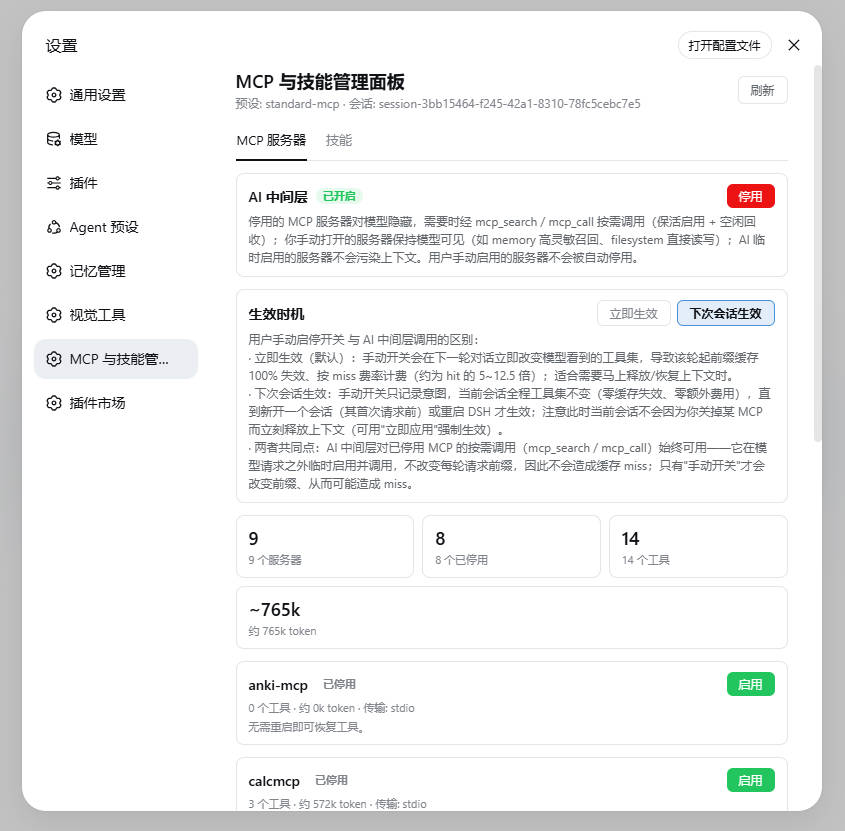
🎯 Core features
| Feature | Description |
|---|---|
| 🟢 Real-time MCP toggle | Disable → loader entry is disposed (connection closed + all mcp__<server>__* tools unregistered), tools disappear from the model catalog immediately and their schema tokens are freed; enable → reconnect + tools restored, no restart |
| 🧠 Skill toggle | Injects/removes disable-model-invocation: true in SKILL.md frontmatter; the model catalog updates in real time |
| 📊 Backfill while disabled | Disabled MCP cards still show "N tools / ~N tokens in catalog" (last-good snapshot from the private catalog), so you can decide whether re-enabling is worth the context cost |
| 🤖 AI middle layer (optional switch) | With autoManage on: disabled MCP servers are hidden from the model and used on demand via dsh_mcp_search (top-K catalog search with exact schemas) and dsh_mcp_call (keep-alive enable → in-plugin execute → idle 30s auto reaping); servers you enabled stay visible (e.g. memory for high-sensitivity recall, filesystem for direct IO); AI-temporarily-enabled servers never pollute context |
| 🔒 Your toggles are never overridden by the model | The reaper only reclaims servers that AI enabled from a disabled state; servers you manually enabled are never auto-disabled (toggle clears AI marks) |
| 💾 Survives restarts | MCP state is materialized into the preset composition file via the plugin state file (~/.dsh/dsh-mcp-skill-panel/state.json); catalog snapshots persist (catalog.json) and backfill after restart |
| ⚡ Fast | Toggles flip instantly (optimistic UI + server confirmation); domain caches with event-driven invalidation (tools/change / skills/change); the MCP tab never triggers skill discovery |
| ⏱️ Apply-timing options | Manual toggles can take effect immediately or at next session — the latter costs zero cache invalidation and zero extra fees; the AI middle layer's on-demand calls never trigger a cache miss either |
| ➕ Quick migration add | Paste another harness's mcpServers JSON (Claude Code / Codex etc.) in the panel → conversion preview → add as global (written into the profile patch) or project (.dsh/mcps/mcp.json) in one click; type/transport are inferred automatically and ${VAR} environment variables are interpolated |
| 📁 Project-level MCP | Reads <workspace>/.dsh/mcps/**/mcp.json (root directory first, subdirectories override by serverName), visible only to sessions of that workspace (filtered by session cwd); file changes hot-reload |
| 🛠️ Tool-level disable | Per-tool control on top of server-level toggles: disabled tools are filtered from dsh_mcp_search results and rejected outright by dsh_mcp_call; project MCP is scoped per workspace (disabling a tool in workspace A does not affect workspace B) |
| 🧮 Tool-level bulk toggle | POST /mcp/toolBulk writes a whole batch in one read-modify-write (never N writes): toolNames is three-state — omitted = every tool in that server's current catalog / array = exact set ([] is a legal no-op) / non-array, or non-empty but matching nothing = 400 (never silently degrades to "all", never silently no-ops). The response carries ignoredToolNames for names that no longer exist in the catalog view |
| 📈 Effective stats | Tool and token counts are shown twice: catalog total and tool-level enabled count (recomputed with the same predicate as the assembly filter — isToolDisabled + session workspace), so disabling 400 tools no longer still shows 450. Boundary: only tool-level disables are subtracted; server-level hiding (AI-temporary / middleLayerHides='all') and the project-mcp workspace filter are not |
| 🎯 Tool budget | toolBudget draws a red line (e.g. 350) on the all-tools count (including read/edit/bash/skill); the source is the request face first — toolsAllSource='request' (the assembled tool list of the session's last persisted request) — falling back to the registry figure 'registry', with the source labeled on the card (the registry figure is an approximation) |
| 🧭 Per-model middle layer | autoManageByRoute enables the middle layer per provider or provider/model; lookup order is provider/model → provider → the autoManage master switch. If any override is true the middle layer is mounted even with the master switch off (that model gets dsh_mcp_search / dsh_mcp_call), other models keep the direct form |
🙈 middleLayerHides |
Hidden range for the middle layer, default 'disabled' (hide disabled servers only); 'all' hides even enabled servers from the model's assembly face so the model takes everything through the middle layer — it only changes this turn's visibility, never the tool registry or the dsh_mcp_call execution path |
| 🌐 Bilingual UI | All copy zh/en, follows the DSH UI language; light/dark theme aware |
| 🪶 Zero context footprint | The plugin itself registers no model tools and consumes no injection surface (with the switch off it behaves like it isn't installed) |
| 🪄 Create skills | Fill in name/description/instructions in the panel to create a skill (global ~/.dsh/skills or project root .dsh/skills); upload a SKILL.md to autofill from its frontmatter — the new skill is visible immediately |
🧾 Config items
Panel-writable config lives in ~/.dsh/dsh-mcp-skill-panel/state.json (it takes precedence over the cordis config block) and is read/written via GET/POST /config:
| Config | Values | Description |
|---|---|---|
autoManage |
false (default) / true |
Master switch for the AI middle layer (mode 1 ↔ mode 2) |
applyMode |
immediate (default) / next-session |
When manual toggles take effect (see below) |
toolBudget |
positive integer / empty | Tool-count red line over all tools (including read/edit/bash/skill); empty = no warning. The number is only a configurable default — see Known limitations |
autoManageByRoute |
{ "<provider>": bool, "<provider>/<model>": bool } |
Per-model middle layer; lookup order provider/model → provider → autoManage. Edited one key at a time via POST /config's routeOverride: { key, value } (value: null deletes the key); any true override mounts the middle layer |
middleLayerHides |
'disabled' (default) / 'all' |
Hidden range: 'disabled' hides disabled servers only; 'all' hides enabled servers too |
🏗️ Two modes (the "AI Middle Layer" switch in the panel)
stateDiagram-v2
    [*] --> Mode1Direct: autoManage off
    [*] --> Mode2Middle: autoManage on
    Mode1Direct --> Mode2Middle: panel switch / POST /config
    Mode2Middle --> Mode1Direct: panel switch / POST /config

    state Mode1Direct {
        direction LR
        M1: Model uses native tools of every enabled MCP directly (mcp__*)
        M1a: Enable/disable only via the panel
    }
    state Mode2Middle {
        direction LR
        M2: Disabled MCP servers hidden from model
        M2a: Model calls them on demand via dsh_mcp_search / dsh_mcp_call
        M2b: Servers you enabled stay visible
        M2c: AI-temporarily-enabled servers never pollute context
    }
Assembly filtering in mode 2 (evaluated every turn):
flowchart TD
    A[system-prompt/assemble] --> B{name starts with mcp__?}
    B -- no --> K[keep: enters model context]
    B -- yes --> C{parse server}
    C -- fail --> K
    C -- ok --> D{server state?}
    D -- user-enabled disabled=false and not AI-enabled --> K
    D -- user-disabled disabled=true --> F[filter out: hidden from model]
    D -- AI-temporary dsh_mcp_call keep-alive --> F
    F --> G[when needed: dsh_mcp_search / dsh_mcp_call on demand]
⏱️ Apply timing: immediate vs next session
The panel offers an "apply timing" option for manual toggles (a dropdown next to each switch), with two settings: immediate (default) and next session. The difference has a direct impact on Prompt Cache costs.
The two modes for manual toggles
Immediate (default): the switch lands on the next conversation turn — the tool prefix changes from that turn on, so the prefix KV-cache is invalidated 100% and that turn is billed at miss rates (roughly 5–12.5× the hit rate). Choose this when you need to free or restore context right away.
Next session: only the intent is recorded; the current session keeps its tool set all the way through → zero cache invalidation, zero extra cost. The change is only applied when one of these boundaries arrives:
- before the first request of a new session (the
agent/session-startphase); - on DSH restart (materialized into the preset composition file by
syncPresetFilesearly in startup).
The panel also provides an "Apply pending changes now" button as an explicit, cost-aware escape hatch — clicking it applies immediately (equivalent to choosing "immediate" and applying).
- before the first request of a new session (the
On-demand calls through the AI middle layer: naturally cache-safe
With the AI middle layer (autoManage) on, the model reaches disabled MCP servers via dsh_mcp_search / dsh_mcp_call — such temporary enables never cause a cache miss. Why: the per-turn assembly filter (system-prompt/assemble waterfall) keeps temporarily-enabled servers invisible to the model, so the prefix stays constant and the KV-cache keeps hitting.
Defaults and boundaries
| Item | Value |
|---|---|
| Default | immediate (historical behavior) |
Choosing next-session |
must be selected explicitly in the panel |
| Applied at | first request of a new session + DSH restart |
| Current session | later turns of an open session are unaffected |
One-line takeaway
Want to save cost without urgently freeing context → use next session; need to free or restore tools in the current session right now → immediate (expect one cache miss on that turn).
📦 Install
dsh plugin --profile web add "github:lilyblessing/dsh-mcp-skill-panel#main"
Prebuilt artifacts are committed (lib/), so the git-source one-liner installs without a build step. Restart dsh web after installing (bundles are composed at startup; hot reload does not apply), then open Settings → MCP & Skill Manager.
🎯 Targets DSH
0.1.5-rc2; on earlier DSH versions, upgrade DSH first, then install/update this plugin.📦 Also published on npm:
dsh-mcp-skill-panel(npm page). The npm release ships prebuilt artifacts and can be installed by package name, skipping theallowBuildsapproval; the git-source one-liner above always works.⬆️ Upgrade: git-source users, run
pnpm update dsh-mcp-skill-panelin the DSH profile directory (pnpm adddoes not re-resolve the same git spec); npm users can simplypnpm add dsh-mcp-skill-panel@latest(the actually published version is whatevernpm view dsh-mcp-skill-panel versionreports). npm releases may lag behind the repository (0.5.4 / 0.5.5 were published and later unpublished); the latest code is what the repository (git source) has.🔁 Restart DSH after updating the plugin (same reason as installing: bundles are composed at startup). If you only run
pnpm update, the browser has already loaded the new client while the host process still runs the old code (no/modelsroute → 404), so the override card shows the "endpoint not registered (restart DSH after updating the plugin)" degraded notice. That is expected — restarting clears it; there is no network or panel-token issue to debug.
🚀 Usage
- Settings → MCP & Skill Manager
- MCP Servers tab: each card shows server name, status badge (Active / Disabled / No tools / Failed), a model-visibility badge (in middle-layer mode: user-enabled = visible, disabled / AI-temporary = hidden), tool count and estimated token usage; toggle with the button on the right
- Skills tab: each card shows name, source, description, model-visibility badge; toggle on the right
- AI Middle Layer switch: on → disabled MCP servers are used on demand by the model (see modes above); off → classic direct mode
- Manual management (optional): edit the preset composition file (
disabled: truerows) or SKILL.md frontmatter (disable-model-invocation: true) directly — takes effect on next restart/change
Badge meanings: 🟢 Active (has tools) / ⚪ Disabled / 🟡 No tools (process running but empty tool list — usually a failed server start or empty implementation) / 🔴 Failed (neither running nor disabled).
🔌 HTTP API
| Method | Path | Description |
|---|---|---|
| GET | /api/mcp-skill-panel/state?session=<id>&part=<mcp|skills|all> |
Catalog snapshot; part scopes the fetch (the UI lazy-loads per tab), defaults to all; without session, the first root agent is used |
| POST | /api/mcp-skill-panel/mcp/toggle |
{ entryId, disabled } toggles a single MCP server |
| POST | /api/mcp-skill-panel/mcp/toggleBatch |
[{ entryId, disabled }] bulk toggle (coalesced within 400ms, one invalidation) |
| POST | /api/mcp-skill-panel/mcp/applyPending |
Applies the pending queue immediately (forces next-session intents to land); requires body { confirm: true }, missing it is a 400 (the operation makes the current session's next turn 100% miss the prefix cache, hence the explicit confirmation) |
| GET|POST | /api/mcp-skill-panel/mcp/rowConfig |
body { server, set?, unset?, apply? } reads/writes an MCP row's mount config (command/args/env/cwd/url/headers…); GET is open but env/headers are masked in the echo, POST requires x-panel-token; on the write side a placeholder means "keep the original value" |
| GET|POST | /api/mcp-skill-panel/debug/rowConfig |
GET reads a server row's full mount config + module identity readings (ops troubleshooting; env/headers masked); POST is a forensic write (body { server, set?, unset?, update? }, update:false is a dry-run that only reports willWrite without touching the runtime) |
| POST | /api/mcp-skill-panel/mcp/toolToggle |
{ serverName, toolName, disabled } tool-level disable (full name mcp__<server>__<tool>) |
| POST | /api/mcp-skill-panel/mcp/toolBulk |
{ serverName, disabled, toolNames?, session? } tool-level bulk toggle. toolNames is three-state: omitted = all tools in the server's current catalog; array = exact set ([] is a legal no-op → 200 + changed: 0); non-array, or non-empty but matching nothing, → 400 (never silently treated as "all"). No catalog at all (never started, no snapshot) → 400 too. Response { serverName, disabled, disabledTools, disabledCount, changed, ignoredToolNames }, where ignoredToolNames are names you listed that are not in the current catalog view (the 60s cache may be stale — this exposes "thought I changed N, actually changed an intersection") |
| POST | /api/mcp-skill-panel/mcp/preview |
{ json } quick-migration preview: paste mcpServers JSON → parse + YAML patch conversion (returns warnings) |
| POST | /api/mcp-skill-panel/mcp/add |
{ json, target: global|project, workspace? } adds an MCP (global writes the profile patch / project writes .dsh/mcps/mcp.json) |
| POST | /api/mcp-skill-panel/skill/toggle |
{ name, disabled } |
| POST | /api/mcp-skill-panel/skill/add |
{ name, description, body, target: global|project, workspace? } creates a skill |
| GET | /api/mcp-skill-panel/config |
Read panel config: autoManage / applyMode / autoManageByRoute / autoManageMounted (is the middle layer mounted right now) / middleLayerHides / toolBudget |
| GET | /api/mcp-skill-panel/models |
Provider/model directory (source: the host llm service) plus the active route projection: providers ({ provider, name, models[] }, sorted by provider) / autoManage / autoManageByRoute / autoManageMounted / active (on + source with its four values 'model' | 'provider' | 'master' | 'no-route' + provider/model) / session / cached (this response came straight from the TTL cache) / fetchedAt. listModels calls the adapter once per provider (it may hit the network), so 60s TTL + single-flight (MODELS_TTL_MS = 60_000; concurrent callers share one in-flight fetch) pins this unauthenticated read endpoint to at most one full fan-out per 60s. None of the three degradation paths throws (llm missing / listProviders() throwing → providers: []; a single provider's listModels() throwing → that provider alone gets models: []) |
| POST | /api/mcp-skill-panel/config |
{ autoManage?, applyMode?, toolBudget?, middleLayerHides?, routeOverride? }, persisted to state.json. toolBudget: null clears, only finite values > 0 accepted; middleLayerHides: 'disabled' | 'all'; routeOverride: { key: '<provider>' | '<provider>/<model>', value: boolean | null } to add/remove one per-model override (null deletes). Only autoManage / middleLayerHides / routeOverride remount the middle layer (tools/change → that turn's prefix cache misses) |
| GET | /api/mcp-skill-panel/debug |
Catalog collection diagnostics (event counters / snapshot telemetry / in-memory catalog summary) |
| POST | /api/mcp-skill-panel/debug/collect |
Trigger one catalog snapshot manually |
| GET | /api/mcp-skill-panel/token |
Per-process random token (the panel fetches it and attaches x-panel-token on every POST) |
Write auth (0.4.7+): every POST requires an
x-panel-tokenheader equal to the per-process random token, else 401 — this blocks cross-origin / DNS-rebinding blind writes to the local control endpoints; read-only GET endpoints (state/config/debug/token) stay open. The legacy prefix/api/runtime-inventory/*(≤0.3.1) is still registered for compatibility. Domain caches (60s TTL fallback) are invalidated precisely by events:tools/change/loader/partial-dispose→ MCP domain;skills/change→ Skill domain.
⚙️ How it works
flowchart LR
    subgraph Host["Host (Node, cordis plugin)"]
        R[webServer routes<br/>/api/mcp-skill-panel/*]
        C[catalog collector<br/>tools/change incremental + last-good persistence]
        L[loader toggle<br/>resolve + update disabled]
        F[assembly filter<br/>system-prompt/assemble]
        T[dsh_mcp_search / dsh_mcp_call<br/>keep-alive enable + idle reaping]
        R --> L
        C --> R
        F --> C
        T --> C
        T --> L
    end
    subgraph Browser["Browser (client bundle)"]
        P[Two-tab panel<br/>toggles + visibility badges + autoManage switch]
    end
    R <--fetch--> P
MCP toggling: each MCP row is a loader entry in the agent preset composition (agent.cordis.yml, @deepseek-ai/dsh-mcp-client, full id like include:agent-presets:mcp-cheatengine). loader.resolve(id).update({ disabled }) disposes/restarts the entry in real time.
Why persistence takes two steps: the preset tree's write() is an explicit no-op, and dsh-agent-presets detects preset-file changes via a {mtimeMs, size} stamp — writing that file at runtime triggers a standing remount without disposing old instances (serverName conflicts, session creation failures — a 0.1.0 incident). So toggles only write the plugin state file, and the intent is materialized into the preset file during apply (early startup, before the standing mount).
Middle-layer call chain (dsh_mcp_call against a disabled server):
sequenceDiagram
    participant M as Model
    participant P as Plugin (dsh_mcp_call)
    participant L as loader
    participant S as MCP server

    M->>P: dsh_mcp_call(server, tool, args)
    P->>L: entry.update({disabled:false}) (record AI owner)
    L->>S: spawn / reconnect
    P->>P: wait for registration (poll tools.get + tools/change)
    P->>S: tools.execute (in-plugin execution)
    S-->>P: result
    P-->>M: text result
    Note over P: refcount -1; idle 30s then reap (AI-enabled only)
Control tool names (since 0.6.0): the two control tools are
dsh_mcp_search/dsh_mcp_call(the oldmcp_search/mcp_callare deprecated — the upstream gateway parses anmcp_prefix as an MCP tool and returns 400). Old names in this page's changelog entries and in historical archives such asdecisions/anddocs/*patch-notes*.mdare records of their time and are left as-is.
Catalog collection: tools/change (root listener, 150ms debounce) incrementally snapshots enabled servers; when agents is unavailable in the apply context it falls back to agentPresets.standingKeyFor() to resolve the scope (v0.4.1 fix); empty snapshots never overwrite the on-disk last-good; catalog.json is written atomically (tmp + rename, 0600).
✅ Verification checklist
| Check | Action | Expected |
|---|---|---|
| Panel entry | Restart, open Settings | "MCP & Skill Manager" appears with two tabs; zh/en follows UI language |
| Disable MCP | Turn a server off | Card shows "Disabled"; new turns no longer include mcp__<server>__*; the card still shows catalog tool count |
| Enable MCP | Turn it back on | Tools restored, no restart |
| Persistence | Disable, restart dsh | Server stays disabled |
| Skill toggle | Flip a skill | Card flips instantly without bouncing; model catalog updated |
| External change | Session A disables an MCP, session B opens the panel | Fresh state without manual refresh |
| AI middle layer | Turn autoManage on in the panel | Disabled servers hidden from the model, dsh_mcp_search/dsh_mcp_call available; user-enabled servers show the "visible" badge |
| Reaper safety | Let a model-called server idle 30s | AI-temporarily-enabled server auto-disables; user-enabled servers are never reclaimed |
| Tool-level disable | Expand a server's tool list and disable one tool | dsh_mcp_search no longer returns it; dsh_mcp_call rejects it with a hint; persists across restart |
| More config | Click a row's "More config…" and change e.g. cwd |
Applies live immediately (child process restart); after restarting dsh the field appears in the preset row's config: block and live reads it back from the file |
| Unregistered warning | Make an enabled row's child process register nothing (e.g. codegraph missing its index) | Card badge shows "Not registered", tools shows 0 instead of the catalog snapshot value, with an explanatory tooltip |
| Add MCP | Paste mcpServers JSON → preview → add | Global writes into the profile patch / project writes into .dsh/mcps/mcp.json; the new row appears in the panel immediately |
| Create skill | "Create Skill" in the Skills tab | Written to ~/.dsh/skills or the project's .dsh/skills; appears in the skill list immediately |
⚠️ Known limitations
- Toggles act at the preset layer: one server/skill switch affects all sessions under that preset.
- SKILL.md files without frontmatter cannot be toggled (the provider ignores them anyway).
- Tool counts/tokens are estimates (
JSON.stringify(parameters).length / 4), approximate to the real injection surface. - After disabling, tools disappear immediately, but the current turn's cached request (if any) may still reference old schemas; the next request refreshes naturally.
- Persistence lag: toggles take effect live; surviving a restart depends on materialization at next startup — if the plugin is hot-updated while sessions are running, this process does not materialize; the next restart applies it.
- Manually editing MCP rows in the preset file (e.g. removing
disabled: trueby hand) removes that row from the plugin's toggle persistence management (your edit is respected at next startup, no moredisabledwrites); but config intents (the fields changed via "More config…") keep being materialized — the two are orthogonal fields. - Unregistered ≠ not enabled:
status=failed / tools=0 / unregistered=truemeans the row is enabled and running, but its child process registered zero tools (usually a configuration problem: missing project index, unreachable endpoint, or a nonexistent executable). The tools listed under the card come from the catalog snapshot — they are merely "searchable viadsh_mcp_search", not necessarily usable right now. - Tool-level disable boundary: the block acts on model visibility (the assembly filter),
dsh_mcp_searchretrieval and the middle layer'sdsh_mcp_call; direct native calls to already-registered tools (bypassing the middle layer) are not intercepted at runtime. - Writing SKILL.md at runtime is safe (the skill-filesystem watcher expects edits); writing the preset composition file at runtime triggers the stamp-remount incident, which the plugin deliberately never does.
- The capability summary (
dsh_mcp_searchwith no args) only covers servers that have a catalog snapshot or a configuredserverSummary; servers that never started successfully (e.g. codegraph) are not listed. Caliber note: withmiddleLayerHides='all'the summary is worded as "taken through the middle layer" and no longer claims a server is "visible to the model" — visibility follows the actual assembly result (with'all', even enabled servers are hidden from the model face). - Per-model override data source (added in 0.6.0): the panel does fetch a provider/model directory (
GET /models, 60s TTL + single-flight). "An unauthenticated read endpoint should not amplify every request into adapter calls" is still why that cache exists — it is just no longer a reason not to fetch the directory. The override card's rows are the collapsible catalog (one row per provider, one per model) plus every other existing key (runtime ∪ persisted (autoManageByRoutePersisted); keys the catalog does not cover land in an "other keys" section), so you can pre-seed a rule for any provider/model without switching to it first. If the directory fetch fails, the card degrades to the old keys-only behaviour and every key stays visible and deletable (keys whose runtime entry was cleared by a failed mount are flagged "saved, not in effect"). The directory only widens what is clickable — it never changes gate semantics (the lookup orderprovider/model→provider→autoManageand the decision itself are untouched). Session scope (0.6.0 pass-through): when available, the panel sends the current session along (?session=on/stateand/models; asessionfield on the/skill/toggleand/mcp/toolBulkbodies) and the host resolves for that session — the highlight and the session-scoped readings (toolsAll*counters, preset/cwd) follow the session you are actually using (that is, when resolution succeeds: the card trusts thesessionIdechoed back by the host and the wording switches between "following current session" and "session bound to this panel" accordingly). Note that the per-server tools/tokens aggregates come from a process-level standing scope and do not follow the session. Both write endpoints use that session's scope:/skill/toggledecides which skill domain is written (the same skill name can land in different files under different sessions) and/mcp/toolBulkresolves the tool names into actual targets. When no session is available (the host does not expose the capability) the requests are byte-identical to the previous version and the host falls back toroots[0](see the next bullet). - The panel is a process-global settings section, but when available it sends the current session along (0.6.0 pass-through, see the bullet above), so the highlight and the session-scoped readings (
toolsAll*counters, preset/cwd) follow the session you are using (when resolution succeeds — the host-echoedsessionIdis the source of truth); only when no session is available does it fall back — asession-less/state, whose owning session the host resolves asroots[0]. Either way the card shows the host-echoedsessionId(—when absent) for cross-checking. - "Effective stats" means tool-level enabled count, not "what actually enters the context": it only subtracts tool-level disables (same predicate as the assembly filter). Boundary: it does not subtract server-level hiding (servers kept alive by
dsh_mcp_call, or every server undermiddleLayerHides='all') nor the project-mcp workspace filter — it answers "how many tools this server has enabled", not "how many the model sees this turn". - The tool budget cap is a configurable default / example only:
toolBudgetand the number in the panel placeholder (e.g. Grok 350) are examples/defaults, not an assertion or hard limit for any provider (caps vary by model and account — fill in your own measurement). The "all tools" number prefers the request face (toolsAllSource='request', the assembled tool list of the session's last persisted request, one turn behind); when unavailable it falls back to the registry figure ('registry') and the card states the source — the registry figure does not subtract server-level hiding or the project workspace filter, so it is an approximation. - Control tool
argumentsmust be a JSON object:dsh_mcp_call'sargumentsis declared as an object, so a string form is rejected up front by argument validation (invalid arguments: "arguments" must be an object). This tightening is intentional (since 0.6.0) — older versions transparently parsed a JSON string; now pass the object form the tool description asks for. - Control-endpoint auth: writes are gated by a per-process random token (
x-panel-token), auto-attached by the same-origin panel; GET reads stay open. The host webServer has no auth layer of its own — if you expose the listener on0.0.0.0, rely on external network isolation.
🛠️ Development
Dependencies are now self-contained (@deepseek-ai/* build-time deps are all in devDependencies; a plain registry install works — no local DSH closure needed):
npm install --legacy-peer-deps --ignore-scripts   # one-time (npm run setup / junctions no longer required)
npm run typecheck  # tsc type check (Context service augmentation comes from @deepseek-ai devDeps)
npm run build      # tsdown (node external all @deepseek-ai/*) -> tsc dts last (order matters)
npm run verify     # artifact verification (no inlined TOOL_RUNTIME_SCHEDULER, client wrapper, lib/types, row-display artifact presence + zero-import gate)
npm run selftest:rowconfig  # preset text / rowConfig pure-logic unit tests
npm run selftest:mcp        # catalog / convert / preset pure-logic unit tests (incl. computeStatus regressions)
npm run selftest:pending    # P1 session-boundary apply-chain unit tests
lib/ artifacts are rebuilt by GitHub Actions (
.github/workflows/build.yml): push your source, CI runs typecheck → build → verify → selftest and, onmain, commits the freshlib/back with[skip ci]— remember togit pullto collect it. Why--legacy-peer-deps: runtime peers come from the DSH closure, while rc.6~rc.8 registry peer graphs conflict (ERESOLVE); why--ignore-scripts: esbuild ships platform binaries via optionalDependencies, no postinstall needed.
The node-half tsdown build must use external: [/^@deepseek-ai\//]: inlining dsh-tools creates a second TOOL_RUNTIME_SCHEDULER Symbol and breaks tool dispatch (same lesson as dsh-context-doctor).
📋 Changelog
Coverage note: this table lists selected versions only — entries for
0.5.1–0.5.5are missing (a pre-existing gap, not introduced here). The authoritative, complete changelog is the ChineseREADME.md§📋 变更日志.
| Version | Content |
|---|---|
| 0.6.0 | First public release (2026-09-16), folding in the pre-release development line (never published). Highlights: control tools renamed to dsh_mcp_search / dsh_mcp_call (the upstream gateway parses an mcp_ prefix as an MCP tool and returns 400); effective stats (tool-level enabled count + token estimate, same predicate as the assembly filter); toolBudget tool-count red line over all tools, preferring the request-face count (toolsAllSource states the source); per-model middle layer (autoManageByRoute, edited one key at a time via routeOverride); middleLayerHides hidden range ('disabled' / 'all'); bulk tool control (filter + disable/enable all or the filtered set, through the three-state toolNames contract); "More config…" per-row mount-config editing with live apply plus intent materialized into the preset at startup; honest reporting of rows that are enabled and running yet register 0 tools; AI-temporary enable made distinguishable (aiOwned badge); POST /mcp/applyPending now requires an explicit { confirm: true } and the panel button asks for confirmation first. Full changelog (zh): README.md §📋 变更日志 |
| 0.5.0 | Prompt Cache optimization (P0+P1, issue #1): mid-session toggle miss warning banner (red severe variant for large packs, 12s auto-dismiss); apply-timing immediate / next-session (the latter records intent into a pending queue, applied at agent/session-start or on restart materialization — zero miss for the current session); toggles coalesced into a single toggleBatch (single invalidateMcp); applyPendingMcp state-residue fallback (rows with desired ≠ live after restart/hot-reload are applied; externally modified rows are respected and cleared) + new selftest-pending chain test (in CI); toggleBatch partial failures no longer abort the batch; updated cover image |
| 0.4.9 | Dependency alignment to the DSH rc.8 line (full pipeline verified on rc.8): 10 @deepseek-ai/* devDeps 0.1.0-rc.6 → 0.1.0-rc.8, peers tightened (cordis ^4.0.1 stable / schemastery ^3.18.1 / dsh-scope ^0.1.0-rc.8); published on npm (first release 0.4.8, repository points back here) + new Trusted Publishing pipeline (publish.yml, OIDC, tokenless) |
| 0.4.8 | Self-contained build + CI: 14 @deepseek-ai/* added to devDependencies (pinned to the rc.6 line; plain registry install enables typecheck/build/selftest without the local DSH closure); new GitHub Actions pipeline (typecheck → build → verify → selftest; on main push it rebuilds and commits lib/ back with [skip ci]) |
| 0.4.7 | Security & robustness: the toggle endpoint now validates the target row is an MCP row (blocks disabling arbitrary loader rows); all write endpoints are gated by a per-process token (x-panel-token, blocks cross-origin/DNS-rebinding blind writes); 64KB request-body cap; waitRegistered bound to context disposal/AbortSignal (no hung mcp_call on unload); removed hardcoded DEFAULT_SUMMARY (capability summary lists real servers only); client unified on the new API prefix and auto-attaches the token; build order fixed so lib/types artifacts ship (types declaration no longer dangles); empty package-lock.json fixed |
| 0.4.3 | Performance pass: restore race fixed (a user manually enabling a server mid-call is never disabled on failure); per-turn visibility Map cache in the assembly filter (O(1) lookups); 500ms schemas reuse window; 300ms catalog persist debounce; in-memory state.json with write merging; 80-char summary truncation; disabled-state token estimate cache; proactive TTL pruning of cache maps; snapshotServer dead code removed |
| 0.4.2 | Assembly filter keyed by server state: MCP tools of user-enabled servers enter the model context (memory high-sensitivity recall); disabled ones are hidden and called on demand via mcp_search/mcp_call; AI-temporary enables never pollute context; manual enable clears AI marks (reaper safety); panel autoManage switch + model-visibility badges |
| 0.4.1 | Catalog collection pipeline fixes: empty agents in apply ctx made auto collection always empty (fallback to standingKeyFor for scope), last-good guard failure, empty-snapshot disk overwrite at startup, persist race; debug diagnostic endpoints; case retests passed (chrome→mimo cross-server, calcmcp burst zero-respawn + 30s reaping) |
| 0.4.0 | AI middle layer (autoManage): mcp_search/mcp_call on-demand MCP usage (keep-alive + idle reaping + assembly filter); private catalog persistence + disabled-state backfill |
| 0.3.2 | API prefix aligned with package name (legacy prefix kept); local dir renamed |
| 0.3.1 | Versioned MCP aggregate reuse; frontend fetch out-of-order guard |
| 0.3.0 | Scoped endpoints + domain caches + event-driven invalidation (tab lazy loading) |
| 0.2.1 | Skill toggle 30s UI lag root cause fixed (confirmed values override stale catalog) |
| 0.2.0 | Renamed to "MCP & Skill Manager" + GitHub repo dsh-mcp-skill-panel |
| 0.1.1 | MCP persistence rework (state file + early-startup materialization), fixing session creation failures caused by writing the preset file at runtime |
| 0.1.0 | Initial: MCP/Skill listing + toggles |
✅ Verification checklist (supplementary, 0.6.0)
| Check | Action | Expected |
|---|---|---|
| Escape-hatch confirm | Bare POST /mcp/applyPending (no body) |
400, error text asks for explicit confirmation |
| Escape-hatch confirm (positive) | Panel "Apply pending changes now" → confirm dialog | Shows the cache cost; after confirming, the change applies and the response carries confirmed: true |
| AI-temp enable badge | Wake a disabled server via dsh_mcp_call |
The row shows an "AI (temp)" badge, disappearing after ~15–30s with reaping |
0.6.0 detail: per-model overrides — the provider/model directory source
- 🧭
GET /modelsdirectory endpoint (a read endpoint, unauthenticated, like every other read endpoint): the source is the host llm service (routeServices.llm, captured viactx.inject) and itslistProviders()/listModels(provider). 60s TTL + single-flight (MODELS_TTL_MS = 60_000) pins this open endpoint to at most one fan-out per 60s (eachlistModelscall reaches the adapter, and may hit the network); results are sorted by provider. None of the three degradation paths throws:llmmissing /listProviders()throwing →providers: []; a single provider'slistModels()throwing → that provider alone getsmodels: []. - 🖱️ The override card is now a collapsible provider/model catalog: both provider rows and model rows carry the three-state override (key =
providerorprovider/model), so any provider/model can be pre-seeded without switching to it first. If the directory fetch fails the card degrades to the old keys-only behaviour; keys the catalog does not cover land in an "other keys" section, and every runtime ∪ persisted key stays visible and deletable. - 🔗
activeshares its source with/state'sautoManageActive: both go throughactiveRouteViewinsrc/model-route.ts({ on, source, provider, model }, withsource∈'model'/'provider'/'master'/'no-route') — the panel highlight and the gate's actual decision are no longer written twice. - ⚠️ Honest boundary: the panel is a process-global settings section, but when available it passes the current session through (0.6.0) so the highlight and readings follow the session you are using; when no session is available it falls back to a
session-less/state, which the host resolves asroots[0](the card always shows the resolvedsessionIdfor cross-checking).
0.6.0 detail: session pass-through — the panel follows the current session when available
- 🔗 Sending the current session: every panel request used to be session-less, so the host could only resolve
roots[0]— with several sessions alive the card showed the startup session instead of the one you are using. The panel now reads the current session from the hostsettings.sectionstandard props (useSessions) and sends it with/stateand/models(?session=) and with the/skill/toggleand/mcp/toolBulkbodies (session). The host has always accepted both parameters: no new endpoints, no change to gate semantics. - 🛡️ Full fallback when unavailable: if the host does not expose the capability (or no session is current), all four requests stay byte-identical to the previous version and the host still resolves
roots[0]— backward compatible and independently revertible. The card wording switches accordingly ("following current session" / "session bound to this panel") and in both cases it shows the resolvedsessionIdfor cross-checking.
📄 License
MIT © lilyblessing
Links
More in this category
yjh051108/dsh-routing-suite★ 6995
One repository, three parts: a runtime injector for DSH plugin packages (inject, hot-reload, unload, promote a dev staging tool to the front, route self-heal, plus a settings-page plugin manager that lists, unloads and drags folders in to internalize), a task-aware reasoning-mode router agent preset (router-standard / router-spec / router-react), and a graded two-level task protocol whose six tools (commit_star, lock_stage, revise_do, edit_plan, mark_task, redteam_verdict) pin task state to disk. The injector implementation ships in-tree, so the install carries its own behaviour rather than a dependency list.
strukto-ai/mirage#dsh★ 3667
Swaps the filesystem and bash providers for a mirage virtual workspace: file tools and shell commands run over mounted resources (RAM, S3, Redis, Slack, Gmail, Notion, Postgres) instead of the host disk, with per-mount read/write/exec modes, per-command sandbox routing (monty, pyodide, quickjs in process; docker, e2b, daytona remote), and installed CLIs (git, gh, slack, linear, ntn, gws, or one you register) as head words in the virtual terminal.
hust-open-atom-club/oh-dsh★ 325
Community distribution: TUI, desktop, and Web UI as one bundle with layered installation.
weijiafu14/pi2dsh★ 208
Pi Host ABI compatibility engine: after one install, unmodified Pi extensions from npm mount as native DSH plugins with `dsh plugin add <pi-package>`. Verified end to end on stock DSH with pi-mcp-adapter (full MCP manager: OAuth, resources, prompts, MCP Apps, elicitation, sampling), @tintinweb/pi-subagents, pi-code, pi-hermes-memory and pi-background-tasks; `pi2dsh inspect` reports a package's compatibility before installing.
lire1131/dsh-undo-savepoint★ 167
Undo/redo & rollback system for DSH: every config change is auto-snapshotted; undo/redo/restore to any version from the WebUI or the offline CLI/GUI tools (works even when DSH fails to boot).
Fishquito7/dsh-skill-mcp-panel★ 158
Manages DSH skills and MCP servers from the web settings: skill cards with hot enable/disable, workspace scopes, groups, batch migration and drag-and-drop import, plus stdio/HTTP MCP CRUD with connection tests, secret redaction and the unified dsh-panel CLI.
Community comments
Comments are public GitHub Discussions. Loading them connects to GitHub and Giscus; a GitHub account is required to post.