A Codex-like effort switcher for Deepseek Harness.
Install
# from GitHub (first run asks for allowBuilds approval — follow the hint, retry)
dsh plugin --profile web add github:lemonorangeapple/dsh-effort-switcher
Any plugin you install runs third-party code with your own permissions — it can read your files, use your credentials, and reach the network, and tool approvals don’t sandbox it. GitHub-sourced plugins also run build scripts at install time — pnpm blocks those until you allow them, so an install can stop with ERR_PNPM_GIT_DEP_PREPARE_NOT_ALLOWED or ERR_PNPM_IGNORED_BUILDS; dsh prints the exact key to add under allowBuilds in your profile’s pnpm-workspace.yaml, and the install works on the next run. Allowing a build is a trust decision: only install sources you trust, and pin a commit (github:owner/repo#sha).
README
This plugin publishes its README in Chinese only.
将 DSH Web 聊天输入区原有的模型/推理强度选择入口替换为推理强度滑动条。滑块会调用 DSH 的 modelDirectories 服务提交当前模型的 reasoningEffort,因此设置会作用于后续请求。
屏幕截图
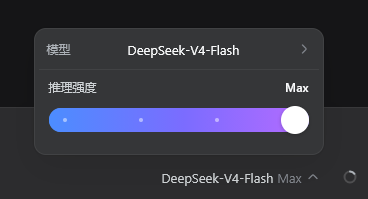
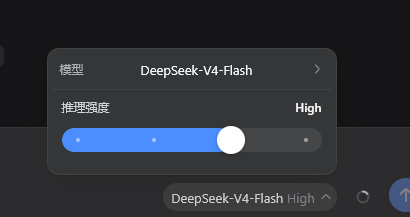
要求
- DSH
0.1.0-rc.6或兼容的 Web profile。 - 当前模型必须暴露至少一个 reasoning effort 级别。普通非推理模型不会显示滑块。
安装
dsh plugin --profile web add github:lemonorangeapple/dsh-effort-switcher
命令会把本包装进当前 Web profile,并因 dsh.bundle 声明自动写入 dsh.profile.bundles。不必再编辑 profile 的 cordis.patch.yml。
完全停止并重新启动 dsh web,然后刷新 http://127.0.0.1:3080。DSH 仅在 Web 进程启动时扫描 dsh.client 元数据;仅刷新旧页面或运行独立开发服务器不会加载本插件。
如果 profile 的 cordis.patch.yml 里还留着旧的手工挂载(id: effort-switcher),先删掉,避免双重挂载。
卸载
dsh plugin --profile web remove dsh-effort-switcher
卸载后同样需要重启 dsh web。
验证安装
在 profile 目录中运行:
node --input-type=module -e "const plugin=await import('dsh-effort-switcher'); console.log(plugin.name)"
预期输出:
effort-switcher
启动 DSH Web 后,选择一个支持 reasoning effort 的模型。聊天输入区模型控件的位置应显示“推理强度”滑块;拖动滑块后,DSH 会重新提交当前模型及新的 reasoningEffort。
项目结构
index.js           Browser client module and slider UI.
host.js            Minimal Cordis host entry used by DSH loader discovery.
cordis.patch.yml   Bundle patch that inserts the host plugin row.
package.json       Package exports, dsh.bundle, and dsh.client manifest.
README.md          Installation and operating instructions.
.gitignore         Local development exclusions.
开发
从本仓库目录把本地 checkout 链进 Web profile:
dsh plugin --profile web add .
修改 index.js 后,必须重启 dsh web 并刷新现有 Web GUI,除非当前 DSH checkout 已运行针对该客户端包的 HMR 构建监视器。
可运行基础语法检查:
npm run check
排障
- 滑块没有显示:确认
dsh.profile.bundles中存在dsh-effort-switcher,完全重启dsh web,并在模型选择器中选用支持 reasoning effort 的模型。 - 安装后页面未更新:Web 启动图已经生成;停止旧
dsh web进程后重新启动。 - 双重控件或重复挂载:删掉 profile
cordis.patch.yml里旧的effort-switcherinsert,只保留 bundle 层。 - 拖动后未生效:检查模型是否支持多个 reasoning effort 级别。对于仅有默认强度或不支持 reasoning 的模型,插件会隐藏控件。
Links
More in this category
zhu1090093659/dsh-web#packages/dsh-task-board★ 8334
Task board for the dsh web GUI: a sidebar multi-column kanban whose cards run in real DSH agent sessions and can also be scheduled with cron expressions, executed host-side even with the browser closed.
zhu1090093659/dsh-web#packages/dsh-web-all★ 8334
Plugin and skin collection for the DSH Web UI: task board, Git graph, right-side panel, remote mobile UI, pet, live token stats, and a skin center.
ccch1mneyyy/dsh-TUI★ 3989
Claude Code-style full-screen terminal UI: pixel-whale header, live status line, and streaming thought expansion.
omdsh-dev/DSH-better-sidebar★ 3981
Full sidebar workbench with file rendering and editing, terminal, Git, and subagents; third-party plugins can register new tabs.
MeteorNOX/DeepSeek-Balance-Whale-Widget★ 3944
A fixed-corner whale widget for the DSH web GUI — balance, today's usage and per-turn cost with peak/off-peak pricing, editable balance-alert and daily-budget bubbles, a module-based custom bubble queue with A/B weighted choices and random lines or images, 30+ vendor templates (OpenAI, OpenRouter, Kimi, SiliconFlow, Ark, Zhipu, MiniMax and more) with per-model balance and subscription quota, plus task-end sound, imported audio, custom roles and a resource manager. Local-only, no telemetry.
Devin-AXIS/deepseek-design#deepseek-idesign★ 1412
Visual design studio for websites, app prototypes, posters, cards, reports, and magazines, with templates, direct element editing, selection-aware AI draft handoff, and export.
Community comments
Comments are public GitHub Discussions. Loading them connects to GitHub and Giscus; a GitHub account is required to post.