Review agent file changes in a Diff panel, add comments for follow-up edits, and undo edited or newly created files.
Install
# from npm (prebuilt)
dsh plugin --profile web add dsh-file-review
# from GitHub (first run asks for allowBuilds approval — follow the hint, retry)
dsh plugin --profile web add github:left0ver/dsh-file-review
Any plugin you install runs third-party code with your own permissions — it can read your files, use your credentials, and reach the network, and tool approvals don’t sandbox it. GitHub-sourced plugins also run build scripts at install time — pnpm blocks those until you allow them, so an install can stop with ERR_PNPM_GIT_DEP_PREPARE_NOT_ALLOWED or ERR_PNPM_IGNORED_BUILDS; dsh prints the exact key to add under allowBuilds in your profile’s pnpm-workspace.yaml, and the install works on the next run. Allowing a build is a trust decision: only install sources you trust, and pin a commit (github:owner/repo#sha).
README
DSH File Review
Review every file an agent just changed—without leaving DeepSeek Harness Web.
English · 简体中文
How to use
Preview
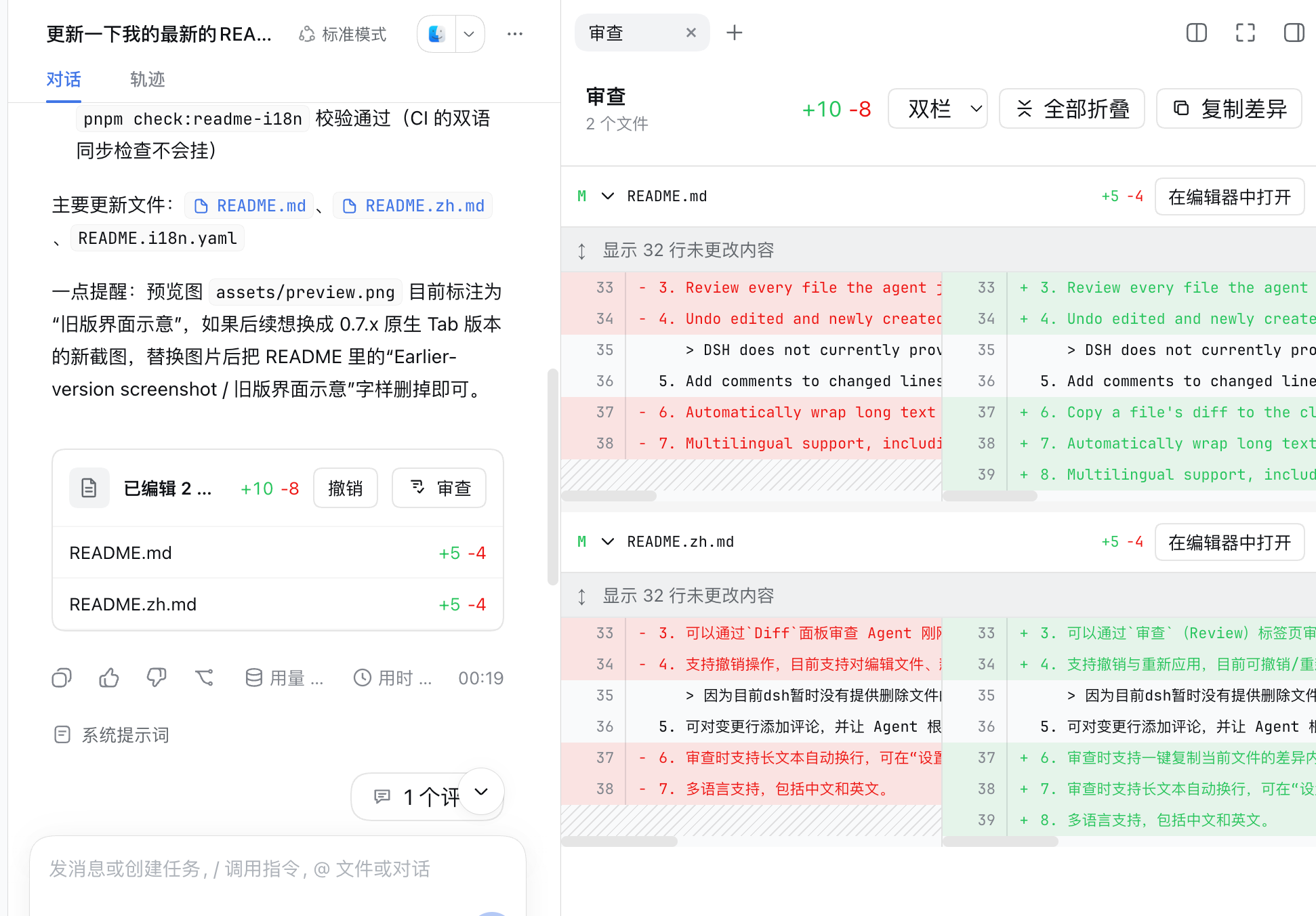
Features
- This plugin supports standard, PTC, and Creator modes, but does not currently support Minimal mode.
- Review every file the agent just changed, shown in the
Diffpanel. - Undo edited and newly created files. Undoing deleted files is not currently supported.
DSH does not currently provide a file-deletion tool, so this plugin cannot yet undo deleted files. Support will be added once DSH provides such a tool.
- Add comments to changed lines and ask the agent to continue making updates based on the feedback, or ask questions about the changes.
- Automatically wrap long text while reviewing. Enable it under Settings → Plugins → Plugin configuration → File review; it is disabled by default.
- Multilingual support — both English and Chinese are supported.
Compatibility
The badge above shows the DSH CLI version this release was tested against. The plugin also accepts the other prereleases and the final release of that DSH version (for example, every 0.2.0-rc.x plus 0.2.0); the exact range is peerDependencies in package.json.
Outside that range, DSH refuses to load the plugin. To run it anyway at your own risk, grant an exemption for the exact versions involved:
dsh plugin --profile web allow-version dsh-file-review@<plugin-version> --dsh-version <dsh-version> --accept-risk
Quick start
0. Add dsh-file-review to pnpm's minimum release age allowlist
Open ~/.dsh/profiles/web/pnpm-workspace.yaml and add:
minimumReleaseAgeExclude:
  - dsh-file-review
Recent versions of pnpm enforce a minimum release age, so newly published packages are not installed until that waiting period has passed. To install the latest versions, add dsh-file-review to the exclusion list.
1. Install this plugin
dsh plugin --profile web add dsh-file-review
2. Start DSH Web
dsh web
3. Enjoy it
Install from source
git clone https://github.com/left0ver/dsh-file-review.git
cd dsh-file-review
pnpm install
pnpm run build
dsh plugin --profile web add ${PWD}
Install from GitHub repository
dsh plugin --profile web add github:left0ver/dsh-file-review
Update the plugin
dsh plugin --profile web update dsh-file-review
Uninstall the plugin
dsh plugin --profile web remove dsh-file-review
Roadmap
- Add undo support for deleted files.
Friendly Links
LINUX DO — A new ideal community
License
Links
More in this category
zhu1090093659/dsh-web#packages/dsh-task-board★ 8801
Task board for the dsh web GUI: a sidebar multi-column kanban whose cards run in real DSH agent sessions and can also be scheduled with cron expressions, executed host-side even with the browser closed.
zhu1090093659/dsh-web#packages/dsh-web-all★ 8801
Plugin and skin collection for the DSH Web UI: task board, Git graph, right-side panel, remote mobile UI, pet, live token stats, and a skin center.
MeteorNOX/DeepSeek-Balance-Whale-Widget★ 4908
A fixed-corner whale widget for the DSH web GUI — balance, today's usage and per-turn cost with peak/off-peak pricing, editable balance-alert and daily-budget bubbles, a module-based custom bubble queue with A/B weighted choices and random lines or images, 30+ vendor templates (OpenAI, OpenRouter, Kimi, SiliconFlow, Ark, Zhipu, MiniMax and more) with per-model balance and subscription quota, plus task-end sound, imported audio, custom roles and a resource manager. Local-only, no telemetry.
ccch1mneyyy/dsh-TUI★ 4640
Claude Code-style full-screen terminal UI: pixel-whale header, live status line, and streaming thought expansion.
omdsh-dev/DSH-better-sidebar★ 4198
Full sidebar workbench with file rendering and editing, terminal, Git, and subagents; third-party plugins can register new tabs.
Devin-AXIS/deepseek-design#deepseek-idesign★ 1463
Visual design studio for websites, app prototypes, posters, cards, reports, and magazines, with templates, direct element editing, selection-aware AI draft handoff, and export.
Community comments
Comments are public GitHub Discussions. Loading them connects to GitHub and Giscus; a GitHub account is required to post.