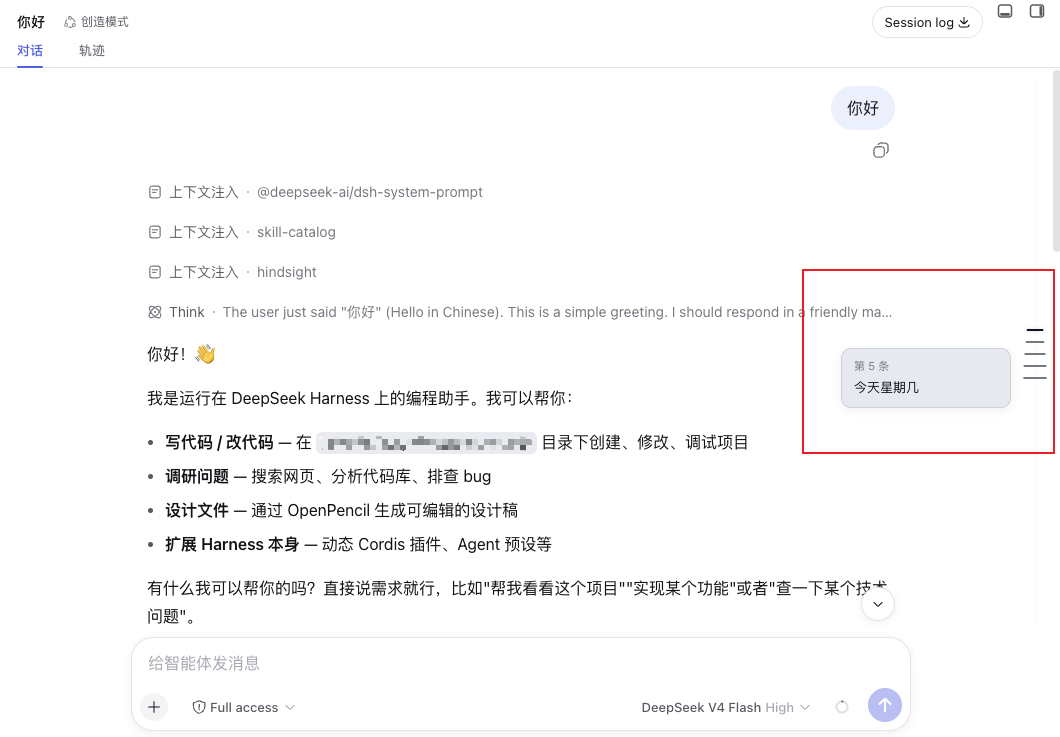
Message timeline rail for DeepSeek Harness web chat: evenly spaced ticks for each user message on the right edge, click to jump, hover to preview.
Install
# from npm (prebuilt)
dsh plugin --profile web add @lcthe/dsh-timeline-rail
# from GitHub (first run asks for allowBuilds approval — follow the hint, retry)
dsh plugin --profile web add github:lcthe/dsh-timeline-rail
Any plugin you install runs third-party code with your own permissions — it can read your files, use your credentials, and reach the network, and tool approvals don’t sandbox it. GitHub-sourced plugins also run build scripts at install time — pnpm blocks those until you allow them, so an install can stop with ERR_PNPM_GIT_DEP_PREPARE_NOT_ALLOWED or ERR_PNPM_IGNORED_BUILDS; dsh prints the exact key to add under allowBuilds in your profile’s pnpm-workspace.yaml, and the install works on the next run. Allowing a build is a trust decision: only install sources you trust, and pin a commit (github:owner/repo#sha).
README
A message timeline rail for the DeepSeek Harness web chat.
Along the left edge of the conversation, above the composer, it draws a low-contrast, evenly spaced column of thin tick marks — one tick per durable user message, styled after a meeting-notes / editor timeline. Hover a tick to preview that message; click it to jump the conversation straight to it.
Desktop & Web both supported. The DeepSeek Harness desktop app is an Electron shell that embeds the same browser client served over a localhost web server, so a "web" plugin renders identically on both. This package targets the browser-side conversation slot and works wherever that client runs — Desktop and Web. Only headless / TUI profiles have no composer slot and render nothing.
Features
- Evenly spaced ticks — one short horizontal line per user message along a 1px track, with a fixed 12px gap; long histories scroll inside the rail instead of compressing the marks.
- Centered marks — each horizontal tick is centered on the vertical rail, keeping the timeline axis visually balanced.
- Complete-history loading — after the session opens, the rail automatically loads earlier history pages in series until no pages remain, and adds ticks as each page arrives.
- Click to jump — aligns the selected user message to the top of the visible message area.
- Hover to preview — a compact wide card shows the user message (
#N) in bold, clamped to 2 lines, followed by the assistant reply clamped to 3 lines; image/attachment-only messages get a labelled placeholder. - Theme aware — colors come from
--dsw-*tokens, so it follows the light/dark theme with no extra config. - Slim and out of the way — pointer-events are none except on the ticks themselves; the rail never blocks clicks on the messages.
How it works
DSH's web GUI is a Cordis composition. This package is a client plugin that registers a single entry into the conversation.input.dock slot (the additive band above the composer card). It reads the live ConversationSnapshot through the slot's useSession hook, maps each durable kind: 'user' node to a tick, and measures the scrollport ([data-conversation-scroll], [data-composer-seat]) to lay the rail out on the left edge. On mount it uses the scoped conversation service's loadOlder() action to fetch earlier pages automatically until the session history is complete; each returned page adds ticks immediately. It defines no new service.
Positioning is computed against the same stable data attributes the product itself uses ([data-conversation-scroll], [data-chat-flow], [data-chat-anchor-key], [data-composer-seat]). The rail is constrained to the visible conversation area, and its empty gutter is pointer-transparent so it does not block conversation or Session Log scrolling. Long histories use an independent rail scrollport; scrolling the rail does not scroll the conversation.
Install
Requires a DeepSeek Harness deployment with the browser client — that is the desktop app (Web UI embedded) or the web version alike. The rail is pure presentation; it renders only where the conversation composer exists.
pnpm add @lcthe/dsh-timeline-rail
Then add the plugin row to your cordis.yml at the same include level as the bundle rows:
- insert:
    - id: dsh-timeline-rail
      name: '@lcthe/dsh-timeline-rail'
Full wiring details live in INSTALL.cordis.yml.md.
Alternative: load in-session as a dynamic plugin
DSH web also ships a first-class dynamic-Cordis tool. If you are in a session and just want to try it, ask the agent to load the plugin (it can cordis_define + cordis_run this package). This is the recommendable route for quick evaluation; the npm package is the stable, shareable form.
Peer dependencies
| package | range |
|---|---|
@deepseek-ai/cordis |
>=4.0.1-rc.1 |
@deepseek-ai/dsh-client-locale |
^0.0.1-rc.1 |
@deepseek-ai/dsh-client-runtime |
^0.0.1-rc.1 |
@deepseek-ai/dsh-client-ui-conversation |
^0.0.1-rc.1 |
@deepseek-ai/dsh-client-ui-slots |
^0.0.1-rc.1 |
react / react-dom |
^18.2.0 |
Development
pnpm install
pnpm run build     # typecheck (tsc) + bundle (tsdown) -> lib/
lib/index.js,lib/invariant.js— node-half ESM for the Host Loader.lib/client.js— the browser bundle in DSH's__ModuleLoader__.load({ id, factory })closure format, with CSS modules inlined and auto-injecting a<style data-plugin>.lib/types/**— emitted TypeScript declarations.
Known limitations and deferred work
- The rail renders only in the web client; headless/TUI profiles have no composer slot, so nothing shows there.
- Ticks are evenly spaced (one per user message) at a fixed 12px gap. Long histories make the rail content independently scrollable rather than compressing the gap; the ticks still do not represent each message's true scroll position. A real-position "minimap" mode is a natural follow-up.
- Message previews clamp the user message to 2 lines and the assistant reply to 3 lines; longer text is truncated without an affordance to expand in the rail itself (clicking the tick already jumps you to the full message).
- The plugin targets the slot contract as of the
0.0.1-rc.1release line of the Harness client packages. If theconversation.input.dockcontract changes in a later RC, this package may need a bump.
License
Links
More in this category
zhu1090093659/dsh-web#packages/dsh-task-board★ 8296
Task board for the dsh web GUI: a sidebar multi-column kanban whose cards run in real DSH agent sessions and can also be scheduled with cron expressions, executed host-side even with the browser closed.
zhu1090093659/dsh-web#packages/dsh-web-all★ 8296
Plugin and skin collection for the DSH Web UI: task board, Git graph, right-side panel, remote mobile UI, pet, live token stats, and a skin center.
omdsh-dev/DSH-better-sidebar★ 3968
Full sidebar workbench with file rendering and editing, terminal, Git, and subagents; third-party plugins can register new tabs.
ccch1mneyyy/dsh-TUI★ 3948
Claude Code-style full-screen terminal UI: pixel-whale header, live status line, and streaming thought expansion.
MeteorNOX/DeepSeek-Balance-Whale-Widget★ 3877
A fixed-corner whale widget for the DSH web GUI — balance, today's usage and per-turn cost with peak/off-peak pricing, editable balance-alert and daily-budget bubbles, a module-based custom bubble queue with A/B weighted choices and random lines or images, 30+ vendor templates (OpenAI, OpenRouter, Kimi, SiliconFlow, Ark, Zhipu, MiniMax and more) with per-model balance and subscription quota, plus task-end sound, imported audio, custom roles and a resource manager. Local-only, no telemetry.
Devin-AXIS/deepseek-design#deepseek-idesign★ 1413
Visual design studio for websites, app prototypes, posters, cards, reports, and magazines, with templates, direct element editing, selection-aware AI draft handoff, and export.
Community comments
Comments are public GitHub Discussions. Loading them connects to GitHub and Giscus; a GitHub account is required to post.