DSH Skill Manager: browse, enable/disable, import from Codex/Claude Code/ZCode/WorkBuddy/QCoderWork, auto-discover skills with symlink support.
Install
# from npm (prebuilt)
dsh plugin --profile web add @lcthe/dsh-skills-hub
# from GitHub (first run asks for allowBuilds approval — follow the hint, retry)
dsh plugin --profile web add github:lcthe/dsh-skills-hub
Any plugin you install runs third-party code with your own permissions — it can read your files, use your credentials, and reach the network, and tool approvals don’t sandbox it. GitHub-sourced plugins also run build scripts at install time — pnpm blocks those until you allow them, so an install can stop with ERR_PNPM_GIT_DEP_PREPARE_NOT_ALLOWED or ERR_PNPM_IGNORED_BUILDS; dsh prints the exact key to add under allowBuilds in your profile’s pnpm-workspace.yaml, and the install works on the next run. Allowing a build is a trust decision: only install sources you trust, and pin a commit (github:owner/repo#sha).
README
A DSH browser-client plugin for browsing and managing Skills stored in DSH's global directory and registered workspaces.
Overview
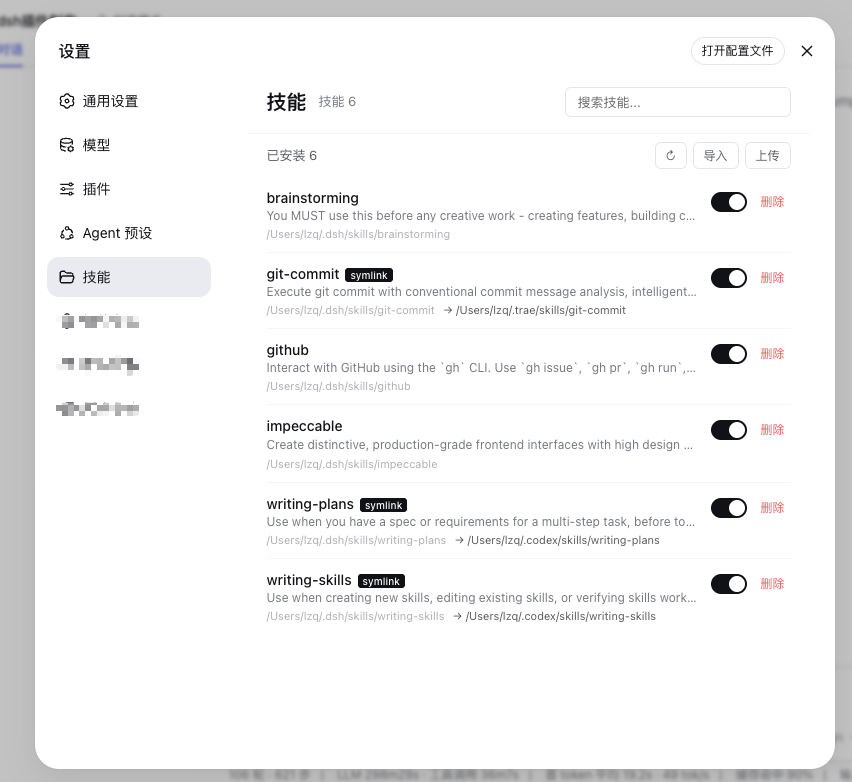
dsh-skills-hub adds Settings → Skills to a DeepSeek Harness (DSH) browser client. It manages Skill directories without changing the DSH core runtime or pretending to provide unsupported Skill lifecycle controls.
The plugin is intended for a DSH deployment with a browser client: either the desktop application with an embedded Web UI or the DSH Web version.
Current capabilities
- Browse installed Skills with names, descriptions, Markdown files, paths, and symlink targets.
- Search installed Skills by name or description.
- Switch between the global Skill directory and registered DSH workspaces.
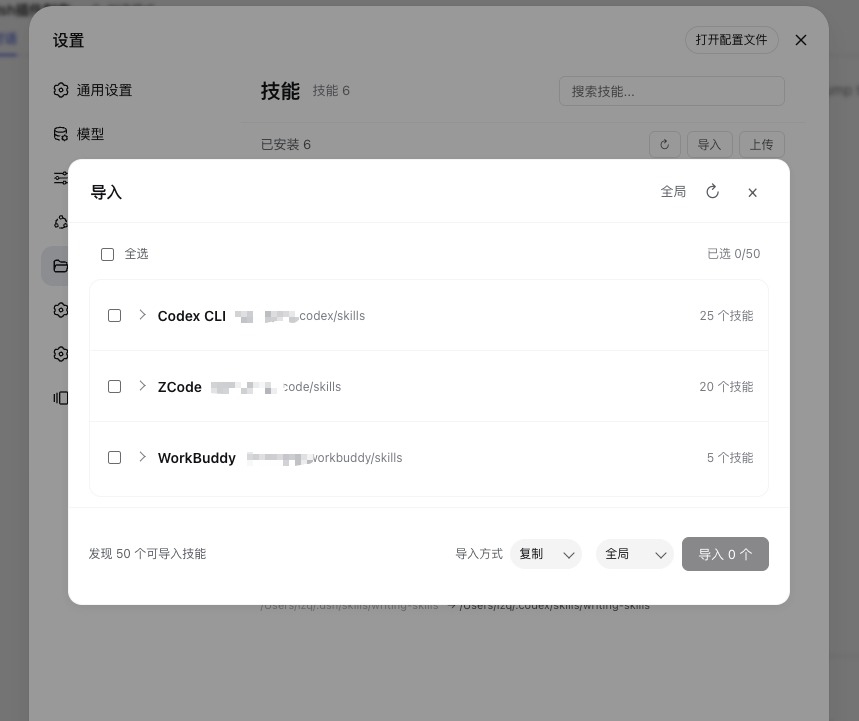
- Detect available Skill directories from Codex, Claude Code, ZCode, WorkBuddy, and QCoderWork, then scan their counts before the import dialog is ready.
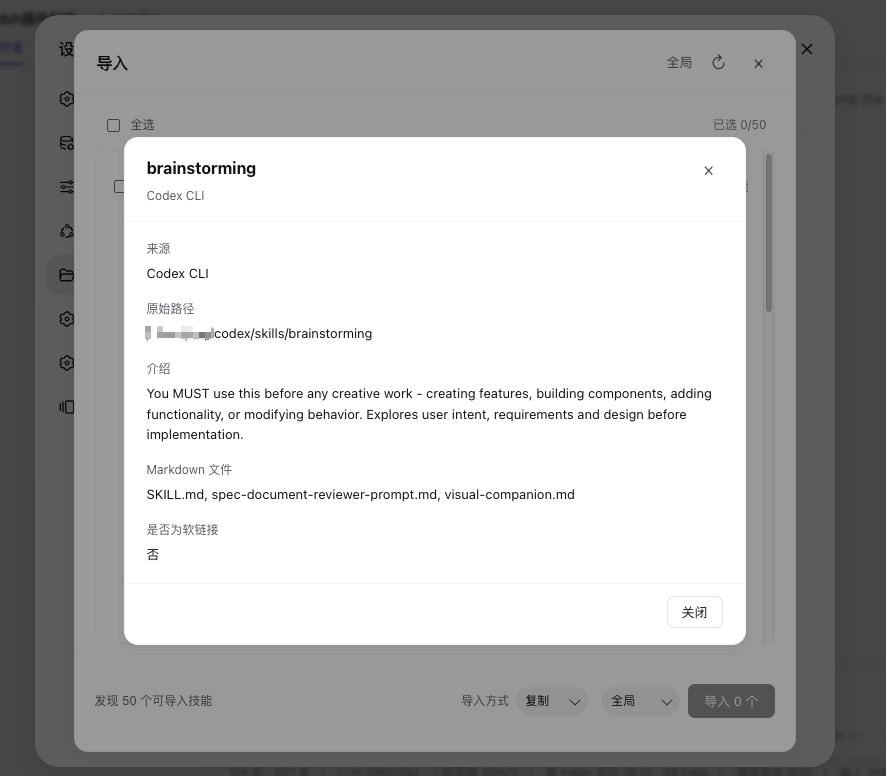
- Inspect scanned external Skills on demand by expanding a source group.
- Import Skills by copying their directories or creating directory symlinks.
- Upload a local Skill folder into the global directory or a registered workspace.
- Skip an existing destination with the same Skill name instead of overwriting it.
- Delete Skill directories or recognized symlinks safely.
- Show an import result summary with imported, skipped, and failed items.
DSH currently does not support runtime enable/disable for an individual Skill. This plugin does not expose a display-only switch for that unsupported behavior.
Quick start
Prerequisites
- A supported DSH browser client: desktop Web UI or DSH Web.
- Permission to install a DSH profile dependency and edit its
cordis.yml.
Install the package
pnpm add @lcthe/dsh-skills-hub
Add the plugin at the same include level as the other bundle rows in your profile's cordis.yml:
- insert:
    - id: dsh-skills-hub
      name: '@lcthe/dsh-skills-hub'
Start the DSH Web client:
pnpm dsh web
Open Settings → Skills after DSH starts.
Usage
Browse installed Skills
The main page scans the selected DSH Skill directory and displays each Skill's name, description, path, Markdown files, and symlink information. Use the search field to filter by name or description.
Switch the Skill scope
Use the scope selector to switch between:
- Global:
~/.dsh/skills/ - Registered workspace:
<workspace>/.dsh/skills/
Workspace options come from the DSH workspace registry. They are not a claim that DSH has one universal “current workspace”.
Import from another Agent
- Open Import.
- The plugin detects which supported Agent directories exist and scans them to calculate the available Skill counts.
- Source groups remain collapsed by default; expand a group to view its scanned Skills.
- Open a Skill to inspect its description and source path.
- Select Skills with checkboxes.
- Choose Copy or Symlink and select the global directory or a registered workspace.
- Confirm the import and review the result summary.
Source groups stay collapsed, but their counts are populated before the dialog is ready. Clicking the dialog's refresh button performs a new source detection and re-scans all detected sources so the displayed totals remain accurate.
Existing destination names are skipped; imports never overwrite an existing Skill directory.
Upload a local Skill folder
Choose Upload on the main Skills page to open the upload dialog. Drag one local Skill folder into the drop zone, or click Choose folder to use the system folder picker. The dialog shows the selected folder, file count, and total size before uploading to the selected global directory or registered workspace. The upload is staged in a temporary directory and moved into the destination only after validation succeeds.
Delete a Skill
Choose Delete and confirm the path shown in the confirmation dialog. A recognized symlink is removed with the link itself only; its target is not followed or deleted. A normal Skill directory and its contents are removed recursively.
Current limitations
- DSH does not currently provide a persisted runtime enable/disable setting for an individual Skill.
disable-model-invocationanduser-invocableinSKILL.mdare static invocation policies, not user-controlled runtime toggles.- DSH's plugin-level
disabledsetting controls an entire loader entry, not one Skill inside a provider. - Skill content editing, folder opening, and a Skill creation wizard are not included.
- Existing Skills cannot be overwritten; same-name destinations are always skipped.
- Custom scan roots are not supported.
- Import previews show Skill metadata but not file sizes.
- A source directory may exist but contain no recognizable Skill directory; recognition requires a directory with at least one Markdown file.
- Dangling symlinks may not be discoverable because source scanning verifies that the target is a usable directory.
Security summary
The plugin applies the following safeguards:
- Skill names must match a safe name format.
- Import, upload, and delete destinations are restricted to the global directory or registered workspace directories.
- Upload paths reject traversal segments and duplicate file writes.
- Upload limits are enforced before commit: 16 MiB request body, 500 files, 4 MiB per file, and 12 MiB total file data.
- Uploads are staged in a temporary directory and atomically renamed into place only after validation succeeds.
- Existing destination directories are never overwritten.
- Recognized symlink deletion removes the link itself rather than its target.
See SPEC.md for the complete behavior and security contract.
Supported import sources
| Source | Scanned paths |
|---|---|
| Codex | ~/.codex/skills/, ~/.codex/vendor_imports/skills/, ~/.codex/plugins/cache/*/skills/ |
| Claude Code | ~/.claude/skills/ |
| ZCode | ~/.zcode/skills/, ~/.zcode/cli/plugins/cache/*/skills/ |
| WorkBuddy | ~/.workbuddy/skills/ |
| QCoderWork | ~/.qcoderwork/skills/ |
Screenshots
Local development
To load a local checkout instead of the published npm package, add a file: dependency to the DSH profile's package.json:
{
  "dependencies": {
    "@lcthe/dsh-skills-hub": "file:/path/to/dsh-skills-hub"
  }
}
Include @lcthe/dsh-skills-hub in dsh.profile.bundles, then build from the checkout:
pnpm install
pnpm run build
pnpm run build runs the TypeScript check before bundling the plugin.
Release and maintenance
- Package name:
@lcthe/dsh-skills-hub - Source package version: see
package.json. - Published versions: verify the npm registry rather than inferring publication status from a local version field.
- Keep changes in this plugin repository. The official
deepseek-harnesssource repository is not a development target for this plugin.
Contributing
Issues and pull requests are welcome. Keep documentation and published metadata aligned with implemented behavior.
License
MIT
Links
More in this category
zhu1090093659/dsh-web#packages/dsh-task-board★ 8440
Task board for the dsh web GUI: a sidebar multi-column kanban whose cards run in real DSH agent sessions and can also be scheduled with cron expressions, executed host-side even with the browser closed.
zhu1090093659/dsh-web#packages/dsh-web-all★ 8440
Plugin and skin collection for the DSH Web UI: task board, Git graph, right-side panel, remote mobile UI, pet, live token stats, and a skin center.
MeteorNOX/DeepSeek-Balance-Whale-Widget★ 4135
A fixed-corner whale widget for the DSH web GUI — balance, today's usage and per-turn cost with peak/off-peak pricing, editable balance-alert and daily-budget bubbles, a module-based custom bubble queue with A/B weighted choices and random lines or images, 30+ vendor templates (OpenAI, OpenRouter, Kimi, SiliconFlow, Ark, Zhipu, MiniMax and more) with per-model balance and subscription quota, plus task-end sound, imported audio, custom roles and a resource manager. Local-only, no telemetry.
ccch1mneyyy/dsh-TUI★ 4130
Claude Code-style full-screen terminal UI: pixel-whale header, live status line, and streaming thought expansion.
omdsh-dev/DSH-better-sidebar★ 4031
Full sidebar workbench with file rendering and editing, terminal, Git, and subagents; third-party plugins can register new tabs.
Devin-AXIS/deepseek-design#deepseek-idesign★ 1424
Visual design studio for websites, app prototypes, posters, cards, reports, and magazines, with templates, direct element editing, selection-aware AI draft handoff, and export.
Community comments
Comments are public GitHub Discussions. Loading them connects to GitHub and Giscus; a GitHub account is required to post.