Progressive-disclosure MCP gateway that searches large remote catalogs through `mcp_search`, then invokes exact schemas through `mcp_call` with lazy connections and bounded caches.
Install
# from npm (prebuilt)
dsh plugin --profile web add dsh-mcp-lens
# from GitHub (first run asks for allowBuilds approval — follow the hint, retry)
dsh plugin --profile web add github:labmimors/dsh-mcp-lens
Any plugin you install runs third-party code with your own permissions — it can read your files, use your credentials, and reach the network, and tool approvals don’t sandbox it. GitHub-sourced plugins also run build scripts at install time — pnpm blocks those until you allow them, so an install can stop with ERR_PNPM_GIT_DEP_PREPARE_NOT_ALLOWED or ERR_PNPM_IGNORED_BUILDS; dsh prints the exact key to add under allowBuilds in your profile’s pnpm-workspace.yaml, and the install works on the next run. Allowing a build is a trust decision: only install sources you trust, and pin a commit (github:owner/repo#sha).
README
English | 简体中文

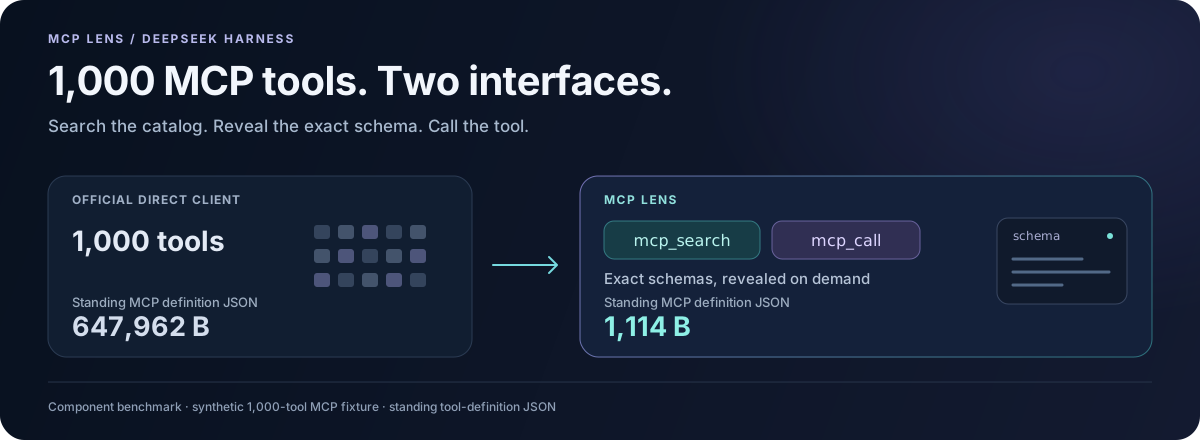
1,000 MCP tools. Two interfaces. Exact schemas when you need them.
Install · Try the 1,000-tool calculator · See product tests
Large tool catalogs take up room before the model starts solving your task. MCP Lens keeps the standing MCP definitions small, finds relevant tools across servers, and preserves the returned data needed by the next call.
MCP Lens gives DeepSeek Harness two model-facing tools:
mcp_searchfinds relevant tools and returns their exact input schemas.mcp_callcalls a specificserver/tooland returns its result, including structured data.
The two tool definitions occupy 1,114 bytes of JSON, regardless of catalog size. In the 1,000-tool component fixture, the direct client's definitions occupy 647,962 bytes. Remote schemas enter the conversation when search returns them. Connections open on demand, and repeated searches reuse the catalog index.
The latest version also fixes multi-step workflows: a customer ID returned alongside a text summary stays visible, so the model can use it to look up the customer's order. The tested data flows improved from 10/12 to 12/12. Read the September 10 results.
This works well for dozens to thousands of tools spread across MCP servers. Search adds a step; for a few tools used on nearly every request, the official direct MCP client is simpler.
Install
Use Node.js ^22.19.0 || >=24.0.0 and Harness 0.1.2-rc.1. As of September 10, 2026, Harness's npm latest and next tags point to this version.
Build Lens rc.10 from the main branch below. The published npm package is still rc.9, which targets Harness 0.1.0-rc.6.
npm install -g @deepseek-ai/dsh@0.1.2-rc.1
git clone https://github.com/labmimors/dsh-mcp-lens.git
cd dsh-mcp-lens
npm ci --ignore-scripts
npm run build
npm pack --ignore-scripts
dsh plugin --profile web add ./dsh-mcp-lens-0.1.0-rc.10.tgz
dsh plugin uses pnpm. If pnpm is missing from PATH, replace the last command with:
npm exec --yes --package=pnpm@10.20.0 -- dsh plugin --profile web add ./dsh-mcp-lens-0.1.0-rc.10.tgz
If you are keeping an existing Harness 0.1.0-rc.6 installation, use dsh plugin --profile web add dsh-mcp-lens@0.1.0-rc.9.
Connect your first MCP server
The plugin starts with no servers. Open ~/.dsh/profiles/web/cordis.patch.yml, or $DSH_HOME/profiles/web/cordis.patch.yml if you set DSH_HOME.
Replace an empty [] with this block. If the file already has other entries, append it as another top-level item; if it already has an mcp-lens item, replace that item's config.
- id: mcp-lens
  config:
    servers:
      - name: mcp-docs
        transport: streamable-http
        url: https://modelcontextprotocol.io/mcp

    cachePath: !!js dshHomePath('mcp-lens/catalog.json')
    allowTools:
      - mcp-docs/search_model_context_protocol
      - mcp-docs/query_docs_filesystem_model_context_protocol
    denyTools: ['mcp-docs/submit_feedback']
This connects the official MCP documentation server and enables its two read-only query tools. The server needs no API key; Harness uses the model provider you have configured.
Check the configuration and start Harness:
dsh --profile web --dump-config
dsh --profile web
Then ask:
Use the official MCP documentation server to explain when an MCP client should use Streamable HTTP.
Ask normal questions. The model uses mcp_search and mcp_call as needed.
Configuration
Set servers, cachePath, and the tools you want in allowTools. Patterns match server/tool, with * as a wildcard. denyTools overrides allowTools; an empty allow list enables no tools.
Each Cordis patch replaces the item's whole config, so include all custom settings you want to keep.
- id: mcp-lens
  config:
    servers:
      - name: local
        transport: stdio
        command: node
        args: ['/absolute/path/to/mcp-server.mjs']
        cwd: /absolute/path/to/project

    cachePath: !!js dshHomePath('mcp-lens/catalog.json')
    allowTools: ['local/search_*', 'local/read_*']
    denyTools: ['local/delete_*']
Replace the command, paths, and tool patterns with those of your MCP server.
- id: mcp-lens
  config:
    servers:
      - name: knowledge
        transport: streamable-http
        url: https://mcp.example.com/rpc
        headers:
          Authorization: !!js '`Bearer ${process.env.MCP_TOKEN}`'
        cacheNamespace: knowledge-acme-readonly

    cachePath: !!js dshHomePath('mcp-lens/catalog.json')
    allowTools: ['knowledge/read_*', 'knowledge/search_*']
    denyTools: ['*/delete_*', '*/destroy_*']
cacheNamespace identifies the account and permission scope, without containing a credential. Change it when the account or scope changes. Without it, an authenticated server's catalog stays in memory and is fetched again after restart.
| Field | Default | Purpose |
|---|---|---|
catalogTtlMs |
86400000 |
Refresh a catalog after 24 hours |
idleDisconnectMs |
300000 |
Close an idle connection after 5 minutes |
connectTimeoutMs |
30000 |
Connection timeout |
callTimeoutMs |
60000 |
Tool-call timeout |
discoveryTimeoutMs |
30000 |
Timeout for the full catalog discovery |
maxDiscoveryPages |
1000 |
Pages per discovery |
maxToolsPerServer |
10000 |
Tools per server |
maxBytesPerTool |
1048576 |
Metadata bytes per tool |
maxTotalCatalogBytes |
67108864 |
Total catalog/cache bytes |
maxHttpResponseBytes |
16777216 |
HTTP response bytes |
maxCursorBytes |
4096 |
Pagination cursor bytes |
searchLimitDefault |
5 |
Default search results |
searchLimitMax |
10 |
Maximum search results |
The defaults are also in cordis.patch.yml.
A failed refresh keeps the previous usable catalog, and one unavailable server does not hide results from other servers. Lens supports MCP Tools over stdio and Streamable HTTP. OAuth, Resources, Prompts, Elicitation, and task-based execution are not currently implemented.
Latest tests
The latest change makes structured results visible to the model, including identifiers needed by later calls.
| Test | Result |
|---|---|
| Automated tests | 178 passed |
| Three Codex model tasks with 16 synthetic tools | Lens 3/3; official direct client 2/3 |
| Data workflows across 16- and 1,000-tool catalogs | 12/12 after the fix; 10/12 before |
| Lens tool definitions | 2 schemas, 1,114 B |
The model tasks ran in Codex through real Harness ToolRuntime and MCP servers. See Product tests for the tasks, results, and reproduction commands.
Earlier experiment: DeepSeek V4 Flash pilot, August 14, 2026.
Try it on your catalog
Open the schema calculator, load the 1,000-tool sample or paste your exported tool definitions, and compare the standing schema size. Use Copy share link, Copy Markdown, or Download card to share your measurements with teammates. Calculation runs in your browser; the share link contains the numeric result.
Have a query that misses the right tool? Send a minimal search example so we can reproduce it. You can also browse MCP Lens in the DSH Directory.
Development
Run these commands from the source checkout:
npm ci
npm run verify
npm run bench -- --output benchmark.json
npm run verify:dsh-install
npm run verify:dsh-profile
verify runs type checking, tests, and the build. The install checks use local MCP fixtures and temporary Harness profiles. If Corepack is unavailable, run the profile check through npm exec --yes --package=corepack@0.35.0 -- npm run verify:dsh-profile.
See Contributing for exact Harness versions, test commands, and the schema-size GitHub Action.
Links
More in this category
yjh051108/dsh-routing-suite★ 7003
One repository, three parts: a runtime injector for DSH plugin packages (inject, hot-reload, unload, promote a dev staging tool to the front, route self-heal, plus a settings-page plugin manager that lists, unloads and drags folders in to internalize), a task-aware reasoning-mode router agent preset (router-standard / router-spec / router-react), and a graded two-level task protocol whose six tools (commit_star, lock_stage, revise_do, edit_plan, mark_task, redteam_verdict) pin task state to disk. The injector implementation ships in-tree, so the install carries its own behaviour rather than a dependency list.
strukto-ai/mirage#dsh★ 3666
Swaps the filesystem and bash providers for a mirage virtual workspace: file tools and shell commands run over mounted resources (RAM, S3, Redis, Slack, Gmail, Notion, Postgres) instead of the host disk, with per-mount read/write/exec modes, per-command sandbox routing (monty, pyodide, quickjs in process; docker, e2b, daytona remote), and installed CLIs (git, gh, slack, linear, ntn, gws, or one you register) as head words in the virtual terminal.
hust-open-atom-club/oh-dsh★ 325
Community distribution: TUI, desktop, and Web UI as one bundle with layered installation.
weijiafu14/pi2dsh★ 206
Pi Host ABI compatibility engine: after one install, unmodified Pi extensions from npm mount as native DSH plugins with `dsh plugin add <pi-package>`. Verified end to end on stock DSH with pi-mcp-adapter (full MCP manager: OAuth, resources, prompts, MCP Apps, elicitation, sampling), @tintinweb/pi-subagents, pi-code, pi-hermes-memory and pi-background-tasks; `pi2dsh inspect` reports a package's compatibility before installing.
lire1131/dsh-undo-savepoint★ 166
Undo/redo & rollback system for DSH: every config change is auto-snapshotted; undo/redo/restore to any version from the WebUI or the offline CLI/GUI tools (works even when DSH fails to boot).
Fishquito7/dsh-skill-mcp-panel★ 155
Manages DSH skills and MCP servers from the web settings: skill cards with hot enable/disable, workspace scopes, groups, batch migration and drag-and-drop import, plus stdio/HTTP MCP CRUD with connection tests, secret redaction and the unified dsh-panel CLI.
Community comments
Comments are public GitHub Discussions. Loading them connects to GitHub and Giscus; a GitHub account is required to post.