On-demand second opinions through ask_advisor, with editable requests, per-call human approval, and text advice from a model configured in DSH.
Install
# from a prebuilt release tarball
dsh plugin --profile web add "https://github.com/kvmem/dsh-super-advisor/releases/latest/download/dsh-super-advisor.tgz"
# from GitHub (first run asks for allowBuilds approval — follow the hint, retry)
dsh plugin --profile web add github:kvmem/dsh-super-advisor
Any plugin you install runs third-party code with your own permissions — it can read your files, use your credentials, and reach the network, and tool approvals don’t sandbox it. GitHub-sourced plugins also run build scripts at install time — pnpm blocks those until you allow them, so an install can stop with ERR_PNPM_GIT_DEP_PREPARE_NOT_ALLOWED or ERR_PNPM_IGNORED_BUILDS; dsh prints the exact key to add under allowBuilds in your profile’s pnpm-workspace.yaml, and the install works on the next run. Allowing a build is a trust decision: only install sources you trust, and pin a commit (github:owner/repo#sha).
README
English | 简体中文
An independent, on-demand advisor tool for DeepSeek Harness. The main model calls ask_advisor, the saved approval policy permits the request, and the advisor returns text advice for the main model to verify and act on.
Source: kvmem/dsh-super-advisor. This is a DeepSeek Harness plugin that uses DSH's existing model, permission, and approval services.
Unofficial project, independently developed and maintained by community members.
Version 0.1.8 adds verified compatibility with five DSH releases and Node 22.19+, and fixes selection of Code Mode tool-result evidence on DSH 0.1.5. See the compatibility matrix. These changes require the 0.1.8 package; an existing 0.1.7 installation is unchanged.
Version 0.1.7 renames this project from DSH Advisor to DSH SuperAdvisor, with package name dsh-super-advisor. Existing users should follow the upgrade instructions. The ask_advisor tool, saved model settings, and audit records remain compatible.
Version 0.1.6 makes plugin output limits optional. New installations inherit the selected DSH model service's token budget and impose no local response-size cap. Existing custom limits are preserved; both can be disabled in Output settings (输出设置). Model/service limits, available resources, and the request timeout still apply.
Version 0.1.5 fixes silent save blocking in the advisor settings card. Invalid drafts now show a specific explanation, and clicking Save focuses that explanation without writing settings. Disabled buttons have a distinct appearance, and an unchanged form explains that there is nothing to save.
2026-09-08: completed a real DeepSeek Flash → Pro advisor call, plus Chromium acceptance checks for approval, editing, rejection, cancellation, timeout, and restart. Version 0.1.1 fixed closing an approval card being reported as unavailable; it now returns cancelled. See the acceptance record (Chinese) for results and the scope of testing.
Version 0.1.2 added support for longer responses with configurable caps. Version 0.1.6 replaces the default caps with service inheritance and uncapped local reception.
Version 0.1.3 improved approval and result presentation: requests are divided into question, goal, constraints, attempts, and evidence, with call configuration available separately. Web results start with a short preview and can expand to show the full advice and original text. A system prompt section explains when to ask for help and distinguishes starting a local approval from sending data to a model service.
Version 0.1.4 added configuration through Settings → Plugins → DSH SuperAdvisor. Installation no longer requires a provider/model selection. Choose a service and model already configured in DSH, or enter a model ID manually, then save. Saving, refreshing, and switching selections do not automatically start inference. Supported services follow the DSH adapter's capabilities and are not limited to DeepSeek or OpenAI-compatible APIs.
Approve all consultations (0.1.11)
In Settings → Plugins → DSH SuperAdvisor → Approval mode (审批方式), select Approve all (全部自动批准(无额外调用)) and save. This explicitly authorizes all valid consultations to the displayed advisor destination, including requires_human_approval: true, absent labels, and requests with local sensitive-content warnings. No reviewer call or per-request confirmation is needed. The result card and audit record identify this policy as always.
Existing redaction still runs. DSH file/command permissions, host approval: never, cancellation, configuration validation, call limits and send-once auditing remain effective. Changing the destination skips the consultation with review_required until the new destination is saved; it does not open a confirmation dialog or retry. This approves sending selected text, not executing operations discussed in that text.
Fresh installations remain manual, and upgrades preserve the saved mode. Switch back to another approval mode and save to disable approve-all. Saving settings does not call a model. This feature requires version 0.1.11 built from source or its package.
Main-model tag approval (0.1.10)
Development version 0.1.10 adds Settings → Plugins → DSH SuperAdvisor → Approval mode (审批方式) → Main-model tag (主模型标注(无额外调用)). Select this mode and save to authorize the displayed advisor destination. No reviewer model needs to be configured. Existing saved modes are preserved; fresh installations remain manual.
The main model includes requires_human_approval in the same ask_advisor tool call as the question and selected evidence:
false: ordinary authorized text consultation; send directly after local checks.true: ask a human, or skip this consultation under the saved fallback.- Missing label: use the same human/skip fallback. Invalid types are rejected rather than coerced.
There is no separate approval inference request in this mode. The label is the executor's judgment, not an independent safety review. Local sensitive-content warnings, endpoint consent, DSH permissions, cancellation and send-once checks still apply. Setting false cannot bypass manual mode. The label is bound into the audited snapshot but is not appended to the advisor's question. Files and commands discussed in advice retain their own execution permissions.
Manual and independent-review modes remain available. Choose independent review if you want another model to evaluate disclosure; it adds a model request. A tag only governs whether selected text may be sent, not whether operations described in that text are authorized.
AI auto-approval (0.1.9)
Version 0.1.9 introduced opt-in independent AI review. Existing installations and new defaults remain manual; this version is not yet a GitHub Release.
In Settings → Plugins → DSH SuperAdvisor, select Approval mode (审批方式) → Independent model review (独立模型审核(额外调用)), choose the reviewer service and model, and save. The reviewer is an explicit, fixed choice from DSH Models; it does not silently follow changes to the main model. No second API key or endpoint configuration is needed.
Saving authorizes the displayed reviewer and advisor destinations to receive selected task questions, code, and diagnostic evidence. A cloud reviewer receives the material before the advisor; a local reviewer keeps that review local. Endpoint changes require confirming and saving the new addresses. Reviewers have no tools and receive neither full conversation history nor hidden reasoning.
Ordinary requests approved by the reviewer proceed without a user prompt. Flagged or invalid reviews follow When human review is needed (需要人工时): Wait for confirmation (等待确认), or Skip this consultation and continue (跳过本次求助,继续任务) for unattended use. Skip returns review_required; it does not grant permission or promise the main model can finish without advice. Credential/PII warnings go directly to this fallback without disclosing the flagged request to the reviewer. Human editing remains in the manual review flow.
Result cards show the approval source, reviewer, and reason. Reviewer calls add latency and service cost. The classifier has a separate 30-second deadline, 1,024-token output budget, and 8 KiB response bound; malformed, incomplete, unavailable, or timed-out reviews never approve. Use a fast model capable of returning short JSON reliably. These bounds do not change the advisor's inherited output settings.
Both manual and automatic grants use DSH's approval service and remain bound to the exact request and current configuration. Host approval: never, cancellation, and existing file/tool permissions still apply. Neither model may grant itself additional permissions. Changes invalidate pending grants, including switching away and back. Reviewer sends/decisions and advisor sends are audited; there are no network retries or automatic fallback providers.
Features
- The main model explicitly supplies a question, goal, constraints, attempted actions and their results, and up to eight evidence items.
- File evidence uses the existing DSH
readtool's permission and execution pipeline. Tool-result evidence must come from completed calls in the current task. - Only the selected text line ranges are included. Full conversations, system history, images, and hidden reasoning are not automatically attached.
- Native user-question cards show the destination, provider/model, output limit, and all system instructions and request text that will be sent.
- Users can replace the question, goal, constraints, attempts, or individual evidence text, and can delete evidence. Edits generate a new preview that requires a separate approval.
- Each approval is bound to an immutable snapshot. The optional AI review issues a snapshot-bound approval; fabricated
approvedarguments and unrelated automatic approvals cannot authorize a request. - Each request calls DSH's
PreparedLlmCall.streamonce, without automatic retries or provider switching. Timeouts and interruptions return explicit statuses. - A send marker is persisted before the call starts. Re-entering the same task and call reuses a saved result or refuses to send again.
Typical setups
- Local main model + cloud advisor. Use a local model connected to DSH and capable of calling tools for routine analysis and execution. When it needs help, use manual or AI approval for a focused request to a stronger cloud model. The cloud advisor receives the approved question and selected evidence, then returns advice for the local model to verify and use.
- Flash main model + Pro advisor. Use
deepseek-v4-flashfor the main task anddeepseek-v4-profor difficult questions or focused reviews. Flash continues the work after receiving Pro's advice; each consultation follows the saved manual or AI approval policy. This setup reuses the services configured in DSH Models.
The goal is to approach the quality of using a stronger model throughout while reducing how often it is called and the resulting cost. Actual quality and savings depend on the task, models, context size, and consultation frequency. No comparative quality or cost benchmark has been performed.
Compatibility
Verified on Linux with a local POSIX filesystem, using Node 22.19.0, 22.23.2, 24.2.0, and 24.19.0, with DSH 0.1.2-alpha.4, 0.1.2-alpha.5, 0.1.2-rc.1, 0.1.3-alpha.2, and 0.1.5-alpha.1. Peer dependencies explicitly accept these releases; development dependencies stay pinned for reproducible builds. Older DSH releases have confirmed API incompatibilities or dependency resolution failures. See the matrix, limitations, and test commands.
Model access uses DSH's provider + model routing and ctx.llm.prepareCall. The plugin has no separate HTTP client, does not manage model deployment, and does not require an OpenAI-compatible API. DSH adapters use the protocols they support.
The selected provider must be registered in listConfigurableProviders(), and its DSH provider configuration must explicitly set baseURL. The URL must not contain a username, password, query parameters, or fragment. Credentials remain managed by DSH's adapter/credentials services, not by this plugin.
For example, llm-deepseek uses baseURL at the configuration root; llm-pi-ai uses providers.<your-provider>.baseURL. Third-party adapters must honor DSH's call-snapshot contract, avoid uploading task data during preparation, and avoid automatic internal retries within a single stream.
Build and install
Install the latest GitHub release without entering a version number (requires Node 24 recommended, or Node 22.19+ within 22.x for plugin 0.1.8, pnpm, and a supported DSH version):
curl -fL https://github.com/kvmem/dsh-super-advisor/releases/latest/download/dsh-super-advisor.tgz -o dsh-super-advisor.tgz
dsh plugin --profile web add ./dsh-super-advisor.tgz
dsh web
The fixed download URL selects the latest release; it does not enable automatic updates. Each release also includes a versioned .tgz for reproducible installations.
Upgrading from DSH Advisor 0.1.6 or earlier
Finish or stop active tasks and exit DSH before replacing the package. Download the new package first, then remove the old package registration and install the new one in the same profile:
curl -fL https://github.com/kvmem/dsh-super-advisor/releases/latest/download/dsh-super-advisor.tgz -o dsh-super-advisor.tgz
dsh plugin --profile web remove dsh-tool-advisor
dsh plugin --profile web add ./dsh-super-advisor.tgz
dsh web
Use the same DSH_HOME and any existing storageDir override. The settings namespace advisor, patch row ID advisor, DSH_ADVISOR_* initial-value variables, and advisor-audit directory are retained. Keep that state when removing the old package; it preserves your model selection, output preferences, and duplicate-send protection. Install one package version per profile. For direct file overlays, rebuild the checkout and keep the existing overlay and audit path.
Existing checkouts can update their remote with git remote set-url origin https://github.com/kvmem/dsh-super-advisor.git. The local directory does not need to be renamed. Historical dsh-tool-advisor-0.1.6.tgz downloads remain intact; the legacy latest filename dsh-tool-advisor.tgz continues to serve the original 0.1.6 package. Use the new filename to install SuperAdvisor.
Build from source
To build from source:
git clone https://github.com/kvmem/dsh-super-advisor.git
cd dsh-super-advisor
npm ci
npm run check
npm pack
check includes source and test type checks, integration tests, and a standalone Node check that loads the build through a real Loader/Include and cordis.yml. Model responses come from a controlled adapter; these tests do not call real paid models.
Use Node 24.2+ (recommended), or Node 22.19+ within 22.x, with a supported DSH version and the pnpm executable required by its plugin installer available. The repository includes .nvmrc; with nvm installed, run nvm install and nvm use. Older Node 22 releases lack APIs needed by DSH’s Code Mode worker or session persistence. Check the Node executable actually used to launch DSH; changing your terminal’s version does not change an already running service. For a locally built package, run these commands from the project directory to install the plugin and start the Web UI:
dsh plugin --profile web add "$PWD/dsh-super-advisor-0.1.10.tgz"
dsh web
Initial setup can be completed entirely in the UI. The advisor settings card currently uses Chinese labels:
- In Settings → Models, add or edit a service with its actual endpoint, API key, and model information. For custom GLM, Qwen, or other services, choose a protocol supported by both the service and the DSH adapter. DSH credentials manages the key.
- In Settings → Plugins → DSH SuperAdvisor, select the service and advisor model, then save. You can enter a model ID manually, but whether it is usable depends on the adapter; the current Pi-ai adapter requires the model to be registered in Models first.
- Under Output settings (
输出设置), check Use model service settings (沿用模型服务设置) and No received-text limit (接收文本不设上限), then save to remove both plugin output caps. Both are on for new installations. Uncheck either option to set a custom limit. Enable advisor (启用顾问) controls whether new requests are allowed.
The advisor reads the address already saved in Models; it does not require another copy. If you have selected a service and model but cannot save, follow the card's explanation. Only if it reports a missing address, check the service's explicit address. In Settings → Models → Edit → Customized settings, enter Base URL and click Apply, then return to the advisor card and save. A gray placeholder such as https://api.deepseek.com is not a saved value. Some DSH adapters can use a default or environment-provided URL, but this plugin requires an explicit baseURL to display and bind the approval destination. Also check the output budget and any conflict or read-only message shown by the card.
DSH persists these settings across page refreshes and server restarts. They do not change the main task's selected model. Requests use manual approval by default; AI auto-approval can be enabled explicitly. Changing advisor settings while approval is pending invalidates the old snapshot; requests already sent retain their original snapshot. When two pages edit settings at once, an outdated draft cannot overwrite a newer configuration and must be reloaded first.
The settings card below was captured in actual DSH with a local test configuration:
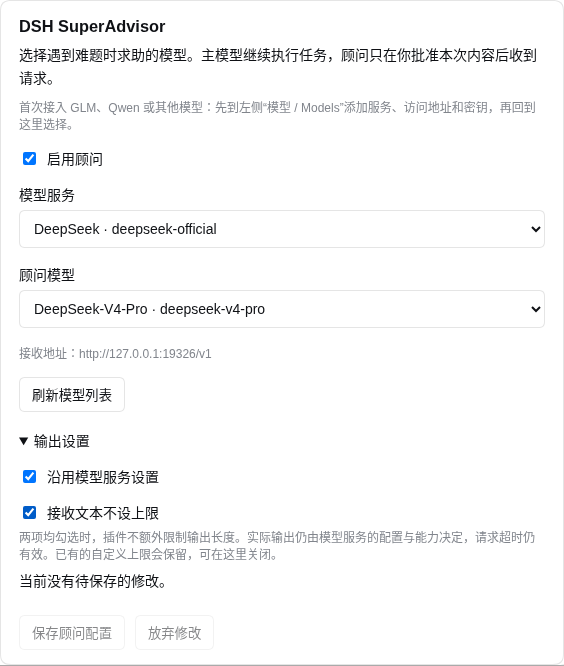
The included cordis.patch.yml inserts an advisor entry. Advanced deployments can still provide initial values through the launch environment variables DSH_ADVISOR_PROVIDER / DSH_ADVISOR_MODEL, or through a profile patch:
- id: advisor
  config:
    provider: your-existing-provider
    model: your-advisor-model
Settings saved in the UI override these initial values. Without a target, the plugin loads normally and remains configurable, while the tool returns not_configured without sending. It also refuses to send when the service is unavailable or lacks an explicit baseURL.
For local development, load the built module directly:
dsh --profile web --patch "$PWD/examples/local.cordis.patch.yml"
Run these commands from the repository root. DSH resolves ../dist/index.js relative to the patch file, so the examples do not depend on a particular machine's directory. The DeepSeek example configures Flash as the main model and Pro as the advisor, using deepseek-v4-flash and deepseek-v4-pro. Configure credentials through DSH or provide DEEPSEEK_API_KEY to the launching process before loading the overlay. Keep keys out of the patch:
dsh --profile web --patch "$PWD/examples/deepseek-flash-pro.cordis.patch.yml" --no-open
The DeepSeek example uses a high output budget; actual output remains subject to service and model limits. For other services, use the general configuration and register the model in Models.
Choose either the installed bundle or a local overlay to avoid registering the tool twice. The profile must provide tools, llm, settings, agents, approval, userQuestions, and systemPrompt, plus an interactive UI for manual approval. AI approval with the skip fallback can run without an interactive answerer. File evidence also requires the existing read tool. Web result cards are discovered through the package's ./client export and DSH tool presentation slots with either installation method.
The repository contains rebuildable source and tests; npm pack generates the installable package. A release can attach the .tgz to GitHub Releases without committing dependencies or local build output. See the release guide (Chinese) for file selection and release steps.
Request and approval example
The plugin injects advisor guidance into root tasks that can access ask_advisor: handle routine work independently; seek a focused independent review after two substantive failed attempts at the same obstacle, when evidence contradicts an explanation, or when a core correctness assumption remains unresolved. For complex arguments involving concurrency, crash recovery, retries, and idempotency, the guidance asks the model to form a candidate conclusion and counterexamples, then consult the advisor before reaching a final conclusion. The model interprets this guidance; there is no programmatic counter or automatic model switch, and it does not guarantee a call on every task. Explicit user restrictions take precedence. A custom persona that replaces the entire system prompt can also override this guidance.
The main model can call:
{
  "question": "Where is this empty-input error most likely occurring? Suggest a way to verify it.",
  "goal": "Fix the parser's handling of empty input",
  "constraints": "Preserve the existing public API",
  "attempts": "Ran the tests; ordinary input passes, but empty input fails.",
  "evidence": [
    { "kind": "file", "source": "src/parser.ts", "start_line": 30, "end_line": 55 },
    { "kind": "tool_result", "source": "prior-test-call-id", "start_line": 1, "end_line": 8 }
  ]
}
File paths are resolved against the current DSH task directory. tool_result.source is the ID of a completed tool call in the current task; Code Mode child-call IDs are also supported. Line selection uses 1-based line numbers in the combined text result. Missing lines, binary content, mixed media, and excerpts truncated by the file-reading tool are rejected. Use [] when no additional evidence is needed.
In manual mode, or when AI review escalates, the user sees a complete preview divided into fields, then chooses Approve and send (批准并发送), Edit content (编辑内容), Delete evidence (删除证据), Reject (拒绝), or View call details (查看调用详情). Call details show the full configuration and request ID. Returning from that view still requires a separate approval; viewing details does not send anything. Editing uses field selection and full-text replacement in native question cards, rather than a separate page editor. Only selecting and submitting Approve and send authorizes transmission. Closing the card, leaving it unanswered, general approvals, and old answers do not authorize the current request.
The advisor receives only text and has no file access, browser, or execution tools. The tool returns status/text/request_id/truncated, and the main model is responsible for verifying the advice. truncated: true means the advisor reached the output token limit.
The Web result card initially shows a short preview from the beginning of the advice, not another model-generated summary. Expanding it displays headings, lists, emphasis, and code. Original text and verification details (原文与核对信息) retains the full unmodified response and request ID. Unsupported Markdown appears as text; HTML, links, and images do not load external resources. Presentation does not rewrite the structured tool result, persisted records, or existing conversation.
| Status | Meaning |
|---|---|
ok |
Text advice has been saved; the main model can continue |
review_required |
AI review could not approve; the skip fallback ended this consultation without calling the advisor |
denied / cancelled |
No valid approval was obtained, or the request was cancelled before sending |
unavailable |
Interactive services, preparation, or storage are unavailable, or an earlier call was interrupted before sending |
not_configured / disabled |
No advisor target has been configured, or the advisor is disabled; nothing was sent |
model_unavailable |
The adapter does not have the selected model available; register it in Models before selecting it; nothing was sent |
unknown |
The request may have been sent, but there is no reliable completion record; it will not be resent automatically |
conflict |
The same call ID was used with different arguments |
budget_exhausted |
The task has used all available dispatch slots |
evidence_* / context_too_large / invalid_* / endpoint_required |
Evidence, arguments, or provider configuration needs correction; nothing was sent |
error |
The advisor finished without returning text advice |
A rejection does not trigger another request automatically. For unknown, a person must decide whether to start a new call; the old approval cannot authorize a retry. Cancellation cannot retract text that has already reached the remote service.
Configuration and audit records
| Setting | Default | Purpose |
|---|---|---|
provider, model |
Empty; configure in the UI | Use an existing DSH model route; a patch or environment variables can supply initial values |
enabled |
true | The UI's Enable advisor toggle, persisted in DSH's advisor settings |
storageDir |
$DSH_HOME/advisor-audit, or ~/.dsh/advisor-audit when DSH_HOME is unset |
Local audit and recovery records |
maxInputBytes |
32768 | Combined UTF-8 byte limit for system instructions and the complete request |
maxOutputTokens |
0 | Zero omits the plugin token override and uses the DSH model service settings; an optional custom limit is 128–1,000,000 tokens |
maxOutputBytes |
0 | Zero removes the plugin response-size cap; an optional custom cap is 1024–16,777,216 UTF-8 bytes |
maxCallsPerTask |
8 | Persistent dispatch budget shared across processes |
timeoutMs |
120000 | Maximum model-call wait time after approval, in milliseconds |
Both output settings are persisted in the advisor settings namespace; UI values override installation patches. Upgrading preserves explicitly configured limits (including old defaults saved in patches/settings). To remove them, enable both output options and save. A zero token setting is never sent as maxTokens: 0: the adapter resolves its own budget, which the approval displays when available. An absent adapter budget is shown as service-controlled rather than unlimited model output. The default 120-second request timeout remains in effect.
Oversized input is rejected rather than silently truncated. Token limits and billing semantics are implemented by the provider. Approval displays the adapter's resolved call configuration without estimating cost. A request allows at most 20 preview rebuilds.
The audit directory must be owned by the current user with mode 0700; files use 0600, and symlink paths are rejected. Records include request snapshots processed by redaction rules, approval decisions, send markers, and final results. They exclude raw provider configurations, authentication headers, API-key environment values, remote error details, and model reasoning streams. Snapshots may still contain code and business information explicitly approved by the user.
Audit records are not deleted automatically: deleting them also removes the basis for duplicate prevention and task call limits. Apply a retention policy only after the relevant tasks will no longer be resumed and no requests are running. The main model's file and command tools must not be able to modify the audit directory; that isolation is part of the DSH deployment configuration.
Boundaries
- This is an on-demand advisor. It does not implement background review, multi-advisor voting, task takeover, or independent advisor browsing.
- Only root tasks are supported. Manual review needs an interactive answerer; AI review can proceed without one. DSH
approval: neverprevents both reviewer and advisor calls. - Approval freezes the text and model-call configuration. Later file changes do not silently refresh approved evidence; updated evidence requires a new request.
- Secret detection uses heuristics and cannot identify every kind of private information. AI review can also misclassify content; choose its disclosure scope and receiver deliberately. In manual mode, inspect the complete preview. DSH itself still records the main model's original tool arguments.
baseURLidentifies the adapter's configured receiving base URL. Proxies, DNS, HTTP redirects, and other plugins in the same process are part of the trusted deployment boundary; the plugin does not guarantee control over the final network peer.- The guarantee is local duplicate prevention, not exactly-once processing across providers. A crash may consume a dispatch slot without sending a request; recovery returns an unknown outcome instead of resending.
- Ordinary filesystem permissions cannot protect against arbitrary code running as the same OS user. Keep the audit directory outside the main model's writable scope.
- Integration tests cover real DSH services, Code Mode, file reads, and Loader. Real Flash/Pro and Playwright-driven Chromium were also used to verify the full Standard mode approval flow. Reasoning settings, other adapters, other browsers, and browser interactions in Code Mode were outside that cloud acceptance run; see the acceptance record (Chinese).
See DESIGN.md (Chinese) for implementation boundaries and maintenance notes. DSH interface references: model adapters, approval service, user-question service, and plugin packaging.
License
MIT · Copyright (c) 2026 kvmem.
Links
More in this category
loopx-project/loopx#dsh-loopx-plugin★ 6398
LoopX, a provider-neutral, local-first state kernel and control plane for long-horizon agents: keeps Goal, Todo, gate, evidence, quota, recovery, and handoff state above DeepSeek Harness, while the plugin bootstraps the CLI and skills, admits bounded same-session continuation, and adds a loopback GoalBar for the exact bound loop.
Q00/ouroboros#integrations/dsh-plugin★ 6260
Config-only bundle that mounts Ouroboros through the DSH MCP client, exposing 36 interview, Seed, execution, evaluation, and evolution workflow tools in DSH.
chuspeeism/dashi-taskboard#deepseek-harness★ 3388
Embeds the active installed Codex Taskboard runtime in the DeepSeek Harness sidebar, using its launcher runtime descriptor instead of a fixed port.
NanmiCoder/dsh-agent-teams★ 2368
AgentTeams multi-agent teams.
EthanYoQ/AI-Novel-Writer#dsh-ai-novel-writer★ 1753
Installs a dedicated AI novel-writing preset and workbench: revisioned local project assets, a compact side drawer, and native approval-gated single-file changes.
Miaotofu01/Study-Mate★ 1144
Your AI learning companion: helping you plan your studies, understand concepts, and build projects to master a subject.
Community comments
Comments are public GitHub Discussions. Loading them connects to GitHub and Giscus; a GitHub account is required to post.