A DeepSeek Harness Web plugin that runs a user-defined command after the web profile has started successfully.
Install
# from npm (prebuilt)
dsh plugin --profile web add @kagurazakayashi/dsh-startup-command
# from GitHub (first run asks for allowBuilds approval — follow the hint, retry)
dsh plugin --profile web add github:kagurazakayashi/dsh-startup-command
Any plugin you install runs third-party code with your own permissions — it can read your files, use your credentials, and reach the network, and tool approvals don’t sandbox it. GitHub-sourced plugins also run build scripts at install time — pnpm blocks those until you allow them, so an install can stop with ERR_PNPM_GIT_DEP_PREPARE_NOT_ALLOWED or ERR_PNPM_IGNORED_BUILDS; dsh prints the exact key to add under allowBuilds in your profile’s pnpm-workspace.yaml, and the install works on the next run. Allowing a build is a trust decision: only install sources you trust, and pin a commit (github:owner/repo#sha).
README

A DeepSeek Harness Web plugin that runs a user-defined command after the web profile has started successfully.
Once dsh web has finished booting (the Loader tree has settled and the web server is listening), this plugin executes the command you configure in your profile — for example, opening the Web GUI in a specific browser with specific flags.
The command is fully driven by configuration (the dsh-startup-command entry of your profile's cordis.patch.yml, editable from the web settings card), never hard-coded in the plugin source. The {url} placeholder is replaced with the actual GUI address (http://127.0.0.1:<port>/?token=…), so it works correctly even when --port 0 lets the OS pick the port.
Screenshots
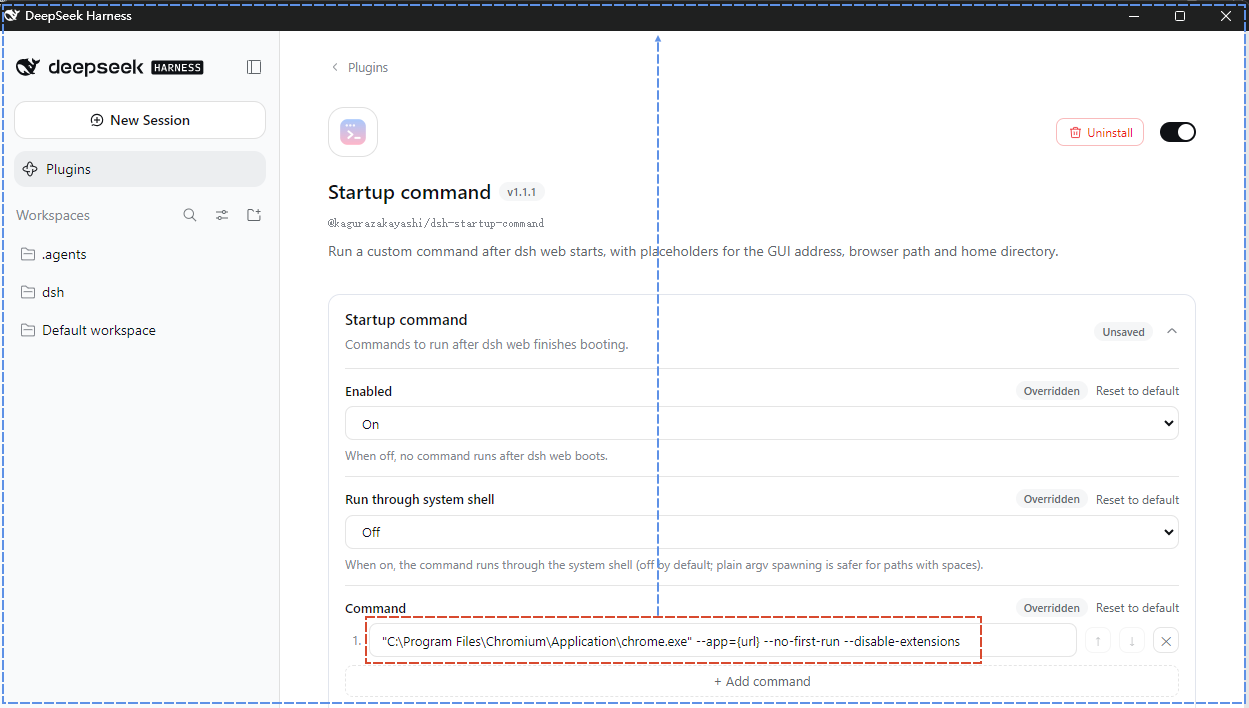
The settings card on this plugin's own page — sidebar Plugins → open this plugin (the configuration section sits between its description and its rows):
Features
- Fires after startup succeeds: it follows the exact lifecycle of the built-in
web-appopenBrowser— it waits for the whole Loader tree to settle and thewebServerservice to be ready, so the address it uses is always the real one after the server starts listening. - Fully configurable command: the plugin declares its own settings schema and the namespace is the profile entry id (
dsh-startup-command);commandaccepts either a single string or an array of multiple commands, which run in order (the next one starts only after the previous one exits). No plugin source changes needed. {url}/{home}/{browser}placeholders:{url}is replaced withhttp://127.0.0.1:<actual port>/?token=…before execution (newer dsh web requires the token to exchange a browser-login cookie; it degrades to the clean URL when theconnectionservice is absent) and works with OS-assigned ports (--port 0);{home}is replaced with the user folder;{browser}auto-detects a Chromium-family browser (priorityChromium > Chrome > Edge, or the default browser when it is one of them).- Does not block dsh: the child process is spawned
detachedwith its standard I/O ignored, so it runs independently and never holds up dsh shutdown. - Toggle and mode:
enabled: falsetemporarily disables the plugin;shell: trueruns the command through the system shell (default off — spawning with a plain argument array is safe even for paths with spaces). - Skips when unconfigured: if
commandis not set, it prints a warning and skips — no silent failure, no accidental execution. - Web settings card: an expandable card on this plugin's own page (sidebar Plugins → open this plugin) edits
enabled,shell, andcommandin place, with an Add example command button that opens an explanation dialog and then inserts a ready-made auto-detect-browser command — no need to editcordis.patch.ymlby hand.
Installation
This plugin is dual-face: a host half (index.js, runs the command at startup) and a browser half (client.js, registers a settings card on this plugin's own page: sidebar Plugins → open this plugin).
1. Get the package
From npm (recommended):
npm install @kagurazakayashi/dsh-startup-command
# or, in a pnpm-based profile:
# pnpm add @kagurazakayashi/dsh-startup-command
Or from source (local development) — place the plugin directory under the profile and link it:
C:\Users\<you>\.dsh\profiles\web\plugins\dsh-startup-command\
{
  "dependencies": {
    "@kagurazakayashi/dsh-startup-command": "link:plugins/dsh-startup-command"
  }
}
Then run pnpm install to materialize the link — or create a
node_modules/@kagurazakayashi/dsh-startup-command junction/symlink pointing
at ../../plugins/dsh-startup-command manually.
2. Mount the plugin
Add an insert entry to C:\Users\<you>\.dsh\profiles\web\cordis.patch.yml (this row only mounts the plugin; the command itself is added as a config entry in the next section):
- insert:
    - id: dsh-startup-command
      name: '@kagurazakayashi/dsh-startup-command'
      inject: [webServer]
3. Configure and restart
Add a config entry for dsh-startup-command to C:\Users\<you>\.dsh\profiles\web\cordis.patch.yml (see the next section), then restart dsh web. After the restart, a settings card appears on this plugin's own page (sidebar Plugins → open this plugin), where enabled, shell, and command can be edited in place.
Where to find that card (in dsh 0.2.x plugin configuration is no longer inside the Settings dialog but on the plugin's own page):
- Open the Plugins page at the top of the sidebar (the four-squares entry, above Workspaces) — not the Settings entry at the bottom.
- Wait for the Installed list to populate. The page asks the host for the plugin inventory, which can take a dozen seconds in a cold browser session; until it arrives the page looks almost empty — that does not mean the content is missing.
- Under Installed, click this plugin's entry to open its detail page — from
1.1.1the list shows the localized name Startup command, while older versions show the package name@kagurazakayashi/dsh-startup-command; clicking the toggle on the right or the blank area does not open it. - The config section sits between the plugin's description and its Included components; the card is collapsed by default, so click its title to expand it.
If a skin with background artwork is active, the page's text is drawn over it and reads poorly (the Plugins page paints no opaque background of its own, while the card keeps its own); temporarily switching or disabling the skin makes it much easier to read.
Configuration
The configuration lives in the dsh-startup-command config entry of the profile's cordis.patch.yml (for example $DSH_HOME/profiles/<profile>/cordis.patch.yml). The plugin declares the schema itself, and the namespace is the profile entry id dsh-startup-command declared by this bundle's cordis.patch.yml; the schema defaults apply when nothing is configured:
- id: dsh-startup-command
  config:
    enabled: true
    shell: false
    command: '"C:\Program Files\Chromium\Application\chrome.exe" --user-data-dir="..." --app={url}'
Supported fields:
command(string | string[]) — a single command as a string, or multiple commands as an array run in order (the next one starts only after the previous one exits); each entry is split into argv honoring quotes, so wrap paths containing spaces in double quotesenabled(boolean, defaulttrue) — set tofalseto disable temporarilyshell(boolean, defaultfalse) — set totrueto run through the system shell
command supports these placeholders, all replaced before execution:
{url}— the actual GUI address (the?token=-authenticated URL on newer dsh web){home}— the current user folder (os.homedir()){browser}— the auto-detected Chromium-family browser executable. Detection rule: if the system default browser is Chromium / Chrome / Edge, the default browser wins; otherwise the first installed browser inChromium > Chrome > Edgepriority is used
The Add example command button on the web settings card opens a dialog explaining the example, then appends a ready-made command using {browser}, {home}, and {url}. The detection result comes from the read-only host route GET /dsh-startup-command/browser, which the card fetches when it mounts; if no Chromium / Chrome / Edge browser was found, it shows a "cannot generate example command" message with the reason instead.
Examples
Open the GUI in Chrome as an app window with dedicated profile and cache directories, no first-run welcome screen, and no extensions:
- id: dsh-startup-command
  config:
    command: '"C:\Program Files\Google\Chrome\Application\chrome.exe" --user-data-dir="D:\dsh-chrome-profile" --disk-cache-dir="D:\dsh-chrome-cache" --app={url} --no-first-run --disable-extensions'
What each flag does:
--app={url}— app-mode window (no address bar / toolbar)--no-first-run— skip the first-run welcome screen--disable-extensions— load no extensions--user-data-dir=<path>— set the configuration (profile) directory--disk-cache-dir=<path>— set the disk cache directory
Note: a dedicated --user-data-dir avoids clashing with an already-running Chrome instance (otherwise --app is taken over by the existing instance and the switches have no effect).
Auto-detect Chromium / Chrome / Edge with the flags above (equivalent to the Add example command button on the web card):
- id: dsh-startup-command
  config:
    command: '"{browser}" --user-data-dir="{home}/.dsh/dsh-browser-data" --disk-cache-dir="{home}/.dsh/dsh-browser-cache" --app={url} --no-first-run --disable-extensions'
Multiple commands run in order (the next one starts only after the previous one exits):
- id: dsh-startup-command
  config:
    command:
      - 'cmd /c ping -n 3 127.0.0.1' # do some preparation first (exits after ~2s in this example)
      - '"C:\Program Files\Google\Chrome\Application\chrome.exe" --app={url}'
Launch any program (e.g. Notepad):
- id: dsh-startup-command
  config:
    command: 'C:\Windows\System32\notepad.exe'
Relationship to the built-in "open default browser"
dsh web opens the system default browser via the open package after startup (the openBrowser flag of the web-runtime row). If you use this plugin to open a specific browser, you usually want to disable the built-in behavior to avoid double-opening. Override that row in cordis.patch.yml (a patch replaces the row's whole config, so every key must be restated):
- id: web-runtime
  config:
    openBrowser: false
    printUrl: true
    surfaceContext: true
    trustedHosts: !!js ctx.webStartup.trustedHosts
If you do not want to disable the built-in behavior (e.g. you want the default browser and your custom command to coexist), simply omit that block.
Timing
dsh web boots
    │
    ▼
Loader tree settles (web server starts listening)
    │
    ▼
dsh-startup-command runs: {url} replacement → spawn(command)
    │
    ▼
child runs detached; dsh keeps serving
Uninstall
Remove the dsh-startup-command insert entry from the profile's cordis.patch.yml (and the web-runtime override if it is no longer needed), remove the id: dsh-startup-command config: entry from the same file, delete the plugin directory, and restart dsh web. That config: entry is the plugin's only persistent trace, so removing it leaves nothing behind.
Notes (safety & limitations)
- Restart required: a running process does not load new patch rows; restart
dsh webafter changing the configuration. - ESM directory-import limitation:
namemust point atindex.js, not the directory, otherwise Node throwsERR_UNSUPPORTED_DIR_IMPORT. - Command parsing: each command string is split into argv by double-quoted groups; an unquoted path containing spaces will be split incorrectly.
- Sequential multi-command: commands run in order; the next one starts only after the previous one exits. If a command is a long-running process (e.g. a browser), every command after it waits indefinitely — put long-running commands last.
- Skips when unconfigured: if
commandis not set, it prints a warning and does nothing. - Does not wait for the whole sequence: each command is spawned
detached; if dsh exits mid-sequence, commands not yet started never run, while already-started detached processes keep running. To confirm the commands ran, check thedsh-startup-command:lines in the dsh startup log.
Version compatibility
The DSH versions and runtime environment this plugin targets:
| Item | Version / notes |
|---|---|
| Targeted DSH core | minimum 0.2.0-rc.1 (engines.dsh; the @deepseek-ai/dsh-settings and @deepseek-ai/dsh-host-webserver peers are >=0.2.0-rc.1 <0.3.0-0); runtime-verified on 0.2.0-rc.2 |
| Plugin version | 1.1.2 |
| Settings schema | the plugin's own schemastery Config with the .volatile() fields enabled, command (string or string[]), shell; there is no settings.register / settings.get |
| Settings namespace | the profile entry id dsh-startup-command, declared by this bundle's cordis.patch.yml; values persist in the profile's cordis.patch.yml (e.g. $DSH_HOME/profiles/<profile>/cordis.patch.yml), not in $DSH_HOME/settings.yaml |
| Settings card slot | plugins.bundle.config, keyed by the npm package name @kagurazakayashi/dsh-startup-command, provided by @deepseek-ai/dsh-client-ui-plugin-manager; the card reads and writes through ctx.configForms.get("dsh-startup-command") (getSnapshot / subscribe / set / unset) |
| Client inject deps | @deepseek-ai/dsh-client-locale, @deepseek-ai/dsh-client-ui-plugin-manager, @deepseek-ai/dsh-client-ui-settings |
| Browser info route | read-only GET /dsh-startup-command/browser on the host; non-GET returns 405 METHOD_NOT_ALLOWED, and the card falls back to "not found" when the route is absent |
| Plugin version | Usable core versions | Basis |
|---|---|---|
1.1.2 |
>= 0.2.0-rc.1 < 0.3.0-0 |
Adds screenshots.json for storefront screenshots, points the README at a single screenshot.png, and switches the language bar and icon to native Markdown; behaviour and the settings mechanism are unchanged from 1.1.1 |
1.1.1 |
>= 0.2.0-rc.1 < 0.3.0-0 |
Adds plugin display metadata: locale/{en,zh}.json supplies the localized plugin name and summary, and icon.svg supplies the Plugins-page artwork; behaviour and the settings mechanism are unchanged from 1.1.0 |
1.1.0 |
>= 0.2.0-rc.1 < 0.3.0-0 |
Adapts the plugin to dsh 0.2.x: declarative Config, configForms (replacing the removed settingsScope), the plugins.bundle.config card on the plugin's own Plugins page, and the browser-info route instead of host-computed schema fields |
1.0.1 |
0.1.x only |
Registers the schema with settings.register and reads it with settings.get; the dsh-startup-command: section of $DSH_HOME/settings.yaml is the storage; the card is registered into the settings.plugin.item slot through the settingsScope service |
1.0.0 |
0.1.x only |
Adds the ready-made example command dialog and the multi-command editing card; same 0.1.x settings API |
0.1.0 |
0.1.x only |
First release: the dsh-startup-command settings schema in settings.yaml and the web settings card |
The ranges do not overlap: dsh 0.2.0 removed the 0.1.x settings API, so 1.1.0 requires 0.2.x, while 1.0.1 and earlier cannot run on 0.2.x.
Migrating from 1.0.1 (dsh 0.1.x): dsh 0.2.0 imports old $DSH_HOME/settings.yaml sections only for profile entry ids that exist in the composition at the time that (already-performed, one-shot) import runs. A dsh-startup-command: section still sitting in settings.yaml.imported must therefore be moved into the profile's cordis.patch.yml manually, using the YAML snippet in the Configuration section above.
License
MIT — see LICENSE, copyright KagurazakaYashi(KagurazakaMiyabi).
Links
More in this category
loopx-project/loopx#dsh-loopx-plugin★ 6388
LoopX, a provider-neutral, local-first state kernel and control plane for long-horizon agents: keeps Goal, Todo, gate, evidence, quota, recovery, and handoff state above DeepSeek Harness, while the plugin bootstraps the CLI and skills, admits bounded same-session continuation, and adds a loopback GoalBar for the exact bound loop.
Q00/ouroboros#integrations/dsh-plugin★ 6255
Config-only bundle that mounts Ouroboros through the DSH MCP client, exposing 36 interview, Seed, execution, evaluation, and evolution workflow tools in DSH.
chuspeeism/dashi-taskboard#deepseek-harness★ 3376
Embeds the active installed Codex Taskboard runtime in the DeepSeek Harness sidebar, using its launcher runtime descriptor instead of a fixed port.
NanmiCoder/dsh-agent-teams★ 2336
AgentTeams multi-agent teams.
EthanYoQ/AI-Novel-Writer#dsh-ai-novel-writer★ 1705
Installs a dedicated AI novel-writing preset and workbench: revisioned local project assets, a compact side drawer, and native approval-gated single-file changes.
Miaotofu01/Study-Mate★ 1124
Your AI learning companion: helping you plan your studies, understand concepts, and build projects to master a subject.
Community comments
Comments are public GitHub Discussions. Loading them connects to GitHub and Giscus; a GitHub account is required to post.