Zen Mode view tab and foreground time tracker for DeepSeek Harness: while the agent works, a calm conversation view shows running/done status, your latest user message, live activity hints and the final AI reply in markdown with one-line turn stats, plus screen-watching (focus) time tracking with daily/weekly Zen scores, a chat-hide toggle that hides tool calls and reasoning rows, auto enter/exit Zen on task start/complete, an Alt+Z shortcut and a Zen settings panel — pure client-side, stored in localStorage, no network.
Install
# from npm (prebuilt)
dsh plugin --profile web add @johnnren/dsh-zen
# from GitHub (first run asks for allowBuilds approval — follow the hint, retry)
dsh plugin --profile web add github:john-walks-slow/dsh-zen
Any plugin you install runs third-party code with your own permissions — it can read your files, use your credentials, and reach the network, and tool approvals don’t sandbox it. GitHub-sourced plugins also run build scripts at install time — pnpm blocks those until you allow them, so an install can stop with ERR_PNPM_GIT_DEP_PREPARE_NOT_ALLOWED or ERR_PNPM_IGNORED_BUILDS; dsh prints the exact key to add under allowBuilds in your profile’s pnpm-workspace.yaml, and the install works on the next run. Allowing a build is a trust decision: only install sources you trust, and pin a commit (github:owner/repo#sha).
README
A Zen Mode view tab + foreground time tracker for DeepSeek Harness (DSH).
While an agent works in the background, switch to the Zen tab and get a calm, minimal surface: a status message, your latest user message, and one line of statistics — no tool calls, no reasoning rows, no noise. Zen also tracks how much of your "running" time was spent actually watching the screen, and reports a daily / weekly Zen score.
Screenshots
| Zen view (while generating) | Zen view (done) | Zen settings |
|---|---|---|
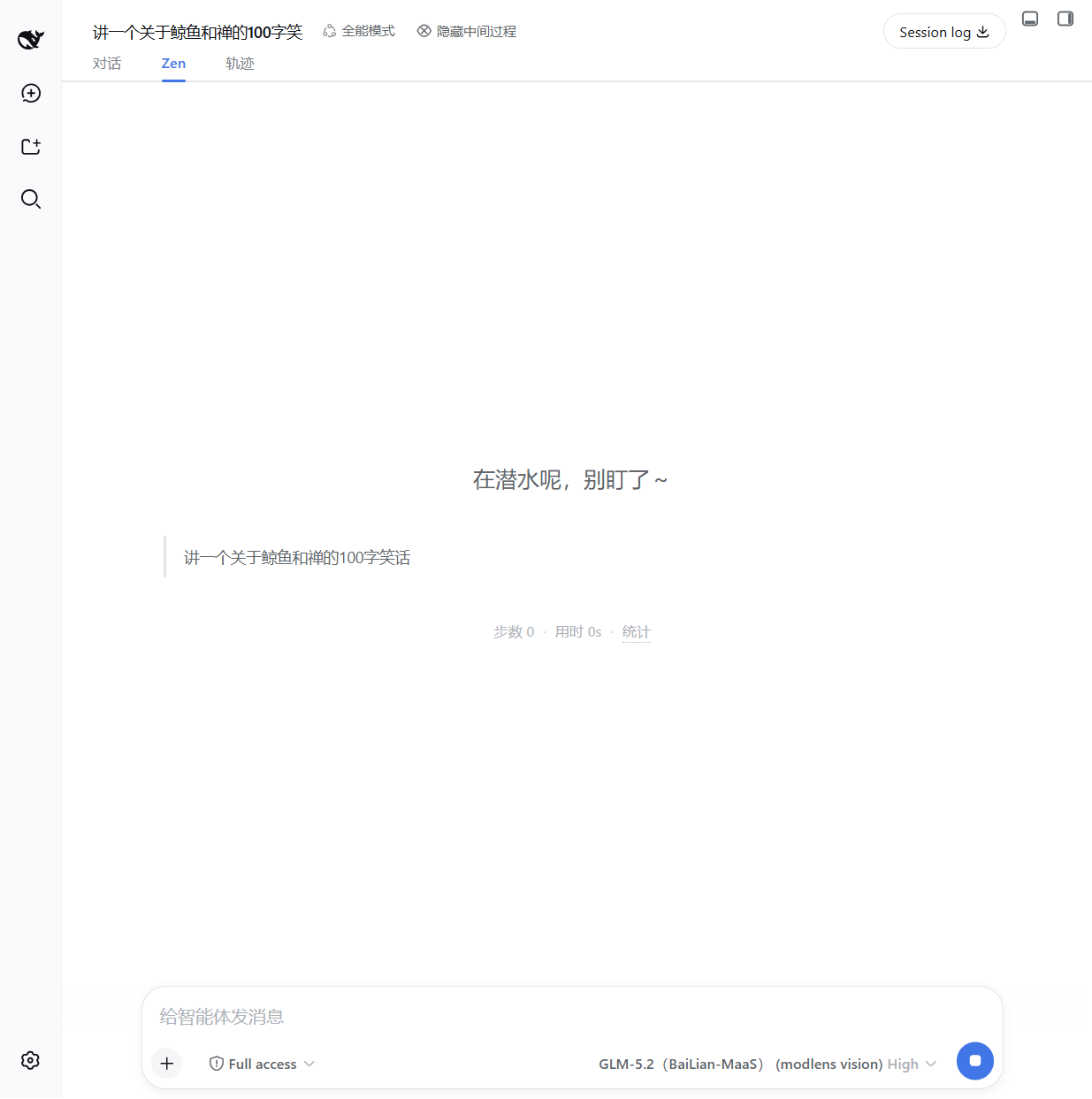 |
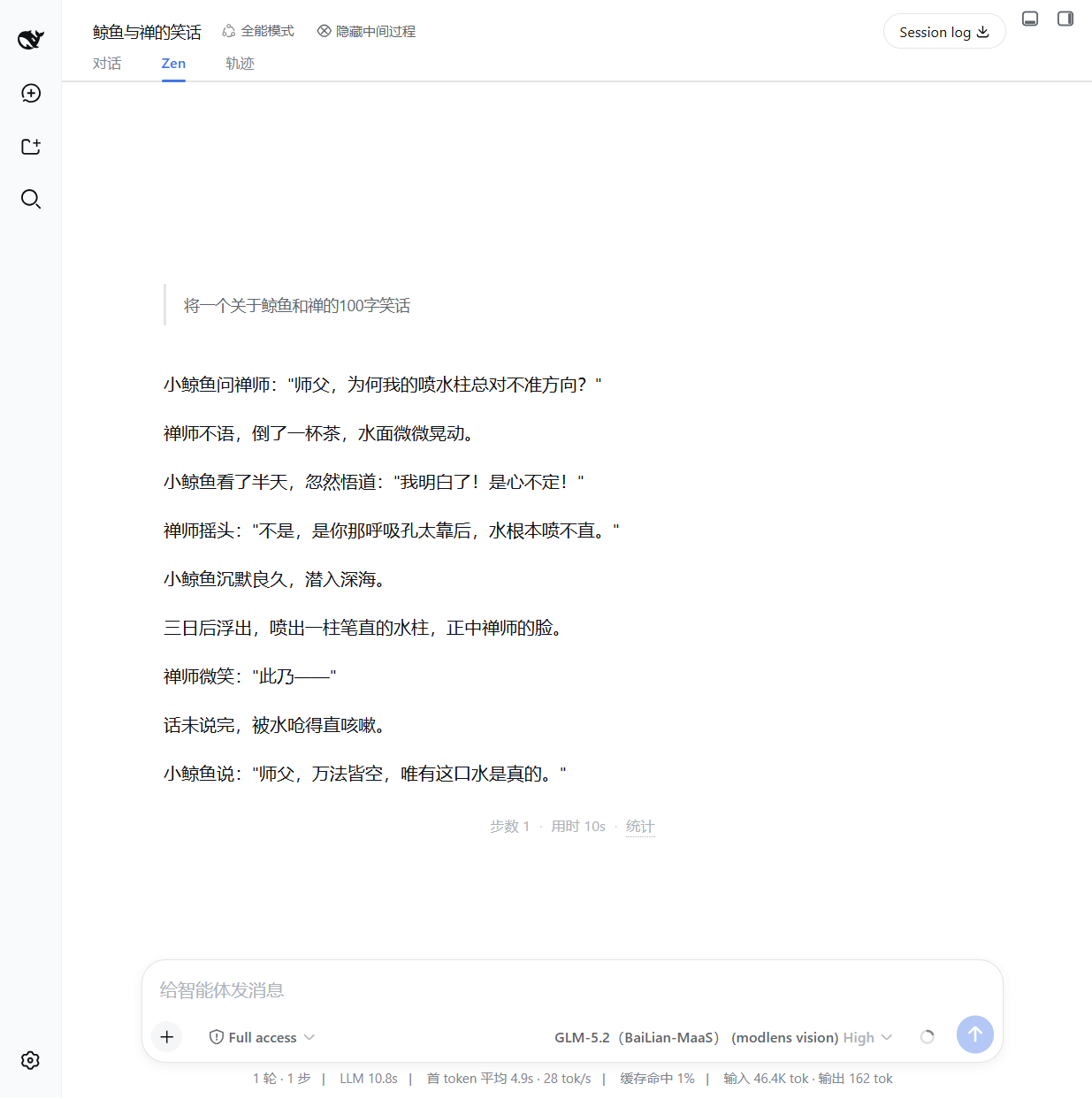 |
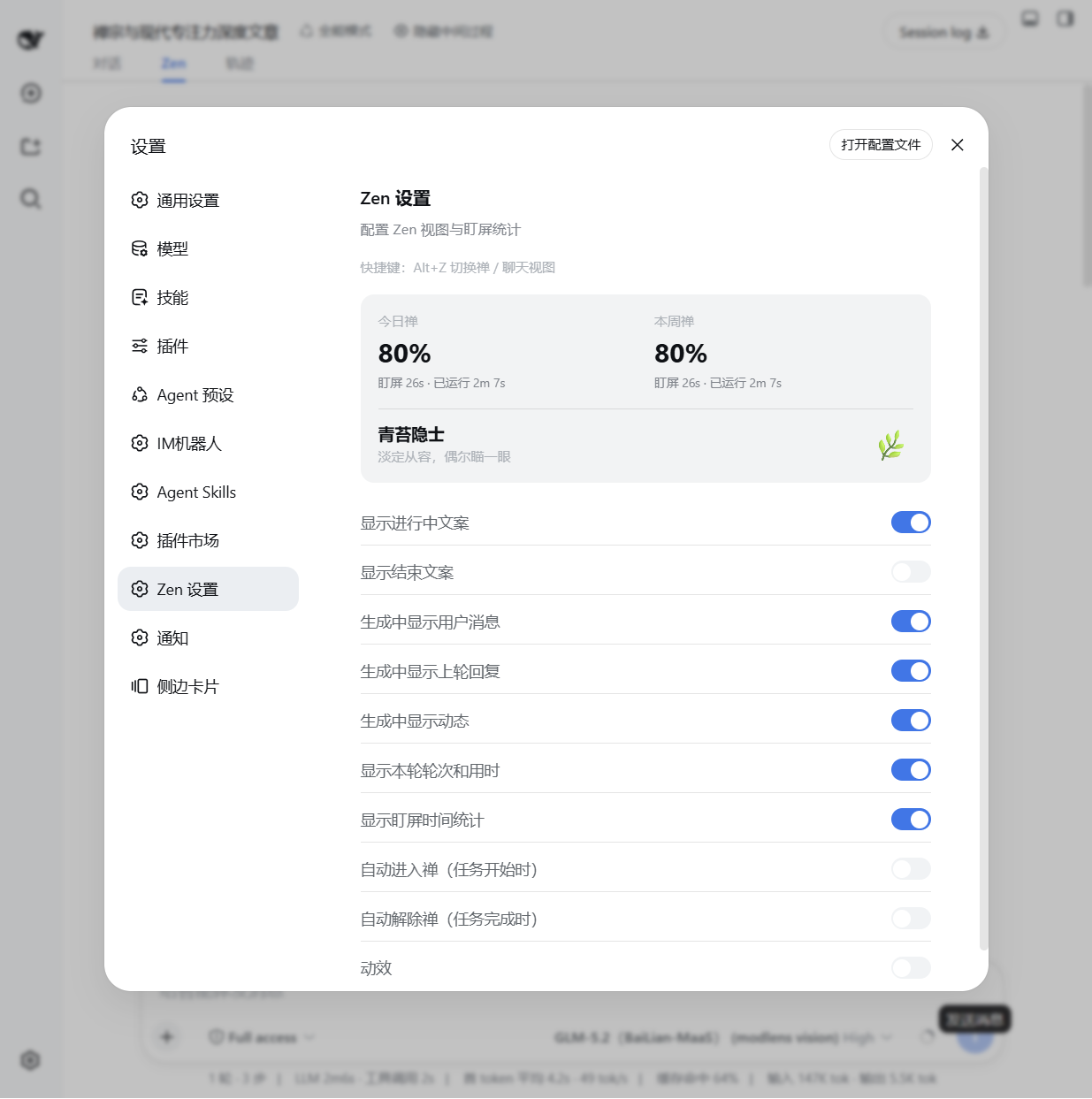 |
Features
- Zen view tab — a dedicated
conversation.viewtab (对话 / Zen / 轨迹), showing:- running / done status message (configurable, with or without the second-line description)
- your user message (while generating), the previous round's reply and live activity hints
- the final AI reply rendered with markdown
- one-line turn stats:
步数 N · 用时 Nm · 统计
- Foreground time tracker — records foreground (visible window) vs. total running time
per session, persisted in
localStorage. Daily / weekly Zen score (100% − 盯屏比例) is shown in the settings panel. - Chat hide toggle — a header button (
隐藏中间过程) that hides tool-call, command, context, compaction, reasoning rows, etc. from the chat view via CSS. - Auto enter / exit Zen — optional: auto-switch to the Zen tab when a task starts, and back to chat when it completes.
- Shortcut — press
Alt+Zto toggle between the Zen and chat views from anywhere. - Animation toggle — disable all entry animations/transitions in Zen view if you prefer instant rendering.
Install
This plugin is distributed as a DSH bundle. It requires a Web-capable profile (the default
web profile).
From a Git repository (recommended)
dsh plugin --profile web add github:john-walks-slow/dsh-zen#<40-character-commit>
Then restart dsh web. The bundle patch (cordis.patch.yml) inserts the zen row
into the profile's composition, and the Web client is served from the committed lib/client.js.
Prefer pinning the exact commit hash; a floating branch can be force-pushed. See docs/PUBLISHING.md for the catalog submission flow.
From npm (once published)
dsh plugin --profile web add @johnnren/dsh-zen
Usage
- Open any conversation in the DSH Web GUI.
- Click the Zen tab (or press
Alt+Z) to switch to the Zen view. - Optionally use the 隐藏中间过程 button in the session header to collapse intermediate process nodes in the chat view.
- Open Settings → Zen 设置 to configure what is shown:
- 显示进行中标题 / 显示进行中副标题 / 显示结束标题 — status message title/subtitle on/off
- 生成中显示用户消息 / 生成中显示上轮回复 / 生成中显示动态 — hints shown while generating
- 显示本轮轮次和用时 — the
步数 N · 用时 Nmline - 显示盯屏时间统计 — the foreground stats tooltip
- 自动进入禅 / 自动解除禅 — auto view switching on task start / complete
- 动效 — entry animations on/off
The settings panel also shows your 今日禅 / 本周禅 scores and the current Zen level.
Development
npm install
npm run build        # bundle src/client.ts + src/index.ts → lib/, deploy into web profile
npm run typecheck    # tsc --noEmit against the local shims in src/dts-shim.d.ts
npm run e2e:zen      # GUI probe against a disposable dsh-e2e instance (see e2e/)
The deploy target is $DSH_HOME/profiles/web/node_modules (default ~/.dsh). Client-only
changes need a page refresh; host-side changes need a DSH restart.
The GUI probe needs a disposable instance started with the provider layer in
e2e/profile/e2e-profile.patch.yml, otherwise agent turns fail with NO_ADAPTER and the
live Chat surfaces cannot be exercised:
export CPA_API_KEY=...   # cpa gateway key (see ~/.config/api-vault)
export DSH_E2E_PLAYWRIGHT_CORE=<path to an installed playwright-core entry>
dsh-e2e start --patch e2e/profile/e2e-profile.patch.yml --wait-ready
npm run e2e:zen
dsh-e2e stop
Repository layout
├── src/
│   ├── client.ts            # Web client: slots, settings section, shortcuts
│   ├── index.ts             # Host face (empty apply; bundle row only)
│   ├── foreground-tracker.ts# Foreground time tracking + persistence
│   ├── zen-settings.ts      # Settings store + migration
│   ├── locales.ts           # zh / en dictionaries
│   └── components/          # ZenView, ChatHideToggle, ZenSettingsSection
├── lib/                     # Committed build artifacts (client factory bundle + host)
├── assets/icon.svg          # Plugin icon
├── cordis.patch.yml         # Bundle patch: inserts the zen row
├── build.mjs                # esbuild bundler + deploy
└── docs/                    # Screenshots and publishing guide
Compatibility
- Requires DeepSeek Harness with the Web client module system (default
webprofile). - Verified against DeepSeek Harness
0.2.0-rc.2(see docs/issues/261011-dsh-02-compat). - Slot contracts used:
conversation.view,conversation.session.header.actions,settings.section. - Client services used:
slots,sessions,locale,uiConversation. - The Zen view reads the Chat target snapshot through
ctx.uiConversation.binding(sessionId).target("chat"); the current Session is derived fromsessions.listmain-view retention. Both are 0.2-era contracts — re-verify them against the target version's source when upgrading. - Zero permissions: no network requests, no file system access, no external
services — the host face is an empty
apply()and all data stays in browserlocalStorage(dsh.zen.*). 无网络请求、无文件写入、无外部服务、无遥测。
Uninstall
dsh plugin --profile web remove @johnnren/dsh-zen
Or remove the row from the profile composition. Stored stats/settings in localStorage
can be cleared by deleting keys prefixed dsh.zen..
License
MIT — see LICENSE.
Community
- Thanks to the LINUX DO community for providing the discussion environment.
Links
More in this category
zhu1090093659/dsh-web#packages/dsh-task-board★ 9967
Task board for the dsh web GUI: a sidebar multi-column kanban whose cards run in real DSH agent sessions and can also be scheduled with cron expressions, executed host-side even with the browser closed.
zhu1090093659/dsh-web#packages/dsh-web-all★ 9967
Plugin and skin collection for the DSH Web UI: task board, Git graph, right-side panel, remote mobile UI, pet, live token stats, and a skin center.
MeteorNOX/DeepSeek-Balance-Whale-Widget★ 6767
A fixed-corner whale widget for the DSH web GUI — balance, today's usage and per-turn cost with peak/off-peak pricing, editable balance-alert and daily-budget bubbles, a module-based custom bubble queue with A/B weighted choices and random lines or images, 30+ vendor templates (OpenAI, OpenRouter, Kimi, SiliconFlow, Ark, Zhipu, MiniMax and more) with per-model balance and subscription quota, plus task-end sound, imported audio, custom roles and a resource manager. Local-only, no telemetry.
ccch1mneyyy/dsh-TUI★ 6630
Claude Code-style full-screen terminal UI: pixel-whale header, live status line, and streaming thought expansion.
omdsh-dev/DSH-better-sidebar★ 4833
Full sidebar workbench with file rendering and editing, terminal, Git, and subagents; third-party plugins can register new tabs.
Devin-AXIS/deepseek-design#deepseek-idesign★ 1681
Visual design studio for websites, app prototypes, posters, cards, reports, and magazines, with templates, direct element editing, selection-aware AI draft handoff, and export.
Community comments
Comments are public GitHub Discussions. Loading them connects to GitHub and Giscus; a GitHub account is required to post.