Model switching and reasoning-effort control for DeepSeek Harness: set_model and list_models agent tools let the agent autonomously change its provider, model or thinking depth (reasoning effort) mid-task with a mandatory reason, a provider whitelist and a context-window token-pressure guard, the active model is injected into the runtime context, and Plan Mode auto-transition switches to a configured planning model on entering plan mode and restores the previous execution model on exit.
Install
# from npm (prebuilt)
dsh plugin --profile web add dsh-set-model
# from GitHub (first run asks for allowBuilds approval — follow the hint, retry)
dsh plugin --profile web add github:john-walks-slow/dsh-set-model
Any plugin you install runs third-party code with your own permissions — it can read your files, use your credentials, and reach the network, and tool approvals don’t sandbox it. GitHub-sourced plugins also run build scripts at install time — pnpm blocks those until you allow them, so an install can stop with ERR_PNPM_GIT_DEP_PREPARE_NOT_ALLOWED or ERR_PNPM_IGNORED_BUILDS; dsh prints the exact key to add under allowBuilds in your profile’s pnpm-workspace.yaml, and the install works on the next run. Allowing a build is a trust decision: only install sources you trust, and pin a commit (github:owner/repo#sha).
README
A DeepSeek Harness (DSH / cordis) plugin: through Jev or through its own tool calls, the agent switches model presets and thinking depth on its own, following the task at hand.
- Automatic switching (Jev): the TypeSafe Jev decision model reads your latest instruction at the start of every turn, classifies the task and moves between your declared presets by itself — deep reasoning for hard debugging, the cheap tier for copy edits and test runs; no manual intervention, and no need to say "think harder" in the prompt. A preset that declares reasoning effort only moves thinking depth on the same model;
- Free model tools: the agent switches provider, model and reasoningEffort by task difficulty via
set_model/list_models; - Preset tools: the deployment declares a set of model presets (model + reasoning effort) and the agent may only switch between them (
switch_preset/list_presets). A preset may omitprovider/model(empty = keep the active model) so it tunes thinking depth alone; an emptypresetslist falls back to the built-inlow/medium/high; - The automatic switch and the two tool switches are fully independent and combine freely (Jev only, tools only, both, neither);
- Accepts a policy prompt: one text tells both the agent (while it holds a switching tool) and Jev which preset each stage should use;
- The plugin injects the active model and preset into the runtime context, and switches models automatically alongside Plan Mode.
Switch to deep reasoning for hard problems, stay on the cost-effective tier for routine work — with Jev enabled that policy runs itself every turn, no manual configuration changes needed.
Three independent switches
| Switch | Default | Effect |
|---|---|---|
enableModelTools |
true |
injects set_model / list_models, letting the agent switch to any registered provider / model / reasoning effort |
enablePresetTools |
false |
injects switch_preset / list_presets, restricting the agent to the declared presets (the built-in three tune thinking depth only) |
jevEnabled |
false |
Jev decides the preset every turn — independent of, and unaffected by, the two tool switches |
The preset tools constrain the agent's tool surface. Your own switching through the GUI model picker is unrestricted (DSH exposes no plugin hook to intercept user selections) and remains a manual fallback. None of the switches changes existing GUI behaviour.
Policy prompt
policyPrompt is the single source of that policy, and it has two readers:
| Reader | Reads it when | Sees it as |
|---|---|---|
| Agent | at least one tool switch is on | a ## Model policy section in the system prompt |
| Jev | jevEnabled is on |
part of every decision request (state.policy), next to the current instruction and the previous reply |
With neither reader present (both tool switches off and Jev off) nothing reads it, and the plugin logs a warning. When the preset tools are on, the generated preset roster is appended to the same section:
policyPrompt: |
  Always switch to deep for planning and hard debugging; use daily for routine work, edits and tests.
What the agent sees once the preset tools are enabled (generated from each preset's id/name/when — nothing to hand-write):
## Model policy

Always switch to deep for planning and hard debugging; use daily for routine work, edits and tests.

本部署只允许在下列模型档位之间切换;进入对应阶段时调用 switch_preset 换档:

- **daily(日常执行)** — deepseek/deepseek-chat · reasoning low — 适用:常规实现、修改、测试
- **deep(深度攻坚)** — deepseek/deepseek-reasoner · reasoning max — 适用:疑难排查、架构设计
With nothing configured the section is empty and leaves no trace in the prompt.
What the model sees
Via systemPrompt.context, the plugin contributes the current active model (and preset) line to the Runtime Context snapshot assembled on every step. That snapshot is committed only when its text changes, so a stable turn keeps a single cache-safe append (the model can check itself at any time without calling a tool):
[Current active model: deepseek/deepseek-chat · reasoning: low · preset: daily]
While Plan Mode is active, a status marker is attached:
[Current active model: deepseek/deepseek-reasoner · reasoning: max · preset: deep] [Plan Mode Active]
preset: xx appears only when the active selection matches a declared preset.
Tools
set_model (free model tools)
set_model({ provider?, model?, reasoningEffort?, reason }) — reason is mandatory (every switch invalidates the session's KV cache, so the tool description requires the agent to justify the switch and avoid frequent changes):
{ "model": "deepseek-reasoner", "reasoningEffort": "high", "reason": "Hard concurrency debugging, deep reasoning required" }
list_models (free model tools)
list_models({ provider? }) lists registered providers and model capabilities (reasoning efforts, context window):
# Available Providers & Models:

## Provider: deepseek
- **deepseek-reasoner** (DeepSeek Reasoner) | Reasoning: [low, high, max] | Context: 128000
- **deepseek-chat** (DeepSeek Chat) | Context: 128000
switch_preset (preset tools)
switch_preset({ preset, reason }) — preset is a configured preset id, reason is mandatory; an unknown id returns the available presets:
Model preset switched to deep (深度攻坚) — deepseek/deepseek-reasoner · reasoning: max. Effective from the next step.
Reason: Hard concurrency debugging, deep reasoning required
list_presets (preset tools)
list_presets({}) lists the allowed presets, the stage each suits, and the one currently in use:
# Model presets

Mode: preset · Plan Mode active
Current: deepseek/deepseek-reasoner · reasoning max · preset deep

- **daily(日常执行)** — deepseek/deepseek-chat · reasoning low — 适用:常规实现、修改、测试
- **deep(深度攻坚)** — deepseek/deepseek-reasoner · reasoning max — 适用:疑难排查、架构设计 ← current
A switch takes effect from the next step: the plugin appends a model/selection event to the session (the same mechanism as the GUI model picker), and the Web UI state stays in sync.
Plan Mode auto-transition
The plugin watches the plan projection state on agent/pre-step — zero manual intervention:
- Entering Plan Mode (
/plan on): stashes the current model and switches automatically — to theplanPresetpreset when one is set (it wins), otherwise to theplanModelroute; - Leaving Plan Mode (
exit_plan_modeapproval //plan off): automatically restores the pre-entry model (autoRestorePlanModel, on by default); - A failed auto-switch only degrades to a warn and never interrupts the step.
Jev Autonomous Model Switching
With jevEnabled on, the plugin asks the TypeSafe Jev decision model once per turn, on the first step: what kind of task is this instruction, and which preset fits it. The decision flow:
- take the latest user instruction of the current turn (even before it is committed to the session), append the previous assistant response as background, then end-align and truncate to 2000 characters;
- send that context together with the policy prompt (
state.policy), and offer every preset inpresets(when/name/id) pluskeep(stay as-is) as the candidate set, letting Jev return the best preset with a confidence score; - below
jevConfidenceThreshold(default 0.7) nothing happens, so there is no pointless switching; - on a hit the plugin writes a
model/selectionevent — the same mechanism as the GUI model picker, so the Web UI stays in sync; the switch applies to requests from the next step onward.
"tweak the color of this button" stays on the daily preset; "orders occasionally get lost in production, help me find out why" moves to the deep preset. The actual decision shows up in the host log:
dsh-set-model: [Jev] auto-switched session <id> to preset "deep" (deepseek/deepseek-reasoner · reasoning: max) with confidence 0.87
When a preset declares reasoningEffort only (provider / model left empty), switching means adjusting thinking depth on the same model — low for routine work, max for hard problems: same model, different thinking budget.
- Ultra-low cost & sub-second latency: based on OpenRouter Decisions API (~200–300ms, ~$0.000015 / request);
- Generic credentials: configure
jevApiKey/jevBaseUrl/jevModelon the settings page, or use theJEV_API_KEY/JEV_BASE_URL/JEV_MODELenvironment variables — no tie to a specific platform or to a machine-local vault (api-vault); - Robust guardrails: 3s timeout cutoff, per-session generation race fences (a newer instruction voids the in-flight decision) and mutual exclusion with Plan Mode; any failure only logs a warning and keeps the current preset, never blocking the turn;
- Decoupled from the tool switches:
jevEnabledis independent ofenableModelTools/enablePresetTools— you can run Jev alone, without exposing model tools to the agent.
Safety guardrails
Provider whitelist: when
allowedProvidersis non-empty, switching to providers outside the whitelist is rejected outright; it also constrains the presets (a preset whose provider is not whitelisted is dropped at load with an error log);Context-window guard: if the current session's token pressure exceeds the target model's context window, the switch is rejected with a prompt to compact context first (e.g. clear_mind):
Current session token pressure (70000 tokens) exceeds target model context window (65536 tokens).
Please compact context (e.g. clear_mind) before switching to this model.
Route validation & adaptive reasoning effort: supports all 7 reasoning levels (
off | minimal | low | medium | high | xhigh | max), automatically clamping to the nearest level the target model supports (e.g.xhigh/max→high) or omitting it on non-reasoning models before validating viactx.llm.resolveCallConfig;Configuration problems are not fatal: duplicate preset ids, missing provider/model, a
planPresetnaming no preset, and similar issues are logged (dsh-set-model: …) and skipped — the plugin still loads, so a typo cannot take the whole plugin tree down;Root agents only: the tools are registered for root agents only (subagents get no self-switching tools); turning both tool switches off disables them entirely.
Settings page
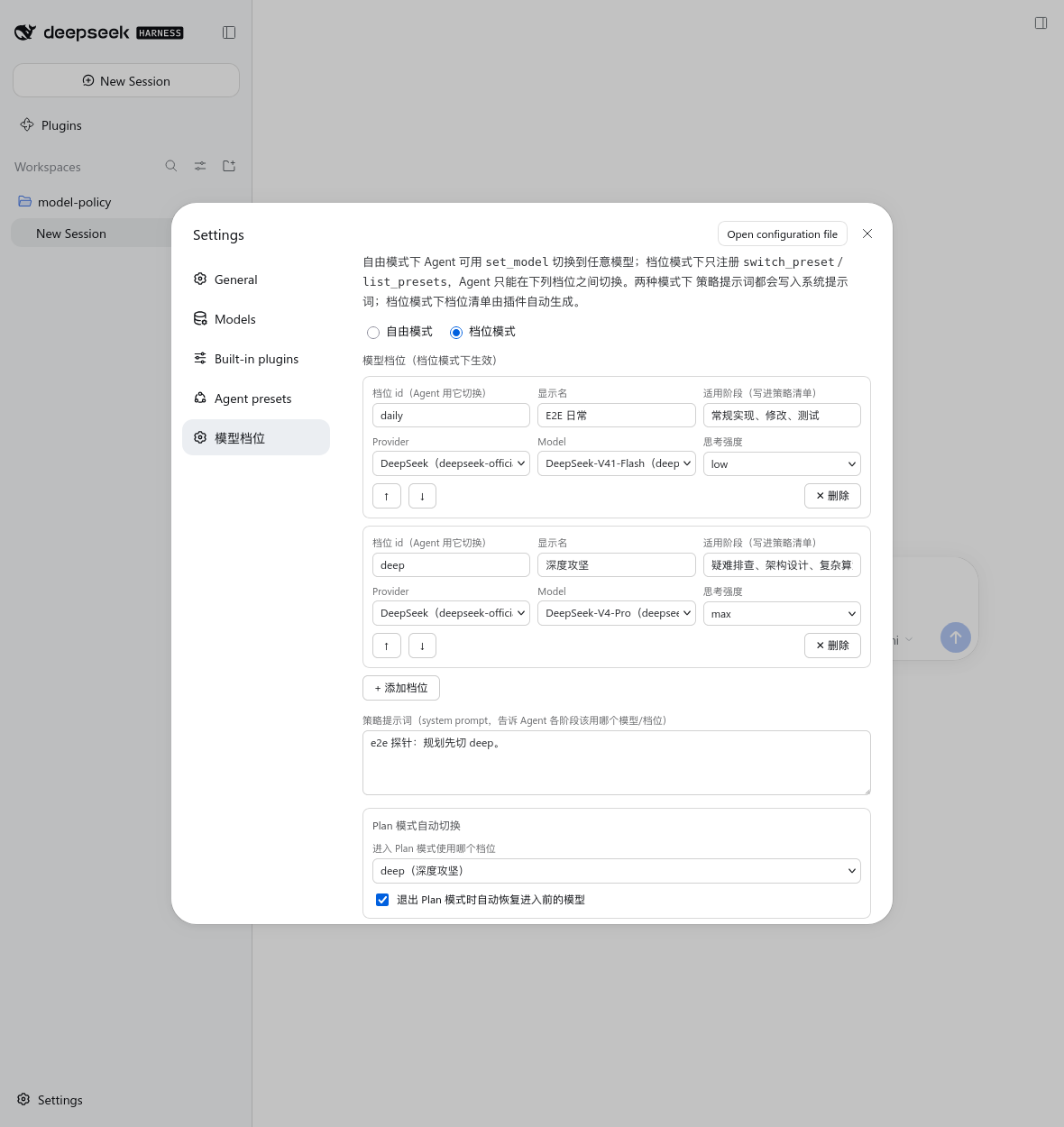
The plugin ships a Web settings page ("动态模型", Settings → 动态模型) where you can maintain:
- the preset table — add, remove and reorder rows; provider, model and reasoning effort are pickers fed by the live model catalog; plus
id, display name and target stage; - the policy prompt;
- agent switching capability: the two tool switches and
allowedProviders; - the Plan target (preset or model) and
autoRestorePlanModel; - the Jev auto-switching toggle and its advanced options (API Key / Base URL / model / confidence threshold), plus a "test connection" button that probes the Decisions API for reachability and latency.
Saving re-applies the plugin configuration on the host immediately, with no restart. Fields must be marked volatile to appear in the settings form (a DSH settings-system rule).
Configuration
The settings namespace is the plugin's profile loader entry id: set-model (configurable in the Web Settings UI; changes take effect at runtime).
# the profile's cordis.patch.yml (or the user layer the settings page writes)
- id: set-model
  name: dsh-set-model
  config:
    enableModelTools: true        # inject set_model / list_models (default true)
    enablePresetTools: false      # inject switch_preset / list_presets (default false)
    jevEnabled: false             # Jev picks the preset per turn (default false, independent of the tool switches)
    presets:                      # defaults to the built-in low / medium / high, none pinning a model
      - id: daily                 # stable id the agent switches by
        name: 日常执行             # display name; falls back to the id
        when: 常规实现、修改、测试  # target stage: rendered into the policy prompt and used as Jev's criterion
        provider: deepseek        # empty provider AND model = keep the active model, tune effort only
        model: deepseek-chat
        reasoningEffort: low      # off | minimal | low | medium | high | xhigh | max; defaults to the model default
      - id: deep
        name: 深度攻坚
        when: 疑难排查、架构设计
        provider: deepseek
        model: deepseek-reasoner
        reasoningEffort: max
    policyPrompt: |               # optional policy text, shared by the agent (when it has tools) and Jev
      Always switch to deep first for production incidents.
    planPreset: deep              # preset activated on entering Plan Mode (takes precedence)
    planModel:                    # model activated on entering Plan Mode when no planPreset is set
      provider: deepseek
      model: deepseek-reasoner
      reasoningEffort: high
    autoRestorePlanModel: true    # restore on leaving Plan Mode (default true)
    allowedProviders: []          # optional: whitelist of switchable providers (empty = unrestricted)
    jevApiKey: ""                 # optional Jev API Key (falls back to JEV_API_KEY environment variable)
    jevBaseUrl: ""                # optional Jev Decisions API URL (falls back to JEV_BASE_URL or default endpoint)
    jevModel: ""                  # optional Jev model (falls back to JEV_MODEL or typesafe/jev-1.13)
    jevConfidenceThreshold: 0.7   # confidence threshold for Jev switches (0.0–1.0, default 0.7)
Install
dsh plugin --profile web add dsh-set-model
No manual configuration needed after install — the bundled cordis.patch.yml mounts automatically.
Install straight from GitHub (source install; pnpm ≥10 requires allowing the build script):
dsh plugin --profile web add github:john-walks-slow/dsh-set-model
# The first add is blocked by pnpm: add the package name pnpm prints to
# allowBuilds in ~/.dsh/profiles/web/pnpm-workspace.yaml, then re-run
Permissions & compatibility
- No direct side effects (standard path) & lightweight decision network (Jev path): the standard path runs without external services, direct network requests, or direct filesystem writes; when autonomous Jev switching is enabled, only a lightweight task summary is sent to the configured Decisions API on the first step of each turn (the current instruction plus the previous assistant response, end-truncated to 2000 characters, together with the policy prompt and the preset list; a 3-second timeout fuse means failures degrade gracefully to warnings without blocking normal turn execution). Changes are recorded strictly via standard Session events (
model/selection) and projected via Runtime Context and system prompt sections; - Browser half: the settings page registers a
settings.sectionfromlib/client.js(a build artifact) and only calls DSH'sremote.settings/remote.sessionRPCs — no network requests of its own - Host version requirement: DSH
^0.1.7-rc.2 || ^0.2.0-rc.1(on 0.1.2–0.1.6 the installer reports an explicit plugin/dsh version incompatibility; upgrade DSH) - Dependency declaration: every DSH runtime package (
cordis,dsh-agent,dsh-llm,dsh-session,dsh-tools, plus optionaldsh-settings) is declared as apeerDependency, so the DSH module resolver routes the plugin's@deepseek-ai/*imports to the host-provided copies — the plugin never ships or hoists its own copies of them; the only runtime dependency is the leaf schema library@deepseek-ai/schemastery(react/esbuild/@types/reactbuild the browser half only; React is provided by the web shell at runtime). Node ≥ 22.5 - Failure degradation: a failed Plan Mode auto-switch only warns and never breaks the step; tool validation failures return a clear error to the agent without polluting session state; a failed settings-page mount only logs to the console and never takes the GUI down
Local development
npm install
npm run check     # tsc(host) + tsc(browser half)
npm test          # tsc(incl. test) + node --test dist/test/*.test.js
npm run build     # tsc → dist/src, esbuild → lib/client.js
npm run build:client   # rebuild the browser half only
For GUI verification, use a minimal dsh-e2e instance (see scripts/dev-worktree.sh):
dsh-e2e start --wait-ready --patch e2e/fixture/cordis.patch.yml
dsh-e2e run e2e/verify-policy-page.mjs
The e2e seed config lives in e2e/fixture/cordis.patch.yml and is injected with --patch; override the playwright / camoufox paths with DSH_E2E_PLAYWRIGHT / DSH_E2E_BROWSER.
After changing the browser half, always rebuild lib/client.js; the build script already runs node --check lib/client.js.
License
MIT
Release a new version
One command runs tests, bumps the version and packs (npm version also commits and tags):
npm run release # patch; for bigger changes: npm version minor or major
Then publish with the fingerprint flow and push:
node ~/.agents/skills/npm-publish/scripts/publish-webauthn.cjs /tmp/dsh-set-model-<newver>.tgz
git push --follow-tags
Verify with npm view dsh-set-model version. When releasing several packages, check "do not challenge for the next 5 minutes" on the webauthn page to publish them all with one fingerprint.
Community
- Thanks to the LINUX DO community for providing the discussion environment.
Links
More in this category
Ebony-Vinyl/dsh-our-free-model★ 57534
Adds free model lanes to DeepSeek Harness — DeepSeek V4.1 Flash, Kimi K3 and others — with no login, sign-up or API key, plus a local OpenAI-compatible gateway, fallback routing and a usage dashboard.
dingminhua/dsh-connect-workbuddy★ 1038
Connects locally signed-in WorkBuddy models, CN and international alike, to DSH, reading each model's credit multiplier from the upstream catalog on every refresh, with per-model image input toggles, account switching backed by an auto-failing-over pool, manual daily check-in, and read-only credit overviews shown as compact pills on the card and in the composer.
Alice-Marx/dsh-model-router★ 654
Routes DeepSeek Harness work across configured model APIs and supported vendor CLIs with dependency-aware packages and cost previews.
V1ki/dsh-plugin-subscriptions★ 548
Use ChatGPT (Codex), Claude, and Grok subscriptions as DeepSeek Harness LLM providers, with Settings login, model catalogs, usage, plus image_generate, video_generate, and x_search tools.
Mars-Sea/dsh-commandcode-provider★ 450
Unofficial Command Code LLM provider: registers a `commandcode` route with a live model catalog and reasoning-effort support.
XDTrees/dsh-workbuddy-xdpool★ 392
Merge every locally signed-in WorkBuddy account into DeepSeek Harness as one auto-failing-over model pool (multi-account rotation, live credits, and a model catalog showing per-model credit multipliers and free/night-discount tags).
Community comments
Comments are public GitHub Discussions. Loading them connects to GitHub and Giscus; a GitHub account is required to post.