DeepSeek Harness Plugin

jiezeng2004-design/dsh-chatgpt-bridge

Stars ★ 3 Category Notifications & Integrations Added 2026-08-15 npm dsh-chatgpt-bridge

MCP bridge that lets ChatGPT Web create, view, continue, and supervise DeepSeek Harness agent sessions and goals while preserving DSH's native approval, sandbox, and workspace security model.

Install

# from npm (prebuilt)

dsh plugin --profile web add dsh-chatgpt-bridge

# from GitHub (first run asks for allowBuilds approval — follow the hint, retry)

dsh plugin --profile web add github:jiezeng2004-design/dsh-chatgpt-bridge

Any plugin you install runs third-party code with your own permissions — it can read your files, use your credentials, and reach the network, and tool approvals don’t sandbox it. GitHub-sourced plugins also run build scripts at install time. Only install sources you trust, and pin a commit (github:owner/repo#sha).

README

An MCP bridge that lets ChatGPT Web create, view, continue and supervise DeepSeek Harness (DSH) agent sessions through the official Model Context Protocol. v0.3.0 — Goal Control Plane. The bridge only connects — DSH keeps its own session log, agent loop, tools, skills, subagents, workflows, approvals, sandbox and workspace security model. It is a standalone DSH plugin: zero DSH core modifications.

Self-hosted / dogfooding development: implemented against the installed DeepSeek Harness source (0.1.0-rc.6) and verified end-to-end against a live local DSH runtime with the official MCP SDK client.


Quick Start

This gets a new user from zero to a verified ChatGPT ↔ DSH connection. Deep architecture and configuration details follow below — you do not need them to install and verify.

Requirements

  • Node.js >= 22 installed and on your PATH.
  • A working DeepSeek Harness (DSH) installationdsh on your PATH (or use pnpm dlx @deepseek-ai/dsh@0.1.0-rc.6 in place of dsh in every command below).
  • A web profile is recommended. The Web UI and the Bridge should run in the same web profile/runtime so that ChatGPT-created sessions appear live in DSH Web.
  • ChatGPT-side MCP and write-action availability depends on your current plan/workspace. Check OpenAI's current official documentation before setup.
  • This plugin includes write/action tools (dsh_send_message, dsh_start_goal, dsh_approve, ...), not just read-only MCP. It drives a real DSH agent that can modify files inside registered workspaces under DSH's approval/sandbox policy. Treat it accordingly.

1. Install

Recommended — install the plugin into the web profile (from the published npm package):

dsh plugin --profile web add dsh-chatgpt-bridge

npm install dsh-chatgpt-bridge alone is not enough: the plugin must be added to a DSH profile bundle, which dsh plugin ... add does for you. See Detailed install for source, headless, and manual variants.

2. Start one shared DSH runtime

dsh web

Run the DSH Web UI and the Bridge in the same web profile/runtime. ChatGPT-created sessions are native DSH sessions; they only stream live in DSH Web when both share one runtime.

Endpoint URL
DSH Web http://127.0.0.1:3080
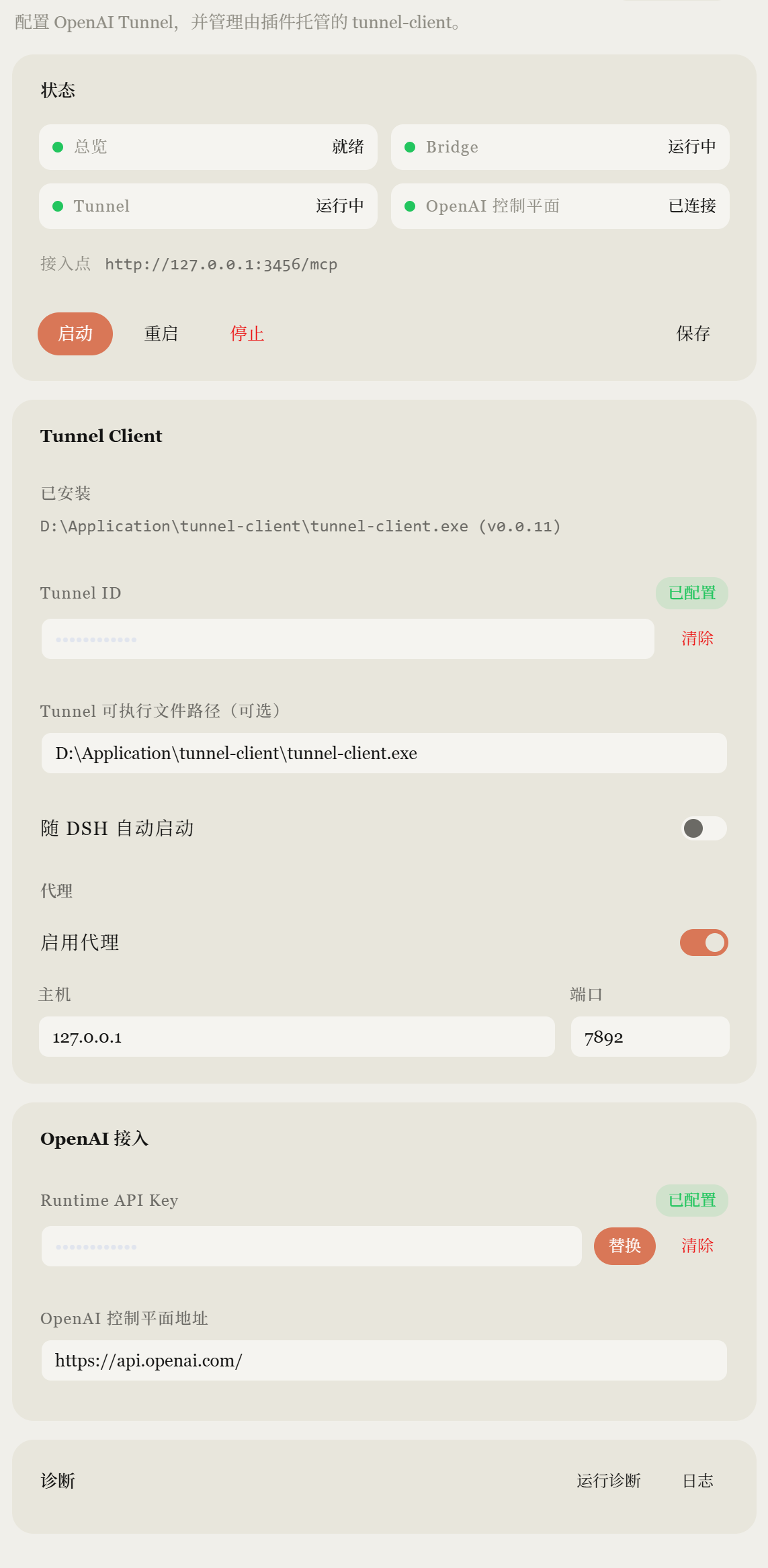
Bridge MCP http://127.0.0.1:3456/mcp

3. Read the authentication token

On first boot the bridge generates a token and persists it to $DSH_HOME/chatgpt-bridge.token. Read it with:

Windows (PowerShell):

Get-Content "$HOME\.dsh\chatgpt-bridge.token"

macOS / Linux:

cat ~/.dsh/chatgpt-bridge.token

Never commit this token to GitHub or paste it into a public chat. It authorizes MCP access to your DSH runtime. Alternatively, set DSH_CHATGPT_BRIDGE_TOKEN yourself and the bridge uses it instead of the generated file.

4. Connect ChatGPT

ChatGPT Web cannot open a plain localhost MCP endpoint. A URL like http://127.0.0.1:3456/mcp exists only on your machine; ChatGPT Web is a remote MCP client and cannot reach it directly.

  • If the Bridge runs on your machine, connect ChatGPT through the Secure MCP Tunnel / secure tunneling mechanism that OpenAI currently supports for MCP/custom apps. The tunnel forwards ChatGPT's requests to the loopback endpoint.
  • Use the token from step 3 as the MCP Authorization Bearer token for the connector/tunnel.
  • The Bridge keeps its localhost-first design: it binds 127.0.0.1, never exposes a public interface, and never self-hosts a tunnel.
  • The stdio transport is not the ChatGPT Web quick path — ChatGPT Web does not launch local processes. See Advanced / other MCP clients for stdio and non-ChatGPT MCP clients.

5. Scan / refresh tools

After the MCP connection is established, scan / refresh the MCP tools in ChatGPT. v0.3.0 exposes 15 tools, and dsh_update_goal must be present (it is the 15th). If the tool list looks stale, refresh/rescan the connector (see Tool count is stale).

6. First verification

Give ChatGPT this read-only acceptance prompt:

请使用已连接的 DSH App,只做只读检查:
1. 调用 dsh_health
2. 调用 dsh_list_workspaces
3. 不修改任何文件
4. 返回 bridge version、health 和 workspace 名称

Expected:

health = ok
bridge version = 0.3.0

Then a minimal Goal Supervision example (still read-only):

使用 dsh_start_goal 创建一个只读检查目标(workspace 用 dsh_list_workspaces
查到的名称),goal 描述为“只读检查项目”,plan 为列出项目结构并总结
README,constraints 使用 {"read_only": true}。然后反复调用 dsh_wait_goal
直到 terminal,最后只汇报 health、goal revision 和总结,不修改任何文件。

Troubleshooting

ChatGPT cannot connect

http://127.0.0.1:3456/mcp is a loopback address on your machine — ChatGPT Web cannot reach it as a remote MCP server. Check the Secure MCP Tunnel / currently supported secure connection method for MCP/custom apps: the tunnel must forward to the loopback endpoint with the bearer token.

401 Unauthorized

  • Read the token: Get-Content "$HOME\.dsh\chatgpt-bridge.token" (PowerShell) or cat ~/.dsh/chatgpt-bridge.token (macOS/Linux).
  • The connector must send it as the Authorization: Bearer <token> header.
  • The token belongs to the runtime that generated it. A different $DSH_HOME, a regenerated token, or a mismatched DSH_CHATGPT_BRIDGE_TOKEN all cause 401 — make sure the token matches the currently running runtime.

dsh_health works but no workspace appears

dsh_list_workspaces only lists workspaces already registered in DSH. The bridge never auto-registers arbitrary paths; dsh_create_session with an unregistered path fails with WORKSPACE_NOT_FOUND on purpose. Register the workspace in DSH (Web profile workspace settings / DSH configuration) first.

Session exists but does not appear live in DSH Web

The Bridge and DSH Web must run in the same web profile/runtime. Do not run a separate chatgpt-bridge runtime and a separate web runtime and expect live parity — sessions persist and can be resumed, but they will not stream in real time.

Tool count is stale / dsh_update_goal missing after upgrade

Re-scan / refresh the MCP tools on the ChatGPT side after upgrading the plugin and restarting the profile. v0.3.0 exposes 15 tools; dsh_update_goal is the 15th.

Port 3456 already in use

Identify the process first — never auto-kill an unknown process. On Windows (PowerShell):

Get-NetTCPConnection -LocalPort 3456 | Select-Object LocalAddress, LocalPort, OwningProcess
Get-Process -Id <OwningProcess> | Select-Object Id, ProcessName, Path

On macOS/Linux:

lsof -iTCP:3456 -sTCP:LISTEN     # or: ss -ltnp 'sport = :3456'

If it is an old dsh/bridge process, stop it cleanly. Otherwise change the bridge port in the profile config (see DSH configuration) or free the port.

Bridge error codes

Symptom Cause / fix
WORKSPACE_NOT_FOUND The workspace is not registered in DSH; dsh_list_workspaces shows what is allowed.
SESSION_NOT_FOUND Unknown session id (never created, or persistence not mounted).
SESSION_NOT_LIVE on cancel The session is not loaded in this process; only live sessions can be cancelled.
APPROVAL_NOT_FOUND / QUESTION_NOT_FOUND The decision was already taken or the bridge restarted (parked decisions are in-memory).
question provider slot taken (log) A web UI is attached and owns user questions; answer them in the UI.
Cold sessions show no title in dsh_list_sessions Cold titles come from the projection cache; concurrent DSH profiles sharing the cache can clobber rows. Single-profile deployments get titles.

60-second smoke test

After completing Quick Start steps 1–3:

  1. dsh web — one shared runtime.
  2. Establish the MCP tunnel to http://127.0.0.1:3456/mcp.
  3. In ChatGPT: Scan Tools.
  4. Ask ChatGPT to call dsh_health.
  5. Confirm:
    • health = ok
    • bridge version = 0.3.0
    • tool count = 15
    • dsh_update_goal exists in the tool list
  6. Optionally call dsh_list_workspaces to confirm your workspace is visible.

Architecture

ChatGPT Web
      |
      | MCP (Streamable HTTP / stdio)
      v
dsh-chatgpt-bridge        <- a DSH (Cordis) plugin row
      |
      v
DeepSeek Harness          <- sessions, agents, tools, approvals, sandbox, workspace
      |
 +----+--------------+
 |    |              |
Session   Agent     Workflow
 |    |              |
 +----+------+-------+
             v
       Local Workspace

The bridge uses DSH's public plugin seams — it never re-implements DSH:

DSH capability seam Usage in the bridge
ctx.agents (AgentRegistry) create() / resume() / get() — live agent lookup, session creation, and resume of persisted sessions after restarts
ctx.sessions (SessionStore) live session listing, flush() durability
ctx.sessionPersistence list() / inspect() — the DSH session log is the authority for session identity across ChatGPT conversations
ctx.sessionTitle title read/write (plus the session/title log fold)
ctx.workspaceRegistry list + resolve — only registered workspaces can host sessions
ctx.approval (approval/request waterfall) the bridge is an answerer: approvals park as waiting_for_approval and are decided one-by-one
ctx.userQuestions (registerProvider) the bridge is the question provider: questions park as waiting_for_user
ctx.agentDefaultModel default provider/model selection for created sessions
ctx.agentPresets (mount) same per-session preset composition the Web UI uses, when a roster exists
installModelSelection (dsh-agent) per-agent model selection with log-derived fallback on resume
createUserMessage + agent.followup() the canonical way to continue a session's durable log

MCP facts

Item Value
Transport Streamable HTTP (default, http://127.0.0.1:3456/mcp) or stdio
Protocol version negotiated by @modelcontextprotocol/sdk 1.30.0 (official MCP SDK)
Authentication Bearer token (default): config token → DSH_CHATGPT_BRIDGE_TOKEN env → generated token persisted to $DSH_HOME/chatgpt-bridge.token
Local endpoint http://127.0.0.1:3456/mcp (loopback only by default)
ChatGPT connection any official MCP client: a local connector at the endpoint with the token, or a remote connector tunneled to the loopback endpoint (e.g. OpenAI's supported Secure MCP Tunnel). The bridge never exposes anything public by itself.

Detailed install

The plugin is a standard DSH profile bundle. It currently targets DSH 0.1.0-rc.6.

Recommended: one DSH runtime for both Web :3080 and the MCP bridge :3456. ChatGPT-created sessions are native DSH sessions. The Web UI only sees them live if it shares ctx.agents / ctx.sessions with the bridge. Do not run a headless chatgpt-bridge profile and a separate web profile at the same time — that is two runtimes and live Web parity will fail.

Install into the Web profile (recommended)

The Quick Start uses dsh plugin --profile web add dsh-chatgpt-bridge. If dsh is not on your PATH, the equivalent is:

pnpm dlx @deepseek-ai/dsh@0.1.0-rc.6 plugin --profile web add dsh-chatgpt-bridge
# published: ... add dsh-chatgpt-bridge@0.3.0

# boot ONE process — Web :3080 and MCP :3456
pnpm dlx @deepseek-ai/dsh@0.1.0-rc.6 --profile web

dsh_health.capabilities.webSurface is true when the Web gateway is in this process.

Headless-only (optional)

A dedicated chatgpt-bridge profile (no Web) still works. Sessions persist and can be resumed later, but DSH Web :3080 will not stream them in real time.

pnpm dlx @deepseek-ai/dsh@0.1.0-rc.6 plugin --profile chatgpt-bridge add dsh-chatgpt-bridge@0.3.0
pnpm dlx @deepseek-ai/dsh@0.1.0-rc.6 --profile chatgpt-bridge

The published npm package is available at dsh-chatgpt-bridge.

Install from source

git clone https://github.com/jiezeng2004-design/dsh-chatgpt-bridge.git
cd dsh-chatgpt-bridge
npm ci
npm run build
pnpm dlx @deepseek-ai/dsh@0.1.0-rc.6 plugin --profile web add "file:$PWD"
pnpm dlx @deepseek-ai/dsh@0.1.0-rc.6 --profile web

For either installation method, dsh plugin installs the package into the profile and, because the package declares dsh.bundle.patch, appends it to the profile's bundle list. The bundle patch inserts only the chatgpt-bridge row so it can sit on top of dsh-web-app without duplicating storage / workspace ids.

A headless profile (no web-app) still needs those host rows. Copy cordis.headless.patch.yml into that profile's own cordis.patch.yml.

If pnpm cannot run in your environment (e.g. symlinks blocked), install manually: create $DSH_HOME/profiles/chatgpt-bridge/ with package.json (dsh.profile.bundles: ["@deepseek-ai/dsh-base", "dsh-chatgpt-bridge"]), empty cordis.yml / cordis.patch.yml, and a node_modules/dsh-chatgpt-bridge link to this checkout. The checkout's own node_modules may be a junction to the DSH installation's hoisted node_modules so both sides share one module instance.

DSH configuration

Only the plugin's own row config (defaults shown):

- id: chatgpt-bridge
  name: dsh-chatgpt-bridge
  config:
    transport: http        # http | stdio
    host: 127.0.0.1        # loopback only by default
    port: 3456
    authMode: token        # token | none (loopback only, not recommended)
    authToken: ''          # static token; empty falls back to env, then generated file
    authTokenEnv: DSH_CHATGPT_BRIDGE_TOKEN
    tokenFile: ''          # default $DSH_HOME/chatgpt-bridge.token
    resultMaxChars: 8000
    resultMaxItems: 50
    sessionMaxItems: 20
    sessionMaxChars: 4000
    logLevel: info

Logs go to $DSH_HOME/chatgpt-bridge.log (redacted) and never to stdout, so the stdio transport stays clean.


Advanced / other MCP clients

The Bridge supports two MCP transports:

Transport When to use
Streamable HTTP (default) ChatGPT Web via a secure tunnel, and any HTTP-capable MCP client that can reach the loopback endpoint.
stdio Local MCP clients that launch a child process on the same machine as the bridge.

The stdio transport is not the ChatGPT Web quick path: ChatGPT Web does not launch local processes, so it cannot use a stdio connector. Use stdio only with clients that run on the same machine as the bridge.

To use stdio, set transport: stdio in the profile config (see DSH configuration) and point the client at the command that boots the bridge profile (dsh --profile chatgpt-bridge). The boot process must not print to stdout; bridge logs go to $DSH_HOME/chatgpt-bridge.log only.

No ChatGPT cookies, logins, or web sessions are ever touched: ChatGPT is strictly an MCP client of the bridge.


MCP tool catalog

Tool Purpose
dsh_health Bridge/DSH status, versions, session counts, capabilities. Never contains tokens/keys/cookies.
dsh_list_workspaces Workspaces DSH already registered (id, title, path, counts).
dsh_create_session Create a real DSH session bound to a registered workspace (id/path/title). Optional title and initial_message.
dsh_list_sessions Live + persisted sessions, newest first, paged (limit/offset), optional workspace filter.
dsh_get_session Status, workspace, bounded recent-message summary (max_items/max_chars), pending work, waiting approvals/questions, todos.
dsh_send_message Continue an existing DSH session (live agent, or resume from persistence). Returns immediately; long tasks run in the background.
dsh_get_task_status idle, queued, running, waiting_for_user, waiting_for_approval, completed, failed, cancelled, blocked, max-tokens, interrupted (DSH-native turn-end reasons).
dsh_get_result Last turn's assistant text, status, tool calls, changed files (from the session log), structured error.
dsh_cancel_task Cancel through DSH's own agent.cancel() — no PID killing.
dsh_answer_question Answer a parked user question (waiting_for_user).
dsh_approve Decide one parked approval (waiting_for_approval) — requires the exact approval_id and an explicit approve/reject. No approve-all.
dsh_start_goal Hand DSH a multi-step goal/plan (new or existing session). Existing session_id revises the Goal (revision +1). Optional execution_mode / constraints.
dsh_update_goal Revise / defer / resume an existing Goal. session_id required; never creates a session.
dsh_wait_goal Bounded long-poll (default 25s). If continuation_required is true, call again immediately.
dsh_stop_goal Idempotent stop/cancel/interrupt of the supervised goal. Fails closed pending approvals/questions.

Goal Supervision (recommended for plans)

ChatGPT plans the work
      |
      v
dsh_start_goal(workspace, goal, plan?)
      |
      |  continuation_required=true
      v
dsh_wait_goal(session_id)   ---- still running ----+
      |                                            |
      |  continuation_required=true                |
      +--------------------------------------------+
      |
      +-- waiting_for_approval --> ask user --> dsh_approve --> wait again
      +-- waiting_for_user     --> ask user --> dsh_answer_question --> wait again
      +-- completed / failed / cancelled --> done (result is in the wait payload)
  • continuation_required is an MCP client contract: ChatGPT should call dsh_wait_goal again in the same assistant turn until the loop stops. Do not reply "the task is running in the background" and end the turn.
  • One MCP call waits internally (≈500ms polls, up to 25s). Do not spam dsh_get_task_status every few hundred milliseconds.
  • waiting_for_approval / waiting_for_user set needs_user_action and do not continue. Never auto-approve; never guess the answer.
  • dsh_stop_goal is the user-facing "stop DSH" tool. It is idempotent (already_stopped=true if the session is already terminal).
  • Optional request_id on dsh_start_goal makes connector retries in the same process idempotent. It is an in-memory map (cap 256), not a Goal DB. After a process restart, continue with session_id.
  • dsh_health.capabilities.goalSupervision is always true in v0.2+.
  • The stabilization work originally tracked as "0.2.1" (never released) is folded into v0.3.0: reconciled todos (from tool/result facts, not assistant text), progress_delta on dsh_wait_goal, structured blocked + remaining_runnable_steps, and fail-safe cleanup of goal-owned temps.
  • v0.3.0 adds dsh_update_goal (15 tools) and a Goal Control Plane: revisions, execution modes, structured constraints, deferred/resume, bounded history.

Low-level tools remain for inspection and one-shot messages.

Goal lifecycle

create   dsh_start_goal(workspace, goal, plan?, execution_mode?, constraints?)
           -> revision 1, session_id
run      DSH agent works; ChatGPT calls dsh_wait_goal
wait     continuation_required → wait again
         waiting_for_user / waiting_for_approval → ask human, then continue
revise   dsh_update_goal(action=revise)  or  dsh_start_goal(..., session_id)
           -> revision +1, previous snapshot kept
defer    dsh_update_goal(action=defer, defer_steps=["npm_publish"])
           -> step is deferred (not failed); independent branches stay runnable
resume   dsh_update_goal(action=resume, resume_steps=["npm_publish"])
           -> same session_id + goal_id; completed steps are not replayed
complete wait returns terminal + result; deferred_steps may still be listed
stop     dsh_stop_goal  (no revision bump; goal_cancelled event)

Approval and question answers do not increment revision.

Execution modes

Mode When Behaviour
standard default, omitted Current v0.2 agent instructions. Reasonable analysis/tests allowed.
minimal "only wait 35s", smoke, no extra work Only actions strictly required. Default constraints: no workspace scan, max_changed_files=0.
strict user-supplied plan/constraints Follow the plan/constraints; do not expand scope.

Constraints (examples)

{
  "read_only": true,
  "allow_workspace_scan": false,
  "max_changed_files": 0,
  "forbidden_actions": ["filesystem.scan", "filesystem.write"]
}

Constraints can only tighten DSH sandbox/approval. read_only=false does not grant write. Runtime enforcement uses the approval waterfall (toolName + optional callId lookup of the logged tool/call) plus post-hoc fact checks. A bash command that never asks approval can only be caught after the fact.

Action classes: filesystem.read, filesystem.write, filesystem.scan, process.exec, git.mutate, npm.publish, github.release, network.

Dependency-aware Goal (npm + GitHub Release)

commit → verify → push → tag
                         ├─ npm publish      (may defer on 2FA)
                         └─ GitHub Release   (still runnable)

When npm hits 2FA: dsh_update_goal({ action: "defer", defer_steps: ["npm_publish"] }). GitHub Release continues on the same session. Later action: "resume" reactivates npm without retagging or repushing.

Deliberately NOT exposed (first version)

execute_shell, run_command, read_any_file, write_any_file, delete_file, git_push, install_package, run_arbitrary_tool. ChatGPT never gets a direct shell: it talks to the DSH agent, and the DSH agent uses DSH tools under DSH's approval/sandbox/workspace policy.


Session lifecycle

Preferred (v0.2 Goal Supervision):

ChatGPT: dsh_start_goal(workspace, goal, plan)
         -> { session_id, continuation_required, next_tool_call: dsh_wait_goal }
ChatGPT: dsh_wait_goal(session_id)  (repeat while continuation_required)
         -> { terminal: true, result: { summary, changed_files, todos } }

Low-level Session API (still supported):

ChatGPT: dsh_create_session(workspace)
         -> session_id (e.g. session-034daf61-...)
ChatGPT: dsh_send_message(session_id, "帮我分析这个项目,不修改文件。")
         -> {accepted: true}            # returns immediately
DSH:     agent.followup() -> turn runs in the background
ChatGPT: dsh_get_task_status(session_id) -> running -> completed
ChatGPT: dsh_get_result(session_id)      -> analysis text
ChatGPT: dsh_send_message(session_id, "刚才第 2 项不错,现在实现它。")
         -> same session, same agent loop, same durable log

DSH is the authority for session identity. Sessions persist as $DSH_HOME/sessions/<workspace>/<session-id>/session.jsonl.zstd (event log) and survive bridge restarts, ChatGPT conversations, and DSH restarts: dsh_send_message on a cold session resumes it through ctx.agents.resume(), which replays the log into the model context (verified: a marker learned before a process restart was still remembered afterwards).


Security model

  • No arbitrary shell tool — see the tool catalog.
  • Workspace boundary — sessions can only be created in workspaces DSH already registered (ctx.workspaceRegistry). Arbitrary paths are never opened or auto-registered; dsh_create_session with C:\Users\..., /, ~, etc. is rejected with WORKSPACE_NOT_FOUND.
  • Approval is never bypassed — if DSH asks for approval, the bridge parks the request (waiting_for_approval) and only dsh_approve with the exact approval id can grant it, once, for that exact tool call (allowed-once). No auto-approve, no approve-all. If the bridge unloads while requests are parked, they resolve cancelled (fail closed).
  • Sandbox is inherited, not weakened — created sessions get meta.cwd = workspace.path, so DSH's per-session sandbox confines the agent's file effects to that workspace.
  • Localhost-first — the HTTP server binds 127.0.0.1 by default.
  • Secret redaction — all bridge logs and tool outputs pass through a redactor (sk-... keys, bearer tokens, key=value secrets, OTP, secret-shaped keys). Goal history never stores OTP, tokens, cookies, or Authorization headers. The generated token is never logged.
  • Goal constraints tighten only — they never raise sandbox or approval rights. OTP supplied for one exact operation is not persisted.
  • No ChatGPT credentials — the bridge never reads cookies, never drives a browser, never stores OpenAI session tokens.

Approval behavior (concrete)

  1. The DSH agent requests a permission. DSH emits approval/request.
  2. The bridge (an answerer for its own sessions) parks the request; the session shows waiting_for_approval with {approval_id, tool_name, call_id?, reason?}.
  3. ChatGPT calls dsh_approve(session_id, approval_id, "approve")allowed-once; or "reject"rejected and the call fails closed.
  4. The agent's turn continues.

Sessions created by the web UI keep being answered by the web UI answerer; the bridge only answers approvals for sessions it created. In a profile where the web UI already owns the single user-questions provider slot, questions flow through that provider instead (reported in dsh_health capabilities).

User question behavior

When the agent calls the ask-user tool, the bridge (as the registered provider) parks the question; the session shows waiting_for_user with the question text/options, and dsh_answer_question resolves it. Answers are validated against the offered options.

Long task behavior

dsh_send_message returns immediately with {accepted: true}. The agent loop runs in the background; dsh_get_task_status polls queued -> running -> completed|failed|cancelled. Cancellation goes through DSH's own agent.cancel({kind:'user'}), which aborts the active turn (turn-end reason aborted) or discards still-queued messages — DSH's semantics, not a second task system.


Tests

npm run typecheck     # tsc --noEmit
npm test              # node scripts/test.mjs — unit suite in one process;
                      #   selects the test-isolation flag for the current
                      #   Node (Node 22: experimental name; Node 23+: stable)
npm run dogfood       # full MCP client flow against a running bridge
npm run dogfood:goal  # v0.3.0 Goal Control Plane: minimal 35s + defer/resume DAG
npm run resume-test   # create marker session -> restart the DSH profile ->
                      #   continue the same session -> marker survives
npm run demo-flow     # two-step demo (analyze, then implement + test)

The dogfood/resume/demo scripts use the official @modelcontextprotocol/sdk client over Streamable HTTP against the booted profile — the same protocol ChatGPT speaks.


Uninstall / disable

  • Disable: in the profile's cordis.patch.yml add - id: chatgpt-bridge + disabled: true, then restart the profile. The MCP endpoint disappears; DSH keeps running untouched (verified).
  • Uninstall: dsh plugin --profile chatgpt-bridge remove dsh-chatgpt-bridge (or delete the profile directory). Bridge-created agents are disposed with the plugin; their session logs remain persisted and can be resumed later from any profile sharing $DSH_HOME.
  • Sessions created by the bridge continue to exist and can be continued by the Web UI or any other entry point — DSH's session log is shared.

DSH core modifications: 0.


Current limitations

  • First version is ChatGPT -> DSH only: it drives DSH sessions; it does not expose a full remote control plane (no file browsing, no arbitrary tool passthrough).
  • Parked approvals/questions live in the bridge process; a bridge restart while something is parked resolves them cancelled (fail closed).
  • dsh_get_result.changed_files is derived from the session log's tool calls (arguments of known editing tools) — data-driven, not a diff viewer.
  • The waiting_for_user provider slot is single-slot; in a profile where the Web UI already owns it, questions flow through the UI.
  • Stdio mode is supported, but the boot process must not print to stdout; prefer the HTTP transport unless a client requires stdio.
  • Live ChatGPT validation was completed on 2026-08-14 through a tunneled MCP connection: ChatGPT discovered and invoked dsh_health and dsh_list_workspaces. The automated dogfood/resume flows additionally use the official MCP SDK client against the same Streamable HTTP endpoint.

DSH compatibility

  • Developed and verified against DeepSeek Harness 0.1.0-rc.6 (profile bundle @deepseek-ai/dsh-base), Node >= 22.
  • Uses only public plugin seams; no DSH core files are modified.

License

MIT

Content from the project README on GitHub ↗

Links

More in this category

View the whole category →